Critical Kernal-Power Event 41 Task (63). Tuneup_plus_log attached


GARoss

Well-known member
Member
VIP
Local time
12:19 PM
Posts
137
Location
Florida, USA
OS
Windows 11 Pro Version 25H2 (OS Build 26200.7309)
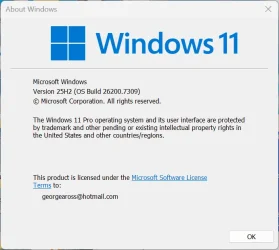
I've been having this issue for quite some time but finally found an opportunity to do the recommended Tuneup_plus_log. The results are attached along with winver. I believe I have followed the instructions but I can do more testing if needed.
Thanks, George Ross

winver George Ross' PC.webp
 

Attachments

My Computer

System One

  • OS
    Windows 11 Pro Version 25H2 (OS Build 26200.7309)
    Computer type
    PC/Desktop
    Manufacturer/Model
    Custom built
    CPU
    AMD Ryzen 9-3900X 12-Core 3.80Ghz
    Motherboard
    Asus Prime X370-Pro
    Memory
    16Gb Corsair DDR4 3466 Mhz
    Graphics Card(s)
    Asus DUAL-RTX2070-O8G-EVO-V2
    Sound Card
    On Motherboard
    Monitor(s) Displays
    ASUS PA329C
    Screen Resolution
    3840x2160
    Hard Drives
    Samsung 980 SSD 1TB PCle 3.0x4, NVMe M.2 2280
    Hitachi Deskstar 2Tb 7200 RPM 32MB Cache
    Seagate Barracuda 500Gb 7200 RPM
    PSU
    Seasonic X750 Gold
    Case
    Antec C100
    Cooling
    CRYORIG H7 Tower Cooler
    Keyboard
    Macally USB
    Mouse
    Microsoft Basic Optical Mouse - USB
    Internet Speed
    350 Mbs
    Browser
    Firefox
    Antivirus
    PC Matic
First sfc /scannow:

Code:
Windows Resource Protection found corrupt files and successfully repaired them.


Second sfc /scannow:

Code:
Windows Resource Protection did not find any integrity violations.


Please run the V2 log collector > post a share link


My Computer

System One

  • OS
    Windows 10
    Computer type
    Laptop
    Manufacturer/Model
    HP
    CPU
    Intel(R) Core(TM) i7-4800MQ CPU @ 2.70GHz
    Motherboard
    Product : 190A Version : KBC Version 94.56
    Memory
    16 GB Total: Manufacturer : Samsung MemoryType : DDR3 FormFactor : SODIMM Capacity : 8GB Speed : 1600
    Graphics Card(s)
    NVIDIA Quadro K3100M; Intel(R) HD Graphics 4600
    Sound Card
    IDT High Definition Audio CODEC; PNP Device ID HDAUDIO\FUNC_01&VEN_111D&DEV_76E0
    Hard Drives
    Model Hitachi HTS727575A9E364
    Antivirus
    Microsoft Defender
    Other Info
    Mobile Workstation
First sfc /scannow:

Code:
Windows Resource Protection found corrupt files and successfully repaired them.


Second sfc /scannow:

Code:
Windows Resource Protection did not find any integrity violations.
That could just be "the Bluetooth file bug" (since July, 2022 preview CU)
In CBS. log, CBS likely reports a Bth*.* file corrupted.

This issue still occurs, but doesn't seem to happen quite as consistently as with 22H2 and 23H2. It started happening with 21H2, since July, 2022, with preview CU, and since the August, 2022 patch-Tuesday for the rest.

The big problem that wasn't occurring so often with 23H2, has been occurring since 24H2, which is the component store being mismatched, DISM comes back with a failure with:
Code:
dism /online /cleanup-image /scanhealth

It's common to need:
Code:
dism /online /cleanup-image /restorehealth
since 24H2. (Then reboot, if the restore is successful)
 

My Computers

System One System Two

  • OS
    Windows 11 Pro x64 24H2
    Computer type
    PC/Desktop
    CPU
    Ryzen 9 5900X
    Motherboard
    ASRock B550 PG Velocita (UEFI-BIOS 3.90)
    Memory
    64 GB G.Skill RipJaws V F4-3200C16D-64GVK
    Graphics Card(s)
    ASRock Steel Legend Arc B580 12 GB
    Monitor(s) Displays
    Alienware AW3423DWF OLED ultrawide
    Hard Drives
    Samsung 990 Pro 1 TB NVMe SSD
    PSU
    eVGA Supernova 750 G3
    Case
    Corsair 275R
    Internet Speed
    VTel FTTH 1 Gb down and 1 Gb up
  • Computer type
    PC/Desktop
    CPU
    Ryzen 7 5800X3D
    Motherboard
    Asus ROG Strix B550-F Gaming (UEFI-BIOS version 3607)
    Memory
    32 GB (2x16 GB G.Skill TridentZ Neo)
    Graphics card(s)
    Sapphire Nitro+ Radeon RX 6750 XT
    Hard Drives
    Samsung 970 Pro 512 GB NVMe SSD
    PSU
    Corsair RM850x
    Case
    Fractal Focus G
First sfc /scannow:

Code:
Windows Resource Protection found corrupt files and successfully repaired them.


Second sfc /scannow:

Code:
Windows Resource Protection did not find any integrity violations.


Please run the V2 log collector > post a share link

Thanks, zbook-

The result from first scannow;
Windows Resource Protection did not find any integrity violations.

With that result, is it necessary to run the second scan?
 

My Computer

System One

  • OS
    Windows 11 Pro Version 25H2 (OS Build 26200.7309)
    Computer type
    PC/Desktop
    Manufacturer/Model
    Custom built
    CPU
    AMD Ryzen 9-3900X 12-Core 3.80Ghz
    Motherboard
    Asus Prime X370-Pro
    Memory
    16Gb Corsair DDR4 3466 Mhz
    Graphics Card(s)
    Asus DUAL-RTX2070-O8G-EVO-V2
    Sound Card
    On Motherboard
    Monitor(s) Displays
    ASUS PA329C
    Screen Resolution
    3840x2160
    Hard Drives
    Samsung 980 SSD 1TB PCle 3.0x4, NVMe M.2 2280
    Hitachi Deskstar 2Tb 7200 RPM 32MB Cache
    Seagate Barracuda 500Gb 7200 RPM
    PSU
    Seasonic X750 Gold
    Case
    Antec C100
    Cooling
    CRYORIG H7 Tower Cooler
    Keyboard
    Macally USB
    Mouse
    Microsoft Basic Optical Mouse - USB
    Internet Speed
    350 Mbs
    Browser
    Firefox
    Antivirus
    PC Matic
The script ran without problems and checked:


Code:
sfc /scannow

dism /online /cleanup-image /scanhealth
dism /online /cleanup-image /restorehealth
sfc /scannow
chkdsk /scan

wmic recoveros get autoreboot

wmic recoveros set autoreboot = false
wmic recoveros get autoreboot

wmic recoveros get DebugInfoType
wmic recoveros set DebugInfoType = 7
wmic recoveros get DebugInfoType

wmic pagefile list /format:list

wmic Computersystem where name="%computername%" get AutomaticManagedPagefile
wmic Computersystem where name="%computername%" set AutomaticManagedPagefile=True
wmic Computersystem where name="%computername%" get AutomaticManagedPagefile

bcdedit /enum {badmemory}


Now the V2 logs are to be scanned for Critical Kernal-Power Event 41.
 

My Computer

System One

  • OS
    Windows 10
    Computer type
    Laptop
    Manufacturer/Model
    HP
    CPU
    Intel(R) Core(TM) i7-4800MQ CPU @ 2.70GHz
    Motherboard
    Product : 190A Version : KBC Version 94.56
    Memory
    16 GB Total: Manufacturer : Samsung MemoryType : DDR3 FormFactor : SODIMM Capacity : 8GB Speed : 1600
    Graphics Card(s)
    NVIDIA Quadro K3100M; Intel(R) HD Graphics 4600
    Sound Card
    IDT High Definition Audio CODEC; PNP Device ID HDAUDIO\FUNC_01&VEN_111D&DEV_76E0
    Hard Drives
    Model Hitachi HTS727575A9E364
    Antivirus
    Microsoft Defender
    Other Info
    Mobile Workstation
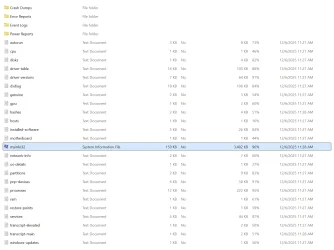
Completed. File GAROSS-(2025-12-06_11-27-07) is too large to attach.

There are 128 files in Error Report. The last is titled; Critical_WINWORD.EXE
I can read msinfo32 file, which is the largest, but I cannot open any of the other. If msinfo file is removed the remaining data probably would upload. Should I or what's next?

Screenshot 2025-12-06 113657.webp
 

My Computer

System One

  • OS
    Windows 11 Pro Version 25H2 (OS Build 26200.7309)
    Computer type
    PC/Desktop
    Manufacturer/Model
    Custom built
    CPU
    AMD Ryzen 9-3900X 12-Core 3.80Ghz
    Motherboard
    Asus Prime X370-Pro
    Memory
    16Gb Corsair DDR4 3466 Mhz
    Graphics Card(s)
    Asus DUAL-RTX2070-O8G-EVO-V2
    Sound Card
    On Motherboard
    Monitor(s) Displays
    ASUS PA329C
    Screen Resolution
    3840x2160
    Hard Drives
    Samsung 980 SSD 1TB PCle 3.0x4, NVMe M.2 2280
    Hitachi Deskstar 2Tb 7200 RPM 32MB Cache
    Seagate Barracuda 500Gb 7200 RPM
    PSU
    Seasonic X750 Gold
    Case
    Antec C100
    Cooling
    CRYORIG H7 Tower Cooler
    Keyboard
    Macally USB
    Mouse
    Microsoft Basic Optical Mouse - USB
    Internet Speed
    350 Mbs
    Browser
    Firefox
    Antivirus
    PC Matic
Please post a V2 share link: drop box, google drive, GoFile.io, etc.


My Computer

System One

  • OS
    Windows 10
    Computer type
    Laptop
    Manufacturer/Model
    HP
    CPU
    Intel(R) Core(TM) i7-4800MQ CPU @ 2.70GHz
    Motherboard
    Product : 190A Version : KBC Version 94.56
    Memory
    16 GB Total: Manufacturer : Samsung MemoryType : DDR3 FormFactor : SODIMM Capacity : 8GB Speed : 1600
    Graphics Card(s)
    NVIDIA Quadro K3100M; Intel(R) HD Graphics 4600
    Sound Card
    IDT High Definition Audio CODEC; PNP Device ID HDAUDIO\FUNC_01&VEN_111D&DEV_76E0
    Hard Drives
    Model Hitachi HTS727575A9E364
    Antivirus
    Microsoft Defender
    Other Info
    Mobile Workstation
File GAROSS-(2025-12-06_11-27-07) is uploaded
 

My Computer

System One

  • OS
    Windows 11 Pro Version 25H2 (OS Build 26200.7309)
    Computer type
    PC/Desktop
    Manufacturer/Model
    Custom built
    CPU
    AMD Ryzen 9-3900X 12-Core 3.80Ghz
    Motherboard
    Asus Prime X370-Pro
    Memory
    16Gb Corsair DDR4 3466 Mhz
    Graphics Card(s)
    Asus DUAL-RTX2070-O8G-EVO-V2
    Sound Card
    On Motherboard
    Monitor(s) Displays
    ASUS PA329C
    Screen Resolution
    3840x2160
    Hard Drives
    Samsung 980 SSD 1TB PCle 3.0x4, NVMe M.2 2280
    Hitachi Deskstar 2Tb 7200 RPM 32MB Cache
    Seagate Barracuda 500Gb 7200 RPM
    PSU
    Seasonic X750 Gold
    Case
    Antec C100
    Cooling
    CRYORIG H7 Tower Cooler
    Keyboard
    Macally USB
    Mouse
    Microsoft Basic Optical Mouse - USB
    Internet Speed
    350 Mbs
    Browser
    Firefox
    Antivirus
    PC Matic

My Computer

System One

  • OS
    Windows 10
    Computer type
    Laptop
    Manufacturer/Model
    HP
    CPU
    Intel(R) Core(TM) i7-4800MQ CPU @ 2.70GHz
    Motherboard
    Product : 190A Version : KBC Version 94.56
    Memory
    16 GB Total: Manufacturer : Samsung MemoryType : DDR3 FormFactor : SODIMM Capacity : 8GB Speed : 1600
    Graphics Card(s)
    NVIDIA Quadro K3100M; Intel(R) HD Graphics 4600
    Sound Card
    IDT High Definition Audio CODEC; PNP Device ID HDAUDIO\FUNC_01&VEN_111D&DEV_76E0
    Hard Drives
    Model Hitachi HTS727575A9E364
    Antivirus
    Microsoft Defender
    Other Info
    Mobile Workstation

My Computer

System One

  • OS
    Windows 11 Pro Version 25H2 (OS Build 26200.7309)
    Computer type
    PC/Desktop
    Manufacturer/Model
    Custom built
    CPU
    AMD Ryzen 9-3900X 12-Core 3.80Ghz
    Motherboard
    Asus Prime X370-Pro
    Memory
    16Gb Corsair DDR4 3466 Mhz
    Graphics Card(s)
    Asus DUAL-RTX2070-O8G-EVO-V2
    Sound Card
    On Motherboard
    Monitor(s) Displays
    ASUS PA329C
    Screen Resolution
    3840x2160
    Hard Drives
    Samsung 980 SSD 1TB PCle 3.0x4, NVMe M.2 2280
    Hitachi Deskstar 2Tb 7200 RPM 32MB Cache
    Seagate Barracuda 500Gb 7200 RPM
    PSU
    Seasonic X750 Gold
    Case
    Antec C100
    Cooling
    CRYORIG H7 Tower Cooler
    Keyboard
    Macally USB
    Mouse
    Microsoft Basic Optical Mouse - USB
    Internet Speed
    350 Mbs
    Browser
    Firefox
    Antivirus
    PC Matic
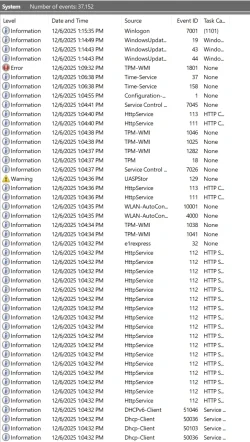
Just had another crash just a few minutes ago. I don't get the BSOD. Just goes black and self reboots.
 

Attachments

  • Screenshot 2025-12-06 131944.webp
    Screenshot 2025-12-06 131944.webp
    179 KB · Views: 1

My Computer

System One

  • OS
    Windows 11 Pro Version 25H2 (OS Build 26200.7309)
    Computer type
    PC/Desktop
    Manufacturer/Model
    Custom built
    CPU
    AMD Ryzen 9-3900X 12-Core 3.80Ghz
    Motherboard
    Asus Prime X370-Pro
    Memory
    16Gb Corsair DDR4 3466 Mhz
    Graphics Card(s)
    Asus DUAL-RTX2070-O8G-EVO-V2
    Sound Card
    On Motherboard
    Monitor(s) Displays
    ASUS PA329C
    Screen Resolution
    3840x2160
    Hard Drives
    Samsung 980 SSD 1TB PCle 3.0x4, NVMe M.2 2280
    Hitachi Deskstar 2Tb 7200 RPM 32MB Cache
    Seagate Barracuda 500Gb 7200 RPM
    PSU
    Seasonic X750 Gold
    Case
    Antec C100
    Cooling
    CRYORIG H7 Tower Cooler
    Keyboard
    Macally USB
    Mouse
    Microsoft Basic Optical Mouse - USB
    Internet Speed
    350 Mbs
    Browser
    Firefox
    Antivirus
    PC Matic
Open administrative command prompt and copy and paste: > post share links

Code:
PowerShell Compress-Archive -Path "$env:homeDrive\Windows\MEMORY.DMP" -DestinationPath "$env:homeDrive$env:homePath\Desktop\Memory_dmp"
 

My Computer

System One

  • OS
    Windows 10
    Computer type
    Laptop
    Manufacturer/Model
    HP
    CPU
    Intel(R) Core(TM) i7-4800MQ CPU @ 2.70GHz
    Motherboard
    Product : 190A Version : KBC Version 94.56
    Memory
    16 GB Total: Manufacturer : Samsung MemoryType : DDR3 FormFactor : SODIMM Capacity : 8GB Speed : 1600
    Graphics Card(s)
    NVIDIA Quadro K3100M; Intel(R) HD Graphics 4600
    Sound Card
    IDT High Definition Audio CODEC; PNP Device ID HDAUDIO\FUNC_01&VEN_111D&DEV_76E0
    Hard Drives
    Model Hitachi HTS727575A9E364
    Antivirus
    Microsoft Defender
    Other Info
    Mobile Workstation

My Computer

System One

  • OS
    Windows 11 Pro Version 25H2 (OS Build 26200.7309)
    Computer type
    PC/Desktop
    Manufacturer/Model
    Custom built
    CPU
    AMD Ryzen 9-3900X 12-Core 3.80Ghz
    Motherboard
    Asus Prime X370-Pro
    Memory
    16Gb Corsair DDR4 3466 Mhz
    Graphics Card(s)
    Asus DUAL-RTX2070-O8G-EVO-V2
    Sound Card
    On Motherboard
    Monitor(s) Displays
    ASUS PA329C
    Screen Resolution
    3840x2160
    Hard Drives
    Samsung 980 SSD 1TB PCle 3.0x4, NVMe M.2 2280
    Hitachi Deskstar 2Tb 7200 RPM 32MB Cache
    Seagate Barracuda 500Gb 7200 RPM
    PSU
    Seasonic X750 Gold
    Case
    Antec C100
    Cooling
    CRYORIG H7 Tower Cooler
    Keyboard
    Macally USB
    Mouse
    Microsoft Basic Optical Mouse - USB
    Internet Speed
    350 Mbs
    Browser
    Firefox
    Antivirus
    PC Matic
1) Please uninstall all PC Pitstop software then create a new restore point.


2) Run Sea Tools Long generic test (all drives) > post images or share links


3) Run HD Sentinel (all drives) > post images or share links

Hard Disk Sentinel - HDD health and temperature monitoring
a) Overview
b) Temperature
c) SMART


4) Run Memtest86+ for 8 or more passes > take pictures > post images or share links

Memtest86+ | The Open-Source Memory Testing Tool

Just 1 error is a test fail and testing can be aborted.

The more the passes the better the testing conditions.

It sometimes takes passes into the 20's to detect malfunctioning RAM.

The RAM can be tested all at one time or one at a time in the same DIMM.

Memtest86+ | The Open-Source Memory Testing Tool

MemTest86+ - Test RAM


5) These steps / tests can be performed overnight while sleeping:
a) Memtest86+
b) Sea Tools Long generic test


Code:
Event[7935]
  Log Name: System
  Source: Microsoft-Windows-TPM-WMI
  Date: 2025-12-06T09:59:45.4610000Z
  Event ID: 1801
  Task: N/A
  Level: Error
  Opcode: Info
  Keyword: N/A
  User: S-1-5-18
  User Name: NT AUTHORITY\SYSTEM
  Computer: GARoss
  Description:
Secure Boot certificates have been updated but are not yet applied to the device firmware. Review the published guidance to complete the update and ensure full protection. This device signature information is included here.
DeviceAttributes: BaseBoardManufacturer:ASUSTeK COMPUTER INC.;FirmwareManufacturer:American Megatrends Inc.;FirmwareVersion:6042;OEMModelNumber:System Product Name;OEMModelBaseBoard:PRIME X370-PRO;OEMModelSystemFamily:To be filled by O.E.M.;OEMManufacturerName:System manufacturer;OEMModelSKU:SKU;OSArchitecture:amd64;
BucketId: 3554d7dac2263d0de27aecff6fe6d0e9d77e2427862d178de48744e842e5c250
BucketConfidenceLevel:
UpdateType:
For more information, please see https://go.microsoft.com/fwlink/?linkid=2301018.


Code:
Event[7673]
  Log Name: System
  Source: Microsoft-Windows-Kernel-Power
  Date: 2025-12-05T10:25:27.1040000Z
  Event ID: 41
  Task: N/A
  Level: Critical
  Opcode: Info
  Keyword: N/A
  User: S-1-5-18
  User Name: NT AUTHORITY\SYSTEM
  Computer: GARoss
  Description:
The system has rebooted without cleanly shutting down first. This error could be caused if the system stopped responding, crashed, or lost power unexpectedly.


Code:
Event[7649]
  Log Name: System
  Source: EventLog
  Date: 2025-12-05T10:25:33.3920000Z
  Event ID: 6008
  Task: None
  Level: Error
  Opcode: N/A
  Keyword: Classic,
  User: N/A
  User Name: N/A
  Computer: GARoss
  Description:
The previous system shutdown at 10:24:03 AM on ?12/?5/?2025 was unexpected.


Code:
Event[4155]
  Log Name: System
  Source: Microsoft-Windows-Kernel-Power
  Date: 2025-11-23T15:31:00.0280000Z
  Event ID: 41
  Task: N/A
  Level: Critical
  Opcode: Info
  Keyword: N/A
  User: S-1-5-18
  User Name: NT AUTHORITY\SYSTEM
  Computer: GARoss
  Description:
The system has rebooted without cleanly shutting down first. This error could be caused if the system stopped responding, crashed, or lost power unexpectedly.


Code:
Event[4144]
  Log Name: System
  Source: EventLog
  Date: 2025-11-23T15:31:06.4460000Z
  Event ID: 6008
  Task: None
  Level: Error
  Opcode: N/A
  Keyword: Classic,
  User: N/A
  User Name: N/A
  Computer: GARoss
  Description:
The previous system shutdown at 3:29:37 PM on ?11/?23/?2025 was unexpected.


Code:
Event[3493]
  Log Name: System
  Source: Microsoft-Windows-Kernel-Power
  Date: 2025-11-21T14:03:54.9950000Z
  Event ID: 41
  Task: N/A
  Level: Critical
  Opcode: Info
  Keyword: N/A
  User: S-1-5-18
  User Name: NT AUTHORITY\SYSTEM
  Computer: GARoss
  Description:
The system has rebooted without cleanly shutting down first. This error could be caused if the system stopped responding, crashed, or lost power unexpectedly.


Code:
Event[3482]
  Log Name: System
  Source: EventLog
  Date: 2025-11-21T14:04:01.5820000Z
  Event ID: 6008
  Task: None
  Level: Error
  Opcode: N/A
  Keyword: Classic,
  User: N/A
  User Name: N/A
  Computer: GARoss
  Description:
The previous system shutdown at 2:02:27 PM on ?11/?21/?2025 was unexpected.


Code:
SuperShieldHookCpy64    3.0.59.0    277.91 KB (284,584 bytes)    2/21/2023 9:57 AM    PC Pitstop LLC    c:\program files (x86)\pcpitstop\super shield\supershieldhookcpy64.dll
 

My Computer

System One

  • OS
    Windows 10
    Computer type
    Laptop
    Manufacturer/Model
    HP
    CPU
    Intel(R) Core(TM) i7-4800MQ CPU @ 2.70GHz
    Motherboard
    Product : 190A Version : KBC Version 94.56
    Memory
    16 GB Total: Manufacturer : Samsung MemoryType : DDR3 FormFactor : SODIMM Capacity : 8GB Speed : 1600
    Graphics Card(s)
    NVIDIA Quadro K3100M; Intel(R) HD Graphics 4600
    Sound Card
    IDT High Definition Audio CODEC; PNP Device ID HDAUDIO\FUNC_01&VEN_111D&DEV_76E0
    Hard Drives
    Model Hitachi HTS727575A9E364
    Antivirus
    Microsoft Defender
    Other Info
    Mobile Workstation
  1. I gather PC Pitstop software is causing my crash issues or will PC Pitstop software block completion of the suggested tests?
  2. Is PC Pitstop software preventing Win 11 updates to install properly?
  3. Will I be reinstalling PC Pitstop software after this?
 

My Computer

System One

  • OS
    Windows 11 Pro Version 25H2 (OS Build 26200.7309)
    Computer type
    PC/Desktop
    Manufacturer/Model
    Custom built
    CPU
    AMD Ryzen 9-3900X 12-Core 3.80Ghz
    Motherboard
    Asus Prime X370-Pro
    Memory
    16Gb Corsair DDR4 3466 Mhz
    Graphics Card(s)
    Asus DUAL-RTX2070-O8G-EVO-V2
    Sound Card
    On Motherboard
    Monitor(s) Displays
    ASUS PA329C
    Screen Resolution
    3840x2160
    Hard Drives
    Samsung 980 SSD 1TB PCle 3.0x4, NVMe M.2 2280
    Hitachi Deskstar 2Tb 7200 RPM 32MB Cache
    Seagate Barracuda 500Gb 7200 RPM
    PSU
    Seasonic X750 Gold
    Case
    Antec C100
    Cooling
    CRYORIG H7 Tower Cooler
    Keyboard
    Macally USB
    Mouse
    Microsoft Basic Optical Mouse - USB
    Internet Speed
    350 Mbs
    Browser
    Firefox
    Antivirus
    PC Matic
Additional dump files or the absence of crashes with drive and RAM test results will be useful.


After a week of computer stability the software can be reinstalled.


Code:
Windows 11 Pro Version: 10.0.26200 (26100.ge_release.240331-1435)

KB5070311 Update      12/2/2025 12:00:00 AM
KB5071142 Update      12/2/2025 12:00:00 AM
 
Last edited:

My Computer

System One

  • OS
    Windows 10
    Computer type
    Laptop
    Manufacturer/Model
    HP
    CPU
    Intel(R) Core(TM) i7-4800MQ CPU @ 2.70GHz
    Motherboard
    Product : 190A Version : KBC Version 94.56
    Memory
    16 GB Total: Manufacturer : Samsung MemoryType : DDR3 FormFactor : SODIMM Capacity : 8GB Speed : 1600
    Graphics Card(s)
    NVIDIA Quadro K3100M; Intel(R) HD Graphics 4600
    Sound Card
    IDT High Definition Audio CODEC; PNP Device ID HDAUDIO\FUNC_01&VEN_111D&DEV_76E0
    Hard Drives
    Model Hitachi HTS727575A9E364
    Antivirus
    Microsoft Defender
    Other Info
    Mobile Workstation
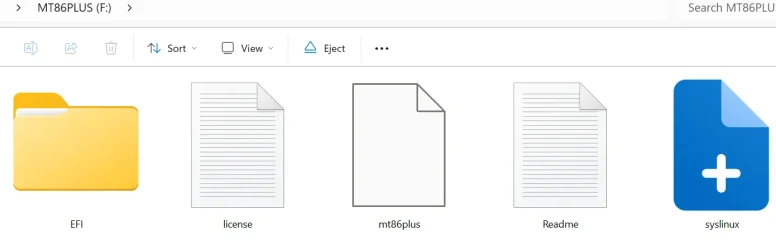
I cannot get mt86plus to boot my PC. Below are all the MT86PLUS files in (F:) I will post the other test results soon but all test passed.

Screenshot 2025-12-12 101432.webp
 

My Computer

System One

  • OS
    Windows 11 Pro Version 25H2 (OS Build 26200.7309)
    Computer type
    PC/Desktop
    Manufacturer/Model
    Custom built
    CPU
    AMD Ryzen 9-3900X 12-Core 3.80Ghz
    Motherboard
    Asus Prime X370-Pro
    Memory
    16Gb Corsair DDR4 3466 Mhz
    Graphics Card(s)
    Asus DUAL-RTX2070-O8G-EVO-V2
    Sound Card
    On Motherboard
    Monitor(s) Displays
    ASUS PA329C
    Screen Resolution
    3840x2160
    Hard Drives
    Samsung 980 SSD 1TB PCle 3.0x4, NVMe M.2 2280
    Hitachi Deskstar 2Tb 7200 RPM 32MB Cache
    Seagate Barracuda 500Gb 7200 RPM
    PSU
    Seasonic X750 Gold
    Case
    Antec C100
    Cooling
    CRYORIG H7 Tower Cooler
    Keyboard
    Macally USB
    Mouse
    Microsoft Basic Optical Mouse - USB
    Internet Speed
    350 Mbs
    Browser
    Firefox
    Antivirus
    PC Matic
Run Memtest86 (free version) for two tests of 4 passes each or (pay version) for 8 passes > take pictures > post share links


My Computer

System One

  • OS
    Windows 10
    Computer type
    Laptop
    Manufacturer/Model
    HP
    CPU
    Intel(R) Core(TM) i7-4800MQ CPU @ 2.70GHz
    Motherboard
    Product : 190A Version : KBC Version 94.56
    Memory
    16 GB Total: Manufacturer : Samsung MemoryType : DDR3 FormFactor : SODIMM Capacity : 8GB Speed : 1600
    Graphics Card(s)
    NVIDIA Quadro K3100M; Intel(R) HD Graphics 4600
    Sound Card
    IDT High Definition Audio CODEC; PNP Device ID HDAUDIO\FUNC_01&VEN_111D&DEV_76E0
    Hard Drives
    Model Hitachi HTS727575A9E364
    Antivirus
    Microsoft Defender
    Other Info
    Mobile Workstation
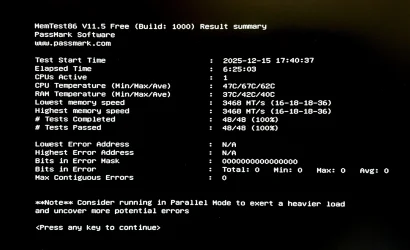
Sorry to take so long to get MemTest86 results.

Here is the link;

MemTest86 only allows max of four scans for the free version. The four scans showed no errors.

IMG_1643.webp
 

My Computer

System One

  • OS
    Windows 11 Pro Version 25H2 (OS Build 26200.7309)
    Computer type
    PC/Desktop
    Manufacturer/Model
    Custom built
    CPU
    AMD Ryzen 9-3900X 12-Core 3.80Ghz
    Motherboard
    Asus Prime X370-Pro
    Memory
    16Gb Corsair DDR4 3466 Mhz
    Graphics Card(s)
    Asus DUAL-RTX2070-O8G-EVO-V2
    Sound Card
    On Motherboard
    Monitor(s) Displays
    ASUS PA329C
    Screen Resolution
    3840x2160
    Hard Drives
    Samsung 980 SSD 1TB PCle 3.0x4, NVMe M.2 2280
    Hitachi Deskstar 2Tb 7200 RPM 32MB Cache
    Seagate Barracuda 500Gb 7200 RPM
    PSU
    Seasonic X750 Gold
    Case
    Antec C100
    Cooling
    CRYORIG H7 Tower Cooler
    Keyboard
    Macally USB
    Mouse
    Microsoft Basic Optical Mouse - USB
    Internet Speed
    350 Mbs
    Browser
    Firefox
    Antivirus
    PC Matic
1) Please post a new V2 share link into the newest post.


2) Run administrative PS: > post share links

wevtutil epl System "$env:USERPROFILE\Desktop\application.evtx" /ow:true

wevtutil epl System "$env:USERPROFILE\Desktop\system.evtx" /ow:true

(check the desktop for the new files)


3) For HD Sentinel
Click on the drive in the left column > view these tabs:
overview
temperature
SMART
Post share links.
 
Last edited:

My Computer

System One

  • OS
    Windows 10
    Computer type
    Laptop
    Manufacturer/Model
    HP
    CPU
    Intel(R) Core(TM) i7-4800MQ CPU @ 2.70GHz
    Motherboard
    Product : 190A Version : KBC Version 94.56
    Memory
    16 GB Total: Manufacturer : Samsung MemoryType : DDR3 FormFactor : SODIMM Capacity : 8GB Speed : 1600
    Graphics Card(s)
    NVIDIA Quadro K3100M; Intel(R) HD Graphics 4600
    Sound Card
    IDT High Definition Audio CODEC; PNP Device ID HDAUDIO\FUNC_01&VEN_111D&DEV_76E0
    Hard Drives
    Model Hitachi HTS727575A9E364
    Antivirus
    Microsoft Defender
    Other Info
    Mobile Workstation

Latest Support Threads

Back
Top Bottom