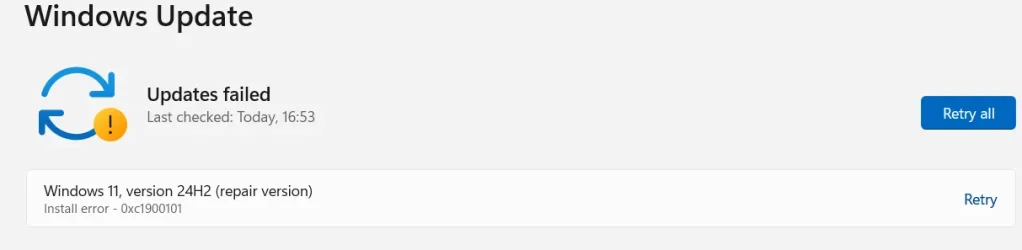
Solved Cumulative Update Fail KB5058411


MrPig

Well-known member
Member
VIP
Local time
6:23 PM
Posts
266
Location
Cheltenham, UK
OS
Win 11 Pro Workstation 25H2 26200.8039

This fails to install, ran DISM clean-up utility & it fails to reinstall some files. But what files?
 
Windows Build/Version
24H2 26100.3775

Attachments

My Computer My Computer

At a glance

Win 11 Pro Workstation 25H2 26200.8039Xeon W7-3455256GbRTX 4500 ADA
OS
Win 11 Pro Workstation 25H2 26200.8039

Computer type
PC/Desktop
Manufacturer/Model
Manmade
CPU
Xeon W7-3455
Motherboard
Gigabyte MW83-RP0
Memory
256Gb
Graphics Card(s)
RTX 4500 ADA
Sound Card
RealTek
Monitor(s) Displays
LG 32UN650P
Screen Resolution
3840x2160
Hard Drives
Boot: Transcend TS1MTE250H. Storage: Sabrent SB-RKT4P. Backup: Toshiba MG08ADA600E
PSU
Corsair 850W
Case
BeQuiet 802
Cooling
Noctua D9
Internet Speed
500Mb
Browser
Edge
Antivirus
Defender
Other Info
25H2 26200.8039

Yeah I got the same. It keeps failing after try repair sfc and DISM.
 

My Computer My Computer

At a glance

Windows 11 25H2i9 285KCorsair Vengeance RGB 48GB DDR 9200mt/s 2 x 24gbNVIDIA RTX 4080 Foundation Editon 16 GB
OS
Windows 11 25H2
Computer type
PC/Desktop
Manufacturer/Model
MSI
CPU
i9 285K
Motherboard
MSI Z890 MEG ACE
Memory
Corsair Vengeance RGB 48GB DDR 9200mt/s 2 x 24gb
Graphics Card(s)
NVIDIA RTX 4080 Foundation Editon 16 GB
Sound Card
EVGA NU Audio
Monitor(s) Displays
Acer Predator X35 35-inch Curved G-Sync Ultimate 200Hz
Screen Resolution
3440 x 1440 G-Sync
Hard Drives
M.2 Samsung Pro 1100 1TB
M.2 Samsung Pro 990 1TB HDD 1TB
PSU
EVGA SuperNOVA 1300 X3
Case
EVGA case D77
Cooling
EVGA CLCx 380 Liquid / Water CPU Cooler
Keyboard
EVGA Z10
Mouse
EVGA Torq X10
Internet Speed
900 mb/s
Browser
Mircosoft Edges Google and Bing
Antivirus
Kaspersky Internet
Other Info
Logitech Z906 THX 5.1 Surround Sound Speakers SPDIF
Ran this:


& got this:

ComponentsScanner Version 1.5.1.0 by sysnative.com
Windows Version: Windows 11 24H2 x64 (10.0.26100.3775)
Start time: 2025-05-14T20:29:30
Hive scanned: %windir%\System32\config\COMPONENTS
Number of keys: 80630
Number of values: 222854

==== Critical Errors ====
Critical registry key "COMPONENTS\DerivedData\VersionedIndex\10.0.26100.3775 (WinBuild.160101.0800)\ComponentFamilies" exists but has no subkeys

==== Corrupt Key Names ====
None

==== Corrupt Value Names ====
None

==== Corrupt Value Data Type ====
None

==== Corrupt Value Data ====
None

==== Repair Log ====
No possible repairs

==== Warnings ====
 

My Computer My Computer

At a glance

Win 11 Pro Workstation 25H2 26200.8039Xeon W7-3455256GbRTX 4500 ADA
OS
Win 11 Pro Workstation 25H2 26200.8039
Computer type
PC/Desktop
Manufacturer/Model
Manmade
CPU
Xeon W7-3455
Motherboard
Gigabyte MW83-RP0
Memory
256Gb
Graphics Card(s)
RTX 4500 ADA
Sound Card
RealTek
Monitor(s) Displays
LG 32UN650P
Screen Resolution
3840x2160
Hard Drives
Boot: Transcend TS1MTE250H. Storage: Sabrent SB-RKT4P. Backup: Toshiba MG08ADA600E
PSU
Corsair 850W
Case
BeQuiet 802
Cooling
Noctua D9
Internet Speed
500Mb
Browser
Edge
Antivirus
Defender
Other Info
25H2 26200.8039
ComponentsScanner Version 1.5.1.0 by sysnative.com
Windows Version: Windows 11 24H2 x64 (10.0.26100.3915)
Start time: 2025-05-14T20:37:58
Hive scanned: %windir%\System32\config\COMPONENTS
Number of keys: 79189
Number of values: 234906

==== Critical Errors ====
None

==== Corrupt Key Names ====
None

==== Corrupt Value Names ====
None

==== Corrupt Value Data Type ====
None

==== Corrupt Value Data ====
None

==== Repair Log ====
No possible repairs

==== Warnings ====
None


Storing 0KB in C:\Users\coolm\AppData\Local\Sysnative\ComponentsScanner

Finish Time: 2025-05-14T20:38:28. Corruption scan time: 5.817174s
===========================EOF===========================
Strange... on my there no issue....
 

My Computer My Computer

At a glance

Windows 11 25H2i9 285KCorsair Vengeance RGB 48GB DDR 9200mt/s 2 x 24gbNVIDIA RTX 4080 Foundation Editon 16 GB
OS
Windows 11 25H2
Computer type
PC/Desktop
Manufacturer/Model
MSI
CPU
i9 285K
Motherboard
MSI Z890 MEG ACE
Memory
Corsair Vengeance RGB 48GB DDR 9200mt/s 2 x 24gb
Graphics Card(s)
NVIDIA RTX 4080 Foundation Editon 16 GB
Sound Card
EVGA NU Audio
Monitor(s) Displays
Acer Predator X35 35-inch Curved G-Sync Ultimate 200Hz
Screen Resolution
3440 x 1440 G-Sync
Hard Drives
M.2 Samsung Pro 1100 1TB
M.2 Samsung Pro 990 1TB HDD 1TB
PSU
EVGA SuperNOVA 1300 X3
Case
EVGA case D77
Cooling
EVGA CLCx 380 Liquid / Water CPU Cooler
Keyboard
EVGA Z10
Mouse
EVGA Torq X10
Internet Speed
900 mb/s
Browser
Mircosoft Edges Google and Bing
Antivirus
Kaspersky Internet
Other Info
Logitech Z906 THX 5.1 Surround Sound Speakers SPDIF
ran DISM clean-up utility & it fails to reinstall some files
DISM log is located at C:\WINDOWS\Logs\DISM\dism.log
 

My Computers My Computers

  • At a glance

    Windows 11 Pro 25H2 26200.8655i9-10900 10 core 20 threads32 gbnone-Intel UHD Graphics 630
    OS
    Windows 11 Pro 25H2 26200.8655
    Computer type
    PC/Desktop
    Manufacturer/Model
    Dell Optiplex 7080
    CPU
    i9-10900 10 core 20 threads
    Motherboard
    DELL 0J37VM
    Memory
    32 gb
    Graphics Card(s)
    none-Intel UHD Graphics 630
    Sound Card
    Integrated Realtek
    Monitor(s) Displays
    Benq 27
    Screen Resolution
    2560x1440
    Hard Drives
    2x1tb Solidigm m.2 nvme /External drives 512gb Samsung m.2 sata+2tb Kingston m2.nvme
    PSU
    500w
    Case
    MT
    Cooling
    Dell Premium
    Keyboard
    Logitech wired
    Mouse
    Logitech wireless
    Internet Speed
    so slow I'm too embarrassed to tell
    Browser
    #1 Edge #2 Firefox
    Antivirus
    Defender+MWB Premium
  • At a glance

    Windows 11 Pro 24H2 26200.8457AMD Ryzen 7 6800U32 gbintegrated
    Operating System
    Windows 11 Pro 24H2 26200.8457
    Computer type
    PC/Desktop
    Manufacturer/Model
    Beelink Mini PC SER5
    CPU
    AMD Ryzen 7 6800U
    Memory
    32 gb
    Graphics card(s)
    integrated
    Sound Card
    integrated
    Monitor(s) Displays
    Benq 27
    Screen Resolution
    2560x1440
    Hard Drives
    1TB Crucial nvme
    Keyboard
    Logitech wired
    Mouse
    Logitech wireless
    Internet Speed
    still too embarrassed to tell
    Browser
    Firefox
    Antivirus
    Defender
    Other Info
    System 3 is non compliant Dell 9020 i7-4770/24gb ram Win11 PRO 26200.8457
I had issues trying to install KB5058411....kept getting a message like "something didn't go as planned..". Reinstalling the current version of Windows solved my problem (see this link).
 

My Computer My Computer

At a glance

Windows 10 Pro
OS
Windows 10 Pro
I had issues trying to install KB5058411....kept getting a message like "something didn't go as planned..". Reinstalling the current version of Windows solved my problem (see this link).

True. But it’s better for this forum to link to the forums tutorials. Simply because it promotes the forum.

@MrPig i’d agree an in-place upgrade/repair often fixes the cumulative update fails. The standalone installer can also prove successful.
Scroll down to How to get this update (a little inconvenient in my opinion)

Otherwise: Option One


First you could try;
  • Temporarily disabling any AntiVirus you have running.
  • Temporarily disabling Secure Boot in the BIOS
 

My Computers My Computers

  • At a glance

    Windows 11 Pro 25H2 Build 26200.8655Intel(R) Core(TM) i7-4770K CPU @ 3.50GHz32.0 GB of I forget and the box is in storage.Gigabyte nVidia GeForce GTX 1660 Super OC 6GB
    OS
    Windows 11 Pro 25H2 Build 26200.8655
    Computer type
    PC/Desktop
    Manufacturer/Model
    Sin-built 2013
    CPU
    Intel(R) Core(TM) i7-4770K CPU @ 3.50GHz
    Motherboard
    ASUS ROG Maximus VI Formula
    Memory
    32.0 GB of I forget and the box is in storage.
    Graphics Card(s)
    Gigabyte nVidia GeForce GTX 1660 Super OC 6GB
    Sound Card
    ROG SupremeFX Formula 8-Channel High Definition Audio
    Monitor(s) Displays
    5 x LG 25MS500-B - 1 x 24MK430H-B - 1 x Wacom Pro 22" Touch Screen Tablet
    Screen Resolution
    All over the place
    Hard Drives
    Too many to list. OS on Samsung 1TB 870 QVO SATA
    PSU
    Silverstone 1500
    Case
    NZXT Phantom 820 Full-Tower Case
    Cooling
    Noctua NH-D15 Elite Class Dual Tower CPU Cooler / 6 x EziDIY 120mm / 2 x Corsair 140mm somethings / 1 x 140mm Thermaltake something / 2 x 200mm Corsair.
    Keyboard
    Corsair K95 / Logitech diNovo Edge Wireless
    Mouse
    Logitech: G402 / G502 / Mx Masters / Mx Air Cordless
    Internet Speed
    2000/500Mbps
    Browser
    All sorts
    Antivirus
    Kaspersky Premium
    Other Info
    ㅤㅤㅤㅤㅤㅤㅤㅤㅤㅤㅤㅤㅤㅤㅤㅤㅤㅤㅤㅤㅤㅤㅤㅤㅤㅤㅤㅤㅤㅤㅤㅤㅤㅤㅤㅤㅤㅤㅤㅤ⠀⠀⠀⠀⠀⠀⠀⠀⠀⠀
    TP-Link BE9300 WiFi 7 Bluetooth 5.4 (Archer TBE550E)
    TP-Link TX201 V1 2.5GB Lan

    Grandstream HT812 - VoIP
    ASUS DSL-AX82U - Mesh
    ASUS RT-AC68U - Mesh
    ASUS RT-BE88U Router

    Brother MFC-L2880DW Printer

    I’m on a horse.
  • At a glance

    Windows 11 Pro 25H2 Build 26200.8655 (Wifes)13th Generation Intel® Core™ i5-1340P Process...16GB LPDDR5-52001x Intel® Iris® Xe Graphics
    Operating System
    Windows 11 Pro 25H2 Build 26200.8655 (Wifes)
    Computer type
    Laptop
    Manufacturer/Model
    LENOVO Yoga 7 14IRL8 - Type 82YL
    CPU
    13th Generation Intel® Core™ i5-1340P Processor(Core™ i5-1340P)
    Memory
    16GB LPDDR5-5200
    Graphics card(s)
    1x Intel® Iris® Xe Graphics
    Sound Card
    Optimized with Dolby Atmos®
    Screen Resolution
    QHD 2880 x 1800 OLED
    Hard Drives
    M.2 512 GB SSD PCIe
    Mouse
    Logiteck MX Master 3S
    Internet Speed
    2000/500
    Antivirus
    Defender / Malwarebytes
    Other Info
    …still on a horse.


    Wireless Network: Wi-Fi 6E 2x2 AX; Bluetooth® 5.1 or above
    Ports: 1x 1 Novo button; 2 in 1 Audio Combo jack; Micro SD Card Reader; HDMI 1.4b; 2 x USB Type-C (TBT4)
    USB 3.2 Gen 2 DP 1.4a
    PD 3.0); 1 x USB 3.2 Gen1 Type A
    Camera
    1x 1080P FHD IR/RGB Hybrid with Privacy Shutter and Dual Array Microphone
    Graphics
    1x Intel® Iris® Xe Graphics
    Monitor
    14" WUXGA
    Form Factor
    Convertible Notebook
  • Windows 11 Pro 25H2 Build 26200.8655 (Wifes)

    Yoga 7 2-in-1 14IML9 - Type 83DJ

    Processor: Intel® Core™ Ultra 7 155H Processor(Core™ Ultra 7 155H)

    Memory: 32GB LPD5X-7467

    Hard Drive: 1 TB SSD PCIe

    Wireless Network: 1x Wi-Fi 6E 2x2 AX; Bluetooth® 5.1 or above

    Ports: 1 x HDMI 2.1 TMDS; 1 x Novo Button; 1 x Combo Audio Jack
    2 x USB-C (USB 4.0)
    1 x USB-A 3.2 Gen 1

    Camera: 1080P FHD IR Hybrid with Dual Microphone

    Graphics: Intel® Arc™ Graphics

    Monitor: 14" 2.8K

    ...Where's my horse?
This one failed 3 times for me with Install error - 0x800f0983. System is brand new Win11 Pro that I have been updating successfully for the past few days. A number of updates have installed ok - but not this one.

After first error I just ran it again. After second error I did some Googling and deleted WinReagent and all its files. After 2nd fail I ran sfc which found no errors. Also ran Dism.exe /online /Cleanup-Image /StartComponentCleanup /ResetBase which ended OK. Also deleted WinReagent and all it's files. Third time failed again same way. So here I am.

I found a YouTube video about how to fix 0x800f0983, but it has a lot of steps that I am unfamiliar with and don't want to experiment with.
Just now I found the comment about ComponentScanner.exe which just finished. This is the result:

The corruption scan completed after 144.22 seconds.
No corruptions were detected, but 5 warnings were found in the COMPONENTS hive.

If you are not experiencing issues with Windows Update, these warnings can likely be ignored.

So far that's the most helpful (?) info I've found. As I said he system runs ok without the upgrade, but I expect I won't be able to install any new ones until I get this one completed.
 

My Computer My Computer

At a glance

Win11 ProAMD Ryzen 5 5500U16 GBRadeon 2100
OS
Win11 Pro
Computer type
PC/Desktop
Manufacturer/Model
BeeLink SER Mini
CPU
AMD Ryzen 5 5500U
Motherboard
BeeLink SER
Memory
16 GB
Graphics Card(s)
Radeon 2100
Sound Card
none
Monitor(s) Displays
Primary: Phillips 4K; Secondary: LG 4K
Screen Resolution
Both 3860 x 2160
Hard Drives
C: NVme 500 GB Windows only
D: 128 GB NVme User data + Windows Temp via Junction Link
PSU
External
Case
Mini
Cooling
Internal fan
Keyboard
Logitech Wireless Lighted
Mouse
Kensington ExpertMouse wireless trackball
Internet Speed
500/500
Browser
Brave
Antivirus
Windows Defender
This is not going well!!

1747328440621.webp
 

My Computer My Computer

At a glance

Win 11 Pro Workstation 25H2 26200.8039Xeon W7-3455256GbRTX 4500 ADA
OS
Win 11 Pro Workstation 25H2 26200.8039
Computer type
PC/Desktop
Manufacturer/Model
Manmade
CPU
Xeon W7-3455
Motherboard
Gigabyte MW83-RP0
Memory
256Gb
Graphics Card(s)
RTX 4500 ADA
Sound Card
RealTek
Monitor(s) Displays
LG 32UN650P
Screen Resolution
3840x2160
Hard Drives
Boot: Transcend TS1MTE250H. Storage: Sabrent SB-RKT4P. Backup: Toshiba MG08ADA600E
PSU
Corsair 850W
Case
BeQuiet 802
Cooling
Noctua D9
Internet Speed
500Mb
Browser
Edge
Antivirus
Defender
Other Info
25H2 26200.8039
1) Please run the V2 log collector and post a share link into this thread using drop box, or google drive

BSOD - Posting Instructions | Windows 11 Forum (elevenforum.com)


2) Run: upgrade_failure_info > post a share link

https://www.tenforums.com/attachmen...s-use-bsod-debugging-upgrade_failure_info.bat

Batch files for use in BSOD debugging - Windows 10 Help Forums

Batch files for use in BSOD debugging - Windows 10 Help Forums


3) Run Tuneup plus > post a share link

https://www.tenforums.com/attachmen...-files-use-bsod-debugging-tuneup_plus_log.bat

Batch files for use in BSOD debugging - Page 2 - Windows 10 Forums


4) Open administrative command prompt and copy and paste:

fltmc

dism /online /get-drivers /format:table >c:\drivers.txt

schtasks.exe /Run /TN "\Microsoft\Windows\Application Experience\Microsoft Compatibility Appraiser"

reg query "HKLM\SOFTWARE\Microsoft\Windows NT\CurrentVersion\AppCompatFlags\TargetVersionUpgradeExperienceIndicators" /s

Post a share link.
 

My Computer My Computer

At a glance

Windows 10Intel(R) Core(TM) i7-4800MQ CPU @ 2.70GHz16 GB Total: Manufacturer : Samsung MemoryTyp...NVIDIA Quadro K3100M; Intel(R) HD Graphics 4600
OS
Windows 10
Computer type
Laptop
Manufacturer/Model
HP
CPU
Intel(R) Core(TM) i7-4800MQ CPU @ 2.70GHz
Motherboard
Product : 190A Version : KBC Version 94.56
Memory
16 GB Total: Manufacturer : Samsung MemoryType : DDR3 FormFactor : SODIMM Capacity : 8GB Speed : 1600
Graphics Card(s)
NVIDIA Quadro K3100M; Intel(R) HD Graphics 4600
Sound Card
IDT High Definition Audio CODEC; PNP Device ID HDAUDIO\FUNC_01&VEN_111D&DEV_76E0
Hard Drives
Model Hitachi HTS727575A9E364
Antivirus
Microsoft Defender
Other Info
Mobile Workstation
True. But it’s better for this forum to link to the forums tutorials. Simply because it promotes the forum.

@MrPig i’d agree an in-place upgrade/repair often fixes the cumulative update fails. The standalone installer can also prove successful.
Scroll down to How to get this update (a little inconvenient in my opinion)

Otherwise: Option One


First you could try;
  • Temporarily disabling any AntiVirus you have running.
  • Temporarily disabling Secure Boot in the BIOS
Thanks, you and yes it does fix for me! No more stress and beer for you 🍺👌
 

My Computer My Computer

At a glance

Windows 11 25H2i9 285KCorsair Vengeance RGB 48GB DDR 9200mt/s 2 x 24gbNVIDIA RTX 4080 Foundation Editon 16 GB
OS
Windows 11 25H2
Computer type
PC/Desktop
Manufacturer/Model
MSI
CPU
i9 285K
Motherboard
MSI Z890 MEG ACE
Memory
Corsair Vengeance RGB 48GB DDR 9200mt/s 2 x 24gb
Graphics Card(s)
NVIDIA RTX 4080 Foundation Editon 16 GB
Sound Card
EVGA NU Audio
Monitor(s) Displays
Acer Predator X35 35-inch Curved G-Sync Ultimate 200Hz
Screen Resolution
3440 x 1440 G-Sync
Hard Drives
M.2 Samsung Pro 1100 1TB
M.2 Samsung Pro 990 1TB HDD 1TB
PSU
EVGA SuperNOVA 1300 X3
Case
EVGA case D77
Cooling
EVGA CLCx 380 Liquid / Water CPU Cooler
Keyboard
EVGA Z10
Mouse
EVGA Torq X10
Internet Speed
900 mb/s
Browser
Mircosoft Edges Google and Bing
Antivirus
Kaspersky Internet
Other Info
Logitech Z906 THX 5.1 Surround Sound Speakers SPDIF
Just looking at the ones that had update issues many are Windows pro. Is there something wrong with the windows pro? is it really windows pro full retail version or a version that is discounted with missing features. Is equipment too old or are Win10 converted too Win11. Missing correct TPM requirement something is causing the failures.
 

My Computer My Computer

At a glance

Win 11 HomeIntel Core Ultra7 Processor16gbIntel Arc
OS
Win 11 Home
Computer type
Laptop
Manufacturer/Model
Dell Inspiron i7640-7366BLU 2 in 1
CPU
Intel Core Ultra7 Processor
Memory
16gb
Graphics Card(s)
Intel Arc
Monitor(s) Displays
on laptop 1XHDMI 1.4
Screen Resolution
1920x1200 Full HD+
Hard Drives
1TB SSD
Keyboard
on laptop / on screen using as tablet
Mouse
Microsoft 3500
Internet Speed
800 mg
Browser
Edge
Antivirus
Defender
One.
 

Attachments

My Computer My Computer

At a glance

Win 11 Pro Workstation 25H2 26200.8039Xeon W7-3455256GbRTX 4500 ADA
OS
Win 11 Pro Workstation 25H2 26200.8039
Computer type
PC/Desktop
Manufacturer/Model
Manmade
CPU
Xeon W7-3455
Motherboard
Gigabyte MW83-RP0
Memory
256Gb
Graphics Card(s)
RTX 4500 ADA
Sound Card
RealTek
Monitor(s) Displays
LG 32UN650P
Screen Resolution
3840x2160
Hard Drives
Boot: Transcend TS1MTE250H. Storage: Sabrent SB-RKT4P. Backup: Toshiba MG08ADA600E
PSU
Corsair 850W
Case
BeQuiet 802
Cooling
Noctua D9
Internet Speed
500Mb
Browser
Edge
Antivirus
Defender
Other Info
25H2 26200.8039
Two:
 

Attachments

My Computer My Computer

At a glance

Win 11 Pro Workstation 25H2 26200.8039Xeon W7-3455256GbRTX 4500 ADA
OS
Win 11 Pro Workstation 25H2 26200.8039
Computer type
PC/Desktop
Manufacturer/Model
Manmade
CPU
Xeon W7-3455
Motherboard
Gigabyte MW83-RP0
Memory
256Gb
Graphics Card(s)
RTX 4500 ADA
Sound Card
RealTek
Monitor(s) Displays
LG 32UN650P
Screen Resolution
3840x2160
Hard Drives
Boot: Transcend TS1MTE250H. Storage: Sabrent SB-RKT4P. Backup: Toshiba MG08ADA600E
PSU
Corsair 850W
Case
BeQuiet 802
Cooling
Noctua D9
Internet Speed
500Mb
Browser
Edge
Antivirus
Defender
Other Info
25H2 26200.8039
Three:

1747338522744.webp
 

My Computer My Computer

At a glance

Win 11 Pro Workstation 25H2 26200.8039Xeon W7-3455256GbRTX 4500 ADA
OS
Win 11 Pro Workstation 25H2 26200.8039
Computer type
PC/Desktop
Manufacturer/Model
Manmade
CPU
Xeon W7-3455
Motherboard
Gigabyte MW83-RP0
Memory
256Gb
Graphics Card(s)
RTX 4500 ADA
Sound Card
RealTek
Monitor(s) Displays
LG 32UN650P
Screen Resolution
3840x2160
Hard Drives
Boot: Transcend TS1MTE250H. Storage: Sabrent SB-RKT4P. Backup: Toshiba MG08ADA600E
PSU
Corsair 850W
Case
BeQuiet 802
Cooling
Noctua D9
Internet Speed
500Mb
Browser
Edge
Antivirus
Defender
Other Info
25H2 26200.8039
When available please post share links for

a) Step #2 upgrade_failure_info

b) Step #4:
a) drivers.txt
b) Compatibility appraiser > reg query


Code:
Deployment Image Servicing and Management tool
Version: 10.0.26100.1150

Image Version: 10.0.26100.3775
 
Error: 0x800f081f

The source files could not be found.


Code:
Event[13017]
  Log Name: System
  Source: Microsoft-Windows-WindowsUpdateClient
  Date: 2025-05-15T17:50:24.7760000Z
  Event ID: 20
  Task: Windows Update Agent
  Level: Error
  Opcode: Installation
  Keyword: Installation,Failure,
  User: S-1-5-18
  User Name: NT AUTHORITY\SYSTEM
  Computer: WH-2
  Description:
Installation Failure: Windows failed to install the following update with error 0xC1900101: Windows 11, version 24H2.


Code:
Event[12785]
  Log Name: System
  Source: Microsoft-Windows-WindowsUpdateClient
  Date: 2025-05-15T16:45:40.0060000Z
  Event ID: 20
  Task: Windows Update Agent
  Level: Error
  Opcode: Installation
  Keyword: Installation,Failure,
  User: S-1-5-18
  User Name: NT AUTHORITY\SYSTEM
  Computer: WH-2
  Description:
Installation Failure: Windows failed to install the following update with error 0x800F081F: 2025-05 Cumulative Update for Windows 11 Version 24H2 for x64-based Systems (KB5058411).


Code:
Event[12334]
  Log Name: System
  Source: Microsoft-Windows-WindowsUpdateClient
  Date: 2025-05-14T21:57:05.5520000Z
  Event ID: 20
  Task: Windows Update Agent
  Level: Error
  Opcode: Installation
  Keyword: Installation,Failure,
  User: S-1-5-18
  User Name: NT AUTHORITY\SYSTEM
  Computer: WH-2
  Description:
Installation Failure: Windows failed to install the following update with error 0x800F0991: 2025-05 Cumulative Update for Windows 11 Version 24H2 for x64-based Systems (KB5058411).


Code:
Event[12187]
  Log Name: System
  Source: Microsoft-Windows-Kernel-Power
  Date: 2025-05-14T21:42:19.0630000Z
  Event ID: 41
  Task: N/A
  Level: Critical
  Opcode: Info
  Keyword: N/A
  User: S-1-5-18
  User Name: NT AUTHORITY\SYSTEM
  Computer: WH-2
  Description:
The system has rebooted without cleanly shutting down first. This error could be caused if the system stopped responding, crashed, or lost power unexpectedly.


Code:
Event[12171]
  Log Name: System
  Source: EventLog
  Date: 2025-05-14T21:42:27.0030000Z
  Event ID: 6008
  Task: None
  Level: Error
  Opcode: N/A
  Keyword: Classic,
  User: N/A
  User Name: N/A
  Computer: WH-2
  Description:
The previous system shutdown at 21:35:46 on ?14/?05/?2025 was unexpected.


Code:
Installation Failure: Windows failed to install the following update with error 0x800F0991: 2025-05 Cumulative Update for Windows 11 Version 24H2 for x64-based Systems (KB5058411).

Installation Failure: Windows failed to install the following update with error 0x800F081F: 2025-05 Cumulative Update for Windows 11 Version 24H2 for x64-based Systems (KB5058411).

Installation Failure: Windows failed to install the following update with error 0x800F0983: 2025-04 Cumulative Update Preview for Windows 11 Version 24H2 for x64-based Systems (KB5055627).

Installation Failure: Windows failed to install the following update with error 0x800704C7: 2025-04 Cumulative Update Preview for Windows 11 Version 24H2 for x64-based Systems (KB5055627).


Code:
Event[2470]
  Log Name: System
  Source: Microsoft-Windows-Kernel-Power
  Date: 2025-04-27T07:34:34.7320000Z
  Event ID: 41
  Task: N/A
  Level: Critical
  Opcode: Info
  Keyword: N/A
  User: S-1-5-18
  User Name: NT AUTHORITY\SYSTEM
  Computer: WH-2
  Description:
The system has rebooted without cleanly shutting down first. This error could be caused if the system stopped responding, crashed, or lost power unexpectedly.


Code:
Event[2442]
  Log Name: System
  Source: EventLog
  Date: 2025-04-27T07:34:38.5220000Z
  Event ID: 6008
  Task: None
  Level: Error
  Opcode: N/A
  Keyword: Classic,
  User: N/A
  User Name: N/A
  Computer: WH-2
  Description:
The previous system shutdown at 06:55:50 on ?27/?04/?2025 was unexpected.
 

My Computer My Computer

At a glance

Windows 10Intel(R) Core(TM) i7-4800MQ CPU @ 2.70GHz16 GB Total: Manufacturer : Samsung MemoryTyp...NVIDIA Quadro K3100M; Intel(R) HD Graphics 4600
OS
Windows 10
Computer type
Laptop
Manufacturer/Model
HP
CPU
Intel(R) Core(TM) i7-4800MQ CPU @ 2.70GHz
Motherboard
Product : 190A Version : KBC Version 94.56
Memory
16 GB Total: Manufacturer : Samsung MemoryType : DDR3 FormFactor : SODIMM Capacity : 8GB Speed : 1600
Graphics Card(s)
NVIDIA Quadro K3100M; Intel(R) HD Graphics 4600
Sound Card
IDT High Definition Audio CODEC; PNP Device ID HDAUDIO\FUNC_01&VEN_111D&DEV_76E0
Hard Drives
Model Hitachi HTS727575A9E364
Antivirus
Microsoft Defender
Other Info
Mobile Workstation
Upgrade failure is 80Mb zipped!

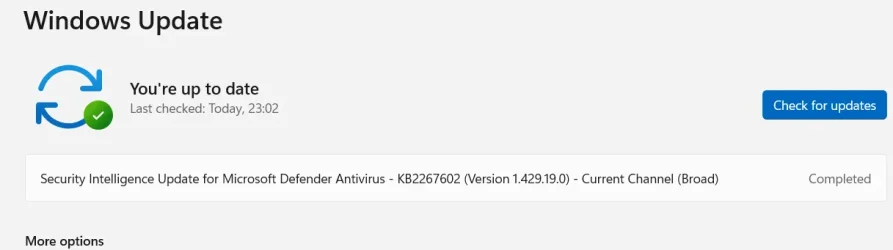
Ran re-install repair & it worked this time after turning secure boot off.

1747346843254.webp
 

My Computer My Computer

At a glance

Win 11 Pro Workstation 25H2 26200.8039Xeon W7-3455256GbRTX 4500 ADA
OS
Win 11 Pro Workstation 25H2 26200.8039
Computer type
PC/Desktop
Manufacturer/Model
Manmade
CPU
Xeon W7-3455
Motherboard
Gigabyte MW83-RP0
Memory
256Gb
Graphics Card(s)
RTX 4500 ADA
Sound Card
RealTek
Monitor(s) Displays
LG 32UN650P
Screen Resolution
3840x2160
Hard Drives
Boot: Transcend TS1MTE250H. Storage: Sabrent SB-RKT4P. Backup: Toshiba MG08ADA600E
PSU
Corsair 850W
Case
BeQuiet 802
Cooling
Noctua D9
Internet Speed
500Mb
Browser
Edge
Antivirus
Defender
Other Info
25H2 26200.8039

My Computers My Computers

  • At a glance

    Windows 11 Pro 25H2 Build 26200.8655Intel(R) Core(TM) i7-4770K CPU @ 3.50GHz32.0 GB of I forget and the box is in storage.Gigabyte nVidia GeForce GTX 1660 Super OC 6GB
    OS
    Windows 11 Pro 25H2 Build 26200.8655
    Computer type
    PC/Desktop
    Manufacturer/Model
    Sin-built 2013
    CPU
    Intel(R) Core(TM) i7-4770K CPU @ 3.50GHz
    Motherboard
    ASUS ROG Maximus VI Formula
    Memory
    32.0 GB of I forget and the box is in storage.
    Graphics Card(s)
    Gigabyte nVidia GeForce GTX 1660 Super OC 6GB
    Sound Card
    ROG SupremeFX Formula 8-Channel High Definition Audio
    Monitor(s) Displays
    5 x LG 25MS500-B - 1 x 24MK430H-B - 1 x Wacom Pro 22" Touch Screen Tablet
    Screen Resolution
    All over the place
    Hard Drives
    Too many to list. OS on Samsung 1TB 870 QVO SATA
    PSU
    Silverstone 1500
    Case
    NZXT Phantom 820 Full-Tower Case
    Cooling
    Noctua NH-D15 Elite Class Dual Tower CPU Cooler / 6 x EziDIY 120mm / 2 x Corsair 140mm somethings / 1 x 140mm Thermaltake something / 2 x 200mm Corsair.
    Keyboard
    Corsair K95 / Logitech diNovo Edge Wireless
    Mouse
    Logitech: G402 / G502 / Mx Masters / Mx Air Cordless
    Internet Speed
    2000/500Mbps
    Browser
    All sorts
    Antivirus
    Kaspersky Premium
    Other Info
    ㅤㅤㅤㅤㅤㅤㅤㅤㅤㅤㅤㅤㅤㅤㅤㅤㅤㅤㅤㅤㅤㅤㅤㅤㅤㅤㅤㅤㅤㅤㅤㅤㅤㅤㅤㅤㅤㅤㅤㅤ⠀⠀⠀⠀⠀⠀⠀⠀⠀⠀
    TP-Link BE9300 WiFi 7 Bluetooth 5.4 (Archer TBE550E)
    TP-Link TX201 V1 2.5GB Lan

    Grandstream HT812 - VoIP
    ASUS DSL-AX82U - Mesh
    ASUS RT-AC68U - Mesh
    ASUS RT-BE88U Router

    Brother MFC-L2880DW Printer

    I’m on a horse.
  • At a glance

    Windows 11 Pro 25H2 Build 26200.8655 (Wifes)13th Generation Intel® Core™ i5-1340P Process...16GB LPDDR5-52001x Intel® Iris® Xe Graphics
    Operating System
    Windows 11 Pro 25H2 Build 26200.8655 (Wifes)
    Computer type
    Laptop
    Manufacturer/Model
    LENOVO Yoga 7 14IRL8 - Type 82YL
    CPU
    13th Generation Intel® Core™ i5-1340P Processor(Core™ i5-1340P)
    Memory
    16GB LPDDR5-5200
    Graphics card(s)
    1x Intel® Iris® Xe Graphics
    Sound Card
    Optimized with Dolby Atmos®
    Screen Resolution
    QHD 2880 x 1800 OLED
    Hard Drives
    M.2 512 GB SSD PCIe
    Mouse
    Logiteck MX Master 3S
    Internet Speed
    2000/500
    Antivirus
    Defender / Malwarebytes
    Other Info
    …still on a horse.


    Wireless Network: Wi-Fi 6E 2x2 AX; Bluetooth® 5.1 or above
    Ports: 1x 1 Novo button; 2 in 1 Audio Combo jack; Micro SD Card Reader; HDMI 1.4b; 2 x USB Type-C (TBT4)
    USB 3.2 Gen 2 DP 1.4a
    PD 3.0); 1 x USB 3.2 Gen1 Type A
    Camera
    1x 1080P FHD IR/RGB Hybrid with Privacy Shutter and Dual Array Microphone
    Graphics
    1x Intel® Iris® Xe Graphics
    Monitor
    14" WUXGA
    Form Factor
    Convertible Notebook
  • Windows 11 Pro 25H2 Build 26200.8655 (Wifes)

    Yoga 7 2-in-1 14IML9 - Type 83DJ

    Processor: Intel® Core™ Ultra 7 155H Processor(Core™ Ultra 7 155H)

    Memory: 32GB LPD5X-7467

    Hard Drive: 1 TB SSD PCIe

    Wireless Network: 1x Wi-Fi 6E 2x2 AX; Bluetooth® 5.1 or above

    Ports: 1 x HDMI 2.1 TMDS; 1 x Novo Button; 1 x Combo Audio Jack
    2 x USB-C (USB 4.0)
    1 x USB-A 3.2 Gen 1

    Camera: 1080P FHD IR Hybrid with Dual Microphone

    Graphics: Intel® Arc™ Graphics

    Monitor: 14" 2.8K

    ...Where's my horse?
So, is it a valid conclusion that since we're in the middle of a WIndows Update in the above scenarios that MS is installing software that MS then decides doesn't pass the secure boot signature test?
 

My Computer My Computer

At a glance

Windows 11 Pro 24H2Intel Ultra 7 155H16gbIntel Arc integrated
OS
Windows 11 Pro 24H2
Computer type
Laptop
Manufacturer/Model
HP
CPU
Intel Ultra 7 155H
Memory
16gb
Graphics Card(s)
Intel Arc integrated
Hard Drives
SSD
So, is it a valid conclusion that since we're in the middle of a WIndows Update in the above scenarios that MS is installing software that MS then decides doesn't pass the secure boot signature test?

I’m not all certain as to why. I just know from paying attention in this forum, that the two things to try before jumping through hoops, when an update issue occurs are:
  1. Disable Antivirus
  2. Disabling Secure Boot.

Sorry that I don't know the intricate’s, it’s weird as obviously these updates are directly implemented by Microsoft.

I know that it relaxes security restrictions that might interfere with the update process. Specifically that Secure Boot verifies the authenticity of the bootloader, and if it's not properly signed, the system might refuse to boot after an update. Disabling it allows the system to boot without this check, potentially resolving update-related boot problems. <- That;’s as close as I have come to understanding. Why would an update have anything to do with the boot loader? It’s all too Monty Python for me.

Go figure?
 

My Computers My Computers

  • At a glance

    Windows 11 Pro 25H2 Build 26200.8655Intel(R) Core(TM) i7-4770K CPU @ 3.50GHz32.0 GB of I forget and the box is in storage.Gigabyte nVidia GeForce GTX 1660 Super OC 6GB
    OS
    Windows 11 Pro 25H2 Build 26200.8655
    Computer type
    PC/Desktop
    Manufacturer/Model
    Sin-built 2013
    CPU
    Intel(R) Core(TM) i7-4770K CPU @ 3.50GHz
    Motherboard
    ASUS ROG Maximus VI Formula
    Memory
    32.0 GB of I forget and the box is in storage.
    Graphics Card(s)
    Gigabyte nVidia GeForce GTX 1660 Super OC 6GB
    Sound Card
    ROG SupremeFX Formula 8-Channel High Definition Audio
    Monitor(s) Displays
    5 x LG 25MS500-B - 1 x 24MK430H-B - 1 x Wacom Pro 22" Touch Screen Tablet
    Screen Resolution
    All over the place
    Hard Drives
    Too many to list. OS on Samsung 1TB 870 QVO SATA
    PSU
    Silverstone 1500
    Case
    NZXT Phantom 820 Full-Tower Case
    Cooling
    Noctua NH-D15 Elite Class Dual Tower CPU Cooler / 6 x EziDIY 120mm / 2 x Corsair 140mm somethings / 1 x 140mm Thermaltake something / 2 x 200mm Corsair.
    Keyboard
    Corsair K95 / Logitech diNovo Edge Wireless
    Mouse
    Logitech: G402 / G502 / Mx Masters / Mx Air Cordless
    Internet Speed
    2000/500Mbps
    Browser
    All sorts
    Antivirus
    Kaspersky Premium
    Other Info
    ㅤㅤㅤㅤㅤㅤㅤㅤㅤㅤㅤㅤㅤㅤㅤㅤㅤㅤㅤㅤㅤㅤㅤㅤㅤㅤㅤㅤㅤㅤㅤㅤㅤㅤㅤㅤㅤㅤㅤㅤ⠀⠀⠀⠀⠀⠀⠀⠀⠀⠀
    TP-Link BE9300 WiFi 7 Bluetooth 5.4 (Archer TBE550E)
    TP-Link TX201 V1 2.5GB Lan

    Grandstream HT812 - VoIP
    ASUS DSL-AX82U - Mesh
    ASUS RT-AC68U - Mesh
    ASUS RT-BE88U Router

    Brother MFC-L2880DW Printer

    I’m on a horse.
  • At a glance

    Windows 11 Pro 25H2 Build 26200.8655 (Wifes)13th Generation Intel® Core™ i5-1340P Process...16GB LPDDR5-52001x Intel® Iris® Xe Graphics
    Operating System
    Windows 11 Pro 25H2 Build 26200.8655 (Wifes)
    Computer type
    Laptop
    Manufacturer/Model
    LENOVO Yoga 7 14IRL8 - Type 82YL
    CPU
    13th Generation Intel® Core™ i5-1340P Processor(Core™ i5-1340P)
    Memory
    16GB LPDDR5-5200
    Graphics card(s)
    1x Intel® Iris® Xe Graphics
    Sound Card
    Optimized with Dolby Atmos®
    Screen Resolution
    QHD 2880 x 1800 OLED
    Hard Drives
    M.2 512 GB SSD PCIe
    Mouse
    Logiteck MX Master 3S
    Internet Speed
    2000/500
    Antivirus
    Defender / Malwarebytes
    Other Info
    …still on a horse.


    Wireless Network: Wi-Fi 6E 2x2 AX; Bluetooth® 5.1 or above
    Ports: 1x 1 Novo button; 2 in 1 Audio Combo jack; Micro SD Card Reader; HDMI 1.4b; 2 x USB Type-C (TBT4)
    USB 3.2 Gen 2 DP 1.4a
    PD 3.0); 1 x USB 3.2 Gen1 Type A
    Camera
    1x 1080P FHD IR/RGB Hybrid with Privacy Shutter and Dual Array Microphone
    Graphics
    1x Intel® Iris® Xe Graphics
    Monitor
    14" WUXGA
    Form Factor
    Convertible Notebook
  • Windows 11 Pro 25H2 Build 26200.8655 (Wifes)

    Yoga 7 2-in-1 14IML9 - Type 83DJ

    Processor: Intel® Core™ Ultra 7 155H Processor(Core™ Ultra 7 155H)

    Memory: 32GB LPD5X-7467

    Hard Drive: 1 TB SSD PCIe

    Wireless Network: 1x Wi-Fi 6E 2x2 AX; Bluetooth® 5.1 or above

    Ports: 1 x HDMI 2.1 TMDS; 1 x Novo Button; 1 x Combo Audio Jack
    2 x USB-C (USB 4.0)
    1 x USB-A 3.2 Gen 1

    Camera: 1080P FHD IR Hybrid with Dual Microphone

    Graphics: Intel® Arc™ Graphics

    Monitor: 14" 2.8K

    ...Where's my horse?

Latest Support Threads

Back
Top Bottom