Custom Icons for Windows 11 Thread (Folders, Dropbox, Google Drive, Podcasts, NVME Drive, Steam, Adobe)


My Computer My Computer

At a glance

Windows XP,11 Linux Fedora Rawhide pre-releas...2 X Intel i7
OS
Windows XP,11 Linux Fedora Rawhide pre-release 45
Computer type
PC/Desktop
CPU
2 X Intel i7
Screen Resolution
4KUHD X 2
Hi everyone, can someone help me please
I'm customizing my Windows Explorer folder
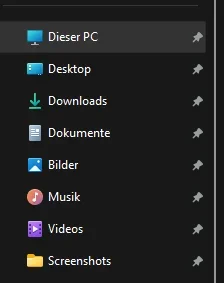
I would like to change some folders that are in quick access with these acronyms that I created.
But when I go to set the folder icon and then insert it in quick access the acronym is too small and I can't read it.
Can you please help me to have these images in a resolution as large as possible to set them in the quick access bar?
Thanks a lot for those who will help me
 

Attachments

  • FONT1.webp
    FONT1.webp
    39.7 KB · Views: 6
  • FONT2.webp
    FONT2.webp
    46.7 KB · Views: 4
  • FONT3.webp
    FONT3.webp
    68.3 KB · Views: 3
  • FONT4.webp
    FONT4.webp
    58.7 KB · Views: 3
  • FONT5.webp
    FONT5.webp
    64.2 KB · Views: 3
  • FONT6.webp
    FONT6.webp
    55.8 KB · Views: 3
  • FONT7.webp
    FONT7.webp
    59.1 KB · Views: 2
  • FONT8.webp
    FONT8.webp
    52.5 KB · Views: 2
  • FONT9.webp
    FONT9.webp
    45.6 KB · Views: 5
  • FONT10.webp
    FONT10.webp
    55.5 KB · Views: 6

My Computer My Computer

At a glance

Windows 11 Pro 24H2Intel Core i7-7700K 4.2GHzCorsair Vengeance (32 GB) DDR4, 3000 MHzMSI GeForce GTX 1080 Ti
OS
Windows 11 Pro 24H2
Computer type
PC/Desktop
CPU
Intel Core i7-7700K 4.2GHz
Motherboard
MSI Z270 Tomahawk
Memory
Corsair Vengeance (32 GB) DDR4, 3000 MHz
Graphics Card(s)
MSI GeForce GTX 1080 Ti
Sound Card
built-in Realtek HD audio
Monitor(s) Displays
LG 21:9
Screen Resolution
2560x1080 75Hz
Hard Drives
Samsung 980 PRO, 1 TB
Samsung 960 EVO, 250 GB
Western Digital Red 4TB
PSU
Evga Supernova 650 G3 Gold
Case
Kolink Unity Arena ARGB Case Mid-Tower
Cooling
Corsair Hydro H100i CW-9060025-WW
Keyboard
Logitech G512
Mouse
Logitech G G502 HERO
Internet Speed
1 Gigabit/s
Browser
Microsoft Edge
Antivirus
Windows Security
Action! (Mirillis) video recorder/streaming tool

1748448760652.webp
 

Attachments

My Computer My Computer

At a glance

Windows 11 HomeIntel i9-13980HX32GB DDR5 5600MHzNVidia GTX 4090 Laptop 256bit 16GB 175W
OS
Windows 11 Home
Computer type
Laptop
Manufacturer/Model
ASUS ROG SCAR 18
CPU
Intel i9-13980HX
Memory
32GB DDR5 5600MHz
Graphics Card(s)
NVidia GTX 4090 Laptop 256bit 16GB 175W
Sound Card
Realtek ALC285 + Dolby Atmos
Monitor(s) Displays
G-Sync NE180QDM-NZ2 18" 16:10, FreeSync Premium XiaoMi Mi 34" 21:9
Screen Resolution
2560x1600@240Hz (internal), 3440x1440@144Hz (external)
Hard Drives
NVMe Lexar NM790 1TB 6GB/s, NVMe Lexar NM790 4TB 6GB/s
PSU
330W (laptop PSU)
Mouse
ROG Strix Carry Wireless-BT mouse
Other Info
4K UHD USB Archgon Star Blu-Ray 4K UHD,
8BitDo Arcade Stick,
Vader 4 Pro controller
Hi everyone, can someone help me please
I'm customizing my Windows Explorer folder
I would like to change some folders that are in quick access with these acronyms that I created.
But when I go to set the folder icon and then insert it in quick access the acronym is too small and I can't read it.
Can you please help me to have these images in a resolution as large as possible to set them in the quick access bar?
Thanks a lot for those who will help me
What font is that?
 

My Computers My Computers

  • At a glance

    Windows 11AMD Ryzen 5 3500U with Radeon Vega Mobile Gfx8.00 GBAMD Radeon(TM) Vega 8 Graphics
    OS
    Windows 11
    Computer type
    Laptop
    Manufacturer/Model
    HP Pavilion Laptop 15-cw1xxx
    CPU
    AMD Ryzen 5 3500U with Radeon Vega Mobile Gfx
    Memory
    8.00 GB
    Graphics Card(s)
    AMD Radeon(TM) Vega 8 Graphics
    Sound Card
    Realtek High Definition Audio
    Monitor(s) Displays
    Generic PnP Monitor
    Screen Resolution
    1920x1080
    Hard Drives
    LITEON CV8-8E128-HP (SSD)
    WDC WD10SPZX-60Z10T0 (Hard Drive)
    PSU
    Microsoft ACPI-Compliant Control Method Battery
    Case
    Proprietary HP Pavilion Laptop 15 shell
    Cooling
    Active Fan Cooling
    Keyboard
    Standard PS/2 Keyboard
    Mouse
    ELAN Clickpad
    Internet Speed
    35.50 Mbps download 23.44 Mbps upload
    Browser
    Edge
    Antivirus
    Windows Defender
  • At a glance

    Windows 11 24h2Intel® Core™ i5-3330S Processor8.00 GB DDR3 1600 MHzNVIDIA GeForce GT 640M
    Operating System
    Windows 11 24h2
    Computer type
    PC/Desktop
    Manufacturer/Model
    Apple iMac "Core i5" 2.7 21.5" (Late 2012)
    CPU
    Intel® Core™ i5-3330S Processor
    Motherboard
    Ivy Bridge (LGA 1155)
    Memory
    8.00 GB DDR3 1600 MHz
    Graphics card(s)
    NVIDIA GeForce GT 640M
    Sound Card
    Cirrus Logic CS4206B (AB 90)
    Monitor(s) Displays
    Generic Monitor (iMac)
    Screen Resolution
    1920x1080
    Hard Drives
    APPLE HDD HTS541010A9E662 (Hard Drive 1TB)
    PSU
    Integrated
    Case
    iMac Aluminum Body
    Cooling
    Fan
    Keyboard
    HP SK-2085
    Mouse
    Lenovo
    Internet Speed
    90.8 Mbps download 23.4 Mbps upload
    Browser
    Google Chrome
    Antivirus
    Windows Defender
What I'd love to have would be a downscale option for the screenshot folder icon so it matches the quick access icons of the libraries. Currently, it scales down to a plain folder.
 

Attachments

  • explorer_EbwvISVeR7.webp
    explorer_EbwvISVeR7.webp
    6 KB · Views: 6

My Computer My Computer

At a glance

Windows 11AMD Ryzen 9 5900XCorsair Vengance 64 GBNvidia GeForce RTX 4080
OS
Windows 11
Computer type
PC/Desktop
Manufacturer/Model
Custom
CPU
AMD Ryzen 9 5900X
Motherboard
Gigabyte X570 Aorus Master
Memory
Corsair Vengance 64 GB
Graphics Card(s)
Nvidia GeForce RTX 4080
Sound Card
too many
Monitor(s) Displays
too many
Screen Resolution
FHD
Hard Drives
Samsung 980 Pro 2 TB
Samsung 870 Evo 2 TB
Samsung 870 Evo 500 GB
PSU
BeQuiet Straight Power 11 Platinum
Case
Corsair 5000D Airflow
Cooling
BeQuiet SilentLoop 2, BeQuiet SilentWings 2
Keyboard
Roccat Vulcan 121 Aimo
Mouse
Corsair Scimitar RGB Elite
What I'd love to have would be a downscale option for the screenshot folder icon so it matches the quick access icons of the libraries. Currently, it scales down to a plain folder.
im not certain for pinned nav pane items, but if you just add it to your nav pane normally, you can set the icon via registry. i have my recycle bin shell location added to the nav pane and changed the icon via reg

1749352313591.webp
 

My Computer My Computer

At a glance

Windows 11 Pro
OS
Windows 11 Pro
Warning:
I forgot to tell you that the folder icons are in png format... so they require conversion to ico.
 

My Computer My Computer

At a glance

Windows 11
OS
Windows 11
Computer type
PC/Desktop
Thanks, David, for providing me with custom icons for Windows 11 that I was looking for ages ago.
 

My Computer My Computer

At a glance

Windows 7Processor: AMD Ryzen 7 - 1800X - 8 Core Proce...16 GB RAM.NVIDIA GeForce GTX 1060 6GB.
OS
Windows 7
Computer type
PC/Desktop
Manufacturer/Model
BIOS: BIOS Date: 08/20/18 12:33:01 Ver: 05.0000D.
CPU
Processor: AMD Ryzen 7 - 1800X - 8 Core Processor - (16 CPUs) - 3.6GHz.
Motherboard
AMD Ryzen 7 - 1800X - 8 Core Processor.
Memory
16 GB RAM.
Graphics Card(s)
NVIDIA GeForce GTX 1060 6GB.
Sound Card
NVIDIA/Realtek High Definition Audio.
Monitor(s) Displays
Generic PnP Monitor.
Screen Resolution
1920x1080.
Hard Drives
My desktop PC has two 8TB hard drives. I plan to add more 8TB hard drives in the future so that I can install Windows 8, 8.1, 10, and 11.
PSU
Current Setting: {5C67A112-A4C9-483F-B4A7-1D473BECAFDC} (Quality).
Case
Antec.
Cooling
N/A.
Keyboard
HID Keyboard Device.
Mouse
HID Compliant Mouse.
Internet Speed
Broadband 20MB.
Browser
Microsoft Edge, Internet Explorer, Google Chrome, Opera Web Browser.
Antivirus
Microsoft Security Essentials, Win/MS Defender, Malwarebytes.
Other Info
My desktop PC has a UEFI BIOS and TPM 2.0 system requirements which means that my system meets the minimum requirements to install Windows 11 in the future.
Work In Progress.....
screenshot_folder-icon-webp.140472
 

Attachments

  • Screenshot_Folder Icon.webp
    Screenshot_Folder Icon.webp
    36.5 KB · Views: 50

My Computer My Computer

At a glance

Windows 11
OS
Windows 11
Computer type
PC/Desktop
Hello all, I've come back from the dead to bring you a Proton Drive folder icon.

I couldn't stand that it didn't match the other folders, so I changed it.

Before:
Explorer Before.webp

After:
Explorer After.webp

Attached is the Proton Drive .ICO file as a zip.

And yes, there's a unique icon per pixel-width (254, 64, 40, 32, 24, 20, and 16).
 

Attachments

My Computers My Computers

  • At a glance

    Windows 11Intel Core i7-8700Kingston HyperX Fury DDR4 8GB (x4 for 32GB)NVIDIA - GeForce RTX 4080
    OS
    Windows 11
    Computer type
    PC/Desktop
    CPU
    Intel Core i7-8700
    Motherboard
    LGA1151 Z370 ATX
    Memory
    Kingston HyperX Fury DDR4 8GB (x4 for 32GB)
    Graphics Card(s)
    NVIDIA - GeForce RTX 4080
    Sound Card
    NVIDIA High Definition Audio
    Monitor(s) Displays
    Monitor 1: ASUS VG248QE 24” (1920x1080 144Hz 1ms), Monitor 2: Dell P2715Q 27” (3840x2160 60Hz), Monitor 3: Dell U2412M (1920x1200 60Hz)
    Screen Resolution
    1920 x 1080, 3840 x 2160, and 1920 x 1200 respesctively.
    Hard Drives
    NVME: HP EX920 M.2 1TB
    SSD: Samsung 680 EVO 4TB
    HDD 1: Hitachi HGST HUH728080ALE600 8TB
    HDD 2: Hitachi HGST HUH728080ALE600 8TB
    PSU
    CORSAIR RM1000x (1000W)
    Case
    Cooler Master HAF 912
    Keyboard
    Ultimate Hacking Keybord 60 V2
    Mouse
    Logitech MX Vertical
    Internet Speed
    1,200 Mbps download, 40 Mbps upload
    Browser
    Mozilla Firefox
    Antivirus
    MalwareBytes
    Other Info
    View full equipment here: http://davidvkimball.com/setup
  • At a glance

    Windows 11 ProIntel Core i54GB
    Operating System
    Windows 11 Pro
    Computer type
    Tablet
    Manufacturer/Model
    Microsoft Surface Pro 3
    CPU
    Intel Core i5
    Memory
    4GB
    Monitor(s) Displays
    10.8” ClearType Full HD Plus Display
    Screen Resolution
    1920 x 1280
    Hard Drives
    128GB SSD
    Browser
    Firefox
    Antivirus
    MalwareBytes
    Other Info
    Originally shipped with Windows 8.1 Pro in 2014, upgraded to 10, and now Windows 11.
Hello all, I've come back from the dead to bring you a Proton Drive folder icon.

I couldn't stand that it didn't match the other folders, so I changed it.

Before:
View attachment 140590

After:
View attachment 140591

Attached is the Proton Drive .ICO file as a zip.

And yes, there's a unique icon per pixel-width (254, 64, 40, 32, 24, 20, and 16).
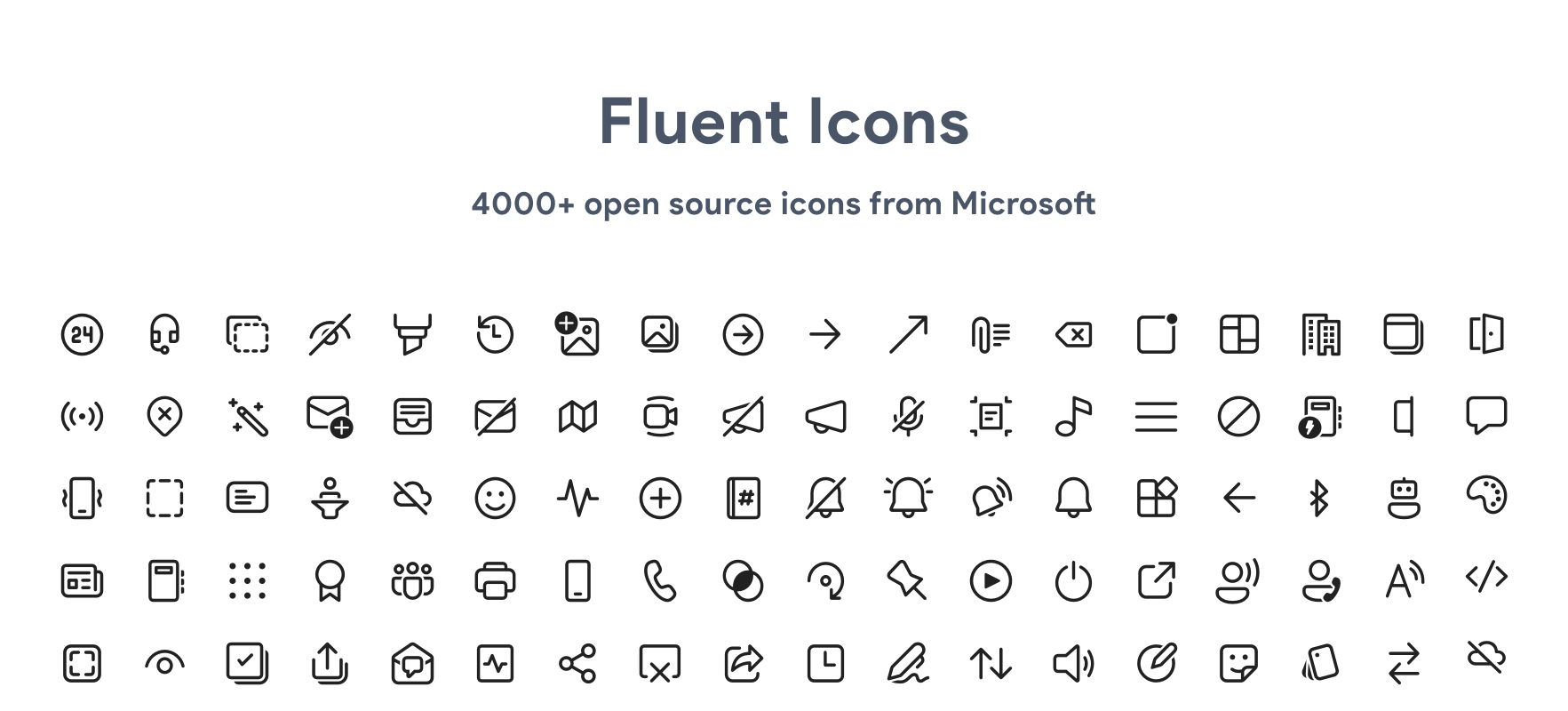
It would be a good idea to use Fluent Design icons for your folders. For example, the Podcasts icon looks a bit off right now.

Here is an example I made
 

Attachments

My Computer My Computer

At a glance

Windows 11 Pro Version 23H2 (OS Build 22631. ...intel i7 13th 13700kVENGEANCE® 64GB (2x32GB) DDR5 DRAM 5600MT/s C...NVidia founders edition 3080 ti
OS
Windows 11 Pro Version 23H2 (OS Build 22631. 3374)
Computer type
PC/Desktop
Manufacturer/Model
Custome Built
CPU
intel i7 13th 13700k
Motherboard
ROG STRIX Z790-F GAMING WIFI
Memory
VENGEANCE® 64GB (2x32GB) DDR5 DRAM 5600MT/s CL40 Memory Kit
Graphics Card(s)
NVidia founders edition 3080 ti
Monitor(s) Displays
27" Odyssey QHD 165Hz 1ms HDR10 Gaming Monitor
Screen Resolution
2k
Keyboard
Logitech G512
Mouse
Logitech G502 Hero
Internet Speed
1GB Fibers
Browser
Edge
Antivirus
ESET Samrt Security
It would be a good idea to use Fluent Design icons for your folders. For example, the Podcasts icon looks a bit off right now.

Here is an example I made
Awesome. What makes this icon "fluent" exactly? Is it pulled from the fluent design library of icons?
 

My Computers My Computers

  • At a glance

    Windows 11Intel Core i7-8700Kingston HyperX Fury DDR4 8GB (x4 for 32GB)NVIDIA - GeForce RTX 4080
    OS
    Windows 11
    Computer type
    PC/Desktop
    CPU
    Intel Core i7-8700
    Motherboard
    LGA1151 Z370 ATX
    Memory
    Kingston HyperX Fury DDR4 8GB (x4 for 32GB)
    Graphics Card(s)
    NVIDIA - GeForce RTX 4080
    Sound Card
    NVIDIA High Definition Audio
    Monitor(s) Displays
    Monitor 1: ASUS VG248QE 24” (1920x1080 144Hz 1ms), Monitor 2: Dell P2715Q 27” (3840x2160 60Hz), Monitor 3: Dell U2412M (1920x1200 60Hz)
    Screen Resolution
    1920 x 1080, 3840 x 2160, and 1920 x 1200 respesctively.
    Hard Drives
    NVME: HP EX920 M.2 1TB
    SSD: Samsung 680 EVO 4TB
    HDD 1: Hitachi HGST HUH728080ALE600 8TB
    HDD 2: Hitachi HGST HUH728080ALE600 8TB
    PSU
    CORSAIR RM1000x (1000W)
    Case
    Cooler Master HAF 912
    Keyboard
    Ultimate Hacking Keybord 60 V2
    Mouse
    Logitech MX Vertical
    Internet Speed
    1,200 Mbps download, 40 Mbps upload
    Browser
    Mozilla Firefox
    Antivirus
    MalwareBytes
    Other Info
    View full equipment here: http://davidvkimball.com/setup
  • At a glance

    Windows 11 ProIntel Core i54GB
    Operating System
    Windows 11 Pro
    Computer type
    Tablet
    Manufacturer/Model
    Microsoft Surface Pro 3
    CPU
    Intel Core i5
    Memory
    4GB
    Monitor(s) Displays
    10.8” ClearType Full HD Plus Display
    Screen Resolution
    1920 x 1280
    Hard Drives
    128GB SSD
    Browser
    Firefox
    Antivirus
    MalwareBytes
    Other Info
    Originally shipped with Windows 8.1 Pro in 2014, upgraded to 10, and now Windows 11.
Awesome. What makes this icon "fluent" exactly? Is it pulled from the fluent design library of icons?
Yes :)

You can easily access them here:
 

My Computer My Computer

At a glance

Windows 11 Pro Version 23H2 (OS Build 22631. ...intel i7 13th 13700kVENGEANCE® 64GB (2x32GB) DDR5 DRAM 5600MT/s C...NVidia founders edition 3080 ti
OS
Windows 11 Pro Version 23H2 (OS Build 22631. 3374)
Computer type
PC/Desktop
Manufacturer/Model
Custome Built
CPU
intel i7 13th 13700k
Motherboard
ROG STRIX Z790-F GAMING WIFI
Memory
VENGEANCE® 64GB (2x32GB) DDR5 DRAM 5600MT/s CL40 Memory Kit
Graphics Card(s)
NVidia founders edition 3080 ti
Monitor(s) Displays
27" Odyssey QHD 165Hz 1ms HDR10 Gaming Monitor
Screen Resolution
2k
Keyboard
Logitech G512
Mouse
Logitech G502 Hero
Internet Speed
1GB Fibers
Browser
Edge
Antivirus
ESET Samrt Security
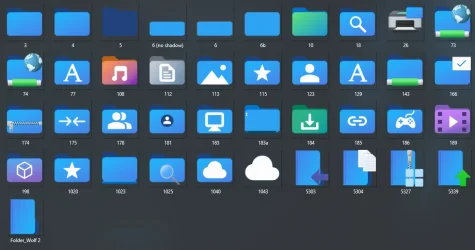
While I'm at it, I might as well share the source files for the front and back folder parts on separate layers.

This allows creating custom folders to be very easy if you want one color for the back and a gradient or separate color for the front.

1753893310520.webp

1753893318738.webp
 

Attachments

My Computers My Computers

  • At a glance

    Windows 11Intel Core i7-8700Kingston HyperX Fury DDR4 8GB (x4 for 32GB)NVIDIA - GeForce RTX 4080
    OS
    Windows 11
    Computer type
    PC/Desktop
    CPU
    Intel Core i7-8700
    Motherboard
    LGA1151 Z370 ATX
    Memory
    Kingston HyperX Fury DDR4 8GB (x4 for 32GB)
    Graphics Card(s)
    NVIDIA - GeForce RTX 4080
    Sound Card
    NVIDIA High Definition Audio
    Monitor(s) Displays
    Monitor 1: ASUS VG248QE 24” (1920x1080 144Hz 1ms), Monitor 2: Dell P2715Q 27” (3840x2160 60Hz), Monitor 3: Dell U2412M (1920x1200 60Hz)
    Screen Resolution
    1920 x 1080, 3840 x 2160, and 1920 x 1200 respesctively.
    Hard Drives
    NVME: HP EX920 M.2 1TB
    SSD: Samsung 680 EVO 4TB
    HDD 1: Hitachi HGST HUH728080ALE600 8TB
    HDD 2: Hitachi HGST HUH728080ALE600 8TB
    PSU
    CORSAIR RM1000x (1000W)
    Case
    Cooler Master HAF 912
    Keyboard
    Ultimate Hacking Keybord 60 V2
    Mouse
    Logitech MX Vertical
    Internet Speed
    1,200 Mbps download, 40 Mbps upload
    Browser
    Mozilla Firefox
    Antivirus
    MalwareBytes
    Other Info
    View full equipment here: http://davidvkimball.com/setup
  • At a glance

    Windows 11 ProIntel Core i54GB
    Operating System
    Windows 11 Pro
    Computer type
    Tablet
    Manufacturer/Model
    Microsoft Surface Pro 3
    CPU
    Intel Core i5
    Memory
    4GB
    Monitor(s) Displays
    10.8” ClearType Full HD Plus Display
    Screen Resolution
    1920 x 1280
    Hard Drives
    128GB SSD
    Browser
    Firefox
    Antivirus
    MalwareBytes
    Other Info
    Originally shipped with Windows 8.1 Pro in 2014, upgraded to 10, and now Windows 11.
While I'm at it, I might as well share the source files for the front and back folder parts on separate layers.

This allows creating custom folders to be very easy if you want one color for the back and a gradient or separate color for the front.

View attachment 140881

View attachment 140882
Would it be possible for you to upload a PSD that includes examples of different folder colors? I'd like to see how you're handling the gradient and positioning to ensure it's all aligned correctly.
 

My Computer My Computer

At a glance

Windows 11 Pro Version 23H2 (OS Build 22631. ...intel i7 13th 13700kVENGEANCE® 64GB (2x32GB) DDR5 DRAM 5600MT/s C...NVidia founders edition 3080 ti
OS
Windows 11 Pro Version 23H2 (OS Build 22631. 3374)
Computer type
PC/Desktop
Manufacturer/Model
Custome Built
CPU
intel i7 13th 13700k
Motherboard
ROG STRIX Z790-F GAMING WIFI
Memory
VENGEANCE® 64GB (2x32GB) DDR5 DRAM 5600MT/s CL40 Memory Kit
Graphics Card(s)
NVidia founders edition 3080 ti
Monitor(s) Displays
27" Odyssey QHD 165Hz 1ms HDR10 Gaming Monitor
Screen Resolution
2k
Keyboard
Logitech G512
Mouse
Logitech G502 Hero
Internet Speed
1GB Fibers
Browser
Edge
Antivirus
ESET Samrt Security
Would it be possible for you to upload a PSD that includes examples of different folder colors? I'd like to see how you're handling the gradient and positioning to ensure it's all aligned correctly.
Actually the PSD already contained a "hidden" effect on each that does that very thing. Just toggle the visibility and you can see the treatment I gave for the Proton folder.
 

My Computers My Computers

  • At a glance

    Windows 11Intel Core i7-8700Kingston HyperX Fury DDR4 8GB (x4 for 32GB)NVIDIA - GeForce RTX 4080
    OS
    Windows 11
    Computer type
    PC/Desktop
    CPU
    Intel Core i7-8700
    Motherboard
    LGA1151 Z370 ATX
    Memory
    Kingston HyperX Fury DDR4 8GB (x4 for 32GB)
    Graphics Card(s)
    NVIDIA - GeForce RTX 4080
    Sound Card
    NVIDIA High Definition Audio
    Monitor(s) Displays
    Monitor 1: ASUS VG248QE 24” (1920x1080 144Hz 1ms), Monitor 2: Dell P2715Q 27” (3840x2160 60Hz), Monitor 3: Dell U2412M (1920x1200 60Hz)
    Screen Resolution
    1920 x 1080, 3840 x 2160, and 1920 x 1200 respesctively.
    Hard Drives
    NVME: HP EX920 M.2 1TB
    SSD: Samsung 680 EVO 4TB
    HDD 1: Hitachi HGST HUH728080ALE600 8TB
    HDD 2: Hitachi HGST HUH728080ALE600 8TB
    PSU
    CORSAIR RM1000x (1000W)
    Case
    Cooler Master HAF 912
    Keyboard
    Ultimate Hacking Keybord 60 V2
    Mouse
    Logitech MX Vertical
    Internet Speed
    1,200 Mbps download, 40 Mbps upload
    Browser
    Mozilla Firefox
    Antivirus
    MalwareBytes
    Other Info
    View full equipment here: http://davidvkimball.com/setup
  • At a glance

    Windows 11 ProIntel Core i54GB
    Operating System
    Windows 11 Pro
    Computer type
    Tablet
    Manufacturer/Model
    Microsoft Surface Pro 3
    CPU
    Intel Core i5
    Memory
    4GB
    Monitor(s) Displays
    10.8” ClearType Full HD Plus Display
    Screen Resolution
    1920 x 1280
    Hard Drives
    128GB SSD
    Browser
    Firefox
    Antivirus
    MalwareBytes
    Other Info
    Originally shipped with Windows 8.1 Pro in 2014, upgraded to 10, and now Windows 11.
Hi @davidvkimball @biyakuga and everyone,

Thank you David for sharing, and by the way showing the correct images for each resolution.
3 years ago, I started some separate templates (4 to superimpose).


Back - Original.webp Shadow.webp Front - No Shadow.webp Border Opacity.webp


I realized that a correct (as original) ICO file contained 8 separate sharp images created, and not just 7 basic conversions based on the 256 one.
(otherwise, the small images get blurred and not that pleasant to use).

In order to customize a folder (with a different color or personal picture), I managed to spot the right position of each conversion (of the "Back folder" in the fist place). To start making proper conversions, the initial 256 image has to be shifted vertically with a few pixels, differently for each new smaller dimensions. I made a table to indicate the number of pixels to be shifted on the main 256 image, for the creation of the smaller ones.
(Positions of the "Front folder" are different also. Unfortunately, I lost the conversions I managed to find, but I could work on it again.)

Note that the width of the layer may be slightly reduced and needs readjusting in some dimensions.
(...and some rounded angles of the folder too)


Images in 8 resolutions based on the full icon (Back template) :

FormatDimensionsPosition256 Vertical Pixel Shift
256224 : 17616 : 34 -- 239 : 209
6454 : 444 : 9 -- 59: 522 Down [16 : 36 ]
4842 : 333 : 6 -- 44 : 382 Up [16 : 32 ]
4036 : 282 : 5 -- 37 : 32No change
3228 : 222 : 4 -- 29 : 252 Up [16 : 32 ]
2422 : 171 : 3 -- 22 : 19No change
2018 : 141 : 3 -- 18 : 167 Down [16 : 41 ]
1616 : 130 : 1 -- 15 : 132 Down [16 : 36 ] + Crop 16:16 / 239:239 (Dim: 224:224)

(the 16x16 image conversion needs the 256 one to be cropped to fill the full image)​


I would have loved to get a program which could make custom icons this was, with a ready preview of each size (which you could separately readjust) to get the best pixel resolution in each dimension, for the front and back folder.
I guess that now IA programs can help you a lot creating this, someone could have a try.
...and why not get some recommendations or help from the original creator Mike :

 

Attachments

My Computers My Computers

  • At a glance

    Windows 10 & 11 LTSC 3xBoot 1809 21H2 24H2Intel Core i5-2550K8 GBNVIDIA GeForce GTS 450
    OS
    Windows 10 & 11 LTSC 3xBoot 1809 21H2 24H2
    Computer type
    PC/Desktop
    Manufacturer/Model
    Self-made 2013
    CPU
    Intel Core i5-2550K
    Motherboard
    Intel DH67CL
    Memory
    8 GB
    Graphics Card(s)
    NVIDIA GeForce GTS 450
    Sound Card
    EmuPMX
    Monitor(s) Displays
    16/9 Samsung + 4/3 iiyama
    Screen Resolution
    1360 x 768 + 1024 x 768
    Hard Drives
    Main SSD: Samsung 250 Gb
    Secondary HDDs: Western Digital
    (Purple 4 Tb + Blue 2 Tb) x2
    + Green 0.5 Tb
    Case
    Antec
    Keyboard
    Dell
    Mouse
    Advance
    Browser
    Brave
    Antivirus
    Windows Security
    Other Info
    + Portable Cleanup Utilities :

    AdwCleaner
    ZHP Cleaner (+Diag)
    Kaspersky Virus Removal Tool
    CCleaner
  • At a glance

    Windows 11 Home
    Operating System
    Windows 11 Home
    Computer type
    Laptop
    Manufacturer/Model
    HP
    Other Info
    Using W11 OS on customers' computers more and more often, and sometimes on my mum's new laptop.

Latest Support Threads

Back
Top Bottom