

- Local time
- 10:50 AM
- Posts
- 74
- OS
- Windows 11 Pro for Workstations
I use a Admin account that auto-logs in each time i start the computer. This is what i want and prefer.
But when i change the Lock screen and set the "Show the lock screen background picture on the sign-in screen" to either On or Off the log-in screen behaves in a randon way. It i set it to On it will sometimes behave as you can see in the video. I see the correct log-in screen only to see it dossolve into a standard Windows screen. I do not want that.
If i set the "Show the lock screen background..." to Off i get a black log-in screen and i like that. But, sometimes it stays black and sometimes it does also dissolve into the same screen as shown in the video. It´s the random behaviour with this that make it more than annoying.
I have noticed that one cannot just delete or replace the file img100.jpg in the folder C:\Windows\Web\Screen to brute force Win 11 in the direction i want. What i want is 100% custom log-in screen during the whole log-in phase or a black log-in screen during the whole log-in phase. I do never want to see any of the default log-in backgrounds.
This issue "only" happens when i cold boot the computer.
How do i solve this?
Video:
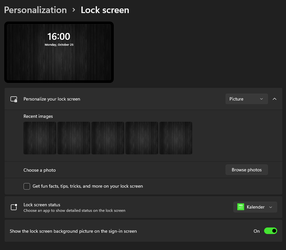
But when i change the Lock screen and set the "Show the lock screen background picture on the sign-in screen" to either On or Off the log-in screen behaves in a randon way. It i set it to On it will sometimes behave as you can see in the video. I see the correct log-in screen only to see it dossolve into a standard Windows screen. I do not want that.
If i set the "Show the lock screen background..." to Off i get a black log-in screen and i like that. But, sometimes it stays black and sometimes it does also dissolve into the same screen as shown in the video. It´s the random behaviour with this that make it more than annoying.
I have noticed that one cannot just delete or replace the file img100.jpg in the folder C:\Windows\Web\Screen to brute force Win 11 in the direction i want. What i want is 100% custom log-in screen during the whole log-in phase or a black log-in screen during the whole log-in phase. I do never want to see any of the default log-in backgrounds.
This issue "only" happens when i cold boot the computer.
How do i solve this?
Video:
- Windows Build/Version
- Win 11, 21H2, build 22000.258
My Computer
At a glance
Windows 11 Pro for WorkstationsIntel Xeon w5-2465X (3.10 GHz)128 GBNvidia RTX PRO 4000 Blackwell
- OS
- Windows 11 Pro for Workstations
- Computer type
- PC/Desktop
- Manufacturer/Model
- HP
- CPU
- Intel Xeon w5-2465X (3.10 GHz)
- Motherboard
- HP Z4 G5
- Memory
- 128 GB
- Graphics Card(s)
- Nvidia RTX PRO 4000 Blackwell
- Sound Card
- On board, Realtek
- Monitor(s) Displays
- ASUS Swift PG279Q (27")
- Screen Resolution
- 2560x1440
- Hard Drives
- OS: SK hynix PC801 HFS001TEJ9X101N
Storage: 4 x Samsung 9100 Pro 8TB
Storage: 1 x Samsung 990 Pro 4TB
- Keyboard
- Steelseries Apex Pro Gen 3
- Mouse
- Contour Rollermouse Red
- Internet Speed
- 500/500
- Browser
- MS Edge
- Other Info
- This is a HP Z4 G5 Workstation.






