Solved D: Drive missing (it's there but not visible)


File recovery is not the same as partition recovery. File recovery recovers lots of files in an unstructured manner (no directories) and can take hours.

Partition Recovery is much better and usually restores partition to its state before being deleted. It typically only takes a few minutes. However, this premium solution is not normally free.
I agree.

But first things first i.e. save the data. After that I can try something else.

Not concerned if free or not, priority is saving the files.
 

My Computer My Computer

At a glance

Windows 11AMD Ryzen 7 2700X 3.70 GHz32 Gb4095MB NVIDIA GeForce RTX 2070
OS
Windows 11
Computer type
PC/Desktop
Manufacturer/Model
Own build
CPU
AMD Ryzen 7 2700X 3.70 GHz
Motherboard
ASUS B450M-A
Memory
32 Gb
Graphics Card(s)
4095MB NVIDIA GeForce RTX 2070
Monitor(s) Displays
AOC Q3279WG5B
Screen Resolution
2560x1440
Hard Drives
465GB Western Digital WDC SSD
1863GB Seagate HDD
I agree.

But first things first i.e. save the data. After that I can try something else.

Not concerned if free or not, priority is saving the files.

If you recover data to same drive as where it is lost, you can overwrite lost data sectors and data is lost for ever.

You should recover data to a separate drive e.g usb hard drive.

Partition Recovery is safer as the lost data is not overwritten.

If you use a free tool like Easeus Partition Manager it will tell you what partitions can be recovered but you need the paid version to do the actual recovery.

I would always try partition recovery first.
 

My Computer My Computer

At a glance

Windows 11 Pro + Win11 Canary VM.I9 13th gen i9-13900H 2.60 GHZ16 GB solderedIntegrated Intel Iris XE
OS
Windows 11 Pro + Win11 Canary VM.
Computer type
Laptop
Manufacturer/Model
ASUS Zenbook 14
CPU
I9 13th gen i9-13900H 2.60 GHZ
Motherboard
Yep, Laptop has one.
Memory
16 GB soldered
Graphics Card(s)
Integrated Intel Iris XE
Sound Card
Realtek built in
Monitor(s) Displays
laptop OLED screen
Screen Resolution
2880x1800 touchscreen
Hard Drives
1 TB NVME SSD (only weakness is only one slot)
PSU
Internal + 65W thunderbolt USB4 charger
Case
Yep, got one
Cooling
Stella Artois (UK pint cans - 568 ml) - extra cost.
Keyboard
Built in UK keybd
Mouse
Bluetooth , wireless dongled, wired
Internet Speed
900 mbs (ethernet), wifi 6 typical 350-450 mb/s both up and down
Browser
Edge
Antivirus
Defender
Other Info
TPM 2.0, 2xUSB4 thunderbolt, 1xUsb3 (usb a), 1xUsb-c, hdmi out, 3.5 mm audio out/in combo, ASUS backlit trackpad (inc. switchable number pad)

Macrium Reflect Home V8
Office 365 Family (6 users each 1TB onedrive space)
Hyper-V (a vm runs almost as fast as my older laptop)
File recovery is not the same as partition recovery. File recovery recovers lots of files in an unstructured manner (no directories) and can take hours.

Partition Recovery is much better and usually restores partition to its state before being deleted. It typically only takes a few minutes. However, this premium solution is not normally free.
I only use file recovery when all other options to the best of my knowledge are exhausted. Alas, partition recovery won't always work on drives that have been reformatted but at least it is worth a try as it is exponentially faster than recovery data one file at a time. Not only that, but things such as videos and sound files have to be pieced back together and it is a long and arduous process.
I don't want to give bad advise so I deleted all of my replies.
That is your prerogative. I have learned so much from this forum that I didn't already know. I used to be some old outback rogue PC builder. Now I'm an educated rogue PC builder! There are some things that we, the wiser fools, might also wish to take into consideration here:

1) We know nothing. (Remember John Snow?)

2) We assume much.

3) In every case where we are giving advice we are working with a model. No matter how genuine and/or/nor fabricated we are still working with a model.

In this model our friend, the OP, is asking for help and states that the drive they need help with once had a considerable amount of data on it. We assume the OP is not in error concerning this. We would jump to the rescue (as many of us have faced similar predicaments) to assist the OP in the recovery of lost data. BUT what do we know?

In good faith we would assist the OP without knowing their reasons for attempting to retrieve data from a drive that appears to be empty and unformatted. I can think of many scenarios where this is something that could go sideways real fast from an ethical if not moral stand point. On the other hand, the OP could be a victim of error, or malware, and has suffered loss of data on their own hardware. Again. What do we know?

I recall a member of this forum stating to me that they thought I was merely "shooting in the dark". My reply: "My gun is still in my holster". In effect, we are all 'shooting in the dark' here because none of us knows everything. My mama once told me an expert is merely a drip under pressure. That always stuck with me.
 

My Computer My Computer

At a glance

WIN 11, WIN 10, WIN 8.1, WIN 7 U, WIN 7 PRO, ...Intel i7 6900K and i9-7960X / AMD 3800X (8 core)128 GB CORSAIR DOMINATOR PLATINUM (B DIE)NVIDIA 1070 and RTX 3070
OS
WIN 11, WIN 10, WIN 8.1, WIN 7 U, WIN 7 PRO, WIN 7 HOME (32 Bit), LINUX MINT
Computer type
PC/Desktop
Manufacturer/Model
DIY, ASUS, and DELL
CPU
Intel i7 6900K and i9-7960X / AMD 3800X (8 core)
Motherboard
ASUS X99E-WS USB 3.1 and ASUS X299 SAGE
Memory
128 GB CORSAIR DOMINATOR PLATINUM (B DIE)
Graphics Card(s)
NVIDIA 1070 and RTX 3070
Sound Card
Crystal Sound (onboard)
Monitor(s) Displays
single Samsung 30" 4K and 8" aux monitor
Screen Resolution
4K and something equally attrocious. I'll be working on this.
Hard Drives
A, B, C, D, E, F, G, H, I, J, K, L, M, N, O, P, Q, R, S, T, U, V, W

Ports X, Y, and Z are reserved for USB access and removable drives.

Drive types consist of the following: Various mechanical hard drives bearing the brand names, Seagate, Toshiba, and Western Digital. Various NVMe drives bearing the brand names Kingston, Intel, Silicon Power, Crucial, Western Digital, and Team Group. Various SATA SSDs bearing various different brand names.

RAID arrays included:

LSI RAID 10 (WD Velociraptors) 1115.72 GB
LSI RAID 10 (WD SSDS) 463.80 GB

INTEL RAID 0 (KINGSTON HYPER X) System 447.14 GB
INTEL RAID 1 TOSHIBA ENTERPRIZE class Data 2794.52 GB
INTEL RAID 1 SEAGATE HYBRID 931.51 GB
PSU
SEVERAL. I prefer my Corsair Platinum HX1000i but I also like EVGA power supplies
Case
ThermalTake Level 10 GT (among others)
Cooling
Noctua is my favorite and I use it in my main. I also own various other coolers.
Keyboard
all kinds.
Mouse
all kinds
Internet Speed
360 mbps - 1 gbps (depending)
Browser
FIREFOX
Antivirus
KASPERSKY (no apologies)
Other Info
Gave Dell touch screen with Windows 11 to daughter and got me an OTVOC. Being a PC builder I own many desktop PCs as well. I am a father of five providing PCs, laptops, and tablets for all my family, most of which I have modified, rebuilt, or simply built from scratch. I do not own a cell phone, never have, never will.
I agree.

But first things first i.e. save the data. After that I can try something else.

Not concerned if free or not, priority is saving the files.
If money is no object you could look into having the manufacturer of the drive recover your data professionally. I know that Seagate provides this service and I don't see why Western Digital wouldn't either. This is just an alternative. Of course, the cost is considerable. It really depends on how much the data is worth to you.
 

My Computer My Computer

At a glance

WIN 11, WIN 10, WIN 8.1, WIN 7 U, WIN 7 PRO, ...Intel i7 6900K and i9-7960X / AMD 3800X (8 core)128 GB CORSAIR DOMINATOR PLATINUM (B DIE)NVIDIA 1070 and RTX 3070
OS
WIN 11, WIN 10, WIN 8.1, WIN 7 U, WIN 7 PRO, WIN 7 HOME (32 Bit), LINUX MINT
Computer type
PC/Desktop
Manufacturer/Model
DIY, ASUS, and DELL
CPU
Intel i7 6900K and i9-7960X / AMD 3800X (8 core)
Motherboard
ASUS X99E-WS USB 3.1 and ASUS X299 SAGE
Memory
128 GB CORSAIR DOMINATOR PLATINUM (B DIE)
Graphics Card(s)
NVIDIA 1070 and RTX 3070
Sound Card
Crystal Sound (onboard)
Monitor(s) Displays
single Samsung 30" 4K and 8" aux monitor
Screen Resolution
4K and something equally attrocious. I'll be working on this.
Hard Drives
A, B, C, D, E, F, G, H, I, J, K, L, M, N, O, P, Q, R, S, T, U, V, W

Ports X, Y, and Z are reserved for USB access and removable drives.

Drive types consist of the following: Various mechanical hard drives bearing the brand names, Seagate, Toshiba, and Western Digital. Various NVMe drives bearing the brand names Kingston, Intel, Silicon Power, Crucial, Western Digital, and Team Group. Various SATA SSDs bearing various different brand names.

RAID arrays included:

LSI RAID 10 (WD Velociraptors) 1115.72 GB
LSI RAID 10 (WD SSDS) 463.80 GB

INTEL RAID 0 (KINGSTON HYPER X) System 447.14 GB
INTEL RAID 1 TOSHIBA ENTERPRIZE class Data 2794.52 GB
INTEL RAID 1 SEAGATE HYBRID 931.51 GB
PSU
SEVERAL. I prefer my Corsair Platinum HX1000i but I also like EVGA power supplies
Case
ThermalTake Level 10 GT (among others)
Cooling
Noctua is my favorite and I use it in my main. I also own various other coolers.
Keyboard
all kinds.
Mouse
all kinds
Internet Speed
360 mbps - 1 gbps (depending)
Browser
FIREFOX
Antivirus
KASPERSKY (no apologies)
Other Info
Gave Dell touch screen with Windows 11 to daughter and got me an OTVOC. Being a PC builder I own many desktop PCs as well. I am a father of five providing PCs, laptops, and tablets for all my family, most of which I have modified, rebuilt, or simply built from scratch. I do not own a cell phone, never have, never will.
Remo Recovery isn't free, you will only be able to recover a small amount of data with the trial version.

I agree that partition recovery was the way to go, but I'm not sure if that's a possibility now that this has already been running for hours.
 

My Computers My Computers

  • At a glance

    Win 11 Pro 25H2, Build 26200.8655Intel Core i5 1450064GB DDR4GeForce RTX 4060
    OS
    Win 11 Pro 25H2, Build 26200.8655
    Computer type
    PC/Desktop
    Manufacturer/Model
    Home Brew
    CPU
    Intel Core i5 14500
    Motherboard
    Gigabyte B760M G P WIFI
    Memory
    64GB DDR4
    Graphics Card(s)
    GeForce RTX 4060
    Sound Card
    Chipset Realtek
    Monitor(s) Displays
    LG 45" Ultragear, Acer 24" 1080p
    Screen Resolution
    5120x1440, 1920x1080
    Hard Drives
    Crucial P310 2TB 2280 PCIe Gen4 3D NAND NVMe M.2 SSD (O/S)
    Silicon Power 2TB US75 NVMe PCIe Gen4 M.2 2280 SSD (backup)
    Crucial BX500 2TB 3D NAND (2nd backup)
    Seagate 4TB Ironwolf, rotating HDD archive files
    External off-line backup Drives: 2 NVMe 4TB drives in external enclosures
    PSU
    Thermaltake Toughpower GF3 750W
    Case
    LIAN LI LANCOOL 216 E-ATX PC Case
    Cooling
    Lots of fans!
    Keyboard
    Microsoft Comfort Curve 2000
    Mouse
    Logitech G305
    Internet Speed
    Verizon FiOS 1GB
    Browser
    Firefox
    Antivirus
    Malware Bytes & Windows Defender Security
  • At a glance

    Win 11 Pro 25H2, Build 26200.8524Intel Core i5 1440032GB DDR5Intel 700 Embedded GPU
    Operating System
    Win 11 Pro 25H2, Build 26200.8524
    Computer type
    PC/Desktop
    Manufacturer/Model
    Home Brew
    CPU
    Intel Core i5 14400
    Motherboard
    Gigabyte B760M DS3H AX
    Memory
    32GB DDR5
    Graphics card(s)
    Intel 700 Embedded GPU
    Sound Card
    Realtek Embedded
    Monitor(s) Displays
    27" HP 1080p
    Screen Resolution
    1920x1080
    Hard Drives
    Crucial P310 2TB 2280 PCIe Gen4 eD NAND PCIe SSD
    Samsung EVO 990 2TB NVMe Gen4 SSD
    Samsung 2TB SATA SSD
    PSU
    Thermaltake Smart BM3 650W
    Case
    Okinos Micro ATX Case
    Cooling
    Fans
    Keyboard
    Microsoft Comfort Curve 2000
    Mouse
    Logitech G305
    Internet Speed
    Verizon FiOS 1GB
    Browser
    Firefox
    Antivirus
    Malware Bytes & Windows Defender Security
I only use file recovery when all other options to the best of my knowledge are exhausted. Alas, partition recovery won't always work on drives that have been reformatted but at least it is worth a try as it is exponentially faster than recovery data one file at a time. Not only that, but things such as videos and sound files have to be pieced back together and it is a long and arduous process.

That is your prerogative. I have learned so much from this forum that I didn't already know. I used to be some old outback rogue PC builder. Now I'm an educated rogue PC builder! There are some things that we, the wiser fools, might also wish to take into consideration here:

1) We know nothing. (Remember John Snow?)

2) We assume much.

3) In every case where we are giving advice we are working with a model. No matter how genuine and/or/nor fabricated we are still working with a model.

In this model our friend, the OP, is asking for help and states that the drive they need help with once had a considerable amount of data on it. We assume the OP is not in error concerning this. We would jump to the rescue (as many of us have faced similar predicaments) to assist the OP in the recovery of lost data. BUT what do we know?

In good faith we would assist the OP without knowing their reasons for attempting to retrieve data from a drive that appears to be empty and unformatted. I can think of many scenarios where this is something that could go sideways real fast from an ethical if not moral stand point. On the other hand, the OP could be a victim of error, or malware, and has suffered loss of data on their own hardware. Again. What do we know?

I recall a member of this forum stating to me that they thought I was merely "shooting in the dark". My reply: "My gun is still in my holster". In effect, we are all 'shooting in the dark' here because none of us knows everything. My mama once told me an expert is merely a drip under pressure. That always stuck with me.
Fair enough... here's the full rundown:

C: drive is 500GB SSD for OS, etc, as per usual. Running Win11.
D: drive is 2TB HDD for day-to-day storage
External 5TB Lacie for backups, last back-up was about 6 months ago due to move, death in the family, mother moving with me, etc.

I reinstalled Win11 yesterday and in the process must have deleted one of the partitions for the D: drive (not the main one but one of the smaller ones created by the OS (mbr?, can't remember).

I have purchased Remo recovery and started the recovery process last night. It has found many many files and is currently busy saving them to the Lacie.

Files I need to recover include MCAD files and photos from my photography business.

I know with Remo I will lose all structure and associativity with the MCAD files, these I can reassociate. Even if it means spending time resorting it all, it's still better than not having the files at all.
 

My Computer My Computer

At a glance

Windows 11AMD Ryzen 7 2700X 3.70 GHz32 Gb4095MB NVIDIA GeForce RTX 2070
OS
Windows 11
Computer type
PC/Desktop
Manufacturer/Model
Own build
CPU
AMD Ryzen 7 2700X 3.70 GHz
Motherboard
ASUS B450M-A
Memory
32 Gb
Graphics Card(s)
4095MB NVIDIA GeForce RTX 2070
Monitor(s) Displays
AOC Q3279WG5B
Screen Resolution
2560x1440
Hard Drives
465GB Western Digital WDC SSD
1863GB Seagate HDD
Fair enough... here's the full rundown:

C: drive is 500GB SSD for OS, etc, as per usual. Running Win11.
D: drive is 2TB HDD for day-to-day storage
External 5TB Lacie for backups, last back-up was about 6 months ago due to move, death in the family, mother moving with me, etc.

I reinstalled Win11 yesterday and in the process must have deleted one of the partitions for the D: drive (not the main one but one of the smaller ones created by the OS (mbr?, can't remember).

I have purchased Remo recovery and started the recovery process last night. It has found many many files and is currently busy saving them to the Lacie.

Files I need to recover include MCAD files and photos from my photography business.

I know with Remo I will lose all structure and associativity with the MCAD files, these I can reassociate. Even if it means spending time resorting it all, it's still better than not having the files at all.
Please understand that I mean no disrespect. I have been in your circumstances more times than I care to admit. Re-associating those videos could prove to be a larger task than you might anticipate. If you haven't tried to recover the partitions I would advise trying that after you're done rescuing your files.

Depending on your level of expertise you may wish to consider acquiring some more large hard drives for flipping your data before attempting a system restore with your backup (s). Just a thought. I managed to pull that trick once and restored all my thousands of pictures that way. Also, I'm not sure if you initiated this option, but if you used Windows File History sometimes this actually works. Once you have all the data you can possibly restore there is an app that I have found especially useful for organizing your files that you may wish to take a look at.


Wishing you the best :-)
 

My Computer My Computer

At a glance

WIN 11, WIN 10, WIN 8.1, WIN 7 U, WIN 7 PRO, ...Intel i7 6900K and i9-7960X / AMD 3800X (8 core)128 GB CORSAIR DOMINATOR PLATINUM (B DIE)NVIDIA 1070 and RTX 3070
OS
WIN 11, WIN 10, WIN 8.1, WIN 7 U, WIN 7 PRO, WIN 7 HOME (32 Bit), LINUX MINT
Computer type
PC/Desktop
Manufacturer/Model
DIY, ASUS, and DELL
CPU
Intel i7 6900K and i9-7960X / AMD 3800X (8 core)
Motherboard
ASUS X99E-WS USB 3.1 and ASUS X299 SAGE
Memory
128 GB CORSAIR DOMINATOR PLATINUM (B DIE)
Graphics Card(s)
NVIDIA 1070 and RTX 3070
Sound Card
Crystal Sound (onboard)
Monitor(s) Displays
single Samsung 30" 4K and 8" aux monitor
Screen Resolution
4K and something equally attrocious. I'll be working on this.
Hard Drives
A, B, C, D, E, F, G, H, I, J, K, L, M, N, O, P, Q, R, S, T, U, V, W

Ports X, Y, and Z are reserved for USB access and removable drives.

Drive types consist of the following: Various mechanical hard drives bearing the brand names, Seagate, Toshiba, and Western Digital. Various NVMe drives bearing the brand names Kingston, Intel, Silicon Power, Crucial, Western Digital, and Team Group. Various SATA SSDs bearing various different brand names.

RAID arrays included:

LSI RAID 10 (WD Velociraptors) 1115.72 GB
LSI RAID 10 (WD SSDS) 463.80 GB

INTEL RAID 0 (KINGSTON HYPER X) System 447.14 GB
INTEL RAID 1 TOSHIBA ENTERPRIZE class Data 2794.52 GB
INTEL RAID 1 SEAGATE HYBRID 931.51 GB
PSU
SEVERAL. I prefer my Corsair Platinum HX1000i but I also like EVGA power supplies
Case
ThermalTake Level 10 GT (among others)
Cooling
Noctua is my favorite and I use it in my main. I also own various other coolers.
Keyboard
all kinds.
Mouse
all kinds
Internet Speed
360 mbps - 1 gbps (depending)
Browser
FIREFOX
Antivirus
KASPERSKY (no apologies)
Other Info
Gave Dell touch screen with Windows 11 to daughter and got me an OTVOC. Being a PC builder I own many desktop PCs as well. I am a father of five providing PCs, laptops, and tablets for all my family, most of which I have modified, rebuilt, or simply built from scratch. I do not own a cell phone, never have, never will.
A lot of us, myself included, have had a nasty experience one way or another.

I lost tons of videos and precious old software such as Drivecrypt 5.0 (I could no longer get this app despite my long search online) when my pc and portable hard disk were attacked by malware. I was then so naive that I thought only others were or would be victims of a ransomeware attack and not me.

Learning from that experience, I now store all my files in several different locations, including the clouds. I have an anti-malware app (Unhackme) and an anti-virus software (Avast One) monitoring my pc whenever I use it online or offline.

The lesson to be learned from a setback of this sort is to back up all your data to at least two or three external locations.
 

My Computer My Computer

At a glance

Win 7,8.1,10,11, Mint, Kde Plasma, DebianIntel(R) Core(TM) i7-6500U CPU @ 2.50GHz16 GBIntel(R) HD Graphics 520/Nvidia GeForce 930M
OS
Win 7,8.1,10,11, Mint, Kde Plasma, Debian
Computer type
Laptop
Manufacturer/Model
Dell
CPU
Intel(R) Core(TM) i7-6500U CPU @ 2.50GHz
Memory
16 GB
Graphics Card(s)
Intel(R) HD Graphics 520/Nvidia GeForce 930M
Sound Card
Intel(R) Display Audio/RealtekAudio
Monitor(s) Displays
Generic Pnp Monitor
Screen Resolution
1366 X 768
Hard Drives
ST2000LM024-1EJ164
Keyboard
Eng (US)
Mouse
Sanwa Supply
Browser
Firefox
Antivirus
Avast One
Other Info
Too many laptops with different system specifications.
Hi @bigseb

Deleted "Nicht Zugeordnet" means "Not initialised/not assigned" - am I correct?
That means you have lost the MBR in sector 0 alongwith the Partition Table/s in it.
When you have finished saving all data - since you have already purchased Remo and on it, just try this.

1. Right click on the left pane where it says "Disk 0 Basic 1863.00GB Online" and initialise the disk as an MBR. Just stop with initialising it as an MBR disk . Do not proceed further, (Do Not, Do Not create a Simple volume , Do Not, Do not Format . That will kill all data in the disk )
Initialising the disk only writes the MBR into sector 0.You have to recover the partition/s and write the Partition Table/s in Sector 0
Deleted

My bad! Yesterday night, I failed to notice that your faulty disk is online, signifying that the MBR in sector 0 is OK and the disk is already in the initialised state.

In your case you need not initialise the disk. Only the partition/s seem/s to have gotten deleted. You can straight away attempt Partition Recovery as indicated herein.

1. Download, and install MiniTool Partition Wizard v9.1. (In later versions of MiniTool Patition Wizard, Partition Recovery is not free) . Download MiniTool Partition Wizard Free Edition 9.1 for windows - Filepuma.com

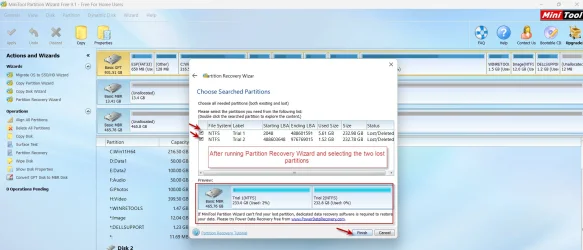
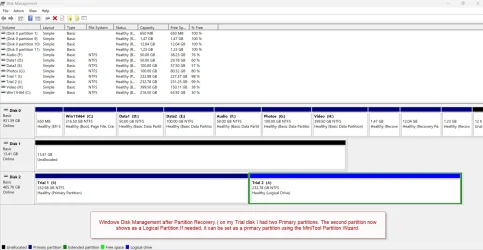
Launch Partition Wizard. If it offers to download the newer version, say "No" and dismiss the popup. On the left Pane click on Partition Recovery Wizard > Next > Select your faulty Drive > Next > Full Disk > Next > QuickScan > Next. Allow the quick scan to complete. At the end of the quickscan you will get a window showing all the found partitions -existing as well as lost partitions. Select all the existing and lost partitions, by putting the check mark in the square. The preview map at the bottom of that window which was showing as "Unallocated" should now show your disk as it existed before. (If you have any doubt in dealing with it at this stage., post a screenshot for my perusal and click on "Cancel". You can rerun Partition Recovery Wizard later). Click on "Finish" and then click on APPLY in the main Menu bar. That will write the partition table/s into Sector 0. After that, reboot your PC and check whether your disk is restored. Good Luck

Screenshots of trial on my Trial disk simulating your drive condition - Basic Online

18-09-2025 11-39-27.webp

18-09-2025 11-58-48.webp

18-09-2025 12-17-16.webp
 
Last edited:

My Computers My Computers

  • At a glance

    Windows 11 Pro Version:25H2 OS Build: 26200.865512th Gen Intel core i5-1235U(Alder16*2 (32 GB) DDR 4-3200(1600MHz) Crucial Tech...Intel Iris Xe Graphics (Internal)
    OS
    Windows 11 Pro Version:25H2 OS Build: 26200.8655
    Computer type
    PC/Desktop
    Manufacturer/Model
    Beelink Mini PC Model: SEi12
    CPU
    12th Gen Intel core i5-1235U(Alder
    Motherboard
    SEi (manufactured by AZW)
    Memory
    16*2 (32 GB) DDR 4-3200(1600MHz) Crucial Technology
    Graphics Card(s)
    Intel Iris Xe Graphics (Internal)
    Sound Card
    Internal
    Monitor(s) Displays
    BenQ GW2283
    Screen Resolution
    1920*1080
    Hard Drives
    500GB NVME (Kingston SNV2S500G)
    1TB (Crucial CT1000BX500SSD1)
    PSU
    Power Brick 19V-6.32A , 120.08W
    Keyboard
    Dell KB3322Wi (Wireless)
    Mouse
    Dell WM118t (Wireless)
    Internet Speed
    4G/5G
    Browser
    MS Edge, Chrome
    Antivirus
    Malwarebytes Premium - Subscription
  • At a glance

    Windows 11 Home Version 25H2 Build 26200.8655Intel Core i3 8145UIntel Optane 16GB module + DDR 4 16GB (Optane...Intel UHD Graphics 620
    Operating System
    Windows 11 Home Version 25H2 Build 26200.8655
    Computer type
    PC/Desktop
    Manufacturer/Model
    Dell Inspiron 3280 AIO 22"
    CPU
    Intel Core i3 8145U
    Motherboard
    Dell inc. 027W48
    Memory
    Intel Optane 16GB module + DDR 4 16GB (Optane disabled.)
    Graphics card(s)
    Intel UHD Graphics 620
    Sound Card
    Internal
    Monitor(s) Displays
    Dell Monitor 22"
    Screen Resolution
    1920x1080
    Hard Drives
    Crucial CT1000BX500SSD1 ; 1000,2 GB
    PSU
    Power Brick
    Case
    All-in one
    Keyboard
    Dell Wireless KM636
    Mouse
    Dell Wireless KM 636
    Internet Speed
    4G
    Browser
    Edge, Chrome
    Antivirus
    Malwarebytes
    Other Info
    Upgraded from Windows 10 Home to Windows 11 Home on 28 Oct 2023
Hi @bigseb

"Nicht Zugeordnet" means "Not initialised" - am I correct?

That means you have lost the MBR in sector 0 alongwith the Partition Table/s in it.

When you have finished saving all data - since you have already purchased Remo and on it, just do this.

1. Right click on the left pane where it says "Disk 0 Basic 1863.00GB Online" and initialise the disk as an MBR. Just stop with initialising it as an MBR disk . Do not proceed further, (Do Not, Do Not create a Simple volume , Do Not, Do not Format . That will kill all data in the disk )

Initialising the disk only writes the MBR into sector 0.You have to recover the partition/s and write the Partition Table/s in Sector 0

2. Now run Partition Recovery Wizard in MiniTool Partition Wizard version 9.1, to restore the lost partition/s. (In later versions of MiniTool Patition Wizard Partition Recovery is not free). It will write the partition table/s in Sector 0 and restore the disk.

You can download MiniTool Partition Wizard v9.1 here. Download MiniTool Partition Wizard Free Edition 9.1 for windows - Filepuma.com

Launch Partition Wizard. If it offers to download the newer version, say "No"and dismiss the popup. On the left Pane click on Partition Recovery Wizard > Next > Select your faulty Drive > Next > Full Disk > Next > QuickScan > Next. Allow the quick scan to complete. At the end of the quickscan you will get a window showing all the found partitions existing as well as lost partitions Select all the existing and lost partitions, by putting the check mark in the square, . The preview map at the bottom of that window which was showing as "Unallocated" should now show your disk as it existed before. Click on "Finish" and that will write the partition table/s into Sector 0 (If you have any doubt in dealing with it., post a screenshot for my perusal and click on Cancel. You can rerun Partition Recovery Wizard later).

You can download MiniTool Partition Wizard v9.1 here. Download MiniTool Partition Wizard Free Edition 9.1 for windows - Filepuma.com
I was wondering if this might come up. Although I agree that the drive needs to be initialized (see my first response) depending on whether the drive was in RAID prior to losing the MBR there is still a risk of loss of data. I recall losing all my data on a drive once simply by initializing it. Fortunately, the drive was in RAID 1 so I could mirror the data back to it. That was my reason for not recommending initialization until after an attempt at data recovery was made first.

Provided the OP follows your suggestions in the order you have listed them: "When you have finished saving all data - since you have already purchased Remo and on it, just do this." ← Especially this.

The OP evidently doesn't have a mirrored copy of the data so it is essential that they at least have some sort of copy of it before they attempt any alteration on the drive.
 

My Computer My Computer

At a glance

WIN 11, WIN 10, WIN 8.1, WIN 7 U, WIN 7 PRO, ...Intel i7 6900K and i9-7960X / AMD 3800X (8 core)128 GB CORSAIR DOMINATOR PLATINUM (B DIE)NVIDIA 1070 and RTX 3070
OS
WIN 11, WIN 10, WIN 8.1, WIN 7 U, WIN 7 PRO, WIN 7 HOME (32 Bit), LINUX MINT
Computer type
PC/Desktop
Manufacturer/Model
DIY, ASUS, and DELL
CPU
Intel i7 6900K and i9-7960X / AMD 3800X (8 core)
Motherboard
ASUS X99E-WS USB 3.1 and ASUS X299 SAGE
Memory
128 GB CORSAIR DOMINATOR PLATINUM (B DIE)
Graphics Card(s)
NVIDIA 1070 and RTX 3070
Sound Card
Crystal Sound (onboard)
Monitor(s) Displays
single Samsung 30" 4K and 8" aux monitor
Screen Resolution
4K and something equally attrocious. I'll be working on this.
Hard Drives
A, B, C, D, E, F, G, H, I, J, K, L, M, N, O, P, Q, R, S, T, U, V, W

Ports X, Y, and Z are reserved for USB access and removable drives.

Drive types consist of the following: Various mechanical hard drives bearing the brand names, Seagate, Toshiba, and Western Digital. Various NVMe drives bearing the brand names Kingston, Intel, Silicon Power, Crucial, Western Digital, and Team Group. Various SATA SSDs bearing various different brand names.

RAID arrays included:

LSI RAID 10 (WD Velociraptors) 1115.72 GB
LSI RAID 10 (WD SSDS) 463.80 GB

INTEL RAID 0 (KINGSTON HYPER X) System 447.14 GB
INTEL RAID 1 TOSHIBA ENTERPRIZE class Data 2794.52 GB
INTEL RAID 1 SEAGATE HYBRID 931.51 GB
PSU
SEVERAL. I prefer my Corsair Platinum HX1000i but I also like EVGA power supplies
Case
ThermalTake Level 10 GT (among others)
Cooling
Noctua is my favorite and I use it in my main. I also own various other coolers.
Keyboard
all kinds.
Mouse
all kinds
Internet Speed
360 mbps - 1 gbps (depending)
Browser
FIREFOX
Antivirus
KASPERSKY (no apologies)
Other Info
Gave Dell touch screen with Windows 11 to daughter and got me an OTVOC. Being a PC builder I own many desktop PCs as well. I am a father of five providing PCs, laptops, and tablets for all my family, most of which I have modified, rebuilt, or simply built from scratch. I do not own a cell phone, never have, never will.
@bigseb

Please note that I have edited my previous post after deeply looking into your Windows Disk Management Screenshot and realised that your disk is online signifying that your disk is already in initialised state . So you need not initialise the disk and can straight away go to Partition Recovery.
 

My Computers My Computers

  • At a glance

    Windows 11 Pro Version:25H2 OS Build: 26200.865512th Gen Intel core i5-1235U(Alder16*2 (32 GB) DDR 4-3200(1600MHz) Crucial Tech...Intel Iris Xe Graphics (Internal)
    OS
    Windows 11 Pro Version:25H2 OS Build: 26200.8655
    Computer type
    PC/Desktop
    Manufacturer/Model
    Beelink Mini PC Model: SEi12
    CPU
    12th Gen Intel core i5-1235U(Alder
    Motherboard
    SEi (manufactured by AZW)
    Memory
    16*2 (32 GB) DDR 4-3200(1600MHz) Crucial Technology
    Graphics Card(s)
    Intel Iris Xe Graphics (Internal)
    Sound Card
    Internal
    Monitor(s) Displays
    BenQ GW2283
    Screen Resolution
    1920*1080
    Hard Drives
    500GB NVME (Kingston SNV2S500G)
    1TB (Crucial CT1000BX500SSD1)
    PSU
    Power Brick 19V-6.32A , 120.08W
    Keyboard
    Dell KB3322Wi (Wireless)
    Mouse
    Dell WM118t (Wireless)
    Internet Speed
    4G/5G
    Browser
    MS Edge, Chrome
    Antivirus
    Malwarebytes Premium - Subscription
  • At a glance

    Windows 11 Home Version 25H2 Build 26200.8655Intel Core i3 8145UIntel Optane 16GB module + DDR 4 16GB (Optane...Intel UHD Graphics 620
    Operating System
    Windows 11 Home Version 25H2 Build 26200.8655
    Computer type
    PC/Desktop
    Manufacturer/Model
    Dell Inspiron 3280 AIO 22"
    CPU
    Intel Core i3 8145U
    Motherboard
    Dell inc. 027W48
    Memory
    Intel Optane 16GB module + DDR 4 16GB (Optane disabled.)
    Graphics card(s)
    Intel UHD Graphics 620
    Sound Card
    Internal
    Monitor(s) Displays
    Dell Monitor 22"
    Screen Resolution
    1920x1080
    Hard Drives
    Crucial CT1000BX500SSD1 ; 1000,2 GB
    PSU
    Power Brick
    Case
    All-in one
    Keyboard
    Dell Wireless KM636
    Mouse
    Dell Wireless KM 636
    Internet Speed
    4G
    Browser
    Edge, Chrome
    Antivirus
    Malwarebytes
    Other Info
    Upgraded from Windows 10 Home to Windows 11 Home on 28 Oct 2023
Ecverything is sorted and running again. Many thanks to all that responded.

Bought Remo. Worked but took forever. Also bought Easeus partition manager. Worked great too.

Solved.
 

My Computer My Computer

At a glance

Windows 11AMD Ryzen 7 2700X 3.70 GHz32 Gb4095MB NVIDIA GeForce RTX 2070
OS
Windows 11
Computer type
PC/Desktop
Manufacturer/Model
Own build
CPU
AMD Ryzen 7 2700X 3.70 GHz
Motherboard
ASUS B450M-A
Memory
32 Gb
Graphics Card(s)
4095MB NVIDIA GeForce RTX 2070
Monitor(s) Displays
AOC Q3279WG5B
Screen Resolution
2560x1440
Hard Drives
465GB Western Digital WDC SSD
1863GB Seagate HDD
Ecverything is sorted and running again. Many thanks to all that responded.

Bought Remo. Worked but took forever. Also bought Easeus partition manager. Worked great too.

Solved.
That's awesome! I was really hoping that it would be something simple like your MBR partition but better to err on the side of caution. (y)

For future reference:

1) Cold storage. It's a good practice to keep data of considerable value in cold storage. That means on the shelf, in the dark, in a cool dry place somewhere.

2) Air gapping. You can also copy priceless data onto an external hard drive and keep disconnecting the drive only to connect it when you move data to it.

3) Archiving. Once a week I move and/or copy all my personal files over to a drive that I labeled "Archives". That way even if my OS crashes and burns and my backups fail (because backups often fail) I still keep at least 95% of my relevant personal data.

4) When installing any OS make certain that all other drives are disconnected. You might get away with not doing it (because I know I have) but it's that "one time" that something goes awry that can be so very costly.

5) When your disk manager is saying that your drive is "not initialized" and it still shows in disk manager this often means something is not quite right with the drive. A drive that was previously in RAID and later used as AHCI can generate this issue. Make sure the drive is in good health and in the correct format for which you intend to use it. Myself, I would do a thorough scan on the drive after having ensured that the data is tucked away in a safer place.

I have a feeling you likely already know all this but for the sake of those who don't I thought I'd share anyway. You already have the tools to do amazing things with your drives now. So glad to see it all worked out for you.

Alles Gute! 😀
 

My Computer My Computer

At a glance

WIN 11, WIN 10, WIN 8.1, WIN 7 U, WIN 7 PRO, ...Intel i7 6900K and i9-7960X / AMD 3800X (8 core)128 GB CORSAIR DOMINATOR PLATINUM (B DIE)NVIDIA 1070 and RTX 3070
OS
WIN 11, WIN 10, WIN 8.1, WIN 7 U, WIN 7 PRO, WIN 7 HOME (32 Bit), LINUX MINT
Computer type
PC/Desktop
Manufacturer/Model
DIY, ASUS, and DELL
CPU
Intel i7 6900K and i9-7960X / AMD 3800X (8 core)
Motherboard
ASUS X99E-WS USB 3.1 and ASUS X299 SAGE
Memory
128 GB CORSAIR DOMINATOR PLATINUM (B DIE)
Graphics Card(s)
NVIDIA 1070 and RTX 3070
Sound Card
Crystal Sound (onboard)
Monitor(s) Displays
single Samsung 30" 4K and 8" aux monitor
Screen Resolution
4K and something equally attrocious. I'll be working on this.
Hard Drives
A, B, C, D, E, F, G, H, I, J, K, L, M, N, O, P, Q, R, S, T, U, V, W

Ports X, Y, and Z are reserved for USB access and removable drives.

Drive types consist of the following: Various mechanical hard drives bearing the brand names, Seagate, Toshiba, and Western Digital. Various NVMe drives bearing the brand names Kingston, Intel, Silicon Power, Crucial, Western Digital, and Team Group. Various SATA SSDs bearing various different brand names.

RAID arrays included:

LSI RAID 10 (WD Velociraptors) 1115.72 GB
LSI RAID 10 (WD SSDS) 463.80 GB

INTEL RAID 0 (KINGSTON HYPER X) System 447.14 GB
INTEL RAID 1 TOSHIBA ENTERPRIZE class Data 2794.52 GB
INTEL RAID 1 SEAGATE HYBRID 931.51 GB
PSU
SEVERAL. I prefer my Corsair Platinum HX1000i but I also like EVGA power supplies
Case
ThermalTake Level 10 GT (among others)
Cooling
Noctua is my favorite and I use it in my main. I also own various other coolers.
Keyboard
all kinds.
Mouse
all kinds
Internet Speed
360 mbps - 1 gbps (depending)
Browser
FIREFOX
Antivirus
KASPERSKY (no apologies)
Other Info
Gave Dell touch screen with Windows 11 to daughter and got me an OTVOC. Being a PC builder I own many desktop PCs as well. I am a father of five providing PCs, laptops, and tablets for all my family, most of which I have modified, rebuilt, or simply built from scratch. I do not own a cell phone, never have, never will.
Last edited:

My Computer My Computer

At a glance

Win 7,8.1,10,11, Mint, Kde Plasma, DebianIntel(R) Core(TM) i7-6500U CPU @ 2.50GHz16 GBIntel(R) HD Graphics 520/Nvidia GeForce 930M
OS
Win 7,8.1,10,11, Mint, Kde Plasma, Debian
Computer type
Laptop
Manufacturer/Model
Dell
CPU
Intel(R) Core(TM) i7-6500U CPU @ 2.50GHz
Memory
16 GB
Graphics Card(s)
Intel(R) HD Graphics 520/Nvidia GeForce 930M
Sound Card
Intel(R) Display Audio/RealtekAudio
Monitor(s) Displays
Generic Pnp Monitor
Screen Resolution
1366 X 768
Hard Drives
ST2000LM024-1EJ164
Keyboard
Eng (US)
Mouse
Sanwa Supply
Browser
Firefox
Antivirus
Avast One
Other Info
Too many laptops with different system specifications.
Back
Top Bottom