Hi
@bigseb
"Nicht Zugeordnet" means "Not initialised" - am I correct?
That means you have lost the MBR in sector 0 alongwith the Partition Table/s in it.
When you have finished saving all data - since you have already purchased Remo and on it, just do this.
1. Right click on the left pane where it says "Disk 0 Basic 1863.00GB Online" and
initialise the disk as an MBR.
Just stop with initialising it as an MBR disk . Do not proceed further, (
Do Not, Do Not create a Simple volume , Do Not, Do not Format .
That will kill all data in the disk )
Initialising the disk only writes the MBR into sector 0.You have to recover the partition/s and write the Partition Table/s in Sector 0
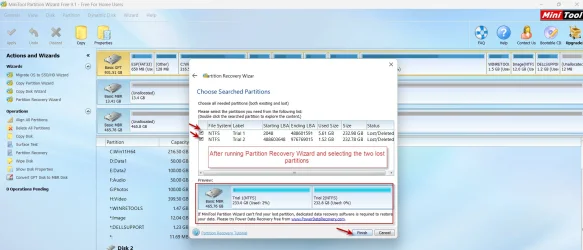
2. Now run Partition Recovery Wizard in MiniTool Partition Wizard
version 9.1, to restore the lost partition/s. (In later versions of MiniTool Patition Wizard Partition Recovery is not free). It will write the partition table/s in Sector 0 and restore the disk.
You can download MiniTool Partition Wizard v9.1 here.
Download MiniTool Partition Wizard Free Edition 9.1 for windows - Filepuma.com
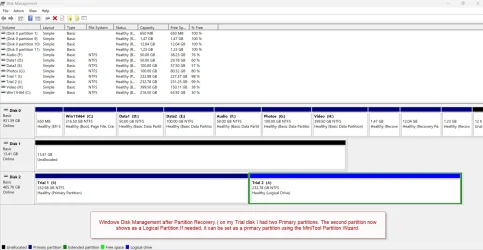
Launch Partition Wizard. If it offers to download the newer version, say "No"and dismiss the popup. On the left Pane click on Partition Recovery Wizard > Next > Select your faulty Drive > Next > Full Disk > Next > QuickScan > Next. Allow the quick scan to complete. At the end of the quickscan you will get a window showing all the found partitions existing as well as lost partitions Select all the existing and lost partitions, by putting the check mark in the square, . The preview map at the bottom of that window which was showing as "Unallocated" should now show your disk as it existed before. Click on "Finish" and that will write the partition table/s into Sector 0 (If you have any doubt in dealing with it., post a screenshot for my perusal and click on Cancel. You can rerun Partition Recovery Wizard later).
You can download
MiniTool Partition Wizard v9.1 here.
Download MiniTool Partition Wizard Free Edition 9.1 for windows - Filepuma.com