Small bit (16MB) of unallocated space on D drive


biyakuga

Well-known member
Member
Local time
3:54 AM
Posts
49
OS
Windows 11 Pro Version 23H2 (OS Build 22631. 3374)
In Disk Management I saw that my D drive has 16MB of Unallocated space in the beginning of the disk and I would like to know what is it? and if I can safely merge it?

1707821408435.png
 

My Computer My Computer

At a glance

Windows 11 Pro Version 23H2 (OS Build 22631. ...intel i7 13th 13700kVENGEANCE® 64GB (2x32GB) DDR5 DRAM 5600MT/s C...NVidia founders edition 3080 ti
OS
Windows 11 Pro Version 23H2 (OS Build 22631. 3374)
Computer type
PC/Desktop
Manufacturer/Model
Custome Built
CPU
intel i7 13th 13700k
Motherboard
ROG STRIX Z790-F GAMING WIFI
Memory
VENGEANCE® 64GB (2x32GB) DDR5 DRAM 5600MT/s CL40 Memory Kit
Graphics Card(s)
NVidia founders edition 3080 ti
Monitor(s) Displays
27" Odyssey QHD 165Hz 1ms HDR10 Gaming Monitor
Screen Resolution
2k
Keyboard
Logitech G512
Mouse
Logitech G502 Hero
Internet Speed
1GB Fibers
Browser
Edge
Antivirus
ESET Samrt Security
You can safely merge it with D: drive there is no partition or data on unallocated space the 16 MB partition are usually a Microsoft Reserved Partition (MSR) is a partition but in your case its deleted partition.
 

My Computer My Computer

At a glance

Windows 11AMD Ryzen 7 5700GMicron Technology DDR4-3200 16GBNVIDIA GeForce RTX 3060
OS
Windows 11
Computer type
PC/Desktop
Manufacturer/Model
HP Pavilion
CPU
AMD Ryzen 7 5700G
Motherboard
Erica6
Memory
Micron Technology DDR4-3200 16GB
Graphics Card(s)
NVIDIA GeForce RTX 3060
Sound Card
Realtek ALC671
Monitor(s) Displays
Samsung SyncMaster U28E590
Screen Resolution
3840 x 2160
Hard Drives
SAMSUNG MZVLQ1T0HALB-000H1
You can safely merge it with D: drive there is no partition or data on unallocated space the 16 MB partition are usually a Microsoft Reserved Partition (MSR) is a partition but in your case its deleted partition.

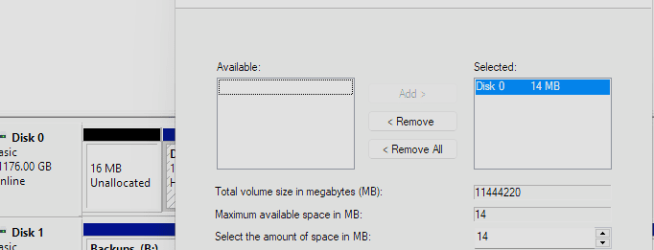
I clicked extend volume on the main partition and it shows only 14MB max space avaliable instead of 16 why is it?

1707826806518.png

And again just to make sure it is not a bad sector or something like that I am asking this because I saw on someone on ms forum says that it might be corrupt data in that area and so render the partition corrupt

Just in case I checked my S.M.A.R.T shows that everything is good but I am still little confused and unsure.
 

Attachments

  • 1707826771107.png
    1707826771107.png
    6.6 KB · Views: 1

My Computer My Computer

At a glance

Windows 11 Pro Version 23H2 (OS Build 22631. ...intel i7 13th 13700kVENGEANCE® 64GB (2x32GB) DDR5 DRAM 5600MT/s C...NVidia founders edition 3080 ti
OS
Windows 11 Pro Version 23H2 (OS Build 22631. 3374)
Computer type
PC/Desktop
Manufacturer/Model
Custome Built
CPU
intel i7 13th 13700k
Motherboard
ROG STRIX Z790-F GAMING WIFI
Memory
VENGEANCE® 64GB (2x32GB) DDR5 DRAM 5600MT/s CL40 Memory Kit
Graphics Card(s)
NVidia founders edition 3080 ti
Monitor(s) Displays
27" Odyssey QHD 165Hz 1ms HDR10 Gaming Monitor
Screen Resolution
2k
Keyboard
Logitech G512
Mouse
Logitech G502 Hero
Internet Speed
1GB Fibers
Browser
Edge
Antivirus
ESET Samrt Security
As far as I remember from extending partitions by the built in Disk Manager, you can only expand partitions if they have free space after the partition, not before. If you would want to add the part before, you would need some third party program.

Are there any files on the normal D: partition? If not or just a few, it might be as easy to just delete the D: partition (after backing up what's on that 'disk' and allocate the whole space to a new D: partition.

Edit:
See this topic for (free) partioning programs:
 

My Computer My Computer

At a glance

Windows 11 Pro 25H2AMD Ryzen 7 5700GKingston FURY Beast 2x16GB DIMM DDR4 2666 CL16MSI GeForce GT 730 2GB LP V1
OS
Windows 11 Pro 25H2
Computer type
PC/Desktop
Manufacturer/Model
Build by vendor to my specs
CPU
AMD Ryzen 7 5700G
Motherboard
MSI PRO B550M-P Gen3
Memory
Kingston FURY Beast 2x16GB DIMM DDR4 2666 CL16
Graphics Card(s)
MSI GeForce GT 730 2GB LP V1
Sound Card
Creative Sound Blaster Audigy FX
Monitor(s) Displays
Samsung S24E450F 24"
Screen Resolution
1920 x 1080
Hard Drives
1. SSD Crucial P5 Plus 500GB PCIe M.2
2. SSD-SATA Crucial MX500-2TB
PSU
Corsair CV650W
Case
Cooler Master Silencio S400
Cooling
Cooler Master Hyper H412R with Be Quiet Pure Wings 2 PWM BL038 fan
Keyboard
Cherry Stream (wired, scissor keys)
Mouse
Asus WT465 (wireless)
Internet Speed
70 Mbps down / 80 Mbps up
Browser
Firefox 130.0
Antivirus
F-Secure (Internetprovider version)
Other Info
Router: FRITZBox 7490
Oracle VirtualBox 7 for testing software on Win 10 or 11

My Computer My Computer

At a glance

Windows 11AMD Ryzen 7 5700GMicron Technology DDR4-3200 16GBNVIDIA GeForce RTX 3060
OS
Windows 11
Computer type
PC/Desktop
Manufacturer/Model
HP Pavilion
CPU
AMD Ryzen 7 5700G
Motherboard
Erica6
Memory
Micron Technology DDR4-3200 16GB
Graphics Card(s)
NVIDIA GeForce RTX 3060
Sound Card
Realtek ALC671
Monitor(s) Displays
Samsung SyncMaster U28E590
Screen Resolution
3840 x 2160
Hard Drives
SAMSUNG MZVLQ1T0HALB-000H1
Back
Top Bottom