Solved Debloated Windows 11 Home or Pro Installation


When I get the replacement SSD, I am going to give @dacrone's RUFUS build with xml a try, checking only the box for my own admin user account. Yeah, I could keep the default 'OWNER' dacrone set up and kill it later, but I want to try setting up my own account first.
if it does fail to create both (which it will... read @garlin post on it. he knows.), you can just edit the xml and change "Owner" to whatever name you want it to create.
 

My Computer

System One

  • OS
    Windows 11 Pro
@dacrone All I did was ask some questions about your .xml file.

No spam. No sarcasm. I'm seriously considering using it on my next fresh install
 

My Computers

System One System Two

  • OS
    Windows 11 Pro 25H2 build: (26200.7623)
    Computer type
    Laptop
    Manufacturer/Model
    Microsoft Surface Pro
    Memory
    32GB
  • Operating System
    Microsoft 25H2 Pro
    Computer type
    Laptop
    Manufacturer/Model
    Dell Pro 14 - PC14250
    CPU
    Intel Core Ultra 7
    Memory
    64GB
    Graphics card(s)
    Intel Integrated Graphics
    Hard Drives
    Micron 1TB SSD
? i didnt say anything to you... was talking to another member.

Yeah I know, but I didn't want you to close the thread down because somebody else is being sarcastic.
 

My Computers

System One System Two

  • OS
    Windows 11 Pro 25H2 build: (26200.7623)
    Computer type
    Laptop
    Manufacturer/Model
    Microsoft Surface Pro
    Memory
    32GB
  • Operating System
    Microsoft 25H2 Pro
    Computer type
    Laptop
    Manufacturer/Model
    Dell Pro 14 - PC14250
    CPU
    Intel Core Ultra 7
    Memory
    64GB
    Graphics card(s)
    Intel Integrated Graphics
    Hard Drives
    Micron 1TB SSD
Yeah I know, but I didn't want you to close the thread down because somebody else is being sarcastic.
lol nah. i'm an adult. dont have to worry about that from me.

btw, for those that follow Titus, he can delve deep into debloating windows. 5 min installation by debloating the ISO PRE INSTALLATION. you can make it extremely bare if you want...

.https://www.youtube.com/watch?v=92SM8Az5QVM
 
Last edited:

My Computer

System One

  • OS
    Windows 11 Pro
if it does fail to create both (which it will... read @garlin post on it. he knows.), you can just edit the xml and change "Owner" to whatever name you want it to create.
@dacrone - Thank you for that! I will try it. I do not know PowerShell worth beans - I am just a copy-and-paste guy for the most part, but I am sure if I search for "Owner" and change the name, I'll be okay if I don't mess with anything else in the script.

I know so little about PowerShell that it took me a few weeks to figure out how to download and install Scoop and yt-dlp from Github that my son told me about. What took me the longest after I successfully installed a working copy was by trial-and-error changing the default %APPDATA% download path to another drive and path of my own choosing. Now I use it a lot to download from YouTube and recreate all the 33 RPMs I lost to May 18, 1980's, Mt. St. Helens eruption that put ash in all the record grooves, clogging them just as effectively as cement. Works really well for videos, too - actually just about anything that YouTube has posted. I documented everything I learned into a text file for my kids to successfully install, too. My youngest son who told me about this had been trying for many, many months without success until I took a crack at it.

I also downloaded the link you provided earlier for the unattended xml file creator. Not sure if it's anything I can use at my level (or lack thereof) of expertise, but it's worth taking a look at. Thank you for that, dacrone.

 

My Computers

System One System Two

  • OS
    Windows 11 Pro 25H2 (Build 26200.6275)
    Computer type
    PC/Desktop
    Manufacturer/Model
    DIY: Custom-Built Frankenstein
    CPU
    Intel Core Ultra 9 285K Series2 24 Core (8P+16E) 3.7GHz
    Motherboard
    ASUS ROG Maximus Z890 Hero Rev 1.xx
    Memory
    Corsair Vengeance 64GB RGB DDR 5 6400 (two kits of 32GB (2x16GB) dual-ranked DIMM). This MoBo can handle much faster, including CU-DIMM, but not so sure about the CPU/NPU because anything over 6400 is required to be overclocked.
    Graphics Card(s)
    MSI Ventus NVIDIA GeForce RTX 4070 Ti SUPER
    Monitor(s) Displays
    Samsung 4K UHD UN65MU8000 (65" Smart TV) via HDMI 2.1
    Screen Resolution
    3840 x 2160 @24 Hz (60 Hz native without UHD from PC)
    Hard Drives
    OS Drive 1 (Windows 11 Pro): Crucial T750 2TB 3D TLC NAND (SLC Cache/TLC Core) PCIe 5.0 1185 NVMe M.2 SSD •–• Storage Drives: Another Crucial T750 2TB M.2 SSD + Seagate Skyhawk 2TB 7200 RPM SATA-III 6 Gb/s SSHD + WD My Passport Ultra 6TB USB-C 150 Mb/s 5400 RPM External HDD •—• OS Drive 2 (Ubuntu 24.04 LTS): WD Black Performance 512GB PCIe 3.0 NVMe 1185 M.2 SSD (Booted from BIOS - Completely Separated from Windows Boot Manager) •–• Storage Drive: TEAMGROUP Team MP33 2TB 3D NAND (SLC Cache/TLC Core) PCIe 3.0 1185 M.2 SSD
    PSU
    Corsair HX-1200i 80 Plus Platinum (1,200 Watts)
    Case
    Fractal Design Pop XL Air RGB Black TG ATX High-Airflow Steel Tower upgraded with be!Quiet Light Wings 140mm PMW High Speed ARGB Fans
    Cooling
    Cooler Master MasterLiquid ARGB 360mm AIO upgraded with be!Quiet Light Wings 120mm PMW High Speed ARGB Fans
    Keyboard
    Logitech K360 Mini Wireless Keyboard/Mouse Combo
    Internet Speed
    Gig Fiber Optic ISP > Ookla Speedtest: Ping 15 ms / ↓ 929.56 Mbps / ↑ 946.71 Mpbs
    Browser
    Brave (64-bit) for its low profile and resource usage / Firefox (64-bit) (default) for YouTube and other helpful extensions / MS Edge (only because some gov't sites don't play well with other browsers and Google Chrome may as well be a virus because you can't completely get rid of non-Enterprise versions of it without major registry surgery once installed)
    Antivirus
    Windows Defender (Just as effective as, if not more effective than 3rd party software, but nowhere near as customizable)
    Other Info
    Sony STR-AZ1000ES 8-channel A/V Receiver w/ Atmos Speakers:
    Jamo S 803 (Front L/R) 57-26 KHz 80W RMS;
    Jamo Concert Series C9 CEN II (Center) 55-24 KHz 50W RMS;
    Jamo S 8 ATM (Front L/R Height) 31.5-24 KHz 140W RMS;
    Pro Monitor 800 (Rear L/R Height) 57-30 KHz 150W RMS
    Jamo S 801 (Rear L/R Surround) 76-26 KHz 60W RMS;
    Klipsch Reference RP-1000SW (Subwoofer 1) 19-131 Hz 300W RMS;
    SVS PB-1000 (Subwoofer 2) 19-270 Hz 300W RMS.
  • Operating System
    Windows 11 Pro 24H2 (Build 26100.6725)
    Computer type
    PC/Desktop
    Manufacturer/Model
    DIY: Custom-Built Frankenstein
    CPU
    Intel Core i7-8700 CPU 6 Core 12 Threads 3.20 GHz
    Motherboard
    Asus TUF Z370-Pro Gaming Rev 1.xx
    Memory
    Corsair Vengeance 32GB (2x16GB) DDR4 2733 (Faster than recommended PC 2666) Dual Channel Mode
    Graphics card(s)
    EVGA NVIDIA GeForce GTX 1080-Ti Super FTW3
    Monitor(s) Displays
    Dual Dell 24" P2419H HD Monitors via Display Ports
    Screen Resolution
    1920 x 1080 @60Hz (Native)
    Hard Drives
    OS Drive (Windows 11 Pro): MSI Spatium M580 2TB 3D NAND (SLC Cache/TLC Core) PCIe 5.0 NVMe 1185 M.2 Frozr SSD w/Cooling Radiator •–• Storage Drives: WD Black SN850X 2TB PCIe 4.0 NVMe 1185 M.2 SSD w/Heatsink + Seagate Skyhawk 2TB 7200 RPM SATA-III 6 Gb/s SSHD + WD Red Pro NAS 20TB 7200 RPM SATA-III 6 Gb/s HDD + Seagate Exos X20 20TB 7200 RPM SATA-III 6Gb/s HDD + WD Blue 512 GB 7200 RPM SATA-III 6Gb/s HDD +WD Corsair (Enterprise) 512 GB 7200 RPM SATA-III 6Gb/s HDD.
    PSU
    ASRock Challenger Bronze CL-750B (750 Watts)
    Case
    Corsair Vengeance Series C70 Steel ATX Mid Tower
    Cooling
    Corsair AIO HX100 RGB Elite with upgraded silent 120mm fans
    Keyboard
    Logitech MK360 Wireless Keyboard/Mouse Combo
    Internet Speed
    Gig Fiber Optic ISP > Ookla Speedtest: Ping 15 ms / ↓ 941.64 Mbps / ↑ 943.77 Mpbs
    Browser
    Brave (default) / Firefox (64-bit) (for YouTube) / MS Edge (for government sites)
    Antivirus
    Windows Defender
@dacrone - Thank you for that! I will try it. I do not know PowerShell worth beans - I am just a copy-and-paste guy for the most part, but I am sure if I search for "Owner" and change the name, I'll be okay if I don't mess with anything else in the script.

I know so little about PowerShell that it took me a few weeks to figure out how to download and install Scoop and yt-dlp from Github that my son told me about. What took me the longest after I successfully installed a working copy was by trial-and-error changing the default %APPDATA% download path to another drive and path of my own choosing. Now I use it a lot to download from YouTube and recreate all the 33 RPMs I lost to May 18, 1980's, Mt. St. Helens eruption that put ash in all the record grooves, clogging them just as effectively as cement. Works really well for videos, too - actually just about anything that YouTube has posted. I documented everything I learned into a text file for my kids to successfully install, too. My youngest son who told me about this had been trying for many, many months without success until I took a crack at it.

I also downloaded the link you provided earlier for the unattended xml file creator. Not sure if it's anything I can use at my level (or lack thereof) of expertise, but it's worth taking a look at. Thank you for that, dacrone.
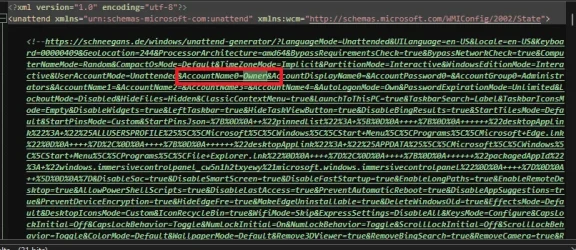
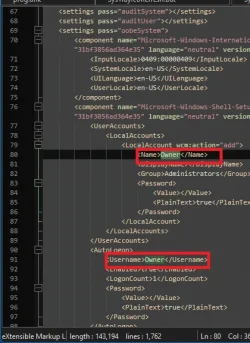
i went ahead and scanned the xml for you. should only be 3 instances you need to change to change the user account name (i used notepad++ to edit it):

1742428089418.webp
1742428099066.webp
 

My Computer

System One

  • OS
    Windows 11 Pro
While I find the embedded URL (which allows you to return to his site and re-edit the saved file) a nice touch, after a while – it's burdensome. In an ideal world, it would use an URL link shortener because it can get to a ridiculous length.

After you figure out how the XML is extended by adding the <Extensions> and the one RunSynchronousCommand which extracts all the files from the embedded file extensions, it's easier for a semi-literate programmer to free-style off the existing template.

I've seen someone on GitHub slap the entire Chris Titus winutil script as their file attachment. Wouldn't go that far, but you get the point.
 

My Computer

System One

  • OS
    Windows 7
Notepad++ is what I had intended to use when I was ready to tackle dacrone's XML file. Notepad++ is what I use to modify the yt-dlp commands for cut-and-paste into the current PowerShell 7 (x64) for processing. Then, I copy-and-paste a text list of song titles from regular MS Notepad into the yt-dlp command lines.

I'm using the programmer's global preset on Notepad++. I understand it is the better format for programming code, but I wouldn't know. The only programming code I've really monkeyed with was GWBasic from the 80s, a little HTML prior to the introduction of XHTML, an XML version of HTML in the 90s for a company webpage, and more recently MS Visual Basic for an OSHA medical surveillance tracking Access database I created about 18 years ago at my place of employment. I left that job in 2014 for a more advanced position. To my knowledge, they were still using the database when I retired for a second time in 2022.

And garlin is right. That is one heck of a long URL string! If I see something like that in an e-mail I send it right to junk because it could really be malicious unless you know exactly what all that meta coding does - and I do not want to find out!

Thanks for letting me know to look for three instances of "Owner," dacrone. Notepad++ would have found duplicate entries for me, but at least now I know how many instances for sure and not worry about missing one. But of course I would have maintained an original reference copy in the event of total disaster on my part.
 

My Computers

System One System Two

  • OS
    Windows 11 Pro 25H2 (Build 26200.6275)
    Computer type
    PC/Desktop
    Manufacturer/Model
    DIY: Custom-Built Frankenstein
    CPU
    Intel Core Ultra 9 285K Series2 24 Core (8P+16E) 3.7GHz
    Motherboard
    ASUS ROG Maximus Z890 Hero Rev 1.xx
    Memory
    Corsair Vengeance 64GB RGB DDR 5 6400 (two kits of 32GB (2x16GB) dual-ranked DIMM). This MoBo can handle much faster, including CU-DIMM, but not so sure about the CPU/NPU because anything over 6400 is required to be overclocked.
    Graphics Card(s)
    MSI Ventus NVIDIA GeForce RTX 4070 Ti SUPER
    Monitor(s) Displays
    Samsung 4K UHD UN65MU8000 (65" Smart TV) via HDMI 2.1
    Screen Resolution
    3840 x 2160 @24 Hz (60 Hz native without UHD from PC)
    Hard Drives
    OS Drive 1 (Windows 11 Pro): Crucial T750 2TB 3D TLC NAND (SLC Cache/TLC Core) PCIe 5.0 1185 NVMe M.2 SSD •–• Storage Drives: Another Crucial T750 2TB M.2 SSD + Seagate Skyhawk 2TB 7200 RPM SATA-III 6 Gb/s SSHD + WD My Passport Ultra 6TB USB-C 150 Mb/s 5400 RPM External HDD •—• OS Drive 2 (Ubuntu 24.04 LTS): WD Black Performance 512GB PCIe 3.0 NVMe 1185 M.2 SSD (Booted from BIOS - Completely Separated from Windows Boot Manager) •–• Storage Drive: TEAMGROUP Team MP33 2TB 3D NAND (SLC Cache/TLC Core) PCIe 3.0 1185 M.2 SSD
    PSU
    Corsair HX-1200i 80 Plus Platinum (1,200 Watts)
    Case
    Fractal Design Pop XL Air RGB Black TG ATX High-Airflow Steel Tower upgraded with be!Quiet Light Wings 140mm PMW High Speed ARGB Fans
    Cooling
    Cooler Master MasterLiquid ARGB 360mm AIO upgraded with be!Quiet Light Wings 120mm PMW High Speed ARGB Fans
    Keyboard
    Logitech K360 Mini Wireless Keyboard/Mouse Combo
    Internet Speed
    Gig Fiber Optic ISP > Ookla Speedtest: Ping 15 ms / ↓ 929.56 Mbps / ↑ 946.71 Mpbs
    Browser
    Brave (64-bit) for its low profile and resource usage / Firefox (64-bit) (default) for YouTube and other helpful extensions / MS Edge (only because some gov't sites don't play well with other browsers and Google Chrome may as well be a virus because you can't completely get rid of non-Enterprise versions of it without major registry surgery once installed)
    Antivirus
    Windows Defender (Just as effective as, if not more effective than 3rd party software, but nowhere near as customizable)
    Other Info
    Sony STR-AZ1000ES 8-channel A/V Receiver w/ Atmos Speakers:
    Jamo S 803 (Front L/R) 57-26 KHz 80W RMS;
    Jamo Concert Series C9 CEN II (Center) 55-24 KHz 50W RMS;
    Jamo S 8 ATM (Front L/R Height) 31.5-24 KHz 140W RMS;
    Pro Monitor 800 (Rear L/R Height) 57-30 KHz 150W RMS
    Jamo S 801 (Rear L/R Surround) 76-26 KHz 60W RMS;
    Klipsch Reference RP-1000SW (Subwoofer 1) 19-131 Hz 300W RMS;
    SVS PB-1000 (Subwoofer 2) 19-270 Hz 300W RMS.
  • Operating System
    Windows 11 Pro 24H2 (Build 26100.6725)
    Computer type
    PC/Desktop
    Manufacturer/Model
    DIY: Custom-Built Frankenstein
    CPU
    Intel Core i7-8700 CPU 6 Core 12 Threads 3.20 GHz
    Motherboard
    Asus TUF Z370-Pro Gaming Rev 1.xx
    Memory
    Corsair Vengeance 32GB (2x16GB) DDR4 2733 (Faster than recommended PC 2666) Dual Channel Mode
    Graphics card(s)
    EVGA NVIDIA GeForce GTX 1080-Ti Super FTW3
    Monitor(s) Displays
    Dual Dell 24" P2419H HD Monitors via Display Ports
    Screen Resolution
    1920 x 1080 @60Hz (Native)
    Hard Drives
    OS Drive (Windows 11 Pro): MSI Spatium M580 2TB 3D NAND (SLC Cache/TLC Core) PCIe 5.0 NVMe 1185 M.2 Frozr SSD w/Cooling Radiator •–• Storage Drives: WD Black SN850X 2TB PCIe 4.0 NVMe 1185 M.2 SSD w/Heatsink + Seagate Skyhawk 2TB 7200 RPM SATA-III 6 Gb/s SSHD + WD Red Pro NAS 20TB 7200 RPM SATA-III 6 Gb/s HDD + Seagate Exos X20 20TB 7200 RPM SATA-III 6Gb/s HDD + WD Blue 512 GB 7200 RPM SATA-III 6Gb/s HDD +WD Corsair (Enterprise) 512 GB 7200 RPM SATA-III 6Gb/s HDD.
    PSU
    ASRock Challenger Bronze CL-750B (750 Watts)
    Case
    Corsair Vengeance Series C70 Steel ATX Mid Tower
    Cooling
    Corsair AIO HX100 RGB Elite with upgraded silent 120mm fans
    Keyboard
    Logitech MK360 Wireless Keyboard/Mouse Combo
    Internet Speed
    Gig Fiber Optic ISP > Ookla Speedtest: Ping 15 ms / ↓ 941.64 Mbps / ↑ 943.77 Mpbs
    Browser
    Brave (default) / Firefox (64-bit) (for YouTube) / MS Edge (for government sites)
    Antivirus
    Windows Defender
Notepad++ is what I had intended to use when I was ready to tackle dacrone's XML file. Notepad++ is what I use to modify the yt-dlp commands for cut-and-paste into the current PowerShell 7 (x64) for processing. Then, I copy-and-paste a text list of song titles from regular MS Notepad into the yt-dlp command lines.

I'm using the programmer's global preset on Notepad++. I understand it is the better format for programming code, but I wouldn't know. The only programming code I've really monkeyed with was GWBasic from the 80s, a little HTML prior to the introduction of XHTML, an XML version of HTML in the 90s for a company webpage, and more recently MS Visual Basic for an OSHA medical surveillance tracking Access database I created about 18 years ago at my place of employment. I left that job in 2014 for a more advanced position. To my knowledge, they were still using the database when I retired for a second time in 2022.

Thanks for letting me know to look for three instances of "Owner," dacrone. Notepad++ would have found duplicate entries for me, but at least now I know how many instances for sure and not worry about missing one. But of course I would have maintained an original reference copy in the event of total disaster on my part.
figured i'd let you know. there will be tons of "ownership" hits in the results too, so just ignore those and look for those 3
 

My Computer

System One

  • OS
    Windows 11 Pro
Two things:

1.) I would want it to not have it automatically search for updates after the .iso is installed.

2.) I'd also want it to remain at 23H2 for the time being without going to 24H2. Is that possible? Or is there no 23H2 iso to work from anymore?
 

My Computers

System One System Two

  • OS
    Windows 11 Pro 25H2 build: (26200.7623)
    Computer type
    Laptop
    Manufacturer/Model
    Microsoft Surface Pro
    Memory
    32GB
  • Operating System
    Microsoft 25H2 Pro
    Computer type
    Laptop
    Manufacturer/Model
    Dell Pro 14 - PC14250
    CPU
    Intel Core Ultra 7
    Memory
    64GB
    Graphics card(s)
    Intel Integrated Graphics
    Hard Drives
    Micron 1TB SSD
Two things:

1.) I would want it to not have it automatically search for updates after the .iso is installed.

2.) I'd also want it to remain at 23H2 for the time being without going to 24H2. Is that possible? Or is there no 23H2 iso to work from anymore?
just uploaded my 23h2 iso for someone else. links are good for 1 week
 

My Computer

System One

  • OS
    Windows 11 Pro
Thanks for the ISO! 😀 👍

Eventually I will update to 24H2 but not for now.

1.) I would want it to not have it automatically search for updates after the .iso is installed.

Is there any way to flag your script so it will (temporarily) block this?
 

My Computers

System One System Two

  • OS
    Windows 11 Pro 25H2 build: (26200.7623)
    Computer type
    Laptop
    Manufacturer/Model
    Microsoft Surface Pro
    Memory
    32GB
  • Operating System
    Microsoft 25H2 Pro
    Computer type
    Laptop
    Manufacturer/Model
    Dell Pro 14 - PC14250
    CPU
    Intel Core Ultra 7
    Memory
    64GB
    Graphics card(s)
    Intel Integrated Graphics
    Hard Drives
    Micron 1TB SSD
Thanks for the ISO! 😀 👍

Eventually I will update to 24H2 but not for now.


Is there any way to flag your script so it will (temporarily) block this?
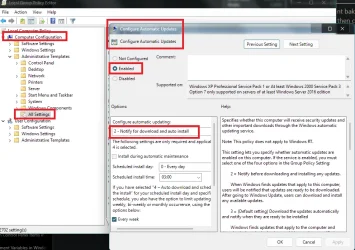
there is but i didnt bake it into the xml. just install with internet disconnected and once in windows use reg or gpo to disable automatic updates, reboot then connect your internet.
 

My Computer

System One

  • OS
    Windows 11 Pro

My Computers

System One System Two

  • OS
    Windows 11 Pro 25H2 build: (26200.7623)
    Computer type
    Laptop
    Manufacturer/Model
    Microsoft Surface Pro
    Memory
    32GB
  • Operating System
    Microsoft 25H2 Pro
    Computer type
    Laptop
    Manufacturer/Model
    Dell Pro 14 - PC14250
    CPU
    Intel Core Ultra 7
    Memory
    64GB
    Graphics card(s)
    Intel Integrated Graphics
    Hard Drives
    Micron 1TB SSD

Latest Support Threads

Back
Top Bottom