Defender Definitions missing in Update History


Chuck99

Well-known member
Member
Local time
5:02 AM
Posts
68
OS
Windows 11 Pro 25H2
Not all Defender Definition KB2267602 show up in Settings > Windows Update > Update History > Definition Updates.

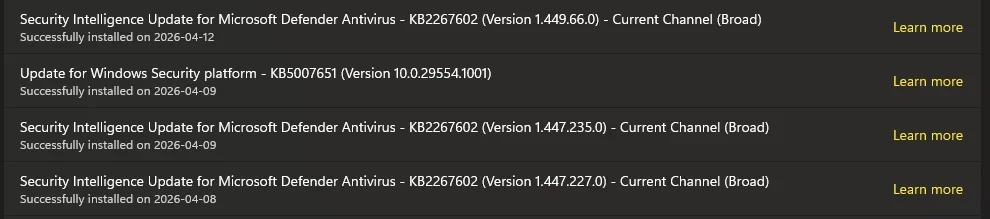
There are a bunch listed but there are also gaps of several days showing nothing. Some time ago I recall reading that these could show up somewhere else but don't recall the details. Where else would I look?

Thanks
 
Windows Build/Version
25H2, build 26.300.8037

My Computer

System One

  • OS
    Windows 11 Pro 25H2
    Computer type
    PC/Desktop
    Manufacturer/Model
    ASRock B760M Pro RS/D4 motherboard
    CPU
    Intel i5-14500
    Motherboard
    ASRock
    Memory
    16 GB
    Graphics Card(s)
    Intel
    Hard Drives
    1 TB Samsung M.2 SSD
    1 TB WD HDD

To manually update Windows Defender antimalware signatures, open Windows Security > Virus & threat protection > Protection updates > Check for updates. Updates are also available via Windows Update in settings. For instant, forced updates, use the command "%ProgramFiles%\Windows Defender\MpCmdRun.exe" -SignatureUpdate
 

My Computer

System One

  • OS
    Windows 11
    Computer type
    PC/Desktop
    Manufacturer/Model
    HP Pavilion
    CPU
    AMD Ryzen 7 5700G
    Motherboard
    Erica6
    Memory
    Micron Technology DDR4-3200 16GB
    Graphics Card(s)
    NVIDIA GeForce RTX 3060
    Sound Card
    Realtek ALC671
    Monitor(s) Displays
    Samsung SyncMaster U28E590
    Screen Resolution
    3840 x 2160
    Hard Drives
    SAMSUNG MZVLQ1T0HALB-000H1
There are a bunch listed but there are also gaps of several days showing nothing. Some time ago I recall reading that these could show up somewhere else but don't recall the details. Where else would I look?
I also have several days that were missing:

1776597940641.webp
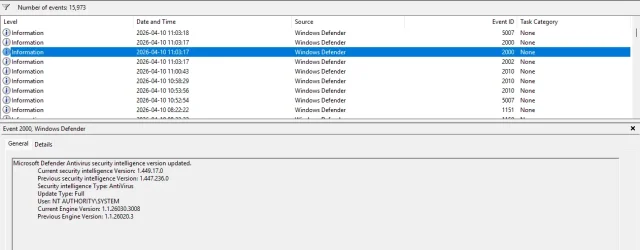
If you look in Event Viewer filtered on Event Source: Windows Defender, Event ID 2000 is for AntiVirus/AntiSpyware updates and 2010 is for getting additional security intelligence from cloud protections. I didn't miss those on the 10th (I didn't check on the 11th). I suspect Update History isn't comprehensive, despite me forcing an update once a day.

1776598294948.webp
 

My Computer

System One

  • OS
    Windows 11 Pro 25H2
    Computer type
    PC/Desktop
Where else would I look?
You need to look in both "Definition Updates" and "Quality Updates".
Definitions are consolidated now and again, so any you might think are missing will be done.
You can also click on Windows update blue button "Check for updates". Most of the time will result in an update of the kind you mention.

Also review your settings in Windows update > Advanced options.

I assume no system mods.
 

My Computer

System One

  • OS
    Windows 11
You need to look in both "Definition Updates" and "Quality Updates".
Definitions are consolidated now and again, so any you might think are missing will be done.
You can also click on Windows update blue button "Check for updates". Most of the time will result in an update of the kind you mention.

Also review your settings in Windows update > Advanced options.

I assume no system mods.

I looked in all the update sections & the only place that shows the KB2267602 is Definition Updates & the last one was on 4-10-2026.

When I'm on the PC sometime a notification pops up that there is a security update & usually I click on it. Early this morning (4-19) a notification appeared but I was in the middle of doing something & did not click on it. It should not make any difference whether the notification is clicked on because most people don't look at the screen 24/7. And I've read that you cannot turn off security updates.

According to any & all the sections in "Update History" the last update of any kind was on 4-10-2026. Where are all the KB2267602 updates listed for the past 9 days?
 

My Computer

System One

  • OS
    Windows 11 Pro 25H2
    Computer type
    PC/Desktop
    Manufacturer/Model
    ASRock B760M Pro RS/D4 motherboard
    CPU
    Intel i5-14500
    Motherboard
    ASRock
    Memory
    16 GB
    Graphics Card(s)
    Intel
    Hard Drives
    1 TB Samsung M.2 SSD
    1 TB WD HDD
BTW, it also looks like Reliability Monitor also shows a more complete list of definition updates:
Control Panel\System and Security\Security and Maintenance\Reliability Monitor
 

My Computer

System One

  • OS
    Windows 11 Pro 25H2
    Computer type
    PC/Desktop
Event Viewer
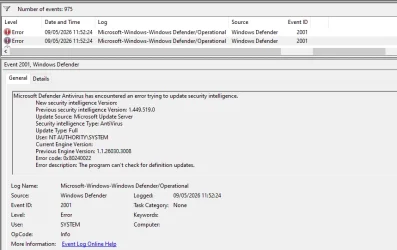
You might be interested in EventID 2001 as well.
WD update error records.webp
I think it happened in the very short interval between waking my computer up & rebooting it while I was still turning on my router, my internet connection & my brain.

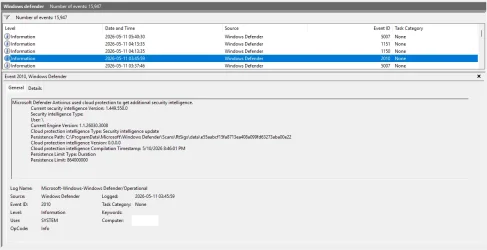
2010 is for getting additional security intelligence from cloud protections
Please would you post an Event viewer diagram with one of your EventID 2010 entries selected.
echo2446 diag.webp
I've never seen one.
Please would you include that bottom section [as I have done for my EventID 2001 diagram above] so I can see the details [General description, Log, Source etc].


All the best,
Denis
 
Last edited:

My Computer

System One

  • OS
    Windows 11 Home x64 Version 25H2 Build 26200.8037
When I'm on the PC sometime a notification pops up that there is a security update & usually I click on it. Early this morning (4-19) a notification appeared but I was in the middle of doing something & did not click on it. It should not make any difference whether the notification is clicked on because most people don't look at the screen 24/7. And I've read that you cannot turn off security updates.

The fact you have that option means you need to adjust your Windows Pro update settings, Windows 11 Pro gives you more options, one of the assumptions is that you are a pro and know what you are doing with update settings.

There is no such option in Windows 11 Home, definition updates are automatic around 1-2 per day assuming you are connected to internet daily.
If I press on "Check for updates" (Home version) most of time I get second of the day definition update. Other than that 100% auto.
 

My Computer

System One

  • OS
    Windows 11
You might be interested in EventID 2001 as well.

Please would you post an Event viewer diagram with one of your EventID 2010 entries selected.
...
I've never seen one.
Please would you include that bottom section [as I have done for my EventID 2001 diagram above] so I can see the details [General description, Log, Source etc].
Thanks for the tip. I have a custom view with the Event Source set to "Windows Defender," so I probably have all the WD events; this particular error 2001 never appeared in my log.

Here's a 2010 entry:
1778454630187.webp

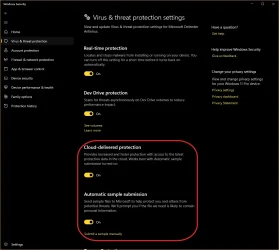
The cloud intelligence updates may or may not have something to do with these settings:
1778454803319.webp
 

My Computer

System One

  • OS
    Windows 11 Pro 25H2
    Computer type
    PC/Desktop
Back
Top Bottom