Solved Defender Install Issue.


Mitch

Well-known member
Member
Local time
12:30 PM
Posts
432
Location
Scotland
OS
Windows 11 Home
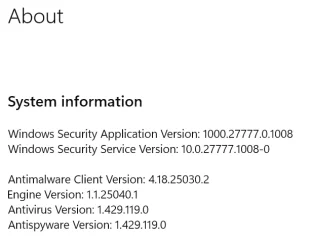
Hi. Wondering if anyone else is having a problem with the latest Defender update? When I updated Defender 2 days ago the Version was 1.429.084. I ran check for Defender updates in Windows Security and it partially updated to 1.429.119. The latest Version is 122 but failed with Error Code 80247140. Is this likely to be a problem with the Version update itself?
Version 1.429.119
Engine Version 1.1.25040.1
Platform Version 4.18.25040.2
Released 22.5.25 5.12am.
Would be grateful for any advice.
Thanks.
 

My Computer My Computer

At a glance

Windows 11 Home
OS
Windows 11 Home
Probably the Windows Update cache is corrupt. You can clear it and search for updates again. To do that open File Explorer and click the Windows drive (C) to select it. Then from Drive Tools select Disk Cleanup. Wait for the list to populate, then click to also include system components. Wait a little longer. Make sure you check the Windows Update cache (or similar). Then restart and search for updates again.
 

My Computers My Computers

  • At a glance

    Windows 11 Pro 23H2 (5699), 25H2 (8655)Mobile DualCore Intel Core 2 Duo T7250, 2000 MHz4GBMobile Intel(R) GMA 4500M (Mobile 4 series)
    OS
    Windows 11 Pro 23H2 (5699), 25H2 (8655)
    Computer type
    Laptop
    Manufacturer/Model
    Acer Extensa 5630EZ
    CPU
    Mobile DualCore Intel Core 2 Duo T7250, 2000 MHz
    Motherboard
    Acer Extensa 5630
    Memory
    4GB
    Graphics Card(s)
    Mobile Intel(R) GMA 4500M (Mobile 4 series)
    Sound Card
    Realtek ALC268 @ Intel 82801IB ICH9 - High Definition Audio Controller
    Monitor(s) Displays
    1
    Screen Resolution
    1280x800
    Hard Drives
    Samsung SSD 850 EVO 250GB SATA Device (250 GB, SATA-III)
    Internet Speed
    VDSL 50 Mbps
    Browser
    MICROSOFT EDGE
    Antivirus
    WINDOWS DEFENDER
    Other Info
    Legacy MBR installation, no TPM, no Secure Boot, no WDDM 2.0 graphics drivers, no SSE4.2, cannot get more unsupported ;) This is only my test laptop. I had installed Windows 11 here before upgrading my main PC. For my main PC I use everyday see my 2nd system specs.
  • At a glance

    Windows 11 Pro v25H2 (build 26200.8655)Intel Core-i7 3770 3.40GHz s1155 (3rd generat...2x Kingston Hyper-X Blu 8GB DDR3-1600GIGABYTE GeForce RTX 3050 WINDFORCE OC V2 6GB...
    Operating System
    Windows 11 Pro v25H2 (build 26200.8655)
    Computer type
    PC/Desktop
    Manufacturer/Model
    Custom-built PC
    CPU
    Intel Core-i7 3770 3.40GHz s1155 (3rd generation)
    Motherboard
    Asus P8H61 s1155 ATX
    Memory
    2x Kingston Hyper-X Blu 8GB DDR3-1600
    Graphics card(s)
    GIGABYTE GeForce RTX 3050 WINDFORCE OC V2 6GB (GV-N3050WF2OCV2-6GD)
    Sound Card
    Realtek HD audio (ALC887)
    Monitor(s) Displays
    Sony Bravia KDL-19L4000 19" LCD TV via VGA
    Screen Resolution
    1440x900 32-bit 60Hz
    Hard Drives
    WD Blue SA510 2.5 1000GB SSD as system disk, Western Digital Caviar Purple 4TB SATA III (WD40PURZ) as second
    PSU
    Thermaltake Litepower RGB 550W Full Wired
    Case
    SUPERCASE MIDI-TOWER
    Cooling
    Deepcool Gamma Archer CPU cooler, 1x 8cm fan at the back
    Keyboard
    Mitsumi 101-key PS/2
    Mouse
    Sunnyline OptiEye PS/2
    Internet Speed
    100Mbps
    Browser
    Microsoft Edge, Mozilla Firefox
    Antivirus
    Microsoft Windows Defender
    Other Info
    Legacy BIOS (MBR) installation, no TPM, no Secure Boot, WDDM 3.0 graphics drivers, WEI score 7.4
Thanks @spapakons . The version hasn't moved from 122 for around 6 hours, which is a long time for these updates (usually 3/4 hours) but I just checked and it updated. Maybe the last update has been adjusted for any problem. The same issue happened on a couple of machines. I'll check again after the next Defender update. Thanks for your help.
 

My Computer My Computer

At a glance

Windows 11 Home
OS
Windows 11 Home
Mine today:

1747914577626.webp
 

My Computers My Computers

  • At a glance

    Win11 Pro RTM Version 24H2 Build 26100.4202Intel Core i5 11th Gen. 2.40GHz12GB
    OS
    Win11 Pro RTM Version 24H2 Build 26100.4202
    Computer type
    Laptop
    Manufacturer/Model
    Dell Vostro 3400
    CPU
    Intel Core i5 11th Gen. 2.40GHz
    Memory
    12GB
    Hard Drives
    256GB SSD NVMe M.2
  • At a glance

    Win11 Pro RTM Version 24H2 Build 26100.4202Intel Core i5 10th Gen. 2.90GHz16GBOnboard, no VGA, using a DisplayPort-to-VGA a...
    Operating System
    Win11 Pro RTM Version 24H2 Build 26100.4202
    Computer type
    PC/Desktop
    Manufacturer/Model
    Dell Vostro 5890
    CPU
    Intel Core i5 10th Gen. 2.90GHz
    Memory
    16GB
    Graphics card(s)
    Onboard, no VGA, using a DisplayPort-to-VGA adapter
    Monitor(s) Displays
    24" Dell
    Hard Drives
    512GB SSD NVMe, 4TB Seagate HDD
    Browser
    Firefox, Edge
    Antivirus
    Windows Defender/Microsoft Security
Use Windows Update Troubleshooter.


  • Right-click on Start button and pick Settings
  • Go to System > Troubleshoot
  • Click on Other Troubleshooters > Windows Update and click Run button.


Download Windows updates manually.


  • Go to the official Microsoft update catalog;
  • Enter a specific update code, for example, KB4481031
  • Select the correct version and click Download
  • Click on the link and Windows will update your computer


Resetting the Windows Update components can usually solve these types of issues.


My Computer My Computer

At a glance

Windows 11AMD Ryzen 7 5700GMicron Technology DDR4-3200 16GBNVIDIA GeForce RTX 3060
OS
Windows 11
Computer type
PC/Desktop
Manufacturer/Model
HP Pavilion
CPU
AMD Ryzen 7 5700G
Motherboard
Erica6
Memory
Micron Technology DDR4-3200 16GB
Graphics Card(s)
NVIDIA GeForce RTX 3060
Sound Card
Realtek ALC671
Monitor(s) Displays
Samsung SyncMaster U28E590
Screen Resolution
3840 x 2160
Hard Drives
SAMSUNG MZVLQ1T0HALB-000H1
Hi @Berton . I ran Defender update at around 9am UK time and it partially updated to v119 from v84 from a couple of days ago. The latest version at that time according to MS was v122 but got an error message. I left it for a couple of hours and it updated to v122. I suspect there was a problem with 122 and it was pulled and reissued. I don't like messing with Windows Update as I've had problems before with it and it's been working normally. Once the next update from v122 is available I'll check again. Thanks.
 

My Computer My Computer

At a glance

Windows 11 Home
OS
Windows 11 Home
Run this as a batch file. It will force a clean signature update package.
Code:
cd %ProgramFiles%\Windows Defender

MpCmdRun.exe -removedefinitions -dynamicsignatures

MpCmdRun.exe -SignatureUpdate
 

My Computer My Computer

At a glance

Windows 11 Pro 25H2 26200.7840Intel Core i3-8145U16GB
OS
Windows 11 Pro 25H2 26200.7840
Computer type
Laptop
Manufacturer/Model
Lenovo IdeaPad L340
CPU
Intel Core i3-8145U
Memory
16GB
Hard Drives
500 GB M2 1 TB HDD
Internet Speed
400 MB
Browser
Chrome | Edge
Antivirus
Microsoft Defender | Block unknown executables | Various ASR rules enabled | Smart App Control
FYI - current version is 1.429.130.0.

Clearing that cache with the troubleshooter, per the first half of what @FreeBooter posted, will probably fix it. It's a cheap and easy fix if it works.
 

My Computer My Computer

At a glance

Windows 11 Pro 24H2Intel Ultra 7 155H16gbIntel Arc integrated
OS
Windows 11 Pro 24H2
Computer type
Laptop
Manufacturer/Model
HP
CPU
Intel Ultra 7 155H
Memory
16gb
Graphics Card(s)
Intel Arc integrated
Hard Drives
SSD
Security Intelligence Update for Microsoft Defender Antivirus - KB2267602 (Version 1.429.122.0) updated for me, no problem.

Error code 80247140 typically indicates a problem with Windows Update, often related to issues with the update service or network connectivity. To resolve it, you can try running the Windows Update Troubleshooter
 

My Computers My Computers

  • At a glance

    Windows 11 Pro 25H2 26200.8655AMD Ryzen 7 5825U with Radeon Graphics16GB
    OS
    Windows 11 Pro 25H2 26200.8655
    Computer type
    Laptop
    Manufacturer/Model
    Acemagic LX15PRO
    CPU
    AMD Ryzen 7 5825U with Radeon Graphics
    Memory
    16GB
    Screen Resolution
    1920 x 1080
    Hard Drives
    SSD 2TB
    Internet Speed
    30 Mbps
    Browser
    Brave
    Antivirus
    Webroot Secure Anywhere
    Other Info
    System 3

    Acer Swift SF114-34 laptop
    OS Windows 11 Pro 26200.8524
    CPU Pentium Silver N6000
    RAM 4GB
    SSD Samsung 970 EVO Plus SSD 2TB (an upgrade)
  • At a glance

    Windows 11 Pro 23H2 22631.2506Atom N450 1.66GHz2GB
    Operating System
    Windows 11 Pro 23H2 22631.2506
    Computer type
    Laptop
    Manufacturer/Model
    HP Mini 210-1090NR PC (bought in late 2009!)
    CPU
    Atom N450 1.66GHz
    Memory
    2GB
    Browser
    Brave
    Antivirus
    Webroot
Security Intelligence Update for Microsoft Defender Antivirus - KB2267602 (Version 1.429.122.0) updated for me, no problem.

Error code 80247140 typically indicates a problem with Windows Update, often related to issues with the update service or network connectivity. To resolve it, you can try running the Windows Update Troubleshooter

122? That is SO several hours ago!
 

My Computer My Computer

At a glance

Windows 11 Pro 24H2Intel Ultra 7 155H16gbIntel Arc integrated
OS
Windows 11 Pro 24H2
Computer type
Laptop
Manufacturer/Model
HP
CPU
Intel Ultra 7 155H
Memory
16gb
Graphics Card(s)
Intel Arc integrated
Hard Drives
SSD
I think the problem was with the AntiMalware Platform update which may not have installed properly. Kb4052623 vers 4.18.25040.2. After a number of restarts it seems to have stuck and I've updated to 130. Thanks for your help.
 

My Computer My Computer

At a glance

Windows 11 Home
OS
Windows 11 Home

Latest Support Threads

Back
Top Bottom