
Defrag.exe


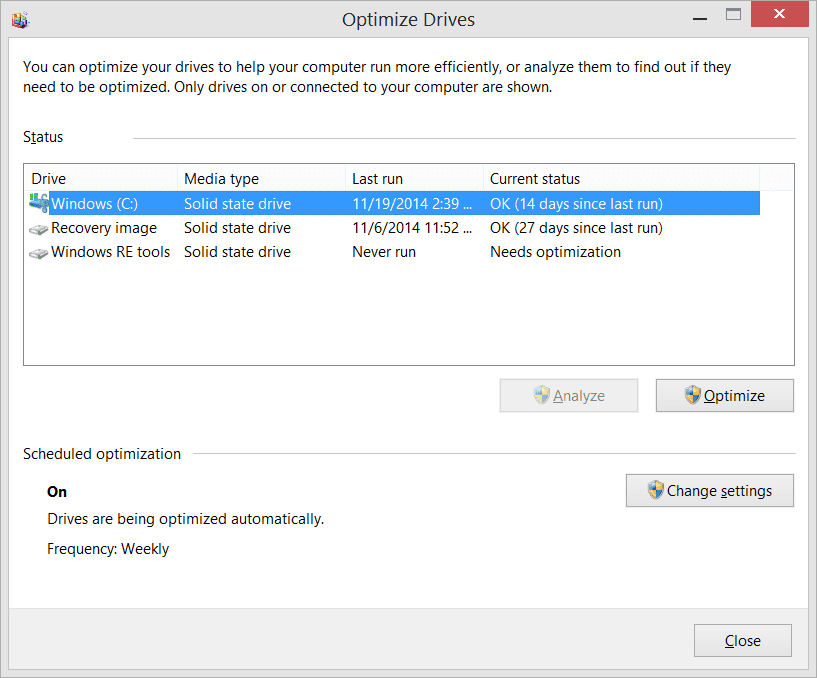
Windows does defrag an SSD, sometimes, under certain circumstances.

Interesting article... my only thought would be whether something has changed in the last ten years with SSD's to change those rules and ruminations. That post was back in the Win8 days. To be clear, I don't know if anything has. I don't follow the SSD world that closely. But I've found, as the article itself discusses in a way, that assumptions are a bad way to decide technical issues.

Either way, I learned a lot in this thread :-)
 

My Computer My Computer

At a glance

Windows 11 Pro 24H2Intel Ultra 7 155H16gbIntel Arc integrated
OS
Windows 11 Pro 24H2
Computer type
Laptop
Manufacturer/Model
HP
CPU
Intel Ultra 7 155H
Memory
16gb
Graphics Card(s)
Intel Arc integrated
Hard Drives
SSD
Interesting article... my only thought would be whether something has changed in the last ten years with SSD's to change those rules and ruminations. That post was back in the Win8 days. To be clear, I don't know if anything has. I don't follow the SSD world that closely. But I've found, as the article itself discusses in a way, that assumptions are a bad way to decide technical issues.

Either way, I learned a lot in this thread :-)
Newer SSDs have much of those functions built in their firmware. OS can only force them to do it on different schedule. Trim command is just a trigger for all functions to start.
 

My Computer My Computer

At a glance

W11 Pro and Insider DevAMD Ryzen 9 7900x2x16GB Kingston 6000MHz, Cl 32 @ 6200MHz Cl30Gigabyte Rx 6600XT Gaming OC 8G Pro
OS
W11 Pro and Insider Dev
Computer type
PC/Desktop
Manufacturer/Model
Home brewed
CPU
AMD Ryzen 9 7900x
Motherboard
ASROCK b650 PRO RS
Memory
2x16GB Kingston 6000MHz, Cl 32 @ 6200MHz Cl30
Graphics Card(s)
Gigabyte Rx 6600XT Gaming OC 8G Pro
Sound Card
MB, Realtek Ac1220p
Monitor(s) Displays
3 x 27"
Screen Resolution
1080p
Hard Drives
Kingston KC3000. 1TBSamsung 970 evo Plus 500GB, Crucial P1 NVMe 1TB, Lexar NVMe 2 TB, Silicon Power M.2 SATA 500GB
PSU
Seasonic 750W
Case
Custom Raidmax
Cooling
Arctic Liquid Freezer III 360mm
Internet Speed
20/19 mbps
Trim is also logged in event viewer under application.

Screenshot 2025-04-24 124054.webp
 

My Computer My Computer

At a glance

Windows 11 Pro
OS
Windows 11 Pro
whether something has changed in the last ten years with SSD's to change those rules and ruminations
Specifics probably have changed, but the general idea is that Windows does different things based on the drive. It doesn’t just blindly assume it’s a spinner and wastefully re-write it.

It’s a lot like how BitLocker acts differently if the drive supports encryption itself.
 

My Computer My Computer

At a glance

Windows 11 Pro 25H212th Gen Core i7-1260P64 GB Micron PC4-25600Intel Iris Xe Graphics
OS
Windows 11 Pro 25H2
Computer type
PC/Desktop
Manufacturer/Model
Intel NUC12WSHi7
CPU
12th Gen Core i7-1260P
Motherboard
NUC12WSBi7
Memory
64 GB Micron PC4-25600
Graphics Card(s)
Intel Iris Xe Graphics
Sound Card
on-board Realtek HD Audio
Monitor(s) Displays
Dell U3219Q
Screen Resolution
3840 x 2160
Hard Drives
Samsung SSD 990 PRO 1TB
Crucial MX500 2 TB
Antivirus
Microsoft Defender
You do not. 11 was defragmenting SSDs every day, then MS fixed it, then fixed it again. Fool me once ... and thrice, no chance. :LOL:
Apart from bricking an OCZ SSD back when SSDs were becoming the latest craze on the domestic market I had some out-dated third party software do a defrag on a very expensive 240GB Kingston SSD. The SSD still worked but its read and write speeds were never the same after ward. Kingston did eventually develop some firmware to stop this sort of thing from happening but I was stuck with a compromised drive. I'm amazed to see MS still doing this today. I'm not confusing defrag for TRIM here and to see others calling TRIM "defrag" is somewhat alarming for me.
 

My Computer My Computer

At a glance

WIN 11, WIN 10, WIN 8.1, WIN 7 U, WIN 7 PRO, ...Intel i7 6900K and i9-7960X / AMD 3800X (8 core)128 GB CORSAIR DOMINATOR PLATINUM (B DIE)NVIDIA 1070 and RTX 3070
OS
WIN 11, WIN 10, WIN 8.1, WIN 7 U, WIN 7 PRO, WIN 7 HOME (32 Bit), LINUX MINT
Computer type
PC/Desktop
Manufacturer/Model
DIY, ASUS, and DELL
CPU
Intel i7 6900K and i9-7960X / AMD 3800X (8 core)
Motherboard
ASUS X99E-WS USB 3.1 and ASUS X299 SAGE
Memory
128 GB CORSAIR DOMINATOR PLATINUM (B DIE)
Graphics Card(s)
NVIDIA 1070 and RTX 3070
Sound Card
Crystal Sound (onboard)
Monitor(s) Displays
single Samsung 30" 4K and 8" aux monitor
Screen Resolution
4K and something equally attrocious. I'll be working on this.
Hard Drives
A, B, C, D, E, F, G, H, I, J, K, L, M, N, O, P, Q, R, S, T, U, V, W

Ports X, Y, and Z are reserved for USB access and removable drives.

Drive types consist of the following: Various mechanical hard drives bearing the brand names, Seagate, Toshiba, and Western Digital. Various NVMe drives bearing the brand names Kingston, Intel, Silicon Power, Crucial, Western Digital, and Team Group. Various SATA SSDs bearing various different brand names.

RAID arrays included:

LSI RAID 10 (WD Velociraptors) 1115.72 GB
LSI RAID 10 (WD SSDS) 463.80 GB

INTEL RAID 0 (KINGSTON HYPER X) System 447.14 GB
INTEL RAID 1 TOSHIBA ENTERPRIZE class Data 2794.52 GB
INTEL RAID 1 SEAGATE HYBRID 931.51 GB
PSU
SEVERAL. I prefer my Corsair Platinum HX1000i but I also like EVGA power supplies
Case
ThermalTake Level 10 GT (among others)
Cooling
Noctua is my favorite and I use it in my main. I also own various other coolers.
Keyboard
all kinds.
Mouse
all kinds
Internet Speed
360 mbps - 1 gbps (depending)
Browser
FIREFOX
Antivirus
KASPERSKY (no apologies)
Other Info
Gave Dell touch screen with Windows 11 to daughter and got me an OTVOC. Being a PC builder I own many desktop PCs as well. I am a father of five providing PCs, laptops, and tablets for all my family, most of which I have modified, rebuilt, or simply built from scratch. I do not own a cell phone, never have, never will.
p
Apart from bricking an OCZ SSD back when SSDs were becoming the latest craze on the domestic market I had some out-dated third party software do a defrag on a very expensive 240GB Kingston SSD. The SSD still worked but its read and write speeds were never the same after ward. Kingston did eventually develop some firmware to stop this sort of thing from happening but I was stuck with a compromised drive. I'm amazed to see MS still doing this today. I'm not confusing defrag for TRIM here and to see others calling TRIM "defrag" is somewhat alarming for me.

Doesn't help that MS has TRIM under "Optimize and Defragement your drive" in the Tools section and running out of the defrag executable.
 

My Computer My Computer

At a glance

Windows 11 Pro 24H2Intel Ultra 7 155H16gbIntel Arc integrated
OS
Windows 11 Pro 24H2
Computer type
Laptop
Manufacturer/Model
HP
CPU
Intel Ultra 7 155H
Memory
16gb
Graphics Card(s)
Intel Arc integrated
Hard Drives
SSD
Specifics probably have changed, but the general idea is that Windows does different things based on the drive. It doesn’t just blindly assume it’s a spinner and wastefully re-write it.

It’s a lot like how BitLocker acts differently if the drive supports encryption itself.

I realize that... but my question is really whether the advice in the article still applies to the current generation of SSD's.

As @CountMike notes:
Newer SSDs have much of those functions built in their firmware. OS can only force them to do it on different schedule. Trim command is just a trigger for all functions to start.

So is the MS software integrating with the Manufacturers SSD optimization... or are they fighting it out at the wholesale level?
 

My Computer My Computer

At a glance

Windows 11 Pro 24H2Intel Ultra 7 155H16gbIntel Arc integrated
OS
Windows 11 Pro 24H2
Computer type
Laptop
Manufacturer/Model
HP
CPU
Intel Ultra 7 155H
Memory
16gb
Graphics Card(s)
Intel Arc integrated
Hard Drives
SSD
but my question is really whether the advice in the article still applies to the current generation of SSD's.
Yes, it does.
So is the MS software integrating with the Manufacturers SSD optimization... or are they fighting it out at the wholesale level?
The scheduled task that runs as part of Windows Automatic Maintenance (WAM) is designed to work in tandem with the SSD's internal optimizations.

That said, for the average user whose internal storage doesn't include any HDDs so it only consists of one or more SSDs, installing Condusiv DymaxIO will almost always be overkill (if not serious overkill). Whereas SSDs being subjected to heavy I/O workloads commonly on something like a heavy-duty (workstation or similar) PC or server very often can benefit from this paid software's advanced optimization technologies, and can actually even do so a lot more substantially than many think, both in terms of performance and life of the SSDs.

DymaxIO gives real-world improvements the magnitude of which tends to greatly depend on the various types of workloads and data use. For example, just because the number of IOPs that your SSDs can provide looks to be wonderous on paper or in a benchmark chart, doesn't mean that they can't easily fall short on IOPs under certain specific conditions. So, one of the things that DymaxIO does is that it prevents Windows from keep hammering the SSDs with two (or three or four or five) boatloads of I/O operations when it's not necessary. So, you'd think that Windows by itself is smart enough that it never will hurt the performance and life of the SDDs, and you'd think wrong. Then again, the good news is that the scheduled task is fully adequate for a lot of users (myself included).
 

My Computers My Computers

  • At a glance

    11 Homei7 13650HX16GB DDR5GeForce RTX 4060 Mobile
    OS
    11 Home
    Computer type
    Laptop
    Manufacturer/Model
    Asus TUF Gaming F16 (2024)
    CPU
    i7 13650HX
    Memory
    16GB DDR5
    Graphics Card(s)
    GeForce RTX 4060 Mobile
    Sound Card
    Eastern Electric MiniMax DAC Supreme; Emotiva UMC-200; Astell & Kern AK240
    Monitor(s) Displays
    Sony Bravia XR-55X90J
    Screen Resolution
    3840×2160
    Hard Drives
    512GB SSD internal
    37TB external
    PSU
    Li-ion
    Cooling
    2× Arc Flow Fans, 4× exhaust vents, 5× heatpipes
    Keyboard
    Logitech K800
    Mouse
    Logitech G402
    Internet Speed
    30Mbit/s up, 500Mbit/s down
    Browser
    FF
    Antivirus
    What's an antivirus?
  • At a glance

    11 Homei5 1135G716GB DDR4Intel Iris Xe
    Operating System
    11 Home
    Computer type
    Laptop
    Manufacturer/Model
    Medion S15450
    CPU
    i5 1135G7
    Memory
    16GB DDR4
    Graphics card(s)
    Intel Iris Xe
    Sound Card
    Eastern Electric MiniMax DAC Supreme; Emotiva UMC-200; Astell & Kern AK240
    Monitor(s) Displays
    Sony Bravia XR-55X90J
    Screen Resolution
    3840×2160
    Hard Drives
    2TB SSD internal
    37TB external
    PSU
    Li-ion
    Keyboard
    Logitech K800
    Mouse
    Logitech G402
    Internet Speed
    30Mbit/s up, 500Mbit/s down
    Browser
    FF

Latest Support Threads

Back
Top Bottom





