Delete Garbage Apps Help


SightUp

Well-known member
Member
Local time
3:46 AM
Posts
179
OS
Windows
Code:
PowerShell -Command "Get-appxpackage -allusers *Microsoft.BingWeather* | Remove-AppxPackage"
TIMEOUT 5
PowerShell -Command "Get-appxprovisionedpackage -online | where-object {$_.packagename -like '*Microsoft.BingWeather*'} | remove-appxprovisionedpackage -online"
TIMEOUT 5

PowerShell -Command "Get-appxpackage -allusers *Microsoft.Print3D* | Remove-AppxPackage"
TIMEOUT 5
PowerShell -Command "Get-appxprovisionedpackage -online | where-object {$_.packagename -like '*Microsoft.Print3D*'} | remove-appxprovisionedpackage -online"
TIMEOUT 5

PowerShell -Command "Get-appxpackage -allusers *Microsoft.Wallet* | Remove-AppxPackage"
TIMEOUT 5
PowerShell -Command "Get-appxprovisionedpackage -online | where-object {$_.packagename -like '*Microsoft.Wallet*'} | remove-appxprovisionedpackage -online"
TIMEOUT 5

PowerShell -Command "Get-appxpackage -allusers *Microsoft.Xbox.TCUI* | Remove-AppxPackage"
TIMEOUT 5
PowerShell -Command "Get-appxprovisionedpackage -online | where-object {$_.packagename -like '*Microsoft.Xbox.TCUI*'} | remove-appxprovisionedpackage -online"
TIMEOUT 5

PowerShell -Command "Get-appxpackage -allusers *Microsoft.XboxIdentityProvider* | Remove-AppxPackage"
TIMEOUT 5
PowerShell -Command "Get-appxprovisionedpackage -online | where-object {$_.packagename -like '*Microsoft.XboxIdentityProvider*'} | remove-appxprovisionedpackage -online"
TIMEOUT 5

PowerShell -Command "Get-appxpackage -allusers *Microsoft.YourPhone* | Remove-AppxPackage"
TIMEOUT 5
PowerShell -Command "Get-appxprovisionedpackage -online | where-object {$_.packagename -like '*Microsoft.YourPhone*'} | remove-appxprovisionedpackage -online"
TIMEOUT 5

PowerShell -Command "Get-appxpackage -allusers *Microsoft.XboxGamingOverlay* | Remove-AppxPackage"
TIMEOUT 5
PowerShell -Command "Get-appxprovisionedpackage -online | where-object {$_.packagename -like '*Microsoft.XboxGamingOverlay*'} | remove-appxprovisionedpackage -online"
TIMEOUT 5

PowerShell -Command "Get-appxpackage -allusers *Microsoft.Microsoft3DViewer* | Remove-AppxPackage"
TIMEOUT 5
PowerShell -Command "Get-appxprovisionedpackage -online | where-object {$_.packagename -like '*Microsoft.Microsoft3DViewer*'} | remove-appxprovisionedpackage -online"
TIMEOUT 5

PowerShell -Command "Get-appxpackage -allusers *Microsoft.MicrosoftStickyNotes* | Remove-AppxPackage"
TIMEOUT 5
PowerShell -Command "Get-appxprovisionedpackage -online | where-object {$_.packagename -like '*Microsoft.MicrosoftStickyNotes*'} | remove-appxprovisionedpackage -online"
TIMEOUT 5

PowerShell -Command "Get-appxpackage -allusers *Microsoft.MixedReality.Portal* | Remove-AppxPackage"
TIMEOUT 5
PowerShell -Command "Get-appxprovisionedpackage -online | where-object {$_.packagename -like '*Microsoft.MixedReality.Portal*'} | remove-appxprovisionedpackage -online"
TIMEOUT 5

PowerShell -Command "Get-appxpackage -allusers *Microsoft.SkypeApp* | Remove-AppxPackage"
TIMEOUT 5
PowerShell -Command "Get-appxprovisionedpackage -online | where-object {$_.packagename -like '*Microsoft.SkypeApp*'} | remove-appxprovisionedpackage -online"
TIMEOUT 5

PowerShell -Command "Get-appxpackage -allusers *Microsoft.Windows.Photos* | Remove-AppxPackage"
TIMEOUT 5
PowerShell -Command "Get-appxprovisionedpackage -online | where-object {$_.packagename -like '*Microsoft.Windows.Photos*'} | remove-appxprovisionedpackage -online"
TIMEOUT 5

PowerShell -Command "Get-appxpackage -allusers *Microsoft.WindowsAlarms* | Remove-AppxPackage"
TIMEOUT 5
PowerShell -Command "Get-appxprovisionedpackage -online | where-object {$_.packagename -like '*Microsoft.WindowsAlarms*'} | remove-appxprovisionedpackage -online"
TIMEOUT 5

PowerShell -Command "Get-appxpackage -allusers *Microsoft.WindowsMaps* | Remove-AppxPackage"
TIMEOUT 5
PowerShell -Command "Get-appxprovisionedpackage -online | where-object {$_.packagename -like '*Microsoft.WindowsMaps*'} | remove-appxprovisionedpackage -online"
TIMEOUT 5

PowerShell -Command "Get-appxpackage -allusers *Microsoft.WindowsSoundRecorder* | Remove-AppxPackage"
TIMEOUT 5
PowerShell -Command "Get-appxprovisionedpackage -online | where-object {$_.packagename -like '*Microsoft.WindowsSoundRecorder*'} | remove-appxprovisionedpackage -online"
TIMEOUT 5

PowerShell -Command "Get-appxpackage -allusers *Microsoft.XboxApp* | Remove-AppxPackage"
TIMEOUT 5
PowerShell -Command "Get-appxprovisionedpackage -online | where-object {$_.packagename -like '*Microsoft.XboxApp*'} | remove-appxprovisionedpackage -online"
TIMEOUT 5

PowerShell -Command "Get-appxpackage -allusers *Microsoft.XboxGameOverlay* | Remove-AppxPackage"
TIMEOUT 5
PowerShell -Command "Get-appxprovisionedpackage -online | where-object {$_.packagename -like '*Microsoft.XboxGameOverlay*'} | remove-appxprovisionedpackage -online"
TIMEOUT 5

PowerShell -Command "Get-appxpackage -allusers *Microsoft.BingNews* | Remove-AppxPackage"
TIMEOUT 5
PowerShell -Command "Get-appxprovisionedpackage -online | where-object {$_.packagename -like '*Microsoft.BingNews*'} | remove-appxprovisionedpackage -online"
TIMEOUT 5

PowerShell -Command "Get-appxpackage -allusers *Microsoft.GamingApp* | Remove-AppxPackage"
TIMEOUT 5
PowerShell -Command "Get-appxprovisionedpackage -online | where-object {$_.packagename -like '*Microsoft.GamingApp*'} | remove-appxprovisionedpackage -online"
TIMEOUT 5

PowerShell -Command "Get-appxpackage -allusers *Microsoft.Getstarted* | Remove-AppxPackage"
TIMEOUT 5
PowerShell -Command "Get-appxprovisionedpackage -online | where-object {$_.packagename -like '*Microsoft.Getstarted*'} | remove-appxprovisionedpackage -online"
TIMEOUT 5

PowerShell -Command "Get-appxpackage -allusers *Microsoft.ScreenSketch* | Remove-AppxPackage"
TIMEOUT 5
PowerShell -Command "Get-appxprovisionedpackage -online | where-object {$_.packagename -like '*Microsoft.ScreenSketch*'} | remove-appxprovisionedpackage -online"
TIMEOUT 5

PowerShell -Command "Get-appxpackage -allusers *Microsoft.Todos* | Remove-AppxPackage"
TIMEOUT 5
PowerShell -Command "Get-appxprovisionedpackage -online | where-object {$_.packagename -like '*Microsoft.Todos*'} | remove-appxprovisionedpackage -online"
TIMEOUT 5

PowerShell -Command "Get-appxpackage -allusers *Microsoft.WindowsCamera* | Remove-AppxPackage"
TIMEOUT 5
PowerShell -Command "Get-appxprovisionedpackage -online | where-object {$_.packagename -like '*Microsoft.WindowsCamera*'} | remove-appxprovisionedpackage -online"
TIMEOUT 5

PowerShell -Command "Get-appxpackage -allusers *Microsoft.WindowsFeedbackHub* | Remove-AppxPackage"
TIMEOUT 5
PowerShell -Command "Get-appxprovisionedpackage -online | where-object {$_.packagename -like '*Microsoft.WindowsFeedbackHub*'} | remove-appxprovisionedpackage -online"
TIMEOUT 5

PowerShell -Command "Get-appxpackage -allusers *Microsoft.ZuneMusic* | Remove-AppxPackage"
TIMEOUT 5
PowerShell -Command "Get-appxprovisionedpackage -online | where-object {$_.packagename -like '*Microsoft.ZuneMusic*'} | remove-appxprovisionedpackage -online"
TIMEOUT 5

PowerShell -Command "Get-appxpackage -allusers *Microsoft.ZuneVideo* | Remove-AppxPackage"
TIMEOUT 5
PowerShell -Command "Get-appxprovisionedpackage -online | where-object {$_.packagename -like '*Microsoft.ZuneVideo*'} | remove-appxprovisionedpackage -online"
TIMEOUT 5

PowerShell -Command "Get-appxpackage -allusers *Microsoft.Office.OneNote* | Remove-AppxPackage"
TIMEOUT 5
PowerShell -Command "Get-appxprovisionedpackage -online | where-object {$_.packagename -like '*Microsoft.Office.OneNote*'} | remove-appxprovisionedpackage -online"
TIMEOUT 5

PowerShell -Command "Get-appxpackage -allusers *Microsoft.XboxSpeechToTextOverlay* | Remove-AppxPackage"
TIMEOUT 5
PowerShell -Command "Get-appxprovisionedpackage -online | where-object {$_.packagename -like '*Microsoft.XboxSpeechToTextOverlay*'} | remove-appxprovisionedpackage -online"
TIMEOUT 5

PowerShell -Command "Get-appxpackage -allusers *Microsoft.GetHelp* | Remove-AppxPackage"
TIMEOUT 5
PowerShell -Command "Get-appxprovisionedpackage -online | where-object {$_.packagename -like '*Microsoft.GetHelp*'} | remove-appxprovisionedpackage -online"
TIMEOUT 5

PowerShell -Command "Get-appxpackage -allusers *Microsoft.MicrosoftSolitaireCollection* | Remove-AppxPackage"
TIMEOUT 5
PowerShell -Command "Get-appxprovisionedpackage -online | where-object {$_.packagename -like '*Microsoft.MicrosoftSolitaireCollection*'} | remove-appxprovisionedpackage -online"
TIMEOUT 5

PowerShell -Command "Get-appxpackage -allusers *Microsoft.WindowsCalculator* | Remove-AppxPackage"
TIMEOUT 5
PowerShell -Command "Get-appxprovisionedpackage -online | where-object {$_.packagename -like '*Microsoft.WindowsCalculator*'} | remove-appxprovisionedpackage -online"
TIMEOUT 5

PowerShell -Command "Get-appxpackage -allusers *Microsoft.MicrosoftOfficeHub* | Remove-AppxPackage"
TIMEOUT 5
PowerShell -Command "Get-appxprovisionedpackage -online | where-object {$_.packagename -like '*Microsoft.MicrosoftOfficeHub*'} | remove-appxprovisionedpackage -online"
TIMEOUT 5

PowerShell -Command "Get-appxpackage -allusers *Microsoft.People* | Remove-AppxPackage"
TIMEOUT 5
PowerShell -Command "Get-appxprovisionedpackage -online | where-object {$_.packagename -like '*Microsoft.People*'} | remove-appxprovisionedpackage -online"
TIMEOUT 5

PowerShell -Command "Get-appxpackage -allusers *Microsoft.WindowsNotepad* | Remove-AppxPackage"
TIMEOUT 5
PowerShell -Command "Get-appxprovisionedpackage -online | where-object {$_.packagename -like '*Microsoft.WindowsNotepad*'} | remove-appxprovisionedpackage -online"
TIMEOUT 5

PowerShell -Command "Get-appxpackage -allusers *Microsoft.WindowsStore* | Remove-AppxPackage"
TIMEOUT 5
PowerShell -Command "Get-appxprovisionedpackage -online | where-object {$_.packagename -like '*Microsoft.WindowsStore*'} | remove-appxprovisionedpackage -online"
TIMEOUT 5

PowerShell -Command "Get-appxpackage -allusers *Microsoft.StorePurchaseApp* | Remove-AppxPackage"
TIMEOUT 5
PowerShell -Command "Get-appxprovisionedpackage -online | where-object {$_.packagename -like '*Microsoft.StorePurchaseApp*'} | remove-appxprovisionedpackage -online"
TIMEOUT 5

PowerShell -Command "Get-appxpackage -allusers *MicrosoftWindows.CrossDevice* | Remove-AppxPackage"
TIMEOUT 5
PowerShell -Command "Get-appxprovisionedpackage -online | where-object {$_.packagename -like '*MicrosoftWindows.CrossDevice*'} | remove-appxprovisionedpackage -online"
TIMEOUT 5

PowerShell -Command "Get-appxpackage -allusers *Clipchamp.Clipchamp* | Remove-AppxPackage"
TIMEOUT 5
PowerShell -Command "Get-appxprovisionedpackage -online | where-object {$_.packagename -like '*Clipchamp.Clipchamp*'} | remove-appxprovisionedpackage -online"
TIMEOUT 5

Pause

This is working perfectly! I removes everything I want it to flawlessly.
I need help though adding the following apps though:

Get Started
Microsoft Teams
Outlook
Quick Assist

What are their names so I can add it to the .bat file?
 

My Computer

System One

  • OS
    Windows
    CPU
    Intel 8086k
    Motherboard
    Asus z370-F
    Graphics Card(s)
    EVGA 3080 Ti FTW3 Ultra
    Sound Card
    ADI-2 DAC fs
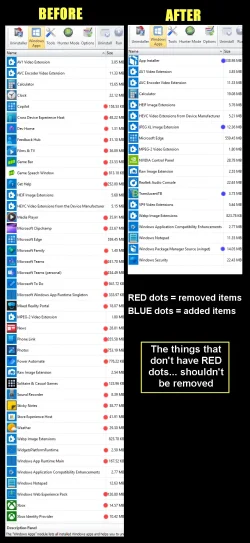
REVO Uninstaller will do the job, and it has a "scan" button that removes all the leftovers as well.


00000 REVO Junk Removal.webp


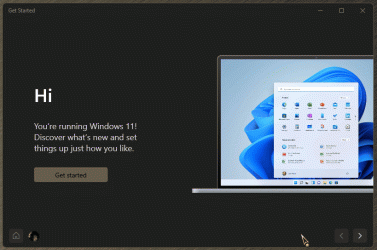
I don't know that anyone has found a way to remove Get Started though.
 

My Computers

System One System Two

  • OS
    Win 11 Home ♦♦♦26200.8655 ♦♦♦♦♦♦♦25H2
    Computer type
    PC/Desktop
    Manufacturer/Model
    Built by Ghot® [May 2020]
    CPU
    AMD Ryzen 7 3700X
    Motherboard
    Asus Pro WS X570-ACE (BIOS 5302)
    Memory
    G.Skill (F4-3200C14D-16GTZKW)
    Graphics Card(s)
    EVGA RTX 2070 (08G-P4-2171-KR)
    Sound Card
    Realtek ALC1220P / ALC S1220A
    Monitor(s) Displays
    Dell U3011 30"
    Screen Resolution
    2560 x 1600
    Hard Drives
    2x Samsung 860 EVO 500GB,
    WD 4TB Black FZBX - SATA III,
    WD 8TB Black FZBX - SATA III,
    DRW-24B1ST CD/DVD Burner
    PSU
    PC Power & Cooling 750W Quad EPS12V
    Case
    Cooler Master ATCS 840 Tower
    Cooling
    CM Hyper 212 EVO (push/pull)
    Keyboard
    Ducky DK9008 Shine II Blue LED
    Mouse
    Logitech Optical M-100
    Internet Speed
    300/300
    Browser
    Firefox (latest)
    Antivirus
    Bitdefender Total Security
    Other Info
    Speakers: Klipsch Pro Media 2.1
  • Operating System
    Windows XP Pro 32bit w/SP3
    Computer type
    PC/Desktop
    Manufacturer/Model
    Built by Ghot® (not in use)
    CPU
    AMD Athlon 64 X2 5000+ (OC'd @ 3.2Ghz)
    Motherboard
    ASUS M2N32-SLI Deluxe Wireless Edition
    Memory
    TWIN2X2048-6400C4DHX (2 x 1GB, DDR2 800)
    Graphics card(s)
    EVGA 256-P2-N758-TR GeForce 8600GT SSC
    Sound Card
    Onboard
    Monitor(s) Displays
    ViewSonic G90FB Black 19" Professional (CRT)
    Screen Resolution
    up to 2048 x 1536
    Hard Drives
    WD 36GB 10,000rpm Raptor SATA
    Seagate 80GB 7200rpm SATA
    Lite-On LTR-52246S CD/RW
    Lite-On LH-18A1P CD/DVD Burner
    PSU
    PC Power & Cooling Silencer 750 Quad EPS12V
    Case
    Generic Beige case, 80mm fans
    Cooling
    ZALMAN 9500A 92mm CPU Cooler
    Keyboard
    Logitech Classic Keybooard 200
    Mouse
    Logitech Optical M-BT96a
    Internet Speed
    300/300
    Browser
    Firefox 3.x ??
    Antivirus
    Symantec (Norton)
    Other Info
    Still assembled, still runs. Haven't turned it on for 15 years?
I am not interested in a 3rd party solution. Mine is clean and doesn't deposit anything extra just for launching it. Just need to add these four last ones and we will be golden.
 

My Computer

System One

  • OS
    Windows
    CPU
    Intel 8086k
    Motherboard
    Asus z370-F
    Graphics Card(s)
    EVGA 3080 Ti FTW3 Ultra
    Sound Card
    ADI-2 DAC fs
I am not interested in a 3rd party solution. Mine is clean and doesn't deposit anything extra just for launching it. Just need to add these four last ones and we will be golden.

Hi SightUp,

You can export a list of all UWAs to your desktop by copying this command into PowerShell: Get-AppxPackage | Select Name, PackageFullName >"$env:userprofile\Desktop\Apps_List.txt"

However, as noted by Ghot, Get Started cannot be uninstalled.

Kind regards,

tecknot
 

My Computer

System One

  • OS
    Windows 11 Pro 25H2 build 26200.8457
    Computer type
    Laptop
    Manufacturer/Model
    Lenovo ThinkPad Workstation P72
    CPU
    Intel i7 8750H @ 2.2 GHz
    Motherboard
    Lenovo 01YU291
    Memory
    16 GB (all Samsung) DDR4-3200 SODIMM (non-ECC) PCIe 3
    Graphics Card(s)
    Intel UHD Graphics 630 & NVIDIA Quadro P600
    Sound Card
    Realtek ALC3286 & Focusrite Saffire 24 Pro DSP
    Monitor(s) Displays
    17.3"
    Screen Resolution
    3840x2160
    Hard Drives
    1TB SSD Samsung 860 EVO SATA 3
    1TB SSD Samsung 970 EVO M.2 NVMe PCIe 3 x 4
    2TB SSD Samsung 990 PRO M.2 NVMe PCIe 3 x 4
    PSU
    230W
    Cooling
    fan
    Keyboard
    UltraNav
    Mouse
    Kensington wireless Orbit
    Internet Speed
    640Mbps
    Browser
    DuckDuckGo and Firefox
    Antivirus
    Defender
    Other Info
    CM246 Chipset
I am not interested in a 3rd party solution. Mine is clean and doesn't deposit anything extra just for launching it. Just need to add these four last ones and we will be golden.
Revo Uninstaller is available as 'portable' app.

Just download it, delete what you want, and then delete it WITHOUT permanently installing it on your device.
 
Last edited:

My Computer

System One

  • OS
    Windows 11 Pro 25H2 (Build 26200.8728)
    Computer type
    PC/Desktop
    Manufacturer/Model
    Dell Pro Max Tower T2 FCT2250
    CPU
    Intel Core Ultra 9 285 5.6 GHz
    Motherboard
    64-bit operating system, x64-based processor
    Memory
    32.00 GB
    Graphics Card(s)
    Intel Integrated Graphics (128 MB)
    Sound Card
    Realtek Audio
    Monitor(s) Displays
    Dell P2714H Monitor
    Screen Resolution
    1920 x 1080
    Hard Drives
    1 x 512GB M.2 XG10d SED KIOXIA PCIe solid state drive (Internal)
    1 x 2TB Seagate ST2000DM008-2UB102 HDD (Internal)
    1 x 1TB Seagate STGX4000400 External HDD
    1 x 4TB Seagate STGX4000400 External HDD
    1 x 6TB WD Elements AE 2689 External HDD
    PSU
    500 Watts
    Cooling
    Air
    Keyboard
    Microsoft Wired Keyboard 600
    Mouse
    Microsoft USB Basic Optical Mouse v2.0
    Browser
    Firefox
    Antivirus
    Windows Defender + Malwarebytes Premium
    Other Info
    BaseBoard Manufacturer Dell Inc.
    BaseBoard Product 022RY57
    BaseBoard Version A01
I am not interested in a 3rd party solution. Mine is clean and doesn't deposit anything extra just for launching it. Just need to add these four last ones and we will be golden.

That's fine, but Revo is used by many other people for other things besides removing garbage apps. It also comes as a portable version so you don't necessarily have to install it.

Since Windows' own Control Panel is inadequate for app cleanup, Revo is the first tool I install after setting up a new machine.
 

My Computers

System One System Two

  • OS
    Windows 11 Pro 25H2 build: (26200.7623)
    Computer type
    Laptop
    Manufacturer/Model
    Microsoft Surface Pro
    Memory
    32GB
  • Operating System
    Microsoft 25H2 Pro
    Computer type
    Laptop
    Manufacturer/Model
    Dell Pro 14 - PC14250
    CPU
    Intel Core Ultra 7
    Memory
    64GB
    Graphics card(s)
    Intel Integrated Graphics
    Hard Drives
    Micron 1TB SSD
powershell -command "Get-appxpackage -allusers *MSTeams* | Remove-AppxPackage"
powershell -command "Get-appxprovisionedpackage -online | where-object {$_.packagename -like '*MSTeams*'} | remove-appxprovisionedpackage -online"

here you go for teams
 

My Computer

System One

  • OS
    Windows 11 25H2 Home Single Language (26200.8037)
    Computer type
    Laptop
    Manufacturer/Model
    LENOVO IdeaPad 5 15ITL05
    CPU
    Intel Core i3-1115G4
    Motherboard
    There is no such a God, I only know mother-Earth
    Memory
    8GB
    Graphics Card(s)
    on-board
    Sound Card
    on-board
    Monitor(s) Displays
    (s) is too ambitious for me
    Screen Resolution
    1920*1080
    Hard Drives
    256GB (SSD)
    PSU
    I was very young when I last saw a PSU
    Case
    ...
    Cooling
    My coldness is enough to cool the computer
    Keyboard
    A broken and very clean keyboard
    Mouse
    Rat
    Internet Speed
    Slowest internet connection in Europe
    Browser
    ChromePortable / FirefoxPortable / TorBrowser
    Antivirus
    G-Virus
    Other Info
    I can simply say that I took the red pill and I am not happy with it.
I am not interested in a 3rd party solution. Mine is clean and doesn't deposit anything extra just for launching it. Just need to add these four last ones and we will be golden.


I understand that.
But... things like this (not Windows related), will keep happening over time. MS also keeps creating new bloatware and installing it. This is one reason that REVO has become more popular. The portable and the installer version both work.

You could even put the portable version on a USB stick.

Further... check out Option Five, here...


And here's another handy thing...


That said, I would still use REVO... it much easier, and removes leftovers.
The best thing about REVO, is that it removes leftovers, that uninstallers leave behind. ^^
 

My Computers

System One System Two

  • OS
    Win 11 Home ♦♦♦26200.8655 ♦♦♦♦♦♦♦25H2
    Computer type
    PC/Desktop
    Manufacturer/Model
    Built by Ghot® [May 2020]
    CPU
    AMD Ryzen 7 3700X
    Motherboard
    Asus Pro WS X570-ACE (BIOS 5302)
    Memory
    G.Skill (F4-3200C14D-16GTZKW)
    Graphics Card(s)
    EVGA RTX 2070 (08G-P4-2171-KR)
    Sound Card
    Realtek ALC1220P / ALC S1220A
    Monitor(s) Displays
    Dell U3011 30"
    Screen Resolution
    2560 x 1600
    Hard Drives
    2x Samsung 860 EVO 500GB,
    WD 4TB Black FZBX - SATA III,
    WD 8TB Black FZBX - SATA III,
    DRW-24B1ST CD/DVD Burner
    PSU
    PC Power & Cooling 750W Quad EPS12V
    Case
    Cooler Master ATCS 840 Tower
    Cooling
    CM Hyper 212 EVO (push/pull)
    Keyboard
    Ducky DK9008 Shine II Blue LED
    Mouse
    Logitech Optical M-100
    Internet Speed
    300/300
    Browser
    Firefox (latest)
    Antivirus
    Bitdefender Total Security
    Other Info
    Speakers: Klipsch Pro Media 2.1
  • Operating System
    Windows XP Pro 32bit w/SP3
    Computer type
    PC/Desktop
    Manufacturer/Model
    Built by Ghot® (not in use)
    CPU
    AMD Athlon 64 X2 5000+ (OC'd @ 3.2Ghz)
    Motherboard
    ASUS M2N32-SLI Deluxe Wireless Edition
    Memory
    TWIN2X2048-6400C4DHX (2 x 1GB, DDR2 800)
    Graphics card(s)
    EVGA 256-P2-N758-TR GeForce 8600GT SSC
    Sound Card
    Onboard
    Monitor(s) Displays
    ViewSonic G90FB Black 19" Professional (CRT)
    Screen Resolution
    up to 2048 x 1536
    Hard Drives
    WD 36GB 10,000rpm Raptor SATA
    Seagate 80GB 7200rpm SATA
    Lite-On LTR-52246S CD/RW
    Lite-On LH-18A1P CD/DVD Burner
    PSU
    PC Power & Cooling Silencer 750 Quad EPS12V
    Case
    Generic Beige case, 80mm fans
    Cooling
    ZALMAN 9500A 92mm CPU Cooler
    Keyboard
    Logitech Classic Keybooard 200
    Mouse
    Logitech Optical M-BT96a
    Internet Speed
    300/300
    Browser
    Firefox 3.x ??
    Antivirus
    Symantec (Norton)
    Other Info
    Still assembled, still runs. Haven't turned it on for 15 years?
I turn off Windows Updates. As this computer is strictly for gaming, they aren't needed if everything is stable. Hopefully no other apps just appear.
 

My Computer

System One

  • OS
    Windows
    CPU
    Intel 8086k
    Motherboard
    Asus z370-F
    Graphics Card(s)
    EVGA 3080 Ti FTW3 Ultra
    Sound Card
    ADI-2 DAC fs
PowerShell -Command "Get-appxpackage -allusers *Microsoft.MicrosoftSolitaireCollection* | Remove-AppxPackage" TIMEOUT 5
I used to use codes to debloat but it is tedious and time-consuming. Revo Uninstaller does an excellent job doing this.
 

My Computer

System One

  • OS
    Win 7,8.1,10,11, Mint, Kde Plasma, Debian
    Computer type
    Laptop
    Manufacturer/Model
    Dell
    CPU
    Intel(R) Core(TM) i7-6500U CPU @ 2.50GHz
    Memory
    16 GB
    Graphics Card(s)
    Intel(R) HD Graphics 520/Nvidia GeForce 930M
    Sound Card
    Intel(R) Display Audio/RealtekAudio
    Monitor(s) Displays
    Generic Pnp Monitor
    Screen Resolution
    1366 X 768
    Hard Drives
    ST2000LM024-1EJ164
    Keyboard
    Eng (US)
    Mouse
    Sanwa Supply
    Browser
    Firefox
    Antivirus
    Avast One
    Other Info
    Too many laptops with different system specifications.
I used to use codes to debloat but it is tedious and time-consuming. Revo Uninstaller does an excellent job doing this.

I prefer to do that process with a BAT file and it is not time consuming.
 

My Computer

System One

  • OS
    Windows 11 25H2 Home Single Language (26200.8037)
    Computer type
    Laptop
    Manufacturer/Model
    LENOVO IdeaPad 5 15ITL05
    CPU
    Intel Core i3-1115G4
    Motherboard
    There is no such a God, I only know mother-Earth
    Memory
    8GB
    Graphics Card(s)
    on-board
    Sound Card
    on-board
    Monitor(s) Displays
    (s) is too ambitious for me
    Screen Resolution
    1920*1080
    Hard Drives
    256GB (SSD)
    PSU
    I was very young when I last saw a PSU
    Case
    ...
    Cooling
    My coldness is enough to cool the computer
    Keyboard
    A broken and very clean keyboard
    Mouse
    Rat
    Internet Speed
    Slowest internet connection in Europe
    Browser
    ChromePortable / FirefoxPortable / TorBrowser
    Antivirus
    G-Virus
    Other Info
    I can simply say that I took the red pill and I am not happy with it.
I don't know that anyone has found a way to remove Get Started though.
Remove???..., are you kidding me!!!
I find Get Started to be the most valuable, resource-rich app on the entire PC!!! :woozy:

11312.gif
 

My Computers

System One System Two

  • OS
    Windows 11 Pro
    Computer type
    PC/Desktop
    Manufacturer/Model
    ASUS ROG Strix
  • Operating System
    Windows 11 Pro
    Computer type
    Laptop
    Manufacturer/Model
    ASUS VivoBook
More recently, some Windows Updates - are more sensible to some of those. If you get an error during next monthly update - this is probably the cause. Same goes for Revo Uninstaller (the stuff it can remove - can break Windows Updates). Does create a System Restore - if you have that option ticked, but till next major update - that system restore can be overwritten/replaced. Helps to have a back-up after a clean install - or you'll have to do an in-place Upgrade - to restore Win Updates functionality. Despite the system being fairy stable (no errors either) - with most of those apps removed (tho, a lot of those are still safe to be removed).
 

My Computer

System One

  • OS
    WinDOS 25H2
    Computer type
    Laptop
    CPU
    Intel & AMD
    Memory
    SO-DIMM SK Hynix 15.8 GB Dual-Channel DDR4-2666 (2 x 8 GB) 1329MHz (19-19-19-43)
    Graphics Card(s)
    nVidia RTX 2060 6GB Mobile GPU (TU106M)
    Sound Card
    Onbord Realtek ALC1220
    Screen Resolution
    1920 x 1080
    Hard Drives
    1x Samsung PM981 NVMe PCIe M.2 512GB / 1x Seagate Expansion ST1000LM035 1TB
Back
Top Bottom