
Solved Delete guest admin account?


archz2

Active member
Local time
2:03 PM
Posts
33
OS
Windows 11
I recently ran some commands in command prompt while trying to attempt to delete system volume information folder from an external SSD. That SSD was once an internal SSD for my laptop.

When I ran those commands, it created a guest admin account on my laptop. I don't remember those commands now as I copied it from a tutorial post.

I tried removing that guest account in admin cmd propmt but I failed.

How can I remove it? I want to keep just one account on my laptop like it has always had from the beginning.

The red highlighted/redacted name is the name of my admin account/username here in this screenshot.
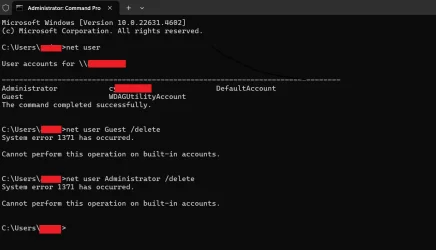
Screenshot 2025-01-08 113546.webp
 
Windows Build/Version
Windows 11 Home Single Language, 23H2, OS build 22631.4602

My Computer

System One

  • OS
    Windows 11
command prompt as admin, and type
Code:
net localgroup administrators

that will show you all administrators. Guest is a default account that can be enabled or disabled. it is only a standard user, not admin. Administrator is the system Administrator baked-in account. it can be enabled/disabled but not deleted.

Code:
net user Guest /active:no
Code:
net user Administrator /active:no
will hide those accounts (disable them)
 

My Computer

System One

  • OS
    Windows 11 Pro
command prompt as admin, and type
Code:
net localgroup administrators

that will show you all administrators. Guest is a default account that can be enabled or disabled. it is only a standard user, not admin. Administrator is the system Administrator baked-in account. it can be enabled/disabled but not deleted.

Code:
net user Guest /active:no
Code:
net user Administrator /active:no
will hide those accounts (disable them)
Fantastic! That solved it. Thanks!
 

My Computer

System One

  • OS
    Windows 11
After using "net user Administrator /active:no" the associated user folders will remain. I just deleted them and nothing bad happened. Saves about 120MB.

I used File Explorer to delete the "Adminstrator" folder in C:\users. Don't delete the wrong one!
 

My Computers

System One System Two

  • OS
    Windows 11 Pro 25H2 26200.8524
    Computer type
    Laptop
    Manufacturer/Model
    Acemagic LX15PRO
    CPU
    AMD Ryzen 7 5825U with Radeon Graphics
    Memory
    16GB
    Screen Resolution
    1920 x 1080
    Hard Drives
    SSD 2TB
    Internet Speed
    30 Mbps
    Browser
    Brave
    Antivirus
    Webroot Secure Anywhere
    Other Info
    System 3

    Acer Swift SF114-34 laptop
    OS Windows 11 Pro 26200.8524
    CPU Pentium Silver N6000
    RAM 4GB
    SSD Samsung 970 EVO Plus SSD 2TB (an upgrade)
  • Operating System
    Windows 11 Pro 23H2 22631.2506
    Computer type
    Laptop
    Manufacturer/Model
    HP Mini 210-1090NR PC (bought in late 2009!)
    CPU
    Atom N450 1.66GHz
    Memory
    2GB
    Browser
    Brave
    Antivirus
    Webroot
Back
Top Bottom


