Solved Delete/Move selected files after a Search


RaptorX

New member
Local time
4:20 PM
Posts
5
OS
Win11
Hello guys, when using the search bar in explorer you get a list of the files that match your search.

Since ancient times you could move or delete the files shown in the search results... I don't seem to be able to do that now. Am i missing something?
Did they really remove that functionality?

That seems insane to me.
 
Windows Build/Version
Win11/ 22H2 22621.2070

My Computer My Computer

At a glance

Win11Intel i5-4460
OS
Win11
Computer type
PC/Desktop
Manufacturer/Model
Asus
CPU
Intel i5-4460
Hi welcome to the forum,
Please consider filling out your system specs with more details when you have a chance.

The setting you are looking for is;

Settings/Privacy & Security/Activity History
 

My Computers My Computers

  • At a glance

    All Branches but ReleaseAMD Ryzen 7 7735HS 3200-4500 Mhz 8 cores x 232 GB DDR5Radeon Graphic / NVIDIA GeForce RTX 4060 8 GB...
    OS
    All Branches but Release
    Computer type
    Laptop
    Manufacturer/Model
    Acer Nitro ANV15-51
    CPU
    AMD Ryzen 7 7735HS 3200-4500 Mhz 8 cores x 2
    Motherboard
    Sportage_RBH
    Memory
    32 GB DDR5
    Graphics Card(s)
    Radeon Graphic / NVIDIA GeForce RTX 4060 8 GB GDDR6
    Sound Card
    AMD/Realtek(R) Audio
    Monitor(s) Displays
    Integrated Monitor (15.3"vis)
    Screen Resolution
    FHD 1920X1080 16:9 144Hz
    Hard Drives
    KINGSTON OM8SEP4512Q-AA 1TB
    Western Digital 256GB
    PSU
    19V DC 6.32 A 120 W
    Cooling
    Dual Fans
    Mouse
    MS Bluetooth
    Internet Speed
    Fiber 1GB Cox -us & 1GB Orange-fr
    Browser
    Edge Canary- Firefox Nightly-Chrome Dev-Chrome Dev
    Antivirus
    Windows Defender
  • At a glance

    Windows 11 BetaAMD A9-94208 GB of DDR4AMD Radeon R5
    Operating System
    Windows 11 Beta
    Computer type
    Laptop
    Manufacturer/Model
    Asus X751BP
    CPU
    AMD A9-9420
    Memory
    8 GB of DDR4
    Graphics card(s)
    AMD Radeon R5
    Screen Resolution
    1600x900
    Hard Drives
    Seagate 1 TB
Did they really remove that functionality?
Welcome to the forum. No, it's still there for me. Pressing the Shift + F10 keys while having something selected will open the "Show more options" context menu for that item.
OR you can disable the 'show more options' and revert back to the old right click context menu entirely.
 

My Computers My Computers

  • At a glance

    Windows 11 Pro 25H2 26200.8655i9-10900 10 core 20 threads32 gbnone-Intel UHD Graphics 630
    OS
    Windows 11 Pro 25H2 26200.8655
    Computer type
    PC/Desktop
    Manufacturer/Model
    Dell Optiplex 7080
    CPU
    i9-10900 10 core 20 threads
    Motherboard
    DELL 0J37VM
    Memory
    32 gb
    Graphics Card(s)
    none-Intel UHD Graphics 630
    Sound Card
    Integrated Realtek
    Monitor(s) Displays
    Benq 27
    Screen Resolution
    2560x1440
    Hard Drives
    2x1tb Solidigm m.2 nvme /External drives 512gb Samsung m.2 sata+2tb Kingston m2.nvme
    PSU
    500w
    Case
    MT
    Cooling
    Dell Premium
    Keyboard
    Logitech wired
    Mouse
    Logitech wireless
    Internet Speed
    so slow I'm too embarrassed to tell
    Browser
    #1 Edge #2 Firefox
    Antivirus
    Defender+MWB Premium
  • At a glance

    Windows 11 Pro 24H2 26200.8457AMD Ryzen 7 6800U32 gbintegrated
    Operating System
    Windows 11 Pro 24H2 26200.8457
    Computer type
    PC/Desktop
    Manufacturer/Model
    Beelink Mini PC SER5
    CPU
    AMD Ryzen 7 6800U
    Memory
    32 gb
    Graphics card(s)
    integrated
    Sound Card
    integrated
    Monitor(s) Displays
    Benq 27
    Screen Resolution
    2560x1440
    Hard Drives
    1TB Crucial nvme
    Keyboard
    Logitech wired
    Mouse
    Logitech wireless
    Internet Speed
    still too embarrassed to tell
    Browser
    Firefox
    Antivirus
    Defender
    Other Info
    System 3 is non compliant Dell 9020 i7-4770/24gb ram Win11 PRO 26200.8457
Welcome to the forum. No, it's still there for me. Pressing the Shift + F10 keys while having something selected will open the "Show more options" context menu for that item.
OR you can disable the 'show more options' and revert back to the old right click context menu entirely.
I have a bit more context.

I just noticed that when I perform a normal search, everything works as expected, with copying/cutting/deleting working correctly.
But if you are performing a search on file contents then that's when those options seem to be disabled.

1691519626735.png
 

My Computer My Computer

At a glance

Win11Intel i5-4460
OS
Win11
Computer type
PC/Desktop
Manufacturer/Model
Asus
CPU
Intel i5-4460
Those are e-mail messages, are they saved to a local folder or part of your Outlook? Windows Search will index Outlook messages.
If they're still in Outlook, then obviously Explorer won't delete them.

Otherwise the Cut/Copy/Delete toolbar icons are available on my Explorer's search results (22621.2070)
 

My Computer My Computer

At a glance

Windows 7
OS
Windows 7
Those are e-mail messages, are they saved to a local folder or part of your Outlook? Windows Search will index Outlook messages.
If they're still in Outlook, then obviously Explorer won't delete them.

Otherwise the Cut/Copy/Delete toolbar icons are available on my Explorer's search results (22621.2070)
Those are .eml files in a folder.
 

My Computer My Computer

At a glance

Win11Intel i5-4460
OS
Win11
Computer type
PC/Desktop
Manufacturer/Model
Asus
CPU
Intel i5-4460
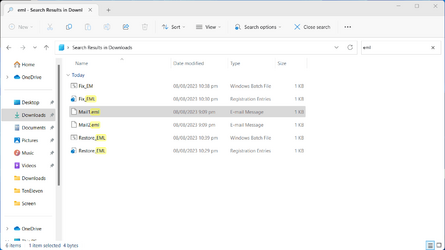
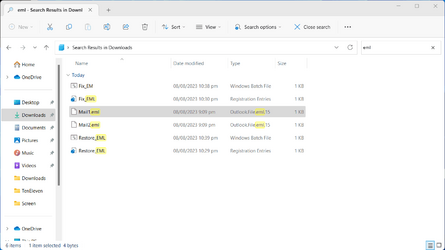
The answer to your question, it turns out, is that's the normal behavior for *.eml files -- ever since Windows 7.

A limited group of file extensions have defined Property Handlers, which restrict what actions may be taken. When *.eml files are displayed in the folder view, they're treated like normal files. When returned in the context of Search results, they stop being normal files and don't have Cut, Rename and Delete actions.

PeterSteier provides his solution here:
Why do .eml files (stored in the regular file system!) not allow delete or move?

There's just one problem, one of the reg keys is protected by TrustedInstaller rights. I don't advise users to follow the normal takeown/icacls commands to take ownership of the registry. There's always a risk of messing up, and breaking Windows.

My preference is to use PowerRun, which opens an elevated CMD window with correct privileges.

From the elevated CMD, run Fix_EML.bat
To revert the change, run Restore_EML.bat

Close any Explorer window you have open, and wait about two seconds. Now *.eml files will behave exactly as normal files inside Search results.
 

Attachments

  • Screenshot 2023-08-08 224321.png
    Screenshot 2023-08-08 224321.png
    26 KB · Views: 1
  • Screenshot 2023-08-08 224441.png
    Screenshot 2023-08-08 224441.png
    26 KB · Views: 1
  • Fix_EML.bat
    Fix_EML.bat
    310 bytes · Views: 4
  • Restore_EML.bat
    Restore_EML.bat
    365 bytes · Views: 4
Last edited:

My Computer My Computer

At a glance

Windows 7
OS
Windows 7
The answer to your question, it turns out, is that's the normal behavior for *.eml files -- ever since Windows 7.

A limited group of file extensions have defined Property Handlers, which restrict what actions may be taken. When *.eml files are displayed in the folder view, they're treated like normal files. When returned in the context of Search results, they stop being normal files and don't have Cut, Rename and Delete actions.

Thanks for the response. Do you know what other file extensions behave that way?
 

My Computer My Computer

At a glance

Win11Intel i5-4460
OS
Win11
Computer type
PC/Desktop
Manufacturer/Model
Asus
CPU
Intel i5-4460
I've never paid any attention to this problem, until you pointed it out.

When you check the Property Handlers, .eml used a completely unique ID that wasn't shared by other Office file extensions. I would assume there's specific reason why it's done, but I'm not that bored to compile a list. These days I try moving on to the next question once there's a working answer.
 

My Computer My Computer

At a glance

Windows 7
OS
Windows 7
I've never paid any attention to this problem, until you pointed it out.

When you check the Property Handlers, .eml used a completely unique ID that wasn't shared by other Office file extensions. I would assume there's specific reason why it's done, but I'm not that bored to compile a list. These days I try moving on to the next question once there's a working answer.

Fair enough, thanks for the help!
 

My Computer My Computer

At a glance

Win11Intel i5-4460
OS
Win11
Computer type
PC/Desktop
Manufacturer/Model
Asus
CPU
Intel i5-4460
My preference is to use PowerRun, which opens an elevated CMD window with correct privileges.
Thanks for pointing out PowerRun. I've used AdvancedRun in the past to run stuff as TrustedInstaller. It's always handy to have an alternative or two in the toolkit.
 

My Computer My Computer

At a glance

Windows 10/11
OS
Windows 10/11
Computer type
Laptop
Manufacturer/Model
Acer
PowerRun seems like the most intuitive tool for non-technical users. Sometimes you need software that doesn't distract users from whatever task they're supposed to finish.
 

My Computer My Computer

At a glance

Windows 7
OS
Windows 7

Latest Support Threads

Back
Top Bottom