Dell Precision 3541 boots to Grub prompt


Ed McCauley

Well-known member
Member
Local time
10:30 PM
Posts
153
OS
Windows 11 Pro 25H2
How do I get rid of Grub and boot to windows?

I booted into the BIOS and went to Boot Sequence. I unchecked Ubuntu and left "UEFI: WDC PC SN730... Partition 1" checked. I reordered the Boot Sequence placing UEFI first. Under "View Boot Option" I have "Boot Option Name"
UEFI WDC PC SN730 SDBQNTY-1T00-1001 Partition 1" which is what I want.
I clicked Apply, and Exit to Reboot.

It still Boots into GNU Grub 2.06 with a Grub Prompt. When I Reboot using F2 the Boot Sequence has changed back to Ubuntu first! I discovered I could actually Delete the Ubuntu Option. Once again, I clicked Apply and Exit to Reboot.

Once again it rebooted to the Grub Prompt. Checking the BIOS, the Ubuntu option had returned, was checked and number 1 in the Boot Sequence...
 
Last edited:

My Computers My Computers

  • At a glance

    Windows 11 Pro 25H2Intel i7 2.60Ghz16GBNvidia Quadro P620 + Intel UHD Graphics 630
    OS
    Windows 11 Pro 25H2
    Computer type
    Laptop
    Manufacturer/Model
    Dell/Precision 351
    CPU
    Intel i7 2.60Ghz
    Motherboard
    Dell 0y8h01
    Memory
    16GB
    Graphics Card(s)
    Nvidia Quadro P620 + Intel UHD Graphics 630
    Sound Card
    Realtek
    Monitor(s) Displays
    Laptop screen only
    Screen Resolution
    1920x1080p
    Hard Drives
    PC SN730 NVMe WDC 512GB
    Mouse
    Logitech Gaming Mouse G600
    Browser
    DuckDuckGo
    Antivirus
    BitDefender
  • At a glance

    Win 11AMD Ryzen 9950X3DCorsair Dominator DDR5 32GBnVidia RTX 5080
    Operating System
    Win 11
    Computer type
    PC/Desktop
    CPU
    AMD Ryzen 9950X3D
    Motherboard
    Asus ROG Crosshair X870E
    Memory
    Corsair Dominator DDR5 32GB
    Graphics card(s)
    nVidia RTX 5080
    Hard Drives
    2 Samsung NVMe M.2 SSD 9100 4TB
    PSU
    Seasonic GX-1200W
    Case
    LanCool 216
    Keyboard
    Steelseries Apex Pro Gen 3
i am assuming you are dual booting.
you will have to change the boot entry within the grub.conf file
boot into Ubuntu and please follow these instructions

if you are not dual booting
then you will have to remove the Ubuntu boot files from the EFI/BOOT partition

best of luck Steve ..
 

My Computers My Computers

  • At a glance

    Debian 13 KDE .. Windows 11 HomeRyzen 7 5825u64GB DDR4 3200Ryzen 7 5825u
    OS
    Debian 13 KDE .. Windows 11 Home
    Computer type
    PC/Desktop
    Manufacturer/Model
    HP 24" AiO
    CPU
    Ryzen 7 5825u
    Motherboard
    HP
    Memory
    64GB DDR4 3200
    Graphics Card(s)
    Ryzen 7 5825u
    Sound Card
    RealTek
    Monitor(s) Displays
    24" HP AiO
    Screen Resolution
    1920 x 1080 @60 Hz
    Hard Drives
    1TB WD Blue SN580 M2 SSD Partitioned.
    2x 1TB USB HDD External Backup/Storage.
    PSU
    90W external power brick
    Case
    24" All in One
    Cooling
    Default Air Cooling
    Keyboard
    HP WiFi UK extended
    Mouse
    HP WiFi 3 Button
    Internet Speed
    1GB full fibre
    Browser
    Edge & Firefox
    Antivirus
    AVG Internet Security/Windows Defender
    Other Info
    Mainly Open Source Software
  • At a glance

    Ubuntu 22.04.5 LTSi5 7200u16GB DDR4Intel
    Operating System
    Ubuntu 22.04.5 LTS
    Computer type
    Laptop
    Manufacturer/Model
    Dell 13" Latitude 2017
    CPU
    i5 7200u
    Motherboard
    Dell
    Memory
    16GB DDR4
    Graphics card(s)
    Intel
    Sound Card
    Intel
    Monitor(s) Displays
    13" Dell Laptop
    Hard Drives
    250GB Crucial 2.5" SSD
    Mouse
    Generic WiFi 3 button
    Internet Speed
    WiFi only
    Browser
    Firefox
    Antivirus
    ClamAV TK
    Other Info
    Mainly Open Source Software
So you have or had Win 11 and Linux as dual boot.
Were they on same drive?
Open a CMD window as administrator and type:
bcdedit

Post the CMD image here

Please post a whole window Disk Manager image of ALL your drives. Don't forget to expand the columns so we can read them. How to Post a Screenshot of Disk Management
If you have a MiniTool or AOMEI Partition use it instead or Windows disk manager.
 

My Computers My Computers

  • At a glance

    Windows 11 Pro - Windows 7 HP 64 - Lubuntui5 6600K - 800MHz to 4400MHz4+4G GSkill DDR4 3000IG - Intel 530
    OS
    Windows 11 Pro - Windows 7 HP 64 - Lubuntu
    Computer type
    PC/Desktop
    Manufacturer/Model
    custom build
    CPU
    i5 6600K - 800MHz to 4400MHz
    Motherboard
    GA-Z170-HD3P
    Memory
    4+4G GSkill DDR4 3000
    Graphics Card(s)
    IG - Intel 530
    Monitor(s) Displays
    Samsung 226BW
    Screen Resolution
    1680x1050
    Hard Drives
    (1) -1 SM951 – 128GB M.2 AHCI PCIe SSD drive for Win 11
    (2) -1 WD SATA 3 - 1T for Data
    (3) -1 WD SATA 3 - 1T for backup
    (4) -1 BX500 SSD - 256G for Windows 7 and Lubuntu
    PSU
    Thermaltake 450W TR2 gold
    Keyboard
    Old and good Chicony mechanical keyboard
    Mouse
    Logitech mX performance - 9 buttons (had to disable some)
    Internet Speed
    500 Mb/s
    Browser
    Firefox 64
  • At a glance

    Windows 11 Proi7-4500U 800- 3000MHz(4+4)G DDR3 1600IG intel 4400 + NVIDIA GeForce GT 745M
    Operating System
    Windows 11 Pro
    Computer type
    Laptop
    Manufacturer/Model
    Asus Q550LF
    CPU
    i7-4500U 800- 3000MHz
    Motherboard
    Asus Q550LF
    Memory
    (4+4)G DDR3 1600
    Graphics card(s)
    IG intel 4400 + NVIDIA GeForce GT 745M
    Sound Card
    Realtek
    Monitor(s) Displays
    LG Display LP156WF4-SPH1
    Screen Resolution
    1920 x 1080
    Hard Drives
    BX500 120G SSD for Windows and programs
    & 1T HDD for data
    Internet Speed
    500 Mb/s
    Browser
    Firefox 64
i am assuming you are dual booting.
you will have to change the boot entry within the grub.conf file
boot into Ubuntu and please follow these instructions

if you are not dual booting
then you will have to remove the Ubuntu boot files from the EFI/BOOT partition

best of luck Steve ..
Thanks, Steve.
This is all way over my head. I know nothing at all about Linux.

This computer had a dual boot config with windows 11 and Linux. I wanted to replace the original SSD drive with a larger one without losing everything installed on the disk. I cloned the original drive, then replaced the original with the new SSD. Regardless of what I do in the BIOS, I end with "grub> _" on the screen.

One of the procedures mentioned in your links uses the cmd "ls". Just to be sure I'm in Linux as I assumed, and only Linux code will work, I entered "ls". The result was "(proc) (memdisk) (hd0) (hd0,gpt3) (hd0, gpt2) (hd0,gpt1). Apparently, this is a list of the 3 gpt partitions on hard drive 0, but I don't know what to do with the info.

Tom
 

My Computers My Computers

  • At a glance

    Windows 11 Pro 25H2Intel i7 2.60Ghz16GBNvidia Quadro P620 + Intel UHD Graphics 630
    OS
    Windows 11 Pro 25H2
    Computer type
    Laptop
    Manufacturer/Model
    Dell/Precision 351
    CPU
    Intel i7 2.60Ghz
    Motherboard
    Dell 0y8h01
    Memory
    16GB
    Graphics Card(s)
    Nvidia Quadro P620 + Intel UHD Graphics 630
    Sound Card
    Realtek
    Monitor(s) Displays
    Laptop screen only
    Screen Resolution
    1920x1080p
    Hard Drives
    PC SN730 NVMe WDC 512GB
    Mouse
    Logitech Gaming Mouse G600
    Browser
    DuckDuckGo
    Antivirus
    BitDefender
  • At a glance

    Win 11AMD Ryzen 9950X3DCorsair Dominator DDR5 32GBnVidia RTX 5080
    Operating System
    Win 11
    Computer type
    PC/Desktop
    CPU
    AMD Ryzen 9950X3D
    Motherboard
    Asus ROG Crosshair X870E
    Memory
    Corsair Dominator DDR5 32GB
    Graphics card(s)
    nVidia RTX 5080
    Hard Drives
    2 Samsung NVMe M.2 SSD 9100 4TB
    PSU
    Seasonic GX-1200W
    Case
    LanCool 216
    Keyboard
    Steelseries Apex Pro Gen 3
Tom,
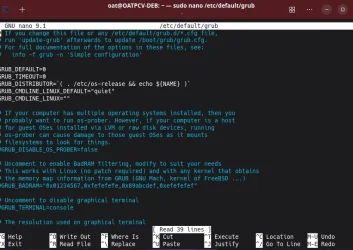
Just follow the steps in the first linked document in order to modify the GRUB configuration.
(be aware that nano is not notepad so be careful when editing and use the key combination at the bottom of the terminal)
the ^ stands for Ctrl, so before you exit you need Ctrl O , enter, and Ctrl X

nano.webp
 

My Computers My Computers

  • At a glance

    All Branches but ReleaseAMD Ryzen 7 7735HS 3200-4500 Mhz 8 cores x 232 GB DDR5Radeon Graphic / NVIDIA GeForce RTX 4060 8 GB...
    OS
    All Branches but Release
    Computer type
    Laptop
    Manufacturer/Model
    Acer Nitro ANV15-51
    CPU
    AMD Ryzen 7 7735HS 3200-4500 Mhz 8 cores x 2
    Motherboard
    Sportage_RBH
    Memory
    32 GB DDR5
    Graphics Card(s)
    Radeon Graphic / NVIDIA GeForce RTX 4060 8 GB GDDR6
    Sound Card
    AMD/Realtek(R) Audio
    Monitor(s) Displays
    Integrated Monitor (15.3"vis)
    Screen Resolution
    FHD 1920X1080 16:9 144Hz
    Hard Drives
    KINGSTON OM8SEP4512Q-AA 1TB
    Western Digital 256GB
    PSU
    19V DC 6.32 A 120 W
    Cooling
    Dual Fans
    Mouse
    MS Bluetooth
    Internet Speed
    Fiber 1GB Cox -us & 1GB Orange-fr
    Browser
    Edge Canary- Firefox Nightly-Chrome Dev-Chrome Dev
    Antivirus
    Windows Defender
  • At a glance

    Windows 11 BetaAMD A9-94208 GB of DDR4AMD Radeon R5
    Operating System
    Windows 11 Beta
    Computer type
    Laptop
    Manufacturer/Model
    Asus X751BP
    CPU
    AMD A9-9420
    Memory
    8 GB of DDR4
    Graphics card(s)
    AMD Radeon R5
    Screen Resolution
    1600x900
    Hard Drives
    Seagate 1 TB
Tom,
Just follow the steps in the first linked document in order to modify the GRUB configuration.
(be aware that nano is not notepad so be careful when editing and use the key combination at the bottom of the terminal)
the ^ stands for Ctrl, so before you exit you need Ctrl O , enter, and Ctrl X

View attachment 176573
I appreciate everyones attempts to help, but as I have stated; Windows is not loaded so I can't get a cmd prompt w/admin privileges. With the exception of "ls" every command I enter tells me that cmd doesn't exist. It says use a text editor preferably nano? It doesn't tell you how to open nano, and i can't change the config file when i can't even get to it...
 

My Computers My Computers

  • At a glance

    Windows 11 Pro 25H2Intel i7 2.60Ghz16GBNvidia Quadro P620 + Intel UHD Graphics 630
    OS
    Windows 11 Pro 25H2
    Computer type
    Laptop
    Manufacturer/Model
    Dell/Precision 351
    CPU
    Intel i7 2.60Ghz
    Motherboard
    Dell 0y8h01
    Memory
    16GB
    Graphics Card(s)
    Nvidia Quadro P620 + Intel UHD Graphics 630
    Sound Card
    Realtek
    Monitor(s) Displays
    Laptop screen only
    Screen Resolution
    1920x1080p
    Hard Drives
    PC SN730 NVMe WDC 512GB
    Mouse
    Logitech Gaming Mouse G600
    Browser
    DuckDuckGo
    Antivirus
    BitDefender
  • At a glance

    Win 11AMD Ryzen 9950X3DCorsair Dominator DDR5 32GBnVidia RTX 5080
    Operating System
    Win 11
    Computer type
    PC/Desktop
    CPU
    AMD Ryzen 9950X3D
    Motherboard
    Asus ROG Crosshair X870E
    Memory
    Corsair Dominator DDR5 32GB
    Graphics card(s)
    nVidia RTX 5080
    Hard Drives
    2 Samsung NVMe M.2 SSD 9100 4TB
    PSU
    Seasonic GX-1200W
    Case
    LanCool 216
    Keyboard
    Steelseries Apex Pro Gen 3

I appreciate everyones attempts to help, but as I have stated; Windows is not loaded so I can't get a cmd prompt w/admin privileges. With the exception of "ls" every command I enter tells me that cmd doesn't exist. It says use a text editor preferably nano? It doesn't tell you how to open nano, and i can't change the config file when i can't even get to it...
Who said anything about Windows command prompt?
My reference was not to use Windows but the Linux terminal. (screenshot above)
The Linux command provided starts nano for you.
Try this: Instead of ls, type in pwd (enter)
 

My Computers My Computers

  • At a glance

    All Branches but ReleaseAMD Ryzen 7 7735HS 3200-4500 Mhz 8 cores x 232 GB DDR5Radeon Graphic / NVIDIA GeForce RTX 4060 8 GB...
    OS
    All Branches but Release
    Computer type
    Laptop
    Manufacturer/Model
    Acer Nitro ANV15-51
    CPU
    AMD Ryzen 7 7735HS 3200-4500 Mhz 8 cores x 2
    Motherboard
    Sportage_RBH
    Memory
    32 GB DDR5
    Graphics Card(s)
    Radeon Graphic / NVIDIA GeForce RTX 4060 8 GB GDDR6
    Sound Card
    AMD/Realtek(R) Audio
    Monitor(s) Displays
    Integrated Monitor (15.3"vis)
    Screen Resolution
    FHD 1920X1080 16:9 144Hz
    Hard Drives
    KINGSTON OM8SEP4512Q-AA 1TB
    Western Digital 256GB
    PSU
    19V DC 6.32 A 120 W
    Cooling
    Dual Fans
    Mouse
    MS Bluetooth
    Internet Speed
    Fiber 1GB Cox -us & 1GB Orange-fr
    Browser
    Edge Canary- Firefox Nightly-Chrome Dev-Chrome Dev
    Antivirus
    Windows Defender
  • At a glance

    Windows 11 BetaAMD A9-94208 GB of DDR4AMD Radeon R5
    Operating System
    Windows 11 Beta
    Computer type
    Laptop
    Manufacturer/Model
    Asus X751BP
    CPU
    AMD A9-9420
    Memory
    8 GB of DDR4
    Graphics card(s)
    AMD Radeon R5
    Screen Resolution
    1600x900
    Hard Drives
    Seagate 1 TB

My Computer My Computer

At a glance

Windows 11 & Zorin ProIntel® Core™ Ultra 9 Processor 275HX 2.7 GHz32 gbNVIDIA® GeForce RTX™ 5060 Laptop GPU
OS
Windows 11 & Zorin Pro
Computer type
Laptop
Manufacturer/Model
Asus Rog Strix G16
CPU
Intel® Core™ Ultra 9 Processor 275HX 2.7 GHz
Motherboard
AsusteK Computer
Memory
32 gb
Graphics Card(s)
NVIDIA® GeForce RTX™ 5060 Laptop GPU
Sound Card
Realtek High Definition Audio
Monitor(s) Displays
Laptop 16 inch
Screen Resolution
2560 X 1600
Hard Drives
Boot: Samsung 9100 NVME 2 TB Microsoft Storage Controller: Standard NVM Express Driver: Microsoft 6/21/2006. No SATA/AHCI on my motherboard or in bios
Mouse
Pad
Browser
Google Chrome
Antivirus
Microsoft
Other Info
Printer: HP Color LaserJet MFP M477dw

My Computers My Computers

  • At a glance

    All Branches but ReleaseAMD Ryzen 7 7735HS 3200-4500 Mhz 8 cores x 232 GB DDR5Radeon Graphic / NVIDIA GeForce RTX 4060 8 GB...
    OS
    All Branches but Release
    Computer type
    Laptop
    Manufacturer/Model
    Acer Nitro ANV15-51
    CPU
    AMD Ryzen 7 7735HS 3200-4500 Mhz 8 cores x 2
    Motherboard
    Sportage_RBH
    Memory
    32 GB DDR5
    Graphics Card(s)
    Radeon Graphic / NVIDIA GeForce RTX 4060 8 GB GDDR6
    Sound Card
    AMD/Realtek(R) Audio
    Monitor(s) Displays
    Integrated Monitor (15.3"vis)
    Screen Resolution
    FHD 1920X1080 16:9 144Hz
    Hard Drives
    KINGSTON OM8SEP4512Q-AA 1TB
    Western Digital 256GB
    PSU
    19V DC 6.32 A 120 W
    Cooling
    Dual Fans
    Mouse
    MS Bluetooth
    Internet Speed
    Fiber 1GB Cox -us & 1GB Orange-fr
    Browser
    Edge Canary- Firefox Nightly-Chrome Dev-Chrome Dev
    Antivirus
    Windows Defender
  • At a glance

    Windows 11 BetaAMD A9-94208 GB of DDR4AMD Radeon R5
    Operating System
    Windows 11 Beta
    Computer type
    Laptop
    Manufacturer/Model
    Asus X751BP
    CPU
    AMD A9-9420
    Memory
    8 GB of DDR4
    Graphics card(s)
    AMD Radeon R5
    Screen Resolution
    1600x900
    Hard Drives
    Seagate 1 TB
It's not really clear what was done that may have caused the problem. A live copy of Linux Mint on a USB could be used to fix but would require some Linux knowledge. If he has a backup of Windows a restore will fix grub.
 

My Computer My Computer

At a glance

Windows 11 & Zorin ProIntel® Core™ Ultra 9 Processor 275HX 2.7 GHz32 gbNVIDIA® GeForce RTX™ 5060 Laptop GPU
OS
Windows 11 & Zorin Pro
Computer type
Laptop
Manufacturer/Model
Asus Rog Strix G16
CPU
Intel® Core™ Ultra 9 Processor 275HX 2.7 GHz
Motherboard
AsusteK Computer
Memory
32 gb
Graphics Card(s)
NVIDIA® GeForce RTX™ 5060 Laptop GPU
Sound Card
Realtek High Definition Audio
Monitor(s) Displays
Laptop 16 inch
Screen Resolution
2560 X 1600
Hard Drives
Boot: Samsung 9100 NVME 2 TB Microsoft Storage Controller: Standard NVM Express Driver: Microsoft 6/21/2006. No SATA/AHCI on my motherboard or in bios
Mouse
Pad
Browser
Google Chrome
Antivirus
Microsoft
Other Info
Printer: HP Color LaserJet MFP M477dw

Who said anything about Windows command prompt?
My reference was not to use Windows but the Linux terminal. (screenshot above)
The Linux command provided starts nano for you.
Try this: Instead of ls, type in pwd (enter)
If you read the Posts from everyone who is trying to help, Windows is mentioned.
As I have stated, the only command that does NOT produce an error is "ls". If pwd is a sub for ls then I don't need it. I tried pwd and it produces an error.

I have even tried the f12 boot once BIOS option. It states that it is set for UEFI boot, but when i boot it goes directly to a grub prompt.

Knowing it wouldn't work, I tried booting with a bootable
But I want to get rid of it, not install or reinstall... Everything there requires knowledge of Ubunto. I tried it - hated it, and now I want if off this machine, but it has taken over the BIOS settings so all I can get is a Grub prompt that doesn't work. Again, it won't allow booting from a Flashdrive, so how can do anything that these sites are telling me to do?
 

My Computers My Computers

  • At a glance

    Windows 11 Pro 25H2Intel i7 2.60Ghz16GBNvidia Quadro P620 + Intel UHD Graphics 630
    OS
    Windows 11 Pro 25H2
    Computer type
    Laptop
    Manufacturer/Model
    Dell/Precision 351
    CPU
    Intel i7 2.60Ghz
    Motherboard
    Dell 0y8h01
    Memory
    16GB
    Graphics Card(s)
    Nvidia Quadro P620 + Intel UHD Graphics 630
    Sound Card
    Realtek
    Monitor(s) Displays
    Laptop screen only
    Screen Resolution
    1920x1080p
    Hard Drives
    PC SN730 NVMe WDC 512GB
    Mouse
    Logitech Gaming Mouse G600
    Browser
    DuckDuckGo
    Antivirus
    BitDefender
  • At a glance

    Win 11AMD Ryzen 9950X3DCorsair Dominator DDR5 32GBnVidia RTX 5080
    Operating System
    Win 11
    Computer type
    PC/Desktop
    CPU
    AMD Ryzen 9950X3D
    Motherboard
    Asus ROG Crosshair X870E
    Memory
    Corsair Dominator DDR5 32GB
    Graphics card(s)
    nVidia RTX 5080
    Hard Drives
    2 Samsung NVMe M.2 SSD 9100 4TB
    PSU
    Seasonic GX-1200W
    Case
    LanCool 216
    Keyboard
    Steelseries Apex Pro Gen 3

It's not really clear what was done that may have caused the problem. A live copy of Linux Mint on a USB could be used to fix but would require some Linux knowledge. If he has a backup of Windows a restore will fix grub.
Yes, the OP is stuck at the GRUB> prompt with limited access to commands.
This requires serious knowledge of GRUB to switch bootable OS, which I don't have.
I wonder if the command below would work by swapping drives.
There is really no guarantee that would work though as I have no volume reference.
drivemap -s (hd0) (hd1)
 

My Computers My Computers

  • At a glance

    All Branches but ReleaseAMD Ryzen 7 7735HS 3200-4500 Mhz 8 cores x 232 GB DDR5Radeon Graphic / NVIDIA GeForce RTX 4060 8 GB...
    OS
    All Branches but Release
    Computer type
    Laptop
    Manufacturer/Model
    Acer Nitro ANV15-51
    CPU
    AMD Ryzen 7 7735HS 3200-4500 Mhz 8 cores x 2
    Motherboard
    Sportage_RBH
    Memory
    32 GB DDR5
    Graphics Card(s)
    Radeon Graphic / NVIDIA GeForce RTX 4060 8 GB GDDR6
    Sound Card
    AMD/Realtek(R) Audio
    Monitor(s) Displays
    Integrated Monitor (15.3"vis)
    Screen Resolution
    FHD 1920X1080 16:9 144Hz
    Hard Drives
    KINGSTON OM8SEP4512Q-AA 1TB
    Western Digital 256GB
    PSU
    19V DC 6.32 A 120 W
    Cooling
    Dual Fans
    Mouse
    MS Bluetooth
    Internet Speed
    Fiber 1GB Cox -us & 1GB Orange-fr
    Browser
    Edge Canary- Firefox Nightly-Chrome Dev-Chrome Dev
    Antivirus
    Windows Defender
  • At a glance

    Windows 11 BetaAMD A9-94208 GB of DDR4AMD Radeon R5
    Operating System
    Windows 11 Beta
    Computer type
    Laptop
    Manufacturer/Model
    Asus X751BP
    CPU
    AMD A9-9420
    Memory
    8 GB of DDR4
    Graphics card(s)
    AMD Radeon R5
    Screen Resolution
    1600x900
    Hard Drives
    Seagate 1 TB
Do you have a windows backup that was made before linux was installed? How old is it? You could move documents, downloads to a large USB before restoring to prevent loss.
 

My Computer My Computer

At a glance

Windows 11 & Zorin ProIntel® Core™ Ultra 9 Processor 275HX 2.7 GHz32 gbNVIDIA® GeForce RTX™ 5060 Laptop GPU
OS
Windows 11 & Zorin Pro
Computer type
Laptop
Manufacturer/Model
Asus Rog Strix G16
CPU
Intel® Core™ Ultra 9 Processor 275HX 2.7 GHz
Motherboard
AsusteK Computer
Memory
32 gb
Graphics Card(s)
NVIDIA® GeForce RTX™ 5060 Laptop GPU
Sound Card
Realtek High Definition Audio
Monitor(s) Displays
Laptop 16 inch
Screen Resolution
2560 X 1600
Hard Drives
Boot: Samsung 9100 NVME 2 TB Microsoft Storage Controller: Standard NVM Express Driver: Microsoft 6/21/2006. No SATA/AHCI on my motherboard or in bios
Mouse
Pad
Browser
Google Chrome
Antivirus
Microsoft
Other Info
Printer: HP Color LaserJet MFP M477dw
Did I understand correctly that you have a Windows 11 (which won't boot) and Ubuntu dual-boot setup on the same SSD, with a single EFI partition? You want to remove Ubuntu and boot into Windows 11?

Formatting the EFI partition is typically unnecessary. Only format it if you want to completely wipe all existing boot data. A common example is after removing a dual-boot installation, as formatting deletes all bootloaders and boot managers stored on the partition.

From the motherboard's one-time boot menu, select the Windows 11 installation USB flash drive as the boot device. If the USB appears twice in the boot menu, select the entry with the "UEFI" prefix. This ensures WinPE boots in UEFI mode, allowing bcdboot to automatically default to installing UEFI boot files.

diskpart
list volume (find the EFI partition number)
select volume # (use the EFI partition number)
format quick fs=fat32
list volume (find the Windows partition letter)
exit

bcdboot x:\windows (replace "x" with the Windows partition letter)

The bcdboot command automatically identifies the FAT32-formatted EFI partition, copies the required UEFI boot files from the Windows partition to it, and creates a new Boot Configuration Data (BCD) store on that partition.


My Computers My Computers

  • At a glance

    Windows 11 ProAMD Ryzen 9 9950X3DKingston FURY Beast 64GB (2x32GB) DDR5 6000MT/sASUS TUF Gaming Radeon RX 9070 OC Edition 16G...
    OS
    Windows 11 Pro
    Computer type
    PC/Desktop
    CPU
    AMD Ryzen 9 9950X3D
    Motherboard
    ASRock B650E Taichi Lite
    Memory
    Kingston FURY Beast 64GB (2x32GB) DDR5 6000MT/s
    Graphics Card(s)
    ASUS TUF Gaming Radeon RX 9070 OC Edition 16GB GDDR6
    Hard Drives
    Solidigm P44 Pro 2TB M.2 NVMe SSD
  • At a glance

    Windows 11 HomeIntel Core Ultra 9 275HX64GB (2x 32GB) DDR5-6400NVIDIA GeForce RTX 5080 16GB GDDR7 Laptop GPU
    Operating System
    Windows 11 Home
    Computer type
    Laptop
    Manufacturer/Model
    Lenovo Legion Pro 7i Gen 10 16"
    CPU
    Intel Core Ultra 9 275HX
    Memory
    64GB (2x 32GB) DDR5-6400
    Graphics card(s)
    NVIDIA GeForce RTX 5080 16GB GDDR7 Laptop GPU
    Hard Drives
    2x 1TB M.2 NVMe SSD (SK Hynix)
if you can make a live Linux USB you can boot into that and then use disks to open the EFI/BOOT partition and remove the Grub folder
then the system will boot in to Windows only.

if you are unable to repair the EFI/BOOT partition then you are looking at a clean install of Windows which will replace everything on the drive including the EFI/BOOT partition.

not the best of news, sorry.
best of luck Steve ..
 

My Computers My Computers

  • At a glance

    Debian 13 KDE .. Windows 11 HomeRyzen 7 5825u64GB DDR4 3200Ryzen 7 5825u
    OS
    Debian 13 KDE .. Windows 11 Home
    Computer type
    PC/Desktop
    Manufacturer/Model
    HP 24" AiO
    CPU
    Ryzen 7 5825u
    Motherboard
    HP
    Memory
    64GB DDR4 3200
    Graphics Card(s)
    Ryzen 7 5825u
    Sound Card
    RealTek
    Monitor(s) Displays
    24" HP AiO
    Screen Resolution
    1920 x 1080 @60 Hz
    Hard Drives
    1TB WD Blue SN580 M2 SSD Partitioned.
    2x 1TB USB HDD External Backup/Storage.
    PSU
    90W external power brick
    Case
    24" All in One
    Cooling
    Default Air Cooling
    Keyboard
    HP WiFi UK extended
    Mouse
    HP WiFi 3 Button
    Internet Speed
    1GB full fibre
    Browser
    Edge & Firefox
    Antivirus
    AVG Internet Security/Windows Defender
    Other Info
    Mainly Open Source Software
  • At a glance

    Ubuntu 22.04.5 LTSi5 7200u16GB DDR4Intel
    Operating System
    Ubuntu 22.04.5 LTS
    Computer type
    Laptop
    Manufacturer/Model
    Dell 13" Latitude 2017
    CPU
    i5 7200u
    Motherboard
    Dell
    Memory
    16GB DDR4
    Graphics card(s)
    Intel
    Sound Card
    Intel
    Monitor(s) Displays
    13" Dell Laptop
    Hard Drives
    250GB Crucial 2.5" SSD
    Mouse
    Generic WiFi 3 button
    Internet Speed
    WiFi only
    Browser
    Firefox
    Antivirus
    ClamAV TK
    Other Info
    Mainly Open Source Software
For a GPT disk to be bootable, it must contain an EFI system partition. This is a small partition, typically 100-500 MB, formatted as FAT32. The UEFI firmware can read FAT32 natively, allowing it to browse the files on the drive before any operating system is loaded.

Windows Setup stores boot-related files there, including:
Code:
\EFI\Microsoft\Boot\bootmgfw.efi - Windows Boot Manager
\EFI\Microsoft\Boot\BCD          - Boot Configuration Data (BCD) store
\EFI\Boot\bootx64.efi            - default fallback boot path (same file as bootmgfw.efi but with a different name)

It looks like there isn't a Windows Boot Manager entry in your BIOS.

The bcdboot command from my previous post (for example, bcdboot C:\Windows) should also create a Windows Boot Manager entry in the UEFI NVRAM.

/s <volume letter>

UEFI:
  • BCDBoot copies the boot files to either the EFI system partition, or the partition specified by the /s option.
  • BCDBoot creates the BCD store in the same partition.
  • By default, BCDBoot creates a Windows Boot Manager entry in the NVRAM on the firmware to identify the boot files on the system partition. If the /s option is used, then this entry is not created. Instead, BCDBoot relies on the default firmware settings to identify the boot files on the system partition. By the UEFI 2.3.1 spec, the default firmware settings should open the file: \efi\boot\bootx64.efi in the EFI System Partition (ESP).

If Windows still does not start after running the bcdboot command and a Windows Boot Manager entry does not appear in the BIOS, try creating the entry manually.


My Computers My Computers

  • At a glance

    Windows 11 ProAMD Ryzen 9 9950X3DKingston FURY Beast 64GB (2x32GB) DDR5 6000MT/sASUS TUF Gaming Radeon RX 9070 OC Edition 16G...
    OS
    Windows 11 Pro
    Computer type
    PC/Desktop
    CPU
    AMD Ryzen 9 9950X3D
    Motherboard
    ASRock B650E Taichi Lite
    Memory
    Kingston FURY Beast 64GB (2x32GB) DDR5 6000MT/s
    Graphics Card(s)
    ASUS TUF Gaming Radeon RX 9070 OC Edition 16GB GDDR6
    Hard Drives
    Solidigm P44 Pro 2TB M.2 NVMe SSD
  • At a glance

    Windows 11 HomeIntel Core Ultra 9 275HX64GB (2x 32GB) DDR5-6400NVIDIA GeForce RTX 5080 16GB GDDR7 Laptop GPU
    Operating System
    Windows 11 Home
    Computer type
    Laptop
    Manufacturer/Model
    Lenovo Legion Pro 7i Gen 10 16"
    CPU
    Intel Core Ultra 9 275HX
    Memory
    64GB (2x 32GB) DDR5-6400
    Graphics card(s)
    NVIDIA GeForce RTX 5080 16GB GDDR7 Laptop GPU
    Hard Drives
    2x 1TB M.2 NVMe SSD (SK Hynix)

Latest Support Threads

Back
Top Bottom