
Dev Drives?


Steve C

Well-known member
Power User
VIP
Local time
7:25 AM
Posts
1,370
Location
North Yorkshire, UK
OS
Windows 11 Pro
I've just discovered the security setting for Dev Drives in Windows Defender virus & threat protection settings in my Windows 11 PCs. I'm mystified why I have these, what they are for whether I should disable DevDrives. Opinions?
 

My Computer

System One

  • OS
    Windows 11 Pro
    Computer type
    PC/Desktop
    Manufacturer/Model
    Self build
    CPU
    Core i7-13700K
    Motherboard
    Asus TUF Gaming Plus WiFi Z790
    Memory
    64 GB Kingston Fury Beast DDR5
    Graphics Card(s)
    Gigabyte GeForce RTX 2060 Super Gaming OC 8G
    Sound Card
    Realtek S1200A
    Monitor(s) Displays
    Viewsonic VP2770 & Dell (secondary)
    Screen Resolution
    2560 x 1440
    Hard Drives
    Kingston KC3000 2TB NVME SSD & SATA HDDs & SSD
    PSU
    EVGA SuperNova G2 850W
    Case
    Nanoxia Deep Silence 1
    Cooling
    Noctua NH-D14
    Keyboard
    Microsoft Digital Media Pro
    Mouse
    Logitech Wireless
    Internet Speed
    80 Mb / s
    Browser
    Chrome
    Antivirus
    Defender, Malwarebytes Free & AdwCleaner

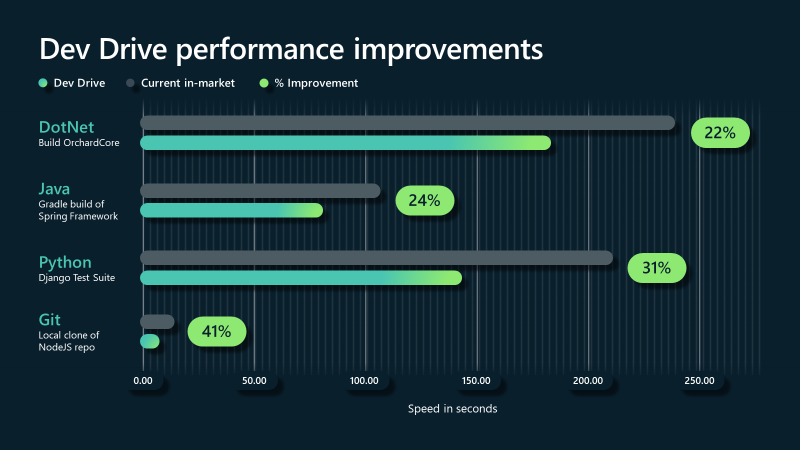
Dev Drives are a form of ReFS volumes designed for application developers to host their code repositories on them. Compiling software requires creating a lot of temp files, which are later discarded, and the default Defender real-time settings can negatively impact the compiler's performance. As a compromise, you migrate your dev activities to a Dev Drive, and Defender promises to be less aggressive in scanning the volume. This only happens because Defender knows why Dev Drives exist in the first place.

If you're not a dev, then Dev Drives don't need to be created.
 

My Computer

System One

  • OS
    Windows 7
Dev Drives are a form of ReFS volumes designed for application developers to host their code repositories on them. Compiling software requires creating a lot of temp files, which are later discarded, and the default Defender real-time settings can negatively impact the compiler's performance. As a compromise, you migrate your dev activities to a Dev Drive, and Defender promises to be less aggressive in scanning the volume. This only happens because Defender knows why Dev Drives exist in the first place.

If you're not a dev, then Dev Drives don't need to be created.
It seems I don't actually have any Dev drives and that Defender option is to configure them shoud I have any.

Screenshot 2024-04-05 223127.png
 

My Computer

System One

  • OS
    Windows 11 Pro
    Computer type
    PC/Desktop
    Manufacturer/Model
    Self build
    CPU
    Core i7-13700K
    Motherboard
    Asus TUF Gaming Plus WiFi Z790
    Memory
    64 GB Kingston Fury Beast DDR5
    Graphics Card(s)
    Gigabyte GeForce RTX 2060 Super Gaming OC 8G
    Sound Card
    Realtek S1200A
    Monitor(s) Displays
    Viewsonic VP2770 & Dell (secondary)
    Screen Resolution
    2560 x 1440
    Hard Drives
    Kingston KC3000 2TB NVME SSD & SATA HDDs & SSD
    PSU
    EVGA SuperNova G2 850W
    Case
    Nanoxia Deep Silence 1
    Cooling
    Noctua NH-D14
    Keyboard
    Microsoft Digital Media Pro
    Mouse
    Logitech Wireless
    Internet Speed
    80 Mb / s
    Browser
    Chrome
    Antivirus
    Defender, Malwarebytes Free & AdwCleaner
For those interested, here's a more complete explanation:

Performance mode compared to real-time protection​

By default, to give the best possible performance, creating a Dev Drive automatically grants trust in the new volume. A trusted Dev Drive volume causes real-time protection to run in a special asynchronous performance mode for that volume. Running performance mode provides a balance between threat protection and performance. The balance is achieved by deferring security scans until after the open file operation has completed, instead of performing the security scan synchronously while the file operation is being processed. This mode of performing security scans inherently provides faster performance, but with less protection. However, enabling performance mode provides significantly better protection than other performance tuning methods such as using folder exclusions, which block security scans altogether.
 

My Computer

System One

  • OS
    Windows 7

My Computer

System One

  • OS
    Windows 11 Pro
    Computer type
    PC/Desktop
    Manufacturer/Model
    Self build
    CPU
    Core i7-13700K
    Motherboard
    Asus TUF Gaming Plus WiFi Z790
    Memory
    64 GB Kingston Fury Beast DDR5
    Graphics Card(s)
    Gigabyte GeForce RTX 2060 Super Gaming OC 8G
    Sound Card
    Realtek S1200A
    Monitor(s) Displays
    Viewsonic VP2770 & Dell (secondary)
    Screen Resolution
    2560 x 1440
    Hard Drives
    Kingston KC3000 2TB NVME SSD & SATA HDDs & SSD
    PSU
    EVGA SuperNova G2 850W
    Case
    Nanoxia Deep Silence 1
    Cooling
    Noctua NH-D14
    Keyboard
    Microsoft Digital Media Pro
    Mouse
    Logitech Wireless
    Internet Speed
    80 Mb / s
    Browser
    Chrome
    Antivirus
    Defender, Malwarebytes Free & AdwCleaner
My Computer

System One

  • OS
    Windows 11 Pro 25H2
    Computer type
    PC/Desktop
    Manufacturer/Model
    Intel NUC12WSHi7
    CPU
    12th Gen Core i7-1260P
    Motherboard
    NUC12WSBi7
    Memory
    64 GB Micron PC4-25600
    Graphics Card(s)
    Intel Iris Xe Graphics
    Sound Card
    on-board Realtek HD Audio
    Monitor(s) Displays
    Dell U3219Q
    Screen Resolution
    3840 x 2160
    Hard Drives
    Samsung SSD 990 PRO 1TB
    Crucial MX500 2 TB
    Antivirus
    Microsoft Defender
Pardon for my noobish question:

Could this feature somehow be used to improve gaming performance? Like putting all the games on a dev drive?
 

My Computer

System One

  • OS
    Windows 11 24H2 Version 10.0.26100.2605
    Computer type
    PC/Desktop
    CPU
    Core I5 6600
    Motherboard
    Gigabyte Z170x Gaming 5
    Memory
    2 x 8 HeperX Fury DDR4 2666 HZ
    Graphics Card(s)
    Nvidia GTX 1070 ti
    Monitor(s) Displays
    165 HZ Gigabyte GS32QC
    Screen Resolution
    1440p
    Hard Drives
    1TB NVME M.2 Samsung 990 Pro
Has anyone experienced issues with Dev Drive, such as the drive suddenly turning RAW?
 

My Computer

System One

  • OS
    Windows 11 Pro
    Computer type
    PC/Desktop
    CPU
    Intel i9 13900KS
    Motherboard
    Asus Maximus Z790 Hero
    Memory
    G.Skill DDR5 32gb 6400mhz
    Graphics Card(s)
    MSI RTX4090 Suprim Liquid
    Sound Card
    Sound Blaster ZxR
    Monitor(s) Displays
    MSI mpg321ur-qd
    Screen Resolution
    4K 144 hz
    Hard Drives
    Samsung 980 Pro 1TB and 2TB and Samsung 860 Pro 4TB
    PSU
    Corsair RMx Shift 1200watt
    Case
    Cooler Master COSMOS C700P
    Cooling
    Asus Ryujin II
    Keyboard
    Logitech G413
    Mouse
    Asus ROG Strix Impact II
    Internet Speed
    100Mbps
    Browser
    Egde Chromium
    Antivirus
    Kaspersky
Back
Top Bottom





