Did Microsoft mess up my Security? Strange story!


Yes. Also in messing around just got prompted for a new Build update, KB5017389.

View attachment 41340
Do you have the folder c:\windows\system32\securityhealth\1.2209-22001-0 ? Does Smart App control show up in the Security dashboard?
 

My Computer My Computer

At a glance

Windows 11 Pro 25H2 (RP channel)AMD Ryzen 7 9800X3D 8-core64GB Corsair Titanium 6000/CL30MSI Suprim 5080 SOC
OS
Windows 11 Pro 25H2 (RP channel)
Computer type
PC/Desktop
Manufacturer/Model
MSI
CPU
AMD Ryzen 7 9800X3D 8-core
Motherboard
MEG X870E Godlike
Memory
64GB Corsair Titanium 6000/CL30
Graphics Card(s)
MSI Suprim 5080 SOC
Sound Card
Soundblaster AE-9
Monitor(s) Displays
ASUS TUF Gaming VG289Q
Screen Resolution
3840x2160
Hard Drives
Samsung 9100 Pro 4TB (gen 5 x4, system drive/games)
Samsung 990 Pro 2TB
Samsung 980 Pro 2TB
Samsung 870 Evo 4TB
Samsung 870 Evo 2TB
Samsung T9 4TB
PSU
Seasonic PX-2200
Case
Bequiet! Dark Base Pro 901
Cooling
Noctua NH-D15S Chromax black
Keyboard
Logitech G915 X (wired)
Mouse
Logitech G903 with PowerPlay charger
Internet Speed
900Mb/sec
Browser
Microsoft Edge
Antivirus
Windows Defender
wait what you mean you dont get updates?
I don't have the TPM running but got the latest update 22621.608 just a couple of days ago
 

My Computer My Computer

At a glance

Windows 11 Pro 25H2 (RP channel)AMD Ryzen 7 9800X3D 8-core64GB Corsair Titanium 6000/CL30MSI Suprim 5080 SOC
OS
Windows 11 Pro 25H2 (RP channel)
Computer type
PC/Desktop
Manufacturer/Model
MSI
CPU
AMD Ryzen 7 9800X3D 8-core
Motherboard
MEG X870E Godlike
Memory
64GB Corsair Titanium 6000/CL30
Graphics Card(s)
MSI Suprim 5080 SOC
Sound Card
Soundblaster AE-9
Monitor(s) Displays
ASUS TUF Gaming VG289Q
Screen Resolution
3840x2160
Hard Drives
Samsung 9100 Pro 4TB (gen 5 x4, system drive/games)
Samsung 990 Pro 2TB
Samsung 980 Pro 2TB
Samsung 870 Evo 4TB
Samsung 870 Evo 2TB
Samsung T9 4TB
PSU
Seasonic PX-2200
Case
Bequiet! Dark Base Pro 901
Cooling
Noctua NH-D15S Chromax black
Keyboard
Logitech G915 X (wired)
Mouse
Logitech G903 with PowerPlay charger
Internet Speed
900Mb/sec
Browser
Microsoft Edge
Antivirus
Windows Defender
Do you have the folder c:\windows\system32\securityhealth\1.2209-22001-0 ?
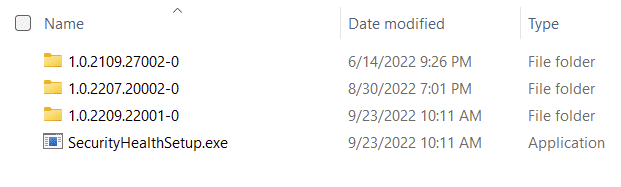
Yes, if you meant this one: 1.0.2209.22001-0

1664770484299.png
Bedtime, gonna let it run all night.
 

My Computers My Computers

  • At a glance

    Win11 Pro RTM Version 24H2 Build 26100.4202Intel Core i5 11th Gen. 2.40GHz12GB
    OS
    Win11 Pro RTM Version 24H2 Build 26100.4202
    Computer type
    Laptop
    Manufacturer/Model
    Dell Vostro 3400
    CPU
    Intel Core i5 11th Gen. 2.40GHz
    Memory
    12GB
    Hard Drives
    256GB SSD NVMe M.2
  • At a glance

    Win11 Pro RTM Version 24H2 Build 26100.4202Intel Core i5 10th Gen. 2.90GHz16GBOnboard, no VGA, using a DisplayPort-to-VGA a...
    Operating System
    Win11 Pro RTM Version 24H2 Build 26100.4202
    Computer type
    PC/Desktop
    Manufacturer/Model
    Dell Vostro 5890
    CPU
    Intel Core i5 10th Gen. 2.90GHz
    Memory
    16GB
    Graphics card(s)
    Onboard, no VGA, using a DisplayPort-to-VGA adapter
    Monitor(s) Displays
    24" Dell
    Hard Drives
    512GB SSD NVMe, 4TB Seagate HDD
    Browser
    Firefox, Edge
    Antivirus
    Windows Defender/Microsoft Security
Yes, if you meant this one: 1.0.2209.22001-0

View attachment 41342
Bedtime, gonna let it run all night.
Three PCs here, two on RP one on Beta in a VM. Smart app control is gone on all, the Security app crashes on the physical machines. Disabling the TPM fixes the crashes
 

My Computer My Computer

At a glance

Windows 11 Pro 25H2 (RP channel)AMD Ryzen 7 9800X3D 8-core64GB Corsair Titanium 6000/CL30MSI Suprim 5080 SOC
OS
Windows 11 Pro 25H2 (RP channel)
Computer type
PC/Desktop
Manufacturer/Model
MSI
CPU
AMD Ryzen 7 9800X3D 8-core
Motherboard
MEG X870E Godlike
Memory
64GB Corsair Titanium 6000/CL30
Graphics Card(s)
MSI Suprim 5080 SOC
Sound Card
Soundblaster AE-9
Monitor(s) Displays
ASUS TUF Gaming VG289Q
Screen Resolution
3840x2160
Hard Drives
Samsung 9100 Pro 4TB (gen 5 x4, system drive/games)
Samsung 990 Pro 2TB
Samsung 980 Pro 2TB
Samsung 870 Evo 4TB
Samsung 870 Evo 2TB
Samsung T9 4TB
PSU
Seasonic PX-2200
Case
Bequiet! Dark Base Pro 901
Cooling
Noctua NH-D15S Chromax black
Keyboard
Logitech G915 X (wired)
Mouse
Logitech G903 with PowerPlay charger
Internet Speed
900Mb/sec
Browser
Microsoft Edge
Antivirus
Windows Defender
You still get Cumulative updates and Defender definitions. Yes Smart App control is completely broken with this Security update
Is this relevant?
Important: Smart App Control can be used on new Windows 11 installs only. If you received it as part of a Windows update on an already running device, you won't be able to turn it on unless you reset your PC or re-install Windows.
from What is Smart App Control?
 

My Computer My Computer

At a glance

Windows 11 Pro 25H2 26200.8737Ryzen 5 760032 Gb DDR5 6000Hz Corsair VengeanceSapphire Pulse RX 7600
OS
Windows 11 Pro 25H2 26200.8737
Computer type
PC/Desktop
Manufacturer/Model
Home built
CPU
Ryzen 5 7600
Motherboard
Gigabyte B650M Aorus Elite AX Ice
Memory
32 Gb DDR5 6000Hz Corsair Vengeance
Graphics Card(s)
Sapphire Pulse RX 7600
Sound Card
Internal Realtek
Monitor(s) Displays
Samsung 32" Odyssey G5 G50D QHD
Screen Resolution
2560 x 1440
Hard Drives
WD Black SN 770 1Tb; SanDisk SDSSDA240G ; Seagate 2Tb HDD
PSU
MSI MAG A750GL
Case
Enermax Marbleshell MS21
Cooling
Thermaltake Peerless Assassin 120 White ARGB, 3 x 120 intake, 1 x 120 exhaust
Keyboard
Aukey KM-G12
Mouse
Razer Basilisk v3 Pro 35K
Internet Speed
1 Gb/s up & 800 Mb/s down
Browser
Brave / Edge
Antivirus
Windows / Malwarebytes
Is this relevant?
Important: Smart App Control can be used on new Windows 11 installs only. If you received it as part of a Windows update on an already running device, you won't be able to turn it on unless you reset your PC or re-install Windows.
from What is Smart App Control?
Not necessarily relevant but SAC was a new feature announced for 22H2 but now it's broken. I did do a clean install of Windows 22H2.
 

My Computer My Computer

At a glance

Windows 11 Pro 25H2 (RP channel)AMD Ryzen 7 9800X3D 8-core64GB Corsair Titanium 6000/CL30MSI Suprim 5080 SOC
OS
Windows 11 Pro 25H2 (RP channel)
Computer type
PC/Desktop
Manufacturer/Model
MSI
CPU
AMD Ryzen 7 9800X3D 8-core
Motherboard
MEG X870E Godlike
Memory
64GB Corsair Titanium 6000/CL30
Graphics Card(s)
MSI Suprim 5080 SOC
Sound Card
Soundblaster AE-9
Monitor(s) Displays
ASUS TUF Gaming VG289Q
Screen Resolution
3840x2160
Hard Drives
Samsung 9100 Pro 4TB (gen 5 x4, system drive/games)
Samsung 990 Pro 2TB
Samsung 980 Pro 2TB
Samsung 870 Evo 4TB
Samsung 870 Evo 2TB
Samsung T9 4TB
PSU
Seasonic PX-2200
Case
Bequiet! Dark Base Pro 901
Cooling
Noctua NH-D15S Chromax black
Keyboard
Logitech G915 X (wired)
Mouse
Logitech G903 with PowerPlay charger
Internet Speed
900Mb/sec
Browser
Microsoft Edge
Antivirus
Windows Defender
But what should affect our Systems? I create an usb Stick with latest Media Creation Tool and the Issue is still there. WinSecurityhealth.exe crashes in 9 to 10 Times when you open Security. This was an complete clean install with formatted NVME before. So no Software or Tools that messes Things up.

Smart App Control is not working too but this is not my Interest. My Interest is an not fully Working Security Center and that let me think that i am not fully secured in my OS.
 

My Computer My Computer

At a glance

Windows 11Ryzen 7 5700X3D32GB DDR4 3600 Kingston RenegadePowercolor 7800XT
OS
Windows 11
Computer type
PC/Desktop
CPU
Ryzen 7 5700X3D
Motherboard
ASUS B550-A Gaming
Memory
32GB DDR4 3600 Kingston Renegade
Graphics Card(s)
Powercolor 7800XT
Sound Card
Onboard ALC1220 Realtek
Monitor(s) Displays
Dell S3220DGF
Screen Resolution
1440p
Hard Drives
Samsung 1TB 980Pro - NVME
Samsung 500GB 970 Evo - NVME
PSU
Corsair RM750
Case
Bequiet Pure Base
Cooling
Arctic Cooling Case Fans 140 x5 / Arctic Freezer 34 for CPU
Keyboard
Roccat Magma
Mouse
Roccat Burst Pro
Internet Speed
1gbit
Browser
Edge
Antivirus
Defender
Other Info
Windows 11 24H2 - 26100.2894

My Computer My Computer

At a glance

Windows 114770k16 gb Kingston2070 super
OS
Windows 11
Computer type
PC/Desktop
Manufacturer/Model
-
CPU
4770k
Motherboard
Asus Maximus Formula VI
Memory
16 gb Kingston
Graphics Card(s)
2070 super

My Computer My Computer

At a glance

Windows 11 Pro 25H2 (RP channel)AMD Ryzen 7 9800X3D 8-core64GB Corsair Titanium 6000/CL30MSI Suprim 5080 SOC
OS
Windows 11 Pro 25H2 (RP channel)
Computer type
PC/Desktop
Manufacturer/Model
MSI
CPU
AMD Ryzen 7 9800X3D 8-core
Motherboard
MEG X870E Godlike
Memory
64GB Corsair Titanium 6000/CL30
Graphics Card(s)
MSI Suprim 5080 SOC
Sound Card
Soundblaster AE-9
Monitor(s) Displays
ASUS TUF Gaming VG289Q
Screen Resolution
3840x2160
Hard Drives
Samsung 9100 Pro 4TB (gen 5 x4, system drive/games)
Samsung 990 Pro 2TB
Samsung 980 Pro 2TB
Samsung 870 Evo 4TB
Samsung 870 Evo 2TB
Samsung T9 4TB
PSU
Seasonic PX-2200
Case
Bequiet! Dark Base Pro 901
Cooling
Noctua NH-D15S Chromax black
Keyboard
Logitech G915 X (wired)
Mouse
Logitech G903 with PowerPlay charger
Internet Speed
900Mb/sec
Browser
Microsoft Edge
Antivirus
Windows Defender
Good morning, I have the same problem on Windows 11 Pro 21H2 [Version 10.0.22000.1042].
After entering security, I have unknown information. The problem is with the TPM tab. Sometimes when I enter everything is ok, TPM is detected. Sometimes the information is unknown. I noticed the problem a few days ago. I have multiboot (2x Win 11 Pro 21H2 on the same PC). Oddly enough, on 1 system that is less used (but also has all the updates installed) the problem does not occur. On the other hand, the system I use most of the time has a problem and sometimes the security is unknown. I don't know what I can do to fix it. I also use Eset internet security. Sorry for my english, i use google translate
 

My Computer My Computer

At a glance

WIndows 11
OS
WIndows 11
Good morning, I have the same problem on Windows 11 Pro 21H2 [Version 10.0.22000.1042].
After entering security, I have unknown information. The problem is with the TPM tab. Sometimes when I enter everything is ok, TPM is detected. Sometimes the information is unknown. I noticed the problem a few days ago. I have multiboot (2x Win 11 Pro 21H2 on the same PC). Oddly enough, on 1 system that is less used (but also has all the updates installed) the problem does not occur. On the other hand, the system I use most of the time has a problem and sometimes the security is unknown. I don't know what I can do to fix it. I also use Eset internet security. Sorry for my english, i use google translate
Check both installs for a folder C:\WIndows\System32\SecurityHealth\1.0.2209-22001-0. Do both have this folder? Or just one?
 

My Computer My Computer

At a glance

Windows 11 Pro 25H2 (RP channel)AMD Ryzen 7 9800X3D 8-core64GB Corsair Titanium 6000/CL30MSI Suprim 5080 SOC
OS
Windows 11 Pro 25H2 (RP channel)
Computer type
PC/Desktop
Manufacturer/Model
MSI
CPU
AMD Ryzen 7 9800X3D 8-core
Motherboard
MEG X870E Godlike
Memory
64GB Corsair Titanium 6000/CL30
Graphics Card(s)
MSI Suprim 5080 SOC
Sound Card
Soundblaster AE-9
Monitor(s) Displays
ASUS TUF Gaming VG289Q
Screen Resolution
3840x2160
Hard Drives
Samsung 9100 Pro 4TB (gen 5 x4, system drive/games)
Samsung 990 Pro 2TB
Samsung 980 Pro 2TB
Samsung 870 Evo 4TB
Samsung 870 Evo 2TB
Samsung T9 4TB
PSU
Seasonic PX-2200
Case
Bequiet! Dark Base Pro 901
Cooling
Noctua NH-D15S Chromax black
Keyboard
Logitech G915 X (wired)
Mouse
Logitech G903 with PowerPlay charger
Internet Speed
900Mb/sec
Browser
Microsoft Edge
Antivirus
Windows Defender
This folder is only on 1 system - the one where the problem occurs. There are 2 folders on this system (1.0.2207.20002-0 and 1.0.2209.22001-0) On system 2 there is only 1 folder 1.0.2207.20002-0, all updates have installed, now I checked). On both systems, however, I have now noticed that the tab with application and browser control has stopped appearing. I have other devices with Win 22h2 and I did not notice such problems there (fresh installation a few days ago). On the computer where the problem occurs, at the earliest at the end of the month, I will be able to do the following format: /
 

My Computer My Computer

At a glance

WIndows 11
OS
WIndows 11
This folder is only on 1 system - the one where the problem occurs. There are 2 folders on this system (1.0.2207.20002-0 and 1.0.2209.22001-0) On system 2 there is only 1 folder 1.0.2207.20002-0, all updates have installed, now I checked). On both systems, however, I have now noticed that the tab with application and browser control has stopped appearing. I have other devices with Win 22h2 and I did not notice such problems there (fresh installation a few days ago). On the computer where the problem occurs, at the earliest at the end of the month, I will be able to do the following format: /
Yes the 2209.22001 update is what broke the Security app and causing crashes. I still have App and Browser Control, I only have the 2209 folder.
Formatting/clean installing Windows won't fix this problem, it's the Security platform update that causes it. I've disabled the TPM to stop the security from crashing.
 

My Computer My Computer

At a glance

Windows 11 Pro 25H2 (RP channel)AMD Ryzen 7 9800X3D 8-core64GB Corsair Titanium 6000/CL30MSI Suprim 5080 SOC
OS
Windows 11 Pro 25H2 (RP channel)
Computer type
PC/Desktop
Manufacturer/Model
MSI
CPU
AMD Ryzen 7 9800X3D 8-core
Motherboard
MEG X870E Godlike
Memory
64GB Corsair Titanium 6000/CL30
Graphics Card(s)
MSI Suprim 5080 SOC
Sound Card
Soundblaster AE-9
Monitor(s) Displays
ASUS TUF Gaming VG289Q
Screen Resolution
3840x2160
Hard Drives
Samsung 9100 Pro 4TB (gen 5 x4, system drive/games)
Samsung 990 Pro 2TB
Samsung 980 Pro 2TB
Samsung 870 Evo 4TB
Samsung 870 Evo 2TB
Samsung T9 4TB
PSU
Seasonic PX-2200
Case
Bequiet! Dark Base Pro 901
Cooling
Noctua NH-D15S Chromax black
Keyboard
Logitech G915 X (wired)
Mouse
Logitech G903 with PowerPlay charger
Internet Speed
900Mb/sec
Browser
Microsoft Edge
Antivirus
Windows Defender
Yes the 2209.22001 update is what broke the Security app and causing crashes. I still have App and Browser Control, I only have the 2209 folder.
Formatting/clean installing Windows won't fix this problem, it's the Security platform update that causes it. I've disabled the TPM to stop the security from crashing.
Then what do you suggest? It remains to wait for microsoft to fix it?
Somehow it does not bother me very much, and eset internet security protects me anyway, so I do not know if these unknown security have any effect on the operation of my computer. And I wanted to do the format anyway, to switch to 22H2 and test the smart app control. On other devices, I've already turned it on and so far everything works OK
 

My Computer My Computer

At a glance

WIndows 11
OS
WIndows 11
Then what do you suggest? It remains to wait for microsoft to fix it?
Somehow it does not bother me very much, and eset internet security protects me anyway, so I do not know if these unknown security have any effect on the operation of my computer. And I wanted to do the format anyway, to switch to 22H2 and test the smart app control. On other devices, I've already turned it on and so far everything works OK
Smart App control is broken with the 2209.22001 update! You could disable the TPM to stop the crashing
 

My Computer My Computer

At a glance

Windows 11 Pro 25H2 (RP channel)AMD Ryzen 7 9800X3D 8-core64GB Corsair Titanium 6000/CL30MSI Suprim 5080 SOC
OS
Windows 11 Pro 25H2 (RP channel)
Computer type
PC/Desktop
Manufacturer/Model
MSI
CPU
AMD Ryzen 7 9800X3D 8-core
Motherboard
MEG X870E Godlike
Memory
64GB Corsair Titanium 6000/CL30
Graphics Card(s)
MSI Suprim 5080 SOC
Sound Card
Soundblaster AE-9
Monitor(s) Displays
ASUS TUF Gaming VG289Q
Screen Resolution
3840x2160
Hard Drives
Samsung 9100 Pro 4TB (gen 5 x4, system drive/games)
Samsung 990 Pro 2TB
Samsung 980 Pro 2TB
Samsung 870 Evo 4TB
Samsung 870 Evo 2TB
Samsung T9 4TB
PSU
Seasonic PX-2200
Case
Bequiet! Dark Base Pro 901
Cooling
Noctua NH-D15S Chromax black
Keyboard
Logitech G915 X (wired)
Mouse
Logitech G903 with PowerPlay charger
Internet Speed
900Mb/sec
Browser
Microsoft Edge
Antivirus
Windows Defender
we still have too few reports to hope to see the problem solved quickly :plead:...
Now this is interesting. I just booted up my Dev channel VirtualBox install. The Securityhealth folder only has the very old 1.0.2109.27002-0 folder inside it. Smart App control is still available (set to OFF as it wasn't a clean install). WU has never attempted to install the Malware platform update 1.0.2209-22001 that's causing the problems on Beta/RP/public builds, the folder is non-existent in this build.
 

My Computer My Computer

At a glance

Windows 11 Pro 25H2 (RP channel)AMD Ryzen 7 9800X3D 8-core64GB Corsair Titanium 6000/CL30MSI Suprim 5080 SOC
OS
Windows 11 Pro 25H2 (RP channel)
Computer type
PC/Desktop
Manufacturer/Model
MSI
CPU
AMD Ryzen 7 9800X3D 8-core
Motherboard
MEG X870E Godlike
Memory
64GB Corsair Titanium 6000/CL30
Graphics Card(s)
MSI Suprim 5080 SOC
Sound Card
Soundblaster AE-9
Monitor(s) Displays
ASUS TUF Gaming VG289Q
Screen Resolution
3840x2160
Hard Drives
Samsung 9100 Pro 4TB (gen 5 x4, system drive/games)
Samsung 990 Pro 2TB
Samsung 980 Pro 2TB
Samsung 870 Evo 4TB
Samsung 870 Evo 2TB
Samsung T9 4TB
PSU
Seasonic PX-2200
Case
Bequiet! Dark Base Pro 901
Cooling
Noctua NH-D15S Chromax black
Keyboard
Logitech G915 X (wired)
Mouse
Logitech G903 with PowerPlay charger
Internet Speed
900Mb/sec
Browser
Microsoft Edge
Antivirus
Windows Defender
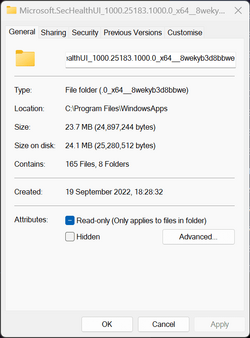
I made another discovery tonight. Beta VM and my 'real' PC have SecurityHealthUI app version 25183.1000.0 (see pic 1). The folder c:\windows\system32\securityhealth\1.0.2209-22001 is present and Smart App control is not working. Security app crashes with the TPM enabled.

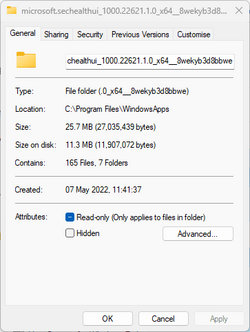
I did a clean install of RP 22621.675 on a VM tonight. The SecurityHealth folder is empty and SAC is working. The SecurityHealthUI app version is 22621.1.0 (see pic 2).

I'm wondering - did MS send out an update to public/RP/Beta by mistake? My RP VM hasn't attempted to install 1.0.2209.22001 tonight (the folder isn't present). The 'wrong' version appears to be for Dev builds going by the build number.
 

Attachments

  • pic 1.png
    pic 1.png
    14.4 KB · Views: 5
  • pic 2.png
    pic 2.png
    8.7 KB · Views: 5

My Computer My Computer

At a glance

Windows 11 Pro 25H2 (RP channel)AMD Ryzen 7 9800X3D 8-core64GB Corsair Titanium 6000/CL30MSI Suprim 5080 SOC
OS
Windows 11 Pro 25H2 (RP channel)
Computer type
PC/Desktop
Manufacturer/Model
MSI
CPU
AMD Ryzen 7 9800X3D 8-core
Motherboard
MEG X870E Godlike
Memory
64GB Corsair Titanium 6000/CL30
Graphics Card(s)
MSI Suprim 5080 SOC
Sound Card
Soundblaster AE-9
Monitor(s) Displays
ASUS TUF Gaming VG289Q
Screen Resolution
3840x2160
Hard Drives
Samsung 9100 Pro 4TB (gen 5 x4, system drive/games)
Samsung 990 Pro 2TB
Samsung 980 Pro 2TB
Samsung 870 Evo 4TB
Samsung 870 Evo 2TB
Samsung T9 4TB
PSU
Seasonic PX-2200
Case
Bequiet! Dark Base Pro 901
Cooling
Noctua NH-D15S Chromax black
Keyboard
Logitech G915 X (wired)
Mouse
Logitech G903 with PowerPlay charger
Internet Speed
900Mb/sec
Browser
Microsoft Edge
Antivirus
Windows Defender
Still no fix with latest 22621.819 Build.
 

My Computer My Computer

At a glance

Windows 11Ryzen 7 5700X3D32GB DDR4 3600 Kingston RenegadePowercolor 7800XT
OS
Windows 11
Computer type
PC/Desktop
CPU
Ryzen 7 5700X3D
Motherboard
ASUS B550-A Gaming
Memory
32GB DDR4 3600 Kingston Renegade
Graphics Card(s)
Powercolor 7800XT
Sound Card
Onboard ALC1220 Realtek
Monitor(s) Displays
Dell S3220DGF
Screen Resolution
1440p
Hard Drives
Samsung 1TB 980Pro - NVME
Samsung 500GB 970 Evo - NVME
PSU
Corsair RM750
Case
Bequiet Pure Base
Cooling
Arctic Cooling Case Fans 140 x5 / Arctic Freezer 34 for CPU
Keyboard
Roccat Magma
Mouse
Roccat Burst Pro
Internet Speed
1gbit
Browser
Edge
Antivirus
Defender
Other Info
Windows 11 24H2 - 26100.2894
  • Like
Reactions: x_1
hi, Brian:
since opening a report on the feedback app does not produce results, can you try to open a report on reddit?
My knowledge of english is not good so it is difficult for me to contact people in order to give visibility to this problem :plead:
 
Last edited:

My Computer My Computer

At a glance

11 25H2
OS
11 25H2

Latest Support Threads

Back
Top Bottom