
Did you manually update your Secure Boot Keys ?


without the new 2023 certificates in the DB, certain apps, drivers and OS's
That's the problem for the majority of us: Microsoft has announced intention to revoke trust in the 2011 Windows PCA keys (the Enforcement Phase, roll-out tentatively starting in January of '26 last I saw) and (I assume) all 2011 signed boot managers. Once concluded, you'll only be able to run Windows 11 in Secure Boot mode if you have 2023 Windows CA keys which would be needed to validate the 2023 signed boot managers.

So even if the 2011 keys would work, it's pointless since the OS most of us use won't work with them.
 

My Computers

System One System Two

  • OS
    Windows 11 Pro
    Computer type
    PC/Desktop
    Manufacturer/Model
    DIY
    CPU
    Ryzen 7 5800X
    Motherboard
    Gigabyte B550M Aorus Pro
    Memory
    GSkill 3200, 2x8GB
    Graphics Card(s)
    MSI RX 6800 XT Gaming Z
    Sound Card
    on-board Realtek
    Monitor(s) Displays
    MSI 180hz
    Screen Resolution
    1440p
    Hard Drives
    Samsung 980 Pro, Samsung 870 Evo, generic PCIe NVME, WD 1TB 2.5" laptop spinner
    PSU
    Corsair RM 650
    Case
    mATX
    Cooling
    BeQuiet 240mm AIO and a bunch of case fans
    Keyboard
    one that clacks softly
    Mouse
    logitech
    Internet Speed
    bunches of bps
    Browser
    Firefox
    Antivirus
    Windows' own
  • Operating System
    Win11 Pro
    Computer type
    PC/Desktop
    Manufacturer/Model
    DIY
    CPU
    Ryzen 7 1700
    Motherboard
    GA-AB350M G-3
    Memory
    16GB DDR4
    Graphics card(s)
    RX-480
    Sound Card
    In-Built Realtek
    Monitor(s) Displays
    Samsung
    Screen Resolution
    1440p
    Hard Drives
    NVME/SSD's
    PSU
    Thermaltake BX1 550W
    Case
    Some junky thing
    Cooling
    ThermalTake Assassin(?)
    Browser
    FF/Edge
    Antivirus
    Whatever Windows does
    Other Info
    Secure Boot enabled updated to 2023 CA keys, TPM2.0 enabled with system drive Bitlocker'd.
That's the problem for the majority of us: Microsoft has announced intention to revoke trust in the 2011 Windows PCA keys (the Enforcement Phase, roll-out tentatively starting in January of '26 last I saw) and (I assume) all 2011 signed boot managers. Once concluded, you'll only be able to run Windows 11 in Secure Boot mode if you have 2023 Windows CA keys which would be needed to validate the 2023 signed boot managers.

So even if the 2011 keys would work, it's pointless since the OS most of us use won't work with them.
I think it would apply to a clean install using a mid-2026, or later W11 iso that only has a 2023 certified bootloader. Existing installs with continue to operate as normal with their 2011 certified bootloader.
 

My Computer

System One

  • OS
    Windows 11
I think it would apply to a clean install using a mid-2026, or later W11 iso that only has a 2023 certified bootloader. Existing installs with continue to operate as normal with their 2011 certified bootloader.
Microsoft pushes out the SVN revocations periodically, with a monthly Security Update. Assuming they just skip systems that lack 2023 keys, I'd suppose it also means getting more and more exposed for vulnerabilities. And (most likely) staying on 25H2 forever... so never being able to do a "clean install" (as you said) but also not being able to do a "repair install with in-place upgrade".

The impression I get is Microsoft wants to completely get off of 2011 keys because of the exposure to boot-block threats like Black Lotus. That suggests to me they'll at some point declare systems not able to use 2023 keys as "unsupported" (at least insofar as Secure Boot goes). It probably can be worked around just like the other things that make a system unsupported. But you very often give up something for that, like Secure Boot itself since you can just disable it and keep on trucking. For now.
 
Last edited:

My Computers

System One System Two

  • OS
    Windows 11 Pro
    Computer type
    PC/Desktop
    Manufacturer/Model
    DIY
    CPU
    Ryzen 7 5800X
    Motherboard
    Gigabyte B550M Aorus Pro
    Memory
    GSkill 3200, 2x8GB
    Graphics Card(s)
    MSI RX 6800 XT Gaming Z
    Sound Card
    on-board Realtek
    Monitor(s) Displays
    MSI 180hz
    Screen Resolution
    1440p
    Hard Drives
    Samsung 980 Pro, Samsung 870 Evo, generic PCIe NVME, WD 1TB 2.5" laptop spinner
    PSU
    Corsair RM 650
    Case
    mATX
    Cooling
    BeQuiet 240mm AIO and a bunch of case fans
    Keyboard
    one that clacks softly
    Mouse
    logitech
    Internet Speed
    bunches of bps
    Browser
    Firefox
    Antivirus
    Windows' own
  • Operating System
    Win11 Pro
    Computer type
    PC/Desktop
    Manufacturer/Model
    DIY
    CPU
    Ryzen 7 1700
    Motherboard
    GA-AB350M G-3
    Memory
    16GB DDR4
    Graphics card(s)
    RX-480
    Sound Card
    In-Built Realtek
    Monitor(s) Displays
    Samsung
    Screen Resolution
    1440p
    Hard Drives
    NVME/SSD's
    PSU
    Thermaltake BX1 550W
    Case
    Some junky thing
    Cooling
    ThermalTake Assassin(?)
    Browser
    FF/Edge
    Antivirus
    Whatever Windows does
    Other Info
    Secure Boot enabled updated to 2023 CA keys, TPM2.0 enabled with system drive Bitlocker'd.
Microsoft pushes out the SVN revocations periodically, with a monthly Security Update. Assuming they just skip systems that lack 2023 keys, I'd suppose it also means getting more and more exposed for vulnerabilities. And (most likely) staying on 25H2 forever... so never being able to do a "clean install" (as you said) but also not being able to do a "repair install with in-place upgrade".

The impression I get is Microsoft wants to completely get off of 2011 keys because of the exposure to boot-block threats like Black Lotus. That suggests to me they'll at some point declare systems not able to use 2023 keys as "unsupported" (at least insofar as Secure Boot goes). It probably can be worked around just like the other things that make a system unsupported. But you very often give up something for that, like Secure Boot itself since you can just disable it and keep on trucking. For now.
Most unsupported devices can at least install the Windows UEFI CA 2023 certificate manually, so not much of an issue going forward, which means secure could can remain activated.
 

My Computer

System One

  • OS
    Windows 11
Most unsupported devices can at least install the Windows UEFI CA 2023 certificate manually, so not much of an issue going forward, which means secure could can remain activated.
I do think most machines can get updated, one way or another. But I also think there are problem machines with flaky BIOS's that don't allow "pushing" the updates into firmware. And especially some with broken UEFI implementations that prevent appending to KEK using any method including MOSBY. Although, just how much of a problem that will be going forward is something I've not seen agreement on even from the 'experts'.

These problem computers would need assistance from the OEM in the form of a BIOS update. But way to often these are also machines the OEM has orphaned, so none are coming. For them, it may be the only way to continue with Win11 while continuing to freely receive all updates and stay current is to disable Secure Boot. Time will tell.
 
Last edited:

My Computers

System One System Two

  • OS
    Windows 11 Pro
    Computer type
    PC/Desktop
    Manufacturer/Model
    DIY
    CPU
    Ryzen 7 5800X
    Motherboard
    Gigabyte B550M Aorus Pro
    Memory
    GSkill 3200, 2x8GB
    Graphics Card(s)
    MSI RX 6800 XT Gaming Z
    Sound Card
    on-board Realtek
    Monitor(s) Displays
    MSI 180hz
    Screen Resolution
    1440p
    Hard Drives
    Samsung 980 Pro, Samsung 870 Evo, generic PCIe NVME, WD 1TB 2.5" laptop spinner
    PSU
    Corsair RM 650
    Case
    mATX
    Cooling
    BeQuiet 240mm AIO and a bunch of case fans
    Keyboard
    one that clacks softly
    Mouse
    logitech
    Internet Speed
    bunches of bps
    Browser
    Firefox
    Antivirus
    Windows' own
  • Operating System
    Win11 Pro
    Computer type
    PC/Desktop
    Manufacturer/Model
    DIY
    CPU
    Ryzen 7 1700
    Motherboard
    GA-AB350M G-3
    Memory
    16GB DDR4
    Graphics card(s)
    RX-480
    Sound Card
    In-Built Realtek
    Monitor(s) Displays
    Samsung
    Screen Resolution
    1440p
    Hard Drives
    NVME/SSD's
    PSU
    Thermaltake BX1 550W
    Case
    Some junky thing
    Cooling
    ThermalTake Assassin(?)
    Browser
    FF/Edge
    Antivirus
    Whatever Windows does
    Other Info
    Secure Boot enabled updated to 2023 CA keys, TPM2.0 enabled with system drive Bitlocker'd.
I revoked the 2011 keys right up front, no real reason to keep them IMO. You can pretty easily add the 2023 certs to bootable drives if needed.
 

My Computers

System One System Two

  • OS
    Win 11 Pro 25H2, Build 26200.8524
    Computer type
    PC/Desktop
    Manufacturer/Model
    Home Brew
    CPU
    Intel Core i5 14500
    Motherboard
    Gigabyte B760M G P WIFI
    Memory
    64GB DDR4
    Graphics Card(s)
    GeForce RTX 4060
    Sound Card
    Chipset Realtek
    Monitor(s) Displays
    LG 45" Ultragear, Acer 24" 1080p
    Screen Resolution
    5120x1440, 1920x1080
    Hard Drives
    Crucial P310 2TB 2280 PCIe Gen4 3D NAND NVMe M.2 SSD (O/S)
    Silicon Power 2TB US75 NVMe PCIe Gen4 M.2 2280 SSD (backup)
    Crucial BX500 2TB 3D NAND (2nd backup)
    Seagate 4TB Ironwolf, rotating HDD archive files
    External off-line backup Drives: 2 NVMe 4TB drives in external enclosures
    PSU
    Thermaltake Toughpower GF3 750W
    Case
    LIAN LI LANCOOL 216 E-ATX PC Case
    Cooling
    Lots of fans!
    Keyboard
    Microsoft Comfort Curve 2000
    Mouse
    Logitech G305
    Internet Speed
    Verizon FiOS 1GB
    Browser
    Firefox
    Antivirus
    Malware Bytes & Windows Defender Security
  • Operating System
    Win 11 Pro 25H2, Build 26200.8524
    Computer type
    PC/Desktop
    Manufacturer/Model
    Home Brew
    CPU
    Intel Core i5 14400
    Motherboard
    Gigabyte B760M DS3H AX
    Memory
    32GB DDR5
    Graphics card(s)
    Intel 700 Embedded GPU
    Sound Card
    Realtek Embedded
    Monitor(s) Displays
    27" HP 1080p
    Screen Resolution
    1920x1080
    Hard Drives
    Crucial P310 2TB 2280 PCIe Gen4 eD NAND PCIe SSD
    Samsung EVO 990 2TB NVMe Gen4 SSD
    Samsung 2TB SATA SSD
    PSU
    Thermaltake Smart BM3 650W
    Case
    Okinos Micro ATX Case
    Cooling
    Fans
    Keyboard
    Microsoft Comfort Curve 2000
    Mouse
    Logitech G305
    Internet Speed
    Verizon FiOS 1GB
    Browser
    Firefox
    Antivirus
    Malware Bytes & Windows Defender Security
There's definitely some confusion out there, MS and Dell have indicated that W11 will boot normally with expired certificates, it's just that without the new 2023 certificates in the DB, certain apps, drivers and OS's will not boot if they're signed with the new certificate. Too add, a device only needs the have the OS and secure boot certificates fully updated in order for the DBX process to function correctly, that in itself will not invalidate the 2011 certificates, it still requires those expired certificates to be intentionally moved to the DBX and only then does it stop 2011 certificates from booting.
That is what I was saying; not in the DB and not in the DBX. How odd. Maybe CA2011 is not that strict, but CA2023 will be.
 

My Computer

System One

  • OS
    Win 11 Pro "25H2" Build 26200.8524, Zorin OS Pro
    Computer type
    PC/Desktop
    Manufacturer/Model
    Self built
    CPU
    Intel® Core™ i7-12700KF 12th Gen.
    Motherboard
    ASUS Prime Z690-A, BIOS v4505
    Memory
    32GB DDR5 5600-36 Vengeance
    Graphics Card(s)
    PCIe4.0 Asus NVIDIA RTX3060Ti
    Sound Card
    Onboard; Realtek
    Monitor(s) Displays
    34" LG 34UC79G-B Curved 21:9 144Hz
    Screen Resolution
    2560x1080 (No HDR)
    Hard Drives
    250Gb Samsung 870PRO NVMe (Win 11 Pro)
    1Tb Samsung 980PRO NVMe
    1Tb Samsung 970EVO NVMe
    2Tb Samsung 990PRO NVMe with heatsink.
    4Tb WDC WD40EZRZ Blue SATA (Int.)
    4Tb WDC WD40EZRZ Blue SATA (Int.)
    3Tb WDC WD30EFRZ Red SATA (Int.)
    256Gb Samsung 840PRO SSD (RHEL 9,5)
    256Gb Samsung 850PRO SSD (Zorin OS Pro 18)
    PSU
    Coolermaster 850W V2 Gold with internal 12cm exaust fan
    Case
    Be-Quiet Pure Base 600.
    Cooling
    3x Be-Quiet! 12/14cm "Silent Wings 4" casefans, 1x Arctic Freezer i35 CPU towerblock with fan.
    Keyboard
    Steelseries APEX 7 keyboard.
    Mouse
    Logitech G-502 Hero
    Internet Speed
    1Gb
    Browser
    Brave
    Antivirus
    F-Secure
    Other Info
    No Noise system.
    256Gb Kingston Travler USB 3.0 drive.
    64Gb Sandisk USB 3.2 drive. (Ventoy)
    8Gb Philips USB 3.0 drive. (Win. Inst.)
    8Gb Philips USB 3.0 drive. (Rescue disk)
    2Tb WD USB 3.0 Passport drive.
    USB Ext. 500Gb WD SATA drive.
    External USB 3.0 C.A. CD/DVD* burner.
I revoked the 2011 keys right up front, no real reason to keep them IMO. You can pretty easily add the 2023 certs to bootable drives if needed.
Yeah, as long as you don't need to reinstall any drivers, software, programs that only have 2011 certificates it should be no problem?
 

My Computer

System One

  • OS
    Windows 11
Yeah, as long as you don't need to reinstall any drivers, software, programs that only have 2011 certificates it should be no problem?
What software programs are using secure boot certs? I still have the Microsoft Corporation UEFI CA 2011 cert active, but I'll be revoking that soon. AFAIK, the Microsoft Windows Production PCA 2011 cert is only used to boot Windows or a recovery disk, backup disk, etc. I've already copied the 2023 certs to all of those that I have that weren't already booting with the 2023 cert, and they all boot successfully with the 2011 cert revoked.
 

My Computers

System One System Two

  • OS
    Win 11 Pro 25H2, Build 26200.8524
    Computer type
    PC/Desktop
    Manufacturer/Model
    Home Brew
    CPU
    Intel Core i5 14500
    Motherboard
    Gigabyte B760M G P WIFI
    Memory
    64GB DDR4
    Graphics Card(s)
    GeForce RTX 4060
    Sound Card
    Chipset Realtek
    Monitor(s) Displays
    LG 45" Ultragear, Acer 24" 1080p
    Screen Resolution
    5120x1440, 1920x1080
    Hard Drives
    Crucial P310 2TB 2280 PCIe Gen4 3D NAND NVMe M.2 SSD (O/S)
    Silicon Power 2TB US75 NVMe PCIe Gen4 M.2 2280 SSD (backup)
    Crucial BX500 2TB 3D NAND (2nd backup)
    Seagate 4TB Ironwolf, rotating HDD archive files
    External off-line backup Drives: 2 NVMe 4TB drives in external enclosures
    PSU
    Thermaltake Toughpower GF3 750W
    Case
    LIAN LI LANCOOL 216 E-ATX PC Case
    Cooling
    Lots of fans!
    Keyboard
    Microsoft Comfort Curve 2000
    Mouse
    Logitech G305
    Internet Speed
    Verizon FiOS 1GB
    Browser
    Firefox
    Antivirus
    Malware Bytes & Windows Defender Security
  • Operating System
    Win 11 Pro 25H2, Build 26200.8524
    Computer type
    PC/Desktop
    Manufacturer/Model
    Home Brew
    CPU
    Intel Core i5 14400
    Motherboard
    Gigabyte B760M DS3H AX
    Memory
    32GB DDR5
    Graphics card(s)
    Intel 700 Embedded GPU
    Sound Card
    Realtek Embedded
    Monitor(s) Displays
    27" HP 1080p
    Screen Resolution
    1920x1080
    Hard Drives
    Crucial P310 2TB 2280 PCIe Gen4 eD NAND PCIe SSD
    Samsung EVO 990 2TB NVMe Gen4 SSD
    Samsung 2TB SATA SSD
    PSU
    Thermaltake Smart BM3 650W
    Case
    Okinos Micro ATX Case
    Cooling
    Fans
    Keyboard
    Microsoft Comfort Curve 2000
    Mouse
    Logitech G305
    Internet Speed
    Verizon FiOS 1GB
    Browser
    Firefox
    Antivirus
    Malware Bytes & Windows Defender Security
What software programs are using secure boot certs?
None.

I've seen it repeated by several of the experts: the secure boot keys can be used only to validate OS secure boot binaries and in the case of the Windows Production CA 2011 (and 2023) key only Windows' secure boot manager files can - or should - use it.

So, it makes sense that if their OS' are the sole user Microsoft can ultimately revoke trust in it at their discretion, as they've said they will at some point by pushing it into firmware DBX. Of course, that's for anyone running a Windows OS in Secure Boot mode... and on-line... and allow security updates. Hopefully also only those who have Windows CA 2023 key in their firmware!

Other/third party OS's and drivers needed for pre-boot execution or use in VM's can use the Microsoft UEFI CA 2011 key for validation which I've not seen anyone say is going to be revoked.
 
Last edited:

My Computers

System One System Two

  • OS
    Windows 11 Pro
    Computer type
    PC/Desktop
    Manufacturer/Model
    DIY
    CPU
    Ryzen 7 5800X
    Motherboard
    Gigabyte B550M Aorus Pro
    Memory
    GSkill 3200, 2x8GB
    Graphics Card(s)
    MSI RX 6800 XT Gaming Z
    Sound Card
    on-board Realtek
    Monitor(s) Displays
    MSI 180hz
    Screen Resolution
    1440p
    Hard Drives
    Samsung 980 Pro, Samsung 870 Evo, generic PCIe NVME, WD 1TB 2.5" laptop spinner
    PSU
    Corsair RM 650
    Case
    mATX
    Cooling
    BeQuiet 240mm AIO and a bunch of case fans
    Keyboard
    one that clacks softly
    Mouse
    logitech
    Internet Speed
    bunches of bps
    Browser
    Firefox
    Antivirus
    Windows' own
  • Operating System
    Win11 Pro
    Computer type
    PC/Desktop
    Manufacturer/Model
    DIY
    CPU
    Ryzen 7 1700
    Motherboard
    GA-AB350M G-3
    Memory
    16GB DDR4
    Graphics card(s)
    RX-480
    Sound Card
    In-Built Realtek
    Monitor(s) Displays
    Samsung
    Screen Resolution
    1440p
    Hard Drives
    NVME/SSD's
    PSU
    Thermaltake BX1 550W
    Case
    Some junky thing
    Cooling
    ThermalTake Assassin(?)
    Browser
    FF/Edge
    Antivirus
    Whatever Windows does
    Other Info
    Secure Boot enabled updated to 2023 CA keys, TPM2.0 enabled with system drive Bitlocker'd.

Other/third party OS's and drivers needed for pre-boot execution or use in VM's can use the Microsoft UEFI CA 2011 key for validation which I've not seen anyone say is going to be revoked.
Or the Microsoft UEFI CA 2023 cert, which would probably be a better choice. There doesn't seem much point in having the 2023 cert if you're going to keep using the 2011 cert. I'm guessing there's a reason that there is a 2023 cert...
 

My Computers

System One System Two

  • OS
    Win 11 Pro 25H2, Build 26200.8524
    Computer type
    PC/Desktop
    Manufacturer/Model
    Home Brew
    CPU
    Intel Core i5 14500
    Motherboard
    Gigabyte B760M G P WIFI
    Memory
    64GB DDR4
    Graphics Card(s)
    GeForce RTX 4060
    Sound Card
    Chipset Realtek
    Monitor(s) Displays
    LG 45" Ultragear, Acer 24" 1080p
    Screen Resolution
    5120x1440, 1920x1080
    Hard Drives
    Crucial P310 2TB 2280 PCIe Gen4 3D NAND NVMe M.2 SSD (O/S)
    Silicon Power 2TB US75 NVMe PCIe Gen4 M.2 2280 SSD (backup)
    Crucial BX500 2TB 3D NAND (2nd backup)
    Seagate 4TB Ironwolf, rotating HDD archive files
    External off-line backup Drives: 2 NVMe 4TB drives in external enclosures
    PSU
    Thermaltake Toughpower GF3 750W
    Case
    LIAN LI LANCOOL 216 E-ATX PC Case
    Cooling
    Lots of fans!
    Keyboard
    Microsoft Comfort Curve 2000
    Mouse
    Logitech G305
    Internet Speed
    Verizon FiOS 1GB
    Browser
    Firefox
    Antivirus
    Malware Bytes & Windows Defender Security
  • Operating System
    Win 11 Pro 25H2, Build 26200.8524
    Computer type
    PC/Desktop
    Manufacturer/Model
    Home Brew
    CPU
    Intel Core i5 14400
    Motherboard
    Gigabyte B760M DS3H AX
    Memory
    32GB DDR5
    Graphics card(s)
    Intel 700 Embedded GPU
    Sound Card
    Realtek Embedded
    Monitor(s) Displays
    27" HP 1080p
    Screen Resolution
    1920x1080
    Hard Drives
    Crucial P310 2TB 2280 PCIe Gen4 eD NAND PCIe SSD
    Samsung EVO 990 2TB NVMe Gen4 SSD
    Samsung 2TB SATA SSD
    PSU
    Thermaltake Smart BM3 650W
    Case
    Okinos Micro ATX Case
    Cooling
    Fans
    Keyboard
    Microsoft Comfort Curve 2000
    Mouse
    Logitech G305
    Internet Speed
    Verizon FiOS 1GB
    Browser
    Firefox
    Antivirus
    Malware Bytes & Windows Defender Security
Or the Microsoft UEFI CA 2023 cert, which would probably be a better choice. There doesn't seem much point in having the 2023 cert if you're going to keep using the 2011 cert. I'm guessing there's a reason that there is a 2023 cert...
True that! But they CAN keep on using it if the binary file(s) it validates never changes. That lack of flexibility will present a security vulnerability if the binaries are compromised though. And any that do change after the 2011 certificates expire will indeed have to be signed by the 2023 certificates for which systems need the Microsoft UEFI CA 2023 key in firmware to validate.

I don't think Microsoft is worried about this one though since it doesn't really leave their Windows OS vulnerable. So, it may be the reason they won't outright revoke trust (by pushing it into DBX) like they plan for the Windows 2011 keys. But I'm just guessing for that.
 
Last edited:

My Computers

System One System Two

  • OS
    Windows 11 Pro
    Computer type
    PC/Desktop
    Manufacturer/Model
    DIY
    CPU
    Ryzen 7 5800X
    Motherboard
    Gigabyte B550M Aorus Pro
    Memory
    GSkill 3200, 2x8GB
    Graphics Card(s)
    MSI RX 6800 XT Gaming Z
    Sound Card
    on-board Realtek
    Monitor(s) Displays
    MSI 180hz
    Screen Resolution
    1440p
    Hard Drives
    Samsung 980 Pro, Samsung 870 Evo, generic PCIe NVME, WD 1TB 2.5" laptop spinner
    PSU
    Corsair RM 650
    Case
    mATX
    Cooling
    BeQuiet 240mm AIO and a bunch of case fans
    Keyboard
    one that clacks softly
    Mouse
    logitech
    Internet Speed
    bunches of bps
    Browser
    Firefox
    Antivirus
    Windows' own
  • Operating System
    Win11 Pro
    Computer type
    PC/Desktop
    Manufacturer/Model
    DIY
    CPU
    Ryzen 7 1700
    Motherboard
    GA-AB350M G-3
    Memory
    16GB DDR4
    Graphics card(s)
    RX-480
    Sound Card
    In-Built Realtek
    Monitor(s) Displays
    Samsung
    Screen Resolution
    1440p
    Hard Drives
    NVME/SSD's
    PSU
    Thermaltake BX1 550W
    Case
    Some junky thing
    Cooling
    ThermalTake Assassin(?)
    Browser
    FF/Edge
    Antivirus
    Whatever Windows does
    Other Info
    Secure Boot enabled updated to 2023 CA keys, TPM2.0 enabled with system drive Bitlocker'd.
I think I'll help MSC at some point and push the UEFI CA 2011 cert into the DBX. I don't have anything that needs it, and any future product I might run should be updated to the newer cert by then.
 

My Computers

System One System Two

  • OS
    Win 11 Pro 25H2, Build 26200.8524
    Computer type
    PC/Desktop
    Manufacturer/Model
    Home Brew
    CPU
    Intel Core i5 14500
    Motherboard
    Gigabyte B760M G P WIFI
    Memory
    64GB DDR4
    Graphics Card(s)
    GeForce RTX 4060
    Sound Card
    Chipset Realtek
    Monitor(s) Displays
    LG 45" Ultragear, Acer 24" 1080p
    Screen Resolution
    5120x1440, 1920x1080
    Hard Drives
    Crucial P310 2TB 2280 PCIe Gen4 3D NAND NVMe M.2 SSD (O/S)
    Silicon Power 2TB US75 NVMe PCIe Gen4 M.2 2280 SSD (backup)
    Crucial BX500 2TB 3D NAND (2nd backup)
    Seagate 4TB Ironwolf, rotating HDD archive files
    External off-line backup Drives: 2 NVMe 4TB drives in external enclosures
    PSU
    Thermaltake Toughpower GF3 750W
    Case
    LIAN LI LANCOOL 216 E-ATX PC Case
    Cooling
    Lots of fans!
    Keyboard
    Microsoft Comfort Curve 2000
    Mouse
    Logitech G305
    Internet Speed
    Verizon FiOS 1GB
    Browser
    Firefox
    Antivirus
    Malware Bytes & Windows Defender Security
  • Operating System
    Win 11 Pro 25H2, Build 26200.8524
    Computer type
    PC/Desktop
    Manufacturer/Model
    Home Brew
    CPU
    Intel Core i5 14400
    Motherboard
    Gigabyte B760M DS3H AX
    Memory
    32GB DDR5
    Graphics card(s)
    Intel 700 Embedded GPU
    Sound Card
    Realtek Embedded
    Monitor(s) Displays
    27" HP 1080p
    Screen Resolution
    1920x1080
    Hard Drives
    Crucial P310 2TB 2280 PCIe Gen4 eD NAND PCIe SSD
    Samsung EVO 990 2TB NVMe Gen4 SSD
    Samsung 2TB SATA SSD
    PSU
    Thermaltake Smart BM3 650W
    Case
    Okinos Micro ATX Case
    Cooling
    Fans
    Keyboard
    Microsoft Comfort Curve 2000
    Mouse
    Logitech G305
    Internet Speed
    Verizon FiOS 1GB
    Browser
    Firefox
    Antivirus
    Malware Bytes & Windows Defender Security
I think I'll help MSC at some point and push the UEFI CA 2011 cert into the DBX. I don't have anything that needs it, and any future product I might run should be updated to the newer cert by then.
I wonder if - or when - OEM's will distribute BIOS updates (or for new systems) with ONLY Microsoft's 2023 keys. I have little doubt they won't roll a revision just for that, of course.
 

My Computers

System One System Two

  • OS
    Windows 11 Pro
    Computer type
    PC/Desktop
    Manufacturer/Model
    DIY
    CPU
    Ryzen 7 5800X
    Motherboard
    Gigabyte B550M Aorus Pro
    Memory
    GSkill 3200, 2x8GB
    Graphics Card(s)
    MSI RX 6800 XT Gaming Z
    Sound Card
    on-board Realtek
    Monitor(s) Displays
    MSI 180hz
    Screen Resolution
    1440p
    Hard Drives
    Samsung 980 Pro, Samsung 870 Evo, generic PCIe NVME, WD 1TB 2.5" laptop spinner
    PSU
    Corsair RM 650
    Case
    mATX
    Cooling
    BeQuiet 240mm AIO and a bunch of case fans
    Keyboard
    one that clacks softly
    Mouse
    logitech
    Internet Speed
    bunches of bps
    Browser
    Firefox
    Antivirus
    Windows' own
  • Operating System
    Win11 Pro
    Computer type
    PC/Desktop
    Manufacturer/Model
    DIY
    CPU
    Ryzen 7 1700
    Motherboard
    GA-AB350M G-3
    Memory
    16GB DDR4
    Graphics card(s)
    RX-480
    Sound Card
    In-Built Realtek
    Monitor(s) Displays
    Samsung
    Screen Resolution
    1440p
    Hard Drives
    NVME/SSD's
    PSU
    Thermaltake BX1 550W
    Case
    Some junky thing
    Cooling
    ThermalTake Assassin(?)
    Browser
    FF/Edge
    Antivirus
    Whatever Windows does
    Other Info
    Secure Boot enabled updated to 2023 CA keys, TPM2.0 enabled with system drive Bitlocker'd.
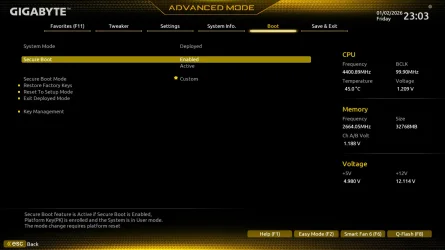
Are there something wrong with these settings? Seems like something has changed while fooling around with some of the scripts ..or maybe not?260102230332.webp
 

My Computer

System One

  • OS
    windows 11
    Computer type
    PC/Desktop
    Manufacturer/Model
    Antec/Case
    CPU
    Intel i5-10600kf
    Motherboard
    GIGABYTE Z590 UD AC
    Memory
    32gb corsair vengerance pro
    Graphics Card(s)
    AMD RX 6500XT
    Sound Card
    onboard
    Monitor(s) Displays
    40" Hisense
    Hard Drives
    Samsung 850
    Samsung 870
    Seagate 2TB
    PSU
    EVGA GQ 750
Are there something wrong with these settings? Seems like something has changed while fooling around with some of the scripts ..or maybe not?View attachment 158710
This is what Google AI said when I queried " Gigabyte BIOS Custom Mode "

In Gigabyte BIOS, "Custom Mode" primarily refers to
a setting within the Secure Boot menu that allows users to manually manage security keys. This is often necessary when Secure Boot is enabled but remains in an "Inactive" or "Setup" state.


How to Access and Use Custom Mode

To enable or configure Secure Boot using Custom Mode:

  1. Enter BIOS: Restart your PC and repeatedly press the Delete key.
  2. Switch to Advanced Mode: If you are in "Easy Mode," press F2 to enter Advanced Mode.
  3. Disable CSM: Navigate to the Boot tab and set CSM Support to Disabled. Secure Boot will not function if CSM is enabled.
  4. Enable Secure Boot:
    • Find the Secure Boot option (usually under the Boot or Settings tab).
    • Change Secure Boot Mode from "Standard" to Custom.
    • Select Restore Factory Keys and confirm with "Yes." This installs the default security keys required for the system to enter "User Mode".
  5. Revert to Standard: Once the keys are installed, you can switch the mode back to Standard.
  6. Save and Exit: Press F10 to save changes and restart.
 

My Computer

System One

  • OS
    Windows 11
This is what Google AI said when I queried " Gigabyte BIOS Custom Mode "

In Gigabyte BIOS, "Custom Mode" primarily refers to
a setting within the Secure Boot menu that allows users to manually manage security keys. This is often necessary when Secure Boot is enabled but remains in an "Inactive" or "Setup" state.


How to Access and Use Custom Mode

To enable or configure Secure Boot using Custom Mode:

  1. Enter BIOS: Restart your PC and repeatedly press the Delete key.
  2. Switch to Advanced Mode: If you are in "Easy Mode," press F2 to enter Advanced Mode.
  3. Disable CSM: Navigate to the Boot tab and set CSM Support to Disabled. Secure Boot will not function if CSM is enabled.
  4. Enable Secure Boot:
    • Find the Secure Boot option (usually under the Boot or Settings tab).
    • Change Secure Boot Mode from "Standard" to Custom.
    • Select Restore Factory Keys and confirm with "Yes." This installs the default security keys required for the system to enter "User Mode".
  5. Revert to Standard: Once the keys are installed, you can switch the mode back to Standard.
  6. Save and Exit: Press F10 to save changes and restart.
So I need to remove and replace the updated keys with factory default, then update key again?
 

My Computer

System One

  • OS
    windows 11
    Computer type
    PC/Desktop
    Manufacturer/Model
    Antec/Case
    CPU
    Intel i5-10600kf
    Motherboard
    GIGABYTE Z590 UD AC
    Memory
    32gb corsair vengerance pro
    Graphics Card(s)
    AMD RX 6500XT
    Sound Card
    onboard
    Monitor(s) Displays
    40" Hisense
    Hard Drives
    Samsung 850
    Samsung 870
    Seagate 2TB
    PSU
    EVGA GQ 750
Thanks , so confusing...Since my keys are updated if I go back to factory default will Windows still boot so I can update the keys again
 

My Computer

System One

  • OS
    windows 11
    Computer type
    PC/Desktop
    Manufacturer/Model
    Antec/Case
    CPU
    Intel i5-10600kf
    Motherboard
    GIGABYTE Z590 UD AC
    Memory
    32gb corsair vengerance pro
    Graphics Card(s)
    AMD RX 6500XT
    Sound Card
    onboard
    Monitor(s) Displays
    40" Hisense
    Hard Drives
    Samsung 850
    Samsung 870
    Seagate 2TB
    PSU
    EVGA GQ 750
Thanks , so confusing...Since my keys are updated if I go back to factory default will Windows still boot so I can update the keys again
Well, it depends. I wouldn't worry about it too much. It will boot with Secure Boot switched off no matter what. That's how you know you'll need to fix the bootloader when it won't boot with Secure Boot switched on after resetting the keys to factory. It's easy to fix the bootloader, once you do, you'll be able to turn Secure Boot back on and it will boot.

There's two sets of boot files under C:\Windows\Boot:


EFI\bootmgfw.efi (CA 2011)

EFI_EX\bootmgfw_EX.efi (CA 2023)


You can simply copy one of the two to the EFI volume. To revert back to CA 2011 boot file:

Code:
    mountvol S: /s

    copy C:\Windows\Boot\EFI\bootmgfw.efi S:\EFI\Microsoft\Boot\bootmgfw.efi

    mountvol S: /d


The destination file always has the same filename, bootmgfw.efi. But the source file might have _EX in the folder and filename.
 

My Computer

System One

  • OS
    Windows 11

Latest Support Threads

Back
Top Bottom


