Did you manually update your Secure Boot Keys ?


Or would it be okay just to leave as is..secure boot according to msinfo32 is on , ran Confirm-SecureBootUEFI shows True
 

My Computer

System One

  • OS
    windows 11
    Computer type
    PC/Desktop
    Manufacturer/Model
    Antec/Case
    CPU
    Intel i5-10600kf
    Motherboard
    GIGABYTE Z590 UD AC
    Memory
    32gb corsair vengerance pro
    Graphics Card(s)
    AMD RX 6500XT
    Sound Card
    onboard
    Monitor(s) Displays
    40" Hisense
    Hard Drives
    Samsung 850
    Samsung 870
    Seagate 2TB
    PSU
    EVGA GQ 750
Thanks. PS 7 changed the calling arguments for Get-PfxCertificate.

Replace "-FileName" with "-LiteralPath":
Code:
171 function Get-PFXCert {
172     [Parameter(Mandatory)]
173     param ([string]$FileName)
174
175     try {
176         $Issuer = (Get-PfxCertificate -LiteralPath $FileName).Issuer
177     }

This edit will be rolled into the next official version of the script (later this week).
Actually, it should say:
Replace "-FilePath" with "-LiteralPath" 😉

function Get-PFXCert {
[Parameter(Mandatory)]
param ([string]$FileName)

try {
$Issuer = (Get-PfxCertificate -FilePath $FileName).Issuer
}
 

My Computer

System One

  • OS
    Windows 11 Pro 25H2
    Computer type
    PC/Desktop
    Manufacturer/Model
    Dell XPS 8930
    CPU
    Intel I9-9900K
    Memory
    64GB
    Graphics Card(s)
    NVIDIA RTX 2060
    Sound Card
    NVIDIA High Definition Audio
    Monitor(s) Displays
    4k Samsung
    Screen Resolution
    3840 x 2160
    Hard Drives
    512GB NVMe, ADATA SU 800, 2TB HDD
I ran the commands from the first post a while back on all my machines, all currently 25H2.
Just in the past few days some of them have gotten KEK updates through Windows Update. All running 25H2:
z390 ud with i7-9700k
h270m-d3h with i7-7700
LG Gram laptop with i7-1360p
MSI laptop with i7-11800h

Screenshot 2026-01-13 121332.webp

But nothing yet on these machines :(
Asus z590 with i7-11700k
Lenovo laptop i5-1135g7
MSI laptop i5-10210u
 

My Computer

System One

  • OS
    Windows 11 Pro
    Computer type
    PC/Desktop
    Manufacturer/Model
    ASUS z590
    CPU
    Intel Core i7-11700k
    Motherboard
    ASUS z590
    Memory
    16GB Patriot Viper Steel @ DDR4-3200
    Graphics Card(s)
    RTX2070
    Monitor(s) Displays
    Sony XBR65Z9D
    Hard Drives
    1TB Crucial T500 M.2 PCIe Gen4 + many SATA + many USB
    PSU
    AS Rock Steel Legend 850W
    Case
    Silverstone
Just in the past few days some of them have gotten KEK updates through Windows Update.
I received the same update on my newer desktop a couple of days ago. Being that my other devices are older I'm not sure if they will get an update or not.
 

My Computers

System One System Two

  • OS
    Windows 11 Pro 25H2
    Computer type
    PC/Desktop
    Manufacturer/Model
    PowerSpec B746
    CPU
    Intel Core i7-10700K
    Motherboard
    ASRock Z490 Phantom Gaming 4/ax
    Memory
    16GB (8GB PC4-19200 DDR4 SDRAM x2)
    Graphics Card(s)
    NVIDIA GeForce GTX 1050 TI
    Sound Card
    Realtek Audio
    Monitor(s) Displays
    #1. LG ULTRAWIDE 34" #2. AOC Q32G2WG3 32"
    Screen Resolution
    #1. 3440 X 1440 #2. 1920 x 1080
    Hard Drives
    NVMe WDC WDS100T2B0C-00PXH0 1TB
    Samsung SSD 860 EVO 1TB
    PSU
    750 Watts (62.5A)
    Case
    PowerSpec/Lian Li ATX 205
    Keyboard
    Logitech K270
    Mouse
    Logitech M185
    Browser
    Microsoft Edge and Firefox
    Antivirus
    Webroot SecureAnywhere CE 26.1
  • Operating System
    Windows 11 Canary Channel
    Computer type
    PC/Desktop
    Manufacturer/Model
    PowerSpec G156
    CPU
    Intel Core i5-8400 CPU @ 2.80GHz
    Motherboard
    AsusTeK Prime B360M-A
    Memory
    16 MB DDR 4-2666
    Monitor(s) Displays
    23" Speptre HDMI 75Hz
    Screen Resolution
    1920x1080
    Hard Drives
    Samsung 970 EVO 500GB NVMe
    Keyboard
    Logitek K270
    Mouse
    Logitek M185
    Browser
    Firefox, Edge and Edge Canary
    Antivirus
    Windows Defender
I had use Mosby to generate all my keys, and I haven't seen any of these updates on any of my machines.
 

My Computers

System One System Two

  • OS
    Win 11 Pro 25H2, Build 26200.8524
    Computer type
    PC/Desktop
    Manufacturer/Model
    Home Brew
    CPU
    Intel Core i5 14500
    Motherboard
    Gigabyte B760M G P WIFI
    Memory
    64GB DDR4
    Graphics Card(s)
    GeForce RTX 4060
    Sound Card
    Chipset Realtek
    Monitor(s) Displays
    LG 45" Ultragear, Acer 24" 1080p
    Screen Resolution
    5120x1440, 1920x1080
    Hard Drives
    Crucial P310 2TB 2280 PCIe Gen4 3D NAND NVMe M.2 SSD (O/S)
    Silicon Power 2TB US75 NVMe PCIe Gen4 M.2 2280 SSD (backup)
    Crucial BX500 2TB 3D NAND (2nd backup)
    Seagate 4TB Ironwolf, rotating HDD archive files
    External off-line backup Drives: 2 NVMe 4TB drives in external enclosures
    PSU
    Thermaltake Toughpower GF3 750W
    Case
    LIAN LI LANCOOL 216 E-ATX PC Case
    Cooling
    Lots of fans!
    Keyboard
    Microsoft Comfort Curve 2000
    Mouse
    Logitech G305
    Internet Speed
    Verizon FiOS 1GB
    Browser
    Firefox
    Antivirus
    Malware Bytes & Windows Defender Security
  • Operating System
    Win 11 Pro 25H2, Build 26200.8524
    Computer type
    PC/Desktop
    Manufacturer/Model
    Home Brew
    CPU
    Intel Core i5 14400
    Motherboard
    Gigabyte B760M DS3H AX
    Memory
    32GB DDR5
    Graphics card(s)
    Intel 700 Embedded GPU
    Sound Card
    Realtek Embedded
    Monitor(s) Displays
    27" HP 1080p
    Screen Resolution
    1920x1080
    Hard Drives
    Crucial P310 2TB 2280 PCIe Gen4 eD NAND PCIe SSD
    Samsung EVO 990 2TB NVMe Gen4 SSD
    Samsung 2TB SATA SSD
    PSU
    Thermaltake Smart BM3 650W
    Case
    Okinos Micro ATX Case
    Cooling
    Fans
    Keyboard
    Microsoft Comfort Curve 2000
    Mouse
    Logitech G305
    Internet Speed
    Verizon FiOS 1GB
    Browser
    Firefox
    Antivirus
    Malware Bytes & Windows Defender Security
I had use Mosby to generate all my keys, and I haven't seen any of these updates on any of my machines.
And you won´t. Mosby uses a different procedure. It doesn´t need the KEK generated by the OEM.

That´s why it can be used to update Secure Boot on old computers that don´t have OEM support.
 

My Computer

System One

  • OS
    Windows 10
And you won´t. Mosby uses a different procedure. It doesn´t need the KEK generated by the OEM.

That´s why it can be used to update Secure Boot on old computers that don´t have OEM support.
My reasoning for using Mosby in the first place was it generates it's own PK that is unique to each machine, not the clone that is only unique to a maker's thousands of machines. Since the whole point of Secure Boot and all this certificate juggling is security, might as well make it as secure as possible.
 

My Computers

System One System Two

  • OS
    Win 11 Pro 25H2, Build 26200.8524
    Computer type
    PC/Desktop
    Manufacturer/Model
    Home Brew
    CPU
    Intel Core i5 14500
    Motherboard
    Gigabyte B760M G P WIFI
    Memory
    64GB DDR4
    Graphics Card(s)
    GeForce RTX 4060
    Sound Card
    Chipset Realtek
    Monitor(s) Displays
    LG 45" Ultragear, Acer 24" 1080p
    Screen Resolution
    5120x1440, 1920x1080
    Hard Drives
    Crucial P310 2TB 2280 PCIe Gen4 3D NAND NVMe M.2 SSD (O/S)
    Silicon Power 2TB US75 NVMe PCIe Gen4 M.2 2280 SSD (backup)
    Crucial BX500 2TB 3D NAND (2nd backup)
    Seagate 4TB Ironwolf, rotating HDD archive files
    External off-line backup Drives: 2 NVMe 4TB drives in external enclosures
    PSU
    Thermaltake Toughpower GF3 750W
    Case
    LIAN LI LANCOOL 216 E-ATX PC Case
    Cooling
    Lots of fans!
    Keyboard
    Microsoft Comfort Curve 2000
    Mouse
    Logitech G305
    Internet Speed
    Verizon FiOS 1GB
    Browser
    Firefox
    Antivirus
    Malware Bytes & Windows Defender Security
  • Operating System
    Win 11 Pro 25H2, Build 26200.8524
    Computer type
    PC/Desktop
    Manufacturer/Model
    Home Brew
    CPU
    Intel Core i5 14400
    Motherboard
    Gigabyte B760M DS3H AX
    Memory
    32GB DDR5
    Graphics card(s)
    Intel 700 Embedded GPU
    Sound Card
    Realtek Embedded
    Monitor(s) Displays
    27" HP 1080p
    Screen Resolution
    1920x1080
    Hard Drives
    Crucial P310 2TB 2280 PCIe Gen4 eD NAND PCIe SSD
    Samsung EVO 990 2TB NVMe Gen4 SSD
    Samsung 2TB SATA SSD
    PSU
    Thermaltake Smart BM3 650W
    Case
    Okinos Micro ATX Case
    Cooling
    Fans
    Keyboard
    Microsoft Comfort Curve 2000
    Mouse
    Logitech G305
    Internet Speed
    Verizon FiOS 1GB
    Browser
    Firefox
    Antivirus
    Malware Bytes & Windows Defender Security
I finally got brave and ran the updates scripts today. Also fixed the TPM errors, TPM is up to date now is seems. Did not run the script to remove keys.

Checking for Administrator permission...
Running as administrator - continuing execution...

21 January 2026
Manufacturer: HP
Model: HP Pavilion Desktop TP01-1xxx
BIOS: AMI, F.54, F.54, HPQOEM - 1072009
Windows version: 25H2 (Build 26200.7623)

Secure Boot status: Enabled

Current UEFI PK
√ HP UEFI Secure Boot PK 2017

Default UEFI PK
√ HP UEFI Secure Boot PK 2017

Current UEFI KEK √ Microsoft Corporation KEK CA 2011 (revoked: False) √ Microsoft Corporation KEK 2K CA 2023 (revoked: False) √ HP UEFI Secure Boot KEK 2017 (revoked: False) Default UEFI KEK √ Microsoft Corporation KEK CA 2011 (revoked: False) X Microsoft Corporation KEK 2K CA 2023
√ HP UEFI Secure Boot KEK 2017 (revoked: False)

Current UEFI DB
√ Microsoft Windows Production PCA 2011 (revoked: False)
√ Microsoft Corporation UEFI CA 2011 (revoked: False)
√ Windows UEFI CA 2023 (revoked: False)
√ Microsoft UEFI CA 2023 (revoked: False)
√ Microsoft Option ROM UEFI CA 2023 (revoked: False)
√ HP UEFI Secure Boot DB 2017 (revoked: False)

Default UEFI DB
√ Microsoft Windows Production PCA 2011 (revoked: False)
√ Microsoft Corporation UEFI CA 2011 (revoked: False)
X Windows UEFI CA 2023
X Microsoft UEFI CA 2023
X Microsoft Option ROM UEFI CA 2023
√ HP UEFI Secure Boot DB 2017 (revoked: False)

Current UEFI DBX (only the latest one is needed to be secure)
2025-06-11 (v1.5.1) : SUCCESS: 430 successes detected
2025-10-14 (v1.6.0) : SUCCESS: 431 successes detected

Press any key to continue . . .
EVENT Viewer ID 1808
This device has updated Secure Boot CA/keys. This device signature information is included here.
DeviceAttributes: FirmwareManufacturer:AMI;FirmwareVersion:F.54;OEMModelBaseBoard:8767;OEMManufacturerName:HP;OSArchitecture:amd64;
BucketId: 58c7a62c3d44f62559eac5f9ac4f9891af9ebfd538f37214d41ff5e68b045997
BucketConfidenceLevel:
UpdateType: Windows UEFI CA 2023 (DB), Option ROM CA 2023 (DB), 3P UEFI CA 2023 (DB), KEK 2023, Boot Manager (2023)
For more information, please see Windows Secure Boot certificate expiration and CA updates - Microsoft Support.

 

My Computer

System One

  • OS
    Windows 11 Intel i5 10400 HD630 graphics chip
    Computer type
    PC/Desktop
    Manufacturer/Model
    HP
    CPU
    i5-10400
    Memory
    12 gb
    Graphics Card(s)
    HD630 chipset
    Monitor(s) Displays
    LG 24inch
    Hard Drives
    SSD, external usb drive 1tb for files/backups
    Keyboard
    wireless Logi
    Mouse
    ms 4000 wireless mouse
    Internet Speed
    10meg
    Browser
    Firefox
    Antivirus
    Defender
    Other Info
    Win11 Home 25h2 26200.8524 05/26/2026
Im on legacy bios , since a few weeks my bootime went from 20 to 40 seconds !
Still searching for the cause ..........
Will I get my 20 seconds back , when converting from MBR to GPT , then changing bios from legacy to EUFI...........???
 

My Computer

System One

  • OS
    Windows11 Pro 25H2
    Computer type
    PC/Desktop
    Manufacturer/Model
    Asus
    CPU
    i7
    Motherboard
    z97k
    Memory
    32GB
    Graphics Card(s)
    nVidia
    Sound Card
    Realtek
    Hard Drives
    3
    Cooling
    air
    Browser
    Edge
    Antivirus
    ESET
Im on legacy bios , since a few weeks my bootime went from 20 to 40 seconds !
Still searching for the cause ..........
Will I get my 20 seconds back , when converting from MBR to GPT , then changing bios from legacy to EUFI...........???
No real way of knowing without doing it. Is that such a big deal, 20 seconds extra for boot? How often do you have to boot?
 

My Computers

System One System Two

  • OS
    Win 11 Pro 25H2, Build 26200.8524
    Computer type
    PC/Desktop
    Manufacturer/Model
    Home Brew
    CPU
    Intel Core i5 14500
    Motherboard
    Gigabyte B760M G P WIFI
    Memory
    64GB DDR4
    Graphics Card(s)
    GeForce RTX 4060
    Sound Card
    Chipset Realtek
    Monitor(s) Displays
    LG 45" Ultragear, Acer 24" 1080p
    Screen Resolution
    5120x1440, 1920x1080
    Hard Drives
    Crucial P310 2TB 2280 PCIe Gen4 3D NAND NVMe M.2 SSD (O/S)
    Silicon Power 2TB US75 NVMe PCIe Gen4 M.2 2280 SSD (backup)
    Crucial BX500 2TB 3D NAND (2nd backup)
    Seagate 4TB Ironwolf, rotating HDD archive files
    External off-line backup Drives: 2 NVMe 4TB drives in external enclosures
    PSU
    Thermaltake Toughpower GF3 750W
    Case
    LIAN LI LANCOOL 216 E-ATX PC Case
    Cooling
    Lots of fans!
    Keyboard
    Microsoft Comfort Curve 2000
    Mouse
    Logitech G305
    Internet Speed
    Verizon FiOS 1GB
    Browser
    Firefox
    Antivirus
    Malware Bytes & Windows Defender Security
  • Operating System
    Win 11 Pro 25H2, Build 26200.8524
    Computer type
    PC/Desktop
    Manufacturer/Model
    Home Brew
    CPU
    Intel Core i5 14400
    Motherboard
    Gigabyte B760M DS3H AX
    Memory
    32GB DDR5
    Graphics card(s)
    Intel 700 Embedded GPU
    Sound Card
    Realtek Embedded
    Monitor(s) Displays
    27" HP 1080p
    Screen Resolution
    1920x1080
    Hard Drives
    Crucial P310 2TB 2280 PCIe Gen4 eD NAND PCIe SSD
    Samsung EVO 990 2TB NVMe Gen4 SSD
    Samsung 2TB SATA SSD
    PSU
    Thermaltake Smart BM3 650W
    Case
    Okinos Micro ATX Case
    Cooling
    Fans
    Keyboard
    Microsoft Comfort Curve 2000
    Mouse
    Logitech G305
    Internet Speed
    Verizon FiOS 1GB
    Browser
    Firefox
    Antivirus
    Malware Bytes & Windows Defender Security
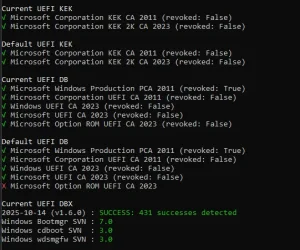
Im only missing Option ROM UEFI CA 2023, but i got it from script. Should i be worried about that in future? or im gonna get it with updates? rn i have disabled updates, im on 23h2. I have to do it with this script every time I reinstall Windows because I still haven't received this one key
1771038554387.webp
 

My Computer

System One

  • OS
    Windows 11
    Computer type
    PC/Desktop
    Manufacturer/Model
    Asrock b760 pro rs
You actually have the Option ROM cert installed. The reason I don't like this script is because everyone mis-reads the results.
Your BIOS doesn't have the Option ROM in the factory defaults. That can't be fixed except by the OEM.
 

My Computer

System One

  • OS
    Windows 7
You actually have the Option ROM cert installed. The reason I don't like this script is because everyone mis-reads the results.
Your BIOS doesn't have the Option ROM in the factory defaults. That can't be fixed except by the OEM.
Yea i know, ty.
So i must waiting for bios update?
 

My Computer

System One

  • OS
    Windows 11
    Computer type
    PC/Desktop
    Manufacturer/Model
    Asrock b760 pro rs
The last BIOS update for your ASR B670 Pro RS was October 2025. They might add it, but probably won't unless someone complains to tech support. My guess is someone in ASUS forgot to check the list and skipped Option ROM.
 

My Computer

System One

  • OS
    Windows 7
Okay, thanks. So let's say they don't update with Option ROM 2023, then I'll have to use the script again, right? (if I reset bios/windows)
 

My Computer

System One

  • OS
    Windows 11
    Computer type
    PC/Desktop
    Manufacturer/Model
    Asrock b760 pro rs
You can always re-apply the OROM cert. Where you might have a serious problem is if your GPU has a firmware signed with OROM. Then you won't see anything at power on (no display). That is a risk depending on your GPU.

Which is why you should complain to ASR about the missing OROM. MS doesn't force every vendor to include it. At a minimum they must support Windows UEFI CA 2023 and Microsoft UEFI CA 2023.
 

My Computer

System One

  • OS
    Windows 7
You can always re-apply the OROM cert. Where you might have a serious problem is if your GPU has a firmware signed with OROM. Then you won't see anything at power on (no display). That is a risk depending on your GPU.

Which is why you should complain to ASR about the missing OROM. MS doesn't force every vendor to include it. At a minimum they must support Windows UEFI CA 2023 and Microsoft UEFI CA 2023.
I have RTX 5060. I will try to email them. Hope they fix that till 2011 will expire.
 

My Computer

System One

  • OS
    Windows 11
    Computer type
    PC/Desktop
    Manufacturer/Model
    Asrock b760 pro rs
You can always re-apply the OROM cert. Where you might have a serious problem is if your GPU has a firmware signed with OROM. Then you won't see anything at power on (no display). That is a risk depending on your GPU.

Which is why you should complain to ASR about the missing OROM. MS doesn't force every vendor to include it. At a minimum they must support Windows UEFI CA 2023 and Microsoft UEFI CA 2023.
I have one more question, so Option ROM 2023 can't be granted to me by Windows Update right?
 

My Computer

System One

  • OS
    Windows 11
    Computer type
    PC/Desktop
    Manufacturer/Model
    Asrock b760 pro rs
Right now, Windows Update is only programmed to install KEK CA 2023 on supported PC's. It could install other certs, but it's a gradual deployment and KEK CA 2023 is the first one. You already have OROM in your UEFI DB, but it's missing from the factory defaults.

WU can't fix this. A separate scheduled task is responsible for pushing out certs. If you were missing OROM, the task could push it again. But again, we're in the optional stage. Windows will not force install certs for a few months.

If your vendor releases a new firmware, sometimes it can be delivered by WU. But that is up to the vendor, not MS, since the vendor has to share the file.

The answer is there is nothing you can do, except complain to ASUS. And wait. You're lucky, other people have PC's where there are no more BIOS updates.
 

My Computer

System One

  • OS
    Windows 7

Latest Support Threads

Back
Top Bottom