Direct X uses microsoft basic display adapter, despite driver


sisakoso

New member
Local time
11:57 AM
Posts
2
OS
win 11
Hi everyone,

My problem is, that even though I installed every latest update for m Nvidia graphics card and in Device Manager it shows GTX 1660Ti when I open dxdiag it uses microsoft basic display adapter. This way I cannot use my screen (I have a laptop) on 144hrz. Tried reinstalling geforce drivers and installing previous versions of Direct X.
Please help.

Nice day,
Ho
 
Windows Build/Version
win 11

My Computer My Computer

At a glance

win 11AMD Ryzen 7 4800xNvidia 1660 Ti
OS
win 11
Computer type
Laptop
Manufacturer/Model
Asus TUF a15
CPU
AMD Ryzen 7 4800x
Graphics Card(s)
Nvidia 1660 Ti

ps. It also says Code 43


My Computer My Computer

At a glance

win 11AMD Ryzen 7 4800xNvidia 1660 Ti
OS
win 11
Computer type
Laptop
Manufacturer/Model
Asus TUF a15
CPU
AMD Ryzen 7 4800x
Graphics Card(s)
Nvidia 1660 Ti
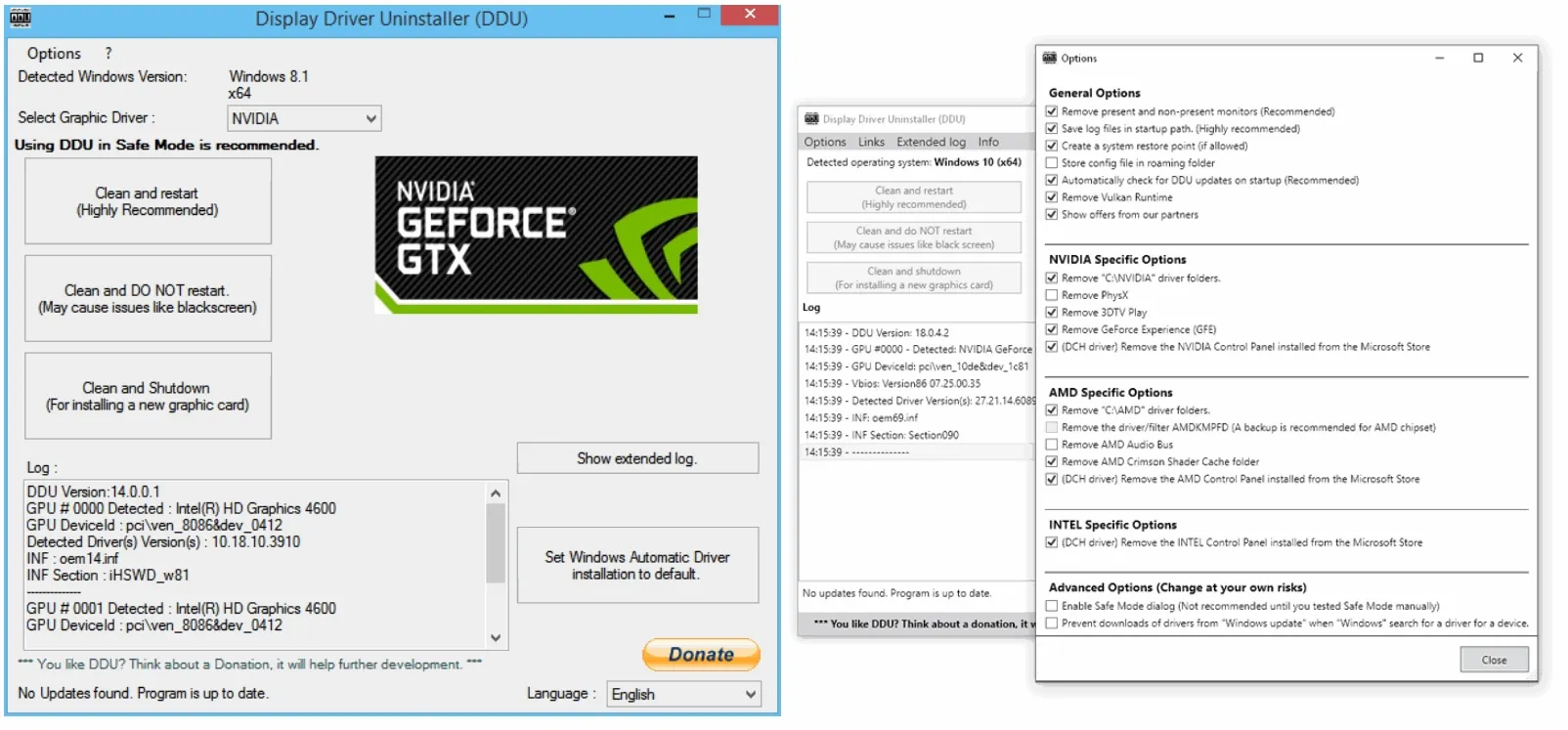
Welcome to the forum. Try using DDU to uninstall all old Nvidia drivers (be sure to check the box to also remove the software) . Must be done in safe mode.

Restart in normal mode.
Then reinstall latest driver. Latest driver is 531.68 Latest NVIDIA GeForce Graphics Drivers for Windows 11
 

My Computers My Computers

  • At a glance

    Windows 11 Pro 25H2 26200.8655i9-10900 10 core 20 threads32 gbnone-Intel UHD Graphics 630
    OS
    Windows 11 Pro 25H2 26200.8655
    Computer type
    PC/Desktop
    Manufacturer/Model
    Dell Optiplex 7080
    CPU
    i9-10900 10 core 20 threads
    Motherboard
    DELL 0J37VM
    Memory
    32 gb
    Graphics Card(s)
    none-Intel UHD Graphics 630
    Sound Card
    Integrated Realtek
    Monitor(s) Displays
    Benq 27
    Screen Resolution
    2560x1440
    Hard Drives
    2x1tb Solidigm m.2 nvme /External drives 512gb Samsung m.2 sata+2tb Kingston m2.nvme
    PSU
    500w
    Case
    MT
    Cooling
    Dell Premium
    Keyboard
    Logitech wired
    Mouse
    Logitech wireless
    Internet Speed
    so slow I'm too embarrassed to tell
    Browser
    #1 Edge #2 Firefox
    Antivirus
    Defender+MWB Premium
  • At a glance

    Windows 11 Pro 24H2 26200.8457AMD Ryzen 7 6800U32 gbintegrated
    Operating System
    Windows 11 Pro 24H2 26200.8457
    Computer type
    PC/Desktop
    Manufacturer/Model
    Beelink Mini PC SER5
    CPU
    AMD Ryzen 7 6800U
    Memory
    32 gb
    Graphics card(s)
    integrated
    Sound Card
    integrated
    Monitor(s) Displays
    Benq 27
    Screen Resolution
    2560x1440
    Hard Drives
    1TB Crucial nvme
    Keyboard
    Logitech wired
    Mouse
    Logitech wireless
    Internet Speed
    still too embarrassed to tell
    Browser
    Firefox
    Antivirus
    Defender
    Other Info
    System 3 is non compliant Dell 9020 i7-4770/24gb ram Win11 PRO 26200.8457
Remove any drivers you have installed from Nvidia and install those provided by ASUS support for your particular model.
Install related system drivers as well.

You should only update from ASUS support, ASUS updating application and Windows updates.

You have lost the links to your specific Laptop hardware, i.e. Graphics Hardware and Display Panel.

The consequence of that are what you describe.

"This way I cannot use my screen (I have a laptop) on 144hz."
 

My Computer My Computer

At a glance

Windows 11
OS
Windows 11
Welcome to the forum. Try using DDU to uninstall all old Nvidia drivers (be sure to check the box to also remove the software) . Must be done in safe mode.

Restart in normal mode.
Then reinstall latest driver. Latest driver is 531.68 Latest NVIDIA GeForce Graphics Drivers for Windows 11
Do this for sure and hopefully you're good to go.


Remove any drivers you have installed from Nvidia and install those provided by ASUS support for your particular model.
Install related system drivers as well.

You should only update from ASUS support, ASUS updating application and Windows updates.

You have lost the links to your specific Laptop hardware, i.e. Graphics Hardware and Display Panel.

The consequence of that are what you describe.

"This way I cannot use my screen (I have a laptop) on 144hz."
Saying you should only update from ASUS support for an NVIDIA product isn't entirely right, I get what you're saying if its a laptop and theres been issues but it isn't the new driver from nvidia that's causing it. Always refer to nvidia for drivers especially if you're gonna game, Ones on manufacturer sites like asus etc tend to be out of date and obsolete.
 

My Computer My Computer

At a glance

11[email protected]Viper Steelseries 32gb@ 3600mhzGigabyte 2070 Super 8GB, +200 core + 600 memory
OS
11
Computer type
PC/Desktop
Manufacturer/Model
Custom
CPU
[email protected]
Motherboard
Gigabyte Gaming X Z490
Memory
Viper Steelseries 32gb@ 3600mhz
Graphics Card(s)
Gigabyte 2070 Super 8GB, +200 core + 600 memory
Monitor(s) Displays
ASUS 4k HDR, Two 1080p Benq and Samsung
Screen Resolution
3840x2160/2560x1440/1920x1080
Hard Drives
Adata XPG SX8200 PRO 1tb
Samsung EVO 870 500GB
PSU
Corsair RX 650
Case
NZXT h510
Cooling
CM HYPER 212 RGB
Keyboard
Razer Ornata Chroma
Mouse
Steelseries Rival 710
"Always refer to nvidia for drivers especially if you're gonna game, Ones on manufacturer sites like asus etc tend to be out of date and obsolete."

You are missing several points. It does not matter that a video driver is not the latest i.e. out of date. They never become obsolete.
On my newest Laptop with an RTX 3070 Ti Laptop GPU, driver version is 527.99(~Dec 2022) the Refresh rate is selectable 60 Hz or 165 Hz, no worries, and it was the manufacturers update. Two since it was out of the box.

Another point is that Laptop Hardware has differences to a desktop Graphics card. e.g. a Laptop may have MUX switches, programmed power limits etc, depending on what the manufacturer decides upon.

At the end of the day the OP may have to reset the Laptop to it's factory/bought state to get to a reasonable working state again.

Hopefully they can avoid mistakes by doing what I suggested.

It is not an idle suggestion either as I have a much older 9 years old Laptop with similar (older) hardware that has been working all that time with no graphics problems.
 

My Computer My Computer

At a glance

Windows 11
OS
Windows 11
"Always refer to nvidia for drivers especially if you're gonna game, Ones on manufacturer sites like asus etc tend to be out of date and obsolete."

You are missing several points. It does not matter that a video driver is not the latest i.e. out of date. They never become obsolete.
On my newest Laptop with an RTX 3070 Ti Laptop GPU, driver version is 527.99(~Dec 2022) the Refresh rate is selectable 60 Hz or 165 Hz, no worries, and it was the manufacturers update. Two since it was out of the box.

Another point is that Laptop Hardware has differences to a desktop Graphics card. e.g. a Laptop may have MUX switches, programmed power limits etc, depending on what the manufacturer decides upon.

At the end of the day the OP may have to reset the Laptop to it's factory/bought state to get to a reasonable working state again.

Hopefully they can avoid mistakes by doing what I suggested.

It is not an idle suggestion either as I have a much older 9 years old Laptop with similar (older) hardware that has been working all that time with no graphics problems.
So what happens in the event of a new driver comes out with say support for game xxxxx but the lets say asus in the case one doesn't, Why would i run the old one that doesnt? I dont believe the run concurrent updates to mirror nvidia or amds therefore lack the support for new games etc.
I know it wasnt an idle suggestion and there probably is merrit in it going back to as a base starting point, but if that resolves it it means you can only use one driver ever? Seems a bit daft to me.
 

My Computer My Computer

At a glance

11[email protected]Viper Steelseries 32gb@ 3600mhzGigabyte 2070 Super 8GB, +200 core + 600 memory
OS
11
Computer type
PC/Desktop
Manufacturer/Model
Custom
CPU
[email protected]
Motherboard
Gigabyte Gaming X Z490
Memory
Viper Steelseries 32gb@ 3600mhz
Graphics Card(s)
Gigabyte 2070 Super 8GB, +200 core + 600 memory
Monitor(s) Displays
ASUS 4k HDR, Two 1080p Benq and Samsung
Screen Resolution
3840x2160/2560x1440/1920x1080
Hard Drives
Adata XPG SX8200 PRO 1tb
Samsung EVO 870 500GB
PSU
Corsair RX 650
Case
NZXT h510
Cooling
CM HYPER 212 RGB
Keyboard
Razer Ornata Chroma
Mouse
Steelseries Rival 710
I wonder whether the issue is related to dual graphics?

The laptop has a Ryzen 7 4800H (not X) CPU, which includes integrated graphics. The OP didn't provide an exact model number. It may be an FA506IU or FA506II.

Asus doesn't provide any iGPU driver downloads for either. I doubt that the nVidia driver downloads include the AMD drivers.

I wonder if the laptop has a BIOS setting to disable the iGPU? I'd do that, if I owned such a laptop (and the option existed). The price would be decreased run time on battery.
 

My Computers My Computers

  • At a glance

    Windows 11 26200.8728Amd Threadripper 7970X128GB (4 X 32) G.Skill DDR5 6400 (RDIMM)Gigabyte RTX 4090 OC
    OS
    Windows 11 26200.8728
    Computer type
    PC/Desktop
    Manufacturer/Model
    homebuilt
    CPU
    Amd Threadripper 7970X
    Motherboard
    Gigabyte TRX50 Aero D Rev. 1.0
    Memory
    128GB (4 X 32) G.Skill DDR5 6400 (RDIMM)
    Graphics Card(s)
    Gigabyte RTX 4090 OC
    Sound Card
    none (USB to speakers), Realtek
    Monitor(s) Displays
    Innocn 32" OLED
    Screen Resolution
    3840 X 2160 @ 60Hz
    Hard Drives
    Crucial T700 2TB M.2 NVME SSD
    WD 4TB Blue SATA SSD
    Seagate 18TB IronWolf Pro
    PSU
    BeQuiet! Straight Power 12 1500W
    Case
    Lian Li 011 Dynamic Evo XL
    Cooling
    SilverStone Technology XE360-TR5, with 3 Phanteks T30 fans
    Keyboard
    Cherry KC 500 MX LP (mechanical)
    Mouse
    Logitech M500s (wired)
    Internet Speed
    2000/250 Mbps (down/up)
    Other Info
    xFinity gateway
  • At a glance

    windows 11 26200.8728Intel I9-13900K64GB G.Skill DDR5-6000Gigabyte RTX 3090 ti
    Operating System
    windows 11 26200.8728
    Computer type
    PC/Desktop
    Manufacturer/Model
    homebuilt
    CPU
    Intel I9-13900K
    Motherboard
    Asus RoG Strix Z690-E
    Memory
    64GB G.Skill DDR5-6000
    Graphics card(s)
    Gigabyte RTX 3090 ti
    Sound Card
    built in Realtek
    Monitor(s) Displays
    Philips 27E1N8900 27" OLED
    Screen Resolution
    3840 X 2160 @60Hz
    Hard Drives
    WDC SN850 1TB
    8TB Seagate Ironwolf
    4TB Seagate Ironwolf
    PSU
    eVGA SuperNOVA 1300 GT
    Case
    Lian Li 011 Dynamic Evo
    Cooling
    Corsair iCUE H150i ELITE CAPELLIX Liquid CPU Cooler
    Keyboard
    Cherry Streaming (wired)
    Mouse
    Logitech M500s (wired)
Original post last Sunday evening (EDT). Nothing since.

Hit-and-run?
 

My Computers My Computers

  • At a glance

    Windows 11 26200.8728Amd Threadripper 7970X128GB (4 X 32) G.Skill DDR5 6400 (RDIMM)Gigabyte RTX 4090 OC
    OS
    Windows 11 26200.8728
    Computer type
    PC/Desktop
    Manufacturer/Model
    homebuilt
    CPU
    Amd Threadripper 7970X
    Motherboard
    Gigabyte TRX50 Aero D Rev. 1.0
    Memory
    128GB (4 X 32) G.Skill DDR5 6400 (RDIMM)
    Graphics Card(s)
    Gigabyte RTX 4090 OC
    Sound Card
    none (USB to speakers), Realtek
    Monitor(s) Displays
    Innocn 32" OLED
    Screen Resolution
    3840 X 2160 @ 60Hz
    Hard Drives
    Crucial T700 2TB M.2 NVME SSD
    WD 4TB Blue SATA SSD
    Seagate 18TB IronWolf Pro
    PSU
    BeQuiet! Straight Power 12 1500W
    Case
    Lian Li 011 Dynamic Evo XL
    Cooling
    SilverStone Technology XE360-TR5, with 3 Phanteks T30 fans
    Keyboard
    Cherry KC 500 MX LP (mechanical)
    Mouse
    Logitech M500s (wired)
    Internet Speed
    2000/250 Mbps (down/up)
    Other Info
    xFinity gateway
  • At a glance

    windows 11 26200.8728Intel I9-13900K64GB G.Skill DDR5-6000Gigabyte RTX 3090 ti
    Operating System
    windows 11 26200.8728
    Computer type
    PC/Desktop
    Manufacturer/Model
    homebuilt
    CPU
    Intel I9-13900K
    Motherboard
    Asus RoG Strix Z690-E
    Memory
    64GB G.Skill DDR5-6000
    Graphics card(s)
    Gigabyte RTX 3090 ti
    Sound Card
    built in Realtek
    Monitor(s) Displays
    Philips 27E1N8900 27" OLED
    Screen Resolution
    3840 X 2160 @60Hz
    Hard Drives
    WDC SN850 1TB
    8TB Seagate Ironwolf
    4TB Seagate Ironwolf
    PSU
    eVGA SuperNOVA 1300 GT
    Case
    Lian Li 011 Dynamic Evo
    Cooling
    Corsair iCUE H150i ELITE CAPELLIX Liquid CPU Cooler
    Keyboard
    Cherry Streaming (wired)
    Mouse
    Logitech M500s (wired)
Back
Top Bottom