Disable Windows 11 Defender


Enginuity

New member
Local time
7:12 PM
Posts
1
OS
Windows 11
Is there a permanent way to disable Windows 11 Defender, not using group policy? I try to disable the service using PowerRun but it won't change.
 

My Computer My Computer

At a glance

Windows 11
OS
Windows 11
Is there a permanent way to disable Windows 11 Defender, not using group policy? I try to disable the service using PowerRun but it won't change.


My Computers My Computers

  • At a glance

    Win 11 Home ♦♦♦26200.8655 ♦♦♦♦♦♦♦25H2AMD Ryzen 7 3700XG.Skill (F4-3200C14D-16GTZKW)EVGA RTX 2070 (08G-P4-2171-KR)
    OS
    Win 11 Home ♦♦♦26200.8655 ♦♦♦♦♦♦♦25H2
    Computer type
    PC/Desktop
    Manufacturer/Model
    Built by Ghot® [May 2020]
    CPU
    AMD Ryzen 7 3700X
    Motherboard
    Asus Pro WS X570-ACE (BIOS 5302)
    Memory
    G.Skill (F4-3200C14D-16GTZKW)
    Graphics Card(s)
    EVGA RTX 2070 (08G-P4-2171-KR)
    Sound Card
    Realtek ALC1220P / ALC S1220A
    Monitor(s) Displays
    Dell U3011 30"
    Screen Resolution
    2560 x 1600
    Hard Drives
    2x Samsung 860 EVO 500GB,
    WD 4TB Black FZBX - SATA III,
    WD 8TB Black FZBX - SATA III,
    DRW-24B1ST CD/DVD Burner
    PSU
    PC Power & Cooling 750W Quad EPS12V
    Case
    Cooler Master ATCS 840 Tower
    Cooling
    CM Hyper 212 EVO (push/pull)
    Keyboard
    Ducky DK9008 Shine II Blue LED
    Mouse
    Logitech Optical M-100
    Internet Speed
    300/300
    Browser
    Firefox (latest)
    Antivirus
    Bitdefender Total Security
    Other Info
    Speakers: Klipsch Pro Media 2.1
  • At a glance

    Windows XP Pro 32bit w/SP3AMD Athlon 64 X2 5000+ (OC'd @ 3.2Ghz)TWIN2X2048-6400C4DHX (2 x 1GB, DDR2 800)EVGA 256-P2-N758-TR GeForce 8600GT SSC
    Operating System
    Windows XP Pro 32bit w/SP3
    Computer type
    PC/Desktop
    Manufacturer/Model
    Built by Ghot® (not in use)
    CPU
    AMD Athlon 64 X2 5000+ (OC'd @ 3.2Ghz)
    Motherboard
    ASUS M2N32-SLI Deluxe Wireless Edition
    Memory
    TWIN2X2048-6400C4DHX (2 x 1GB, DDR2 800)
    Graphics card(s)
    EVGA 256-P2-N758-TR GeForce 8600GT SSC
    Sound Card
    Onboard
    Monitor(s) Displays
    ViewSonic G90FB Black 19" Professional (CRT)
    Screen Resolution
    up to 2048 x 1536
    Hard Drives
    WD 36GB 10,000rpm Raptor SATA
    Seagate 80GB 7200rpm SATA
    Lite-On LTR-52246S CD/RW
    Lite-On LH-18A1P CD/DVD Burner
    PSU
    PC Power & Cooling Silencer 750 Quad EPS12V
    Case
    Generic Beige case, 80mm fans
    Cooling
    ZALMAN 9500A 92mm CPU Cooler
    Keyboard
    Logitech Classic Keybooard 200
    Mouse
    Logitech Optical M-BT96a
    Internet Speed
    300/300
    Browser
    Firefox 3.x ??
    Antivirus
    Symantec (Norton)
    Other Info
    Still assembled, still runs. Haven't turned it on for 15 years?
In this video, i will guide you on how to disable Windows Defender in Windows 11.


My Computer My Computer

At a glance

Windows 11AMD Ryzen 7 5700GMicron Technology DDR4-3200 16GBNVIDIA GeForce RTX 3060
OS
Windows 11
Computer type
PC/Desktop
Manufacturer/Model
HP Pavilion
CPU
AMD Ryzen 7 5700G
Motherboard
Erica6
Memory
Micron Technology DDR4-3200 16GB
Graphics Card(s)
NVIDIA GeForce RTX 3060
Sound Card
Realtek ALC671
Monitor(s) Displays
Samsung SyncMaster U28E590
Screen Resolution
3840 x 2160
Hard Drives
SAMSUNG MZVLQ1T0HALB-000H1
There is a permanent way to disable dedender. First install adaware antivirus let it run the virus definiation update. Download an app called autorun.
Go to msconfig and choose safe mode reboot. In safe mode run autorun go to services show microsoft ones. Untick windefend. After open regedit go to services change the owner to your user the following keys sense Wdboot Wdfilter wdnisdrv Wdnissvc Windefend and change the start option for all of them 4 which means disabled. Go to msconfig and select normal reboot. When you are out of safe mode uninstall adaware it will ask if you want re enable defender say no. Thats it after uninstall finished check your services.
 

My Computer My Computer

At a glance

Debian Linux, Freebsd 13, Windows 10, Windows 11
OS
Debian Linux, Freebsd 13, Windows 10, Windows 11
One more thing before reboot to safe mode disable tampering and virus scaning at control security.
 

My Computer My Computer

At a glance

Debian Linux, Freebsd 13, Windows 10, Windows 11
OS
Debian Linux, Freebsd 13, Windows 10, Windows 11
Is there a permanent way to disable Windows 11 Defender, not using group policy? I try to disable the service using PowerRun but it won't change.
Well I use Avast Premier Pro and it totally disables Defender
 

My Computer My Computer

At a glance

Windows 11 Pro Version 23H2(OS Build 22631.4890)12-Core AMD Ryzen 9 5900X, 4950 MHz (49.5 x 100)4 - G Skill Trident Z Neo F4-3600C16-16GTZNCPCI Express 4.0 x16: PowerColor RX 6800
OS
Windows 11 Pro Version 23H2(OS Build 22631.4890)
Computer type
PC/Desktop
Manufacturer/Model
AMD
CPU
12-Core AMD Ryzen 9 5900X, 4950 MHz (49.5 x 100)
Motherboard
Gigabyte X570 Aorus Master
Memory
4 - G Skill Trident Z Neo F4-3600C16-16GTZNC
Graphics Card(s)
PCI Express 4.0 x16: PowerColor RX 6800
Sound Card
Realtek ALC1220 @ AMD K19.2 - High Definition Audio Controller
Monitor(s) Displays
2 - 27 inch Westinghouse
Screen Resolution
1920 x 1080
Hard Drives
2 SSD - 2 TB each
1 SSD - 4TB
1 HDD - 2TB
Keyboard
logitech
Mouse
logitech
Internet Speed
1 GB
Browser
Firefox
Antivirus
Eset Endpoint Security
### Microsoft Defender Antivirus
## Turn Off Windows Defender Real-time Protection
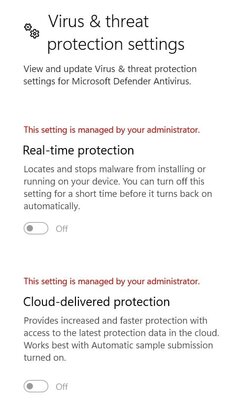
# Privacy & seecurity > Windows Security > Virus & thread protection > Virus & thread protection settings > Manage settings > Real-time protection
[Microsoft.Win32.Registry]::SetValue("HKEY_LOCAL_MACHINE\SOFTWARE\Policies\Microsoft\Windows Defender\Real-Time Protection", "DisableRealtimeMonitoring", 0x01)
## Turn Off Cloud-delivered Protection
Set-MpPreference -MAPSReporting Disabled
## Disable Cloud-delivered Protection for Microsoft Defender Antivirus
[Microsoft.Win32.Registry]::SetValue("HKEY_LOCAL_MACHINE\SOFTWARE\Policies\Microsoft\Windows Defender\Spynet", "SpynetReporting", 0x00)
Set-ItemProperty -Path "HKLM:\SOFTWARE\Policies\Microsoft\Windows Defender\Spynet" -Name "SubmitSamplesConsent" -Type DWord -Value 2
## Turn Off Controlled Folder Access
Set-MpPreference -EnableControlledFolderAccess Disabled
## Disable Controlled Folder Access
[Microsoft.Win32.Registry]::SetValue("HKEY_LOCAL_MACHINE\SOFTWARE\Policies\Microsoft\Windows Defender\Windows Defender Exploit Guard\Controlled Folder Access", "EnableControlledFolderAccess", 0x00)
# Virtualization-based security OFF
Set-ItemProperty -Path "HKLM:\SYSTEM\CurrentControlSet\Control\DeviceGuard" -Type DWord -Name "EnableVirtualizationBasedSecurity" -Value 0 -Force
## Enable or Disable Microsoft Defender SmartScreen for Microsoft Edge in Windows 11 Tutorial
## Turn Off Microsoft Defender SmartScreen Check Apps and Files from Web ("Warn", "Off")
Set-ItemProperty -Path "HKLM:\SOFTWARE\Microsoft\Windows\CurrentVersion\Explorer" -Type String -Name "SmartScreenEnabled" -Value "Off" -Force
## Disable SmartScreen Check Apps and Files from Web
Set-ItemProperty -Path "HKLM:\SOFTWARE\Policies\Microsoft\Windows\System" -Type DWord -Name "EnableSmartScreen" -Value 0 -Force
## Turn On or Off Tamper Protection 0 = Off; 5 = On
## [Microsoft.Win32.Registry]::SetValue("HKEY_LOCAL_MACHINE\SOFTWARE\Microsoft\Windows Defender\Features", "TamperProtection", 0x00)
## ??? Disable Microsoft Defender Antivirus
[Microsoft.Win32.Registry]::SetValue("HKEY_LOCAL_MACHINE\SOFTWARE\Policies\Microsoft\Windows Defender", "DisableAntiSpyware", 0x01)

# By hand Tamper protection 'Off"

1.jpg

2.jpg
 

My Computer My Computer

At a glance

Microsoft Windows 11 HomeIntel Core i5-13490F2 x 16 Patriot Memory (PDP Systems) PSD516G56...GIGABYTE GeForce RTX 4070 WINDFORCE OC 12G (G...
OS
Microsoft Windows 11 Home
Computer type
PC/Desktop
Manufacturer/Model
MSI MS-7D98
CPU
Intel Core i5-13490F
Motherboard
MSI B760 GAMING PLUS WIFI
Memory
2 x 16 Patriot Memory (PDP Systems) PSD516G560081 6400MT (32-37-37-74); 1.35V)
Graphics Card(s)
GIGABYTE GeForce RTX 4070 WINDFORCE OC 12G (GV-N4070WF3OC-12GD)
Sound Card
Bluetooth Аудио
Monitor(s) Displays
INNOCN 15K1F
Screen Resolution
1920 x 1080
Hard Drives
WD_BLACK SN770 250GB
KINGSTON SNV2S1000G (ELFK0S.6)
PSU
Thermaltake Toughpower GF3 1000W
Case
CG560 - DeepCool
Cooling
ID-COOLING SE-224-XTS / 2 x 140Mm Fan - rear and top; 3 x 120Mm - front
Keyboard
Corsair K70 RGB TKL
Mouse
Corsair KATAR PRO XT
Internet Speed
100 Mbps
Browser
Firefox
Antivirus
Microsoft Defender Antivirus
Other Info
https://www.userbenchmark.com/UserRun/66553205
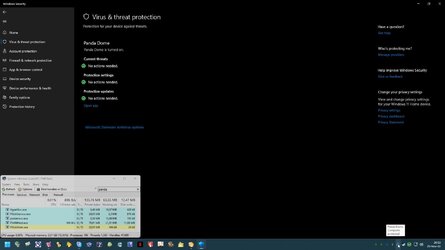
Yes, install another security application.
Indeed, even if The One disables Defender, Windows will treat it as an error, it will fill in logs and so on.
It is better to get used to it. I installed Panda not because I need it, but just to make Windows happy.
 

Attachments

  • capture_11252022_205347.jpg
    capture_11252022_205347.jpg
    86.5 KB · Views: 5

My Computer My Computer

At a glance

Home26H2CanAMD Ryzen 5 8600G (07/24)2x32GB Kingston FURY DDR5 5600 MHz CL36 @5200...ASROCK Radeon RX 6600 Challenger D 8G @48FPS ...
OS
Home26H2Can
Computer type
PC/Desktop
CPU
AMD Ryzen 5 8600G (07/24)
Motherboard
ASROCK B650M-HDV/M.2 (07/24) BIOS 4.21 AGESA ComboAM5 1.3.0.1 (04/26)
Memory
2x32GB Kingston FURY DDR5 5600 MHz CL36 @5200 CL36 (07/24)
Graphics Card(s)
ASROCK Radeon RX 6600 Challenger D 8G @48FPS (08/24)
Sound Card
Creative Sound BlasterX AE-5 Plus (05/24)
Monitor(s) Displays
24" Philips 24M1N3200ZS/00 (05/24)
Screen Resolution
1920×1080@165Hz via DP1.4
Hard Drives
Kingston KC3000 NVMe 2TB (05/24)
ADATA XPG GAMMIX S11 Pro 512GB (07/19)
PSU
Seasonic Core GM 550 Gold (04/24)
Case
Fractal Design Define 7 Mini with 3x Noctua NF-P14s/12@555rpm (04/24)
Cooling
Noctua NH-U12S with Noctua NF-P12 (04/24)
Keyboard
HP Pavilion Wired Keyboard 300 (07/24) + Rabalux 76017 Parker (01/24)
Mouse
Logitech M330 Silent Plus (01/26)
Internet Speed
500/100 Mbps via RouterOS (05/21) & TCP Optimizer
Browser
Edge, Brave for YouTube, LibreWolf for FB
Antivirus
NextDNS blocking 1/3 Traffic
Other Info
Phone: Motorola Moto G86 (02/26)
Backup: Hasleo Backup Suite (PreOS)
Headphones: Sennheiser RS170 (09/10)
Chair: Huzaro Force 4.4 Grey Mesh (05/24)
Notifier: Xiaomi Mi Band 9 Milanese (10/24)
FlexCore USB-C 3.2 Gen 1 (M) to LAN (F) (08/25)
When you install a 3 party AV parts of Defender still remain active thats why you need to go to safe mode and disable Defender completly registry group policy system security settings so when you uninstall the 3 part AV Windows wont look for it.
 

My Computer My Computer

At a glance

Debian Linux, Freebsd 13, Windows 10, Windows 11
OS
Debian Linux, Freebsd 13, Windows 10, Windows 11

Attachments

  • capture-09282022-211634.jpg
    capture-09282022-211634.jpg
    67.1 KB · Views: 6

My Computer My Computer

At a glance

Home26H2CanAMD Ryzen 5 8600G (07/24)2x32GB Kingston FURY DDR5 5600 MHz CL36 @5200...ASROCK Radeon RX 6600 Challenger D 8G @48FPS ...
OS
Home26H2Can
Computer type
PC/Desktop
CPU
AMD Ryzen 5 8600G (07/24)
Motherboard
ASROCK B650M-HDV/M.2 (07/24) BIOS 4.21 AGESA ComboAM5 1.3.0.1 (04/26)
Memory
2x32GB Kingston FURY DDR5 5600 MHz CL36 @5200 CL36 (07/24)
Graphics Card(s)
ASROCK Radeon RX 6600 Challenger D 8G @48FPS (08/24)
Sound Card
Creative Sound BlasterX AE-5 Plus (05/24)
Monitor(s) Displays
24" Philips 24M1N3200ZS/00 (05/24)
Screen Resolution
1920×1080@165Hz via DP1.4
Hard Drives
Kingston KC3000 NVMe 2TB (05/24)
ADATA XPG GAMMIX S11 Pro 512GB (07/19)
PSU
Seasonic Core GM 550 Gold (04/24)
Case
Fractal Design Define 7 Mini with 3x Noctua NF-P14s/12@555rpm (04/24)
Cooling
Noctua NH-U12S with Noctua NF-P12 (04/24)
Keyboard
HP Pavilion Wired Keyboard 300 (07/24) + Rabalux 76017 Parker (01/24)
Mouse
Logitech M330 Silent Plus (01/26)
Internet Speed
500/100 Mbps via RouterOS (05/21) & TCP Optimizer
Browser
Edge, Brave for YouTube, LibreWolf for FB
Antivirus
NextDNS blocking 1/3 Traffic
Other Info
Phone: Motorola Moto G86 (02/26)
Backup: Hasleo Backup Suite (PreOS)
Headphones: Sennheiser RS170 (09/10)
Chair: Huzaro Force 4.4 Grey Mesh (05/24)
Notifier: Xiaomi Mi Band 9 Milanese (10/24)
FlexCore USB-C 3.2 Gen 1 (M) to LAN (F) (08/25)
Back
Top Bottom