
hi friends,
I just upgraded to W11 on last sunday ie 12th October 2025. My C drive has 133GB allocated space, out of which around 11-15gb are available since the upgrade, don't recall the availability prior to that. D drive has over 300gb+ free space.
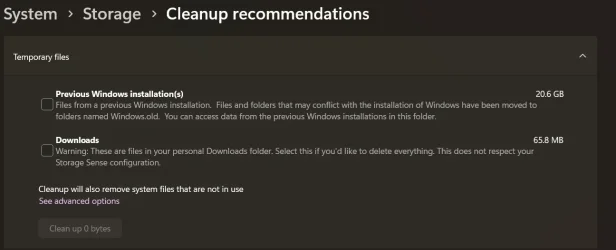
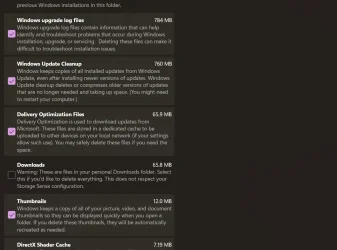
Anyways, coming to the point.. I saw Disk Cleanup was suggested after upgrading to W11, since I haven't encountered any issues after upgrade, was wondering if I could clean up the following files in the Disk Cleanup. Old windows alone stores 20+gb
I just upgraded to W11 on last sunday ie 12th October 2025. My C drive has 133GB allocated space, out of which around 11-15gb are available since the upgrade, don't recall the availability prior to that. D drive has over 300gb+ free space.
Anyways, coming to the point.. I saw Disk Cleanup was suggested after upgrading to W11, since I haven't encountered any issues after upgrade, was wondering if I could clean up the following files in the Disk Cleanup. Old windows alone stores 20+gb
- Windows Build/Version
- windows 11 25H2
Attachments
My Computer
At a glance
Windows 11 x64 25H2AMD Ryzen 5 Mobile 4600H16GB
- OS
- Windows 11 x64 25H2
- Computer type
- Laptop
- Manufacturer/Model
- Lenovo IdeaPad Gaming3 15ARH05D
- CPU
- AMD Ryzen 5 Mobile 4600H
- Memory
- 16GB
- Browser
- Firefox, Chrome, Edge, Vivaldi, Brave
- Antivirus
- BitDefender Total Security






