Disk errors. What do you think happened . . . .


john1955

Jack of all trades
Power User
VIP
Local time
12:22 AM
Posts
576
Location
Southern California
OS
Windows 11 (up to date)
It suggested in a pop-up that I reboot to fix errors but it took three reboots for it to run

=========================================================

Code:
Chkdsk was executed in scan mode on a volume snapshot.

Checking file system on C:
Volume label is Win-11.

Stage 1: Examining basic file system structure ...
    Found 0x4e clusters allocated to file "<0x34,0x701>" at offset "0x1" marked as free
        ... repaired online.
    Found corrupt basic file structure for "<0x34,0x701>"
        ... repaired online.
Attribute record of type 0x80 and instance tag 0x4 is cross linked
starting at 0x117d4 for possibly 0x2 clusters.
    Found corrupt basic file structure for "\Windows\System32\LogFiles\WMI\NtfsLog.etl.006 <0x9,0x392b>"
        ... queued for offline repair.
Attribute record of type 0x80 and instance tag 0x4 is cross linked
starting at 0x22e8f for possibly 0x3 clusters.
    Found corrupt basic file structure for "\Windows\Prefetch\PINGSENDER.EXE-FDA1D146.pf <0xb,0x64db>"
        ... queued for offline repair.
Attribute record of type 0x80 and instance tag 0x4 is cross linked
starting at 0x213734 for possibly 0x2 clusters.
    Found corrupt basic file structure for "\Users\John\AppData\Roaming\Mozilla\Firefox\Profiles\8ro0d3sa.default-release\prefs.js <0x1c,0xf3ad>"
        ... queued for offline repair.
    Found 0x3 clusters allocated to file "\Windows\SoftwareDistribution\Download\2f679a05faf4cb802966fef6821080dd\Metadata\Windows11.0-KB5074109-x64\Microsoft-Windows-LanguageFeatures-Fonts-Beng-Package-Wrapper~31bf3856ad364e35~amd64~~10.0.26100.7623.cat <0xb,0x1010a>" at offset "0" marked as free
        ... repaired online.
Attribute record of type 0x80 and instance tag 0x4 is cross linked
starting at 0x5d6887 for possibly 0x1 clusters.
    Found corrupt basic file structure for "\Windows\SoftwareDistribution\Download\2f679a05faf4cb802966fef6821080dd\Metadata\Windows11.0-KB5074109-x64\Microsoft-Windows-GroupPolicy-Management-Tools-FoD-Package-Wrapper~31bf3856ad364e35~amd64~ca-ES~10.0.26100.7623.mum <0xb,0x12cd5>"
        ... queued for offline repair.
Attribute record of type 0x80 and instance tag 0x4 is cross linked
starting at 0x5d68d9 for possibly 0x3 clusters.
    Found corrupt basic file structure for "\Windows\SoftwareDistribution\Download\2f679a05faf4cb802966fef6821080dd\Metadata\Windows11.0-KB5074109-x64\Microsoft-Windows-IRDA-Package-Wrapper~31bf3856ad364e35~amd64~ca-ES~10.0.26100.7623.cat <0xf,0x12cf4>"
        ... queued for offline repair.
Attribute record of type 0x80 and instance tag 0x4 is cross linked
starting at 0x527324 for possibly 0x8 clusters.
    Found corrupt basic file structure for "\Windows\SoftwareDistribution\Download\2f679a05faf4cb802966fef6821080dd\Metadata\Windows11.0-KB5074109-x64\Microsoft-Windows-Client-Features-Package06~31bf3856ad364e35~amd64~~10.0.26100.7623.cat <0x19,0x2acc3>"
        ... queued for offline repair.
Attribute record of type 0x80 and instance tag 0x4 is cross linked
starting at 0x5d68d6 for possibly 0x3 clusters.
    Found corrupt basic file structure for "\Windows\SoftwareDistribution\Download\2f679a05faf4cb802966fef6821080dd\Metadata\Windows11.0-KB5074109-x64\Microsoft-OneCore-Multimedia-MFPMP-Package~31bf3856ad364e35~amd64~~10.0.26100.7623.cat <0x1e,0x2b56b>"
        ... queued for offline repair.
    File "<0x34,0x701>" and file "\Windows\SoftwareDistribution\Download\2f679a05faf4cb802966fef6821080dd\Metadata\Windows11.0-KB5074109-x64\Microsoft-Windows-GroupPolicy-Management-Tools-FoD-Package-Wrapper~31bf3856ad364e35~amd64~ca-ES~10.0.26100.7623.mum <0xb,0x12cd5>" both own logical cluster 0x5d6887
        ... queued for offline repair.
    File "<0x34,0x701>" and file "\Windows\SoftwareDistribution\Download\2f679a05faf4cb802966fef6821080dd\Metadata\Windows11.0-KB5074109-x64\Microsoft-OneCore-Multimedia-MFPMP-Package~31bf3856ad364e35~amd64~~10.0.26100.7623.cat <0x1e,0x2b56b>" both own logical clusters [0x5d68d6, 0x5d68d9)
        ... queued for offline repair.
    File "<0x34,0x701>" and file "\Windows\SoftwareDistribution\Download\2f679a05faf4cb802966fef6821080dd\Metadata\Windows11.0-KB5074109-x64\Microsoft-Windows-IRDA-Package-Wrapper~31bf3856ad364e35~amd64~ca-ES~10.0.26100.7623.cat <0xf,0x12cf4>" both own logical clusters [0x5d68d9, 0x5d68dc)
        ... queued for offline repair.
    File "\ProgramData\Microsoft\Windows\AppRepository\StateRepository-Deployment.srd-shm <0x15,0x7aa>" and file "\Users\John\AppData\Roaming\Mozilla\Firefox\Profiles\8ro0d3sa.default-release\prefs.js <0x1c,0xf3ad>" both own logical clusters [0x213734, 0x213736)
        ... queued for offline repair.
    File "\Users\John\AppData\Roaming\Mozilla\Firefox\Profiles\8ro0d3sa.default-release\datareporting\archived\2026-01\1768786603386.44c25eb3-09e5-4886-8906-0bac0092d4ad.event.jsonlz4 <0x13,0x1198>" and file "\Windows\System32\LogFiles\WMI\NtfsLog.etl.006 <0x9,0x392b>" both own logical clusters [0x117d4, 0x117d6)
        ... queued for offline repair.
    File "\Windows\Logs\WindowsUpdate\WindowsUpdate.20260119.102917.279.1.etl <0x7,0x15d7>" and file "\Windows\Prefetch\PINGSENDER.EXE-FDA1D146.pf <0xb,0x64db>" both own logical clusters [0x22e8f, 0x22e92)
        ... queued for offline repair.
    File "\Users\John\AppData\Roaming\Mozilla\Firefox\Profiles\8ro0d3sa.default-release\storage-sync-v2.sqlite-wal <0x1d,0xab63>" and file "\Windows\SoftwareDistribution\Download\2f679a05faf4cb802966fef6821080dd\Metadata\Windows11.0-KB5074109-x64\Microsoft-Windows-Client-Features-Package06~31bf3856ad364e35~amd64~~10.0.26100.7623.cat <0x19,0x2acc3>" both own logical clusters [0x527324, 0x52732c)
        ... queued for offline repair.
  913152 file records processed.                                                        File verification completed.
 Phase duration (File record verification): 8.74 seconds.
  12891 large file records processed.                                    Phase duration (Orphan file record recovery): 8.32 milliseconds.
  0 bad file records processed.                                      Phase duration (Bad file record checking): 3.11 milliseconds.

Stage 2: Examining file name linkage ...
  263 reparse records processed.                                          Found an unneeded link ($FILE_NAME: "ACTIVI~2.JSO") in index "$I30" of directory "\Users\John\AppData\Local\Mozilla\Firefox\Profiles\8ro0d3sa.default-release <0x6,0x460f>"
        ... repaired online.
    Found an unneeded link ($FILE_NAME: "SKELET~1") in index "$I30" of directory "\Users\John\AppData\Local\Mozilla\Firefox <0x3,0x1785f>"
        ... repaired online.
  1035302 index entries processed.                                                       Index verification completed.
 Phase duration (Index verification): 11.34 seconds.

 Phase duration (Orphan reconnection): 902.75 milliseconds.

    Found 2 lost files (<0x34,0x701>, \Users\John\AppData\Roaming\Mozilla\Firefox\Profiles\8ro0d3sa.default-release\prefs.js <0x1c,0xf3ad>); requesting reconnection to index "$I30" of directory "\??\C:\found.000"
        ... queued for offline repair.
    Found lost file "\Users\John\AppData\Roaming\Mozilla\Firefox\Profiles\8ro0d3sa.default-release\storage-sync-v2.sqlite-wal <0x1d,0xab63>"; requesting reconnection to index "$I30" of directory "\Users\John\AppData\Roaming\Mozilla\Firefox\Profiles\8ro0d3sa.default-release <0x3,0x17a4b>"
        ... repaired online.
    Found lost file "\Users\John\AppData\Roaming\Mozilla\Firefox\Profiles\8ro0d3sa.default-release\storage\default\https+++www.elevenforum.com\cache\context_open.marker <0x2b,0xf9fd>"; requesting reconnection to index "$I30" of directory "\Users\John\AppData\Roaming\Mozilla\Firefox\Profiles\8ro0d3sa.default-release\storage\default\https+++www.elevenforum.com\cache <0x6,0x2e7b>"
        ... repaired online.
 Phase duration (Orphan recovery to lost and found): 10.94 milliseconds.
  263 reparse records processed.                                       Phase duration (Reparse point and Object ID verification): 9.59 milliseconds.

Stage 3: Examining security descriptors ...
Security descriptor verification completed.
 Phase duration (Security descriptor verification): 92.37 milliseconds.
  61083 data files processed.                                            Phase duration (Data attribute verification): 7.19 milliseconds.
CHKDSK is verifying Usn Journal...
Usn Journal verification completed.
Windows has found problems and some were fixed online;
the remaining problems must be fixed offline.
Please run "chkdsk /spotfix" to fix the issues.

 244094099 KB total disk space.
  81272148 KB in 292096 files.
    186716 KB in 61078 indexes.
    996223 KB in use by the system.
     65536 KB occupied by the log file.
 161639012 KB available on disk.

      4096 bytes in each allocation unit.
  61023524 total allocation units on disk.
  40409753 allocation units available on disk.
Total duration: 21.13 seconds (21130 ms).

----------------------------------------------------------------------


Stage 1: Examining basic file system structure ...
Some clusters occupied by attribute of type 0x80 and instance tag 0x4
in file 0x392b is already in use.
Deleting corrupt attribute record (0x80, "")
from file record segment 0x392B.
Some clusters occupied by attribute of type 0x80 and instance tag 0x4
in file 0x64db is already in use.
Deleting corrupt attribute record (0x80, "")
from file record segment 0x64DB.
Some clusters occupied by attribute of type 0x80 and instance tag 0x4
in file 0xf3ad is already in use.
Deleting corrupt attribute record (0x80, "")
from file record segment 0xF3AD.
Some clusters occupied by attribute of type 0x80 and instance tag 0x4
in file 0x12cd5 is already in use.
Deleting corrupt attribute record (0x80, "")
from file record segment 0x12CD5.
Some clusters occupied by attribute of type 0x80 and instance tag 0x4
in file 0x12cf4 is already in use.
Deleting corrupt attribute record (0x80, "")
from file record segment 0x12CF4.
Some clusters occupied by attribute of type 0x80 and instance tag 0x4
in file 0x2acc3 is already in use.
Deleting corrupt attribute record (0x80, "")
from file record segment 0x2ACC3.
Some clusters occupied by attribute of type 0x80 and instance tag 0x4
in file 0x2b56b is already in use.
Deleting corrupt attribute record (0x80, "")
from file record segment 0x2B56B.

Stage 2: Examining file name linkage ...
The file reference 0x1e00000000ab63 of index entry ACTIVI~2.JSO of index $I30
with parent 0x460f is not the same as 0x1d00000000ab63.
Deleting index entry ACTIVI~2.JSO in index $I30 of file 460F.
Index entry SKELET~1 of index $I30 in file 0x1785f points to unused file 0x9f7.
Deleting index entry SKELET~1 in index $I30 of file 1785F.
CHKDSK is scanning unindexed files for reconnect to their original directory.
Recovering orphaned file STORAG~4.SQL (AB63) into directory file 17A4B.
Recovering orphaned file storage-sync-v2.sqlite-wal (AB63) into directory file 17A4B.
Recovering orphaned file STORAG~4.SQL (AB63) into directory file 17A4B.
Recovering orphaned file storage-sync-v2.sqlite-wal (AB63) into directory file 17A4B.
Recovering orphaned file CONTEX~1.MAR (F9FD) into directory file 2E7B.
Recovering orphaned file context_open.marker (F9FD) into directory file 2E7B.
Recovering orphaned file CONTEX~1.MAR (F9FD) into directory file 2E7B.
Recovering orphaned file context_open.marker (F9FD) into directory file 2E7B.
  2 unindexed files recovered to original directory.
CHKDSK is recovering remaining unindexed files.
    Lost and found is located at \found.000


Stage 3: Examining security descriptors ...
Inserting data attribute into file 392B.
Inserting data attribute into file 64DB.
Inserting data attribute into file F3AD.
Inserting data attribute into file 12CD5.
Inserting data attribute into file 12CF4.
Inserting data attribute into file 2ACC3.
Inserting data attribute into file 2B56B.
 

My Computers My Computers

  • At a glance

    Windows 11 (up to date)Intel i5 12400Corsair Vengeance LPX 16GBOn Board the Z690
    OS
    Windows 11 (up to date)
    Computer type
    PC/Desktop
    Manufacturer/Model
    Custom
    CPU
    Intel i5 12400
    Motherboard
    Gigabyte Z690 UA
    Memory
    Corsair Vengeance LPX 16GB
    Graphics Card(s)
    On Board the Z690
    Sound Card
    On Board
    Monitor(s) Displays
    43" Samsung tu7000
    Screen Resolution
    2560 x 1440
    Hard Drives
    SAMSUNG SSD 1TB NVMe M.2
    PSU
    Thermaltake smart 500w 80+
    Case
    LIAN LANCOOL_205M
    Cooling
    Bunch of fans . . . :o) (lights dont work)
    Keyboard
    Unicomp: Ultra Classic White Buckling Spring USB
    Mouse
    M510
    Internet Speed
    50mbps on Ethernet
    Browser
    Fire Fox
    Antivirus
    Windows
    Other Info
    Love this computer but I still prefer Win-7 like I love my old Lazy Boy Recliner . . . it just feels better.
  • At a glance

    WIN-7-64BIT and Win-11 pro for testing on uns...i5-3570K CPU @ 3.40GHz, 3801 Mhz, 4 Core(s), ...16 GB - Crucial Ballistick 4GB PC3-14900 DDR3...NVIDIA GeForce GTX 1050
    Operating System
    WIN-7-64BIT and Win-11 pro for testing on unsupported hardware
    Computer type
    PC/Desktop
    Manufacturer/Model
    Home built
    CPU
    i5-3570K CPU @ 3.40GHz, 3801 Mhz, 4 Core(s), 4 Logical Processor(s)
    Motherboard
    GA-Z77-HD3
    Memory
    16 GB - Crucial Ballistick 4GB PC3-14900 DDR3-1333 MHz
    Graphics card(s)
    NVIDIA GeForce GTX 1050
    Sound Card
    On Board
    Monitor(s) Displays
    ASUS VP278
    Screen Resolution
    1920 x 1080
    Hard Drives
    4 - internal Samsung 2.5" SSD, 1 WD HDD 7200 and some external drives
    PSU
    EVGA 550w
    Case
    Old Gygabyte Tower
    Cooling
    Yes
    Keyboard
    Unicomp - UNIOP4A USB (like the old IBM Model H that I started with)
    Mouse
    M510
    Internet Speed
    50mbps
    Browser
    Firefox
    Antivirus
    Windows
    Other Info
    The only thing it lack is USB-3.2 on the front face but it has 3.0 on the back
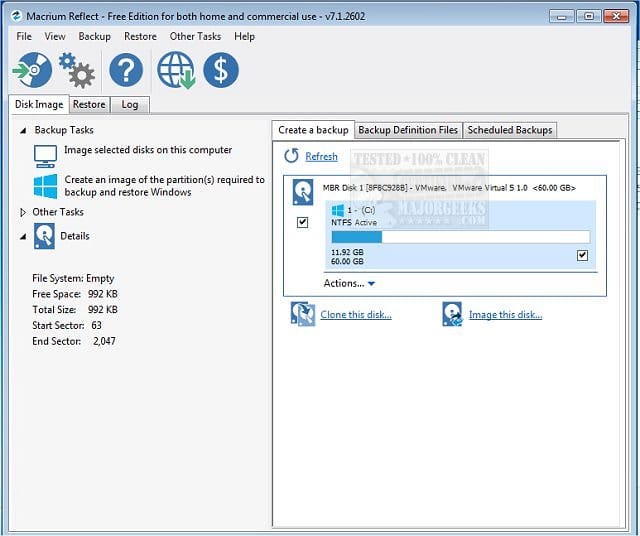
1) Please backup files or make backup images:


(Acronis, Aoemi, EaseUS, Hasleo, Macrium, Paragon, etc.)

Macrium is widely used in Ten Forums.

Macrium Software | Your Image is Everything


Backup and Restore with Macrium Reflect


2) Run Sea Tools Long generic test (all drives) > post images or share links


3) Run HD Tune (all drives) (old version) > post images or share links


a) Health

b) Full error scan


4) Open administrative command prompt and copy and paste:

chkdsk /b /v

Run these chkdsk switches on all drives using the syntax: chkdsk /b /v C: or chkdsk /b /v D: or chkdsk /b /v E: etc.

Make sure that the windows drive runs overnight while sleeping.

C:\WINDOWS\system32>chkdsk /b /v
The type of the file system is NTFS.
Cannot lock current drive.
Chkdsk cannot run because the volume is in use by another
process. Would you like to schedule this volume to be
checked the next time the system restarts? (Y/N)

Type: Y

Reboot as needed.


5) After completing all chkdsk /b /v run:

https://www.tenforums.com/attachmen...-files-use-bsod-debugging-chkdskfromevent.bat

Batch files for use in BSOD debugging - Windows 10 Help Forums

Batch files for use in BSOD debugging - Windows 10 Help Forums


Make sure that this runs only after the prior three steps for each drive.


6) Run HD Sentinel (all drives) > post images or share links (do not run until posting results for each steps 5, 6, 7 and 8)

Hard Disk Sentinel - HDD health and temperature monitoring
a) Overview
b) Temperature
c) SMART
 

My Computer My Computer

At a glance

Windows 10Intel(R) Core(TM) i7-4800MQ CPU @ 2.70GHz16 GB Total: Manufacturer : Samsung MemoryTyp...NVIDIA Quadro K3100M; Intel(R) HD Graphics 4600
OS
Windows 10
Computer type
Laptop
Manufacturer/Model
HP
CPU
Intel(R) Core(TM) i7-4800MQ CPU @ 2.70GHz
Motherboard
Product : 190A Version : KBC Version 94.56
Memory
16 GB Total: Manufacturer : Samsung MemoryType : DDR3 FormFactor : SODIMM Capacity : 8GB Speed : 1600
Graphics Card(s)
NVIDIA Quadro K3100M; Intel(R) HD Graphics 4600
Sound Card
IDT High Definition Audio CODEC; PNP Device ID HDAUDIO\FUNC_01&VEN_111D&DEV_76E0
Hard Drives
Model Hitachi HTS727575A9E364
Antivirus
Microsoft Defender
Other Info
Mobile Workstation
Why run Seatools on Samsung SSD's? I read there's potential risk. I already have hdsentinel_Trail
My only seagate drive is external
 

My Computers My Computers

  • At a glance

    Windows 11 (up to date)Intel i5 12400Corsair Vengeance LPX 16GBOn Board the Z690
    OS
    Windows 11 (up to date)
    Computer type
    PC/Desktop
    Manufacturer/Model
    Custom
    CPU
    Intel i5 12400
    Motherboard
    Gigabyte Z690 UA
    Memory
    Corsair Vengeance LPX 16GB
    Graphics Card(s)
    On Board the Z690
    Sound Card
    On Board
    Monitor(s) Displays
    43" Samsung tu7000
    Screen Resolution
    2560 x 1440
    Hard Drives
    SAMSUNG SSD 1TB NVMe M.2
    PSU
    Thermaltake smart 500w 80+
    Case
    LIAN LANCOOL_205M
    Cooling
    Bunch of fans . . . :o) (lights dont work)
    Keyboard
    Unicomp: Ultra Classic White Buckling Spring USB
    Mouse
    M510
    Internet Speed
    50mbps on Ethernet
    Browser
    Fire Fox
    Antivirus
    Windows
    Other Info
    Love this computer but I still prefer Win-7 like I love my old Lazy Boy Recliner . . . it just feels better.
  • At a glance

    WIN-7-64BIT and Win-11 pro for testing on uns...i5-3570K CPU @ 3.40GHz, 3801 Mhz, 4 Core(s), ...16 GB - Crucial Ballistick 4GB PC3-14900 DDR3...NVIDIA GeForce GTX 1050
    Operating System
    WIN-7-64BIT and Win-11 pro for testing on unsupported hardware
    Computer type
    PC/Desktop
    Manufacturer/Model
    Home built
    CPU
    i5-3570K CPU @ 3.40GHz, 3801 Mhz, 4 Core(s), 4 Logical Processor(s)
    Motherboard
    GA-Z77-HD3
    Memory
    16 GB - Crucial Ballistick 4GB PC3-14900 DDR3-1333 MHz
    Graphics card(s)
    NVIDIA GeForce GTX 1050
    Sound Card
    On Board
    Monitor(s) Displays
    ASUS VP278
    Screen Resolution
    1920 x 1080
    Hard Drives
    4 - internal Samsung 2.5" SSD, 1 WD HDD 7200 and some external drives
    PSU
    EVGA 550w
    Case
    Old Gygabyte Tower
    Cooling
    Yes
    Keyboard
    Unicomp - UNIOP4A USB (like the old IBM Model H that I started with)
    Mouse
    M510
    Internet Speed
    50mbps
    Browser
    Firefox
    Antivirus
    Windows
    Other Info
    The only thing it lack is USB-3.2 on the front face but it has 3.0 on the back
There are multiple types of drive tests.

Long and short generic
Long and short DST (drive self test)
Surface / error tests
SMART tests
etc.


A drive can fail one test and pass on others.


Every test has its tradeoffs between comprehensiveness and speed.


The Long generic test is commonly used for warranty replacement.


The Sea Tools software runs on most drives.

It is one of the most comprehensive drive tests.


Samsung has drive testing software (Magician) for many but not all of their drives.

It appears to perform surface and smart tests without Long or short generic tests.

In Ten Forum threads there were drives that had passed Samsung Magician that had problems detected by HD Tune.

Macrorit error scans also had differing results from HD Tune.


Dell, HP, and Lenovo have hardware diagnostic software that typically run the Long and short DST.


The software GSmart Control is excellent testing software running the long generic test but it may not identify some drives.


HD Sentinel free version has GUI results and text results.

It runs instantaneous SMART which attempts to predict drive failure.

It automatically relocates bad areas which can be missed. (the text reports are rarely viewed when GUI is immediately available)
 

My Computer My Computer

At a glance

Windows 10Intel(R) Core(TM) i7-4800MQ CPU @ 2.70GHz16 GB Total: Manufacturer : Samsung MemoryTyp...NVIDIA Quadro K3100M; Intel(R) HD Graphics 4600
OS
Windows 10
Computer type
Laptop
Manufacturer/Model
HP
CPU
Intel(R) Core(TM) i7-4800MQ CPU @ 2.70GHz
Motherboard
Product : 190A Version : KBC Version 94.56
Memory
16 GB Total: Manufacturer : Samsung MemoryType : DDR3 FormFactor : SODIMM Capacity : 8GB Speed : 1600
Graphics Card(s)
NVIDIA Quadro K3100M; Intel(R) HD Graphics 4600
Sound Card
IDT High Definition Audio CODEC; PNP Device ID HDAUDIO\FUNC_01&VEN_111D&DEV_76E0
Hard Drives
Model Hitachi HTS727575A9E364
Antivirus
Microsoft Defender
Other Info
Mobile Workstation
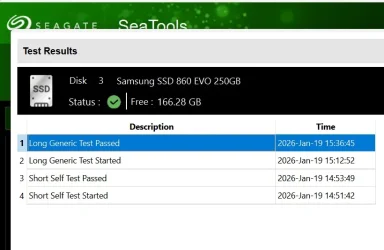
2) Run Sea Tools Long generic test (all drives) > post images or share links

I figured it would pass as I tested all my drives last week but not with SeaTools but I would rather not test all 6 of my drives again, it takes a long time for this test.

1768867474512.webp
 

Attachments

  • 1768867417539.webp
    1768867417539.webp
    30.1 KB · Views: 1

My Computers My Computers

  • At a glance

    Windows 11 (up to date)Intel i5 12400Corsair Vengeance LPX 16GBOn Board the Z690
    OS
    Windows 11 (up to date)
    Computer type
    PC/Desktop
    Manufacturer/Model
    Custom
    CPU
    Intel i5 12400
    Motherboard
    Gigabyte Z690 UA
    Memory
    Corsair Vengeance LPX 16GB
    Graphics Card(s)
    On Board the Z690
    Sound Card
    On Board
    Monitor(s) Displays
    43" Samsung tu7000
    Screen Resolution
    2560 x 1440
    Hard Drives
    SAMSUNG SSD 1TB NVMe M.2
    PSU
    Thermaltake smart 500w 80+
    Case
    LIAN LANCOOL_205M
    Cooling
    Bunch of fans . . . :o) (lights dont work)
    Keyboard
    Unicomp: Ultra Classic White Buckling Spring USB
    Mouse
    M510
    Internet Speed
    50mbps on Ethernet
    Browser
    Fire Fox
    Antivirus
    Windows
    Other Info
    Love this computer but I still prefer Win-7 like I love my old Lazy Boy Recliner . . . it just feels better.
  • At a glance

    WIN-7-64BIT and Win-11 pro for testing on uns...i5-3570K CPU @ 3.40GHz, 3801 Mhz, 4 Core(s), ...16 GB - Crucial Ballistick 4GB PC3-14900 DDR3...NVIDIA GeForce GTX 1050
    Operating System
    WIN-7-64BIT and Win-11 pro for testing on unsupported hardware
    Computer type
    PC/Desktop
    Manufacturer/Model
    Home built
    CPU
    i5-3570K CPU @ 3.40GHz, 3801 Mhz, 4 Core(s), 4 Logical Processor(s)
    Motherboard
    GA-Z77-HD3
    Memory
    16 GB - Crucial Ballistick 4GB PC3-14900 DDR3-1333 MHz
    Graphics card(s)
    NVIDIA GeForce GTX 1050
    Sound Card
    On Board
    Monitor(s) Displays
    ASUS VP278
    Screen Resolution
    1920 x 1080
    Hard Drives
    4 - internal Samsung 2.5" SSD, 1 WD HDD 7200 and some external drives
    PSU
    EVGA 550w
    Case
    Old Gygabyte Tower
    Cooling
    Yes
    Keyboard
    Unicomp - UNIOP4A USB (like the old IBM Model H that I started with)
    Mouse
    M510
    Internet Speed
    50mbps
    Browser
    Firefox
    Antivirus
    Windows
    Other Info
    The only thing it lack is USB-3.2 on the front face but it has 3.0 on the back
The Sea Tools tests can run overnight while sleeping.

Running chkdsk switches before other drive tests on occasion may be related to data loss.

On the above drive, which had created found
( Lost and found is located at \found.000),
the chkdsk deeper switches can run to recheck the drive.
 

My Computer My Computer

At a glance

Windows 10Intel(R) Core(TM) i7-4800MQ CPU @ 2.70GHz16 GB Total: Manufacturer : Samsung MemoryTyp...NVIDIA Quadro K3100M; Intel(R) HD Graphics 4600
OS
Windows 10
Computer type
Laptop
Manufacturer/Model
HP
CPU
Intel(R) Core(TM) i7-4800MQ CPU @ 2.70GHz
Motherboard
Product : 190A Version : KBC Version 94.56
Memory
16 GB Total: Manufacturer : Samsung MemoryType : DDR3 FormFactor : SODIMM Capacity : 8GB Speed : 1600
Graphics Card(s)
NVIDIA Quadro K3100M; Intel(R) HD Graphics 4600
Sound Card
IDT High Definition Audio CODEC; PNP Device ID HDAUDIO\FUNC_01&VEN_111D&DEV_76E0
Hard Drives
Model Hitachi HTS727575A9E364
Antivirus
Microsoft Defender
Other Info
Mobile Workstation

My Computer My Computer

At a glance

Windows 11 Pro
OS
Windows 11 Pro
It suggested in a pop-up that I reboot to fix errors but it took three reboots for it to run
All the errors chkdsk found were logical errors, that is the data in the SSD can be read perfectly, but the data itself is incorrect. There is nothing to suspect that the SSD is at fault, rather the OS has written corrupt data to it. This could happen, for example, if the system crashed while writing to the drive, or with cached data yet to be written.

To see the health of the SSD, look at its SMART data. You can see this in your HD Sentinel, or with CrystalDiskInfo. Look for anything related to data errors, or Reallocated Sectors. Different manufacturers may use a different set of SMART entries, but there will always be something that records data errors. The raw values for all of these should be zero. If they are, then you can be confident that the SSD is sound and that it wasn't responsible for the errors.

1768872213441.webp 1768872299117.webp
 

My Computers My Computers

  • At a glance

    Windows 11 HomeAMD Athlon Silver 3050U8GBRadeon Graphics
    OS
    Windows 11 Home
    Computer type
    Laptop
    Manufacturer/Model
    Acer Aspire 3 A315-23-R9VY
    CPU
    AMD Athlon Silver 3050U
    Memory
    8GB
    Graphics Card(s)
    Radeon Graphics
    Monitor(s) Displays
    laptop screen
    Screen Resolution
    1366x768 native resolution, up to 2560x1440 with Radeon Virtual Super Resolution
    Hard Drives
    1TB Samsung EVO 870 SSD (from April 2026: 250GB EVO 850)
    Internet Speed
    150 Mbps
    Browser
    Edge, Firefox
    Antivirus
    Defender
    Other Info
    fully 'Windows 11 ready' laptop. Windows 10 C: partition migrated from my old unsupported 'main machine' then upgraded to 11. A test migration ran Insider builds for 2 months. When 11 was released on 5th October 2021 it was re-imaged back to 10 and was offered the upgrade in Windows Update on 20th October. Windows Update offered the 22H2 Feature Update on 20th September 2022. It got the 23H2 Feature Update on 4th November 2023 through Windows Update, 24H2 on 3rd October 2024 through Windows Update by setting the Target Release Version for 24H2, and 25H2 on 30th September 2025 through Windows Update by setting the Target Release Version for 25H2.

    UPDATE - 11 April 2026: due to mechanical deterioration this PC has been retired from active duty. The OS with all software and files has been migrated to my System Seven in 'Other systems' to carry on as my general purpose 'main machine'.

    I've now clean installed 25H2 and used Garlin's scripts to update Secure Boot to CA 2023 and revoke the PCA 2011 certificates. It's new role is to test secure boot issues.
  • At a glance

    Windows 11 ProIntel® Core™ i5-520M8GB(integrated graphics) Intel HD Graphics
    Operating System
    Windows 11 Pro
    Computer type
    Laptop
    Manufacturer/Model
    Dell Latitude E4310
    CPU
    Intel® Core™ i5-520M
    Motherboard
    0T6M8G
    Memory
    8GB
    Graphics card(s)
    (integrated graphics) Intel HD Graphics
    Screen Resolution
    1366x768
    Hard Drives
    500GB Crucial MX500 SSD
    Browser
    Firefox, Edge
    Antivirus
    Defender
    Other Info
    unsupported machine: Legacy bios, MBR, TPM 1.2, upgraded from W10 to W11 using W10/W11 hybrid install media workaround.

    In-place upgrade to 22H2 using ISO and a workaround.
    Feature Update to 23H2 by manually installing the Enablement Package.
    In-place upgrade to 24H2 using hybrid 23H2/24H2 install media.
    Upgraded to 25H2 by Enablement Package.

    Also running Insider Dev, and Canary builds and Windows 10 as native boot .vhdx.
  • My SYSTEM THREE is a Dell Latitude 5410, i7-10610U, 32GB RAM, 512GB NVMe ssd, supported device running Windows 11 Pro.

    My SYSTEM FOUR is a 2-in-1 convertible Lenovo Yoga 11e 20DA, Celeron N2930, 8GB RAM, 256GB ssd. Unsupported device: currently running Win10 Pro, plus Win11 Pro RTM and Insider Dev, Beta, and RP 24H2 as native boot vhdx.

    My SYSTEM FIVE is a Dell Latitude 3190 2-in-1, Pentium Silver N5030, 8GB RAM, 1TB NVMe ssd, supported device running Windows 11 Pro, plus Insider Beta, Dev, and Canary builds (and a few others) as a native boot .vhdx.

    My SYSTEM SIX is a Dell Latitude 5550, Core Ultra 7 165H, 64GB RAM, 1TB NVMe SSD, supported device, Windows 11 Pro 24H2, Hyper-V host machine. Updated to 25H2 on 30th September 2025.

    My SYSTEM SEVEN is a Lenovo Thinkpad T580, Intel Core i7-8650U, 16GB RAM, 512GB NVMe SSD + 2nd 512GB NVMe SSD, a supported device for Windows 11. This is my current general purpose 'main machine'. The installed Windows 11 Home from my System One has been migrated to this machine.
All the errors chkdsk found were logical errors, that is the data in the SSD can be read perfectly, but the data itself is incorrect. There is nothing to suspect that the SSD is at fault, rather the OS has written corrupt data to it. This could happen, for example, if the system crashed while writing to the drive, or with cached data yet to be written.

To see the health of the SSD, look at its SMART data. You can see this in your HD Sentinel, or with CrystalDiskInfo. Look for anything related to data errors, or Reallocated Sectors. Different manufacturers may use a different set of SMART entries, but there will always be something that records data errors. The raw values for all of these should be zero. If they are, then you can be confident that the SSD is sound and that it wasn't responsible for the errors.

View attachment 160465 View attachment 160467
Thanks, All the line items that should be zero are zero with Good 99%

The only drive I have that has any errors is my HDD backup drive and I now cloned that drive just in case
 

My Computers My Computers

  • At a glance

    Windows 11 (up to date)Intel i5 12400Corsair Vengeance LPX 16GBOn Board the Z690
    OS
    Windows 11 (up to date)
    Computer type
    PC/Desktop
    Manufacturer/Model
    Custom
    CPU
    Intel i5 12400
    Motherboard
    Gigabyte Z690 UA
    Memory
    Corsair Vengeance LPX 16GB
    Graphics Card(s)
    On Board the Z690
    Sound Card
    On Board
    Monitor(s) Displays
    43" Samsung tu7000
    Screen Resolution
    2560 x 1440
    Hard Drives
    SAMSUNG SSD 1TB NVMe M.2
    PSU
    Thermaltake smart 500w 80+
    Case
    LIAN LANCOOL_205M
    Cooling
    Bunch of fans . . . :o) (lights dont work)
    Keyboard
    Unicomp: Ultra Classic White Buckling Spring USB
    Mouse
    M510
    Internet Speed
    50mbps on Ethernet
    Browser
    Fire Fox
    Antivirus
    Windows
    Other Info
    Love this computer but I still prefer Win-7 like I love my old Lazy Boy Recliner . . . it just feels better.
  • At a glance

    WIN-7-64BIT and Win-11 pro for testing on uns...i5-3570K CPU @ 3.40GHz, 3801 Mhz, 4 Core(s), ...16 GB - Crucial Ballistick 4GB PC3-14900 DDR3...NVIDIA GeForce GTX 1050
    Operating System
    WIN-7-64BIT and Win-11 pro for testing on unsupported hardware
    Computer type
    PC/Desktop
    Manufacturer/Model
    Home built
    CPU
    i5-3570K CPU @ 3.40GHz, 3801 Mhz, 4 Core(s), 4 Logical Processor(s)
    Motherboard
    GA-Z77-HD3
    Memory
    16 GB - Crucial Ballistick 4GB PC3-14900 DDR3-1333 MHz
    Graphics card(s)
    NVIDIA GeForce GTX 1050
    Sound Card
    On Board
    Monitor(s) Displays
    ASUS VP278
    Screen Resolution
    1920 x 1080
    Hard Drives
    4 - internal Samsung 2.5" SSD, 1 WD HDD 7200 and some external drives
    PSU
    EVGA 550w
    Case
    Old Gygabyte Tower
    Cooling
    Yes
    Keyboard
    Unicomp - UNIOP4A USB (like the old IBM Model H that I started with)
    Mouse
    M510
    Internet Speed
    50mbps
    Browser
    Firefox
    Antivirus
    Windows
    Other Info
    The only thing it lack is USB-3.2 on the front face but it has 3.0 on the back
Seven reallocated on my crucial mx300. Been like that for years.
 

My Computers My Computers

  • At a glance

    Win7,Win11i7-97002x16gb 3600mhz
    OS
    Win7,Win11
    Computer type
    PC/Desktop
    CPU
    i7-9700
    Motherboard
    gigabyte b365m ds3h
    Memory
    2x16gb 3600mhz
    Monitor(s) Displays
    benq gw2480
    PSU
    bequiet pure power 11 400CM
    Cooling
    cryorig m9i
  • At a glance

    win7,win11i5-84002x8gb 3200
    Operating System
    win7,win11
    Computer type
    PC/Desktop
    CPU
    i5-8400
    Motherboard
    gigabyte b365m ds3h
    Memory
    2x8gb 3200
    PSU
    xfx pro 450
One or more of these links may be useful:


My Computer My Computer

At a glance

Windows 10Intel(R) Core(TM) i7-4800MQ CPU @ 2.70GHz16 GB Total: Manufacturer : Samsung MemoryTyp...NVIDIA Quadro K3100M; Intel(R) HD Graphics 4600
OS
Windows 10
Computer type
Laptop
Manufacturer/Model
HP
CPU
Intel(R) Core(TM) i7-4800MQ CPU @ 2.70GHz
Motherboard
Product : 190A Version : KBC Version 94.56
Memory
16 GB Total: Manufacturer : Samsung MemoryType : DDR3 FormFactor : SODIMM Capacity : 8GB Speed : 1600
Graphics Card(s)
NVIDIA Quadro K3100M; Intel(R) HD Graphics 4600
Sound Card
IDT High Definition Audio CODEC; PNP Device ID HDAUDIO\FUNC_01&VEN_111D&DEV_76E0
Hard Drives
Model Hitachi HTS727575A9E364
Antivirus
Microsoft Defender
Other Info
Mobile Workstation
One or more of these links may be useful:


First thing I did was look up that article on how to use it to see if I could use other apps while it was running and it said not to so I had to finish what I was doing and then start it so it could run uninterpreted.
 

My Computers My Computers

  • At a glance

    Windows 11 (up to date)Intel i5 12400Corsair Vengeance LPX 16GBOn Board the Z690
    OS
    Windows 11 (up to date)
    Computer type
    PC/Desktop
    Manufacturer/Model
    Custom
    CPU
    Intel i5 12400
    Motherboard
    Gigabyte Z690 UA
    Memory
    Corsair Vengeance LPX 16GB
    Graphics Card(s)
    On Board the Z690
    Sound Card
    On Board
    Monitor(s) Displays
    43" Samsung tu7000
    Screen Resolution
    2560 x 1440
    Hard Drives
    SAMSUNG SSD 1TB NVMe M.2
    PSU
    Thermaltake smart 500w 80+
    Case
    LIAN LANCOOL_205M
    Cooling
    Bunch of fans . . . :o) (lights dont work)
    Keyboard
    Unicomp: Ultra Classic White Buckling Spring USB
    Mouse
    M510
    Internet Speed
    50mbps on Ethernet
    Browser
    Fire Fox
    Antivirus
    Windows
    Other Info
    Love this computer but I still prefer Win-7 like I love my old Lazy Boy Recliner . . . it just feels better.
  • At a glance

    WIN-7-64BIT and Win-11 pro for testing on uns...i5-3570K CPU @ 3.40GHz, 3801 Mhz, 4 Core(s), ...16 GB - Crucial Ballistick 4GB PC3-14900 DDR3...NVIDIA GeForce GTX 1050
    Operating System
    WIN-7-64BIT and Win-11 pro for testing on unsupported hardware
    Computer type
    PC/Desktop
    Manufacturer/Model
    Home built
    CPU
    i5-3570K CPU @ 3.40GHz, 3801 Mhz, 4 Core(s), 4 Logical Processor(s)
    Motherboard
    GA-Z77-HD3
    Memory
    16 GB - Crucial Ballistick 4GB PC3-14900 DDR3-1333 MHz
    Graphics card(s)
    NVIDIA GeForce GTX 1050
    Sound Card
    On Board
    Monitor(s) Displays
    ASUS VP278
    Screen Resolution
    1920 x 1080
    Hard Drives
    4 - internal Samsung 2.5" SSD, 1 WD HDD 7200 and some external drives
    PSU
    EVGA 550w
    Case
    Old Gygabyte Tower
    Cooling
    Yes
    Keyboard
    Unicomp - UNIOP4A USB (like the old IBM Model H that I started with)
    Mouse
    M510
    Internet Speed
    50mbps
    Browser
    Firefox
    Antivirus
    Windows
    Other Info
    The only thing it lack is USB-3.2 on the front face but it has 3.0 on the back

Latest Support Threads

Back
Top Bottom