- Local time
- 4:26 PM
- Posts
- 92
- OS
- Microsoft Windows 11 Professional High End
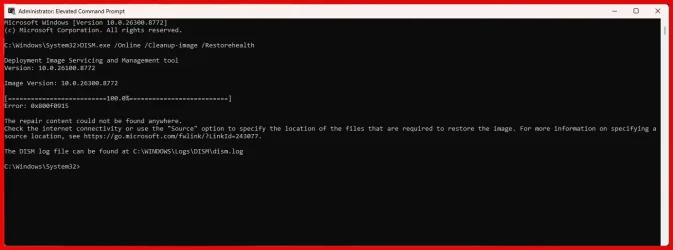
I am not a highly technical user, so I do not understand this following error message I received after running the DISM command: "The repair content could not be found anywhere."
My internet connection is fine.
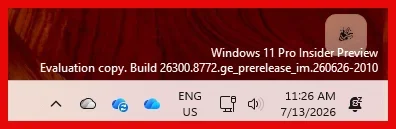
My Windows version is:
Windows 11 Pro Insider Preview
Evaluation copy. Build 26300.8772.ge_prerelease_im.260626-2010
I like seeing the latest improvements, so I have the insider's Windows version and beta Office version.
Administrator: Elevated Command Prompt
Microsoft Windows [Version 10.0.26300.8772]
(c) Microsoft Corporation. All rights reserved.
C:\Windows\System32>DISM.exe /Online /Cleanup-image /Restorehealth
Deployment Image Servicing and Management tool
Version: 10.0.26100.8772
Image Version: 10.0.26300.8772
[==========================100.0%==========================]
Error: @x800f0915
The repair content could not be found anywhere.
Check the internet connectivity or use the "Source" option to specify the location of the files that are required to restore the image. For more information on specifying a source location, see Configure a Windows Repair Source.
The DISM log file can be found at C:\WINDOWS\Logs\DISM\dism.log
C:\Windows\System32>
I have included two screenshots: first, DISM error message; and second, Windows version.
Also, I am not sure that I placed this message in the correct location. Please feel free to move.
I look forward to your help.
My internet connection is fine.
My Windows version is:
Windows 11 Pro Insider Preview
Evaluation copy. Build 26300.8772.ge_prerelease_im.260626-2010
I like seeing the latest improvements, so I have the insider's Windows version and beta Office version.
Administrator: Elevated Command Prompt
Microsoft Windows [Version 10.0.26300.8772]
(c) Microsoft Corporation. All rights reserved.
C:\Windows\System32>DISM.exe /Online /Cleanup-image /Restorehealth
Deployment Image Servicing and Management tool
Version: 10.0.26100.8772
Image Version: 10.0.26300.8772
[==========================100.0%==========================]
Error: @x800f0915
The repair content could not be found anywhere.
Check the internet connectivity or use the "Source" option to specify the location of the files that are required to restore the image. For more information on specifying a source location, see Configure a Windows Repair Source.
The DISM log file can be found at C:\WINDOWS\Logs\DISM\dism.log
C:\Windows\System32>
I have included two screenshots: first, DISM error message; and second, Windows version.
Also, I am not sure that I placed this message in the correct location. Please feel free to move.
I look forward to your help.
- Windows Build/Version
- Windows 11 Pro Insider Preview Evaluation copy. Build 26300.8772.ge_prerelease_im.260626-2010
Attachments
My Computer
At a glance
Microsoft Windows 11 Professional High End13th Gen Intel(R) Core(TM) i9-13900K 3.00 GHz
- OS
- Microsoft Windows 11 Professional High End
- Computer type
- PC/Desktop
- Manufacturer/Model
- Boxx Technologies
- CPU
- 13th Gen Intel(R) Core(TM) i9-13900K 3.00 GHz