
DistributedCom warnings and other errors in event viewer


sdowney717

Well-known member
Member
VIP
Local time
4:16 AM
Posts
1,335
OS
windows 11
What does this mean?
Sometimes this PC also halts, no mouse or keyboard input accepted, then after a minute it works fine again.
This seems to have happened after I did a ' reset this PC' just couple days ago.
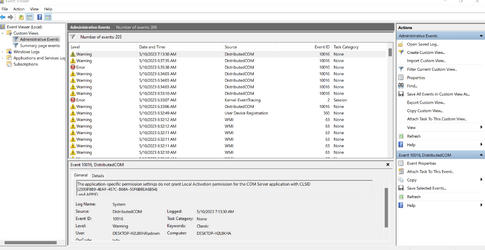
Log Name: System Source: Microsoft-Windows-DistributedCOM Date: 5/10/2023 7:13:30 AM Event ID: 10016 Task Category: None Level: Warning Keywords: Classic User: DESKTOP-H2L8KHA\sdown Computer: DESKTOP-H2L8KHA Description: The application-specific permission settings do not grant Local Activation permission for the COM Server application with CLSID {2593F8B9-4EAF-457C-B68A-50F6B8EA6B54} and APPID {15C20B67-12E7-4BB6-92BB-7AFF07997402} to the user DESKTOP-H2L8KHA\sdown SID (S-1-5-21-3995664575-3804192487-1385624515-1001) from address LocalHost (Using LRPC) running in the application container Unavailable SID (Unavailable). This security permission can be modified using the Component Services administrative tool. Event Xml: <Event xmlns="http://schemas.microsoft.com/win/2004/08/events/event"> <System> <Provider Name="Microsoft-Windows-DistributedCOM" Guid="{1B562E86-B7AA-4131-BADC-B6F3A001407E}" EventSourceName="DCOM" /> <EventID Qualifiers="0">10016</EventID> <Version>0</Version> <Level>3</Level> <Task>0</Task> <Opcode>0</Opcode> <Keywords>0x8080000000000000</Keywords> <TimeCreated SystemTime="2023-05-10T11:13:30.7838261Z" /> <EventRecordID>883</EventRecordID> <Correlation ActivityID="{6b3f4e25-c1c4-41b9-ad4e-aa37e9879d9c}" /> <Execution ProcessID="568" ThreadID="1880" /> <Channel>System</Channel> <Computer>DESKTOP-H2L8KHA</Computer> <Security UserID="S-1-5-21-3995664575-3804192487-1385624515-1001" /> </System> <EventData> <Data Name="param1">application-specific</Data> <Data Name="param2">Local</Data> <Data Name="param3">Activation</Data> <Data Name="param4">{2593F8B9-4EAF-457C-B68A-50F6B8EA6B54}</Data> <Data Name="param5">{15C20B67-12E7-4BB6-92BB-7AFF07997402}</Data> <Data Name="param6">DESKTOP-H2L8KHA</Data> <Data Name="param7">sdown</Data> <Data Name="param8">S-1-5-21-3995664575-3804192487-1385624515-1001</Data> <Data Name="param9">LocalHost (Using LRPC)</Data> <Data Name="param10">Unavailable</Data> <Data Name="param11">Unavailable</Data> </EventData> </Event>

1683717940737.png
 

My Computer

System One

  • OS
    windows 11
    Computer type
    PC/Desktop
    Manufacturer/Model
    some kind of old ASUS MB
    CPU
    old AMD B95
    Motherboard
    ASUS
    Memory
    8gb
    Hard Drives
    ssd WD 500 gb
DCOM Events 10016 are perfectly normal. Why Certain DCOM 10016 Events Don't Matter - Windows 10 Help Forums

The event viewer can be a daunting experience, because all healthy Windows operating systems are constantly generating events and errors, and Windows is designed to overcome those events without the user even being aware a problem occurred. That is the way Windows is designed.
Microsoft indicates you can and should ignore those errors, and unless your system is experiencing problems, there is no need for further action. The event viewer is meant to be used only if a system is having problems and even then only persistent critical and error level events should be looked into.
 
Last edited:

My Computers

System One System Two

  • OS
    Windows 11 Pro 25H2
    Computer type
    PC/Desktop
    Manufacturer/Model
    Dell Optiplex 7080
    CPU
    i9-10900 10 core 20 threads
    Motherboard
    DELL 0J37VM
    Memory
    32 gb
    Graphics Card(s)
    none-Intel UHD Graphics 630
    Sound Card
    Integrated Realtek
    Monitor(s) Displays
    Benq 27
    Screen Resolution
    2560x1440
    Hard Drives
    2x1tb Solidigm m.2 nvme /External drives 512gb Samsung m.2 sata+2tb Kingston m2.nvme
    PSU
    500w
    Case
    MT
    Cooling
    Dell Premium
    Keyboard
    Logitech wired
    Mouse
    Logitech wireless
    Internet Speed
    so slow I'm too embarrassed to tell
    Browser
    #1 Edge #2 Firefox
    Antivirus
    Defender+MWB Premium
  • Operating System
    Windows 11 Pro 24H2 26200.8457
    Computer type
    PC/Desktop
    Manufacturer/Model
    Beelink Mini PC SER5
    CPU
    AMD Ryzen 7 6800U
    Memory
    32 gb
    Graphics card(s)
    integrated
    Sound Card
    integrated
    Monitor(s) Displays
    Benq 27
    Screen Resolution
    2560x1440
    Hard Drives
    1TB Crucial nvme
    Keyboard
    Logitech wired
    Mouse
    Logitech wireless
    Internet Speed
    still too embarrassed to tell
    Browser
    Firefox
    Antivirus
    Defender
    Other Info
    System 3 is non compliant Dell 9020 i7-4770/24gb ram Win11 PRO 26200.8457
Glasskuter said it all and one should stay away from the event logs for their own mental health.

This said the key is also here: <Data Name="param7">sdown</Data>
You will get those every time you shut down your system as DCOM is unable to call objects since they are no longer available.
 

My Computers

System One System Two

  • OS
    All Branches but Release
    Computer type
    Laptop
    Manufacturer/Model
    Acer Nitro ANV15-51
    CPU
    AMD Ryzen 7 7735HS 3200-4500 Mhz 8 cores x 2
    Motherboard
    Sportage_RBH
    Memory
    32 GB DDR5
    Graphics Card(s)
    Radeon Graphic / NVIDIA GeForce RTX 4060 8 GB GDDR6
    Sound Card
    AMD/Realtek(R) Audio
    Monitor(s) Displays
    Integrated Monitor (15.3"vis)
    Screen Resolution
    FHD 1920X1080 16:9 144Hz
    Hard Drives
    KINGSTON OM8SEP4512Q-AA 1TB
    Western Digital 256GB
    PSU
    19V DC 6.32 A 120 W
    Cooling
    Dual Fans
    Mouse
    MS Bluetooth
    Internet Speed
    Fiber 1GB Cox -us & 1GB Orange-fr
    Browser
    Edge Canary- Firefox Nightly-Chrome Dev-Chrome Dev
    Antivirus
    Windows Defender
  • Operating System
    Windows 11 Beta
    Computer type
    Laptop
    Manufacturer/Model
    Asus X751BP
    CPU
    AMD A9-9420
    Memory
    8 GB of DDR4
    Graphics card(s)
    AMD Radeon R5
    Screen Resolution
    1600x900
    Hard Drives
    Seagate 1 TB
In this video, i will guide you on how to fix DistributedCOM Event ID 10016 error in Windows 10 and Windows 11.


My Computer

System One

  • OS
    Windows 11
    Computer type
    PC/Desktop
    Manufacturer/Model
    HP Pavilion
    CPU
    AMD Ryzen 7 5700G
    Motherboard
    Erica6
    Memory
    Micron Technology DDR4-3200 16GB
    Graphics Card(s)
    NVIDIA GeForce RTX 3060
    Sound Card
    Realtek ALC671
    Monitor(s) Displays
    Samsung SyncMaster U28E590
    Screen Resolution
    3840 x 2160
    Hard Drives
    SAMSUNG MZVLQ1T0HALB-000H1
Back
Top Bottom




