Solved Do I Need System Restore?


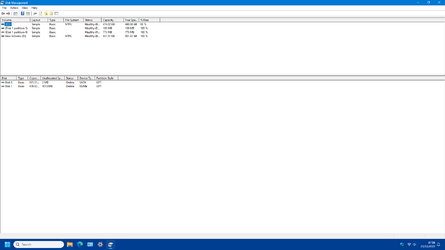
I'd like to see that too. Something hints that the C partition is extremely small if it can't make a restore. I'm wondering how many partitions have been created on the disk. Maybe Mitch would have been better off formatting the drive. DM should show all.
Looks like we aren't going to see the disk layout. Oh well.....
 

My Computers My Computers

  • At a glance

    Windows 11AMD Ryzen 7 3800XT32GBEVGA GeForce GTX 1080 Ti
    OS
    Windows 11
    Computer type
    PC/Desktop
    Manufacturer/Model
    Homebuilt
    CPU
    AMD Ryzen 7 3800XT
    Motherboard
    ASUS ROG Crosshair VII Hero (WiFi)
    Memory
    32GB
    Graphics Card(s)
    EVGA GeForce GTX 1080 Ti
  • At a glance

    Windows 11 EducationIntel i7-8550U32GBNvidia Geforce MX150
    Operating System
    Windows 11 Education
    Computer type
    Laptop
    Manufacturer/Model
    Dell Inspiron 7773
    CPU
    Intel i7-8550U
    Memory
    32GB
    Graphics card(s)
    Nvidia Geforce MX150
    Sound Card
    Realtek
    Monitor(s) Displays
    17"
    Screen Resolution
    1920 x 1080
    Hard Drives
    Toshiba 512GB NVMe SSD
    SK Hynix 512GB SATA SSD
    Internet Speed
    Fast!
I never found System Restore especially useful. I now turn it off since I use Macrium Reflect for frequent system backups.
 

My Computer My Computer

At a glance

Windows 11 ProCore i7-13700K64 GB Kingston Fury Beast DDR5Gigabyte GeForce RTX 2060 Super Gaming OC 8G
OS
Windows 11 Pro
Computer type
PC/Desktop
Manufacturer/Model
Self build
CPU
Core i7-13700K
Motherboard
Asus TUF Gaming Plus WiFi Z790
Memory
64 GB Kingston Fury Beast DDR5
Graphics Card(s)
Gigabyte GeForce RTX 2060 Super Gaming OC 8G
Sound Card
Realtek S1200A
Monitor(s) Displays
Viewsonic VP2770 & Dell (secondary)
Screen Resolution
2560 x 1440
Hard Drives
Kingston KC3000 2TB NVME SSD & SATA HDDs & SSD
PSU
EVGA SuperNova G2 850W
Case
Nanoxia Deep Silence 1
Cooling
Noctua NH-D14
Keyboard
Microsoft Digital Media Pro
Mouse
Logitech Wireless
Internet Speed
80 Mb / s
Browser
Chrome
Antivirus
Defender, Malwarebytes Free & AdwCleaner
Hi. Sorry to be so long in replying - battling the Christmas crowds! I am attaching 2 screenshots of Disk Management and would appreciate any advice. Thanks again.Disk Management 1..pngDisk Management 2.png
 

My Computer My Computer

At a glance

Windows 11 Home
OS
Windows 11 Home
That looks OK. You have 2 partitions, the unlabelled 1.06gb and the unallocated 1012mb but your C drive should be OK with 474gb to run Windows. How much free space does it have when you look at 'This PC'?
 

My Computer My Computer

At a glance

Windows 11 Pro 25H2 26200.7922Intel Core i9 13900F2 x Kingston Fury 32gb DDR5 5600 BeastGigabyte Eagle (Nvidia) RTX 3060
OS
Windows 11 Pro 25H2 26200.7922
Computer type
PC/Desktop
Manufacturer/Model
Local shop built (KC Computers Ltd)
CPU
Intel Core i9 13900F
Motherboard
Gigabyte Z690 Gaming X (rev. 1.0/1.1) - (BIOS: F32 09 18 2025)
Memory
2 x Kingston Fury 32gb DDR5 5600 Beast
Graphics Card(s)
Gigabyte Eagle (Nvidia) RTX 3060
Sound Card
Chord Async USB 44.1kHz - 384kHz 2Qute DAC
Monitor(s) Displays
Gigabyte AORUS FO32U2 32” OLED Flat Gaming Monitor, 0.03ms, KVM, 250 cd/m2, FreeSync Premium Pro, HDR True Black 400
Screen Resolution
3840 x 2160 (UHD), 240Hz
Hard Drives
1 x KINGSTON NVMe M.2 SSDSKC3000D2048G 2TB
1 x Samsung SSD 870 EVO 250GB
2 x Crucial CT4000MX500SSD1 4TB
2 x Crucial CT2000MX500SSD1 2TB
1 x Crucial CT250MX500SSD1 250.0 GB
PSU
Gigabyte 750w
Case
Fractal Torrent
Cooling
Stock Intel CPU, 2 x Fractal 180mm PWM (front), 3 x Fractal 140mm PWM (bottom)
Keyboard
Logitech MX Mechanical Wireless Illuminated Performance Keyboard
Mouse
Logitech MX Master 3S Wireless Performance Mouse
Internet Speed
900 Mbps/900 Mbps Trooli FTTP
Browser
Firefox
Antivirus
Eset Nod32
How can I create a desktop shortcut for system restore? A tutorial might be good for us older folks? :)
You can also add a direct Create Restore Point to your context menu if you really want to use it..


My Computer My Computer

At a glance

Windows 11 Pro
OS
Windows 11 Pro
vssadmin resize shadowstorage / for=C: /On=C: /maxsize=900MB
I don't think 900MB is enough, I have mine set to 12GB to have as many restore points as possible when and if I need them.
 

My Computer My Computer

At a glance

Windows 11 Pro 23H2Intel i3 8100 @3.6Ghz1 x 16GB DDR4 @2400 MHzNvidia GeForce GT 1030 2GB SDDR4
OS
Windows 11 Pro 23H2
Computer type
PC/Desktop
Manufacturer/Model
MSI / MS-7B29
CPU
Intel i3 8100 @3.6Ghz
Motherboard
H310M PRO-VDH (MS-7B29)
Memory
1 x 16GB DDR4 @2400 MHz
Graphics Card(s)
Nvidia GeForce GT 1030 2GB SDDR4
Sound Card
Realtek VEN_10EC&DEV_0887 / NVIDIA VEN_10DE&DEV_0081
Monitor(s) Displays
Acer V226HQL
Screen Resolution
1920 x 1080
Hard Drives
SSD 500 GB Crucial MX500 / HDD 1 TB TOSHIBA DT01ACA100
PSU
ATX, details unknown
Case
Everest 551B
Cooling
details unknown
Keyboard
Mechanical Gaming Hydra R7 - Rampage
Mouse
Logitech G703
Internet Speed
Down: 28Mbps / Up: 19Mbps
Browser
Microsoft Edge
Antivirus
Microsoft Defender Antivirus
Other Info
Bluetooth: TP Link 5.0 Nano USB adapter UB500
WLAN: D-Link 150 Pico USB adapter, N standard
Web camera: Logitech C270 HD 720p @30fps
Microphone: Trust MICO, model 23790
Thanks all for taking the time to reply. I was given Cmd Prompts to try -

vssadmin list shadowstorage
vssadmin resize shadowstorage /for= /on= [/maxsize=]


When available please post the above commands with results.

Which partitions did you want to delete that were unable to be deleted?
Were they grayed or was there an error message?


My Computer My Computer

At a glance

Windows 10Intel(R) Core(TM) i7-4800MQ CPU @ 2.70GHz16 GB Total: Manufacturer : Samsung MemoryTyp...NVIDIA Quadro K3100M; Intel(R) HD Graphics 4600
OS
Windows 10
Computer type
Laptop
Manufacturer/Model
HP
CPU
Intel(R) Core(TM) i7-4800MQ CPU @ 2.70GHz
Motherboard
Product : 190A Version : KBC Version 94.56
Memory
16 GB Total: Manufacturer : Samsung MemoryType : DDR3 FormFactor : SODIMM Capacity : 8GB Speed : 1600
Graphics Card(s)
NVIDIA Quadro K3100M; Intel(R) HD Graphics 4600
Sound Card
IDT High Definition Audio CODEC; PNP Device ID HDAUDIO\FUNC_01&VEN_111D&DEV_76E0
Hard Drives
Model Hitachi HTS727575A9E364
Antivirus
Microsoft Defender
Other Info
Mobile Workstation
@thecaretaker . Thanks for replying. There is nothing on the C drive except the OS and shows 474GB free on This PC. @zbook Thanks also. What should the max size be when entering the 3rd command? Dell says 900mb which seems small. Also, when I turned on System Restore I moved the storage sliders up to near max. Should I put them back to zero (or turn off System Restore) while executing the cmds? Thanks
 

My Computer My Computer

At a glance

Windows 11 Home
OS
Windows 11 Home
Which partitions did you want to delete that were unable to be deleted?

Were they grayed or was there an error message?


Please post share links for:

a) V2 log collector:

b) Event viewer log files:
 

My Computer My Computer

At a glance

Windows 10Intel(R) Core(TM) i7-4800MQ CPU @ 2.70GHz16 GB Total: Manufacturer : Samsung MemoryTyp...NVIDIA Quadro K3100M; Intel(R) HD Graphics 4600
OS
Windows 10
Computer type
Laptop
Manufacturer/Model
HP
CPU
Intel(R) Core(TM) i7-4800MQ CPU @ 2.70GHz
Motherboard
Product : 190A Version : KBC Version 94.56
Memory
16 GB Total: Manufacturer : Samsung MemoryType : DDR3 FormFactor : SODIMM Capacity : 8GB Speed : 1600
Graphics Card(s)
NVIDIA Quadro K3100M; Intel(R) HD Graphics 4600
Sound Card
IDT High Definition Audio CODEC; PNP Device ID HDAUDIO\FUNC_01&VEN_111D&DEV_76E0
Hard Drives
Model Hitachi HTS727575A9E364
Antivirus
Microsoft Defender
Other Info
Mobile Workstation
There were 2 partitions which were greyed out when I was deleting them. There was no error message. I formatted the C drive and left the 1TB alone. The 4 partitions left were the 512GB Primary C drive, the 1 TB HDD and the 2 greyed out partitions. If I remember correctly 1 was around 12GB and the other about 1GB. Dell thinks they could be Dell installed partitions.
 

My Computer My Computer

At a glance

Windows 11 Home
OS
Windows 11 Home
When available post share links into this thread using one drive, drop box, or google drive.

V2
event viewer
vssadmin List ShadowStorage /For=C:

(heading to bed, later in the day I'll scan the logs)
 

My Computer My Computer

At a glance

Windows 10Intel(R) Core(TM) i7-4800MQ CPU @ 2.70GHz16 GB Total: Manufacturer : Samsung MemoryTyp...NVIDIA Quadro K3100M; Intel(R) HD Graphics 4600
OS
Windows 10
Computer type
Laptop
Manufacturer/Model
HP
CPU
Intel(R) Core(TM) i7-4800MQ CPU @ 2.70GHz
Motherboard
Product : 190A Version : KBC Version 94.56
Memory
16 GB Total: Manufacturer : Samsung MemoryType : DDR3 FormFactor : SODIMM Capacity : 8GB Speed : 1600
Graphics Card(s)
NVIDIA Quadro K3100M; Intel(R) HD Graphics 4600
Sound Card
IDT High Definition Audio CODEC; PNP Device ID HDAUDIO\FUNC_01&VEN_111D&DEV_76E0
Hard Drives
Model Hitachi HTS727575A9E364
Antivirus
Microsoft Defender
Other Info
Mobile Workstation
I ran the cmds to increase the shadow storage allocation to 3GB but the same insufficient storage error appeared. No luck.
 

My Computer My Computer

At a glance

Windows 11 Home
OS
Windows 11 Home
I should have added in my last post that after I ran the cmds the size of the shadow storage area was successfully increased to 3GB. After running System Restore the same storage error appeared.
 

My Computer My Computer

At a glance

Windows 11 Home
OS
Windows 11 Home
@Mitch,
Also, when I turned on System Restore I moved the storage sliders up to near max. Should I put them back to zero (or turn off System Restore) while executing the cmds? Thanks
Understand moving the slider all the way to the "max" (the right) will use 100% percent of your storage space, and means nothing else can use that space, and why you got the error not enough storage space, as the more space used for Restore Points, the less space available for use by Windows and other apps.

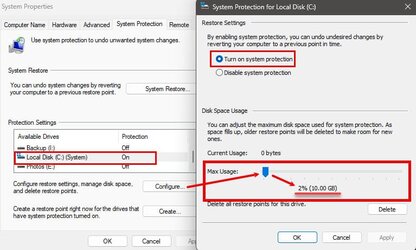
I can't remember, but I think the default is around 2% percent when turned on. But it can be configured as you've done (though way too much). I myself use only 2% percent (9.5gig) on my 512gig drive, and that's plenty for me (more on that in a second). Additionally, the larger the drive the more space is used for a given percentage:

Example at 5% percent on a 512gig drive, 23.8 gig of space is reserved. On a 1TB drive that same 5% percent will reserve 46.5gig, and on a 2TB drive, it will be 93.20gig. So, the percentage reserved is based on drive size.
System Protection.jpg

Now when I said for me, I'm pointing out... System Restore is NOT, repeat NOT, a backup system, it is that NOT designed for or intended to be a backup system in that it DOES NOT backup personal data (files and folders). Its job is to take a snapshot of the registry and system files to be restored prior to an event where your system becomes unstable or unresponsive. (BTW, when turned on, Windows automatically creates Restore Points in under certain trigger events such as updates or certain system changes).

Example: You install a driver or app, and the system becomes unresponsive or unstable, you can then use a Restore Point to return the PC to a state before you installed said driver or app. During the restore process it will restore the previous registry, and system files. HOWEVER, it does not affect (either way) your personal files and folders. So, say you deleted a file from your Documents folder. Using a Restore Point won't get that file back, because that's not the purpose of System Restore.

Point? if your mindset is you want System Restore enabled for "Backup" purposes, that's not what it does, and you'll be disappointed when you use it and find your personal files and data was NOT restored.

So, when I said, 10gig was good enough for me, it was based on the fact I know System Restore isn't a backup system, and therefore don't need a lot of space dedicated to System Restore. I also create manual Restore Points prior to installing certain drivers (typically GPU) and apps. Here, if an issue arises, I can immediately restore the system back to before said drivers or apps were installed. Kind or like erasing a mistake.

That said, Restore Points do not last forever, and are also overwritten as space is exhausted (thus your reserve percentage). Additionally, whenever you do a major upgrade of Windows, all the Restore Points of the previous version are wiped (deleted). Why? Because they are no longer applicable to the new version of the OS.

Sorry for the long post, but my intent is to provide a bit of info to help you make a better-informed decision on whether to use or not use, and how much to storage to allocate for System Restore.

Good luck.

 
Last edited:

My Computers My Computers

  • At a glance

    Windows 11 Pro 24H2 (Build 26100.4770)Intel Core 9 Ultra 285K64G (4x16) DDR5 Corsair RGB Dominator Platinu...Radeon (XFX Mercury) RX 9070XT OC (with Magne...
    OS
    Windows 11 Pro 24H2 (Build 26100.4770)
    Computer type
    PC/Desktop
    Manufacturer/Model
    Custom built
    CPU
    Intel Core 9 Ultra 285K
    Motherboard
    Gigabyte Aorus Z890 Xtreme AI Top
    Memory
    64G (4x16) DDR5 Corsair RGB Dominator Platinum (6400Mhz)
    Graphics Card(s)
    Radeon (XFX Mercury) RX 9070XT OC (with Magnetic Fans)
    Sound Card
    Onboard (DTS:X® Ultra Audio: ESS ES9280A DAC)
    Monitor(s) Displays
    27-inch Eizo Color Edge - CG2700X
    Screen Resolution
    3840 x 2160
    Hard Drives
    4 Samsung NVM 990 Pro drives: 1TB (OS), 2TB, 2 X 4TB.
    PSU
    Seasonic TX-1300 (1300 Watts)
    Case
    Cooler Master H500M
    Cooling
    Corsair Link Titan 280 RX RGB
    Keyboard
    Logitech Craft
    Mouse
    Logitech MX Master 3S
    Internet Speed
    1TB Download. 512mb Upload
    Browser
    Microsoft Edge Chromium
    Antivirus
    Windows Security
    Other Info
    System used for gaming, photography, music, school.
  • At a glance

    Windows 11 Pro 24H2 (Build 26100.4061)Intel Core i9-9900K32gig (4 x 8) Corsair Dominator Platinum DDR4...Radeon XFX Merc 7900XT (20gig)
    Operating System
    Windows 11 Pro 24H2 (Build 26100.4061)
    Computer type
    PC/Desktop
    Manufacturer/Model
    Custom built
    CPU
    Intel Core i9-9900K
    Motherboard
    Gigabyte Z390 Aorus Xtreme
    Memory
    32gig (4 x 8) Corsair Dominator Platinum DDR4 3600Mhz (B-Die)
    Graphics card(s)
    Radeon XFX Merc 7900XT (20gig)
    Sound Card
    Onboard
    Monitor(s) Displays
    24-Inch NEC PA242W
    Screen Resolution
    2880 x 1800
    Hard Drives
    2 X NVME, 1 X SATA SSD
    PSU
    EVGA Super Nova 1000 P2 (1000 Watt)
    Case
    Phantek Enthoo Luxe
    Cooling
    Corsair H115i Elite AIO Cooler
    Keyboard
    Logitech Keys
    Mouse
    Logitech MX Master 3
    Internet Speed
    1TB Download. 512mb Upload
    Browser
    Microsoft Edge Chromium
    Antivirus
    Windows Security
    Other Info
    Backup System
@Dru2 Thanks for your post. My maim reason for enabling System Restore was to undo problems with Dell and Windows Updates. When a Dell driver update is installed thru Support Assist there is an option to Restore if things go wrong, not available if System Protection is turned off. Normal driver updates are not a problem, my main concern are BIOS updates. For drivers I can usually Roll Back or reinstall from Dell Drivers and Downloads. As Garioch says its just an additional layer of backup. My main safety blanket is Macrium Reflect which I use always - almost never System Restore .
If System Restore isn't working is it better to just turn it off as it was before? I'm assuming turning off System Protect won't affect Windows Updates etc? Thanks for your advice.
 

My Computer My Computer

At a glance

Windows 11 Home
OS
Windows 11 Home
Normal driver updates are not a problem, my main concern are BIOS updates.
Sorry Mitch - BIOS updates are installed outside of Windows so system restore will not revert them
.
 

My Computers My Computers

  • At a glance

    Windows 11 Proi716Gb
    OS
    Windows 11 Pro
    Computer type
    Laptop
    Manufacturer/Model
    Lafite 14
    CPU
    i7
    Memory
    16Gb
    Internet Speed
    150Mbps/39Mbps
    Browser
    Firefox
    Antivirus
    Defender
  • At a glance

    Win 11 Proi58Gb
    Operating System
    Win 11 Pro
    Computer type
    PC/Desktop
    Manufacturer/Model
    PC Specialist
    CPU
    i5
    Memory
    8Gb
    Internet Speed
    150Mbps/39Mbps
    Browser
    Firefox
    Antivirus
    Defender
    Other Info
    Incompatible Win 10 Pro PC upgraded to Win 11 Pro
Hi @fixer. Luckily I've never had a problem with BIOS updates but have to say I get apprehensive when they have to be installed. I spoke to Dell and was told that in the first instance all they would do is use cmd to increase the size of the shadow allocation. Thereafter the problem would need to he escalated to the next level. As things stand I've turned off System Protection as it has been since the clean install and rely on Macrium which has helped me out of a few issues. Thanks again.
 

My Computer My Computer

At a glance

Windows 11 Home
OS
Windows 11 Home
@Dru2 Thanks for your post. My maim reason for enabling System Restore was to undo problems with Dell and Windows Updates. When a Dell driver update is installed thru Support Assist there is an option to Restore if things go wrong, not available if System Protection is turned off. Normal driver updates are not a problem,
Agree, and I personally recommend it be turned on (though some will say otherwise) for those reasons.
my main concern are BIOS updates. For drivers I can usually Roll Back or reinstall from Dell Drivers and Downloads. As Garioch says its just an additional layer of backup. My main safety blanket is Macrium Reflect which I use always - almost never System Restore .
I'm 99.999.9 sure System Restore isn't going to reverse BIOS updates as that's written into the BIOS' chip which System Restore does not have access to. If you're looking to reverse BIOS updates, don't look to System Restore :nope:
If System Restore isn't working is it better to just turn it off as it was before?
If it's not working then, yeah, no need to turn it on... but you'll never know if it's "not working" until you try to use it when needed ;-)

Many will have negative opinions of the system, but many are based on misinformation or misunderstanding and why I wrote the long post in explaining things. And yes, NOTHING is without fault... Including Windows itself, so.... But yes, the system works when used in the manner it was designed and not as a "backup" program. It will also probably fail, it you try to do a million things to the OS, in trying to solve an issue, and THEN you decide to try and use it. My suggestion is to use it as a first resort, not a last resort after tinkering with the registry and other stuff first.
I'm assuming turning off System Protect won't affect Windows Updates etc? Thanks for your advice.
No, turning off (or on) System Protection will NOT affect Windows Updates. No need to worry there.
 

My Computers My Computers

  • At a glance

    Windows 11 Pro 24H2 (Build 26100.4770)Intel Core 9 Ultra 285K64G (4x16) DDR5 Corsair RGB Dominator Platinu...Radeon (XFX Mercury) RX 9070XT OC (with Magne...
    OS
    Windows 11 Pro 24H2 (Build 26100.4770)
    Computer type
    PC/Desktop
    Manufacturer/Model
    Custom built
    CPU
    Intel Core 9 Ultra 285K
    Motherboard
    Gigabyte Aorus Z890 Xtreme AI Top
    Memory
    64G (4x16) DDR5 Corsair RGB Dominator Platinum (6400Mhz)
    Graphics Card(s)
    Radeon (XFX Mercury) RX 9070XT OC (with Magnetic Fans)
    Sound Card
    Onboard (DTS:X® Ultra Audio: ESS ES9280A DAC)
    Monitor(s) Displays
    27-inch Eizo Color Edge - CG2700X
    Screen Resolution
    3840 x 2160
    Hard Drives
    4 Samsung NVM 990 Pro drives: 1TB (OS), 2TB, 2 X 4TB.
    PSU
    Seasonic TX-1300 (1300 Watts)
    Case
    Cooler Master H500M
    Cooling
    Corsair Link Titan 280 RX RGB
    Keyboard
    Logitech Craft
    Mouse
    Logitech MX Master 3S
    Internet Speed
    1TB Download. 512mb Upload
    Browser
    Microsoft Edge Chromium
    Antivirus
    Windows Security
    Other Info
    System used for gaming, photography, music, school.
  • At a glance

    Windows 11 Pro 24H2 (Build 26100.4061)Intel Core i9-9900K32gig (4 x 8) Corsair Dominator Platinum DDR4...Radeon XFX Merc 7900XT (20gig)
    Operating System
    Windows 11 Pro 24H2 (Build 26100.4061)
    Computer type
    PC/Desktop
    Manufacturer/Model
    Custom built
    CPU
    Intel Core i9-9900K
    Motherboard
    Gigabyte Z390 Aorus Xtreme
    Memory
    32gig (4 x 8) Corsair Dominator Platinum DDR4 3600Mhz (B-Die)
    Graphics card(s)
    Radeon XFX Merc 7900XT (20gig)
    Sound Card
    Onboard
    Monitor(s) Displays
    24-Inch NEC PA242W
    Screen Resolution
    2880 x 1800
    Hard Drives
    2 X NVME, 1 X SATA SSD
    PSU
    EVGA Super Nova 1000 P2 (1000 Watt)
    Case
    Phantek Enthoo Luxe
    Cooling
    Corsair H115i Elite AIO Cooler
    Keyboard
    Logitech Keys
    Mouse
    Logitech MX Master 3
    Internet Speed
    1TB Download. 512mb Upload
    Browser
    Microsoft Edge Chromium
    Antivirus
    Windows Security
    Other Info
    Backup System
Hi @Dru2 . Thanks for the info. Was just wondering, if I can't set a manual restore point, does it also imply that an automatic restore point set by windows wouldn't also be set? Thanks
 

My Computer My Computer

At a glance

Windows 11 Home
OS
Windows 11 Home
Hi @Dru2 . Thanks for the info. Was just wondering, if I can't set a manual restore point, does it also imply that an automatic restore point set by windows wouldn't also be set? Thanks
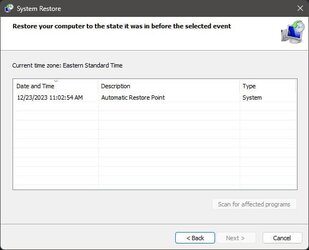
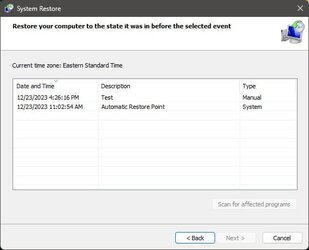
Windows WILL create System Restore point at certain intervals whether you create manual ones or not.

Frist image, here Windows has created an Automatic Restore Point on 23 Dec, 11:02:53 this morning. Second image, my manually created Restore Point added on 23 Dec, 4:26:16 a few minutes ago. You can name your manual Restore Points. This one is "Test"

Automatic Restore points.jpg Manual Restore Point.jpg
 

My Computers My Computers

  • At a glance

    Windows 11 Pro 24H2 (Build 26100.4770)Intel Core 9 Ultra 285K64G (4x16) DDR5 Corsair RGB Dominator Platinu...Radeon (XFX Mercury) RX 9070XT OC (with Magne...
    OS
    Windows 11 Pro 24H2 (Build 26100.4770)
    Computer type
    PC/Desktop
    Manufacturer/Model
    Custom built
    CPU
    Intel Core 9 Ultra 285K
    Motherboard
    Gigabyte Aorus Z890 Xtreme AI Top
    Memory
    64G (4x16) DDR5 Corsair RGB Dominator Platinum (6400Mhz)
    Graphics Card(s)
    Radeon (XFX Mercury) RX 9070XT OC (with Magnetic Fans)
    Sound Card
    Onboard (DTS:X® Ultra Audio: ESS ES9280A DAC)
    Monitor(s) Displays
    27-inch Eizo Color Edge - CG2700X
    Screen Resolution
    3840 x 2160
    Hard Drives
    4 Samsung NVM 990 Pro drives: 1TB (OS), 2TB, 2 X 4TB.
    PSU
    Seasonic TX-1300 (1300 Watts)
    Case
    Cooler Master H500M
    Cooling
    Corsair Link Titan 280 RX RGB
    Keyboard
    Logitech Craft
    Mouse
    Logitech MX Master 3S
    Internet Speed
    1TB Download. 512mb Upload
    Browser
    Microsoft Edge Chromium
    Antivirus
    Windows Security
    Other Info
    System used for gaming, photography, music, school.
  • At a glance

    Windows 11 Pro 24H2 (Build 26100.4061)Intel Core i9-9900K32gig (4 x 8) Corsair Dominator Platinum DDR4...Radeon XFX Merc 7900XT (20gig)
    Operating System
    Windows 11 Pro 24H2 (Build 26100.4061)
    Computer type
    PC/Desktop
    Manufacturer/Model
    Custom built
    CPU
    Intel Core i9-9900K
    Motherboard
    Gigabyte Z390 Aorus Xtreme
    Memory
    32gig (4 x 8) Corsair Dominator Platinum DDR4 3600Mhz (B-Die)
    Graphics card(s)
    Radeon XFX Merc 7900XT (20gig)
    Sound Card
    Onboard
    Monitor(s) Displays
    24-Inch NEC PA242W
    Screen Resolution
    2880 x 1800
    Hard Drives
    2 X NVME, 1 X SATA SSD
    PSU
    EVGA Super Nova 1000 P2 (1000 Watt)
    Case
    Phantek Enthoo Luxe
    Cooling
    Corsair H115i Elite AIO Cooler
    Keyboard
    Logitech Keys
    Mouse
    Logitech MX Master 3
    Internet Speed
    1TB Download. 512mb Upload
    Browser
    Microsoft Edge Chromium
    Antivirus
    Windows Security
    Other Info
    Backup System
Back
Top Bottom