
Does anyone use Desksoft's WindowManager?


QuicktellPro

Active member
Member
Local time
1:04 AM
Posts
292
OS
Windows 11
A few of my apps refuse to retain their previous window size when Windows boots or restarts which I find intensely annoying. Never happened until Windows 11. Anyway, 9 years ago I bought WindowManager which solved this issue, however I never reinstalled it on my current laptop. Exasperated, 2 days ago I did and updated it to the latest version, but I can't get it to work. The app has had so many improvements, it has now become extremely complicated to use. The only video available has no sound and is of the version I had 9 years ago which no longer resembles the latest one. I wrote to support and was told to read the manual because the app works perfectly. Regretfully, I can't understand the manual which I find to be too technical.

If you use this app, can you tell me what I have to do to get a window size saved, please?
 
Windows Build/Version
25H2 (26200.7840)

My Computer

System One

  • OS
    Windows 11
    Computer type
    Laptop
    Manufacturer/Model
    Alienware A51M R2
    CPU
    Intel(R) Core(TM) i9-10900K CPU @ 3.70GHz
    Memory
    32,0 GB
    Graphics Card(s)
    Nvidia GeForce RTX2080 Super
    Sound Card
    Realtek
    Screen Resolution
    4K
    Hard Drives
    2TB (2x 1TB PCle M.2 SSD) RAID 0 [Boot] + 2TB (2x 1TB
    PCle M.2 SSD) Non-Raid [Storage]

My Computers

System One System Two

  • OS
    Windows 11 Home 25H2 26200.8524
    Computer type
    PC/Desktop
    Manufacturer/Model
    HP Pavilion TP01-2xxx
    CPU
    AMD Ryzen 3 5300G
    Memory
    8gb
    Graphics Card(s)
    Radeon Graphics 4.00GHZ
    Monitor(s) Displays
    ViewSonic
    Keyboard
    HP
    Mouse
    wireless Microsoft
    Browser
    FireFox
    Antivirus
    Avira
  • Operating System
    Updated Windows 10 to 11 25H2 26200.8524
    Computer type
    PC/Desktop
    Manufacturer/Model
    HP
    CPU
    Intel Core i3 8100 @3.60 GHz
    Motherboard
    HP 8653 (U3E1)
    Memory
    8.GB
    Graphics card(s)
    Intel UHD 360 (HP)
    Sound Card
    Realtek High Def
    Monitor(s) Displays
    ViewSonic
    Other Info
    #3 System: HP laptop Windows 25H2 11Pro 26200.7840
A few of my apps refuse to retain their previous window size when Windows boots or restarts which I find intensely annoying. Never happened until Windows 11. Anyway, 9 years ago I bought WindowManager which solved this issue, however I never reinstalled it on my current laptop. Exasperated, 2 days ago I did and updated it to the latest version, but I can't get it to work. The app has had so many improvements, it has now become extremely complicated to use. The only video available has no sound and is of the version I had 9 years ago which no longer resembles the latest one. I wrote to support and was told to read the manual because the app works perfectly. Regretfully, I can't understand the manual which I find to be too technical.

If you use this app, can you tell me what I have to do to get a window size saved, please?
test this on one of your apps/windows:

open it, maximize it (the square in top right), hold CTRL and close it via the X (top right)
reopen it and it should be maximized, now unmax it and resize it to what you want, hold CTRL and close it via the X again
reopen it - does it retain the sizing you applied?

i posted this somewhere here back in 24H2 days. seemed to be a glitch that i figured out via random testing back then...
 

My Computer

System One

  • OS
    Windows 11 Pro
I use AlomWare Toolbox for my window management. Just press its hotkey of Shift+Ctrl+Alt+O on the current window and it will always open that way in future. Couldn't be simpler. (Caveat: Some windows are trickier and need a manual tweak to work, but in general the hotkey does it perfectly). A bonus point for this app is that if a window is always-on-top or transparent, it will also re-open that way as well.
 

My Computer

System One

  • OS
    Windows 11 Pro
A few of my apps refuse to retain their previous window size when Windows boots or restarts which I find intensely annoying. Never happened until Windows 11. Anyway, 9 years ago I bought WindowManager which solved this issue, however I never reinstalled it on my current laptop. Exasperated, 2 days ago I did and updated it to the latest version, but I can't get it to work. The app has had so many improvements, it has now become extremely complicated to use. The only video available has no sound and is of the version I had 9 years ago which no longer resembles the latest one. I wrote to support and was told to read the manual because the app works perfectly. Regretfully, I can't understand the manual which I find to be too technical.

If you use this app, can you tell me what I have to do to get a window size saved, please?
I’ve been using it for a few years now. My process is pretty simple: I open the program I want to resize, launch WindowManager, hit the Pick button, select the program, and then apply whatever changes I need.

The software does have some quirks, though. Sometimes it randomly loses all its settings, or a program stops opening with the correct layout. When that happens, I have to add it again, which leaves me with two entries using the same name. I delete the older one, and things usually start working properly again.

I’ve also noticed it struggles with multi‑monitor setups, it often picks up incorrect X/Y coordinates.
 

My Computers

System One System Two

  • OS
    Windows 11 25H2
    Computer type
    PC/Desktop
    Manufacturer/Model
    Custom Built
    CPU
    Intel i9 14900KF
    Motherboard
    ASUS Z790 ProArt Creator WiFi
    Memory
    64GB Corsair Vengeance RGB
    Graphics Card(s)
    MSI 4090 Suprim X
    Sound Card
    Onboard
    Monitor(s) Displays
    1 x Asus 24". 1 x Asus 32"
    Screen Resolution
    1920 x 1080 & 2560 x 1440
    Hard Drives
    Multiple
    PSU
    Corsair 1200HX
    Case
    Corsair 7000D RGB
    Cooling
    Corsair H150I Capellix XT
    Keyboard
    Corsair K70 RGB PRO
    Mouse
    Corsair M55 RGB Pro
    Internet Speed
    1000Mbps
    Browser
    Edge
    Antivirus
    Windows Default
  • Operating System
    Windows 11 25H2
    Computer type
    PC/Desktop
    Manufacturer/Model
    Custom Built
    CPU
    Intel i7 6800K
    Motherboard
    ASUS Z99 Deluxe
    Memory
    32GB DDR4 (Corsair)
    Graphics card(s)
    ASUS GTX 1080ti
    Sound Card
    Onboard
    Monitor(s) Displays
    1x Viewsonic 24" 1x LG 19"
    Screen Resolution
    1920 x 1080 & 1600 x 900
    Hard Drives
    3 x SATA SSD
    PSU
    650W Gigabyte Bronze
    Case
    Coolermaster HAF-X
    Cooling
    Noctua NH-15 Chroma black
    Keyboard
    Generic RGB
    Mouse
    Microsoft Basic
    Internet Speed
    1000Mbps
    Browser
    Edge
    Antivirus
    Windows Default

My Computer

System One

  • OS
    Windows 11
    Computer type
    Laptop
    Manufacturer/Model
    Alienware A51M R2
    CPU
    Intel(R) Core(TM) i9-10900K CPU @ 3.70GHz
    Memory
    32,0 GB
    Graphics Card(s)
    Nvidia GeForce RTX2080 Super
    Sound Card
    Realtek
    Screen Resolution
    4K
    Hard Drives
    2TB (2x 1TB PCle M.2 SSD) RAID 0 [Boot] + 2TB (2x 1TB
    PCle M.2 SSD) Non-Raid [Storage]
open it, maximize it (the square in top right), hold CTRL and close it via the X (top right)
reopen it and it should be maximized, now unmax it and resize it to what you want, hold CTRL and close it via the X again
reopen it - does it retain the sizing you applied?
Yes, it does, but it doesn't after a restart.
FYI, the window I tested that with was WhatsApp.
 

My Computer

System One

  • OS
    Windows 11
    Computer type
    Laptop
    Manufacturer/Model
    Alienware A51M R2
    CPU
    Intel(R) Core(TM) i9-10900K CPU @ 3.70GHz
    Memory
    32,0 GB
    Graphics Card(s)
    Nvidia GeForce RTX2080 Super
    Sound Card
    Realtek
    Screen Resolution
    4K
    Hard Drives
    2TB (2x 1TB PCle M.2 SSD) RAID 0 [Boot] + 2TB (2x 1TB
    PCle M.2 SSD) Non-Raid [Storage]
I use AlomWare Toolbox for my window management. Just press its hotkey of Shift+Ctrl+Alt+O on the current window and it will always open that way in future. Couldn't be simpler. (Caveat: Some windows are trickier and need a manual tweak to work, but in general the hotkey does it perfectly). A bonus point for this app is that if a window is always-on-top or transparent, it will also re-open that way as well.
That looks to be an excellent app! Pity the free version requires you to get a temporary license code on a daily basis. Maybe I will buy it in the not-so-distant future.
 

My Computer

System One

  • OS
    Windows 11
    Computer type
    Laptop
    Manufacturer/Model
    Alienware A51M R2
    CPU
    Intel(R) Core(TM) i9-10900K CPU @ 3.70GHz
    Memory
    32,0 GB
    Graphics Card(s)
    Nvidia GeForce RTX2080 Super
    Sound Card
    Realtek
    Screen Resolution
    4K
    Hard Drives
    2TB (2x 1TB PCle M.2 SSD) RAID 0 [Boot] + 2TB (2x 1TB
    PCle M.2 SSD) Non-Raid [Storage]
I’ve been using it for a few years now. My process is pretty simple: I open the program I want to resize, launch WindowManager, hit the Pick button, select the program, and then apply whatever changes I need.

The software does have some quirks, though. Sometimes it randomly loses all its settings, or a program stops opening with the correct layout. When that happens, I have to add it again, which leaves me with two entries using the same name. I delete the older one, and things usually start working properly again.

I’ve also noticed it struggles with multi‑monitor setups, it often picks up incorrect X/Y coordinates.
I'm running v10.25.0. Which version are you running?
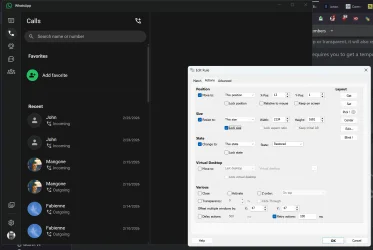
I am including a screenshot of WhatsApp and WM's current settings. Once I have dragged the window to the size I want, it always returned to that size when reopened, even without using WM. The problem I am encountering is that after a restart or cold start, it returns to its default size. This only started after WhatsApp's recent update.

wm_whatsapp.webp
 

My Computer

System One

  • OS
    Windows 11
    Computer type
    Laptop
    Manufacturer/Model
    Alienware A51M R2
    CPU
    Intel(R) Core(TM) i9-10900K CPU @ 3.70GHz
    Memory
    32,0 GB
    Graphics Card(s)
    Nvidia GeForce RTX2080 Super
    Sound Card
    Realtek
    Screen Resolution
    4K
    Hard Drives
    2TB (2x 1TB PCle M.2 SSD) RAID 0 [Boot] + 2TB (2x 1TB
    PCle M.2 SSD) Non-Raid [Storage]
I'm running v10.25.0. Which version are you running?
I am including a screenshot of WhatsApp and WM's current settings. Once I have dragged the window to the size I want, it always returned to that size when reopened, even without using WM. The problem I am encountering is that after a restart or cold start, it returns to its default size. This only started after WhatsApp's recent update.

View attachment 164890
Using the same version, I have found that some apps dont seem to work correclty, espcially these new glorified web apps. The delveoper has usally been helpful with my queries in the past but can come across a bit blunt at times.
 

My Computers

System One System Two

  • OS
    Windows 11 25H2
    Computer type
    PC/Desktop
    Manufacturer/Model
    Custom Built
    CPU
    Intel i9 14900KF
    Motherboard
    ASUS Z790 ProArt Creator WiFi
    Memory
    64GB Corsair Vengeance RGB
    Graphics Card(s)
    MSI 4090 Suprim X
    Sound Card
    Onboard
    Monitor(s) Displays
    1 x Asus 24". 1 x Asus 32"
    Screen Resolution
    1920 x 1080 & 2560 x 1440
    Hard Drives
    Multiple
    PSU
    Corsair 1200HX
    Case
    Corsair 7000D RGB
    Cooling
    Corsair H150I Capellix XT
    Keyboard
    Corsair K70 RGB PRO
    Mouse
    Corsair M55 RGB Pro
    Internet Speed
    1000Mbps
    Browser
    Edge
    Antivirus
    Windows Default
  • Operating System
    Windows 11 25H2
    Computer type
    PC/Desktop
    Manufacturer/Model
    Custom Built
    CPU
    Intel i7 6800K
    Motherboard
    ASUS Z99 Deluxe
    Memory
    32GB DDR4 (Corsair)
    Graphics card(s)
    ASUS GTX 1080ti
    Sound Card
    Onboard
    Monitor(s) Displays
    1x Viewsonic 24" 1x LG 19"
    Screen Resolution
    1920 x 1080 & 1600 x 900
    Hard Drives
    3 x SATA SSD
    PSU
    650W Gigabyte Bronze
    Case
    Coolermaster HAF-X
    Cooling
    Noctua NH-15 Chroma black
    Keyboard
    Generic RGB
    Mouse
    Microsoft Basic
    Internet Speed
    1000Mbps
    Browser
    Edge
    Antivirus
    Windows Default
but can come across a bit blunt at times.
Yes, I have noticed.
What's needed is an updated video showing how to use the program since it no longer resembles the version used 9 years ago.

After booting this morning, I can confirm that the settings I used for locking the window size of WhatsApp and KirbyAlarmPro have not worked.
 

My Computer

System One

  • OS
    Windows 11
    Computer type
    Laptop
    Manufacturer/Model
    Alienware A51M R2
    CPU
    Intel(R) Core(TM) i9-10900K CPU @ 3.70GHz
    Memory
    32,0 GB
    Graphics Card(s)
    Nvidia GeForce RTX2080 Super
    Sound Card
    Realtek
    Screen Resolution
    4K
    Hard Drives
    2TB (2x 1TB PCle M.2 SSD) RAID 0 [Boot] + 2TB (2x 1TB
    PCle M.2 SSD) Non-Raid [Storage]
Back
Top Bottom


