Does Rufus Still Work ?


Thanks for that......the laptop I am trying to install W11 on is a Toshiba L670-1J8 model, and is I think about FOURTEEN years old, as are all the Toshiba one's I have, it was originally a W7 machine, successfully updated to W10, as they all were......I guess they are probably just too old to run W11, but thought it worth a try.....if anyone can tell me how to disable secure boot it might help, but from what I can see there is NO option to do that on these older machines.....I do have W11 on a fairly new Dell machine, but hate to think that these old Toshiba's are destined for landfill.....oh well, progress I guess !!......
 

My Computer My Computer

At a glance

W 11 Pro Version 25H2
OS
W 11 Pro Version 25H2
Manufacturer/Model
Dell Precision M4800 25H2
You put 24H2 on that and you’re going to be disappointed. It’ll run like a bag of…

BUT there are a few members here that have worked with PC’s that used to belong to Moses and have done OK, sort of. But I’d suggest 23H2, which actually gets retired in Nov, but members like @Bree may be able to advise.

P.S.
A laptop like that, I doubt has UEFI, if it does it’ll be via the BIOS. I’m not that clued in so another member can advise. So your Partition probably needs to be/or is already MBR as does that setting in Rufus (Number 3 in my settings image)

Did you use that tutorial to find the partition scheme?

EDIT: I had a look, no UEFI that I can see.
 
Last edited:

My Computers My Computers

  • At a glance

    Windows 11 Pro 25H2 Build 26200.8655Intel(R) Core(TM) i7-4770K CPU @ 3.50GHz32.0 GB of I forget and the box is in storage.Gigabyte nVidia GeForce GTX 1660 Super OC 6GB
    OS
    Windows 11 Pro 25H2 Build 26200.8655
    Computer type
    PC/Desktop
    Manufacturer/Model
    Sin-built 2013
    CPU
    Intel(R) Core(TM) i7-4770K CPU @ 3.50GHz
    Motherboard
    ASUS ROG Maximus VI Formula
    Memory
    32.0 GB of I forget and the box is in storage.
    Graphics Card(s)
    Gigabyte nVidia GeForce GTX 1660 Super OC 6GB
    Sound Card
    ROG SupremeFX Formula 8-Channel High Definition Audio
    Monitor(s) Displays
    5 x LG 25MS500-B - 1 x 24MK430H-B - 1 x Wacom Pro 22" Touch Screen Tablet
    Screen Resolution
    All over the place
    Hard Drives
    Too many to list. OS on Samsung 1TB 870 QVO SATA
    PSU
    Silverstone 1500
    Case
    NZXT Phantom 820 Full-Tower Case
    Cooling
    Noctua NH-D15 Elite Class Dual Tower CPU Cooler / 6 x EziDIY 120mm / 2 x Corsair 140mm somethings / 1 x 140mm Thermaltake something / 2 x 200mm Corsair.
    Keyboard
    Corsair K95 / Logitech diNovo Edge Wireless
    Mouse
    Logitech: G402 / G502 / Mx Masters / Mx Air Cordless
    Internet Speed
    2000/500Mbps
    Browser
    All sorts
    Antivirus
    Kaspersky Premium
    Other Info
    ㅤㅤㅤㅤㅤㅤㅤㅤㅤㅤㅤㅤㅤㅤㅤㅤㅤㅤㅤㅤㅤㅤㅤㅤㅤㅤㅤㅤㅤㅤㅤㅤㅤㅤㅤㅤㅤㅤㅤㅤ⠀⠀⠀⠀⠀⠀⠀⠀⠀⠀
    TP-Link BE9300 WiFi 7 Bluetooth 5.4 (Archer TBE550E)
    TP-Link TX201 V1 2.5GB Lan

    Grandstream HT812 - VoIP
    ASUS DSL-AX82U - Mesh
    ASUS RT-AC68U - Mesh
    ASUS RT-BE88U Router

    Brother MFC-L2880DW Printer

    I’m on a horse.
  • At a glance

    Windows 11 Pro 25H2 Build 26200.8655 (Wifes)13th Generation Intel® Core™ i5-1340P Process...16GB LPDDR5-52001x Intel® Iris® Xe Graphics
    Operating System
    Windows 11 Pro 25H2 Build 26200.8655 (Wifes)
    Computer type
    Laptop
    Manufacturer/Model
    LENOVO Yoga 7 14IRL8 - Type 82YL
    CPU
    13th Generation Intel® Core™ i5-1340P Processor(Core™ i5-1340P)
    Memory
    16GB LPDDR5-5200
    Graphics card(s)
    1x Intel® Iris® Xe Graphics
    Sound Card
    Optimized with Dolby Atmos®
    Screen Resolution
    QHD 2880 x 1800 OLED
    Hard Drives
    M.2 512 GB SSD PCIe
    Mouse
    Logiteck MX Master 3S
    Internet Speed
    2000/500
    Antivirus
    Defender / Malwarebytes
    Other Info
    …still on a horse.


    Wireless Network: Wi-Fi 6E 2x2 AX; Bluetooth® 5.1 or above
    Ports: 1x 1 Novo button; 2 in 1 Audio Combo jack; Micro SD Card Reader; HDMI 1.4b; 2 x USB Type-C (TBT4)
    USB 3.2 Gen 2 DP 1.4a
    PD 3.0); 1 x USB 3.2 Gen1 Type A
    Camera
    1x 1080P FHD IR/RGB Hybrid with Privacy Shutter and Dual Array Microphone
    Graphics
    1x Intel® Iris® Xe Graphics
    Monitor
    14" WUXGA
    Form Factor
    Convertible Notebook
  • Windows 11 Pro 25H2 Build 26200.8655 (Wifes)

    Yoga 7 2-in-1 14IML9 - Type 83DJ

    Processor: Intel® Core™ Ultra 7 155H Processor(Core™ Ultra 7 155H)

    Memory: 32GB LPD5X-7467

    Hard Drive: 1 TB SSD PCIe

    Wireless Network: 1x Wi-Fi 6E 2x2 AX; Bluetooth® 5.1 or above

    Ports: 1 x HDMI 2.1 TMDS; 1 x Novo Button; 1 x Combo Audio Jack
    2 x USB-C (USB 4.0)
    1 x USB-A 3.2 Gen 1

    Camera: 1080P FHD IR Hybrid with Dual Microphone

    Graphics: Intel® Arc™ Graphics

    Monitor: 14" 2.8K

    ...Where's my horse?
Mmmhhh......al is probably not lost !!.......my main laptop (the one I am using now) DOES have the facility to turn Secure Boot, on and off.....it's also a Toshiba Satellite but slightly newer than the others.......the plan is to create a W10 ISO, in case things go wrong, and then attempt to install W11 on THIS machine.....fingers crossed !!......
 

My Computer My Computer

At a glance

W 11 Pro Version 25H2
OS
W 11 Pro Version 25H2
Manufacturer/Model
Dell Precision M4800 25H2
Nope.....still won't recognise the flash drive......just about to give up !!.......
 

My Computer My Computer

At a glance

W 11 Pro Version 25H2
OS
W 11 Pro Version 25H2
Manufacturer/Model
Dell Precision M4800 25H2
.....the laptop I am trying to install W11 on is a Toshiba L670-1J8 model, and is I think about FOURTEEN years old, as are all the Toshiba one's I have, it was originally a W7 machine, successfully updated to W10, as they all were......I guess they are probably just too old to run W11, but thought it worth a try.....

You put 24H2 on that and you’re going to be disappointed. It’ll run like a bag of…

BUT there are a few members here that have worked with PC’s that used to belong to Moses and have done OK, sort of. But I’d suggest 23H2, which actually gets retired in Nov, but members like @Bree may be able to advise.
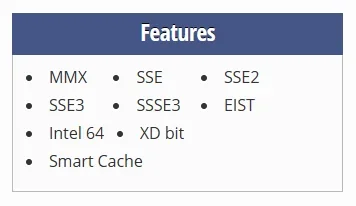
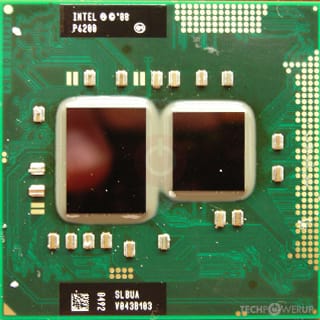
The Toshiba L670 had an Intel Pentium P6200. This is too old for 24H2, it lacks the SSE4.2 instruction set without which 24H2 cannot run. Your L670 cannot run anything higher than 23H2.

1753013390809.webp
.......my main laptop (the one I am using now) DOES have the facility to turn Secure Boot, on and off.....it's also a Toshiba Satellite but slightly newer than the others.......
Secure boot is not essential, that requirement (and TPM, CPU, etc.) can be bypassed with a workaround. The only hard requirement for 24H2 is SSE4.2. I have installed 24H2 on a slightly newer Toshiba Satellite than your L670, a Legacy bios/MBR machine - but it does have SSE4.2.

Now 24H2 is in General Availability I've just repeated the clean install test on the same (very) unsupported device, a Toshiba Satellite L750 from circa 2011.
screenshot-2024-10-01-233637-png.110782
 

My Computers My Computers

  • At a glance

    Windows 11 HomeAMD Athlon Silver 3050U8GBRadeon Graphics
    OS
    Windows 11 Home
    Computer type
    Laptop
    Manufacturer/Model
    Acer Aspire 3 A315-23-R9VY
    CPU
    AMD Athlon Silver 3050U
    Memory
    8GB
    Graphics Card(s)
    Radeon Graphics
    Monitor(s) Displays
    laptop screen
    Screen Resolution
    1366x768 native resolution, up to 2560x1440 with Radeon Virtual Super Resolution
    Hard Drives
    1TB Samsung EVO 870 SSD (from April 2026: 250GB EVO 850)
    Internet Speed
    150 Mbps
    Browser
    Edge, Firefox
    Antivirus
    Defender
    Other Info
    fully 'Windows 11 ready' laptop. Windows 10 C: partition migrated from my old unsupported 'main machine' then upgraded to 11. A test migration ran Insider builds for 2 months. When 11 was released on 5th October 2021 it was re-imaged back to 10 and was offered the upgrade in Windows Update on 20th October. Windows Update offered the 22H2 Feature Update on 20th September 2022. It got the 23H2 Feature Update on 4th November 2023 through Windows Update, 24H2 on 3rd October 2024 through Windows Update by setting the Target Release Version for 24H2, and 25H2 on 30th September 2025 through Windows Update by setting the Target Release Version for 25H2.

    UPDATE - 11 April 2026: due to mechanical deterioration this PC has been retired from active duty. The OS with all software and files has been migrated to my System Seven in 'Other systems' to carry on as my general purpose 'main machine'.
  • At a glance

    Windows 11 ProIntel® Core™ i5-520M8GB(integrated graphics) Intel HD Graphics
    Operating System
    Windows 11 Pro
    Computer type
    Laptop
    Manufacturer/Model
    Dell Latitude E4310
    CPU
    Intel® Core™ i5-520M
    Motherboard
    0T6M8G
    Memory
    8GB
    Graphics card(s)
    (integrated graphics) Intel HD Graphics
    Screen Resolution
    1366x768
    Hard Drives
    500GB Crucial MX500 SSD
    Browser
    Firefox, Edge
    Antivirus
    Defender
    Other Info
    unsupported machine: Legacy bios, MBR, TPM 1.2, upgraded from W10 to W11 using W10/W11 hybrid install media workaround.

    In-place upgrade to 22H2 using ISO and a workaround.
    Feature Update to 23H2 by manually installing the Enablement Package.
    In-place upgrade to 24H2 using hybrid 23H2/24H2 install media.
    Upgraded to 25H2 by Enablement Package.

    Also running Insider Dev, and Canary builds and Windows 10 as native boot .vhdx.
  • My SYSTEM THREE is a Dell Latitude 5410, i7-10610U, 32GB RAM, 512GB NVMe ssd, supported device running Windows 11 Pro.

    My SYSTEM FOUR is a 2-in-1 convertible Lenovo Yoga 11e 20DA, Celeron N2930, 8GB RAM, 256GB ssd. Unsupported device: currently running Win10 Pro, plus Win11 Pro RTM and Insider Dev, Beta, and RP 24H2 as native boot vhdx.

    My SYSTEM FIVE is a Dell Latitude 3190 2-in-1, Pentium Silver N5030, 8GB RAM, 1TB NVMe ssd, supported device running Windows 11 Pro, plus Insider Beta, Dev, and Canary builds (and a few others) as a native boot .vhdx.

    My SYSTEM SIX is a Dell Latitude 5550, Core Ultra 7 165H, 64GB RAM, 1TB NVMe SSD, supported device, Windows 11 Pro 24H2, Hyper-V host machine. Updated to 25H2 on 30th September 2025.

    My SYSTEM SEVEN is a Lenovo Thinkpad T580, Intel Core i7-8650U, 16GB RAM, 512GB NVMe SSD + 2nd 512GB NVMe SSD, a supported device for Windows 11. This is my current general purpose 'main machine'. The installed Windows 11 Home from my System One has been migrated to this machine.
Thanks for that......I'm just wondering WHY it won't recognise the flash drive ?.......
 

My Computer My Computer

At a glance

W 11 Pro Version 25H2
OS
W 11 Pro Version 25H2
Manufacturer/Model
Dell Precision M4800 25H2
Does it recognize and boot a clonezilla live flash drive?
 

My Computer My Computer

At a glance

11 Pro 25H2i7-10750H16GB Samsung DDR4 3200Intel + Nvidia RTX3060 Laptop
OS
11 Pro 25H2
Computer type
Laptop
Manufacturer/Model
MSI
CPU
i7-10750H
Motherboard
MSI MS-17F5
Memory
16GB Samsung DDR4 3200
Graphics Card(s)
Intel + Nvidia RTX3060 Laptop
Sound Card
Realtek
Monitor(s) Displays
Samsung 24" Curved (HDMI)
Screen Resolution
1920x1080
Hard Drives
Sabrent Rocket Gen3 1Tb Smasung EVO 870 1TB
Antivirus
Bitdefender
Thanks for that......I'm just wondering WHY it won't recognise the flash drive ?.......
Did you make the flash drive with Rufus? Did you configure it for Legacy boot or just UEFI?

I used a standard install USB made with Microsoft's Media Creation Tool. Try turning off Secure boot in the bios, and enabling Legacy USB support (often referred to as CSM). Then use a standard USB with the workarounds for a clean install (Option Two) or an upgrade (Option Three) here:


My Computers My Computers

  • At a glance

    Windows 11 HomeAMD Athlon Silver 3050U8GBRadeon Graphics
    OS
    Windows 11 Home
    Computer type
    Laptop
    Manufacturer/Model
    Acer Aspire 3 A315-23-R9VY
    CPU
    AMD Athlon Silver 3050U
    Memory
    8GB
    Graphics Card(s)
    Radeon Graphics
    Monitor(s) Displays
    laptop screen
    Screen Resolution
    1366x768 native resolution, up to 2560x1440 with Radeon Virtual Super Resolution
    Hard Drives
    1TB Samsung EVO 870 SSD (from April 2026: 250GB EVO 850)
    Internet Speed
    150 Mbps
    Browser
    Edge, Firefox
    Antivirus
    Defender
    Other Info
    fully 'Windows 11 ready' laptop. Windows 10 C: partition migrated from my old unsupported 'main machine' then upgraded to 11. A test migration ran Insider builds for 2 months. When 11 was released on 5th October 2021 it was re-imaged back to 10 and was offered the upgrade in Windows Update on 20th October. Windows Update offered the 22H2 Feature Update on 20th September 2022. It got the 23H2 Feature Update on 4th November 2023 through Windows Update, 24H2 on 3rd October 2024 through Windows Update by setting the Target Release Version for 24H2, and 25H2 on 30th September 2025 through Windows Update by setting the Target Release Version for 25H2.

    UPDATE - 11 April 2026: due to mechanical deterioration this PC has been retired from active duty. The OS with all software and files has been migrated to my System Seven in 'Other systems' to carry on as my general purpose 'main machine'.
  • At a glance

    Windows 11 ProIntel® Core™ i5-520M8GB(integrated graphics) Intel HD Graphics
    Operating System
    Windows 11 Pro
    Computer type
    Laptop
    Manufacturer/Model
    Dell Latitude E4310
    CPU
    Intel® Core™ i5-520M
    Motherboard
    0T6M8G
    Memory
    8GB
    Graphics card(s)
    (integrated graphics) Intel HD Graphics
    Screen Resolution
    1366x768
    Hard Drives
    500GB Crucial MX500 SSD
    Browser
    Firefox, Edge
    Antivirus
    Defender
    Other Info
    unsupported machine: Legacy bios, MBR, TPM 1.2, upgraded from W10 to W11 using W10/W11 hybrid install media workaround.

    In-place upgrade to 22H2 using ISO and a workaround.
    Feature Update to 23H2 by manually installing the Enablement Package.
    In-place upgrade to 24H2 using hybrid 23H2/24H2 install media.
    Upgraded to 25H2 by Enablement Package.

    Also running Insider Dev, and Canary builds and Windows 10 as native boot .vhdx.
  • My SYSTEM THREE is a Dell Latitude 5410, i7-10610U, 32GB RAM, 512GB NVMe ssd, supported device running Windows 11 Pro.

    My SYSTEM FOUR is a 2-in-1 convertible Lenovo Yoga 11e 20DA, Celeron N2930, 8GB RAM, 256GB ssd. Unsupported device: currently running Win10 Pro, plus Win11 Pro RTM and Insider Dev, Beta, and RP 24H2 as native boot vhdx.

    My SYSTEM FIVE is a Dell Latitude 3190 2-in-1, Pentium Silver N5030, 8GB RAM, 1TB NVMe ssd, supported device running Windows 11 Pro, plus Insider Beta, Dev, and Canary builds (and a few others) as a native boot .vhdx.

    My SYSTEM SIX is a Dell Latitude 5550, Core Ultra 7 165H, 64GB RAM, 1TB NVMe SSD, supported device, Windows 11 Pro 24H2, Hyper-V host machine. Updated to 25H2 on 30th September 2025.

    My SYSTEM SEVEN is a Lenovo Thinkpad T580, Intel Core i7-8650U, 16GB RAM, 512GB NVMe SSD + 2nd 512GB NVMe SSD, a supported device for Windows 11. This is my current general purpose 'main machine'. The installed Windows 11 Home from my System One has been migrated to this machine.
Did you make the flash drive with Rufus? Did you configure it for Legacy boot or just UEFI?

I used a standard install USB made with Microsoft's Media Creation Tool. Try turning off Secure boot in the bios, and enabling Legacy USB support (often referred to as CSM). Then use a standard USB with the workarounds for a clean install (Option Two) or an upgrade (Option Three) here:


All this has been suggested but not much in a way of detailed responses have been provided to the suggestions, from memory.
I included a pretty extensive Rufus tutorial/steps, I believe Kelper suggested secure boot changes etc etc
 

My Computers My Computers

  • At a glance

    Windows 11 Pro 25H2 Build 26200.8655Intel(R) Core(TM) i7-4770K CPU @ 3.50GHz32.0 GB of I forget and the box is in storage.Gigabyte nVidia GeForce GTX 1660 Super OC 6GB
    OS
    Windows 11 Pro 25H2 Build 26200.8655
    Computer type
    PC/Desktop
    Manufacturer/Model
    Sin-built 2013
    CPU
    Intel(R) Core(TM) i7-4770K CPU @ 3.50GHz
    Motherboard
    ASUS ROG Maximus VI Formula
    Memory
    32.0 GB of I forget and the box is in storage.
    Graphics Card(s)
    Gigabyte nVidia GeForce GTX 1660 Super OC 6GB
    Sound Card
    ROG SupremeFX Formula 8-Channel High Definition Audio
    Monitor(s) Displays
    5 x LG 25MS500-B - 1 x 24MK430H-B - 1 x Wacom Pro 22" Touch Screen Tablet
    Screen Resolution
    All over the place
    Hard Drives
    Too many to list. OS on Samsung 1TB 870 QVO SATA
    PSU
    Silverstone 1500
    Case
    NZXT Phantom 820 Full-Tower Case
    Cooling
    Noctua NH-D15 Elite Class Dual Tower CPU Cooler / 6 x EziDIY 120mm / 2 x Corsair 140mm somethings / 1 x 140mm Thermaltake something / 2 x 200mm Corsair.
    Keyboard
    Corsair K95 / Logitech diNovo Edge Wireless
    Mouse
    Logitech: G402 / G502 / Mx Masters / Mx Air Cordless
    Internet Speed
    2000/500Mbps
    Browser
    All sorts
    Antivirus
    Kaspersky Premium
    Other Info
    ㅤㅤㅤㅤㅤㅤㅤㅤㅤㅤㅤㅤㅤㅤㅤㅤㅤㅤㅤㅤㅤㅤㅤㅤㅤㅤㅤㅤㅤㅤㅤㅤㅤㅤㅤㅤㅤㅤㅤㅤ⠀⠀⠀⠀⠀⠀⠀⠀⠀⠀
    TP-Link BE9300 WiFi 7 Bluetooth 5.4 (Archer TBE550E)
    TP-Link TX201 V1 2.5GB Lan

    Grandstream HT812 - VoIP
    ASUS DSL-AX82U - Mesh
    ASUS RT-AC68U - Mesh
    ASUS RT-BE88U Router

    Brother MFC-L2880DW Printer

    I’m on a horse.
  • At a glance

    Windows 11 Pro 25H2 Build 26200.8655 (Wifes)13th Generation Intel® Core™ i5-1340P Process...16GB LPDDR5-52001x Intel® Iris® Xe Graphics
    Operating System
    Windows 11 Pro 25H2 Build 26200.8655 (Wifes)
    Computer type
    Laptop
    Manufacturer/Model
    LENOVO Yoga 7 14IRL8 - Type 82YL
    CPU
    13th Generation Intel® Core™ i5-1340P Processor(Core™ i5-1340P)
    Memory
    16GB LPDDR5-5200
    Graphics card(s)
    1x Intel® Iris® Xe Graphics
    Sound Card
    Optimized with Dolby Atmos®
    Screen Resolution
    QHD 2880 x 1800 OLED
    Hard Drives
    M.2 512 GB SSD PCIe
    Mouse
    Logiteck MX Master 3S
    Internet Speed
    2000/500
    Antivirus
    Defender / Malwarebytes
    Other Info
    …still on a horse.


    Wireless Network: Wi-Fi 6E 2x2 AX; Bluetooth® 5.1 or above
    Ports: 1x 1 Novo button; 2 in 1 Audio Combo jack; Micro SD Card Reader; HDMI 1.4b; 2 x USB Type-C (TBT4)
    USB 3.2 Gen 2 DP 1.4a
    PD 3.0); 1 x USB 3.2 Gen1 Type A
    Camera
    1x 1080P FHD IR/RGB Hybrid with Privacy Shutter and Dual Array Microphone
    Graphics
    1x Intel® Iris® Xe Graphics
    Monitor
    14" WUXGA
    Form Factor
    Convertible Notebook
  • Windows 11 Pro 25H2 Build 26200.8655 (Wifes)

    Yoga 7 2-in-1 14IML9 - Type 83DJ

    Processor: Intel® Core™ Ultra 7 155H Processor(Core™ Ultra 7 155H)

    Memory: 32GB LPD5X-7467

    Hard Drive: 1 TB SSD PCIe

    Wireless Network: 1x Wi-Fi 6E 2x2 AX; Bluetooth® 5.1 or above

    Ports: 1 x HDMI 2.1 TMDS; 1 x Novo Button; 1 x Combo Audio Jack
    2 x USB-C (USB 4.0)
    1 x USB-A 3.2 Gen 1

    Camera: 1080P FHD IR Hybrid with Dual Microphone

    Graphics: Intel® Arc™ Graphics

    Monitor: 14" 2.8K

    ...Where's my horse?
Hi folks.

@Del 80
try running diskpart in administrator mode. You might see that the disk is offline. -If that's the case select disk <disk nr of offlined disk> and then online <that disk>

OK might not be the solution but always go for the "easiest" things first. Nothing to lose by just trying it. - This won't break or overwrite anything.

Example on this type of stuff : !!

I had the other day experience of a "so called" system admin taking 1.5 hrs with all sorts of totally rubbish advice while giving a junior trainee I.T guy absolute b/s on trying to clone a Windows VM running on "kvm/quemu" linux host.

Fortunately she (I'm not sexist but IMHO some women -- not all I must add --I have had some excellent women project managers in my time -- always seem to try and do to much "micro managing" which inevitably ends up in tears (for both manager and those being managed") got some sort of call so she went away. I took the guy aside and just said --here just logon to the virt-manager GUI app -- and run "clone VM". -- finished / working -- 10 mins !!! and I'm not being paid €95,000 a year either !!!

(And my speciality is electrical engineering -- not computer science etc).

Cheers
jimbo
 
Last edited:

My Computer My Computer

At a glance

Windows XP,11 Linux Fedora Rawhide pre-releas...2 X Intel i7
OS
Windows XP,11 Linux Fedora Rawhide pre-release 45
Computer type
PC/Desktop
CPU
2 X Intel i7
Screen Resolution
4KUHD X 2
Thanks for that......I'm just wondering WHY it won't recognise the flash drive ?.......
Try booting any other drive - eg a linux usb. Just to see if it will boot from usb. However, I do remember that when 7" netbooks with Intel GMA 3150 wouldn't run Windows 10 (they came with XP and would run Windows 7), that on attempting to boot, it would just fail - it just wouldn't boot something it couldn't deal with. You can test that out by trying to boot something else.

If, as Bree says, it's not going to run Windows 11 24H2 then there isn't much point putting Windows 11 on it at all, because 23H2 stops being supported in October (although technically it should run 23H2).

If it ran Windows 7 before, then it will run Windows 10 - so you could install Windows 10 and sign up for the ESU (extended support) for a year until Nov 2026. After that it's uncertain.

Another thought - could it be infected? If it won't boot anything at all that might be a possibility. So a good test would be to make a linux usb stick and try booting that (although they can be pernicketty as well!). Or does it have a dvd drive? Or do you have an external dvd drive? I had one older machine I used to have to boot from cd/external usb dvd drive, because it just didn't like booting from usb's for some reason. Maybe older hardware prefers/recognises older hardware! Another time I had one that would only accept a usb2 stick, not a usb3 stick.

You could make a parted magic linux usb stick (but that isn't free - about £11 I think) which always boots and boots from ram and lets you wipe the drive, repartition and all sorts. And if that doesn't boot then it's because secure boot is turned on - it's about the only thing that stops it booting.

If it's infected, then erasing the drive would sort it maybe. (Or just swap the hard drive!).
 

My Computers My Computers

  • At a glance

    Windows 11 Home 25H2Core i5-1035G132gb
    OS
    Windows 11 Home 25H2
    Computer type
    Laptop
    Manufacturer/Model
    HP Pavilion 14-ce3606sa
    CPU
    Core i5-1035G1
    Memory
    32gb
    Hard Drives
    Samsung 870 evo sata ssd
    Cooling
    Could be better
    Internet Speed
    50 mbps Starlink
    Browser
    Firefox
    Other Info
    Originally came installed with a 500gb H10 Optane ssd
  • At a glance

    Windows 11 HomeIntel Core i5-1035G116gb
    Operating System
    Windows 11 Home
    Computer type
    Laptop
    Manufacturer/Model
    HP Pavilion ce3606sa
    CPU
    Intel Core i5-1035G1
    Memory
    16gb
    Hard Drives
    Hynix Gold P31 2TB
    Internet Speed
    200mbps Starlink
    Browser
    Firefox
    Antivirus
    Defender
Thank you, and everyone else who tried to help......it' all gotten rather to technical for me I'm afraid......I'm looking at buying a new W11 laptop......which is what Microsoft wanted all along.......God bless you all.........
 

My Computer My Computer

At a glance

W 11 Pro Version 25H2
OS
W 11 Pro Version 25H2
Manufacturer/Model
Dell Precision M4800 25H2
Yes these things get too much. I have an old one that won't run Windows 11 either - it will run Windows 10 or Linux though :-) I didn't want it just sitting there with nothing on it so have Linux on it. Linux isn't for everyone, but if you wanted to breathe some new life into them you could try downloading Linux Mint and installing that :-) It is the most windows like one apparently and most people find it easy to use. You would need the lightest xfce version. Just download it from their website, and burn that to a usb (using rufus again but I think when you get to a certain point it asks if you want to burn it as ISO or DD and in my experience it only works if you choose dd) :-) When you've had a breather!

If it's too much hassle, then just stick em in the loft! And decide what to do with them some time in the future. I have a box full of things like that and don't like just throwing them away! New Windows 11 laptops aren't cheap but there are some good deals for midrange laptops. You'd really want at least core i5 and 16gb ram, because most of them now don't have upgradeable ram so you can't increase it later. And 16gb is about what's needed these days and also fairly futureproof.
 

My Computers My Computers

  • At a glance

    Windows 11 Home 25H2Core i5-1035G132gb
    OS
    Windows 11 Home 25H2
    Computer type
    Laptop
    Manufacturer/Model
    HP Pavilion 14-ce3606sa
    CPU
    Core i5-1035G1
    Memory
    32gb
    Hard Drives
    Samsung 870 evo sata ssd
    Cooling
    Could be better
    Internet Speed
    50 mbps Starlink
    Browser
    Firefox
    Other Info
    Originally came installed with a 500gb H10 Optane ssd
  • At a glance

    Windows 11 HomeIntel Core i5-1035G116gb
    Operating System
    Windows 11 Home
    Computer type
    Laptop
    Manufacturer/Model
    HP Pavilion ce3606sa
    CPU
    Intel Core i5-1035G1
    Memory
    16gb
    Hard Drives
    Hynix Gold P31 2TB
    Internet Speed
    200mbps Starlink
    Browser
    Firefox
    Antivirus
    Defender
This is a basic one that does everything needed. It only has 8gb ram but I believe the ram is upgradeable on this model. It has 2 x 4gb so they could be replaced with two x 8gb in future.


This one costs a bit more but has 16gb ram


My Computers My Computers

  • At a glance

    Windows 11 Home 25H2Core i5-1035G132gb
    OS
    Windows 11 Home 25H2
    Computer type
    Laptop
    Manufacturer/Model
    HP Pavilion 14-ce3606sa
    CPU
    Core i5-1035G1
    Memory
    32gb
    Hard Drives
    Samsung 870 evo sata ssd
    Cooling
    Could be better
    Internet Speed
    50 mbps Starlink
    Browser
    Firefox
    Other Info
    Originally came installed with a 500gb H10 Optane ssd
  • At a glance

    Windows 11 HomeIntel Core i5-1035G116gb
    Operating System
    Windows 11 Home
    Computer type
    Laptop
    Manufacturer/Model
    HP Pavilion ce3606sa
    CPU
    Intel Core i5-1035G1
    Memory
    16gb
    Hard Drives
    Hynix Gold P31 2TB
    Internet Speed
    200mbps Starlink
    Browser
    Firefox
    Antivirus
    Defender
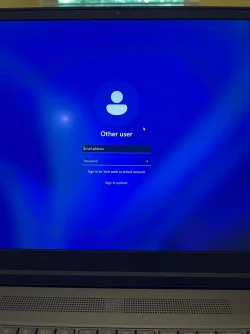
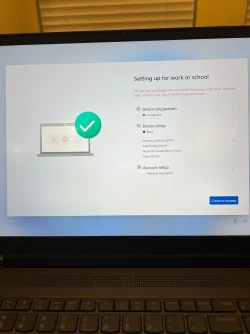
I tried it yesterday and it did not work. I had a fresh download of Win11 from the MSFT site. I received the same results using Rufus as I did with the installed version on a brand new Lenovo P16 Gen 2. When I get to the "Setting up for work or school" page the install errors out on "Device setup".

I called Lenovo Premium support and was told to create the Lenovo Recovery USB Key, which downloads the image from the Lenovo site then writes it to a USB stick. Same results. Twice.

Next I downloaded the image from the MSFT site. Same results.

Finally I created a Rufus boot stick using the image downloaded from MSFT. Same results.

I created a new user login to @outlook.com to insure I had a valid Microsoft account. My existing accounts didn't work and neither did the new account.

It's just me, so I don't know why the installation would look for:

Security policies
Certificates

as part of a regular setup.

See attached screen shots.
 

Attachments

  • Other user.webp
    Other user.webp
    117.7 KB · Views: 2
  • Setting up for work or school-error.webp
    Setting up for work or school-error.webp
    248.2 KB · Views: 2

My Computers My Computers

  • At a glance

    Windows 11Intel Core i9-14900K - Core i9 14th Gen. 24-c...Corsair Vengeance 128GB (4 x 32 GB) 288-pin P...ASUS TUF Gaming NVIDIA GeForce RTX 4070 Ti Su...
    OS
    Windows 11
    Computer type
    PC/Desktop
    Manufacturer/Model
    Custom built
    CPU
    Intel Core i9-14900K - Core i9 14th Gen. 24-core CPU
    Motherboard
    ASUS ROG Strix Z790-A Gaming WiFi II (WiFi 7) motherboard
    Memory
    Corsair Vengeance 128GB (4 x 32 GB) 288-pin PC RAM DDR5 5600 (PC5 44800)
    Graphics Card(s)
    ASUS TUF Gaming NVIDIA GeForce RTX 4070 Ti Super OC Gaming Graphics Card
    Sound Card
    Motherboard
    Monitor(s) Displays
    Dell 42"
    Screen Resolution
    4K
    Hard Drives
    2 Samsung SSD 990 Pro 4TB NVMe M.2 2280 for a RAID 1 boot pair
    4 WD Red Plus 10TB HDD 7200 RPM SATA 6Gbps, 256MB cache in a RAID 5 array, formatted to 18TB
    2 WD Red Plus 10TB HDD 7200 RPM SATA 6Gbps, 256MB cache, each as a stand-alone drive
    PSU
    ASUS ROG Thor ROG-THOR-1000P2-GAMING 1000 W ATX12V 80 PLUS PLATINUM Certified Full Modular Power Supply
    Case
    Thermaltake Core V71 Tempered Glass E-ATX Full Tower Case
    Cooling
    ASUS ROG Ryujin III 360 ARGB Liquid CPU Cooler with Radiator
    Other Info
    LG Black Blu-ray Burner BDXL-Burns up to 100GB Blu-ray DVDs for archival storage
  • At a glance

    Windows 11 Pro14th Generation Intel® Core™ i7-14700HX Proce...64 GB DDR5-5600MT/s (SODIMM)(2 x 32 GB)NVIDIA RTX™ 3500 Ada Generation Laptop GPU 12...
    Operating System
    Windows 11 Pro
    Computer type
    Laptop
    Manufacturer/Model
    Lenovo ThinkPad P16 Gen 2 Intel (16")
    CPU
    14th Generation Intel® Core™ i7-14700HX Processor (E-cores up to 3.90 GHz P-cores up to 5.50 GHz)
    Memory
    64 GB DDR5-5600MT/s (SODIMM)(2 x 32 GB)
    Graphics card(s)
    NVIDIA RTX™ 3500 Ada Generation Laptop GPU 12GB GDDR6
    Monitor(s) Displays
    16" WQUXGA (3840 x 2400), IPS, Anti-Glare, Non-Touch, HDR 400, 100%DCI-P3, 800 nits, 60Hz, Low Blue Light
    Screen Resolution
    4K
    Hard Drives
    1 TB SSD M.2 2280 PCIe Gen4 Performance TLC Opal
    OWC ThunderBay 4 with four 10TB WD drives; OWC SoftRAID
    PSU
    230W
@Kelly16 Your device appears to be joining some company's Intune/Entra ID environment.
 

My Computer My Computer

At a glance

Windows 11 Pro 25H212th Gen Core i7-1260P64 GB Micron PC4-25600Intel Iris Xe Graphics
OS
Windows 11 Pro 25H2
Computer type
PC/Desktop
Manufacturer/Model
Intel NUC12WSHi7
CPU
12th Gen Core i7-1260P
Motherboard
NUC12WSBi7
Memory
64 GB Micron PC4-25600
Graphics Card(s)
Intel Iris Xe Graphics
Sound Card
on-board Realtek HD Audio
Monitor(s) Displays
Dell U3219Q
Screen Resolution
3840 x 2160
Hard Drives
Samsung SSD 990 PRO 1TB
Crucial MX500 2 TB
Antivirus
Microsoft Defender
I've opened a case with MSFT. We'll see how well that goes. The first level tech is stymied, so he's sending it to the next level. I really don't want to have to switch to MacOS.
 

My Computers My Computers

  • At a glance

    Windows 11Intel Core i9-14900K - Core i9 14th Gen. 24-c...Corsair Vengeance 128GB (4 x 32 GB) 288-pin P...ASUS TUF Gaming NVIDIA GeForce RTX 4070 Ti Su...
    OS
    Windows 11
    Computer type
    PC/Desktop
    Manufacturer/Model
    Custom built
    CPU
    Intel Core i9-14900K - Core i9 14th Gen. 24-core CPU
    Motherboard
    ASUS ROG Strix Z790-A Gaming WiFi II (WiFi 7) motherboard
    Memory
    Corsair Vengeance 128GB (4 x 32 GB) 288-pin PC RAM DDR5 5600 (PC5 44800)
    Graphics Card(s)
    ASUS TUF Gaming NVIDIA GeForce RTX 4070 Ti Super OC Gaming Graphics Card
    Sound Card
    Motherboard
    Monitor(s) Displays
    Dell 42"
    Screen Resolution
    4K
    Hard Drives
    2 Samsung SSD 990 Pro 4TB NVMe M.2 2280 for a RAID 1 boot pair
    4 WD Red Plus 10TB HDD 7200 RPM SATA 6Gbps, 256MB cache in a RAID 5 array, formatted to 18TB
    2 WD Red Plus 10TB HDD 7200 RPM SATA 6Gbps, 256MB cache, each as a stand-alone drive
    PSU
    ASUS ROG Thor ROG-THOR-1000P2-GAMING 1000 W ATX12V 80 PLUS PLATINUM Certified Full Modular Power Supply
    Case
    Thermaltake Core V71 Tempered Glass E-ATX Full Tower Case
    Cooling
    ASUS ROG Ryujin III 360 ARGB Liquid CPU Cooler with Radiator
    Other Info
    LG Black Blu-ray Burner BDXL-Burns up to 100GB Blu-ray DVDs for archival storage
  • At a glance

    Windows 11 Pro14th Generation Intel® Core™ i7-14700HX Proce...64 GB DDR5-5600MT/s (SODIMM)(2 x 32 GB)NVIDIA RTX™ 3500 Ada Generation Laptop GPU 12...
    Operating System
    Windows 11 Pro
    Computer type
    Laptop
    Manufacturer/Model
    Lenovo ThinkPad P16 Gen 2 Intel (16")
    CPU
    14th Generation Intel® Core™ i7-14700HX Processor (E-cores up to 3.90 GHz P-cores up to 5.50 GHz)
    Memory
    64 GB DDR5-5600MT/s (SODIMM)(2 x 32 GB)
    Graphics card(s)
    NVIDIA RTX™ 3500 Ada Generation Laptop GPU 12GB GDDR6
    Monitor(s) Displays
    16" WQUXGA (3840 x 2400), IPS, Anti-Glare, Non-Touch, HDR 400, 100%DCI-P3, 800 nits, 60Hz, Low Blue Light
    Screen Resolution
    4K
    Hard Drives
    1 TB SSD M.2 2280 PCIe Gen4 Performance TLC Opal
    OWC ThunderBay 4 with four 10TB WD drives; OWC SoftRAID
    PSU
    230W
I've opened a case with MSFT. We'll see how well that goes. The first level tech is stymied, so he's sending it to the next level. I really don't want to have to switch to MacOS.

If your device is brand new, send it back. It certainly looks like it's tied to a company's management environment. Either a company bought it and returned it, or someone misconfigured it and tied it to a company by mistake. Regardless, a device purchased for home use should not be doing this.
 

My Computer My Computer

At a glance

Windows 11 Pro 25H212th Gen Core i7-1260P64 GB Micron PC4-25600Intel Iris Xe Graphics
OS
Windows 11 Pro 25H2
Computer type
PC/Desktop
Manufacturer/Model
Intel NUC12WSHi7
CPU
12th Gen Core i7-1260P
Motherboard
NUC12WSBi7
Memory
64 GB Micron PC4-25600
Graphics Card(s)
Intel Iris Xe Graphics
Sound Card
on-board Realtek HD Audio
Monitor(s) Displays
Dell U3219Q
Screen Resolution
3840 x 2160
Hard Drives
Samsung SSD 990 PRO 1TB
Crucial MX500 2 TB
Antivirus
Microsoft Defender
I really don't want to have to switch to MacOS.

🙄 Please post us a photo of your new Mac with this thread in a browser showing on the screen, when you do.
 

My Computers My Computers

  • At a glance

    Windows 11 Pro 25H2 Build 26200.8655Intel(R) Core(TM) i7-4770K CPU @ 3.50GHz32.0 GB of I forget and the box is in storage.Gigabyte nVidia GeForce GTX 1660 Super OC 6GB
    OS
    Windows 11 Pro 25H2 Build 26200.8655
    Computer type
    PC/Desktop
    Manufacturer/Model
    Sin-built 2013
    CPU
    Intel(R) Core(TM) i7-4770K CPU @ 3.50GHz
    Motherboard
    ASUS ROG Maximus VI Formula
    Memory
    32.0 GB of I forget and the box is in storage.
    Graphics Card(s)
    Gigabyte nVidia GeForce GTX 1660 Super OC 6GB
    Sound Card
    ROG SupremeFX Formula 8-Channel High Definition Audio
    Monitor(s) Displays
    5 x LG 25MS500-B - 1 x 24MK430H-B - 1 x Wacom Pro 22" Touch Screen Tablet
    Screen Resolution
    All over the place
    Hard Drives
    Too many to list. OS on Samsung 1TB 870 QVO SATA
    PSU
    Silverstone 1500
    Case
    NZXT Phantom 820 Full-Tower Case
    Cooling
    Noctua NH-D15 Elite Class Dual Tower CPU Cooler / 6 x EziDIY 120mm / 2 x Corsair 140mm somethings / 1 x 140mm Thermaltake something / 2 x 200mm Corsair.
    Keyboard
    Corsair K95 / Logitech diNovo Edge Wireless
    Mouse
    Logitech: G402 / G502 / Mx Masters / Mx Air Cordless
    Internet Speed
    2000/500Mbps
    Browser
    All sorts
    Antivirus
    Kaspersky Premium
    Other Info
    ㅤㅤㅤㅤㅤㅤㅤㅤㅤㅤㅤㅤㅤㅤㅤㅤㅤㅤㅤㅤㅤㅤㅤㅤㅤㅤㅤㅤㅤㅤㅤㅤㅤㅤㅤㅤㅤㅤㅤㅤ⠀⠀⠀⠀⠀⠀⠀⠀⠀⠀
    TP-Link BE9300 WiFi 7 Bluetooth 5.4 (Archer TBE550E)
    TP-Link TX201 V1 2.5GB Lan

    Grandstream HT812 - VoIP
    ASUS DSL-AX82U - Mesh
    ASUS RT-AC68U - Mesh
    ASUS RT-BE88U Router

    Brother MFC-L2880DW Printer

    I’m on a horse.
  • At a glance

    Windows 11 Pro 25H2 Build 26200.8655 (Wifes)13th Generation Intel® Core™ i5-1340P Process...16GB LPDDR5-52001x Intel® Iris® Xe Graphics
    Operating System
    Windows 11 Pro 25H2 Build 26200.8655 (Wifes)
    Computer type
    Laptop
    Manufacturer/Model
    LENOVO Yoga 7 14IRL8 - Type 82YL
    CPU
    13th Generation Intel® Core™ i5-1340P Processor(Core™ i5-1340P)
    Memory
    16GB LPDDR5-5200
    Graphics card(s)
    1x Intel® Iris® Xe Graphics
    Sound Card
    Optimized with Dolby Atmos®
    Screen Resolution
    QHD 2880 x 1800 OLED
    Hard Drives
    M.2 512 GB SSD PCIe
    Mouse
    Logiteck MX Master 3S
    Internet Speed
    2000/500
    Antivirus
    Defender / Malwarebytes
    Other Info
    …still on a horse.


    Wireless Network: Wi-Fi 6E 2x2 AX; Bluetooth® 5.1 or above
    Ports: 1x 1 Novo button; 2 in 1 Audio Combo jack; Micro SD Card Reader; HDMI 1.4b; 2 x USB Type-C (TBT4)
    USB 3.2 Gen 2 DP 1.4a
    PD 3.0); 1 x USB 3.2 Gen1 Type A
    Camera
    1x 1080P FHD IR/RGB Hybrid with Privacy Shutter and Dual Array Microphone
    Graphics
    1x Intel® Iris® Xe Graphics
    Monitor
    14" WUXGA
    Form Factor
    Convertible Notebook
  • Windows 11 Pro 25H2 Build 26200.8655 (Wifes)

    Yoga 7 2-in-1 14IML9 - Type 83DJ

    Processor: Intel® Core™ Ultra 7 155H Processor(Core™ Ultra 7 155H)

    Memory: 32GB LPD5X-7467

    Hard Drive: 1 TB SSD PCIe

    Wireless Network: 1x Wi-Fi 6E 2x2 AX; Bluetooth® 5.1 or above

    Ports: 1 x HDMI 2.1 TMDS; 1 x Novo Button; 1 x Combo Audio Jack
    2 x USB-C (USB 4.0)
    1 x USB-A 3.2 Gen 1

    Camera: 1080P FHD IR Hybrid with Dual Microphone

    Graphics: Intel® Arc™ Graphics

    Monitor: 14" 2.8K

    ...Where's my horse?
The issue was PEBCAK* -- me! I'm used to F10 being F10, but once the OS loads FN + F10 is the effective F10. I was able to Shift + FN + F10 and get a command shell into which I entered the command OOBE\BYPASSNRO. The install process restarted and I created a local account. Once Windows 11 Pro was installed, I turned on WiFi and started updating.

I'm getting an OWC ThunderBay 4 (www.owc.com) today and I've got four 10TB drives to install in it. I'll also license the SoftRAID driver for my desktop so I can connect the ThunderBay 4 array to the desktop and the file system is preserved.

Without the ability to create a local account I would not have been able to complete installation.

I know that the US DoD and IC community use Windows 11 Pro on air-gapped networks, so I knew there was a way to install without being connected to the 'Net.

Thanks to all for your input. It was simple user error.

*Problem Exists Between Chair And Keyboard
 

My Computers My Computers

  • At a glance

    Windows 11Intel Core i9-14900K - Core i9 14th Gen. 24-c...Corsair Vengeance 128GB (4 x 32 GB) 288-pin P...ASUS TUF Gaming NVIDIA GeForce RTX 4070 Ti Su...
    OS
    Windows 11
    Computer type
    PC/Desktop
    Manufacturer/Model
    Custom built
    CPU
    Intel Core i9-14900K - Core i9 14th Gen. 24-core CPU
    Motherboard
    ASUS ROG Strix Z790-A Gaming WiFi II (WiFi 7) motherboard
    Memory
    Corsair Vengeance 128GB (4 x 32 GB) 288-pin PC RAM DDR5 5600 (PC5 44800)
    Graphics Card(s)
    ASUS TUF Gaming NVIDIA GeForce RTX 4070 Ti Super OC Gaming Graphics Card
    Sound Card
    Motherboard
    Monitor(s) Displays
    Dell 42"
    Screen Resolution
    4K
    Hard Drives
    2 Samsung SSD 990 Pro 4TB NVMe M.2 2280 for a RAID 1 boot pair
    4 WD Red Plus 10TB HDD 7200 RPM SATA 6Gbps, 256MB cache in a RAID 5 array, formatted to 18TB
    2 WD Red Plus 10TB HDD 7200 RPM SATA 6Gbps, 256MB cache, each as a stand-alone drive
    PSU
    ASUS ROG Thor ROG-THOR-1000P2-GAMING 1000 W ATX12V 80 PLUS PLATINUM Certified Full Modular Power Supply
    Case
    Thermaltake Core V71 Tempered Glass E-ATX Full Tower Case
    Cooling
    ASUS ROG Ryujin III 360 ARGB Liquid CPU Cooler with Radiator
    Other Info
    LG Black Blu-ray Burner BDXL-Burns up to 100GB Blu-ray DVDs for archival storage
  • At a glance

    Windows 11 Pro14th Generation Intel® Core™ i7-14700HX Proce...64 GB DDR5-5600MT/s (SODIMM)(2 x 32 GB)NVIDIA RTX™ 3500 Ada Generation Laptop GPU 12...
    Operating System
    Windows 11 Pro
    Computer type
    Laptop
    Manufacturer/Model
    Lenovo ThinkPad P16 Gen 2 Intel (16")
    CPU
    14th Generation Intel® Core™ i7-14700HX Processor (E-cores up to 3.90 GHz P-cores up to 5.50 GHz)
    Memory
    64 GB DDR5-5600MT/s (SODIMM)(2 x 32 GB)
    Graphics card(s)
    NVIDIA RTX™ 3500 Ada Generation Laptop GPU 12GB GDDR6
    Monitor(s) Displays
    16" WQUXGA (3840 x 2400), IPS, Anti-Glare, Non-Touch, HDR 400, 100%DCI-P3, 800 nits, 60Hz, Low Blue Light
    Screen Resolution
    4K
    Hard Drives
    1 TB SSD M.2 2280 PCIe Gen4 Performance TLC Opal
    OWC ThunderBay 4 with four 10TB WD drives; OWC SoftRAID
    PSU
    230W
Back
Top Bottom