Does updating to 25H2 undo any existing scripts


flick

Active member
Member
Local time
12:21 AM
Posts
65
OS
11
Currently on 24H2 and considering upgrading to 25H2. Before proceeding, I'd like to know whether the update will overwrite or reset any debloat script configurations applied to the existing installation.
 
Windows Build/Version
24H2 26100.7171

My Computer

System One

  • OS
    11
    Computer type
    Laptop
    Manufacturer/Model
    Lenovo Thinkpad X1C
    CPU
    155H
    Memory
    32GB
    Graphics Card(s)
    Intel Graphics; NPU, Integrated
    Hard Drives
    256GB SSD
    Antivirus
    WD
Currently on 24H2 and considering upgrading to 25H2. Before proceeding, I'd like to know whether the update will overwrite or reset any debloat script configurations applied to the existing installation.
Difficult to tell by your description and without looking at the scripts.
The scripts themselves will not be removed but what they have undone might be reinstalled.
Are we talking of Edge being removed? OneDrive?
Please kindly be more specific.
 

My Computers

System One System Two

  • OS
    All Branches but Release
    Computer type
    Laptop
    Manufacturer/Model
    Acer Nitro ANV15-51
    CPU
    AMD Ryzen 7 7735HS 3200-4500 Mhz 8 cores x 2
    Motherboard
    Sportage_RBH
    Memory
    32 GB DDR5
    Graphics Card(s)
    Radeon Graphic / NVIDIA GeForce RTX 4060 8 GB GDDR6
    Sound Card
    AMD/Realtek(R) Audio
    Monitor(s) Displays
    Integrated Monitor (15.3"vis)
    Screen Resolution
    FHD 1920X1080 16:9 144Hz
    Hard Drives
    KINGSTON OM8SEP4512Q-AA 1TB
    Western Digital 256GB
    PSU
    19V DC 6.32 A 120 W
    Cooling
    Dual Fans
    Mouse
    MS Bluetooth
    Internet Speed
    Fiber 1GB Cox -us & 1GB Orange-fr
    Browser
    Edge Canary- Firefox Nightly-Chrome Dev-Chrome Dev
    Antivirus
    Windows Defender
  • Operating System
    Windows 11 Beta
    Computer type
    Laptop
    Manufacturer/Model
    Asus X751BP
    CPU
    AMD A9-9420
    Memory
    8 GB of DDR4
    Graphics card(s)
    AMD Radeon R5
    Screen Resolution
    1600x900
    Hard Drives
    Seagate 1 TB
Updated 24H2 and 25H2 systems are virtually identical except for the presence of the 25H2 Enablement Package.

Both are built from the same code base, and take the same updates. 25H2 is strictly any version of 24H2 (August 2025 or later), which has the 25H2 Enablement Package installed. A 25H2 ISO is basically a later version of 24H2 with the EP pre-installed. Having the EP unlocks the 25H2 feature set, much like a personality switch.

Given you're already running 24H2, then upgrading to 25H2 only requires the installation of the EP. This doesn't overwrite any existing settings or features, any more than allowing your 24H2 system to receive updates. Assuming you only install the EP, your system will become 25H2 frozen at November 2025 (26200.7171).

If you allow Windows Update to move forward, then it's exactly like if you allowed 24H2 to update itself in terms of undoing any debloating changes.

No new Windows apps will be installed, because 25H2 has the same set of Windows apps. So if you removed any Windows apps, they won't return when the system transforms into 25H2.

Since 25H2 unlocks a set of new features, you may need to re-run the script if there are 25H2-specific tweaks covered by the script.
 

My Computer

System One

  • OS
    Windows 7

My Computers

System One System Two

  • OS
    Windows 11 Pro 25H2
    Computer type
    PC/Desktop
    Manufacturer/Model
    Dell Optiplex 7080
    CPU
    i9-10900 10 core 20 threads
    Motherboard
    DELL 0J37VM
    Memory
    32 gb
    Graphics Card(s)
    none-Intel UHD Graphics 630
    Sound Card
    Integrated Realtek
    Monitor(s) Displays
    Benq 27
    Screen Resolution
    2560x1440
    Hard Drives
    2x1tb Solidigm m.2 nvme /External drives 512gb Samsung m.2 sata+2tb Kingston m2.nvme
    PSU
    500w
    Case
    MT
    Cooling
    Dell Premium
    Keyboard
    Logitech wired
    Mouse
    Logitech wireless
    Internet Speed
    so slow I'm too embarrassed to tell
    Browser
    #1 Edge #2 Firefox
    Antivirus
    Defender+MWB Premium
  • Operating System
    Windows 11 Pro 24H2 26200.8457
    Computer type
    PC/Desktop
    Manufacturer/Model
    Beelink Mini PC SER5
    CPU
    AMD Ryzen 7 6800U
    Memory
    32 gb
    Graphics card(s)
    integrated
    Sound Card
    integrated
    Monitor(s) Displays
    Benq 27
    Screen Resolution
    2560x1440
    Hard Drives
    1TB Crucial nvme
    Keyboard
    Logitech wired
    Mouse
    Logitech wireless
    Internet Speed
    still too embarrassed to tell
    Browser
    Firefox
    Antivirus
    Defender
    Other Info
    System 3 is non compliant Dell 9020 i7-4770/24gb ram Win11 PRO 26200.8457
Difficult to tell by your description and without looking at the scripts.
The scripts themselves will not be removed but what they have undone might be reinstalled.
Are we talking of Edge being removed? OneDrive?
Please kindly be more specific.
I had used the Schneegans unattended generator to create the script, I kept Edge since removing it would have broken something at that point. I'm trying to find the script so I can give more info, but I didn't touch things that would be break like edge or MS store

Thanks @garlin Appreciate for your insight. This clear up some of the confusion. As a matter fact, when I got the laptop last year, it already was on 24H2.
 

My Computer

System One

  • OS
    11
    Computer type
    Laptop
    Manufacturer/Model
    Lenovo Thinkpad X1C
    CPU
    155H
    Memory
    32GB
    Graphics Card(s)
    Intel Graphics; NPU, Integrated
    Hard Drives
    256GB SSD
    Antivirus
    WD
Currently on 24H2 and considering upgrading to 25H2....

As has already been said, the 25H2 update is just a small enablement package that tuns on the dormant 25H2 features. They have already been added to your system files by the monthly cumulative updates. It is offered in Windows update to all supported devices on 24H2 (which your Lenovo Thinkpad X1C certainly is). Windows Update installs it just like a cumulative update, and it can be unistalled just as easily.

1780537538740.webp

You may like to know that when 26H2 is released later this year it too will be an enablement package.
 

My Computers

System One System Two

  • OS
    Windows 11 Home
    Computer type
    Laptop
    Manufacturer/Model
    Acer Aspire 3 A315-23-R9VY
    CPU
    AMD Athlon Silver 3050U
    Memory
    8GB
    Graphics Card(s)
    Radeon Graphics
    Monitor(s) Displays
    laptop screen
    Screen Resolution
    1366x768 native resolution, up to 2560x1440 with Radeon Virtual Super Resolution
    Hard Drives
    1TB Samsung EVO 870 SSD (from April 2026: 250GB EVO 850)
    Internet Speed
    150 Mbps
    Browser
    Edge, Firefox
    Antivirus
    Defender
    Other Info
    fully 'Windows 11 ready' laptop. Windows 10 C: partition migrated from my old unsupported 'main machine' then upgraded to 11. A test migration ran Insider builds for 2 months. When 11 was released on 5th October 2021 it was re-imaged back to 10 and was offered the upgrade in Windows Update on 20th October. Windows Update offered the 22H2 Feature Update on 20th September 2022. It got the 23H2 Feature Update on 4th November 2023 through Windows Update, 24H2 on 3rd October 2024 through Windows Update by setting the Target Release Version for 24H2, and 25H2 on 30th September 2025 through Windows Update by setting the Target Release Version for 25H2.

    UPDATE - 11 April 2026: due to mechanical deterioration this PC has been retired from active duty. The OS with all software and files has been migrated to my System Seven below to carry on as my general purpose 'main machine'.

    My SYSTEM THREE is a Dell Latitude 5410, i7-10610U, 32GB RAM, 512GB NVMe ssd, supported device running Windows 11 Pro.

    My SYSTEM FOUR is a 2-in-1 convertible Lenovo Yoga 11e 20DA, Celeron N2930, 8GB RAM, 256GB ssd. Unsupported device: currently running Win10 Pro, plus Win11 Pro RTM and Insider Dev, Beta, and RP 24H2 as native boot vhdx.

    My SYSTEM FIVE is a Dell Latitude 3190 2-in-1, Pentium Silver N5030, 8GB RAM, 1TB NVMe ssd, supported device running Windows 11 Pro, plus Insider Beta, Dev, and Canary builds (and a few others) as a native boot .vhdx.

    My SYSTEM SIX is a Dell Latitude 5550, Core Ultra 7 165H, 64GB RAM, 1TB NVMe SSD, supported device, Windows 11 Pro 24H2, Hyper-V host machine. Updated to 25H2 on 30th September 2025.

    My SYSTEM SEVEN is a Lenovo Thinkpad T580, Intel Core i7-8650U, 16GB RAM, 512GB NVMe SSD + 2nd 512GB NVMe SSD, a supported device for Windows 11. This is my current general purpose 'main machine'. The installed Windows 11 Home from my System One has been migrated to this machine.
  • Operating System
    Windows 11 Pro
    Computer type
    Laptop
    Manufacturer/Model
    Dell Latitude E4310
    CPU
    Intel® Core™ i5-520M
    Motherboard
    0T6M8G
    Memory
    8GB
    Graphics card(s)
    (integrated graphics) Intel HD Graphics
    Screen Resolution
    1366x768
    Hard Drives
    500GB Crucial MX500 SSD
    Browser
    Firefox, Edge
    Antivirus
    Defender
    Other Info
    unsupported machine: Legacy bios, MBR, TPM 1.2, upgraded from W10 to W11 using W10/W11 hybrid install media workaround. In-place upgrade to 22H2 using ISO and a workaround. Feature Update to 23H2 by manually installing the Enablement Package. In-place upgrade to 24H2 using hybrid 23H2/24H2 install media. Upgraded to 25H2 by Enablement Package. Also running Insider Dev, and Canary builds and Windows 10 as native boot .vhdx.

    My SYSTEM THREE is a Dell Latitude 5410, i7-10610U, 32GB RAM, 512GB NVMe ssd, supported device running Windows 11 Pro.

    My SYSTEM FOUR is a 2-in-1 convertible Lenovo Yoga 11e 20DA, Celeron N2930, 8GB RAM, 256GB ssd. Unsupported device: currently running Win10 Pro, plus Win11 Pro RTM and Insider Dev, Beta, and RP 24H2 as native boot vhdx.

    My SYSTEM FIVE is a Dell Latitude 3190 2-in-1, Pentium Silver N5030, 8GB RAM, 1TB NVMe ssd, supported device running Windows 11 Pro, plus Insider Beta, Dev, and Canary builds (and a few others) as a native boot .vhdx.

    My SYSTEM SIX is a Dell Latitude 5550, Core Ultra 7 165H, 64GB RAM, 1TB NVMe SSD, supported device, Windows 11 Pro 24H2, Hyper-V host machine. Updated to 25H2 on 30th September 2025.

    My SYSTEM SEVEN is a Lenovo Thinkpad T580, Intel Core i7-8650U, 16GB RAM, 512GB NVMe SSD + 2nd 512GB NVMe SSD, a supported device for Windows 11. This is my current general purpose 'main machine'. The installed Windows 11 Home from my System One has been migrated to this machine.
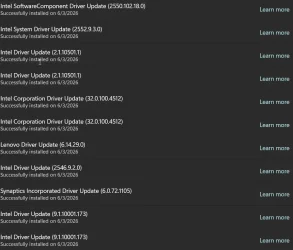
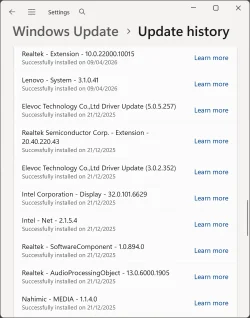
Windows pushed driver updates automatically despite presenting a manual install option. This is so frustrating because I typically choose Lenovo's site to download drivers manually

Is there a way to verify which specific Intel driver was updated? trying to cross check through device manager. The learn more part doesn't help much either

1780538025714.webp
 

My Computer

System One

  • OS
    11
    Computer type
    Laptop
    Manufacturer/Model
    Lenovo Thinkpad X1C
    CPU
    155H
    Memory
    32GB
    Graphics Card(s)
    Intel Graphics; NPU, Integrated
    Hard Drives
    256GB SSD
    Antivirus
    WD
Schneegan tends to stay on the "safe" side of debloating, unlike some other scripts.

To remove Edge, he uses a known hack for editing IntegratedServicesRegionPolicySet.json. This instructs Windows that your PC is eligible to uninstall Edge, even if you're not a resident of an EEA ("EU") country. If Edge is correctly removed, then it won't return on a future Monthly Update. Other Edge removal or debloating scripts may contain the same basic mechanism (some just change your country code, which is probably not the smarter choice).

Simple debloating scripts can uninstall default Windows apps which are marked as removable. A wide range of scripts and tools can perform the same task. If removable apps are correctly deprovisioned, then an update won't reinstall them. Deprovisioning is more than simply uninstalling the Windows apps, you need to create some reg keys so Windows knows you don't want them to be re-installed.
 

My Computer

System One

  • OS
    Windows 7

My Computer

System One

  • OS
    11
    Computer type
    Laptop
    Manufacturer/Model
    Lenovo Thinkpad X1C
    CPU
    155H
    Memory
    32GB
    Graphics Card(s)
    Intel Graphics; NPU, Integrated
    Hard Drives
    256GB SSD
    Antivirus
    WD
All technical and/or programming mumbo-jumbo aside, it should be noted that Microsoft/Windows can - and will - do what it wants, when it wants. While W11 is more manageable and customisable than previous OS's, like life, there is no certainty. The Redmond backroom team has seen to that.

EDIT
I thought that was the whole point and benefits of scripts, to stick it up Microsoft so that whenever they had their evil ways, the user had a tool to quickly put things back the way they were wanted
 
Last edited:

My Computers

System One System Two

  • OS
    Windows 11 2xH2 (latest update ... forever anal)
    Computer type
    PC/Desktop
    Manufacturer/Model
    HP Slim S01
    CPU
    Intel i5-12400
    Memory
    8GB
    Graphics Card(s)
    NVIDIA GeForce GT730
    Sound Card
    OOBE
    Monitor(s) Displays
    Acer 32"
    Screen Resolution
    1920x1080
    Hard Drives
    512GB KIOXIA NVMe
    1TB SATA SSD
    PSU
    OOBE
    Case
    OOBE
    Cooling
    OOBE
    Keyboard
    BT
    Mouse
    BT
    Browser
    Brave FFox Chrome Opera
    Antivirus
    KIS
  • Operating System
    Windows 11 Pro 2xH2 (latest update ... 4ever anal)
    Computer type
    Laptop
    Manufacturer/Model
    HP Pavillion 15
    CPU
    i7-1165G7 @ 2.80GHz
    Graphics card(s)
    Intel Iris Xe Graphics
    Hard Drives
    Samsung NVMe 512GB
    + numerous/multiple SSD Type C USB enclosures
    Internet Speed
    NBN FTTN 50
    Browser
    Brave
    Antivirus
    KIS
Well, why not make an image backup of 24H2, upgrade and find out?

If things go wrong, then restore image backup.
 

My Computer

System One

  • OS
    Windows 11 Pro + Win11 Canary VM.
    Computer type
    Laptop
    Manufacturer/Model
    ASUS Zenbook 14
    CPU
    I9 13th gen i9-13900H 2.60 GHZ
    Motherboard
    Yep, Laptop has one.
    Memory
    16 GB soldered
    Graphics Card(s)
    Integrated Intel Iris XE
    Sound Card
    Realtek built in
    Monitor(s) Displays
    laptop OLED screen
    Screen Resolution
    2880x1800 touchscreen
    Hard Drives
    1 TB NVME SSD (only weakness is only one slot)
    PSU
    Internal + 65W thunderbolt USB4 charger
    Case
    Yep, got one
    Cooling
    Stella Artois (UK pint cans - 568 ml) - extra cost.
    Keyboard
    Built in UK keybd
    Mouse
    Bluetooth , wireless dongled, wired
    Internet Speed
    900 mbs (ethernet), wifi 6 typical 350-450 mb/s both up and down
    Browser
    Edge
    Antivirus
    Defender
    Other Info
    TPM 2.0, 2xUSB4 thunderbolt, 1xUsb3 (usb a), 1xUsb-c, hdmi out, 3.5 mm audio out/in combo, ASUS backlit trackpad (inc. switchable number pad)

    Macrium Reflect Home V8
    Office 365 Family (6 users each 1TB onedrive space)
    Hyper-V (a vm runs almost as fast as my older laptop)
Windows pushed driver updates automatically despite presenting a manual install option. This is so frustrating because I typically choose Lenovo's site to download drivers manually

Your laptop (Lenovo ThinkPad X1 Carbon) uses an Intel processor, and for most users, Windows Update can automatically install the drivers needed for normal operation.

I've never downloaded drivers from Lenovo's support site, and I haven't had any issues with my Intel-based Lenovo laptops.

Windows Update.webp

When I performed a clean installation of Windows 11 on my laptop (Lenovo Legion Pro 7i Gen 10, Intel Core Ultra 9 275HX), I allowed Windows Update to automatically install the system drivers and only manually managed the graphics driver (NVIDIA GeForce RTX 5080).

For NVIDIA GPUs:

"Get Automatic Driver Updates"


Setting: Open the NVIDIA App > go to Settings > enable the option "Automatically download drivers and let me choose when to install."


When I performed a clean installation of Windows 11 on my desktop (ASRock B650E Taichi Lite, AMD Ryzen 9 9950X3D, ASUS TUF Gaming Radeon RX 9070), I manually managed the Ryzen chipsets and AMD graphics drivers, and let Windows Update handle all other drivers.

For AMD CPUs/GPUs:

"Auto-Detect and Install Driver Updates for AMD Radeon™ Series Graphics and Ryzen™ Chipsets"


The Auto-Detect tool installs AMD Software: Adrenalin Edition. Do not uncheck "Keep AMD software up to date." Once installed, it will periodically handle graphics and chipset updates so you don't have to visit the site manually later.
 

My Computers

System One System Two

  • OS
    Windows 11 Pro
    Computer type
    PC/Desktop
    CPU
    AMD Ryzen 9 9950X3D
    Motherboard
    ASRock B650E Taichi Lite
    Memory
    Kingston FURY Beast 64GB (2x32GB) DDR5 6000MT/s
    Graphics Card(s)
    ASUS TUF Gaming Radeon RX 9070 OC Edition 16GB GDDR6
    Hard Drives
    Solidigm P44 Pro 2TB M.2 NVMe SSD
  • Operating System
    Windows 11 Home
    Computer type
    Laptop
    Manufacturer/Model
    Lenovo Legion Pro 7i Gen 10 16"
    CPU
    Intel Core Ultra 9 275HX
    Memory
    64GB (2x 32GB) DDR5-6400
    Graphics card(s)
    NVIDIA GeForce RTX 5080 16GB GDDR7 Laptop GPU
    Hard Drives
    2x 1TB M.2 NVMe SSD (SK Hynix)
Your laptop (Lenovo ThinkPad X1 Carbon) uses an Intel processor, and for most users, Windows Update can automatically install the drivers needed for normal operation.

I've never downloaded drivers from Lenovo's support site, and I haven't had any issues with my Intel-based Lenovo laptops.

When I performed a clean installation of Windows 11 on my laptop (Lenovo Legion Pro 7i Gen 10, Intel Core Ultra 9 275HX), I allowed Windows Update to automatically install the system drivers and only manually managed the graphics driver (NVIDIA GeForce RTX 5080).
From my experience, Lenovo's support page is quite detailed, it pretty much shows exactly which Intel components are included, such as the Intel management engine and dynamic Tuning, neural processing unit and I can decide whether to download them based on how urgent the update.

It's also worth noting that driver updates may not always be up to date on Windows.
Well, why not make an image backup of 24H2, upgrade and find out?

If things go wrong, then restore image backup.
Yeah, this method would be great for a test environment, since it's my daily driver, I'd rather stick with stability. Then again, from what I understood from fellow members, nothing drastic is expected to change with 25H2
 
Last edited:

My Computer

System One

  • OS
    11
    Computer type
    Laptop
    Manufacturer/Model
    Lenovo Thinkpad X1C
    CPU
    155H
    Memory
    32GB
    Graphics Card(s)
    Intel Graphics; NPU, Integrated
    Hard Drives
    256GB SSD
    Antivirus
    WD
It's also worth noting that driver updates may not always be up to date on Windows.
While I didn't manually download anything from Lenovo, the drivers on my Legion Pro 7i are fully up to date. I just ran the 'Automatic Driver Update' on their support site, and it reported: 'No driver updates are required for your machine.'
 

My Computers

System One System Two

  • OS
    Windows 11 Pro
    Computer type
    PC/Desktop
    CPU
    AMD Ryzen 9 9950X3D
    Motherboard
    ASRock B650E Taichi Lite
    Memory
    Kingston FURY Beast 64GB (2x32GB) DDR5 6000MT/s
    Graphics Card(s)
    ASUS TUF Gaming Radeon RX 9070 OC Edition 16GB GDDR6
    Hard Drives
    Solidigm P44 Pro 2TB M.2 NVMe SSD
  • Operating System
    Windows 11 Home
    Computer type
    Laptop
    Manufacturer/Model
    Lenovo Legion Pro 7i Gen 10 16"
    CPU
    Intel Core Ultra 9 275HX
    Memory
    64GB (2x 32GB) DDR5-6400
    Graphics card(s)
    NVIDIA GeForce RTX 5080 16GB GDDR7 Laptop GPU
    Hard Drives
    2x 1TB M.2 NVMe SSD (SK Hynix)
@flick

First off, here's ten points just for filling out your computer specs. :-)

The following will prevent MS from including driver updates with Windows Updates. They will still be available, but will now be Optional...

Use Option Two step #3, here...


Here's some other things that you may find useful...


My Computers

System One System Two

  • OS
    Win 11 Home ♦♦♦26200.8457 ♦♦♦♦♦♦♦25H2
    Computer type
    PC/Desktop
    Manufacturer/Model
    Built by Ghot® [May 2020]
    CPU
    AMD Ryzen 7 3700X
    Motherboard
    Asus Pro WS X570-ACE (BIOS 5302)
    Memory
    G.Skill (F4-3200C14D-16GTZKW)
    Graphics Card(s)
    EVGA RTX 2070 (08G-P4-2171-KR)
    Sound Card
    Realtek ALC1220P / ALC S1220A
    Monitor(s) Displays
    Dell U3011 30"
    Screen Resolution
    2560 x 1600
    Hard Drives
    2x Samsung 860 EVO 500GB,
    WD 4TB Black FZBX - SATA III,
    WD 8TB Black FZBX - SATA III,
    DRW-24B1ST CD/DVD Burner
    PSU
    PC Power & Cooling 750W Quad EPS12V
    Case
    Cooler Master ATCS 840 Tower
    Cooling
    CM Hyper 212 EVO (push/pull)
    Keyboard
    Ducky DK9008 Shine II Blue LED
    Mouse
    Logitech Optical M-100
    Internet Speed
    300/300
    Browser
    Firefox (latest)
    Antivirus
    Bitdefender Total Security
    Other Info
    Speakers: Klipsch Pro Media 2.1
  • Operating System
    Windows XP Pro 32bit w/SP3
    Computer type
    PC/Desktop
    Manufacturer/Model
    Built by Ghot® (not in use)
    CPU
    AMD Athlon 64 X2 5000+ (OC'd @ 3.2Ghz)
    Motherboard
    ASUS M2N32-SLI Deluxe Wireless Edition
    Memory
    TWIN2X2048-6400C4DHX (2 x 1GB, DDR2 800)
    Graphics card(s)
    EVGA 256-P2-N758-TR GeForce 8600GT SSC
    Sound Card
    Onboard
    Monitor(s) Displays
    ViewSonic G90FB Black 19" Professional (CRT)
    Screen Resolution
    up to 2048 x 1536
    Hard Drives
    WD 36GB 10,000rpm Raptor SATA
    Seagate 80GB 7200rpm SATA
    Lite-On LTR-52246S CD/RW
    Lite-On LH-18A1P CD/DVD Burner
    PSU
    PC Power & Cooling Silencer 750 Quad EPS12V
    Case
    Generic Beige case, 80mm fans
    Cooling
    ZALMAN 9500A 92mm CPU Cooler
    Keyboard
    Logitech Classic Keybooard 200
    Mouse
    Logitech Optical M-BT96a
    Internet Speed
    300/300
    Browser
    Firefox 3.x ??
    Antivirus
    Symantec (Norton)
    Other Info
    Still assembled, still runs. Haven't turned it on for 15 years?

Latest Support Threads

Back
Top Bottom