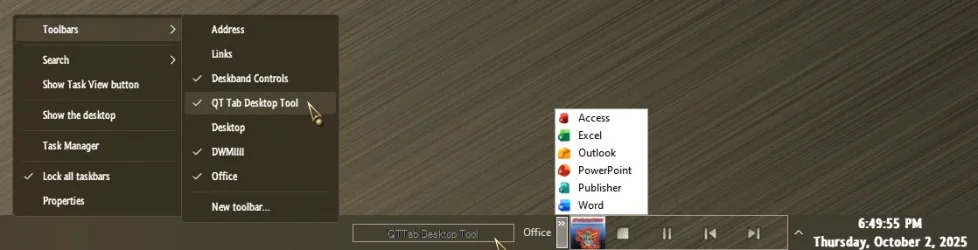
Does Windhawk support adding toolbars and restoring Quick Launch capability?


bobhalverson

Well-known member
Member
Local time
4:53 AM
Posts
46
OS
Windows 11
I have the Windhawk program loaded -- tried to scan thru the many mod options (there must be 200 of them).
I didn't see an option(s) that would bring back Quick Launch -- unfortunately there is no search function.
Can somebody advise if Windhawk supports this, and if so, which option(s) to enable?
 
Last edited:

My Computers My Computers

  • At a glance

    Windows 11Intel Core i5-8500 CPU @ 3.00GHz [6 Cores]64 GbIntel UHD Graphics 630
    OS
    Windows 11
    Computer type
    PC/Desktop
    Manufacturer/Model
    HP ProDesk 600 G4 MT
    CPU
    Intel Core i5-8500 CPU @ 3.00GHz [6 Cores]
    Motherboard
    HP 83EC - KBC Version 07.D4.00
    Memory
    64 Gb
    Graphics Card(s)
    Intel UHD Graphics 630
    Sound Card
    Synaptics HD Audio
    Monitor(s) Displays
    24" LG
    Screen Resolution
    1920 x 1080
    Hard Drives
    (2) 1 TB
    Internet Speed
    25 Mb/s
    Browser
    Chrome
    Antivirus
    MS Defender
  • At a glance

    Windows 11 ProAMD Ryzen 5 7430U with Radeon Graphics, 2.3 G...32 GBRadeon Graphics (integrated in mother board)
    Operating System
    Windows 11 Pro
    Computer type
    Laptop
    Manufacturer/Model
    HP Laptop 17-cp3005dx
    CPU
    AMD Ryzen 5 7430U with Radeon Graphics, 2.3 Ghz, 6 Core(s), 12 Logical Processor(s)
    Motherboard
    HP 8D6B ver. 5908
    Memory
    32 GB
    Graphics card(s)
    Radeon Graphics (integrated in mother board)
    Sound Card
    AMD High Definition Audio Device
    Monitor(s) Displays
    HP Internal Display
    Screen Resolution
    1920x1080 60 Hz
    Hard Drives
    USB Attached SCSI (USAS) Mass Storage Device (1 TB)
    Browser
    Chrome
    Antivirus
    Defender
I am a happy user of Windhawk and did modify my taskbar so that it has my favorite color, different size and smaller icons.
But as far as I know there is no 'Mod' for getting back the Quick Launch as in windows 10 (and archievable by installing either StartAllBack or ExplorerPatcher).
But I do have some kind of Quick Launch by putting shortcuts of apps and folders on the taskbar. How I did that I described here:
Modify shortcuts so that they can be copied to the taskbar and act as Quick Launch.

But of course there are other methods, other members certainly will tell you how.
 

My Computer My Computer

At a glance

Windows 11 Pro 25H2AMD Ryzen 7 5700GKingston FURY Beast 2x16GB DIMM DDR4 2666 CL16MSI GeForce GT 730 2GB LP V1
OS
Windows 11 Pro 25H2
Computer type
PC/Desktop
Manufacturer/Model
Build by vendor to my specs
CPU
AMD Ryzen 7 5700G
Motherboard
MSI PRO B550M-P Gen3
Memory
Kingston FURY Beast 2x16GB DIMM DDR4 2666 CL16
Graphics Card(s)
MSI GeForce GT 730 2GB LP V1
Sound Card
Creative Sound Blaster Audigy FX
Monitor(s) Displays
Samsung S24E450F 24"
Screen Resolution
1920 x 1080
Hard Drives
1. SSD Crucial P5 Plus 500GB PCIe M.2
2. SSD-SATA Crucial MX500-2TB
PSU
Corsair CV650W
Case
Cooler Master Silencio S400
Cooling
Cooler Master Hyper H412R with Be Quiet Pure Wings 2 PWM BL038 fan
Keyboard
Cherry Stream (wired, scissor keys)
Mouse
Asus WT465 (wireless)
Internet Speed
70 Mbps down / 80 Mbps up
Browser
Firefox 130.0
Antivirus
F-Secure (Internetprovider version)
Other Info
Router: FRITZBox 7490
Oracle VirtualBox 7 for testing software on Win 10 or 11

My Computer My Computer

At a glance

Windows 11 Pro
OS
Windows 11 Pro
In case I haven't told you lately...

* * * YOU ROCK * * *
 

My Computers My Computers

  • At a glance

    Windows 11Intel Core i5-8500 CPU @ 3.00GHz [6 Cores]64 GbIntel UHD Graphics 630
    OS
    Windows 11
    Computer type
    PC/Desktop
    Manufacturer/Model
    HP ProDesk 600 G4 MT
    CPU
    Intel Core i5-8500 CPU @ 3.00GHz [6 Cores]
    Motherboard
    HP 83EC - KBC Version 07.D4.00
    Memory
    64 Gb
    Graphics Card(s)
    Intel UHD Graphics 630
    Sound Card
    Synaptics HD Audio
    Monitor(s) Displays
    24" LG
    Screen Resolution
    1920 x 1080
    Hard Drives
    (2) 1 TB
    Internet Speed
    25 Mb/s
    Browser
    Chrome
    Antivirus
    MS Defender
  • At a glance

    Windows 11 ProAMD Ryzen 5 7430U with Radeon Graphics, 2.3 G...32 GBRadeon Graphics (integrated in mother board)
    Operating System
    Windows 11 Pro
    Computer type
    Laptop
    Manufacturer/Model
    HP Laptop 17-cp3005dx
    CPU
    AMD Ryzen 5 7430U with Radeon Graphics, 2.3 Ghz, 6 Core(s), 12 Logical Processor(s)
    Motherboard
    HP 8D6B ver. 5908
    Memory
    32 GB
    Graphics card(s)
    Radeon Graphics (integrated in mother board)
    Sound Card
    AMD High Definition Audio Device
    Monitor(s) Displays
    HP Internal Display
    Screen Resolution
    1920x1080 60 Hz
    Hard Drives
    USB Attached SCSI (USAS) Mass Storage Device (1 TB)
    Browser
    Chrome
    Antivirus
    Defender
In case I haven't told you lately...

* * * YOU ROCK * * *
there have been a handful of good mods created/updated (such as File Explorer Styler) in the past few months but i've been extremely busy. watch the windhawk thread on this forum for updates/explanations. i'll be updating it either this weekend or monday.


My Computer My Computer

At a glance

Windows 11 Pro
OS
Windows 11 Pro
I was able to install the "Fake Explorer path" and "Enable Win10 taskbar on Win11 24H2" mods.
I also installed the "Classic Theme Explorer Lite" and "Non Immersive Taskbar Context Menu" mods.
Further, I launched the legacy tray setup dialog: explorer shell:::{05d7b0f4-2121-4eff-bf6b-ed3f69b894d9}
Clicking on the taskbar does nothing.
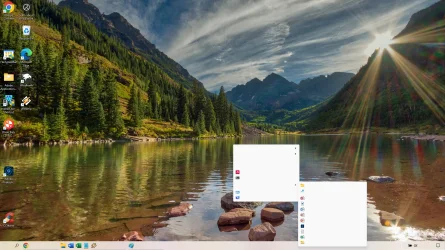
Clicking on the desktop brings up an empty grey window with some small icons in it.
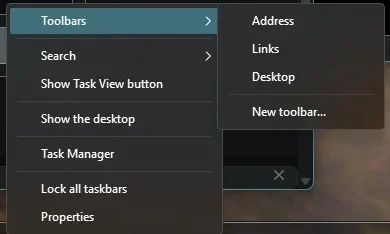
Don't know how to get the the menu that would allow me to add toolbars,
Sorry to be high maintenance on this, but I'm somewhat flying blind...
 

My Computers My Computers

  • At a glance

    Windows 11Intel Core i5-8500 CPU @ 3.00GHz [6 Cores]64 GbIntel UHD Graphics 630
    OS
    Windows 11
    Computer type
    PC/Desktop
    Manufacturer/Model
    HP ProDesk 600 G4 MT
    CPU
    Intel Core i5-8500 CPU @ 3.00GHz [6 Cores]
    Motherboard
    HP 83EC - KBC Version 07.D4.00
    Memory
    64 Gb
    Graphics Card(s)
    Intel UHD Graphics 630
    Sound Card
    Synaptics HD Audio
    Monitor(s) Displays
    24" LG
    Screen Resolution
    1920 x 1080
    Hard Drives
    (2) 1 TB
    Internet Speed
    25 Mb/s
    Browser
    Chrome
    Antivirus
    MS Defender
  • At a glance

    Windows 11 ProAMD Ryzen 5 7430U with Radeon Graphics, 2.3 G...32 GBRadeon Graphics (integrated in mother board)
    Operating System
    Windows 11 Pro
    Computer type
    Laptop
    Manufacturer/Model
    HP Laptop 17-cp3005dx
    CPU
    AMD Ryzen 5 7430U with Radeon Graphics, 2.3 Ghz, 6 Core(s), 12 Logical Processor(s)
    Motherboard
    HP 8D6B ver. 5908
    Memory
    32 GB
    Graphics card(s)
    Radeon Graphics (integrated in mother board)
    Sound Card
    AMD High Definition Audio Device
    Monitor(s) Displays
    HP Internal Display
    Screen Resolution
    1920x1080 60 Hz
    Hard Drives
    USB Attached SCSI (USAS) Mass Storage Device (1 TB)
    Browser
    Chrome
    Antivirus
    Defender
i use SAB for the win 7 taskabr style. i havent used the windhawk taskbar mod... can you post a screenshot of that so i can try to diagnose?
 

My Computer My Computer

At a glance

Windows 11 Pro
OS
Windows 11 Pro
a screenshot of my desktop?
(with the blank windows)
 

My Computers My Computers

  • At a glance

    Windows 11Intel Core i5-8500 CPU @ 3.00GHz [6 Cores]64 GbIntel UHD Graphics 630
    OS
    Windows 11
    Computer type
    PC/Desktop
    Manufacturer/Model
    HP ProDesk 600 G4 MT
    CPU
    Intel Core i5-8500 CPU @ 3.00GHz [6 Cores]
    Motherboard
    HP 83EC - KBC Version 07.D4.00
    Memory
    64 Gb
    Graphics Card(s)
    Intel UHD Graphics 630
    Sound Card
    Synaptics HD Audio
    Monitor(s) Displays
    24" LG
    Screen Resolution
    1920 x 1080
    Hard Drives
    (2) 1 TB
    Internet Speed
    25 Mb/s
    Browser
    Chrome
    Antivirus
    MS Defender
  • At a glance

    Windows 11 ProAMD Ryzen 5 7430U with Radeon Graphics, 2.3 G...32 GBRadeon Graphics (integrated in mother board)
    Operating System
    Windows 11 Pro
    Computer type
    Laptop
    Manufacturer/Model
    HP Laptop 17-cp3005dx
    CPU
    AMD Ryzen 5 7430U with Radeon Graphics, 2.3 Ghz, 6 Core(s), 12 Logical Processor(s)
    Motherboard
    HP 8D6B ver. 5908
    Memory
    32 GB
    Graphics card(s)
    Radeon Graphics (integrated in mother board)
    Sound Card
    AMD High Definition Audio Device
    Monitor(s) Displays
    HP Internal Display
    Screen Resolution
    1920x1080 60 Hz
    Hard Drives
    USB Attached SCSI (USAS) Mass Storage Device (1 TB)
    Browser
    Chrome
    Antivirus
    Defender
1) click on the taskbar pinned items does not work? or taskbar context menu does not open?
2) clicking on the desktop folder within file explorer or clicking anywhere on your desktop?
 

My Computer My Computer

At a glance

Windows 11 Pro
OS
Windows 11 Pro

My Computer My Computer

At a glance

Windows 11 Home x64 Version 25H2 Build 26200....
OS
Windows 11 Home x64 Version 25H2 Build 26200.8037
StartAllBack:

10637.webp
 

My Computers My Computers

  • At a glance

    Windows 11 Pro
    OS
    Windows 11 Pro
    Computer type
    PC/Desktop
    Manufacturer/Model
    ASUS ROG Strix
  • At a glance

    Windows 11 Pro
    Operating System
    Windows 11 Pro
    Computer type
    Laptop
    Manufacturer/Model
    ASUS VivoBook
  • ASUS VivoBook 'Lite' ~ Windows 11 Home
Clicking on a pinned item give me the choice of opening the item or unpinning it.
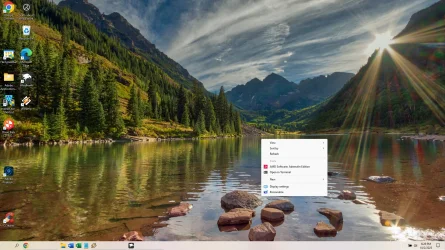
I will attach a shot of what happens when I right-click on the desktop
 

Attachments

  • Screenshot 2025-10-02 181802.webp
    Screenshot 2025-10-02 181802.webp
    343.8 KB · Views: 3

My Computers My Computers

  • At a glance

    Windows 11Intel Core i5-8500 CPU @ 3.00GHz [6 Cores]64 GbIntel UHD Graphics 630
    OS
    Windows 11
    Computer type
    PC/Desktop
    Manufacturer/Model
    HP ProDesk 600 G4 MT
    CPU
    Intel Core i5-8500 CPU @ 3.00GHz [6 Cores]
    Motherboard
    HP 83EC - KBC Version 07.D4.00
    Memory
    64 Gb
    Graphics Card(s)
    Intel UHD Graphics 630
    Sound Card
    Synaptics HD Audio
    Monitor(s) Displays
    24" LG
    Screen Resolution
    1920 x 1080
    Hard Drives
    (2) 1 TB
    Internet Speed
    25 Mb/s
    Browser
    Chrome
    Antivirus
    MS Defender
  • At a glance

    Windows 11 ProAMD Ryzen 5 7430U with Radeon Graphics, 2.3 G...32 GBRadeon Graphics (integrated in mother board)
    Operating System
    Windows 11 Pro
    Computer type
    Laptop
    Manufacturer/Model
    HP Laptop 17-cp3005dx
    CPU
    AMD Ryzen 5 7430U with Radeon Graphics, 2.3 Ghz, 6 Core(s), 12 Logical Processor(s)
    Motherboard
    HP 8D6B ver. 5908
    Memory
    32 GB
    Graphics card(s)
    Radeon Graphics (integrated in mother board)
    Sound Card
    AMD High Definition Audio Device
    Monitor(s) Displays
    HP Internal Display
    Screen Resolution
    1920x1080 60 Hz
    Hard Drives
    USB Attached SCSI (USAS) Mass Storage Device (1 TB)
    Browser
    Chrome
    Antivirus
    Defender
Clicking on a pinned item give me the choice of opening the item or unpinning it.
I will attach a shot of what happens when I right-click on the desktop
"Classic Theme Explorer Lite" and "Non Immersive Taskbar Context Menu"
disable these each one by one and see which is causing it. i assume the lite theme
 

My Computer My Computer

At a glance

Windows 11 Pro
OS
Windows 11 Pro
Still nothing when I click on the taskbar, but clicking on the desktop gives the pop-up shown in the attached.
The sliver on the far right to get the desktop no longer works -- is there a mod that brings back the desktop icon?
 

Attachments

  • Screenshot 2025-10-02 182858.webp
    Screenshot 2025-10-02 182858.webp
    359.5 KB · Views: 3

My Computers My Computers

  • At a glance

    Windows 11Intel Core i5-8500 CPU @ 3.00GHz [6 Cores]64 GbIntel UHD Graphics 630
    OS
    Windows 11
    Computer type
    PC/Desktop
    Manufacturer/Model
    HP ProDesk 600 G4 MT
    CPU
    Intel Core i5-8500 CPU @ 3.00GHz [6 Cores]
    Motherboard
    HP 83EC - KBC Version 07.D4.00
    Memory
    64 Gb
    Graphics Card(s)
    Intel UHD Graphics 630
    Sound Card
    Synaptics HD Audio
    Monitor(s) Displays
    24" LG
    Screen Resolution
    1920 x 1080
    Hard Drives
    (2) 1 TB
    Internet Speed
    25 Mb/s
    Browser
    Chrome
    Antivirus
    MS Defender
  • At a glance

    Windows 11 ProAMD Ryzen 5 7430U with Radeon Graphics, 2.3 G...32 GBRadeon Graphics (integrated in mother board)
    Operating System
    Windows 11 Pro
    Computer type
    Laptop
    Manufacturer/Model
    HP Laptop 17-cp3005dx
    CPU
    AMD Ryzen 5 7430U with Radeon Graphics, 2.3 Ghz, 6 Core(s), 12 Logical Processor(s)
    Motherboard
    HP 8D6B ver. 5908
    Memory
    32 GB
    Graphics card(s)
    Radeon Graphics (integrated in mother board)
    Sound Card
    AMD High Definition Audio Device
    Monitor(s) Displays
    HP Internal Display
    Screen Resolution
    1920x1080 60 Hz
    Hard Drives
    USB Attached SCSI (USAS) Mass Storage Device (1 TB)
    Browser
    Chrome
    Antivirus
    Defender
Still nothing when I click on the taskbar, but clicking on the desktop gives the pop-up shown in the attached.
The sliver on the far right to get the desktop no longer works -- is there a mod that brings back the desktop icon?
i assume you're talking about Peek? ok. disable all windhawk mods. restart explorer. make sure its working properly. enable one mod at a time and see when that issues starts
 

My Computer My Computer

At a glance

Windows 11 Pro
OS
Windows 11 Pro
Classic Theme Explorer Lite is the culprit with the blank window clicking on the desktop.
If you look at the last screen shot you can see the notifications box in the lower right corner.
Not doing that now -- everything else seems to be working, including peek.
If I click on the taskbar I get my choice of Task Manager or Taskbar Settings.
Not sure where to go from here to add the Quick Launch Toolbar...
 

My Computers My Computers

  • At a glance

    Windows 11Intel Core i5-8500 CPU @ 3.00GHz [6 Cores]64 GbIntel UHD Graphics 630
    OS
    Windows 11
    Computer type
    PC/Desktop
    Manufacturer/Model
    HP ProDesk 600 G4 MT
    CPU
    Intel Core i5-8500 CPU @ 3.00GHz [6 Cores]
    Motherboard
    HP 83EC - KBC Version 07.D4.00
    Memory
    64 Gb
    Graphics Card(s)
    Intel UHD Graphics 630
    Sound Card
    Synaptics HD Audio
    Monitor(s) Displays
    24" LG
    Screen Resolution
    1920 x 1080
    Hard Drives
    (2) 1 TB
    Internet Speed
    25 Mb/s
    Browser
    Chrome
    Antivirus
    MS Defender
  • At a glance

    Windows 11 ProAMD Ryzen 5 7430U with Radeon Graphics, 2.3 G...32 GBRadeon Graphics (integrated in mother board)
    Operating System
    Windows 11 Pro
    Computer type
    Laptop
    Manufacturer/Model
    HP Laptop 17-cp3005dx
    CPU
    AMD Ryzen 5 7430U with Radeon Graphics, 2.3 Ghz, 6 Core(s), 12 Logical Processor(s)
    Motherboard
    HP 8D6B ver. 5908
    Memory
    32 GB
    Graphics card(s)
    Radeon Graphics (integrated in mother board)
    Sound Card
    AMD High Definition Audio Device
    Monitor(s) Displays
    HP Internal Display
    Screen Resolution
    1920x1080 60 Hz
    Hard Drives
    USB Attached SCSI (USAS) Mass Storage Device (1 TB)
    Browser
    Chrome
    Antivirus
    Defender
Classic Theme Explorer Lite is the culprit with the blank window clicking on the desktop.
If you look at the last screen shot you can see the notifications box in the lower right corner.
Not doing that now -- everything else seems to be working, including peek.
If I click on the taskbar I get my choice of Task Manager or Taskbar Settings.
Not sure where to go from here to add the Quick Launch Toolbar...
if you're getting the classic taskbar context menu, that mod may be outdated and need some revisions... you will get the classic context menu if you use SAB or EP
1759450800444.webp
 

My Computer My Computer

At a glance

Windows 11 Pro
OS
Windows 11 Pro
Last time I used Explorer Patcher I had to jump a thousand hoops and Win 11 still hated it.
If you're planning to make revisions to bring back the classic taskbar context menu, I would prefer to wait for that.

Thanks for all you do --- Microsoft is *not* helpful and their penchant for constant forced change is more than just frustrating.
 

My Computers My Computers

  • At a glance

    Windows 11Intel Core i5-8500 CPU @ 3.00GHz [6 Cores]64 GbIntel UHD Graphics 630
    OS
    Windows 11
    Computer type
    PC/Desktop
    Manufacturer/Model
    HP ProDesk 600 G4 MT
    CPU
    Intel Core i5-8500 CPU @ 3.00GHz [6 Cores]
    Motherboard
    HP 83EC - KBC Version 07.D4.00
    Memory
    64 Gb
    Graphics Card(s)
    Intel UHD Graphics 630
    Sound Card
    Synaptics HD Audio
    Monitor(s) Displays
    24" LG
    Screen Resolution
    1920 x 1080
    Hard Drives
    (2) 1 TB
    Internet Speed
    25 Mb/s
    Browser
    Chrome
    Antivirus
    MS Defender
  • At a glance

    Windows 11 ProAMD Ryzen 5 7430U with Radeon Graphics, 2.3 G...32 GBRadeon Graphics (integrated in mother board)
    Operating System
    Windows 11 Pro
    Computer type
    Laptop
    Manufacturer/Model
    HP Laptop 17-cp3005dx
    CPU
    AMD Ryzen 5 7430U with Radeon Graphics, 2.3 Ghz, 6 Core(s), 12 Logical Processor(s)
    Motherboard
    HP 8D6B ver. 5908
    Memory
    32 GB
    Graphics card(s)
    Radeon Graphics (integrated in mother board)
    Sound Card
    AMD High Definition Audio Device
    Monitor(s) Displays
    HP Internal Display
    Screen Resolution
    1920x1080 60 Hz
    Hard Drives
    USB Attached SCSI (USAS) Mass Storage Device (1 TB)
    Browser
    Chrome
    Antivirus
    Defender
Last time I used Explorer Patcher I had to jump a thousand hoops and Win 11 still hated it.
If you're planning to make revisions to bring back the classic taskbar context menu, I would prefer to wait for that.

Thanks for all you do --- Microsoft is *not* helpful and their penchant for constant forced change is more than just frustrating.

I didn’t create that windhawk mod so I don’t know when it’ll be updated.

Install startallback, after install the config window will open. Choose win 11 style. Under start menu - turn that off. Under explorer - choose whatever style you want. Under taskbar - turn it on - choose whatever style you want.

Has a 100 day trial and is only $5 to buy. See if that does what you want.

 
Last edited:

My Computer My Computer

At a glance

Windows 11 Pro
OS
Windows 11 Pro
Will try that -- thanks for your help!
 

My Computers My Computers

  • At a glance

    Windows 11Intel Core i5-8500 CPU @ 3.00GHz [6 Cores]64 GbIntel UHD Graphics 630
    OS
    Windows 11
    Computer type
    PC/Desktop
    Manufacturer/Model
    HP ProDesk 600 G4 MT
    CPU
    Intel Core i5-8500 CPU @ 3.00GHz [6 Cores]
    Motherboard
    HP 83EC - KBC Version 07.D4.00
    Memory
    64 Gb
    Graphics Card(s)
    Intel UHD Graphics 630
    Sound Card
    Synaptics HD Audio
    Monitor(s) Displays
    24" LG
    Screen Resolution
    1920 x 1080
    Hard Drives
    (2) 1 TB
    Internet Speed
    25 Mb/s
    Browser
    Chrome
    Antivirus
    MS Defender
  • At a glance

    Windows 11 ProAMD Ryzen 5 7430U with Radeon Graphics, 2.3 G...32 GBRadeon Graphics (integrated in mother board)
    Operating System
    Windows 11 Pro
    Computer type
    Laptop
    Manufacturer/Model
    HP Laptop 17-cp3005dx
    CPU
    AMD Ryzen 5 7430U with Radeon Graphics, 2.3 Ghz, 6 Core(s), 12 Logical Processor(s)
    Motherboard
    HP 8D6B ver. 5908
    Memory
    32 GB
    Graphics card(s)
    Radeon Graphics (integrated in mother board)
    Sound Card
    AMD High Definition Audio Device
    Monitor(s) Displays
    HP Internal Display
    Screen Resolution
    1920x1080 60 Hz
    Hard Drives
    USB Attached SCSI (USAS) Mass Storage Device (1 TB)
    Browser
    Chrome
    Antivirus
    Defender
Back
Top Bottom