Apps Download and Install Microsoft PC Manager app in Windows 11 and Windows 10

  • Thread starter Thread starter Brink
  • Start date Published: Start date Updated Updated:

PC_Manager_banner.png

This tutorial will show you how to download and install the Microsoft PC Manager app for your account in Windows 11 and Windows 10.

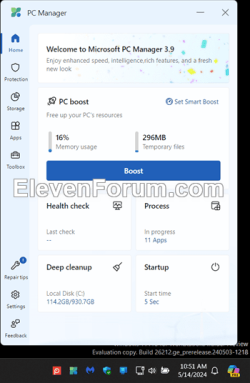
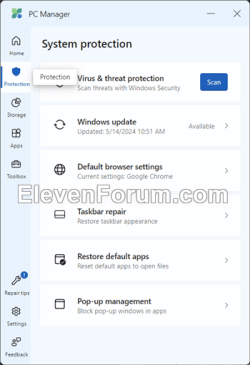
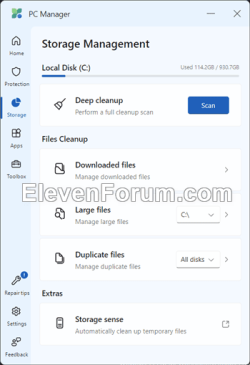
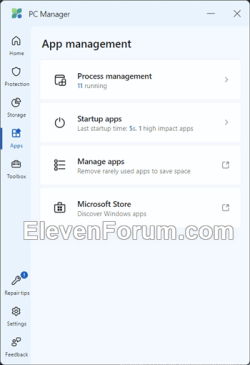
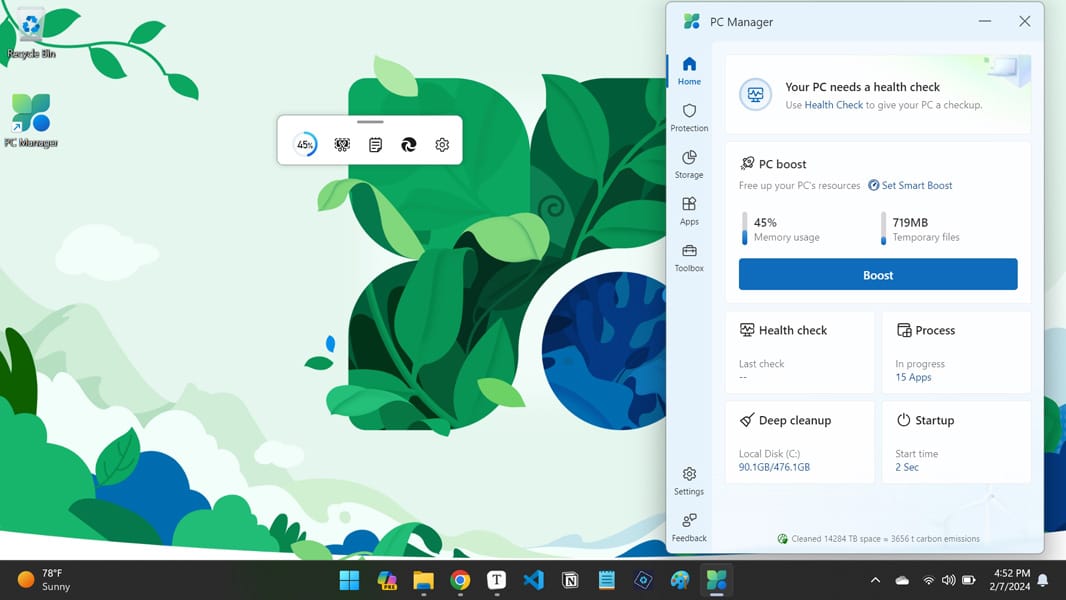
Microsoft PC Manager is a utility app for your PC. It offers features such as one-click boost, storage clean-up, file management, and protection of your default settings from unauthorized changes.

Reference:

The Microsoft PC Manager app is currently available in US and China.


Contents

  • Option One: Download and Install "Microsoft PC Manager" app from Microsoft Store
  • Option Two: Download and Install "Microsoft PC Manager" app using EXE file
  • Option Three: Download and Install "Microsoft PC Manager" app using winget Command


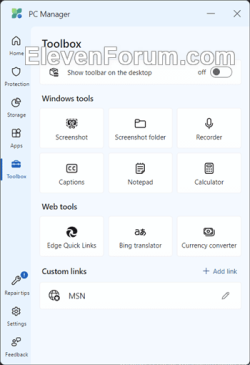
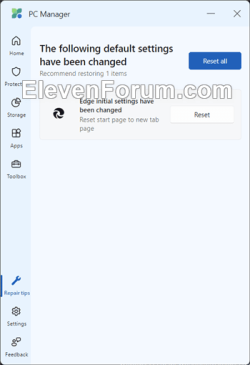
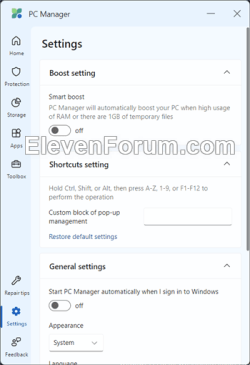
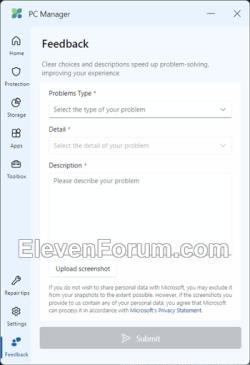
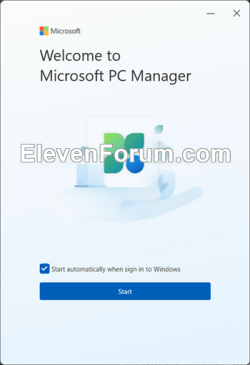
EXAMPLE: Microsoft PC Manager app
Microsoft_PC_Manager-1.png Microsoft_PC_Manager-2.png Microsoft_PC_Manager-3.pngMicrosoft_PC_Manager-4.png Microsoft_PC_Manager-5.png Microsoft_PC_Manager-6.pngMicrosoft_PC_Manager-7.png Microsoft_PC_Manager-8.png Microsoft_PC_Manager-9.png


Option One

Download and Install "Microsoft PC Manager" app from Microsoft Store


1 Go to the Microsoft PC Manager app page in the Microsoft Store, and click/tap on View in Store. (see screenshot below)

Direct link: Microsoft PC Manager

Microsoft_PC_Manager-download.png

2 If prompted, click/tap on Open Microsoft Store app to confirm. (see screenshot below)

Open_in_Microsoft_Store.png

3 Click/tap Install. (see screenshot below)

install_PC_Manager_store-1.png

4 If prompted by UAC, click/tap on Yes to approve.

5 The app will now start to download and install. (see screenshot below)

install_PC_Manager_store-2.png

6 When the app has finished installing, you can Open the app if wanted. (see screenshot below)

install_PC_Manager_store-3.png


Option Two

Download and Install "Microsoft PC Manager" app using EXE file


1 Go to the Microsoft PC Manager app page in the Microsoft Store, and click/tap on Download. (see screenshot below)

Microsoft_PC_Manager-download.png

2 Run the downloaded Microsoft PC Manager Installer.exe file.

3 If prompted by UAC, click/tap on Yes to approve.

4 The app will now start to download and install. (see screenshot below)

install_PC_Manager_store-2.png

5 When the app has finished installing, it will automatically open.


Option Three

Download and Install "Microsoft PC Manager" app using winget Command


1 Open Windows Terminal, and select either Windows PowerShell or Command Prompt.

2 Copy and paste the command below into Windows Terminal, and press Enter. (see screenshot below step 3)

winget install 9pm860492szd

3 When prompted Do you agree to the terms? for the app in the terminal, type Y, and press Enter. (see screenshot below)

install_PC_Manager_winget-1.png

4 If prompted by UAC, click/tap on Yes to approve.

5 After a moment when the app has finished installing, you will see a notification to open the app if wanted. (see screenshot below)

install_PC_Manager_winget-2.png


That's it,
Shawn Brink


Last edited:
Microsoft PC Manager is a utility app for your PC. It offers features such as one-click boost, storage clean-up, file management, and protection of your default settings from unauthorized changes.

I have read in numerous articles (the following is one of them) that PC Manager has significant security vulnerabilities when PC Manager is being used by non-administrator (limited user) accounts. Specifically, limited users have full control over various critical features within the PC Manager interface, which should ideally be restricted to administrator-level access only.

One of the most alarming findings is that non-admin users have the ability to manipulate recommended startup applications, including stopping (turning on and off) essential processes such as the "MS-Anti Virus" application. This capability poses a severe risk as it allows unauthorized users to disable crucial security measures, compromising the overall system integrity. These issues undermine the fundamental principles of user access control and pose significant security risks to systems running the PC Manager application


So having read all that is this utility safe or any good to use ??
 

My Computer My Computer

At a glance

Windows 11 Pro 64 Bit 25H2 26200 9168Intel Core I5-8250U 1.80 GHZ16 GBIntel UHD Graphics 620
OS
Windows 11 Pro 64 Bit 25H2 26200 9168
Computer type
Laptop
Manufacturer/Model
Asus X510UAR
CPU
Intel Core I5-8250U 1.80 GHZ
Memory
16 GB
Graphics Card(s)
Intel UHD Graphics 620
Sound Card
Conexant
Monitor(s) Displays
Dell 24" ST2420
Screen Resolution
1920x1080
Hard Drives
ADATA SU635 DDS
Keyboard
Logitech
Mouse
Logitech
Internet Speed
465
Browser
Google Chrome, MS Edge
Antivirus
Norton 360
Other Info
Windows Feature Experience Pack 1000.26100.297
You have to remember PC Manager is targeted for the (single) home user. Most of the mentioned security vulnerabilities are concerns for a shared or managed business environment, where you may not want non-IT users to perform specific tasks. PC Manager isn't intended for them.

Think of PC Manager as MS's immature, but slowly evolving, CCleaner knock off. It may not serve everyone's needs, but it's free.
 

My Computer My Computer

At a glance

Windows 7
OS
Windows 7
Oats and Garlin, Thanks for chiming . As I already use CCleaner, my preference for now is to stay away from PC Manager until they further refine it.
 

My Computer My Computer

At a glance

Windows 11 Pro 64 Bit 25H2 26200 9168Intel Core I5-8250U 1.80 GHZ16 GBIntel UHD Graphics 620
OS
Windows 11 Pro 64 Bit 25H2 26200 9168
Computer type
Laptop
Manufacturer/Model
Asus X510UAR
CPU
Intel Core I5-8250U 1.80 GHZ
Memory
16 GB
Graphics Card(s)
Intel UHD Graphics 620
Sound Card
Conexant
Monitor(s) Displays
Dell 24" ST2420
Screen Resolution
1920x1080
Hard Drives
ADATA SU635 DDS
Keyboard
Logitech
Mouse
Logitech
Internet Speed
465
Browser
Google Chrome, MS Edge
Antivirus
Norton 360
Other Info
Windows Feature Experience Pack 1000.26100.297
I don't need an overlord, have enough
 

My Computer My Computer

At a glance

Win11i9-1390064 GBNvidia RTX 5070 TI OC
OS
Win11
Computer type
PC/Desktop
Manufacturer/Model
Asus Home built
CPU
i9-13900
Motherboard
ASUS Strix Z790-H
Memory
64 GB
Graphics Card(s)
Nvidia RTX 5070 TI OC
Monitor(s) Displays
Sony 55"
Hard Drives
SSD
PSU
850 watt EVGA
Case
Cooler Master Haf 932
Cooling
CoolerMaster
Keyboard
RedDragon
Mouse
CoolerMaster
Internet Speed
300/300
Antivirus
Defender
Other Info
VR, Virtual Reality
I get this error,

An unexpected error occurred while executing the command:
0x8a150044 : The rest source endpoint is not found.
 

My Computer My Computer

At a glance

Windows 10
OS
Windows 10
I get this error,

An unexpected error occurred while executing the command:
0x8a150044 : The rest source endpoint is not found.
Hello Andy, and welcome. :alien:

Were you able to use another option to install with instead?
 

My Computers My Computers

  • At a glance

    Windows 11 Pro for WorkstationsIntel i7-8700K 5 GHz64 GB (4x16GB) G.SKILL TridentZ RGB DDR4 3600...ASUS ROG-STRIX-GTX1080TI-O11G-GAMING (11GB GD...
    OS
    Windows 11 Pro for Workstations
    Computer type
    PC/Desktop
    Manufacturer/Model
    Custom self build
    CPU
    Intel i7-8700K 5 GHz
    Motherboard
    ASUS ROG Maximus XI Formula Z390
    Memory
    64 GB (4x16GB) G.SKILL TridentZ RGB DDR4 3600 MHz (F4-3600C18D-32GTZR)
    Graphics Card(s)
    ASUS ROG-STRIX-GTX1080TI-O11G-GAMING (11GB GDDR5X)
    Sound Card
    Integrated Digital Audio (S/PDIF)
    Monitor(s) Displays
    2 x Samsung Odyssey G75 27"
    Screen Resolution
    2560x1440
    Hard Drives
    1TB Samsung 990 PRO M.2,
    4TB Samsung 990 PRO M.2,
    TerraMaster F8 SSD Plus NAS
    PSU
    Seasonic Prime Titanium 850W
    Case
    Thermaltake Core P3 wall mounted
    Cooling
    Corsair Hydro H115i
    Keyboard
    Amazon Basics Wired Full Keyboard MD005
    Mouse
    Logitech MX Master 4
    Internet Speed
    2 Gbps Download and 100 Mbps Upload
    Browser
    Chrome and Edge
    Antivirus
    Microsoft Defender
    Other Info
    Logitech Z625 speaker system,
    Logitech BRIO 4K Pro webcam,
    HP Color LaserJet Pro MFP M477fdn,
    CyberPower CP1500PFCLCD
    Galaxy S23 Plus phone
  • At a glance

    Windows 11 ProSnapdragon X Elite (12 core) 3.42 GHz16 GB LPDDR5x-7467 MHz
    Operating System
    Windows 11 Pro
    Computer type
    Laptop
    Manufacturer/Model
    Surface Laptop 7 Copilot+ PC
    CPU
    Snapdragon X Elite (12 core) 3.42 GHz
    Memory
    16 GB LPDDR5x-7467 MHz
    Monitor(s) Displays
    15" HDR
    Screen Resolution
    2496 x 1664
    Hard Drives
    1 TB SSD
    Internet Speed
    Wi-Fi 7 and Bluetooth 5.4
    Browser
    Chrome and Edge
    Antivirus
    Microsoft Defender
I get this error,

An unexpected error occurred while executing the command:
0x8a150044 : The rest source endpoint is not found.
Same here, it's because the app isn't available from the Store unless you're in the US.
I'm in UK, I can see the app on the store page but no Download option.
WINGET doesn't work.

I haven't tried the .EXE file.
 

My Computer My Computer

At a glance

Windows 11 Pro 25H2 (RP channel)AMD Ryzen 7 9800X3D 8-core64GB Corsair Titanium 6000/CL30MSI Suprim 5080 SOC
OS
Windows 11 Pro 25H2 (RP channel)
Computer type
PC/Desktop
Manufacturer/Model
MSI
CPU
AMD Ryzen 7 9800X3D 8-core
Motherboard
MEG X870E Godlike
Memory
64GB Corsair Titanium 6000/CL30
Graphics Card(s)
MSI Suprim 5080 SOC
Sound Card
Soundblaster AE-9
Monitor(s) Displays
ASUS TUF Gaming VG289Q
Screen Resolution
3840x2160
Hard Drives
Samsung 9100 Pro 4TB (gen 5 x4, system drive/games)
Samsung 990 Pro 2TB
Samsung 980 Pro 2TB
Samsung 870 Evo 4TB
Samsung 870 Evo 2TB
Samsung T9 4TB
PSU
Seasonic PX-2200
Case
Bequiet! Dark Base Pro 901
Cooling
Noctua NH-D15S Chromax black
Keyboard
Logitech G915 X (wired)
Mouse
Logitech G903 with PowerPlay charger
Internet Speed
900Mb/sec
Browser
Microsoft Edge
Antivirus
Windows Defender
Hello Andy, and welcome. :alien:

Were you able to use another option to install with instead?
Thanks for the quick response,

BrianinEngland answered my question.
I tried the exe but it doesnt install just takes me to store.
 

My Computer My Computer

At a glance

Windows 10
OS
Windows 10
Maybe @Brink could update this article to reflect the fact that the app is currently US only?
 

My Computer My Computer

At a glance

Windows 11 Pro 25H2 (RP channel)AMD Ryzen 7 9800X3D 8-core64GB Corsair Titanium 6000/CL30MSI Suprim 5080 SOC
OS
Windows 11 Pro 25H2 (RP channel)
Computer type
PC/Desktop
Manufacturer/Model
MSI
CPU
AMD Ryzen 7 9800X3D 8-core
Motherboard
MEG X870E Godlike
Memory
64GB Corsair Titanium 6000/CL30
Graphics Card(s)
MSI Suprim 5080 SOC
Sound Card
Soundblaster AE-9
Monitor(s) Displays
ASUS TUF Gaming VG289Q
Screen Resolution
3840x2160
Hard Drives
Samsung 9100 Pro 4TB (gen 5 x4, system drive/games)
Samsung 990 Pro 2TB
Samsung 980 Pro 2TB
Samsung 870 Evo 4TB
Samsung 870 Evo 2TB
Samsung T9 4TB
PSU
Seasonic PX-2200
Case
Bequiet! Dark Base Pro 901
Cooling
Noctua NH-D15S Chromax black
Keyboard
Logitech G915 X (wired)
Mouse
Logitech G903 with PowerPlay charger
Internet Speed
900Mb/sec
Browser
Microsoft Edge
Antivirus
Windows Defender
It can be installed by switching the Windows region to US, then switching back after but I wouldn't recommend doing this


My Computer My Computer

At a glance

Windows 11 Pro 25H2 (RP channel)AMD Ryzen 7 9800X3D 8-core64GB Corsair Titanium 6000/CL30MSI Suprim 5080 SOC
OS
Windows 11 Pro 25H2 (RP channel)
Computer type
PC/Desktop
Manufacturer/Model
MSI
CPU
AMD Ryzen 7 9800X3D 8-core
Motherboard
MEG X870E Godlike
Memory
64GB Corsair Titanium 6000/CL30
Graphics Card(s)
MSI Suprim 5080 SOC
Sound Card
Soundblaster AE-9
Monitor(s) Displays
ASUS TUF Gaming VG289Q
Screen Resolution
3840x2160
Hard Drives
Samsung 9100 Pro 4TB (gen 5 x4, system drive/games)
Samsung 990 Pro 2TB
Samsung 980 Pro 2TB
Samsung 870 Evo 4TB
Samsung 870 Evo 2TB
Samsung T9 4TB
PSU
Seasonic PX-2200
Case
Bequiet! Dark Base Pro 901
Cooling
Noctua NH-D15S Chromax black
Keyboard
Logitech G915 X (wired)
Mouse
Logitech G903 with PowerPlay charger
Internet Speed
900Mb/sec
Browser
Microsoft Edge
Antivirus
Windows Defender
PC Manager may be downloaded through Microsoft Store - Generation Project (v1.2.3) [by @rgadguard & mkuba50]

1. Click the above link in your browser.
2. Select "PackageFamilyName" on the search bar's left side drop menu.
3. Copy "Microsoft.MicrosoftPCManager_8wekyb3d8bbwe" into the search field.
4. Click on the right side ✔ symbol.

For some reason, adguard.net will sometimes not find this App. Probably because some of its servers are not located in the US. Keep clicking the ✔ symbol a few times until you see a result.

5. When presented with a list of files, click the link for: Microsoft.MicrosoftPCManager_3.9.3.0_neutral_~_8wekyb3d8bbwe.msixbundle

Your browser might block the download for security reasons. The provided link goes to a legitimate MS server.

6. From File Explorer, click on the Microsoft.MicrosoftPCManager file and Windows will install it for you.
 
Last edited:

My Computer My Computer

At a glance

Windows 7
OS
Windows 7
Version update to 3.9.5
 

My Computers My Computers

  • At a glance

    All Branches but StableAMD Ryzen 7 7735HS 3200-4500 Mhz 8 cores x 232 GB DDR5Radeon Graphic / NVIDIA GeForce RTX 4060 8 GB...
    OS
    All Branches but Stable
    Computer type
    Laptop
    Manufacturer/Model
    Acer Nitro ANV15-51
    CPU
    AMD Ryzen 7 7735HS 3200-4500 Mhz 8 cores x 2
    Motherboard
    Sportage_RBH
    Memory
    32 GB DDR5
    Graphics Card(s)
    Radeon Graphic / NVIDIA GeForce RTX 4060 8 GB GDDR6
    Sound Card
    AMD/Realtek(R) Audio
    Monitor(s) Displays
    Integrated Monitor (15.3"vis)
    Screen Resolution
    FHD 1920X1080 16:9 144Hz
    Hard Drives
    KINGSTON OM8SEP4512Q-AA 1TB
    Western Digital 256GB
    PSU
    19V DC 6.32 A 120 W
    Cooling
    Dual Fans
    Mouse
    MS Bluetooth
    Internet Speed
    Fiber 1GB Cox -us & 1GB Orange-fr
    Browser
    Edge Canary- Firefox Nightly-Chrome Dev-Chrome Dev
    Antivirus
    Windows Defender
  • At a glance

    Windows 11 BetaAMD A9-94208 GB of DDR4AMD Radeon R5
    Operating System
    Windows 11 Beta
    Computer type
    Laptop
    Manufacturer/Model
    Asus X751BP
    CPU
    AMD A9-9420
    Memory
    8 GB of DDR4
    Graphics card(s)
    AMD Radeon R5
    Screen Resolution
    1600x900
    Hard Drives
    Seagate 1 TB
Is this any good? Is it recommended? Pros and Cons anyone?
 

My Computer My Computer

At a glance

Win 11 Insider Release Preview and Beta chann...i5 Core [email protected] (Unsupported for Win 11)12GBGeneric PnP Monitor (1920x1080@60Hz) Intel HD...
OS
Win 11 Insider Release Preview and Beta channels.
Computer type
Laptop
Manufacturer/Model
HP ENVY Bought: March 2017
CPU
i5 Core [email protected] (Unsupported for Win 11)
Motherboard
HP 81AD (U3E1)
Memory
12GB
Graphics Card(s)
Generic PnP Monitor (1920x1080@60Hz) Intel HD Graphics 620 (HP)
Sound Card
Conexant ISST audio
Monitor(s) Displays
Generic PnP Monitor
Screen Resolution
1536x864 pixels
Hard Drives
HGST HTS721010A9E630
PSU
Well...PSU you too!! What's this mean?
Case
HP ENVY SILVER
Cooling
A fan.
Keyboard
USA
Mouse
Logitec Anywhere 2
Internet Speed
Good enough for me! Fast!
Browser
Edge/Waterfox
Antivirus
Windows Defender
Other Info
No 'mo.
Same here, it's because the app isn't available from the Store unless you're in the US.
I'm in UK, I can see the app on the store page but no Download option.
WINGET doesn't work.

I haven't tried the .EXE file.
The exe I used is here (The Beta one).....


.....which installs and works in the UK (restart will put it in the right side taskbar startups).

Inside it you can update it to the latest version as of today (3.9.7.0)

I find It's a quick and easy way of getting rid of rubbish.

It's not nearly as detailed as other tools but nonetheless useful as all the tools one might regularly use are in one place.

2024-05-30_000506.jpg


:-)
 
Last edited:

My Computer My Computer

At a glance

Windows 11 Enterprise
OS
Windows 11 Enterprise
Another useless programme just like Microsoft PowerToys.
 

My Computer My Computer

At a glance

Microsoft Windows 11 HomeIntel Core i5-13490F2 x 16 Patriot Memory (PDP Systems) PSD516G56...GIGABYTE GeForce RTX 4070 WINDFORCE OC 12G (G...
OS
Microsoft Windows 11 Home
Computer type
PC/Desktop
Manufacturer/Model
MSI MS-7D98
CPU
Intel Core i5-13490F
Motherboard
MSI B760 GAMING PLUS WIFI
Memory
2 x 16 Patriot Memory (PDP Systems) PSD516G560081 6400MT (32-37-37-74); 1.35V)
Graphics Card(s)
GIGABYTE GeForce RTX 4070 WINDFORCE OC 12G (GV-N4070WF3OC-12GD)
Sound Card
Bluetooth Аудио
Monitor(s) Displays
INNOCN 15K1F
Screen Resolution
1920 x 1080
Hard Drives
WD_BLACK SN770 250GB
KINGSTON SNV2S1000G (ELFK0S.6)
PSU
Thermaltake Toughpower GF3 1000W
Case
CG560 - DeepCool
Cooling
ID-COOLING SE-224-XTS / 2 x 140Mm Fan - rear and top; 3 x 120Mm - front
Keyboard
Corsair K70 RGB TKL
Mouse
Corsair KATAR PRO XT
Internet Speed
100 Mbps
Browser
Firefox
Antivirus
Microsoft Defender Antivirus
Other Info
https://www.userbenchmark.com/UserRun/66553205
Paul Thurrott didn't like this app when he reviewed it earlier this year.


I installed it a while ago for a quick look and wasn't impressed either and quickly uninstalled it.
 

My Computers My Computers

  • At a glance

    Windows 11 Pro 25H2Intel Core i9 13900KCorsair Dominator Platinum 64gb 5600MT/s DDR5...Sapphire NITRO+ AMD Radeon RX 7900 XTX Vapor-...
    OS
    Windows 11 Pro 25H2
    Computer type
    PC/Desktop
    Manufacturer/Model
    Homebuilt
    CPU
    Intel Core i9 13900K
    Motherboard
    Asus ProArt Z790 Creator WiFi - Bios 3107
    Memory
    Corsair Dominator Platinum 64gb 5600MT/s DDR5 Dual Channel
    Graphics Card(s)
    Sapphire NITRO+ AMD Radeon RX 7900 XTX Vapor-X 24GB
    Sound Card
    External DAC: Cambridge Audio DACMagic200M - Headphone Amp: Topping L50
    Monitor(s) Displays
    Panasonic MX950 Mini LED 55" TV 120hz
    Screen Resolution
    3840 x 2160 120hz
    Hard Drives
    Samsung 980 Pro 2TB (OS)
    Samsung 980 Pro 1TB (Files)
    Lexar NZ790 4TB
    LaCie d2 Professional 6TB external - USB 3.1
    Seagate Expansion 16TB external - USB 3.2
    Seagate One Touch 18TB external HD - USB 3.0
    PSU
    Corsair RM1200x Shift
    Case
    Corsair RGB Smart Case 5000x (white)
    Cooling
    Corsair iCue H150i Elite Capellix XT
    Keyboard
    Incase Ergonomic USB (Microsoft clone)
    Mouse
    Logitech MX Master 3S
    Internet Speed
    Fibre 900/500 Mbps
    Browser
    Microsoft Edge Chromium
    Antivirus
    Bitdefender Total Security
    Other Info
    AMD Radeon Software & Drivers 26.1.1
    Hasleo Backup Suite
    Dashlane password manager
    Kensington Verimark fingerprint reader
    Logitech Brio 4K webcam
    Orico 10-port powered USB 3.0 hub
  • At a glance

    Windows 11 Pro 25H2Intel® Core™ i9-13900H32GB DDR4-3200 Dual channel*Intel Iris Xᵉ Graphics G7
    Operating System
    Windows 11 Pro 25H2
    Computer type
    Laptop
    Manufacturer/Model
    Asus Vivobook X1605VA
    CPU
    Intel® Core™ i9-13900H
    Motherboard
    Asus X1605VA bios 309
    Memory
    32GB DDR4-3200 Dual channel
    Graphics card(s)
    *Intel Iris Xᵉ Graphics G7
    Sound Card
    Realtek | Intel SST Bluetooth & USB
    Monitor(s) Displays
    16.0-inch, WUXGA 16:10 aspect ratio, IPS-level Panel
    Screen Resolution
    1920 x 1200 60hz
    Hard Drives
    512GB M.2 NVMe™ PCIe® 3.0 SSD
    Mouse
    Logitech MX Ergo Trackball
    Antivirus
    Bitdefender Total Security
    Other Info
    720p Webcam
    WiFi & USB to ethernet

My Computer My Computer

At a glance

Windows 11
OS
Windows 11
So what you're really trying to say is, deep down inside you truly liked it?

Nice try. There was a typo in my original post, now been fixed. :oops:
 

My Computers My Computers

  • At a glance

    Windows 11 Pro 25H2Intel Core i9 13900KCorsair Dominator Platinum 64gb 5600MT/s DDR5...Sapphire NITRO+ AMD Radeon RX 7900 XTX Vapor-...
    OS
    Windows 11 Pro 25H2
    Computer type
    PC/Desktop
    Manufacturer/Model
    Homebuilt
    CPU
    Intel Core i9 13900K
    Motherboard
    Asus ProArt Z790 Creator WiFi - Bios 3107
    Memory
    Corsair Dominator Platinum 64gb 5600MT/s DDR5 Dual Channel
    Graphics Card(s)
    Sapphire NITRO+ AMD Radeon RX 7900 XTX Vapor-X 24GB
    Sound Card
    External DAC: Cambridge Audio DACMagic200M - Headphone Amp: Topping L50
    Monitor(s) Displays
    Panasonic MX950 Mini LED 55" TV 120hz
    Screen Resolution
    3840 x 2160 120hz
    Hard Drives
    Samsung 980 Pro 2TB (OS)
    Samsung 980 Pro 1TB (Files)
    Lexar NZ790 4TB
    LaCie d2 Professional 6TB external - USB 3.1
    Seagate Expansion 16TB external - USB 3.2
    Seagate One Touch 18TB external HD - USB 3.0
    PSU
    Corsair RM1200x Shift
    Case
    Corsair RGB Smart Case 5000x (white)
    Cooling
    Corsair iCue H150i Elite Capellix XT
    Keyboard
    Incase Ergonomic USB (Microsoft clone)
    Mouse
    Logitech MX Master 3S
    Internet Speed
    Fibre 900/500 Mbps
    Browser
    Microsoft Edge Chromium
    Antivirus
    Bitdefender Total Security
    Other Info
    AMD Radeon Software & Drivers 26.1.1
    Hasleo Backup Suite
    Dashlane password manager
    Kensington Verimark fingerprint reader
    Logitech Brio 4K webcam
    Orico 10-port powered USB 3.0 hub
  • At a glance

    Windows 11 Pro 25H2Intel® Core™ i9-13900H32GB DDR4-3200 Dual channel*Intel Iris Xᵉ Graphics G7
    Operating System
    Windows 11 Pro 25H2
    Computer type
    Laptop
    Manufacturer/Model
    Asus Vivobook X1605VA
    CPU
    Intel® Core™ i9-13900H
    Motherboard
    Asus X1605VA bios 309
    Memory
    32GB DDR4-3200 Dual channel
    Graphics card(s)
    *Intel Iris Xᵉ Graphics G7
    Sound Card
    Realtek | Intel SST Bluetooth & USB
    Monitor(s) Displays
    16.0-inch, WUXGA 16:10 aspect ratio, IPS-level Panel
    Screen Resolution
    1920 x 1200 60hz
    Hard Drives
    512GB M.2 NVMe™ PCIe® 3.0 SSD
    Mouse
    Logitech MX Ergo Trackball
    Antivirus
    Bitdefender Total Security
    Other Info
    720p Webcam
    WiFi & USB to ethernet
Version update to 3.9.7
 

My Computers My Computers

  • At a glance

    All Branches but StableAMD Ryzen 7 7735HS 3200-4500 Mhz 8 cores x 232 GB DDR5Radeon Graphic / NVIDIA GeForce RTX 4060 8 GB...
    OS
    All Branches but Stable
    Computer type
    Laptop
    Manufacturer/Model
    Acer Nitro ANV15-51
    CPU
    AMD Ryzen 7 7735HS 3200-4500 Mhz 8 cores x 2
    Motherboard
    Sportage_RBH
    Memory
    32 GB DDR5
    Graphics Card(s)
    Radeon Graphic / NVIDIA GeForce RTX 4060 8 GB GDDR6
    Sound Card
    AMD/Realtek(R) Audio
    Monitor(s) Displays
    Integrated Monitor (15.3"vis)
    Screen Resolution
    FHD 1920X1080 16:9 144Hz
    Hard Drives
    KINGSTON OM8SEP4512Q-AA 1TB
    Western Digital 256GB
    PSU
    19V DC 6.32 A 120 W
    Cooling
    Dual Fans
    Mouse
    MS Bluetooth
    Internet Speed
    Fiber 1GB Cox -us & 1GB Orange-fr
    Browser
    Edge Canary- Firefox Nightly-Chrome Dev-Chrome Dev
    Antivirus
    Windows Defender
  • At a glance

    Windows 11 BetaAMD A9-94208 GB of DDR4AMD Radeon R5
    Operating System
    Windows 11 Beta
    Computer type
    Laptop
    Manufacturer/Model
    Asus X751BP
    CPU
    AMD A9-9420
    Memory
    8 GB of DDR4
    Graphics card(s)
    AMD Radeon R5
    Screen Resolution
    1600x900
    Hard Drives
    Seagate 1 TB

Latest Support Threads

Back
Top Bottom