[DRIVERS] Realtek Audio (AMD 3xx/4xx/5xx/6xx/8xx & Intel 2xx/3xx/4xx/5xx/6xx/7xx/8xx)


Hello. Thank you for putting this thread together and supporting it. I think I have this right but for the ASUS ROG Maximum Extreme X790 I should use AUDIO_Realtek_USB_UAD_ASUS_ROG_SS3-DTS_v6.3.9600.2347?

This is a fresh install of Win11 Pro and I used the drivers from the ASUS website which are v6.3.9600.2342. Do I need to completely clean out these drivers first or can I just update to this 6.3.9600.2347 since my existing version is so close?

Appreciate it bud!
 

My Computer My Computer

At a glance

Windows 11 Pro
OS
Windows 11 Pro
Hi,
which driver do i need for an Asus Prime B450M Gaming/BR ?
Thanks in advance.
View attachment 50339

Hi,

You have an ASUS PRIME Realtek motherboard, so :

You need Realtek Audio Drivers (UAD - ASUS ROG/TUF/PRIME RTK) from the first post of this thread.

Follow scrupulously your CLEANUP process then your INSTALL process, for the next drivers packages that I would release, you will can directly follow your UPDATE process.

Hello. I just bought a new Mainboard - ASUS Crosshair VIII Dark Hero. Is it correct that I have to use the ss3 DTS driver package?

Hi,

Correct.

Hello. Thank you for putting this thread together and supporting it. I think I have this right but for the ASUS ROG Maximum Extreme X790 I should use AUDIO_Realtek_USB_UAD_ASUS_ROG_SS3-DTS_v6.3.9600.2347?

Hi,

Correct but you posted in the wrong thread.

You have an ASUS ROG SS3|DTS Sound Unbound motherboard with ALC40xx codec, so :

You need Realtek USB Audio Drivers (UAD - ASUS ROG SS3-DTS) from the first post of this thread : [DRIVERS] Realtek USB Audio (Intel 5xx/6xx/7xx & AMD 5xx/6xx/TRX40).

This is a fresh install of Win11 Pro and I used the drivers from the ASUS website which are v6.3.9600.2342. Do I need to completely clean out these drivers first or can I just update to this 6.3.9600.2347 since my existing version is so close?

Appreciate it bud!

You can update directly, but in order to start on a clean basis, it is better to follow scrupulously your CLEANUP process then your INSTALL process, for the next drivers packages that I would release, you will can directly follow your UPDATE process.
 
Last edited:

My Computer My Computer

At a glance

Windows 11 ProAMD Ryzen 7 7800X3DG.Skill Trident Z5 Neo RGB DDR5 6000MHz CL30 ...ASUS ROG Strix RTX 4080 OC
OS
Windows 11 Pro
Computer type
PC/Desktop
CPU
AMD Ryzen 7 7800X3D
Motherboard
ASUS ROG Strix B650E-F Gaming WiFi
Memory
G.Skill Trident Z5 Neo RGB DDR5 6000MHz CL30 - 32GB (2 x 16GB)
Graphics Card(s)
ASUS ROG Strix RTX 4080 OC
Monitor(s) Displays
ASUS ROG Strix XG35VQ
Screen Resolution
3440 x 1440 Full RGB @ 100Hz
Hard Drives
SSD Samsung 990 PRO 1TB
SSD Samsung 970 EVO Plus 500GB
PSU
Seasonic Focus GX 850W ATX 3.0
Case
NZXT H5 Flow
Cooling
NZXT Kraken X53
Keyboard
Logitech G513
Mouse
Logitech G502
oops, my bad didn't realize there was a separate thread for USB. Appreciate the help :)
 

My Computer My Computer

At a glance

Windows 11 Pro
OS
Windows 11 Pro
Cleaned all, and then installed and downloaded the ROG/PRIME/etc... RTK download, installed, auto reboot, installed Realtek Audio Console from FileHorse website (as Microsoft App Store is broken right now for this app - version 1.41.289 [LATEST as of Jan 16th 2023]). Opening the Realtek Audio Console, it says "Realtek Audio Console doesn't support for this machine".

Can confirm that I've installed Realtek Audio Driver 6.0.9464.1 - and I am using an ASUS ROG STRIX B550-I Gaming Motherboard.

How should I proceed? Is the ROG/Prime/etc RTK the correct download? I wasn't sure which to install, as this was not clear to me.


Thank you
 

My Computer My Computer

At a glance

Windows 10
OS
Windows 10
Cleaned all, and then installed and downloaded the ROG/PRIME/etc... RTK download, installed, auto reboot, installed Realtek Audio Console from FileHorse website (as Microsoft App Store is broken right now for this app - version 1.41.289 [LATEST as of Jan 16th 2023]). Opening the Realtek Audio Console, it says "Realtek Audio Console doesn't support for this machine".

Can confirm that I've installed Realtek Audio Driver 6.0.9464.1 - and I am using an ASUS ROG STRIX B550-I Gaming Motherboard.

How should I proceed? Is the ROG/Prime/etc RTK the correct download? I wasn't sure which to install, as this was not clear to me.


Thank you

Hi,

You have an ASUS ROG SS3|DTS Sound Unbound motherboard, so :

You need Realtek Audio Drivers (UAD - ASUS ROG SS3-DTS) from the first post of this thread.

Follow scrupulously your CLEANUP process then your INSTALL process, for the next drivers packages that I would release, you will can directly follow your UPDATE process.
 

My Computer My Computer

At a glance

Windows 11 ProAMD Ryzen 7 7800X3DG.Skill Trident Z5 Neo RGB DDR5 6000MHz CL30 ...ASUS ROG Strix RTX 4080 OC
OS
Windows 11 Pro
Computer type
PC/Desktop
CPU
AMD Ryzen 7 7800X3D
Motherboard
ASUS ROG Strix B650E-F Gaming WiFi
Memory
G.Skill Trident Z5 Neo RGB DDR5 6000MHz CL30 - 32GB (2 x 16GB)
Graphics Card(s)
ASUS ROG Strix RTX 4080 OC
Monitor(s) Displays
ASUS ROG Strix XG35VQ
Screen Resolution
3440 x 1440 Full RGB @ 100Hz
Hard Drives
SSD Samsung 990 PRO 1TB
SSD Samsung 970 EVO Plus 500GB
PSU
Seasonic Focus GX 850W ATX 3.0
Case
NZXT H5 Flow
Cooling
NZXT Kraken X53
Keyboard
Logitech G513
Mouse
Logitech G502
Hi,

You have an ASUS ROG SS3|DTS Sound Unbound motherboard, so :

You need Realtek Audio Drivers (UAD - ASUS ROG SS3-DTS) from the first post of this thread.

Follow scrupulously your CLEANUP process then your INSTALL process, for the next drivers packages that I would release, you will can directly follow your UPDATE process.
OK, I've done this, and the audio and the Realtek audio console is working again after the uninstalls and installs of your driver package.

However, New bug that I've never had before. The balance of the L and R are incorrect. I have the balance set 50/50 like normal, but my speakers (also headphones when testing) are not giving me anything but a balance of 10/90 (L/R).

Any ideas?

Thank you so much for everything!
 

My Computer My Computer

At a glance

Windows 10
OS
Windows 10
After installing the latest ASUS ROG SS3-DTS drivers, I'm getting a loud pop on reboot and on Windows boot.

Since I have a "ButtKicker" connected, this is very jarring. Has anyone else experienced this?

I had pretty old drivers before (stock Windows 11 install) that did not have this issue.
 

My Computer My Computer

At a glance

11
OS
11
After installing the latest ASUS ROG SS3-DTS drivers, I'm getting a loud pop on reboot and on Windows boot.

Since I have a "ButtKicker" connected, this is very jarring. Has anyone else experienced this?

I had pretty old drivers before (stock Windows 11 install) that did not have this issue.
Yep, same drivers, same issue. My sub is hating it lol
 

My Computer My Computer

At a glance

Windows 10
OS
Windows 10
After installing the latest ASUS ROG SS3-DTS drivers, I'm getting a loud pop on reboot and on Windows boot.

Since I have a "ButtKicker" connected, this is very jarring. Has anyone else experienced this?

I had pretty old drivers before (stock Windows 11 install) that did not have this issue.
From what I've learned so far in this thread, you'll have to go to the official ASUS forum for support. I have this issue too, but Mokichu is saying it's unrelated to his drivers. His advice is to do the full clean up, and just go back to official drivers from the ASUS driver support page for your motherboard - which is what I intend to do in order to get to a baseline wherein ASUS support can actually help me out with any potential bugs, as they won't be able to help if we have 3rd party drivers installed. C'est la vie!
 

My Computer My Computer

At a glance

Windows 10
OS
Windows 10
From what I've learned so far in this thread, you'll have to go to the official ASUS forum for support. I have this issue too, but Mokichu is saying it's unrelated to his drivers. His advice is to do the full clean up, and just go back to official drivers from the ASUS driver support page for your motherboard - which is what I intend to do in order to get to a baseline wherein ASUS support can actually help me out with any potential bugs, as they won't be able to help if we have 3rd party drivers installed. C'est la vie!
Whooooa! You must be misunderstanding something.
The driver packs MoKiChU posts, ARE official WHQL drivers.
The third party parts are the NAHIMIC SS3 drivers from A-Volute,(now owned by Steele Series), and the DTS, but they are official.
 

My Computers My Computers

  • At a glance

    Win10 Pro, Win10 Pro N, Win10 Home, Windows 8...Intel Core i9 9900K32 GB Quad Kit, G.Skill Trident Z RGB Series ...ASUS GeForce RTX 3090 ROG Strix O24G, 24576 M...
    OS
    Win10 Pro, Win10 Pro N, Win10 Home, Windows 8.1 Pro, Ubuntu
    Computer type
    PC/Desktop
    Manufacturer/Model
    ۞ΞЖ†ԘΜΞ۞
    CPU
    Intel Core i9 9900K
    Motherboard
    ASUS ROG Maximus X Hero
    Memory
    32 GB Quad Kit, G.Skill Trident Z RGB Series schwarz, DDR4-3866, 18-19-19-39-2T
    Graphics Card(s)
    ASUS GeForce RTX 3090 ROG Strix O24G, 24576 MB GDDR6X
    Sound Card
    (1) HD Webcam C270 (2) NVIDIA High Definition Audio (3) Realtek High Definition Audio
    Monitor(s) Displays
    BenQ BL2711U(4K) and a hp 27vx(1080p)
    Hard Drives
    C: Samsung 960 EVO NVMe M.2 SSD
    E: & O: Libraries & OneDrive-> Samsung 850 EVO 1TB
    D: Hyper-V VM's -> Samsung PM951 Client M.2 512Gb SSD
    G: System Images -> Samsung 860 Pro 2TB
    PSU
    Corsair HX1000i High Performance ATX Power Supply 80+ Platinum
    Case
    Phanteks Enthoo Pro TG
    Cooling
    Thermaltake Floe Riing RGB TT Premium-Edition 360mm and 2x120 Phantek& Halo front, and 1x140 Phanteks
    Keyboard
    Trust GTX THURA
    Mouse
    Trust GTX 148
    Internet Speed
    25+/5+ (+usually faster)
    Browser
    Edge; Chrome;
    Antivirus
    Windows Defender of course & Malwarebytes Anti-Exploit as an added layer between browser & OS
    Other Info
    Router: FRITZ!Box 7590 AX V2
    Sound system: SHARP HT-SBW460 Dolby Atmos Soundbar
    Webcam: Logitech BRIO ULTRA HD PRO WEBCAM 4K webcam with HDR
  • At a glance

    Windoes 10 HomeIntel Ii 6700K32GB DDR4 Corsair Vengeance Blue 3000MHzZOTAC GAMING GeForce RTX 1080 Ti AMP Extreme ...
    Operating System
    Windoes 10 Home
    Computer type
    PC/Desktop
    Manufacturer/Model
    Hyrican
    CPU
    Intel Ii 6700K
    Motherboard
    MSI Z170A PC MATE
    Memory
    32GB DDR4 Corsair Vengeance Blue 3000MHz
    Graphics card(s)
    ZOTAC GAMING GeForce RTX 1080 Ti AMP Extreme Core
    Sound Card
    Connected via HDMI from graics card to home theater system
    Monitor(s) Displays
    Samsung 50" Crystal UHD 4K TU7179 (2020)
    Screen Resolution
    4K
    Hard Drives
    two 256GB San Disk SSD Plus
    PSU
    Corsair 650W CX650M (80+ Bronze)
    Case
    Inwin 303
    Cooling
    Arctic Freezer i11 for CPU and 3 Corsair fans on top ans 3 on the bottom
    Keyboard
    Old generic from Lenovo
    Mouse
    Old generic from Lenovo
    Internet Speed
    25/5
    Browser
    Edge, Chrome
    Antivirus
    Windows Security(Defender)
Whooooa! You must be misunderstanding something.
The driver packs MoKiChU posts, ARE official WHQL drivers.
The third party parts are the NAHIMIC SS3 drivers from A-Volute,(now owned by Steele Series), and the DTS, but they are official.
My mistake then, I apologize.

Does anyone know why I might be having a glitch with Left and Right balance not working properly? Has anyone heard of, or had this issue before? This was working fine before I upgraded my drivers.
 

My Computer My Computer

At a glance

Windows 10
OS
Windows 10
My mistake then, I apologize.

Does anyone know why I might be having a glitch with Left and Right balance not working properly? Has anyone heard of, or had this issue before? This was working fine before I upgraded my drivers.
One thing you and @techj75 could try is, use RAPR(DriverStoreExplore) and select old drivers, and delete them.
I do this after all driver updates to reduce any chance of conflicts.
 

My Computers My Computers

  • At a glance

    Win10 Pro, Win10 Pro N, Win10 Home, Windows 8...Intel Core i9 9900K32 GB Quad Kit, G.Skill Trident Z RGB Series ...ASUS GeForce RTX 3090 ROG Strix O24G, 24576 M...
    OS
    Win10 Pro, Win10 Pro N, Win10 Home, Windows 8.1 Pro, Ubuntu
    Computer type
    PC/Desktop
    Manufacturer/Model
    ۞ΞЖ†ԘΜΞ۞
    CPU
    Intel Core i9 9900K
    Motherboard
    ASUS ROG Maximus X Hero
    Memory
    32 GB Quad Kit, G.Skill Trident Z RGB Series schwarz, DDR4-3866, 18-19-19-39-2T
    Graphics Card(s)
    ASUS GeForce RTX 3090 ROG Strix O24G, 24576 MB GDDR6X
    Sound Card
    (1) HD Webcam C270 (2) NVIDIA High Definition Audio (3) Realtek High Definition Audio
    Monitor(s) Displays
    BenQ BL2711U(4K) and a hp 27vx(1080p)
    Hard Drives
    C: Samsung 960 EVO NVMe M.2 SSD
    E: & O: Libraries & OneDrive-> Samsung 850 EVO 1TB
    D: Hyper-V VM's -> Samsung PM951 Client M.2 512Gb SSD
    G: System Images -> Samsung 860 Pro 2TB
    PSU
    Corsair HX1000i High Performance ATX Power Supply 80+ Platinum
    Case
    Phanteks Enthoo Pro TG
    Cooling
    Thermaltake Floe Riing RGB TT Premium-Edition 360mm and 2x120 Phantek& Halo front, and 1x140 Phanteks
    Keyboard
    Trust GTX THURA
    Mouse
    Trust GTX 148
    Internet Speed
    25+/5+ (+usually faster)
    Browser
    Edge; Chrome;
    Antivirus
    Windows Defender of course & Malwarebytes Anti-Exploit as an added layer between browser & OS
    Other Info
    Router: FRITZ!Box 7590 AX V2
    Sound system: SHARP HT-SBW460 Dolby Atmos Soundbar
    Webcam: Logitech BRIO ULTRA HD PRO WEBCAM 4K webcam with HDR
  • At a glance

    Windoes 10 HomeIntel Ii 6700K32GB DDR4 Corsair Vengeance Blue 3000MHzZOTAC GAMING GeForce RTX 1080 Ti AMP Extreme ...
    Operating System
    Windoes 10 Home
    Computer type
    PC/Desktop
    Manufacturer/Model
    Hyrican
    CPU
    Intel Ii 6700K
    Motherboard
    MSI Z170A PC MATE
    Memory
    32GB DDR4 Corsair Vengeance Blue 3000MHz
    Graphics card(s)
    ZOTAC GAMING GeForce RTX 1080 Ti AMP Extreme Core
    Sound Card
    Connected via HDMI from graics card to home theater system
    Monitor(s) Displays
    Samsung 50" Crystal UHD 4K TU7179 (2020)
    Screen Resolution
    4K
    Hard Drives
    two 256GB San Disk SSD Plus
    PSU
    Corsair 650W CX650M (80+ Bronze)
    Case
    Inwin 303
    Cooling
    Arctic Freezer i11 for CPU and 3 Corsair fans on top ans 3 on the bottom
    Keyboard
    Old generic from Lenovo
    Mouse
    Old generic from Lenovo
    Internet Speed
    25/5
    Browser
    Edge, Chrome
    Antivirus
    Windows Security(Defender)
One thing you and @techj75 could try is, use RAPR(DriverStoreExplore) and select old drivers, and delete them.
I do this after all driver updates to reduce any chance of conflicts.
Interestingly, this is an uncommon issue reported all around the internet with Realtek drivers. For example: Unbalanced sound on vi Hero with Windows 10 and 2.1 speakers.

I tried all of their recommendations and have not fixed it. This has been on and off issue for years, reported online.

I already got rid of old drivers from Mokichu's clean install steps, and the issue persists...
 

My Computer My Computer

At a glance

Windows 10
OS
Windows 10
That was all I could think of, I use a Sharp Dolby Atmos Soundbar and RIG 500 Dolby Atmos headset and never had any problems.
I do turn off any processing(EQ and effect) in Realtek Audio Console, and use SS3's EQ and effects, plus I use Dolby Access with the Game performance mode setting turned on when using optical input.

1674861999663.png
 

My Computers My Computers

  • At a glance

    Win10 Pro, Win10 Pro N, Win10 Home, Windows 8...Intel Core i9 9900K32 GB Quad Kit, G.Skill Trident Z RGB Series ...ASUS GeForce RTX 3090 ROG Strix O24G, 24576 M...
    OS
    Win10 Pro, Win10 Pro N, Win10 Home, Windows 8.1 Pro, Ubuntu
    Computer type
    PC/Desktop
    Manufacturer/Model
    ۞ΞЖ†ԘΜΞ۞
    CPU
    Intel Core i9 9900K
    Motherboard
    ASUS ROG Maximus X Hero
    Memory
    32 GB Quad Kit, G.Skill Trident Z RGB Series schwarz, DDR4-3866, 18-19-19-39-2T
    Graphics Card(s)
    ASUS GeForce RTX 3090 ROG Strix O24G, 24576 MB GDDR6X
    Sound Card
    (1) HD Webcam C270 (2) NVIDIA High Definition Audio (3) Realtek High Definition Audio
    Monitor(s) Displays
    BenQ BL2711U(4K) and a hp 27vx(1080p)
    Hard Drives
    C: Samsung 960 EVO NVMe M.2 SSD
    E: & O: Libraries & OneDrive-> Samsung 850 EVO 1TB
    D: Hyper-V VM's -> Samsung PM951 Client M.2 512Gb SSD
    G: System Images -> Samsung 860 Pro 2TB
    PSU
    Corsair HX1000i High Performance ATX Power Supply 80+ Platinum
    Case
    Phanteks Enthoo Pro TG
    Cooling
    Thermaltake Floe Riing RGB TT Premium-Edition 360mm and 2x120 Phantek& Halo front, and 1x140 Phanteks
    Keyboard
    Trust GTX THURA
    Mouse
    Trust GTX 148
    Internet Speed
    25+/5+ (+usually faster)
    Browser
    Edge; Chrome;
    Antivirus
    Windows Defender of course & Malwarebytes Anti-Exploit as an added layer between browser & OS
    Other Info
    Router: FRITZ!Box 7590 AX V2
    Sound system: SHARP HT-SBW460 Dolby Atmos Soundbar
    Webcam: Logitech BRIO ULTRA HD PRO WEBCAM 4K webcam with HDR
  • At a glance

    Windoes 10 HomeIntel Ii 6700K32GB DDR4 Corsair Vengeance Blue 3000MHzZOTAC GAMING GeForce RTX 1080 Ti AMP Extreme ...
    Operating System
    Windoes 10 Home
    Computer type
    PC/Desktop
    Manufacturer/Model
    Hyrican
    CPU
    Intel Ii 6700K
    Motherboard
    MSI Z170A PC MATE
    Memory
    32GB DDR4 Corsair Vengeance Blue 3000MHz
    Graphics card(s)
    ZOTAC GAMING GeForce RTX 1080 Ti AMP Extreme Core
    Sound Card
    Connected via HDMI from graics card to home theater system
    Monitor(s) Displays
    Samsung 50" Crystal UHD 4K TU7179 (2020)
    Screen Resolution
    4K
    Hard Drives
    two 256GB San Disk SSD Plus
    PSU
    Corsair 650W CX650M (80+ Bronze)
    Case
    Inwin 303
    Cooling
    Arctic Freezer i11 for CPU and 3 Corsair fans on top ans 3 on the bottom
    Keyboard
    Old generic from Lenovo
    Mouse
    Old generic from Lenovo
    Internet Speed
    25/5
    Browser
    Edge, Chrome
    Antivirus
    Windows Security(Defender)
That was all I could think of, I use a Sharp Dolby Atmos Soundbar and RIG 500 Dolby Atmos headset and never had any problems.
I do turn off any processing(EQ and effect) in Realtek Audio Console, and use SS3's EQ and effects, plus I use Dolby Access with the Game performance mode setting turned on when using optical input.

View attachment 51168
Am I supposed to have a sound effect area under my "Speakers"? Because I don't!

1674862240194.png


Also, SS3 won't open properly, despite my Mobo supporting it?

1674862352194.png
 

My Computer My Computer

At a glance

Windows 10
OS
Windows 10
My speakers looks like this, it usin headset
1674862994250.png
 

My Computers My Computers

  • At a glance

    Win10 Pro, Win10 Pro N, Win10 Home, Windows 8...Intel Core i9 9900K32 GB Quad Kit, G.Skill Trident Z RGB Series ...ASUS GeForce RTX 3090 ROG Strix O24G, 24576 M...
    OS
    Win10 Pro, Win10 Pro N, Win10 Home, Windows 8.1 Pro, Ubuntu
    Computer type
    PC/Desktop
    Manufacturer/Model
    ۞ΞЖ†ԘΜΞ۞
    CPU
    Intel Core i9 9900K
    Motherboard
    ASUS ROG Maximus X Hero
    Memory
    32 GB Quad Kit, G.Skill Trident Z RGB Series schwarz, DDR4-3866, 18-19-19-39-2T
    Graphics Card(s)
    ASUS GeForce RTX 3090 ROG Strix O24G, 24576 MB GDDR6X
    Sound Card
    (1) HD Webcam C270 (2) NVIDIA High Definition Audio (3) Realtek High Definition Audio
    Monitor(s) Displays
    BenQ BL2711U(4K) and a hp 27vx(1080p)
    Hard Drives
    C: Samsung 960 EVO NVMe M.2 SSD
    E: & O: Libraries & OneDrive-> Samsung 850 EVO 1TB
    D: Hyper-V VM's -> Samsung PM951 Client M.2 512Gb SSD
    G: System Images -> Samsung 860 Pro 2TB
    PSU
    Corsair HX1000i High Performance ATX Power Supply 80+ Platinum
    Case
    Phanteks Enthoo Pro TG
    Cooling
    Thermaltake Floe Riing RGB TT Premium-Edition 360mm and 2x120 Phantek& Halo front, and 1x140 Phanteks
    Keyboard
    Trust GTX THURA
    Mouse
    Trust GTX 148
    Internet Speed
    25+/5+ (+usually faster)
    Browser
    Edge; Chrome;
    Antivirus
    Windows Defender of course & Malwarebytes Anti-Exploit as an added layer between browser & OS
    Other Info
    Router: FRITZ!Box 7590 AX V2
    Sound system: SHARP HT-SBW460 Dolby Atmos Soundbar
    Webcam: Logitech BRIO ULTRA HD PRO WEBCAM 4K webcam with HDR
  • At a glance

    Windoes 10 HomeIntel Ii 6700K32GB DDR4 Corsair Vengeance Blue 3000MHzZOTAC GAMING GeForce RTX 1080 Ti AMP Extreme ...
    Operating System
    Windoes 10 Home
    Computer type
    PC/Desktop
    Manufacturer/Model
    Hyrican
    CPU
    Intel Ii 6700K
    Motherboard
    MSI Z170A PC MATE
    Memory
    32GB DDR4 Corsair Vengeance Blue 3000MHz
    Graphics card(s)
    ZOTAC GAMING GeForce RTX 1080 Ti AMP Extreme Core
    Sound Card
    Connected via HDMI from graics card to home theater system
    Monitor(s) Displays
    Samsung 50" Crystal UHD 4K TU7179 (2020)
    Screen Resolution
    4K
    Hard Drives
    two 256GB San Disk SSD Plus
    PSU
    Corsair 650W CX650M (80+ Bronze)
    Case
    Inwin 303
    Cooling
    Arctic Freezer i11 for CPU and 3 Corsair fans on top ans 3 on the bottom
    Keyboard
    Old generic from Lenovo
    Mouse
    Old generic from Lenovo
    Internet Speed
    25/5
    Browser
    Edge, Chrome
    Antivirus
    Windows Security(Defender)
I have uninstalled ss3 and dts app still realtek doesn't shows its eq.
My motherboard is rog x570-f gaming
 

Attachments

  • Screenshot_20230129-032325.png
    Screenshot_20230129-032325.png
    472.7 KB · Views: 5

My Computer My Computer

At a glance

Windows 11Ryzen 5 5600X16GBRX6700XT
OS
Windows 11
Computer type
PC/Desktop
Manufacturer/Model
Asus
CPU
Ryzen 5 5600X
Motherboard
Asus Rog Strix X570-F Gaming
Memory
16GB
Graphics Card(s)
RX6700XT
Sound Card
S1220A
Monitor(s) Displays
Acer VG240YS
Screen Resolution
1080P
Hard Drives
4TB
PSU
650W
Case
Ant Esports
Cooling
Liquid Cooler
Keyboard
Logitech G213
Mouse
G203
Internet Speed
1GB/s
Salut MoKiChU,

I install a lot of Prime drivers. Do you know if one of the ROG drivers can be used (if possible) for Prime boards with the ALC 897 NO DTS.

I know that the Tuf gaming boards use the same codec but with DTS which is not the case for Prime P

Thanks


My Computer My Computer

At a glance

Windows 11 EducationIntel® Core™ i9-13900K Desktop Processor 16 (...G.Skill Ripjaws V Series 32gb (2x16gb) DDR4 3...Asus Dual Geforce Rtx™ 3060 TI Edition 8gb Gddr6
OS
Windows 11 Education
Computer type
PC/Desktop
CPU
Intel® Core™ i9-13900K Desktop Processor 16 (8P+8E)
Motherboard
Asus TUF Gaming Z790-PLUS WIFI D4
Memory
G.Skill Ripjaws V Series 32gb (2x16gb) DDR4 3600mhz
Graphics Card(s)
Asus Dual Geforce Rtx™ 3060 TI Edition 8gb Gddr6
Monitor(s) Displays
BenQ EW3270U 31.5” 3840x2160 UHD 16:9 HDR LED 4K LG 27UK850-W 27'' 4K UHD IPS LED Monitor with HDR10
Screen Resolution
3840x2160
Hard Drives
Samsung 990 with heatsink PRO PCIe 4.0 Gen 4 NVMe® SSD 1TB
WD_BLACK SN850X NVMe M.2 2280 1TB PCI-Express 4.0
Crucial T500 2TB Gen4
Samsung 970 Evo M.2 2280 2tb Pcie Gen3. X4
PSU
Corsair AXi Series AX860i Digital 860W 80 PLUS PSU
Case
Fractal Meshify C ATX Mid Tower Case
Keyboard
Logi MX Keys
Mouse
Logi M705
Internet Speed
400 mbs
Browser
Firefox
Antivirus
Eset NOD32
Other Info
Love fast boots
After installing the latest ASUS ROG SS3-DTS drivers, I'm getting a loud pop on reboot and on Windows boot.

Since I have a "ButtKicker" connected, this is very jarring. Has anyone else experienced this?

I had pretty old drivers before (stock Windows 11 install) that did not have this issue.
Yep, same drivers, same issue. My sub is hating it lol

Hi,

The pop sound when rebooting the PC has always been, it's the amplifier cut-off. The fact that you do not have this issue with the generic Microsoft built-in audio drivers is explained by the fact that these do not manage your amplifier and therefore that one is not used.

Note : If, on the other hand, you experienced multiple pops/cracks (while listening to music or playing games for example), this is not normal. I advise you to follow the processes listed at the bottom of all my audio drivers threads, in the TIPS category.

Am I supposed to have a sound effect area under my "Speakers"? Because I don't!

View attachment 51169
I have uninstalled ss3 and dts app still realtek doesn't shows its eq.
My motherboard is rog x570-f gaming

It is by design, it's intended to work like this at least for ASUS products : If an third party app is built-in, the equalization is done via the third party app.

Also, since you have an ASUS ROG SS3|DTS Sound Unbound motherboard, the configuration of the Upmix / Surround must be done via Sonic Studio III (SS3) and/or DTS Sound Unbound :

SS3 : Sonic Studio > Basic Mode :

Sonic Studio Effects : On
Upmix / Surround : Checked​

DTS Sound Unbound : DTS Headphone:X > Enable DTS Headphone:X > Configure > Click on the 3 dots (...) and type the reference of your audio equipment :

- If you find your audio equipment select it.
- If you don't find your audio equipment :

If you use earphones : Choose the earphones icon
If you use headphone/headset : Choose the headset icon
If you use speakers : Choose the crossed headset icon​

Notes :

- Do not go beyond 48000Hz 24Bits. If you go beyond 48000Hz 24Bits, DTS Sound Unbound will not work, and SS3 may generate crashes or lag spike with some apps/games.
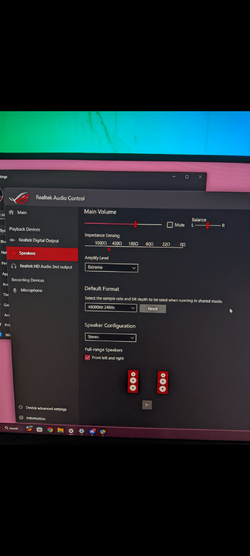
- If you are not using headphones and you are using electrically powered speakers, the detected impedance is distorted and I recommend setting your amplifier to the lowest level (Realtek Audio Control > Playback Devices > Speakers > Amplify Level : Performance).​

Also, SS3 won't open properly, despite my Mobo supporting it?

View attachment 51170

To fix SS3 TIMEOUT issue, follow this :

- Follow scrupulously your CLEANUP process
- Use this SS3 Cleaner tool (Right click on "A-Volute_SS3_Cleanup.exe" > Run as administrator) then restart your PC
- Follow scrupulously your INSTALL process​

For the next drivers packages that I would release, you will can directly follow your UPDATE process.

Salut MoKiChU,

I install a lot of Prime drivers. Do you know if one of the ROG drivers can be used (if possible) for Prime boards with the ALC 897 NO DTS.

I know that the Tuf gaming boards use the same codec but with DTS which is not the case for Prime P

Thanks


Hi,

You cannot choose a drivers package type, each drivers package type is dedicated to each motherboards type.

 
Last edited:

My Computer My Computer

At a glance

Windows 11 ProAMD Ryzen 7 7800X3DG.Skill Trident Z5 Neo RGB DDR5 6000MHz CL30 ...ASUS ROG Strix RTX 4080 OC
OS
Windows 11 Pro
Computer type
PC/Desktop
CPU
AMD Ryzen 7 7800X3D
Motherboard
ASUS ROG Strix B650E-F Gaming WiFi
Memory
G.Skill Trident Z5 Neo RGB DDR5 6000MHz CL30 - 32GB (2 x 16GB)
Graphics Card(s)
ASUS ROG Strix RTX 4080 OC
Monitor(s) Displays
ASUS ROG Strix XG35VQ
Screen Resolution
3440 x 1440 Full RGB @ 100Hz
Hard Drives
SSD Samsung 990 PRO 1TB
SSD Samsung 970 EVO Plus 500GB
PSU
Seasonic Focus GX 850W ATX 3.0
Case
NZXT H5 Flow
Cooling
NZXT Kraken X53
Keyboard
Logitech G513
Mouse
Logitech G502
Hi,

You cannot choose a drivers package type, each drivers package type is dedicated to each motherboards type.
That's what I thought. Thanks anyways. (y)
 

My Computer My Computer

At a glance

Windows 11 EducationIntel® Core™ i9-13900K Desktop Processor 16 (...G.Skill Ripjaws V Series 32gb (2x16gb) DDR4 3...Asus Dual Geforce Rtx™ 3060 TI Edition 8gb Gddr6
OS
Windows 11 Education
Computer type
PC/Desktop
CPU
Intel® Core™ i9-13900K Desktop Processor 16 (8P+8E)
Motherboard
Asus TUF Gaming Z790-PLUS WIFI D4
Memory
G.Skill Ripjaws V Series 32gb (2x16gb) DDR4 3600mhz
Graphics Card(s)
Asus Dual Geforce Rtx™ 3060 TI Edition 8gb Gddr6
Monitor(s) Displays
BenQ EW3270U 31.5” 3840x2160 UHD 16:9 HDR LED 4K LG 27UK850-W 27'' 4K UHD IPS LED Monitor with HDR10
Screen Resolution
3840x2160
Hard Drives
Samsung 990 with heatsink PRO PCIe 4.0 Gen 4 NVMe® SSD 1TB
WD_BLACK SN850X NVMe M.2 2280 1TB PCI-Express 4.0
Crucial T500 2TB Gen4
Samsung 970 Evo M.2 2280 2tb Pcie Gen3. X4
PSU
Corsair AXi Series AX860i Digital 860W 80 PLUS PSU
Case
Fractal Meshify C ATX Mid Tower Case
Keyboard
Logi MX Keys
Mouse
Logi M705
Internet Speed
400 mbs
Browser
Firefox
Antivirus
Eset NOD32
Other Info
Love fast boots
Back
Top Bottom