
Drives keep changing letters


Bikeit

Well-known member
Member
VIP
Local time
7:51 PM
Posts
259
OS
Windows 11 pro
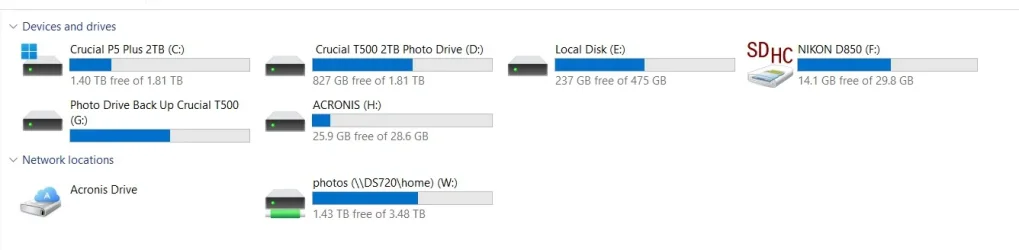
I have several internal and external drives on my laptop which I have assigned different letters to each of them but I noticed yesterday whenever I plug them into the laptop the letters are changing automatically on the external drives, the drive called Acronis was assigned F now its H for example, how can i stop this from happening?
Screenshot 2025-11-04 124516.webp
 
Windows Build/Version
23H2 Build 22631.6133

My Computer

System One

  • OS
    Windows 11 pro
    Computer type
    Laptop
    Manufacturer/Model
    HP Zbook
    CPU
    Intel(R) Core(TM) i7-8850H CPU @ 2.60GHz 2.59 GHz
    Motherboard
    HP 842D
    Memory
    32GB
    Graphics Card(s)
    Nvidia Quadro P3200
    Hard Drives
    Samsung 980 1TB M.2
    Toshiba KXG50ZNV512G M.2
    Crucial P5 Plus 2TB M.2
    Mouse
    MX Master 3
    Internet Speed
    500MBPS
    Browser
    Chrome, Edge
    Antivirus
    Windows defender
This can happen if, for example, you connected the Nikon & Photo drive disks before the Acronis one.
When Windows boots, it's first-come-first-served for drive letters.
If you had connected the Acronis disk yet none of the others, Acronis should be assigned F:\. And then the others would have been G, H if you'd connected them later on.

I hardly ever bother with assigning specific letters to external drives now but, when I used to, I used letters M onwards because they were unlikely to get used up by other devices.
e.g.
If you had assigned M to Acronis, Nikon & Photo drive disks would be F, G as now yet Acronis would still be M.

Denis
 
Last edited:

My Computer

System One

  • OS
    Windows 11 Home x64 Version 25H2 Build 26200.8037
Sorry, I've been fiddling with my reply.
You'll need to refresh the webpage to see the changed version.


Denis
 

My Computer

System One

  • OS
    Windows 11 Home x64 Version 25H2 Build 26200.8037
Sorry, I've been fiddling with my reply.
You'll need to refresh the webpage to see the changed version.


Denis
Thanks, in that case i will need to change the drive which i have labled Acronis a different higher letter as Acronis will look for a pacific letter when its updating the rescue media builder, same with the drive labled photo drive back up as Goodsync looks for the same letter drive when its being updated.
 

My Computer

System One

  • OS
    Windows 11 pro
    Computer type
    Laptop
    Manufacturer/Model
    HP Zbook
    CPU
    Intel(R) Core(TM) i7-8850H CPU @ 2.60GHz 2.59 GHz
    Motherboard
    HP 842D
    Memory
    32GB
    Graphics Card(s)
    Nvidia Quadro P3200
    Hard Drives
    Samsung 980 1TB M.2
    Toshiba KXG50ZNV512G M.2
    Crucial P5 Plus 2TB M.2
    Mouse
    MX Master 3
    Internet Speed
    500MBPS
    Browser
    Chrome, Edge
    Antivirus
    Windows defender
Acronis will look for a pacific letter when its updating the rescue media builder
I didn't know Acronis could be set to look for specific drive letters.
I never update the boot 'disk' anyway.
[I only have the sawn-off, free version from Seagate.]

For procedures run by my batch scripts in Windows 10-11, I write the scripts to search for the drive label [e.g. Acronis] then retrieve that to use as the target for backing up / whatever. But that's no use for running Acronis / Goodsync etc.
Identifydrives.bat [post #36] - TenForums


Best of luck,
Denis
 

My Computer

System One

  • OS
    Windows 11 Home x64 Version 25H2 Build 26200.8037
Your drive letters will remain persistent if you assign letters high in the alphabet. For example, I have one nvme external drive I use for storage that stays connected all the time. It is partitioned into 2 partitions. I assigned it S and T. I have 4 other external nvme drives I plug in randomly that I use for images and other special purposes.. I have assigned them, , U, V, W and X. I mapped my Google Drive to Z. I don't use flash drives much anymore but when I do one will assign a low letter when it's plugged in.
 

My Computers

System One System Two

  • OS
    Windows 11 Pro 25H2 26200.8655
    Computer type
    PC/Desktop
    Manufacturer/Model
    Dell Optiplex 7080
    CPU
    i9-10900 10 core 20 threads
    Motherboard
    DELL 0J37VM
    Memory
    32 gb
    Graphics Card(s)
    none-Intel UHD Graphics 630
    Sound Card
    Integrated Realtek
    Monitor(s) Displays
    Benq 27
    Screen Resolution
    2560x1440
    Hard Drives
    2x1tb Solidigm m.2 nvme /External drives 512gb Samsung m.2 sata+2tb Kingston m2.nvme
    PSU
    500w
    Case
    MT
    Cooling
    Dell Premium
    Keyboard
    Logitech wired
    Mouse
    Logitech wireless
    Internet Speed
    so slow I'm too embarrassed to tell
    Browser
    #1 Edge #2 Firefox
    Antivirus
    Defender+MWB Premium
  • Operating System
    Windows 11 Pro 24H2 26200.8457
    Computer type
    PC/Desktop
    Manufacturer/Model
    Beelink Mini PC SER5
    CPU
    AMD Ryzen 7 6800U
    Memory
    32 gb
    Graphics card(s)
    integrated
    Sound Card
    integrated
    Monitor(s) Displays
    Benq 27
    Screen Resolution
    2560x1440
    Hard Drives
    1TB Crucial nvme
    Keyboard
    Logitech wired
    Mouse
    Logitech wireless
    Internet Speed
    still too embarrassed to tell
    Browser
    Firefox
    Antivirus
    Defender
    Other Info
    System 3 is non compliant Dell 9020 i7-4770/24gb ram Win11 PRO 26200.8457
Back
Top Bottom




