
Drives keep changing letters


Bikeit

Well-known member
Member
VIP
Local time
6:57 PM
Posts
261
OS
Windows 11 pro
I have several internal and external drives on my laptop which I have assigned different letters to each of them but I noticed yesterday whenever I plug them into the laptop the letters are changing automatically on the external drives, the drive called Acronis was assigned F now its H for example, how can i stop this from happening?
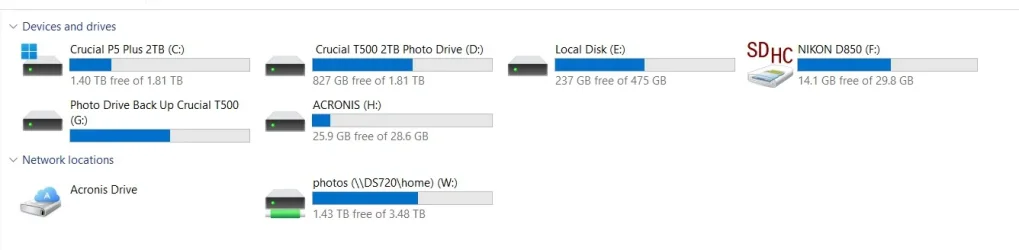
Screenshot 2025-11-04 124516.webp
 
Windows Build/Version
23H2 Build 22631.6133

My Computer My Computer

At a glance

Windows 11 proIntel(R) Core(TM) i7-8850H CPU @ 2.60GHz 2.59...32GBNvidia Quadro P3200
OS
Windows 11 pro
Computer type
Laptop
Manufacturer/Model
HP Zbook
CPU
Intel(R) Core(TM) i7-8850H CPU @ 2.60GHz 2.59 GHz
Motherboard
HP 842D
Memory
32GB
Graphics Card(s)
Nvidia Quadro P3200
Hard Drives
Samsung 980 1TB M.2
Toshiba KXG50ZNV512G M.2
Crucial P5 Plus 2TB M.2
Mouse
MX Master 3
Internet Speed
500MBPS
Browser
Chrome, Edge
Antivirus
Windows defender
This can happen if, for example, you connected the Nikon & Photo drive disks before the Acronis one.
When Windows boots, it's first-come-first-served for drive letters.
If you had connected the Acronis disk yet none of the others, Acronis should be assigned F:\. And then the others would have been G, H if you'd connected them later on.

I hardly ever bother with assigning specific letters to external drives now but, when I used to, I used letters M onwards because they were unlikely to get used up by other devices.
e.g.
If you had assigned M to Acronis, Nikon & Photo drive disks would be F, G as now yet Acronis would still be M.

Denis
 
Last edited:

My Computer My Computer

At a glance

Windows 11 Home x64 Version 25H2 Build 26200....
OS
Windows 11 Home x64 Version 25H2 Build 26200.9168
Sorry, I've been fiddling with my reply.
You'll need to refresh the webpage to see the changed version.


Denis
 

My Computer My Computer

At a glance

Windows 11 Home x64 Version 25H2 Build 26200....
OS
Windows 11 Home x64 Version 25H2 Build 26200.9168
Sorry, I've been fiddling with my reply.
You'll need to refresh the webpage to see the changed version.


Denis
Thanks, in that case i will need to change the drive which i have labled Acronis a different higher letter as Acronis will look for a pacific letter when its updating the rescue media builder, same with the drive labled photo drive back up as Goodsync looks for the same letter drive when its being updated.
 

My Computer My Computer

At a glance

Windows 11 proIntel(R) Core(TM) i7-8850H CPU @ 2.60GHz 2.59...32GBNvidia Quadro P3200
OS
Windows 11 pro
Computer type
Laptop
Manufacturer/Model
HP Zbook
CPU
Intel(R) Core(TM) i7-8850H CPU @ 2.60GHz 2.59 GHz
Motherboard
HP 842D
Memory
32GB
Graphics Card(s)
Nvidia Quadro P3200
Hard Drives
Samsung 980 1TB M.2
Toshiba KXG50ZNV512G M.2
Crucial P5 Plus 2TB M.2
Mouse
MX Master 3
Internet Speed
500MBPS
Browser
Chrome, Edge
Antivirus
Windows defender
Acronis will look for a pacific letter when its updating the rescue media builder
I didn't know Acronis could be set to look for specific drive letters.
I never update the boot 'disk' anyway.
[I only have the sawn-off, free version from Seagate.]

For procedures run by my batch scripts in Windows 10-11, I write the scripts to search for the drive label [e.g. Acronis] then retrieve that to use as the target for backing up / whatever. But that's no use for running Acronis / Goodsync etc.
Identifydrives.bat [post #36] - TenForums


Best of luck,
Denis
 

My Computer My Computer

At a glance

Windows 11 Home x64 Version 25H2 Build 26200....
OS
Windows 11 Home x64 Version 25H2 Build 26200.9168
Your drive letters will remain persistent if you assign letters high in the alphabet. For example, I have one nvme external drive I use for storage that stays connected all the time. It is partitioned into 2 partitions. I assigned it S and T. I have 4 other external nvme drives I plug in randomly that I use for images and other special purposes.. I have assigned them, , U, V, W and X. I mapped my Google Drive to Z. I don't use flash drives much anymore but when I do one will assign a low letter when it's plugged in.
 

My Computers My Computers

  • At a glance

    Windows 11 Pro 25H2 26200.9168i9-10900 10 core 20 threads32 gbnone-Intel UHD Graphics 630
    OS
    Windows 11 Pro 25H2 26200.9168
    Computer type
    PC/Desktop
    Manufacturer/Model
    Dell Optiplex 7080
    CPU
    i9-10900 10 core 20 threads
    Motherboard
    DELL 0J37VM
    Memory
    32 gb
    Graphics Card(s)
    none-Intel UHD Graphics 630
    Sound Card
    Integrated Realtek
    Monitor(s) Displays
    Benq 27
    Screen Resolution
    2560x1440
    Hard Drives
    2x1tb Solidigm m.2 nvme /External drives 512gb Samsung m.2 sata+2tb Kingston m2.nvme
    PSU
    500w
    Case
    MT
    Cooling
    Dell Premium
    Keyboard
    Logitech wired
    Mouse
    Logitech wireless
    Internet Speed
    so slow I'm too embarrassed to tell
    Browser
    #1 Edge #2 Firefox
    Antivirus
    Defender+MWB Premium
  • At a glance

    Windows 11 Pro 24H2 26200.9168AMD Ryzen 7 6800U32 gbintegrated
    Operating System
    Windows 11 Pro 24H2 26200.9168
    Computer type
    PC/Desktop
    Manufacturer/Model
    Beelink Mini PC SER5
    CPU
    AMD Ryzen 7 6800U
    Memory
    32 gb
    Graphics card(s)
    integrated
    Sound Card
    integrated
    Monitor(s) Displays
    Benq 27
    Screen Resolution
    2560x1440
    Hard Drives
    1TB Crucial nvme
    Keyboard
    Logitech wired
    Mouse
    Logitech wireless
    Internet Speed
    still too embarrassed to tell
    Browser
    Firefox
    Antivirus
    Defender
  • System 3 is non compliant Dell 9020 i7-4770/24gb ram Win11 PRO 26200.9168

Latest Support Threads

Back
Top Bottom




