Dual Windows Boot winload.efi error on every restart


Use EasyBCD to manage your Boot loader

You can copy your X:\Users\UserName folders (ie) Desktop,. Downloads, Documents etc from your older Windows 11 drive to your fresh install of Windows 11 in the same folders and install any of your 3rd party apps. (Change X: to the proper drive letter if booted into the newer Windows)
Already suggested this. I guess OP isn't interested?
 

My Computer

System One

  • OS
    WIN 11, WIN 10, WIN 8.1, WIN 7 U, WIN 7 PRO, WIN 7 HOME (32 Bit), LINUX MINT
    Computer type
    PC/Desktop
    Manufacturer/Model
    DIY, ASUS, and DELL
    CPU
    Intel i7 6900K and i9-7960X / AMD 3800X (8 core)
    Motherboard
    ASUS X99E-WS USB 3.1 and ASUS X299 SAGE
    Memory
    128 GB CORSAIR DOMINATOR PLATINUM (B DIE)
    Graphics Card(s)
    NVIDIA 1070 and RTX 3070
    Sound Card
    Crystal Sound (onboard)
    Monitor(s) Displays
    single Samsung 30" 4K and 8" aux monitor
    Screen Resolution
    4K and something equally attrocious. I'll be working on this.
    Hard Drives
    A, B, C, D, E, F, G, H, I, J, K, L, M, N, O, P, Q, R, S, T, U, V, W

    Ports X, Y, and Z are reserved for USB access and removable drives.

    Drive types consist of the following: Various mechanical hard drives bearing the brand names, Seagate, Toshiba, and Western Digital. Various NVMe drives bearing the brand names Kingston, Intel, Silicon Power, Crucial, Western Digital, and Team Group. Various SATA SSDs bearing various different brand names.

    RAID arrays included:

    LSI RAID 10 (WD Velociraptors) 1115.72 GB
    LSI RAID 10 (WD SSDS) 463.80 GB

    INTEL RAID 0 (KINGSTON HYPER X) System 447.14 GB
    INTEL RAID 1 TOSHIBA ENTERPRIZE class Data 2794.52 GB
    INTEL RAID 1 SEAGATE HYBRID 931.51 GB
    PSU
    SEVERAL. I prefer my Corsair Platinum HX1000i but I also like EVGA power supplies
    Case
    ThermalTake Level 10 GT (among others)
    Cooling
    Noctua is my favorite and I use it in my main. I also own various other coolers.
    Keyboard
    all kinds.
    Mouse
    all kinds
    Internet Speed
    360 mbps - 1 gbps (depending)
    Browser
    FIREFOX
    Antivirus
    KASPERSKY (no apologies)
    Other Info
    Gave Dell touch screen with Windows 11 to daughter and got me an OTVOC. Being a PC builder I own many desktop PCs as well. I am a father of five providing PCs, laptops, and tablets for all my family, most of which I have modified, rebuilt, or simply built from scratch. I do not own a cell phone, never have, never will.
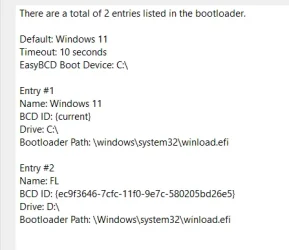
i already tried easybcd made no difference
I'm sorry to hear that. All my mains are multi-boot and I can thank EasyBCD for this. I'll assume you already know how to make a fresh boot strap with it then and that you know how to use it correctly. Easy BCD does have a forum page where they can help with specific booting issues. The choice is entirely yours.
 

My Computer

System One

  • OS
    WIN 11, WIN 10, WIN 8.1, WIN 7 U, WIN 7 PRO, WIN 7 HOME (32 Bit), LINUX MINT
    Computer type
    PC/Desktop
    Manufacturer/Model
    DIY, ASUS, and DELL
    CPU
    Intel i7 6900K and i9-7960X / AMD 3800X (8 core)
    Motherboard
    ASUS X99E-WS USB 3.1 and ASUS X299 SAGE
    Memory
    128 GB CORSAIR DOMINATOR PLATINUM (B DIE)
    Graphics Card(s)
    NVIDIA 1070 and RTX 3070
    Sound Card
    Crystal Sound (onboard)
    Monitor(s) Displays
    single Samsung 30" 4K and 8" aux monitor
    Screen Resolution
    4K and something equally attrocious. I'll be working on this.
    Hard Drives
    A, B, C, D, E, F, G, H, I, J, K, L, M, N, O, P, Q, R, S, T, U, V, W

    Ports X, Y, and Z are reserved for USB access and removable drives.

    Drive types consist of the following: Various mechanical hard drives bearing the brand names, Seagate, Toshiba, and Western Digital. Various NVMe drives bearing the brand names Kingston, Intel, Silicon Power, Crucial, Western Digital, and Team Group. Various SATA SSDs bearing various different brand names.

    RAID arrays included:

    LSI RAID 10 (WD Velociraptors) 1115.72 GB
    LSI RAID 10 (WD SSDS) 463.80 GB

    INTEL RAID 0 (KINGSTON HYPER X) System 447.14 GB
    INTEL RAID 1 TOSHIBA ENTERPRIZE class Data 2794.52 GB
    INTEL RAID 1 SEAGATE HYBRID 931.51 GB
    PSU
    SEVERAL. I prefer my Corsair Platinum HX1000i but I also like EVGA power supplies
    Case
    ThermalTake Level 10 GT (among others)
    Cooling
    Noctua is my favorite and I use it in my main. I also own various other coolers.
    Keyboard
    all kinds.
    Mouse
    all kinds
    Internet Speed
    360 mbps - 1 gbps (depending)
    Browser
    FIREFOX
    Antivirus
    KASPERSKY (no apologies)
    Other Info
    Gave Dell touch screen with Windows 11 to daughter and got me an OTVOC. Being a PC builder I own many desktop PCs as well. I am a father of five providing PCs, laptops, and tablets for all my family, most of which I have modified, rebuilt, or simply built from scratch. I do not own a cell phone, never have, never will.
I'm sorry to hear that. All my mains are multi-boot and I can thank EasyBCD for this. I'll assume you already know how to make a fresh boot strap with it then and that you know how to use it correctly. Easy BCD does have a forum page where they can help with specific booting issues. The choice is entirely yours.
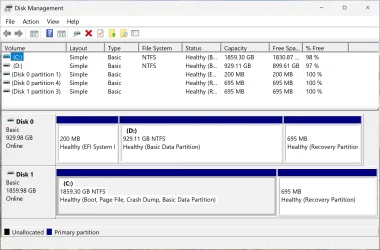
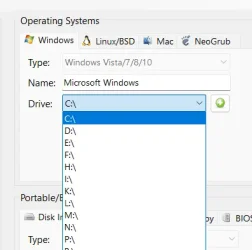
look here on the pictures, i added a new one and added my broken one. but still have issues, is there anything else i can do with it?
 

Attachments

  • image_2025-08-20_150239813.webp
    image_2025-08-20_150239813.webp
    21.6 KB · Views: 4
  • image_2025-08-20_150303776.webp
    image_2025-08-20_150303776.webp
    12.9 KB · Views: 4

My Computer

System One

  • OS
    Windows 11
    Computer type
    PC/Desktop
look here on the pictures, i added a new one and added my broken one. but still have issues, is there anything else i can do with it?
Yes. You can give Entry #2 a drive letter. Call it D. The software will adjust for it being "C" when you attempt to boot to it. Bear in mind that you will NOT be able to boot to it if it is a clone of your existing "C" drive. Let me know what happens.

*correction* I see you have already labeled the drive "D". I apologize for my bad eyes. I have a question. Can you boot to this second drive directly from your UEFI/BIOS? There is a reason I'm asking this. You may have eliminated your boot partition. If you did there is a way to rebuild it. But I would just do a fresh install after stripping my personal data off the drive. That is my way of doing things. To the best of my knowledge two Windows 11 operating systems of the same version won't work unless you keep one disconnected. You should be able to run one Windows 11 Home Edition and one Windows 11 Pro without having to keep one drive disconnected. I know of one fellow here who physically air gaps his drives and reconnects them as he wants to boot them. I'm too lazy for that. I prefer to use a switch box for such things but this is a different subject.

I would need to see your drives in Disc Manager as they are now before I can make any further recommendations. Restoring your boot partition can involve a bit of fiddling about. It can be done but I don't know why the effort would be worth the trouble. Even a drive with a damaged operating system can be accessed via another operating system to extract personal data and files. Yep. I'm a big fan of fresh installs and cloning. I also do a lot of multi-booting.

I don't mean to over-state the obvious but you can't have two copies of the same operating systems using the same activation key on the same PC.
 
Last edited:

My Computer

System One

  • OS
    WIN 11, WIN 10, WIN 8.1, WIN 7 U, WIN 7 PRO, WIN 7 HOME (32 Bit), LINUX MINT
    Computer type
    PC/Desktop
    Manufacturer/Model
    DIY, ASUS, and DELL
    CPU
    Intel i7 6900K and i9-7960X / AMD 3800X (8 core)
    Motherboard
    ASUS X99E-WS USB 3.1 and ASUS X299 SAGE
    Memory
    128 GB CORSAIR DOMINATOR PLATINUM (B DIE)
    Graphics Card(s)
    NVIDIA 1070 and RTX 3070
    Sound Card
    Crystal Sound (onboard)
    Monitor(s) Displays
    single Samsung 30" 4K and 8" aux monitor
    Screen Resolution
    4K and something equally attrocious. I'll be working on this.
    Hard Drives
    A, B, C, D, E, F, G, H, I, J, K, L, M, N, O, P, Q, R, S, T, U, V, W

    Ports X, Y, and Z are reserved for USB access and removable drives.

    Drive types consist of the following: Various mechanical hard drives bearing the brand names, Seagate, Toshiba, and Western Digital. Various NVMe drives bearing the brand names Kingston, Intel, Silicon Power, Crucial, Western Digital, and Team Group. Various SATA SSDs bearing various different brand names.

    RAID arrays included:

    LSI RAID 10 (WD Velociraptors) 1115.72 GB
    LSI RAID 10 (WD SSDS) 463.80 GB

    INTEL RAID 0 (KINGSTON HYPER X) System 447.14 GB
    INTEL RAID 1 TOSHIBA ENTERPRIZE class Data 2794.52 GB
    INTEL RAID 1 SEAGATE HYBRID 931.51 GB
    PSU
    SEVERAL. I prefer my Corsair Platinum HX1000i but I also like EVGA power supplies
    Case
    ThermalTake Level 10 GT (among others)
    Cooling
    Noctua is my favorite and I use it in my main. I also own various other coolers.
    Keyboard
    all kinds.
    Mouse
    all kinds
    Internet Speed
    360 mbps - 1 gbps (depending)
    Browser
    FIREFOX
    Antivirus
    KASPERSKY (no apologies)
    Other Info
    Gave Dell touch screen with Windows 11 to daughter and got me an OTVOC. Being a PC builder I own many desktop PCs as well. I am a father of five providing PCs, laptops, and tablets for all my family, most of which I have modified, rebuilt, or simply built from scratch. I do not own a cell phone, never have, never will.
Yes. You can give Entry #2 a drive letter. Call it D. The software will adjust for it being "C" when you attempt to boot to it. Bear in mind that you will NOT be able to boot to it if it is a clone of your existing "C" drive. Let me know what happens.

*correction* I see you have already labeled the drive "D". I apologize for my bad eyes. I have a question. Can you boot to this second drive directly from your UEFI/BIOS?
Drive D is the broken one and the one i need fixing. when i try booting into it in boot menu in bios i get that winload error. its not a clone of my working windows, its another windows an old one. the broken windows drive is not on the bios list. i only see my working windows m2 drive that has a boot loader. so it uses that to show me the boot menu so i can choose between Windows 11 and FL (FL being the broken one)
 

My Computer

System One

  • OS
    Windows 11
    Computer type
    PC/Desktop
When I first started dual booting Windows I used two drives but left both drives connected when I installed the two versions of Windows. When I removed the drive with the first Windows install I could no longer boot into the second Windows I had installed. I tried all the suggestions I read plus the one for Macrium fixing the boot entry. Nothing worked and I eventually did a clean install. Once I knew it was working I used the Macrium image of the old C: partition I had made to do a restore over the new C: partition. Now when I setup a dual boot I only connect the drive I'm installing Windows on. Once both versions are installed I connect both drives and use EasyBCD to setup the dual boot menu.
 

My Computers

System One System Two

  • OS
    Windows 11 Pro 25H2
    Computer type
    PC/Desktop
    Manufacturer/Model
    PowerSpec B746
    CPU
    Intel Core i7-10700K
    Motherboard
    ASRock Z490 Phantom Gaming 4/ax
    Memory
    16GB (8GB PC4-19200 DDR4 SDRAM x2)
    Graphics Card(s)
    NVIDIA GeForce GTX 1050 TI
    Sound Card
    Realtek Audio
    Monitor(s) Displays
    #1. LG ULTRAWIDE 34" #2. AOC Q32G2WG3 32"
    Screen Resolution
    #1. 3440 X 1440 #2. 1920 x 1080
    Hard Drives
    NVMe WDC WDS100T2B0C-00PXH0 1TB
    Samsung SSD 860 EVO 1TB
    PSU
    750 Watts (62.5A)
    Case
    PowerSpec/Lian Li ATX 205
    Keyboard
    Logitech K270
    Mouse
    Logitech M185
    Browser
    Microsoft Edge and Firefox
    Antivirus
    Webroot SecureAnywhere CE 26.1
  • Operating System
    Windows 11 Canary Channel
    Computer type
    PC/Desktop
    Manufacturer/Model
    PowerSpec G156
    CPU
    Intel Core i5-8400 CPU @ 2.80GHz
    Motherboard
    AsusTeK Prime B360M-A
    Memory
    16 MB DDR 4-2666
    Monitor(s) Displays
    23" Speptre HDMI 75Hz
    Screen Resolution
    1920x1080
    Hard Drives
    Samsung 970 EVO 500GB NVMe
    Keyboard
    Logitek K270
    Mouse
    Logitek M185
    Browser
    Firefox, Edge and Edge Canary
    Antivirus
    Windows Defender
Yes. You can give Entry #2 a drive letter. Call it D. The software will adjust for it being "C" when you attempt to boot to it. Bear in mind that you will NOT be able to boot to it if it is a clone of your existing "C" drive. Let me know what happens.

*correction* I see you have already labeled the drive "D". I apologize for my bad eyes. I have a question. Can you boot to this second drive directly from your UEFI/BIOS? There is a reason I'm asking this. You may have eliminated your boot partition. If you did there is a way to rebuild it. But I would just do a fresh install after stripping my personal data off the drive. That is my way of doing things. To the best of my knowledge two Windows 11 operating systems of the same version won't work unless you keep one disconnected. You should be able to run one Windows 11 Home Edition and one Windows 11 Pro without having to keep one drive disconnected. I know of one fellow here who physically air gaps his drives and reconnects them as he wants to boot them. I'm too lazy for that. I prefer to use a switch box for such things but this is a different subject.

I would need to see your drives in Disc Manager as they are now before I can make any further recommendations. Restoring your boot partition can involve a bit of fiddling about. It can be done but I don't know why the effort would be worth the trouble. Even a drive with a damaged operating system can be accessed via another operating system to extract personal data and files. Yep. I'm a big fan of fresh installs and cloning. I also do a lot of multi-booting.

I don't mean to over-state the obvious but you can't have two copies of the same operating systems using the same activation key on the same PC.
its not the same windows, one is enterprise the other is pro. the broken is pro. and they have different keys. disk 4 is the broken one, disk 6 is working
 

Attachments

  • image_2025-08-20_191644030.webp
    image_2025-08-20_191644030.webp
    20.3 KB · Views: 5

My Computer

System One

  • OS
    Windows 11
    Computer type
    PC/Desktop
The instructions are for Windows 10 but they are the same for Windows 11
Download Minitool Partition Wizard, Create a bootable Windows PE Rescue USB Flash drive within the app.
Boot the computer to the USB Flash drive with a version of Minitool app.
And try the Fix Boot option
 

My Computer

System One

  • OS
    Windows 11 Pro Insider 64 bit 25H2 26200.5742
    Computer type
    PC/Desktop
    Manufacturer/Model
    Gigabyte Z390 UD
    CPU
    Intel Core i7 9700K 3.60
    Motherboard
    Gigabyte Z390 UD
    Memory
    16 GB
    Graphics Card(s)
    nVidia GEForce RTX 2060 Super
    Sound Card
    onboard
    Monitor(s) Displays
    Two 27" Dell 4K monitors
    Screen Resolution
    3840 x 2160
    Hard Drives
    M.2 NVME SSD, 500 GB; Two 2TB Mechanical HDD's
    PSU
    850w PSU
    Case
    Cyberpower PC
    Cooling
    Water cooled
    Keyboard
    Backlit Cyberpower gaming keyboard
    Mouse
    Backlit Cyberpower gaming mouse
    Internet Speed
    1 GB mbps
    Browser
    Brave
    Antivirus
    Windows Security
The instructions are for Windows 10 but they are the same for Windows 11
Download Minitool Partition Wizard, Create a bootable Windows PE Rescue USB Flash drive within the app.
Boot the computer to the USB Flash drive with a version of Minitool app.
And try the Fix Boot option
I already did that with AOMEI partition it can also fix mbr. no change
 

My Computer

System One

  • OS
    Windows 11
    Computer type
    PC/Desktop
Looks like you tried everything, I would backup all your data, and do a Clean Install of Windows.
Be sure to unplug the other Windows disk, or the Windows install will use the hidden EFI Boot partition on the secondary drive as the boot file.
 

My Computer

System One

  • OS
    Windows 11 Pro Insider 64 bit 25H2 26200.5742
    Computer type
    PC/Desktop
    Manufacturer/Model
    Gigabyte Z390 UD
    CPU
    Intel Core i7 9700K 3.60
    Motherboard
    Gigabyte Z390 UD
    Memory
    16 GB
    Graphics Card(s)
    nVidia GEForce RTX 2060 Super
    Sound Card
    onboard
    Monitor(s) Displays
    Two 27" Dell 4K monitors
    Screen Resolution
    3840 x 2160
    Hard Drives
    M.2 NVME SSD, 500 GB; Two 2TB Mechanical HDD's
    PSU
    850w PSU
    Case
    Cyberpower PC
    Cooling
    Water cooled
    Keyboard
    Backlit Cyberpower gaming keyboard
    Mouse
    Backlit Cyberpower gaming mouse
    Internet Speed
    1 GB mbps
    Browser
    Brave
    Antivirus
    Windows Security
Looks like you tried everything, I would backup all your data, and do a Clean Install of Windows.
Be sure to unplug the other Windows disk, or the Windows install will use the hidden EFI Boot partition on the secondary drive as the boot file.
i dont need to reinstall new windows, i already have a working one. ill leave the other one so i can backup what i need from it and then just format the drive and use it as storage
 

My Computer

System One

  • OS
    Windows 11
    Computer type
    PC/Desktop
its not the same windows, one is enterprise the other is pro. the broken is pro. and they have different keys. disk 4 is the broken one, disk 6 is working
Thank you for informing me on this. Well, it should work and I'm not sure what the issue is. If I had a spare enterprise OS just kicking around I'd make sure I kept the license key on file and opt for a fresh install to give my PC a multi-boot option. I pretty much use the same method WinUser mentioned above. That is, to disconnect all drives except the one I'm installing on to at first make each boot independently from the BIOS once I reconnect the drives. Then, as an added convenience, I install Easy BCD as this will give me a boot screen to select from without having to boot to my OS of choice from the UEFI/BIOS.

Rescuing your personal data from the faulty drive should not be a problem if it shows up in Disk Management. Just right click on the drive represented in Disk Management and open it. Then you can drag and drop your personal files into a folder (made by you) on your desk top. Once you have done this you can remove all the partitions from the faulty drive, reformat that faulty drive, completely shut down the PC, disconnect the working drive with the functional OS, and proceed to install your other Windows OS on the once upon a time faulty drive. *Edit* Remember to shut down PC and reconnect the other drive after you're done.

i dont need to reinstall new windows, i already have a working one. ill leave the other one so i can backup what i need from it and then just format the drive and use it as storage

This too is an option but I'm sorry to see you're giving up so soon on running a multi-boot PC. Once you have it figured out it's really easy and it's handy to have your options. Anyway, user preference prevails. :-)
 

My Computer

System One

  • OS
    WIN 11, WIN 10, WIN 8.1, WIN 7 U, WIN 7 PRO, WIN 7 HOME (32 Bit), LINUX MINT
    Computer type
    PC/Desktop
    Manufacturer/Model
    DIY, ASUS, and DELL
    CPU
    Intel i7 6900K and i9-7960X / AMD 3800X (8 core)
    Motherboard
    ASUS X99E-WS USB 3.1 and ASUS X299 SAGE
    Memory
    128 GB CORSAIR DOMINATOR PLATINUM (B DIE)
    Graphics Card(s)
    NVIDIA 1070 and RTX 3070
    Sound Card
    Crystal Sound (onboard)
    Monitor(s) Displays
    single Samsung 30" 4K and 8" aux monitor
    Screen Resolution
    4K and something equally attrocious. I'll be working on this.
    Hard Drives
    A, B, C, D, E, F, G, H, I, J, K, L, M, N, O, P, Q, R, S, T, U, V, W

    Ports X, Y, and Z are reserved for USB access and removable drives.

    Drive types consist of the following: Various mechanical hard drives bearing the brand names, Seagate, Toshiba, and Western Digital. Various NVMe drives bearing the brand names Kingston, Intel, Silicon Power, Crucial, Western Digital, and Team Group. Various SATA SSDs bearing various different brand names.

    RAID arrays included:

    LSI RAID 10 (WD Velociraptors) 1115.72 GB
    LSI RAID 10 (WD SSDS) 463.80 GB

    INTEL RAID 0 (KINGSTON HYPER X) System 447.14 GB
    INTEL RAID 1 TOSHIBA ENTERPRIZE class Data 2794.52 GB
    INTEL RAID 1 SEAGATE HYBRID 931.51 GB
    PSU
    SEVERAL. I prefer my Corsair Platinum HX1000i but I also like EVGA power supplies
    Case
    ThermalTake Level 10 GT (among others)
    Cooling
    Noctua is my favorite and I use it in my main. I also own various other coolers.
    Keyboard
    all kinds.
    Mouse
    all kinds
    Internet Speed
    360 mbps - 1 gbps (depending)
    Browser
    FIREFOX
    Antivirus
    KASPERSKY (no apologies)
    Other Info
    Gave Dell touch screen with Windows 11 to daughter and got me an OTVOC. Being a PC builder I own many desktop PCs as well. I am a father of five providing PCs, laptops, and tablets for all my family, most of which I have modified, rebuilt, or simply built from scratch. I do not own a cell phone, never have, never will.

His problem is between the two disks - he has (made known to me) 3 EFI Partitions (System Partitions).................
the only Partitions that should be on the second disk is the Second OS and Data..........
 

My Computer

System One

  • OS
    Windows
1) Please run the V2 log collector > post a share link


2) Run diskparinfo > post a share link


My Computer

System One

  • OS
    Windows 10
    Computer type
    Laptop
    Manufacturer/Model
    HP
    CPU
    Intel(R) Core(TM) i7-4800MQ CPU @ 2.70GHz
    Motherboard
    Product : 190A Version : KBC Version 94.56
    Memory
    16 GB Total: Manufacturer : Samsung MemoryType : DDR3 FormFactor : SODIMM Capacity : 8GB Speed : 1600
    Graphics Card(s)
    NVIDIA Quadro K3100M; Intel(R) HD Graphics 4600
    Sound Card
    IDT High Definition Audio CODEC; PNP Device ID HDAUDIO\FUNC_01&VEN_111D&DEV_76E0
    Hard Drives
    Model Hitachi HTS727575A9E364
    Antivirus
    Microsoft Defender
    Other Info
    Mobile Workstation
His problem is between the two disks - he has (made known to me) 3 EFI Partitions (System Partitions).................
the only Partitions that should be on the second disk is the Second OS and Data..........
I was under the impression that he removed those additional partitions. No worries. He is happy with what he has.
 

My Computer

System One

  • OS
    WIN 11, WIN 10, WIN 8.1, WIN 7 U, WIN 7 PRO, WIN 7 HOME (32 Bit), LINUX MINT
    Computer type
    PC/Desktop
    Manufacturer/Model
    DIY, ASUS, and DELL
    CPU
    Intel i7 6900K and i9-7960X / AMD 3800X (8 core)
    Motherboard
    ASUS X99E-WS USB 3.1 and ASUS X299 SAGE
    Memory
    128 GB CORSAIR DOMINATOR PLATINUM (B DIE)
    Graphics Card(s)
    NVIDIA 1070 and RTX 3070
    Sound Card
    Crystal Sound (onboard)
    Monitor(s) Displays
    single Samsung 30" 4K and 8" aux monitor
    Screen Resolution
    4K and something equally attrocious. I'll be working on this.
    Hard Drives
    A, B, C, D, E, F, G, H, I, J, K, L, M, N, O, P, Q, R, S, T, U, V, W

    Ports X, Y, and Z are reserved for USB access and removable drives.

    Drive types consist of the following: Various mechanical hard drives bearing the brand names, Seagate, Toshiba, and Western Digital. Various NVMe drives bearing the brand names Kingston, Intel, Silicon Power, Crucial, Western Digital, and Team Group. Various SATA SSDs bearing various different brand names.

    RAID arrays included:

    LSI RAID 10 (WD Velociraptors) 1115.72 GB
    LSI RAID 10 (WD SSDS) 463.80 GB

    INTEL RAID 0 (KINGSTON HYPER X) System 447.14 GB
    INTEL RAID 1 TOSHIBA ENTERPRIZE class Data 2794.52 GB
    INTEL RAID 1 SEAGATE HYBRID 931.51 GB
    PSU
    SEVERAL. I prefer my Corsair Platinum HX1000i but I also like EVGA power supplies
    Case
    ThermalTake Level 10 GT (among others)
    Cooling
    Noctua is my favorite and I use it in my main. I also own various other coolers.
    Keyboard
    all kinds.
    Mouse
    all kinds
    Internet Speed
    360 mbps - 1 gbps (depending)
    Browser
    FIREFOX
    Antivirus
    KASPERSKY (no apologies)
    Other Info
    Gave Dell touch screen with Windows 11 to daughter and got me an OTVOC. Being a PC builder I own many desktop PCs as well. I am a father of five providing PCs, laptops, and tablets for all my family, most of which I have modified, rebuilt, or simply built from scratch. I do not own a cell phone, never have, never will.
Hyper-V virtual machine
Windows 11 24H2 build 26100.4349 ISO file
Macrium Reflect Home 10.0.8576

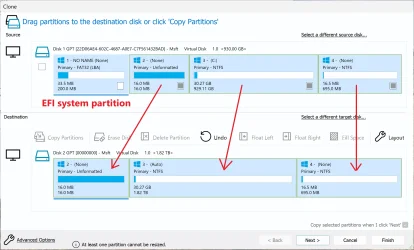
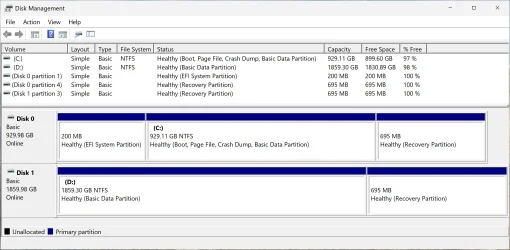
1.webp

2.webp

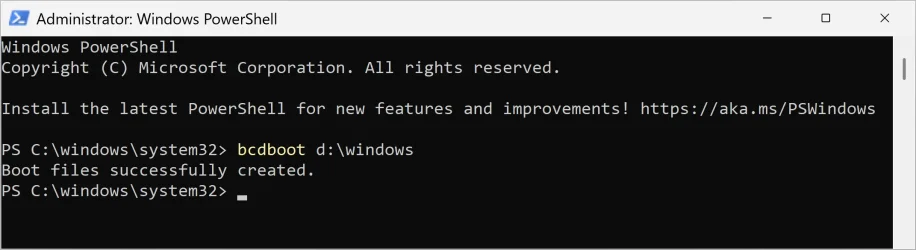
Add boot option (image below).
Run the following command as administrator:

bcdboot x:\windows

- replace "x" with the drive letter of the cloned Windows partition

3.webp

You can now boot into the cloned Windows (image below).

4.webp

Optional. Enables verbose mode. Example:

bcdboot d:\windows /v

Code:
PS C:\windows\system32> bcdboot d:\windows /v
BFSVC: ServiceBootFiles MuiOnly:n Res:y Fonts:y BootMgrOvw:n BootStatOvw:n DbgTrn:y SuspendBDE:n Offline:n
BFSVC: Using EX bins because bootmgfw on ESP is 2023 already.
BFSVC: Using source OS version a000065f40001
BFSVC: Copying boot files CopyBootManager(Yes) d:\windows\boot\EFI -> \\?\GLOBALROOT\Device\HarddiskVolume1\EFI\Microsoft\Boot
BFSVC: Destination Boot.stl exists. Will copy both boot.stls (current and pending) to the destination.
BFSVC: Updating \\?\GLOBALROOT\Device\HarddiskVolume1\EFI\Boot\bootx64.efi
BFSVC: Creating Recovery directory.
BFSVC: Logging boot file servicing to bootstat log \\?\GLOBALROOT\Device\HarddiskVolume1\EFI\Microsoft\Boot\BOOTSTAT.DAT.
BFSVC: Copying font files from d:\windows\boot\Fonts to \\?\GLOBALROOT\Device\HarddiskVolume1\EFI\Microsoft\Boot\Fonts...
BFSVC: Copying resource files from d:\windows\boot\Resources to \\?\GLOBALROOT\Device\HarddiskVolume1\EFI\Microsoft\Boot\Resources...
BFSVC: Servicing debugger files
BFSVC: List of debugger files is empty
BFSVC: System partition is not in a space
BFSVC: BfsInitializeBcdStore flags(0x0000000c) RetainElementData:n DelExistinObject:n
BFSVC: VolumePathName for d:\windows is d:\
BFSVC: SystemRoot is \windows
BFSVC: Opening template from \Device\HarddiskVolume6\windows\System32\config\BCD-Template.
BFSVC: Reopening system store.
BFSVC: Creating General objects.
BFSVC: Creating Resume object.
BFSVC: Creating MemTest object.
BFSVC: Creating OsLoader object.
BFSVC: OsLoader identifier: {fc51a37f-7dd2-11f0-9431-de43990a398d}
BFSVC: Removing duplicate entries.
BFSVC: Removing duplicate object {fc51a37d-7dd2-11f0-9431-de43990a398d}
BFSVC: Create BOOTMGR object RetainBootDefault:n
BFSVC: Setting {default} to {fc51a37f-7dd2-11f0-9431-de43990a398d}
BFSVC: Cleaning up debugger settings.
BFSVC: Cleaning up hypervisor settings.
BFSVC: Opening recovery store from \Device\HarddiskVolume1\EFI\Microsoft\Recovery\BCD
BFSVC: Creating General objects.
BFSVC: Create BOOTMGR object RetainBootDefault:y
BFSVC: Setting {default} to {2ff3e490-7dfc-11f0-a5ec-00155d010400}
Boot files successfully created.
PS C:\windows\system32>
 

My Computers

System One System Two

  • OS
    Windows 11 Pro
    Computer type
    PC/Desktop
    CPU
    AMD Ryzen 9 9950X3D
    Motherboard
    ASRock B650E Taichi Lite
    Memory
    Kingston FURY Beast 64GB (2x32GB) DDR5 6000MT/s
    Graphics Card(s)
    ASUS TUF Gaming Radeon RX 9070 OC Edition 16GB GDDR6
    Hard Drives
    Solidigm P44 Pro 2TB M.2 NVMe SSD
  • Operating System
    Windows 11 Home
    Computer type
    Laptop
    Manufacturer/Model
    Lenovo Legion Pro 7i Gen 10 16"
    CPU
    Intel Core Ultra 9 275HX
    Memory
    64GB (2x 32GB) DDR5-6400
    Graphics card(s)
    NVIDIA GeForce RTX 5080 16GB GDDR7 Laptop GPU
    Hard Drives
    2x 1TB M.2 NVMe SSD (SK Hynix)
It behooves me to say that that looks to be a sensible fix. (y)
 

My Computer

System One

  • OS
    WIN 11, WIN 10, WIN 8.1, WIN 7 U, WIN 7 PRO, WIN 7 HOME (32 Bit), LINUX MINT
    Computer type
    PC/Desktop
    Manufacturer/Model
    DIY, ASUS, and DELL
    CPU
    Intel i7 6900K and i9-7960X / AMD 3800X (8 core)
    Motherboard
    ASUS X99E-WS USB 3.1 and ASUS X299 SAGE
    Memory
    128 GB CORSAIR DOMINATOR PLATINUM (B DIE)
    Graphics Card(s)
    NVIDIA 1070 and RTX 3070
    Sound Card
    Crystal Sound (onboard)
    Monitor(s) Displays
    single Samsung 30" 4K and 8" aux monitor
    Screen Resolution
    4K and something equally attrocious. I'll be working on this.
    Hard Drives
    A, B, C, D, E, F, G, H, I, J, K, L, M, N, O, P, Q, R, S, T, U, V, W

    Ports X, Y, and Z are reserved for USB access and removable drives.

    Drive types consist of the following: Various mechanical hard drives bearing the brand names, Seagate, Toshiba, and Western Digital. Various NVMe drives bearing the brand names Kingston, Intel, Silicon Power, Crucial, Western Digital, and Team Group. Various SATA SSDs bearing various different brand names.

    RAID arrays included:

    LSI RAID 10 (WD Velociraptors) 1115.72 GB
    LSI RAID 10 (WD SSDS) 463.80 GB

    INTEL RAID 0 (KINGSTON HYPER X) System 447.14 GB
    INTEL RAID 1 TOSHIBA ENTERPRIZE class Data 2794.52 GB
    INTEL RAID 1 SEAGATE HYBRID 931.51 GB
    PSU
    SEVERAL. I prefer my Corsair Platinum HX1000i but I also like EVGA power supplies
    Case
    ThermalTake Level 10 GT (among others)
    Cooling
    Noctua is my favorite and I use it in my main. I also own various other coolers.
    Keyboard
    all kinds.
    Mouse
    all kinds
    Internet Speed
    360 mbps - 1 gbps (depending)
    Browser
    FIREFOX
    Antivirus
    KASPERSKY (no apologies)
    Other Info
    Gave Dell touch screen with Windows 11 to daughter and got me an OTVOC. Being a PC builder I own many desktop PCs as well. I am a father of five providing PCs, laptops, and tablets for all my family, most of which I have modified, rebuilt, or simply built from scratch. I do not own a cell phone, never have, never will.
Hyper-V virtual machine
Windows 11 24H2 build 26100.4349 ISO file
Macrium Reflect Home 10.0.8576

View attachment 142962

View attachment 142963

Add boot option (image below).
Run the following command as administrator:

bcdboot x:\windows

- replace "x" with the drive letter of the cloned Windows partition

View attachment 142964

You can now boot into the cloned Windows (image below).

View attachment 142965

Optional. Enables verbose mode. Example:

bcdboot d:\windows /v

Code:
PS C:\windows\system32> bcdboot d:\windows /v
BFSVC: ServiceBootFiles MuiOnly:n Res:y Fonts:y BootMgrOvw:n BootStatOvw:n DbgTrn:y SuspendBDE:n Offline:n
BFSVC: Using EX bins because bootmgfw on ESP is 2023 already.
BFSVC: Using source OS version a000065f40001
BFSVC: Copying boot files CopyBootManager(Yes) d:\windows\boot\EFI -> \\?\GLOBALROOT\Device\HarddiskVolume1\EFI\Microsoft\Boot
BFSVC: Destination Boot.stl exists. Will copy both boot.stls (current and pending) to the destination.
BFSVC: Updating \\?\GLOBALROOT\Device\HarddiskVolume1\EFI\Boot\bootx64.efi
BFSVC: Creating Recovery directory.
BFSVC: Logging boot file servicing to bootstat log \\?\GLOBALROOT\Device\HarddiskVolume1\EFI\Microsoft\Boot\BOOTSTAT.DAT.
BFSVC: Copying font files from d:\windows\boot\Fonts to \\?\GLOBALROOT\Device\HarddiskVolume1\EFI\Microsoft\Boot\Fonts...
BFSVC: Copying resource files from d:\windows\boot\Resources to \\?\GLOBALROOT\Device\HarddiskVolume1\EFI\Microsoft\Boot\Resources...
BFSVC: Servicing debugger files
BFSVC: List of debugger files is empty
BFSVC: System partition is not in a space
BFSVC: BfsInitializeBcdStore flags(0x0000000c) RetainElementData:n DelExistinObject:n
BFSVC: VolumePathName for d:\windows is d:\
BFSVC: SystemRoot is \windows
BFSVC: Opening template from \Device\HarddiskVolume6\windows\System32\config\BCD-Template.
BFSVC: Reopening system store.
BFSVC: Creating General objects.
BFSVC: Creating Resume object.
BFSVC: Creating MemTest object.
BFSVC: Creating OsLoader object.
BFSVC: OsLoader identifier: {fc51a37f-7dd2-11f0-9431-de43990a398d}
BFSVC: Removing duplicate entries.
BFSVC: Removing duplicate object {fc51a37d-7dd2-11f0-9431-de43990a398d}
BFSVC: Create BOOTMGR object RetainBootDefault:n
BFSVC: Setting {default} to {fc51a37f-7dd2-11f0-9431-de43990a398d}
BFSVC: Cleaning up debugger settings.
BFSVC: Cleaning up hypervisor settings.
BFSVC: Opening recovery store from \Device\HarddiskVolume1\EFI\Microsoft\Recovery\BCD
BFSVC: Creating General objects.
BFSVC: Create BOOTMGR object RetainBootDefault:y
BFSVC: Setting {default} to {2ff3e490-7dfc-11f0-a5ec-00155d010400}
Boot files successfully created.
PS C:\windows\system32>
did not work
 

My Computer

System One

  • OS
    Windows 11
    Computer type
    PC/Desktop
When available please update the progress with post #75.
 

My Computer

System One

  • OS
    Windows 10
    Computer type
    Laptop
    Manufacturer/Model
    HP
    CPU
    Intel(R) Core(TM) i7-4800MQ CPU @ 2.70GHz
    Motherboard
    Product : 190A Version : KBC Version 94.56
    Memory
    16 GB Total: Manufacturer : Samsung MemoryType : DDR3 FormFactor : SODIMM Capacity : 8GB Speed : 1600
    Graphics Card(s)
    NVIDIA Quadro K3100M; Intel(R) HD Graphics 4600
    Sound Card
    IDT High Definition Audio CODEC; PNP Device ID HDAUDIO\FUNC_01&VEN_111D&DEV_76E0
    Hard Drives
    Model Hitachi HTS727575A9E364
    Antivirus
    Microsoft Defender
    Other Info
    Mobile Workstation
Back
Top Bottom