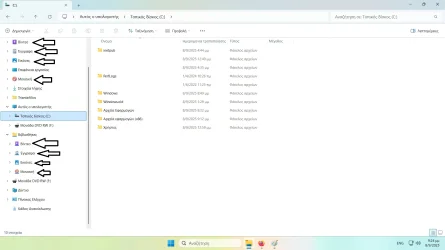
It seems like you need to remove “Libraries” from the bottom navigation pane.
Or Remove “Quick Access” from the top of the navigation pane.
I don’t believe they are “Duplicate Folders”
Tutorials attached at the bottom of this post.
Your File Explorer Navigation Pane is as follows:
Folder translations (for members):
Code:
Greek → English (System Folders)

- Βίντεο → Videos
- Έγγραφα → Documents
- Εικόνες → Pictures
- Επιφάνεια εργασίας → Desktop
- Μουσική → Music
- Στοιχεία λήψης → Downloads
- Αυτός ο υπολογιστής → This PC
- Τοπικός δίσκος (C:) → Local Disk (C:)
- Μονάδα DVD RW (F:) → DVD RW Drive (F:)
- Βιβλιοθήκες → Libraries
- Δίκτυο → Network
- Πίνακας Ελέγχου → Control Panel
- Κάδος Ανακύκλωσης → Recycle Bin
File Explorer Navigation Pane:
Quick Access
- Βίντεο → Videos
- Έγγραφα → Documents
- Εικόνες → Pictures
- Επιφάνεια εργασίας → Desktop
- Μουσική → Music
- Στοιχεία λήψης → Downloads
This PC
- Τοπικός δίσκος (C:) → Local Disk (C:)
- Μονάδα DVD RW (F:) → DVD RW Drive (F:)
Libraries
- Βίντεο → Videos
- Έγγραφα → Documents
- Εικόνες → Pictures
- Μουσική → Music
Other
- Δίκτυο → Network
- Πίνακας Ελέγχου → Control Panel
- Κάδος Ανακύκλωσης → Recycle Bin
Use this to remove the bottom duplicate entries (Libraries):
This tutorial will show you how to add or remove Libraries in the navigation pane of File Explorer for your account or all users in Windows 11. Libraries are virtual containers which provide users with a single coherent view of their files even when those files are stored in different...

www.elevenforum.com
Or
Use this to remove the top entries (Quick Access):
This tutorial will show you how to add or remove the Quick access section in File Explorer Home for all users in Windows 11. Starting with Windows 11 build 22593, Quick access in File Explorer (Win+E) is now called Home. The name Quick access has been repurposed for the pinned/frequent Folders...
www.elevenforum.com