- Local time
- 11:37 AM
- Posts
- 353
- Location
- San Juan-Abra, Philippines
- OS
- Windows 11 Home 26H2 build: 26300.9550
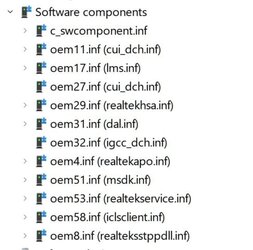
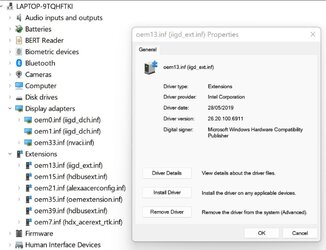
After installing the latest Intel DCH gpu driver (Intel's Display Installer app) for my Acer a515-54G I found 12 old duplicate drivers that I deleted with RAPR. Some that I was not sure of (attached) I did not delete yet (oem 11, 13 and oem 31) but I am getting Event error 7011: "A timeout (30000 milliseconds) was reached while waiting for a transaction response from the igfxCUIService" and a 2 seconds BSOD during saving a link with Edge. I have 2 igfxCUIService drivers running (2019 and 2022) according to Device Mngr (attached) and wonder if I should delete the old (2019) one?
I have no issues, no event errors other than an Info event about that DAL driver (oem 31) that I am inclined to uninstall and delete.
I posted these questions also on the Intel forum but did not get a reply yet (cannot even find my post).
Thanks
Frank
I have no issues, no event errors other than an Info event about that DAL driver (oem 31) that I am inclined to uninstall and delete.
I posted these questions also on the Intel forum but did not get a reply yet (cannot even find my post).
Thanks
Frank
- Windows Build/Version
- W11 Home 21H2 22000.918
Attachments

My Computers
-
At a glance
Windows 11 Home 26H2 build: 26300.9550Intel(R) Core(TM) Ultra 7 258V, 2200 Mhz, 8 C...32 GB LPDDR5X (soldered)Intel(R) Arc(TM) 140V GPU (16GB)- OS
- Windows 11 Home 26H2 build: 26300.9550
- Computer type
- Laptop
- Manufacturer/Model
- Acer Swift Edge SFE14-51T
- CPU
- Intel(R) Core(TM) Ultra 7 258V, 2200 Mhz, 8 Cores
- Motherboard
- NB.JG411.004 mainboard, manufactured by Compal.
- Memory
- 32 GB LPDDR5X (soldered)
- Graphics Card(s)
- Intel(R) Arc(TM) 140V GPU (16GB)
- Sound Card
- RealTek + Intel Smart Sound
- Monitor(s) Displays
- 14" OLED matte Touch
- Screen Resolution
- 2880 x1800 x120Hz
- Hard Drives
- KINGSTON OM8PGP41024Q-AA, NVMe Gen4, 1TB
- PSU
- 65W USB-C charger
- Case
- Magnesium aluminum alloy body
- Cooling
- 1 fan
- Keyboard
- US with Backlight
- Mouse
- Precision Trackpad
- Internet Speed
- 25 Mb/s 5G
- Browser
- Edge
- Antivirus
- Windows Defender
- Other Info
- BIOS Version/Date: IInsyde Corp. V1.06, 3/16/2026, Windows Hello IR camera with Facial recognition. Secure Boot 2026 KEK key installed
-
At a glance
Windows 11 Home 26H2 build: 26300.9550Intel 12th Gen. i7 12700H, 14 cores, 2.3 GHz ...8GB LPDDR4 on board + 8GB LPDDR4 3200 MHz in ...Intel Iris Xe supports up to 4096 x 2304 @ 120Hz- Operating System
- Windows 11 Home 26H2 build: 26300.9550
- Computer type
- Laptop
- Manufacturer/Model
- Asus Vivobook K3502Z S15 15" OLED
- CPU
- Intel 12th Gen. i7 12700H, 14 cores, 2.3 GHz (24M Cache, up to 4.7 GHz, 6P+8E cores)
- Motherboard
- Alder Lake-H, 1700-4700 MHz clock rate
- Memory
- 8GB LPDDR4 on board + 8GB LPDDR4 3200 MHz in Dual Channel.
- Graphics card(s)
- Intel Iris Xe supports up to 4096 x 2304 @ 120Hz
- Sound Card
- Harman Kardon - DTS
- Monitor(s) Displays
- OLED 15.6inch 2.8K (2880 x 1620)
- Screen Resolution
- 16:9 aspect ratio 0.2ms response time 120Hz refresh rate, 550nits
- Hard Drives
- 512GB M.2 NVMe Gen4 PCIe 4.0 SSD, Micron_2450_MTFDKBA512TFK
- PSU
- 90-Watt USB charger (Thunderbolt4)
- Case
- Metal lid, plastic case
- Cooling
- 1 fan
- Keyboard
- With adjustable backlight
- Mouse
- Precision Trackpad
- Internet Speed
- ISP provides 15 mb/s WIFI LTE (4G), laptop WIFI 6 adapter.
- Browser
- Edge
- Antivirus
- Windows Defender
- Other Info
- BIOS American Megatrends International, LLC. 10.1.2.312, 13/03/2024. Network adapter: Intel Wi-Fi 6E AX211 160 MHz, Secure Boot 2026 KEK key installed