Eliminate ALL other users than myself


I get what you're trying to do and I've tried that too. However, trying to safely gut the infrastructure of the Registry to fully stop all programs from using these Library names is not safe and Microsoft will potentially re-enable this structure during certain updates.

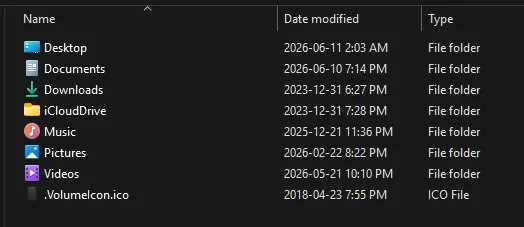
I do store the majority of such items on Another Drive all under D:\MyData
1782846679538.webp

I could rename the folders if wanted but to ease the pain of day to day file management it's probably best to simply move the folders where you want and live with it. Even changing the folders to another drive and location using the approved method still results in many programs that will not 100% function correctly as they do not honor the move folder redirection used by Windows.

Trying to 100% fully abandon what and how Microsoft stores document types can be done but speaking for myself I find it too annoying on the daily as most modern Windows Apps do expect it to 1. Be on the C: drive. 2. Be under your profile 3. Use the specific names Microsoft chose.
 

My Computer My Computer

At a glance

Windows 10Intel i9-9900K64GBEVGA GeForce GTX 1070 TI
OS
Windows 10
Computer type
PC/Desktop
Manufacturer/Model
MSI Custom build
CPU
Intel i9-9900K
Motherboard
MSI MPG Z390 Gaming Edge AC
Memory
64GB
Graphics Card(s)
EVGA GeForce GTX 1070 TI
Internet Speed
1 Gbps
Browser
Firefox
Antivirus
Malwarebytes
I was speaking more in terms of hide/unhide vs. enable/disable.

In other words, can the account stay unhidden while being disabled at the same time?
People can sometimes be loose in the way they refer to this account.
The account is either enabled or disabled.
Are you possibly referring to whether or not its user profile folder is visible or hidden in File explorer?


Denis
 

My Computer My Computer

At a glance

Windows 11 Home x64 Version 25H2 Build 26200....
OS
Windows 11 Home x64 Version 25H2 Build 26200.8037
Are you possibly referring to whether or not its user profile folder is visible or hidden in File explorer?

Visible to a point that where if I want to quickly enable the admin account (or profile), I can get to it real fast and then switch. I don't want to dig around in menus or submenus to look for it.
 

My Computers My Computers

  • At a glance

    Windows 11 Pro 25H2 build: (26200.7623)32GB
    OS
    Windows 11 Pro 25H2 build: (26200.7623)
    Computer type
    Laptop
    Manufacturer/Model
    Microsoft Surface Pro
    Memory
    32GB
  • At a glance

    Microsoft 25H2 ProIntel Core Ultra 764GBIntel Integrated Graphics
    Operating System
    Microsoft 25H2 Pro
    Computer type
    Laptop
    Manufacturer/Model
    Dell Pro 14 - PC14250
    CPU
    Intel Core Ultra 7
    Memory
    64GB
    Graphics card(s)
    Intel Integrated Graphics
    Hard Drives
    Micron 1TB SSD
if I want to quickly enable the admin account
The built-in Admin account is enabled using a command not a menu item.
Its profile folder can be seen in File explorer only after it has been logged into at least once.

I remain confused about what you are referring to in sentences containing both enabled/disabled & visible/hidden as it seems to me that you are referring to both the account and its profile folder as though they were the same thing.


Denis
 

My Computer My Computer

At a glance

Windows 11 Home x64 Version 25H2 Build 26200....
OS
Windows 11 Home x64 Version 25H2 Build 26200.8037
Thanks for the response.

I was speaking more in terms of hide/unhide vs. enable/disable.

In other words, can the account stay unhidden while being disabled at the same time?

Again, thanks

The account would be hidden while disabled. There's not a hide/unhide option. Only enable/disable. Its profile folder will always remain once enabled and signed in to the first time.
 

My Computers My Computers

  • At a glance

    Windows 11 Pro for WorkstationsIntel i7-8700K 5 GHz64 GB (4x16GB) G.SKILL TridentZ RGB DDR4 3600...ASUS ROG-STRIX-GTX1080TI-O11G-GAMING (11GB GD...
    OS
    Windows 11 Pro for Workstations
    Computer type
    PC/Desktop
    Manufacturer/Model
    Custom self build
    CPU
    Intel i7-8700K 5 GHz
    Motherboard
    ASUS ROG Maximus XI Formula Z390
    Memory
    64 GB (4x16GB) G.SKILL TridentZ RGB DDR4 3600 MHz (F4-3600C18D-32GTZR)
    Graphics Card(s)
    ASUS ROG-STRIX-GTX1080TI-O11G-GAMING (11GB GDDR5X)
    Sound Card
    Integrated Digital Audio (S/PDIF)
    Monitor(s) Displays
    2 x Samsung Odyssey G75 27"
    Screen Resolution
    2560x1440
    Hard Drives
    1TB Samsung 990 PRO M.2,
    4TB Samsung 990 PRO M.2,
    TerraMaster F8 SSD Plus NAS
    PSU
    Seasonic Prime Titanium 850W
    Case
    Thermaltake Core P3 wall mounted
    Cooling
    Corsair Hydro H115i
    Keyboard
    Amazon Basics Wired Full Keyboard MD005
    Mouse
    Logitech MX Master 4
    Internet Speed
    2 Gbps Download and 100 Mbps Upload
    Browser
    Chrome and Edge
    Antivirus
    Microsoft Defender
    Other Info
    Logitech Z625 speaker system,
    Logitech BRIO 4K Pro webcam,
    HP Color LaserJet Pro MFP M477fdn,
    CyberPower CP1500PFCLCD
    Galaxy S23 Plus phone
  • At a glance

    Windows 11 ProSnapdragon X Elite (12 core) 3.42 GHz16 GB LPDDR5x-7467 MHz
    Operating System
    Windows 11 Pro
    Computer type
    Laptop
    Manufacturer/Model
    Surface Laptop 7 Copilot+ PC
    CPU
    Snapdragon X Elite (12 core) 3.42 GHz
    Memory
    16 GB LPDDR5x-7467 MHz
    Monitor(s) Displays
    15" HDR
    Screen Resolution
    2496 x 1664
    Hard Drives
    1 TB SSD
    Internet Speed
    Wi-Fi 7 and Bluetooth 5.4
    Browser
    Chrome and Edge
    Antivirus
    Microsoft Defender
Visible to a point that where if I want to quickly enable the admin account (or profile), I can get to it real fast and then switch. I don't want to dig around in menus or submenus to look for it.
Why?

I've been using and supporting Windows now for decades. This security model has been in place now many years and I've never once had to enable and login as the local Administrator account.

I have used elevated account methods such as TrustedInstaller for very specific reasons but not the actual local administrator account. How it's called with security tokens works just fine.
 

My Computer My Computer

At a glance

Windows 10Intel i9-9900K64GBEVGA GeForce GTX 1070 TI
OS
Windows 10
Computer type
PC/Desktop
Manufacturer/Model
MSI Custom build
CPU
Intel i9-9900K
Motherboard
MSI MPG Z390 Gaming Edge AC
Memory
64GB
Graphics Card(s)
EVGA GeForce GTX 1070 TI
Internet Speed
1 Gbps
Browser
Firefox
Antivirus
Malwarebytes
The account would be hidden while disabled. There's not a hide/unhide option. Only enable/disable. Its profile folder will always remain once enabled and signed in to the first time.

Ok, Brink just answered my question. That's what I was getting at. (y)

And thanks to all for all your help.
 

My Computers My Computers

  • At a glance

    Windows 11 Pro 25H2 build: (26200.7623)32GB
    OS
    Windows 11 Pro 25H2 build: (26200.7623)
    Computer type
    Laptop
    Manufacturer/Model
    Microsoft Surface Pro
    Memory
    32GB
  • At a glance

    Microsoft 25H2 ProIntel Core Ultra 764GBIntel Integrated Graphics
    Operating System
    Microsoft 25H2 Pro
    Computer type
    Laptop
    Manufacturer/Model
    Dell Pro 14 - PC14250
    CPU
    Intel Core Ultra 7
    Memory
    64GB
    Graphics card(s)
    Intel Integrated Graphics
    Hard Drives
    Micron 1TB SSD
By default, the built-in Admin account has UAC challenges disabled [but they can easily be enabled if desired], whilst
By default, an Admin account created by a user has UAC challenges enabled [but they can easily be disabled if desired].
It's not the same. To make UAC really disabled you must go to HKEY_LOCAL_MACHINE\SOFTWARE\Microsoft\Windows\CurrentVersion\Policies\ and set EnableLUA DWORD value to 0

I don't know what that C:\Config.msi folder in your diagram is. I don't have one even with HS items unhidden.
What account are you signed into in that diagram? - a WhoAmI cmd would show that. Are you by any chance using utility that lets you emulate the System user?
My Windows 10 computer has a C:\Config.msi folder and an Admin user I created can open it in a cmd window but not in File explorer [File explorer does not run elevated so that was not a surprise].

Denis
To make the images I enabled and logged as the system administrator and as Luiz
I think C:\Config.msi folder was created when I installed MS Office. Now it's empty. Only the System administrator has access to it.

Denis, I don't want to argue with you. You showed your point of view and so do I.
My intention was to show that, in order to log in as a second administrator to fix a corrupted profile, some can use the built in System Administrator instead of creating a new user.
 
Last edited:

My Computers My Computers

  • At a glance

    Windows 11 Pro - Windows 7 HP 64 - Lubuntui5 6600K - 800MHz to 4400MHz4+4G GSkill DDR4 3000IG - Intel 530
    OS
    Windows 11 Pro - Windows 7 HP 64 - Lubuntu
    Computer type
    PC/Desktop
    Manufacturer/Model
    custom build
    CPU
    i5 6600K - 800MHz to 4400MHz
    Motherboard
    GA-Z170-HD3P
    Memory
    4+4G GSkill DDR4 3000
    Graphics Card(s)
    IG - Intel 530
    Monitor(s) Displays
    Samsung 226BW
    Screen Resolution
    1680x1050
    Hard Drives
    (1) -1 SM951 – 128GB M.2 AHCI PCIe SSD drive for Win 11
    (2) -1 WD SATA 3 - 1T for Data
    (3) -1 WD SATA 3 - 1T for backup
    (4) -1 BX500 SSD - 256G for Windows 7 and Lubuntu
    PSU
    Thermaltake 450W TR2 gold
    Keyboard
    Old and good Chicony mechanical keyboard
    Mouse
    Logitech mX performance - 9 buttons (had to disable some)
    Internet Speed
    500 Mb/s
    Browser
    Firefox 64
  • At a glance

    Windows 11 Proi7-4500U 800- 3000MHz(4+4)G DDR3 1600IG intel 4400 + NVIDIA GeForce GT 745M
    Operating System
    Windows 11 Pro
    Computer type
    Laptop
    Manufacturer/Model
    Asus Q550LF
    CPU
    i7-4500U 800- 3000MHz
    Motherboard
    Asus Q550LF
    Memory
    (4+4)G DDR3 1600
    Graphics card(s)
    IG intel 4400 + NVIDIA GeForce GT 745M
    Sound Card
    Realtek
    Monitor(s) Displays
    LG Display LP156WF4-SPH1
    Screen Resolution
    1920 x 1080
    Hard Drives
    BX500 120G SSD for Windows and programs
    & 1T HDD for data
    Internet Speed
    500 Mb/s
    Browser
    Firefox 64
I've been using and supporting Windows now for decades. This security model has been in place now many years and I've never once had to enable and login as the local Administrator account.

Aye. We’ve had the Administrator account disabled and the password randomized since Windows 2000. Never been a problem.
 

My Computer My Computer

At a glance

Windows 11 Pro 25H212th Gen Core i7-1260P64 GB Micron PC4-25600Intel Iris Xe Graphics
OS
Windows 11 Pro 25H2
Computer type
PC/Desktop
Manufacturer/Model
Intel NUC12WSHi7
CPU
12th Gen Core i7-1260P
Motherboard
NUC12WSBi7
Memory
64 GB Micron PC4-25600
Graphics Card(s)
Intel Iris Xe Graphics
Sound Card
on-board Realtek HD Audio
Monitor(s) Displays
Dell U3219Q
Screen Resolution
3840 x 2160
Hard Drives
Samsung SSD 990 PRO 1TB
Crucial MX500 2 TB
Keyboard
CODE 104-Key mechanical with Cherry MX Clears
Antivirus
Microsoft Defender
I don't think I'm explaining well what my gripe is:
First thing I want to do is delete all the windows 11 libraries for every user profile. I do not use windows libraries, I create my own folders and place them where it makes sense and works for me. When I open File Explorer I see several sets of libraries and I do not want them or use them, or see them.
Second, I understand that MS created and embedded several "users" in the OS for MS and other entities to use on my PC. While I have to accept MS's use on the misnamed "user" to download MS updates to my PC, I am the only one that ever uses this PC, I have security on it, and I do not want to see or use the "users" in black. These only get in my way and are distracting without providing any use to me. All I want to see in file explorer are the two red users not the other "users."
1782849124749.webp
Third, I want to ensure that when I download anything it goes to the one and only folder I use for downloads and that I placed where I can easily see it and manipulate it and secure it.

There is NOBODY else that has access to this PC, so I do not need an "All Users", "Default", "Default User", "DefaultAppPool" or "Public" user. If these "users" have to be kept (which I will try to avoid) I at least want to hide them in file explorer, even when I click "show hidden files, so I do not have to search through more than 2 "users". And I want to get rid of all the worthless (to me) libraries. If "Public" has to be kept, at least name it something else and place it elsewhere.

Windows may be designed for a system with multiple users, but at home I would guess the vast majority of home users never have anyone else on their PC. I would suggest to MS that they design a Windows 11 version that is structured for only one user.
 

My Computer My Computer

At a glance

Windows 11
OS
Windows 11
Computer type
PC/Desktop
I don't think I'm explaining well what my gripe is:
First thing I want to do is delete all the windows 11 libraries for every user profile. I do not use windows libraries, I create my own folders and place them where it makes sense and works for me. When I open File Explorer I see several sets of libraries and I do not want them or use them, or see them.
Second, I understand that MS created and embedded several "users" in the OS for MS and other entities to use on my PC. While I have to accept MS's use on the misnamed "user" to download MS updates to my PC, I am the only one that ever uses this PC, I have security on it, and I do not want to see or use the "users" in black. These only get in my way and are distracting without providing any use to me. All I want to see in file explorer are the two red users not the other "users."
View attachment 175630
Third, I want to ensure that when I download anything it goes to the one and only folder I use for downloads and that I placed where I can easily see it and manipulate it and secure it.

There is NOBODY else that has access to this PC, so I do not need an "All Users", "Default", "Default User", "DefaultAppPool" or "Public" user. If these "users" have to be kept (which I will try to avoid) I at least want to hide them in file explorer, even when I click "show hidden files, so I do not have to search through more than 2 "users". And I want to get rid of all the worthless (to me) libraries. If "Public" has to be kept, at least name it something else and place it elsewhere.

Windows may be designed for a system with multiple users, but at home I would guess the vast majority of home users never have anyone else on their PC. I would suggest to MS that they design a Windows 11 version that is structured for only one user.
You may find post #21 useful. There are some things that are hard coded into the OS that will break other things if you change them. I doubt MS is going to change their methodology of the last three decades.
 

My Computer My Computer

At a glance

Windows 11 25H2Broadwell-e 6850K 4.5ghz @1.36v32GB Corsair LPM 3600 C16EVGA RTX 3080Ti FTW
OS
Windows 11 25H2
Computer type
PC/Desktop
Manufacturer/Model
EVGA home brew
CPU
Broadwell-e 6850K 4.5ghz @1.36v
Motherboard
EVGA X99 FTW K
Memory
32GB Corsair LPM 3600 C16
Graphics Card(s)
EVGA RTX 3080Ti FTW
Sound Card
Asus Centurion true 7.1 headset. (5 speakers in each earpeice)
Monitor(s) Displays
LG C4 55"
Screen Resolution
4K 144hz
Hard Drives
Various models of SSDs ~10TB No HDDs installed.
PSU
be quiet! BN516 Straight Power 12-1000w 80 Plus Platinum
Case
Corsair 780T modified to dual 200mm intake fans
Cooling
Corsair H110i
Keyboard
Corsair K95 Platinum
Mouse
Corsair M65 RGB Elite
Internet Speed
50Mbs
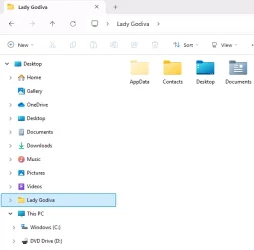
I think it would be easiest to start by turning on the "Show all folders" option in Explorer's folder options. One of the things that does is add an entry to the left navigation pane for the current user's home directory. If you use that, you never need to go into the Users folder and see all these other folders with which you seem to take issue.

showing home directory.webp

Then, if you want, you can hide some of the items in the left navigation pane: Music, Pictures, Home, etc. I only use a few of them and have the rest hidden.

Speaking of folder options, the reason you're seeing the "All Users" and "Default User" folders is because you have unhidden protected OS files. That's not the default for Explorer, and it's generally unnecessary. I can tell you that "All Users" and "Default User" don't really need to exist anymore; they're there for backward compatibility and are just pointers to other folders. But really, just hide protected OS folders and they'll go away.
 

My Computer My Computer

At a glance

Windows 11 Pro 25H212th Gen Core i7-1260P64 GB Micron PC4-25600Intel Iris Xe Graphics
OS
Windows 11 Pro 25H2
Computer type
PC/Desktop
Manufacturer/Model
Intel NUC12WSHi7
CPU
12th Gen Core i7-1260P
Motherboard
NUC12WSBi7
Memory
64 GB Micron PC4-25600
Graphics Card(s)
Intel Iris Xe Graphics
Sound Card
on-board Realtek HD Audio
Monitor(s) Displays
Dell U3219Q
Screen Resolution
3840 x 2160
Hard Drives
Samsung SSD 990 PRO 1TB
Crucial MX500 2 TB
Keyboard
CODE 104-Key mechanical with Cherry MX Clears
Antivirus
Microsoft Defender
Back
Top Bottom