Browsers and Mail Enable or Disable Personalize Advertising and Experiences in Microsoft Edge

  • Thread starter Thread starter Brink
  • Start date Published: Start date Updated Updated:

Microsoft_Edge_banner.png

This tutorial will show you how to enable or disable personalize advertising and experiences in Microsoft Edge for your account or all users in Windows 10 and Windows 11.

The Microsoft Edge web browser included in Windows 11 is based on Chromium and was released on January 15, 2020. It is compatible with all supported versions of Windows, and macOS. With speed, performance, best in class compatibility for websites and extensions, and built-in privacy and security features.

You can turn on or off Allow Microsoft to save your browsing activity including history, usage, favorites, web content, and other browsing data to personalize Microsoft Edge and Microsoft services like ads, search, shopping and news..

If turned on, Microsoft Edge will collect and use your browsing activity to personalize advertising and experiences for Microsoft Edge, Microsoft Bing, Microsoft News, and other Microsoft services. Microsoft will use your browsing activity to make your web experience, including ads, search results, and news articles, more relevant and useful to you.

Your browsing activity currently includes things such as:
  • Browsing history
  • Favorite sites like your favorites and collections
  • Usage data about how you use the browser
  • Web content like the pages you view
  • Device data like version number
For example, when Microsoft personalizes Microsoft Edge Shopping, if Microsoft infers from your browsing activity that you prefer shopping at a particular store, the coupons or advertising you see might be customized to display that store’s products. Similarly, when Microsoft personalizes your news, if you frequently look at travel blogs and read travel articles, then your Microsoft news feed might display more relevant news content about traveling.

This data will not be collected while browsing InPrivate or Guest.

Your customer content, like notes in your Collections, will never be used to personalize advertisements.

If turned off to stop sharing this data, Microsoft will no longer collect and use your browsing activity for personalization of advertising or experiences from that point forward.

You can turn this off any time and manage your data in the Microsoft privacy dashboard.

Reference:


Contents

  • Option One: Turn On or Off Personalize Advertising and Experiences in Microsoft Edge for Current User
  • Option Two: Enable or Disable Personalize Advertising and Experiences in Microsoft Edge for All Users


Option One

Turn On or Off Personalize Advertising and Experiences in Microsoft Edge for Current User


1 Open Microsoft Edge.

2 Click/tap on the Settings and more (Alt+F) 3 dots menu icon, and click/tap on Settings. (see screenshot below)

Microsoft_Edge_settings.png

3 Click/tap on Privacy, search, and services in the left pane, and click/tap on Privacy in the right pane. (see screenshot below)

If you do not see a left pane, then either click/tap on the 3 bars menu button towards the top left OR widen the horizontal borders of the Microsoft Edge window until you do.


Microsoft_Edge_personalization_and_advertising-1.webp

4 Turn On (default) or Off Allow Microsoft to save your browsing activity including history, usage, favorites, web content, and other browsing data to personalize Microsoft Edge and Microsoft services like ads, search, shopping and news. for what you want. (see screenshot below)

Microsoft_Edge_personalization_and_advertising-2.webp

5 You can now close the Settings tab in Microsoft Edge if you like.


Option Two

Enable or Disable Personalize Advertising and Experiences in Microsoft Edge for All Users


You must be signed in as an administrator to use this option.

This option uses the PersonalizationReportingEnabled policy for Microsoft Edge.


1 Do step 2 (enable) or step 3 (disable) below for what you want.

2 Enable Personalize Advertising and Experiences in Microsoft Edge

This is the default setting to allow using Option One.


A) Click/tap on the Download button below to download the REG file below, and go to step 4 below.​

Enable_advertising_and_experiences_in_Microsoft_Edge.reg


(Contents of REG file for reference)
Code:
Windows Registry Editor Version 5.00

[HKEY_LOCAL_MACHINE\SOFTWARE\Policies\Microsoft\Edge]
"PersonalizationReportingEnabled"=-

3 Disable Personalize Advertising and Experiences in Microsoft Edge for All Users

This will override and prevent using Option One.


This will also disable Secure DNS.


A) Click/tap on the Download button below to download the REG file below, and go to step 4 below.​

Disable_personalize_advertising_and_experiences_in_Microsoft_Edge_for_all_users.reg


(Contents of REG file for reference)
Code:
Windows Registry Editor Version 5.00

[HKEY_LOCAL_MACHINE\SOFTWARE\Policies\Microsoft\Edge]
"PersonalizationReportingEnabled"=dword:00000000

4 Save the .reg file to your desktop.

5 If you have Smart App Control turned on, you will need to unblock the downloaded REG file.

6 Double click/tap on the downloaded .reg file to merge it.

7 When prompted, click/tap on Run, Yes (UAC), Yes, and OK to approve the merge.

8 If Microsoft Edge is currently open, then close and reopen Microsoft Edge to apply.

9 You can now delete the downloaded .reg file if you like.


That's it,
Shawn Brink


Attachments

Last edited:

I vote for... disable. Oh wait... this isn't a poll. :D
 

My Computers

System One System Two

  • OS
    Win 11 Home ♦♦♦26200.8457 ♦♦♦♦♦♦♦25H2
    Computer type
    PC/Desktop
    Manufacturer/Model
    Built by Ghot® [May 2020]
    CPU
    AMD Ryzen 7 3700X
    Motherboard
    Asus Pro WS X570-ACE (BIOS 5302)
    Memory
    G.Skill (F4-3200C14D-16GTZKW)
    Graphics Card(s)
    EVGA RTX 2070 (08G-P4-2171-KR)
    Sound Card
    Realtek ALC1220P / ALC S1220A
    Monitor(s) Displays
    Dell U3011 30"
    Screen Resolution
    2560 x 1600
    Hard Drives
    2x Samsung 860 EVO 500GB,
    WD 4TB Black FZBX - SATA III,
    WD 8TB Black FZBX - SATA III,
    DRW-24B1ST CD/DVD Burner
    PSU
    PC Power & Cooling 750W Quad EPS12V
    Case
    Cooler Master ATCS 840 Tower
    Cooling
    CM Hyper 212 EVO (push/pull)
    Keyboard
    Ducky DK9008 Shine II Blue LED
    Mouse
    Logitech Optical M-100
    Internet Speed
    300/300
    Browser
    Firefox (latest)
    Antivirus
    Bitdefender Total Security
    Other Info
    Speakers: Klipsch Pro Media 2.1
  • Operating System
    Windows XP Pro 32bit w/SP3
    Computer type
    PC/Desktop
    Manufacturer/Model
    Built by Ghot® (not in use)
    CPU
    AMD Athlon 64 X2 5000+ (OC'd @ 3.2Ghz)
    Motherboard
    ASUS M2N32-SLI Deluxe Wireless Edition
    Memory
    TWIN2X2048-6400C4DHX (2 x 1GB, DDR2 800)
    Graphics card(s)
    EVGA 256-P2-N758-TR GeForce 8600GT SSC
    Sound Card
    Onboard
    Monitor(s) Displays
    ViewSonic G90FB Black 19" Professional (CRT)
    Screen Resolution
    up to 2048 x 1536
    Hard Drives
    WD 36GB 10,000rpm Raptor SATA
    Seagate 80GB 7200rpm SATA
    Lite-On LTR-52246S CD/RW
    Lite-On LH-18A1P CD/DVD Burner
    PSU
    PC Power & Cooling Silencer 750 Quad EPS12V
    Case
    Generic Beige case, 80mm fans
    Cooling
    ZALMAN 9500A 92mm CPU Cooler
    Keyboard
    Logitech Classic Keybooard 200
    Mouse
    Logitech Optical M-BT96a
    Internet Speed
    300/300
    Browser
    Firefox 3.x ??
    Antivirus
    Symantec (Norton)
    Other Info
    Still assembled, still runs. Haven't turned it on for 15 years?
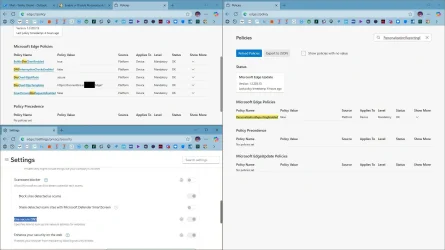
btw if you disable this from registry you can't enable Secure DNS options, it's greyed out
 

My Computer

System One

  • OS
    Windows 11
    Computer type
    PC/Desktop
    Manufacturer/Model
    Intel
    CPU
    7800x3D
    Motherboard
    MSI X690E TOMHAWK
    Memory
    KINGSTONE DDR5
    Graphics Card(s)
    ZOTAC 4090 AMP EXTREME
    Sound Card
    Creative SXFI AMP
    Monitor(s) Displays
    Samsung S90C
    Screen Resolution
    3840x2160
    Hard Drives
    Nmve WD850N 1TB
    SanDisk SDSSDXPS480G
    Samsung SSD 840 PRO Series 256Gb
    WDC Enterprise Gold 16TB 512MB
    WDC Enterprise Gold 6TB 256MB
    PSU
    ThermalTake ToughPower 1650
    Case
    Obsidian Series™ 750D Airflow Edition Full Tower ATX Case
    Cooling
    Arctic Liquid Freezer II 360
    Keyboard
    SteelSeries APEX PRO
    Mouse
    SwitPoint Z2
    Internet Speed
    5000/500
    Browser
    CHROME
    Antivirus
    ESET Internet Security
btw if you disable this from registry you can't enable Secure DNS options, it's greyed out
Then you can enable Secure DNS using registry as well.
 

Attachments

  • capture_10182025_132707.webp
    capture_10182025_132707.webp
    112 KB · Views: 30

My Computer

System One

  • OS
    Home26H2Can
    Computer type
    PC/Desktop
    CPU
    AMD Ryzen 5 8600G (07/24)
    Motherboard
    ASROCK B650M-HDV/M.2 (07/24) BIOS 4.21 AGESA ComboAM5 1.3.0.1 (04/26)
    Memory
    2x32GB Kingston FURY DDR5 5600 MHz CL36 @5200 CL36 (07/24)
    Graphics Card(s)
    ASROCK Radeon RX 6600 Challenger D 8G @48FPS (08/24)
    Sound Card
    Creative Sound BlasterX AE-5 Plus (05/24)
    Monitor(s) Displays
    24" Philips 24M1N3200ZS/00 (05/24)
    Screen Resolution
    1920×1080@165Hz via DP1.4
    Hard Drives
    Kingston KC3000 NVMe 2TB (05/24)
    ADATA XPG GAMMIX S11 Pro 512GB (07/19)
    PSU
    Seasonic Core GM 550 Gold (04/24)
    Case
    Fractal Design Define 7 Mini with 3x Noctua NF-P14s/12@555rpm (04/24)
    Cooling
    Noctua NH-U12S with Noctua NF-P12 (04/24)
    Keyboard
    HP Pavilion Wired Keyboard 300 (07/24) + Rabalux 76017 Parker (01/24)
    Mouse
    Logitech M330 Silent Plus (01/26)
    Internet Speed
    500/100 Mbps via RouterOS (05/21) & TCP Optimizer
    Browser
    Edge, Brave for YouTube, LibreWolf for FB
    Antivirus
    NextDNS blocking 1/3 Traffic
    Other Info
    Phone: Motorola Moto G86 (02/26)
    Backup: Hasleo Backup Suite (PreOS)
    Headphones: Sennheiser RS170 (09/10)
    Chair: Huzaro Force 4.4 Grey Mesh (05/24)
    Notifier: Xiaomi Mi Band 9 Milanese (10/24)
    FlexCore USB-C 3.2 Gen 1 (M) to LAN (F) (08/25)
btw if you disable this from registry you can't enable Secure DNS options, it's greyed out

Hello, :alien:

I'm still able to turn on and set Secure DNS settings in Edge when Allow Microsoft to save your browsing activity including history, usage, favorites, web content, and other browsing data to personalize Microsoft Edge and Microsoft services like ads, search, shopping and news is turned off.
 

My Computers

System One System Two

  • OS
    Windows 11 Pro for Workstations
    Computer type
    PC/Desktop
    Manufacturer/Model
    Custom self build
    CPU
    Intel i7-8700K 5 GHz
    Motherboard
    ASUS ROG Maximus XI Formula Z390
    Memory
    64 GB (4x16GB) G.SKILL TridentZ RGB DDR4 3600 MHz (F4-3600C18D-32GTZR)
    Graphics Card(s)
    ASUS ROG-STRIX-GTX1080TI-O11G-GAMING (11GB GDDR5X)
    Sound Card
    Integrated Digital Audio (S/PDIF)
    Monitor(s) Displays
    2 x Samsung Odyssey G75 27"
    Screen Resolution
    2560x1440
    Hard Drives
    1TB Samsung 990 PRO M.2,
    4TB Samsung 990 PRO M.2,
    TerraMaster F8 SSD Plus NAS
    PSU
    Seasonic Prime Titanium 850W
    Case
    Thermaltake Core P3 wall mounted
    Cooling
    Corsair Hydro H115i
    Keyboard
    Amazon Basics Wired Full Keyboard MD005
    Mouse
    Logitech MX Master 4
    Internet Speed
    2 Gbps Download and 100 Mbps Upload
    Browser
    Chrome and Edge
    Antivirus
    Microsoft Defender
    Other Info
    Logitech Z625 speaker system,
    Logitech BRIO 4K Pro webcam,
    HP Color LaserJet Pro MFP M477fdn,
    CyberPower CP1500PFCLCD
    Galaxy S23 Plus phone
  • Operating System
    Windows 11 Pro
    Computer type
    Laptop
    Manufacturer/Model
    Surface Laptop 7 Copilot+ PC
    CPU
    Snapdragon X Elite (12 core) 3.42 GHz
    Memory
    16 GB LPDDR5x-7467 MHz
    Monitor(s) Displays
    15" HDR
    Screen Resolution
    2496 x 1664
    Hard Drives
    1 TB SSD
    Internet Speed
    Wi-Fi 7 and Bluetooth 5.4
    Browser
    Chrome and Edge
    Antivirus
    Microsoft Defender
Hello, :alien:

I'm still able to turn on and set Secure DNS settings in Edge when Allow Microsoft to save your browsing activity including history, usage, favorites, web content, and other browsing data to personalize Microsoft Edge and Microsoft services like ads, search, shopping and news is turned off.
from the application yes. but when adding the registry to disable it, the secure options is disable. it says managed by your something
 

My Computer

System One

  • OS
    Windows 11
    Computer type
    PC/Desktop
    Manufacturer/Model
    Intel
    CPU
    7800x3D
    Motherboard
    MSI X690E TOMHAWK
    Memory
    KINGSTONE DDR5
    Graphics Card(s)
    ZOTAC 4090 AMP EXTREME
    Sound Card
    Creative SXFI AMP
    Monitor(s) Displays
    Samsung S90C
    Screen Resolution
    3840x2160
    Hard Drives
    Nmve WD850N 1TB
    SanDisk SDSSDXPS480G
    Samsung SSD 840 PRO Series 256Gb
    WDC Enterprise Gold 16TB 512MB
    WDC Enterprise Gold 6TB 256MB
    PSU
    ThermalTake ToughPower 1650
    Case
    Obsidian Series™ 750D Airflow Edition Full Tower ATX Case
    Cooling
    Arctic Liquid Freezer II 360
    Keyboard
    SteelSeries APEX PRO
    Mouse
    SwitPoint Z2
    Internet Speed
    5000/500
    Browser
    CHROME
    Antivirus
    ESET Internet Security
from the application yes. but when adding the registry to disable it, the secure options is disable. it says managed by your something

Ah, so it does. Strange the policy will disable Secure DNS, but the setting doesn't. Warning added.
 

My Computers

System One System Two

  • OS
    Windows 11 Pro for Workstations
    Computer type
    PC/Desktop
    Manufacturer/Model
    Custom self build
    CPU
    Intel i7-8700K 5 GHz
    Motherboard
    ASUS ROG Maximus XI Formula Z390
    Memory
    64 GB (4x16GB) G.SKILL TridentZ RGB DDR4 3600 MHz (F4-3600C18D-32GTZR)
    Graphics Card(s)
    ASUS ROG-STRIX-GTX1080TI-O11G-GAMING (11GB GDDR5X)
    Sound Card
    Integrated Digital Audio (S/PDIF)
    Monitor(s) Displays
    2 x Samsung Odyssey G75 27"
    Screen Resolution
    2560x1440
    Hard Drives
    1TB Samsung 990 PRO M.2,
    4TB Samsung 990 PRO M.2,
    TerraMaster F8 SSD Plus NAS
    PSU
    Seasonic Prime Titanium 850W
    Case
    Thermaltake Core P3 wall mounted
    Cooling
    Corsair Hydro H115i
    Keyboard
    Amazon Basics Wired Full Keyboard MD005
    Mouse
    Logitech MX Master 4
    Internet Speed
    2 Gbps Download and 100 Mbps Upload
    Browser
    Chrome and Edge
    Antivirus
    Microsoft Defender
    Other Info
    Logitech Z625 speaker system,
    Logitech BRIO 4K Pro webcam,
    HP Color LaserJet Pro MFP M477fdn,
    CyberPower CP1500PFCLCD
    Galaxy S23 Plus phone
  • Operating System
    Windows 11 Pro
    Computer type
    Laptop
    Manufacturer/Model
    Surface Laptop 7 Copilot+ PC
    CPU
    Snapdragon X Elite (12 core) 3.42 GHz
    Memory
    16 GB LPDDR5x-7467 MHz
    Monitor(s) Displays
    15" HDR
    Screen Resolution
    2496 x 1664
    Hard Drives
    1 TB SSD
    Internet Speed
    Wi-Fi 7 and Bluetooth 5.4
    Browser
    Chrome and Edge
    Antivirus
    Microsoft Defender
Back
Top Bottom