Apps Enable or Disable UserChoice Protection Driver (UCPD) in Windows 11 and 10

  • Thread starter Thread starter Brink
  • Start date Published: Start date Updated Updated:

Default_app_banner.png

This tutorial will show you how to enable or disable the "UserChoice Protection Driver" (UCPD) service for all users in Windows 10 and Windows 11.

Microsoft has quietly introduced the UserChoice Protection Driver (UCPD) service that is enabled and running by default to block third-party apps access to UserChoice registry keys to prevent changing default apps choices set by users.

UCPD will still allows access, but only if the process is signed by Microsoft and not on the deny list. This means third-party programs will be blocked from making changes to default apps. The deny list includes Windows tools (ex: regedit.exe, reg.exe, or powershell.exe) to prevent third-party app developers from using them as workaround to make changes to default apps.

UCPD does not prevent users from manually making changes to their default apps settings. UCPD only affects third-party apps.


UCPD can be a good security feature to prevent third-party apps from making unwanted or unknown changes to your default apps choices.

However, if UCPD is blocking a third-party app you want to use to make changes to your default apps, you are able to disable UCPD to allow third-party apps to make changes to default apps again.

Reference:


Contents


Option One

Check if UCPD is Currently Enabled or Disabled


1 Open Windows Terminal, and select either Windows PowerShell or Command Prompt.

2 Copy and paste the appropriate command below into Windows Terminal, and press Enter. (see screenshots below)

Command Prompt:
sc query ucpd

OR​

Windows PowerShell:
Get-Service ucpd

3 Look to see if the STATE (command) or Status (PowerShell) shows as Running (enabled - default) or Stopped (disabled).

query_ucpd_command_running.png
query_ucpd_command_stopped.png

query_ucpd_PowerShell_running.png
query_ucpd_PowerShell_stopped.png


Option Two

Enable or Disable UCPD


You must be signed in as an administrator to use this option.


1 Open Windows Terminal (Admin), and select either Windows PowerShell or Command Prompt.

2 Do step 3 (enable) or step 4 (disable) below for what you want.

3 Enable UCPD

This is the default setting.


A) Copy and paste each appropriate command below into Windows Terminal (Admin), and press Enter after each command. (see screenshots below)​

Command Prompt:
sc config UCPD start=auto

schtasks /change /Enable /TN "\Microsoft\Windows\AppxDeploymentClient\UCPD velocity"

OR​

Windows PowerShell:
Set-Service -Name UCPD -StartupType Automatic

Enable-ScheduledTask -TaskName "\Microsoft\Windows\AppxDeploymentClient\UCPD velocity"

B) Restart the computer to apply.​

enable_ucpd_command.png
enable_ucpd_PowerShell.png

4 Disable UCPD

A) Copy and paste each appropriate command below into Windows Terminal (Admin), and press Enter after each command. (see screenshots below)​

Command Prompt:
sc config UCPD start=disabled

schtasks /change /Disable /TN "\Microsoft\Windows\AppxDeploymentClient\UCPD velocity"

OR​

Windows PowerShell:
Set-Service -Name UCPD -StartupType Disabled

Disable-ScheduledTask -TaskName "\Microsoft\Windows\AppxDeploymentClient\UCPD velocity"

B) Restart the computer to apply.​

disable_ucpd_command.png
disable_ucpd_PowerShell.png


That's it,
Shawn Brink


Last edited:
Microsoft is doing this on purpose because the average user doesnt know how to set default apps. And because they made the default app screen worse in windows 11 vs windows 10, it will be more annoying to set programs as default.

I bet you can still right click a file extension and do the open with and then choose default app > always but this is still frustrating. They are purposely making it harder for other browsers and programs to easily allow them to be the default so they can push edge and other microsoft apps. The fact vlc and other non browser apps have no button to make it the default for anything it can open and you have to slowly select every single extension is ridiculous.

If the default apps settings panel wasn't so awful, this wouldnt be so bad. But this isn't a users choice protection at all. It's a way for microsoft to push their stuff even more.


The one and only benefit from this which I do like is it could help potentially stop malware from changing program defaults to open up nefarious things, but I doubt this was the reason microsoft have done this. It is definitely more about trying to control the average user into using the microsoft services.
 

My Computers

System One System Two

  • OS
    Windows 11 Pro
    Computer type
    PC/Desktop
    Manufacturer/Model
    Custom Built
    CPU
    Ryzen 7 5700 X3D
    Motherboard
    MSI MPG B550 GAMING PLUS
    Memory
    64 GB DDR4 3600mhz Gskill Ripjaws V
    Graphics Card(s)
    RTX 4070 Super , 12GB VRAM Asus EVO Overclock
    Monitor(s) Displays
    Gigabyte M27Q (rev. 2.0) 2560 x 1440 @ 170hz HDR
    Hard Drives
    2TB Samsung nvme ssd
    4TB Western Digital nvme ssd
    PSU
    CORSAIR RMx SHIFT Series™ RM750x 80 PLUS Gold Fully Modular ATX Power Supply
    Case
    CORSAIR 3500X ARGB Mid-Tower ATX PC Case – Black
    Cooling
    ID-COOLING FROSTFLOW X 240 CPU Water Cooler
    Keyboard
    Logitech G213
    Mouse
    Logitech G203
    Internet Speed
    1.2gbps Fiber 😎
  • Operating System
    Chrome OS
    Computer type
    Laptop
    Manufacturer/Model
    HP Chromebook
    CPU
    Intel Pentium Quad Core
    Memory
    4GB LPDDR4
    Monitor(s) Displays
    14 Inch HD SVA anti glare micro edge display
    Hard Drives
    64 GB emmc
@Brink are you sure about this sc config UPCD start-disabled command isn't executed with = symbol like so sc config UPCD start=disabled all SC command you posted are same.
 

My Computer

System One

  • OS
    Windows 11
    Computer type
    PC/Desktop
    Manufacturer/Model
    HP Pavilion
    CPU
    AMD Ryzen 7 5700G
    Motherboard
    Erica6
    Memory
    Micron Technology DDR4-3200 16GB
    Graphics Card(s)
    NVIDIA GeForce RTX 3060
    Sound Card
    Realtek ALC671
    Monitor(s) Displays
    Samsung SyncMaster U28E590
    Screen Resolution
    3840 x 2160
    Hard Drives
    SAMSUNG MZVLQ1T0HALB-000H1
@Brink are you sure about this sc config UPCD start-disabled command isn't executed with = symbol like so sc config UPCD start=disabled all SC command you posted are same.
Correct. It should be = and not - in the command. :shawn:
 

My Computers

System One System Two

  • OS
    Windows 11 Pro for Workstations
    Computer type
    PC/Desktop
    Manufacturer/Model
    Custom self build
    CPU
    Intel i7-8700K 5 GHz
    Motherboard
    ASUS ROG Maximus XI Formula Z390
    Memory
    64 GB (4x16GB) G.SKILL TridentZ RGB DDR4 3600 MHz (F4-3600C18D-32GTZR)
    Graphics Card(s)
    ASUS ROG-STRIX-GTX1080TI-O11G-GAMING (11GB GDDR5X)
    Sound Card
    Integrated Digital Audio (S/PDIF)
    Monitor(s) Displays
    2 x Samsung Odyssey G75 27"
    Screen Resolution
    2560x1440
    Hard Drives
    1TB Samsung 990 PRO M.2,
    4TB Samsung 990 PRO M.2,
    TerraMaster F8 SSD Plus NAS
    PSU
    Seasonic Prime Titanium 850W
    Case
    Thermaltake Core P3 wall mounted
    Cooling
    Corsair Hydro H115i
    Keyboard
    Amazon Basics Wired Full Keyboard MD005
    Mouse
    Logitech MX Master 4
    Internet Speed
    2 Gbps Download and 100 Mbps Upload
    Browser
    Chrome and Edge
    Antivirus
    Microsoft Defender
    Other Info
    Logitech Z625 speaker system,
    Logitech BRIO 4K Pro webcam,
    HP Color LaserJet Pro MFP M477fdn,
    CyberPower CP1500PFCLCD
    Galaxy S23 Plus phone
  • Operating System
    Windows 11 Pro
    Computer type
    Laptop
    Manufacturer/Model
    Surface Laptop 7 Copilot+ PC
    CPU
    Snapdragon X Elite (12 core) 3.42 GHz
    Memory
    16 GB LPDDR5x-7467 MHz
    Monitor(s) Displays
    15" HDR
    Screen Resolution
    2496 x 1664
    Hard Drives
    1 TB SSD
    Internet Speed
    Wi-Fi 7 and Bluetooth 5.4
    Browser
    Chrome and Edge
    Antivirus
    Microsoft Defender

My Computer

System One

  • OS
    Windows 11
    Computer type
    PC/Desktop
    Manufacturer/Model
    HP Pavilion
    CPU
    AMD Ryzen 7 5700G
    Motherboard
    Erica6
    Memory
    Micron Technology DDR4-3200 16GB
    Graphics Card(s)
    NVIDIA GeForce RTX 3060
    Sound Card
    Realtek ALC671
    Monitor(s) Displays
    Samsung SyncMaster U28E590
    Screen Resolution
    3840 x 2160
    Hard Drives
    SAMSUNG MZVLQ1T0HALB-000H1
A driver no one asked for or wanted. Which Microsoft introduced to complicate any change in the default Windows state.

As Orwellian as its name.
 

My Computers

System One System Two

  • OS
    Windows 11 Education For 25H2
    Computer type
    Laptop
    Manufacturer/Model
    HP ZBook G2
    CPU
    Intel® Core i7 5500u
    Motherboard
    HP
    Memory
    8 GB
    Graphics Card(s)
    Intel HD Family Graphics 5500 AMD Firepro 4150M
    Sound Card
    Realtek High Audio
    Hard Drives
    1 TB SSD
    Mouse
    HP USB Mouse
    Antivirus
    Windows Defender
  • Operating System
    Windows 11 Pro For Workstations 25H2
    Computer type
    Laptop
    Manufacturer/Model
    HP Zbook G4
    CPU
    Xeon 1535m v6
    Motherboard
    HP
    Memory
    32 GB
    Graphics card(s)
    AMD Quadro Pro 4100
    Sound Card
    Bang and Olufson Audio
    Hard Drives
    1TB SSD
    Mouse
    HP USB Mouse
    Antivirus
    Windows Defender
Every day it's something new with Microsoft....sheesh....thx for the tutorial!
 

My Computer

System One

  • OS
    Windows 10 IoT Enterprise
    Computer type
    PC/Desktop
    Manufacturer/Model
    Custom self build
    CPU
    i9 10920X
    Motherboard
    Asus Pro WS X299 SAGE II
    Memory
    Corsair Dominator Platinum 64GB
    Graphics Card(s)
    Nvidia GTX 1070
    PSU
    Seasonic Prime TX-1300W ATX 3.0
    Case
    CM C700M

My Computers

System One System Two

  • OS
    Windows 11 Pro for Workstations
    Computer type
    PC/Desktop
    Manufacturer/Model
    Custom self build
    CPU
    Intel i7-8700K 5 GHz
    Motherboard
    ASUS ROG Maximus XI Formula Z390
    Memory
    64 GB (4x16GB) G.SKILL TridentZ RGB DDR4 3600 MHz (F4-3600C18D-32GTZR)
    Graphics Card(s)
    ASUS ROG-STRIX-GTX1080TI-O11G-GAMING (11GB GDDR5X)
    Sound Card
    Integrated Digital Audio (S/PDIF)
    Monitor(s) Displays
    2 x Samsung Odyssey G75 27"
    Screen Resolution
    2560x1440
    Hard Drives
    1TB Samsung 990 PRO M.2,
    4TB Samsung 990 PRO M.2,
    TerraMaster F8 SSD Plus NAS
    PSU
    Seasonic Prime Titanium 850W
    Case
    Thermaltake Core P3 wall mounted
    Cooling
    Corsair Hydro H115i
    Keyboard
    Amazon Basics Wired Full Keyboard MD005
    Mouse
    Logitech MX Master 4
    Internet Speed
    2 Gbps Download and 100 Mbps Upload
    Browser
    Chrome and Edge
    Antivirus
    Microsoft Defender
    Other Info
    Logitech Z625 speaker system,
    Logitech BRIO 4K Pro webcam,
    HP Color LaserJet Pro MFP M477fdn,
    CyberPower CP1500PFCLCD
    Galaxy S23 Plus phone
  • Operating System
    Windows 11 Pro
    Computer type
    Laptop
    Manufacturer/Model
    Surface Laptop 7 Copilot+ PC
    CPU
    Snapdragon X Elite (12 core) 3.42 GHz
    Memory
    16 GB LPDDR5x-7467 MHz
    Monitor(s) Displays
    15" HDR
    Screen Resolution
    2496 x 1664
    Hard Drives
    1 TB SSD
    Internet Speed
    Wi-Fi 7 and Bluetooth 5.4
    Browser
    Chrome and Edge
    Antivirus
    Microsoft Defender
@Brink or anyone,

Hey Shawn, does the service gets automatically stopped when UAC is also disabled?
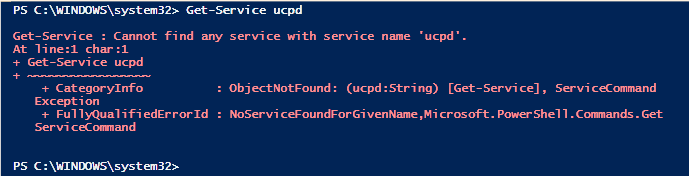
In truth, that service is not even present on my system. Is it only on Windows Home versions?
UCPD.sys is present but no service created.


Never mind & Thank you.
 
Last edited:

My Computers

System One System Two

  • OS
    All Branches but Release
    Computer type
    Laptop
    Manufacturer/Model
    Acer Nitro ANV15-51
    CPU
    AMD Ryzen 7 7735HS 3200-4500 Mhz 8 cores x 2
    Motherboard
    Sportage_RBH
    Memory
    32 GB DDR5
    Graphics Card(s)
    Radeon Graphic / NVIDIA GeForce RTX 4060 8 GB GDDR6
    Sound Card
    AMD/Realtek(R) Audio
    Monitor(s) Displays
    Integrated Monitor (15.3"vis)
    Screen Resolution
    FHD 1920X1080 16:9 144Hz
    Hard Drives
    KINGSTON OM8SEP4512Q-AA 1TB
    Western Digital 256GB
    PSU
    19V DC 6.32 A 120 W
    Cooling
    Dual Fans
    Mouse
    MS Bluetooth
    Internet Speed
    Fiber 1GB Cox -us & 1GB Orange-fr
    Browser
    Edge Canary- Firefox Nightly-Chrome Dev-Chrome Dev
    Antivirus
    Windows Defender
  • Operating System
    Windows 11 Beta
    Computer type
    Laptop
    Manufacturer/Model
    Asus X751BP
    CPU
    AMD A9-9420
    Memory
    8 GB of DDR4
    Graphics card(s)
    AMD Radeon R5
    Screen Resolution
    1600x900
    Hard Drives
    Seagate 1 TB
Another hack for defeating UCPD is to simply rename regedit.exe, reg.exe, powershell.exe or pwsh.exe. It works by blocking reg key updates from a hard-coded list of program filenames.

Code:
copy regedit.exe regedit2.exe
regedit2

copy reg.exe not_reg.exe
not_reg add "HKLM...." /v SomeKey /t REG_SZ /d SomeValue /f
 

My Computer

System One

  • OS
    Windows 7
This is news to me.. I'm up to date on release. Anyone have any ideas why I do not have that service?

EDIT: Oh Wait...Is this because I have disabled driver updates with WU? It says UCPD is a driver.
ps1.png
 

Attachments

  • ps1.png
    ps1.png
    6.6 KB · Views: 72
Last edited:

My Computers

System One System Two

  • OS
    Windows 11 Pro 25H2 26200.8655
    Computer type
    PC/Desktop
    Manufacturer/Model
    Dell Optiplex 7080
    CPU
    i9-10900 10 core 20 threads
    Motherboard
    DELL 0J37VM
    Memory
    32 gb
    Graphics Card(s)
    none-Intel UHD Graphics 630
    Sound Card
    Integrated Realtek
    Monitor(s) Displays
    Benq 27
    Screen Resolution
    2560x1440
    Hard Drives
    2x1tb Solidigm m.2 nvme /External drives 512gb Samsung m.2 sata+2tb Kingston m2.nvme
    PSU
    500w
    Case
    MT
    Cooling
    Dell Premium
    Keyboard
    Logitech wired
    Mouse
    Logitech wireless
    Internet Speed
    so slow I'm too embarrassed to tell
    Browser
    #1 Edge #2 Firefox
    Antivirus
    Defender+MWB Premium
  • Operating System
    Windows 11 Pro 24H2 26200.8457
    Computer type
    PC/Desktop
    Manufacturer/Model
    Beelink Mini PC SER5
    CPU
    AMD Ryzen 7 6800U
    Memory
    32 gb
    Graphics card(s)
    integrated
    Sound Card
    integrated
    Monitor(s) Displays
    Benq 27
    Screen Resolution
    2560x1440
    Hard Drives
    1TB Crucial nvme
    Keyboard
    Logitech wired
    Mouse
    Logitech wireless
    Internet Speed
    still too embarrassed to tell
    Browser
    Firefox
    Antivirus
    Defender
    Other Info
    System 3 is non compliant Dell 9020 i7-4770/24gb ram Win11 PRO 26200.8457
Or you can just delete the driver using emco unlockit.
 

My Computer

System One

  • OS
    Win 11
    Computer type
    Laptop
    Manufacturer/Model
    Surface Pro 3
    CPU
    i5
    Memory
    8GB
Or you can just delete the driver using emco unlockit.
The driver will return if you run SFC /scannow or DISM restorehealth to repair a system. Disabling the service is a more permanent fix.
 
Last edited:

My Computer

System One

  • OS
    Windows 7
Sorry to revive a dead thread but I'm running into this now as even though I changed Brave to my default, some things are still opening in Edge. I'm also having the same issue as glasskuter is, when I run the commands it says UPCD is not found yet i'm still blocked from editing the two registry entries to fix the defaults. Does anyone have any new information in this? Has MS hidden UPCD and now there is another way you have to do it? If I truly don't have UPCD active based on both the PowerShell and command prompt commands not finding it, then why am I still blocked from editing those in the registry? This not being able to have everything open in my default browser is driving me nuts so any help would be appreciated.
 

My Computer

System One

  • OS
    Windows 11 Pro
    Computer type
    PC/Desktop
    Manufacturer/Model
    CyberPower PC
Sorry to revive a dead thread but I'm running into this now as even though I changed Brave to my default, some things are still opening in Edge. I'm also having the same issue as glasskuter is, when I run the commands it says UPCD is not found yet i'm still blocked from editing the two registry entries to fix the defaults. Does anyone have any new information in this? Has MS hidden UPCD and now there is another way you have to do it? If I truly don't have UPCD active based on both the PowerShell and command prompt commands not finding it, then why am I still blocked from editing those in the registry? This not being able to have everything open in my default browser is driving me nuts so any help would be appreciated.

Hello, and welcome to the forum. :alien:

This is normal with Edge since it's hard coded to open by default for some URLs and file types.

You can use something like the free Edge Blocker app to help.
 

My Computers

System One System Two

  • OS
    Windows 11 Pro for Workstations
    Computer type
    PC/Desktop
    Manufacturer/Model
    Custom self build
    CPU
    Intel i7-8700K 5 GHz
    Motherboard
    ASUS ROG Maximus XI Formula Z390
    Memory
    64 GB (4x16GB) G.SKILL TridentZ RGB DDR4 3600 MHz (F4-3600C18D-32GTZR)
    Graphics Card(s)
    ASUS ROG-STRIX-GTX1080TI-O11G-GAMING (11GB GDDR5X)
    Sound Card
    Integrated Digital Audio (S/PDIF)
    Monitor(s) Displays
    2 x Samsung Odyssey G75 27"
    Screen Resolution
    2560x1440
    Hard Drives
    1TB Samsung 990 PRO M.2,
    4TB Samsung 990 PRO M.2,
    TerraMaster F8 SSD Plus NAS
    PSU
    Seasonic Prime Titanium 850W
    Case
    Thermaltake Core P3 wall mounted
    Cooling
    Corsair Hydro H115i
    Keyboard
    Amazon Basics Wired Full Keyboard MD005
    Mouse
    Logitech MX Master 4
    Internet Speed
    2 Gbps Download and 100 Mbps Upload
    Browser
    Chrome and Edge
    Antivirus
    Microsoft Defender
    Other Info
    Logitech Z625 speaker system,
    Logitech BRIO 4K Pro webcam,
    HP Color LaserJet Pro MFP M477fdn,
    CyberPower CP1500PFCLCD
    Galaxy S23 Plus phone
  • Operating System
    Windows 11 Pro
    Computer type
    Laptop
    Manufacturer/Model
    Surface Laptop 7 Copilot+ PC
    CPU
    Snapdragon X Elite (12 core) 3.42 GHz
    Memory
    16 GB LPDDR5x-7467 MHz
    Monitor(s) Displays
    15" HDR
    Screen Resolution
    2496 x 1664
    Hard Drives
    1 TB SSD
    Internet Speed
    Wi-Fi 7 and Bluetooth 5.4
    Browser
    Chrome and Edge
    Antivirus
    Microsoft Defender
Hello, and welcome to the forum. :alien:

This is normal with Edge since it's hard coded to open by default for some URLs and file types.

You can use something like the free Edge Blocker app to help.
Thanks for the reply, i'll look into that. So do you know has MS indeed hidden UPCD now where you cannot disable it. I'm also highly annoyed with them that I paid for the Pro version because i want the control of my OS and then they still block me from doing something and I cannot figure out a way to even get the access I want.
 

My Computer

System One

  • OS
    Windows 11 Pro
    Computer type
    PC/Desktop
    Manufacturer/Model
    CyberPower PC
Thanks for the reply, i'll look into that. So do you know has MS indeed hidden UPCD now where you cannot disable it. I'm also highly annoyed with them that I paid for the Pro version because i want the control of my OS and then they still block me from doing something and I cannot figure out a way to even get the access I want.

It's normal to not have permissions by default to edit this in the registry. Running the command in an elevated Terminal will allow you to.

If it shows the service as disabled in option one, then it should be.

Disabling this service doesn't help with Edge since Edge is hard coded to do this.
 

My Computers

System One System Two

  • OS
    Windows 11 Pro for Workstations
    Computer type
    PC/Desktop
    Manufacturer/Model
    Custom self build
    CPU
    Intel i7-8700K 5 GHz
    Motherboard
    ASUS ROG Maximus XI Formula Z390
    Memory
    64 GB (4x16GB) G.SKILL TridentZ RGB DDR4 3600 MHz (F4-3600C18D-32GTZR)
    Graphics Card(s)
    ASUS ROG-STRIX-GTX1080TI-O11G-GAMING (11GB GDDR5X)
    Sound Card
    Integrated Digital Audio (S/PDIF)
    Monitor(s) Displays
    2 x Samsung Odyssey G75 27"
    Screen Resolution
    2560x1440
    Hard Drives
    1TB Samsung 990 PRO M.2,
    4TB Samsung 990 PRO M.2,
    TerraMaster F8 SSD Plus NAS
    PSU
    Seasonic Prime Titanium 850W
    Case
    Thermaltake Core P3 wall mounted
    Cooling
    Corsair Hydro H115i
    Keyboard
    Amazon Basics Wired Full Keyboard MD005
    Mouse
    Logitech MX Master 4
    Internet Speed
    2 Gbps Download and 100 Mbps Upload
    Browser
    Chrome and Edge
    Antivirus
    Microsoft Defender
    Other Info
    Logitech Z625 speaker system,
    Logitech BRIO 4K Pro webcam,
    HP Color LaserJet Pro MFP M477fdn,
    CyberPower CP1500PFCLCD
    Galaxy S23 Plus phone
  • Operating System
    Windows 11 Pro
    Computer type
    Laptop
    Manufacturer/Model
    Surface Laptop 7 Copilot+ PC
    CPU
    Snapdragon X Elite (12 core) 3.42 GHz
    Memory
    16 GB LPDDR5x-7467 MHz
    Monitor(s) Displays
    15" HDR
    Screen Resolution
    2496 x 1664
    Hard Drives
    1 TB SSD
    Internet Speed
    Wi-Fi 7 and Bluetooth 5.4
    Browser
    Chrome and Edge
    Antivirus
    Microsoft Defender
Thanks for the reply, i'll look into that. So do you know has MS indeed hidden UPCD now where you cannot disable it. I'm also highly annoyed with them that I paid for the Pro version because i want the control of my OS and then they still block me from doing something and I cannot figure out a way to even get the access I want.
Just an added FYI, if you install the free Microsoft Wintoys app you can easily enable and disable the User Choice Protection Driver with the flip of a switch. There's actually some useful tweaks in that app to make it worth installing.

Screenshot 2026-02-19 084219.webp
 

My Computers

System One System Two

  • OS
    Windows 11 25H2
    Computer type
    Laptop
    Manufacturer/Model
    Alienware 18 Area-51
    CPU
    Intel Core Ultra 9 275HX (24-Core)
    Motherboard
    Alienware
    Memory
    64GB DDR5 6400MT/s
    Graphics Card(s)
    NVIDIA GeForce RTX 5080 and Intel UHD Graphics
    Sound Card
    Onboard, Realtek high-performance Audio chips (ALC3329 & ALC1708))
    Monitor(s) Displays
    300HZ 18-inch QHD 500 nit Comfort View+
    Screen Resolution
    2560 x 1600
    Hard Drives
    2TB NVMe M.2 PCIe Gen 5 SSD
    Case
    Magnesium Alloy
    Cooling
    Advanced Cryo-Tech Quad-Fan Cooling system & large vapor chamber
    Keyboard
    Cherry MX ultra low profile mechanical keyboard with per key AlienFX RGB lighting
    Mouse
    Logitech MX Master 4
    Browser
    Vivaldi (main), Firefox, Chrome, Edge
    Antivirus
    MS Defender and Malwarebytes Free
  • Operating System
    Windows 11 25H2
    Computer type
    Laptop
    Manufacturer/Model
    Microsoft Surface Laptop 7
    CPU
    Qualcomm Snapdragon X Elite (12 Core) ARM based CPU
    Motherboard
    Microsoft Corp.
    Memory
    16GB LPDDR5
    Graphics card(s)
    Qualcomm Adreno X1-85
    Sound Card
    Omnisonic speakers with Dolby Atmos spatial sound
    Monitor(s) Displays
    120 Hz 13.8-inch 600 nit PixelSense Flow touchscreen
    Screen Resolution
    2304x1536
    Hard Drives
    1TB NVMe Gen 4 SSD
    Case
    Anodized Aluminum
    Cooling
    Traditional active cooling fan system
    Keyboard
    Mechanical QWERTY, backlit when in use
    Mouse
    Logitech MX Master 4 and Surface Arc Mouse
    Browser
    Vivaldi (main), Firefox, Chrome, Edge
    Antivirus
    MS Defender and Malwarebytes Free
It's normal to not have permissions by default to edit this in the registry. Running the command in an elevated Terminal will allow you to.

If it shows the service as disabled in option one, then it should be.

Disabling this service doesn't help with Edge since Edge is hard coded to do this.
My problem isn't the permissions, when I ran the commands to see if UPCD was even running I had the same issue as Glasskuter posted above in an image, it says that it cannot find the UPCD service so it's like they have hidden it again. I ran both the Powershell and the Command prompt command in an admin window and both say that it doesn't exist. So it was odd to me if it doesn't exist then why is my registry still locked. That's why I was wondering if maybe as of a recent update they have now hidden the driver where the commands posted in 2024 no longer work.

@FrankoDT, thank you for that information, i'll take a look tonight when I get home.
 

My Computer

System One

  • OS
    Windows 11 Pro
    Computer type
    PC/Desktop
    Manufacturer/Model
    CyberPower PC
Back
Top Bottom