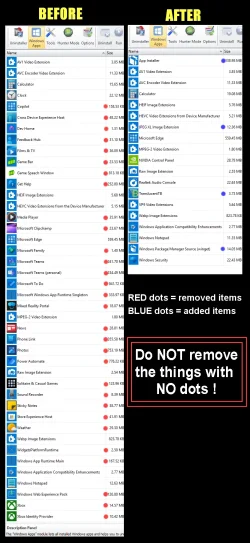
It offered no options for removal of CoPilot.
If you've already "tampered" with removing a program, Revo has difficulty in finding the components to remove. Used initially/originally, in the first instance, it's almost infallible in removing and cleaning up
Often suggested when a program can't be found, it sometimes helps to re-install the target program, then re-run Revo
Make sure you sue the advanced option to remove all leftovers
For installed programs :
Install and run RevoUninstaller
Options tab (along the top) > Uninstaller (LH column)
Untick
Make a Restore Point before uninstall
Tick
Checkmark all leftovers by default
Uninstaller tab > Double click the desired program
Run the uninstallation process
IMPORTANT
DO NOT reboot even if prompted when completed (Cancel if prompted)
Select the Advanced button and then run the process to remove all leftover files/folders/registry entries left behind after a normal default uninstall process
If prompted at any stage previously, now do the reboot
For Windows bloatware apps :
Install and run RevoUninstaller
Options tab (along the top) > Uninstaller (LH column)
Untick
Make a Restore Point before uninstall
Tick
Checkmark all leftovers by default
Windows Apps tab > Double click the desired program
Run the uninstallation process
IMPORTANT
DO NOT reboot even if prompted when completed (Cancel if prompted)
Select Scan to run the process to remove all leftover files/folders/registry entries left behind after a normal default uninstall process
If prompted at any stage previously, now do the reboot
If Revo is unsuccessful, try Geek Uninstaller (often can find some options Revo misses)