Erratic stall / freeze with browsers, 25H2, NVIDIA 4060


After 20 years of random problems being caused by bad updates, this is my solution:
View attachment 177650
This stops windows from changing things in the background, as the changes are constant and inevitably lead to something not working...

Not sure what I'm looking at exactly lol?
 

My Computer My Computer

At a glance

Windows 11 Pro 25H2i7 12700k64GB DDR5 [CMK64GX5M2B5200C40]MSI 4060 2x Ventus 8G
OS
Windows 11 Pro 25H2
Computer type
PC/Desktop
Manufacturer/Model
DIY
CPU
i7 12700k
Motherboard
7E07vM9 [Z790 Pro Max Wifi]
Memory
64GB DDR5 [CMK64GX5M2B5200C40]
Graphics Card(s)
MSI 4060 2x Ventus 8G
Sound Card
Realtek® ALC4080 Codec
Monitor(s) Displays
ASUS VA24DQSB
Screen Resolution
1920x1080 @ 75hz
Hard Drives
Samsung 980 Pro 1TB (OS Drive)
Samsung 980 Pro 2TB (Secondary Drive)
Samsung 980 Pro 1TB (Other)
Samsung 860 Pro 512 (Other)
WD6400AAKS (Other)
PSU
Corsair 850x
Cooling
Noctua NH-D15
Mouse
G502 X Lightspeed
Browser
Chrome, Firefox
Antivirus
Malwarebytes Premium, Defender

Not sure what I'm looking at exactly lol?
That's the registry key that controls the task scheduler. Turning it off stops windows update, CBS servicing, driver updates, etc... setting the start value to 4 means it's off...
 

My Computer My Computer

At a glance

Windows 11 22H2 Pro (X-lite Micro 11 version)i7 13850HX (20 cores, 28 threads)32GB DDR5Intel UHD/ RTX 1000 ADA
OS
Windows 11 22H2 Pro (X-lite Micro 11 version)
Computer type
Laptop
Manufacturer/Model
Dell/ Precision 7680
CPU
i7 13850HX (20 cores, 28 threads)
Motherboard
Dell
Memory
32GB DDR5
Graphics Card(s)
Intel UHD/ RTX 1000 ADA
Sound Card
Realtek
Monitor(s) Displays
4K UHD Touchscreen
Screen Resolution
3840 x 2400
Hard Drives
Samsung 512GB system drive
WD Blue 1TB game drive
PSU
240W AC adapter, 1800W when docked
Internet Speed
1 gigabit symmetrical
Browser
Firefox, Librewolf
Antivirus
None. Manully configured so nobody except me can change any critical system files. (Don't ask how, it's probably against some rule somewhere)
That's the registry key that controls the task scheduler. Turning it off stops windows update, CBS servicing, driver updates, etc... setting the start value to 4 means it's off...

So you have WU completely disabled then? I accomplish a similar thing using Group Policy by disabling automatic updates.
 

My Computer My Computer

At a glance

Windows 11 Pro 25H2i7 12700k64GB DDR5 [CMK64GX5M2B5200C40]MSI 4060 2x Ventus 8G
OS
Windows 11 Pro 25H2
Computer type
PC/Desktop
Manufacturer/Model
DIY
CPU
i7 12700k
Motherboard
7E07vM9 [Z790 Pro Max Wifi]
Memory
64GB DDR5 [CMK64GX5M2B5200C40]
Graphics Card(s)
MSI 4060 2x Ventus 8G
Sound Card
Realtek® ALC4080 Codec
Monitor(s) Displays
ASUS VA24DQSB
Screen Resolution
1920x1080 @ 75hz
Hard Drives
Samsung 980 Pro 1TB (OS Drive)
Samsung 980 Pro 2TB (Secondary Drive)
Samsung 980 Pro 1TB (Other)
Samsung 860 Pro 512 (Other)
WD6400AAKS (Other)
PSU
Corsair 850x
Cooling
Noctua NH-D15
Mouse
G502 X Lightspeed
Browser
Chrome, Firefox
Antivirus
Malwarebytes Premium, Defender

have you tried SFC on the system
open a CMD prompt as admin and write
sfc /scannow

let it run and see if it fixes any errors.
best of luck Steve ..
 

My Computers My Computers

  • At a glance

    Windows 11 HomeRyzen 7 5825u64GB DDR4 3200Ryzen 7 5825u
    OS
    Windows 11 Home
    Computer type
    PC/Desktop
    Manufacturer/Model
    HP 24" AiO
    CPU
    Ryzen 7 5825u
    Motherboard
    HP
    Memory
    64GB DDR4 3200
    Graphics Card(s)
    Ryzen 7 5825u
    Sound Card
    RealTek
    Monitor(s) Displays
    24" HP AiO
    Screen Resolution
    1920 x 1080 @60 Hz
    Hard Drives
    1TB WD Blue SN580 M2 SSD Partitioned.
    2x 1TB USB HDD External Backup/Storage.
    PSU
    90W external power brick
    Case
    24" All in One
    Cooling
    Default Air Cooling
    Keyboard
    HP WiFi UK extended
    Mouse
    HP WiFi 3 Button
    Internet Speed
    1GB full fibre
    Browser
    Edge & Firefox
    Antivirus
    AVG Internet Security/Windows Defender
    Other Info
    Mainly Open Source Software
  • At a glance

    Ubuntu 22.04.5 LTSi5 7200u16GB DDR4Intel
    Operating System
    Ubuntu 22.04.5 LTS
    Computer type
    Laptop
    Manufacturer/Model
    Dell 13" Latitude 2017
    CPU
    i5 7200u
    Motherboard
    Dell
    Memory
    16GB DDR4
    Graphics card(s)
    Intel
    Sound Card
    Intel
    Monitor(s) Displays
    13" Dell Laptop
    Hard Drives
    250GB Crucial 2.5" SSD
    Mouse
    Generic WiFi 3 button
    Internet Speed
    WiFi only
    Browser
    Firefox
    Antivirus
    ClamAV TK
    Other Info
    Mainly Open Source Software
Thus far... it appears what I have said is the solution.
Too easy eh.
 

My Computer My Computer

At a glance

Windows 11
OS
Windows 11
have you tried SFC on the system
open a CMD prompt as admin and write
sfc /scannow

let it run and see if it fixes any errors.
best of luck Steve ..

DISM + SFC were the first things I ran but never found any problems.
 

My Computer My Computer

At a glance

Windows 11 Pro 25H2i7 12700k64GB DDR5 [CMK64GX5M2B5200C40]MSI 4060 2x Ventus 8G
OS
Windows 11 Pro 25H2
Computer type
PC/Desktop
Manufacturer/Model
DIY
CPU
i7 12700k
Motherboard
7E07vM9 [Z790 Pro Max Wifi]
Memory
64GB DDR5 [CMK64GX5M2B5200C40]
Graphics Card(s)
MSI 4060 2x Ventus 8G
Sound Card
Realtek® ALC4080 Codec
Monitor(s) Displays
ASUS VA24DQSB
Screen Resolution
1920x1080 @ 75hz
Hard Drives
Samsung 980 Pro 1TB (OS Drive)
Samsung 980 Pro 2TB (Secondary Drive)
Samsung 980 Pro 1TB (Other)
Samsung 860 Pro 512 (Other)
WD6400AAKS (Other)
PSU
Corsair 850x
Cooling
Noctua NH-D15
Mouse
G502 X Lightspeed
Browser
Chrome, Firefox
Antivirus
Malwarebytes Premium, Defender

I don't know if this will solve your issue, but everyone should know about the Tutorial below, and the DDU instructions.

Sometimes the drivers that MS occasionally includes with Windows Updates...
can conflict with drivers that are already installed. Which is what the tutorial below is for.

DDU, on the other hand, will remove all the leftovers from MS or Nvidia drivers, so when you install an Nvidia driver, it has a clean slate to work with.


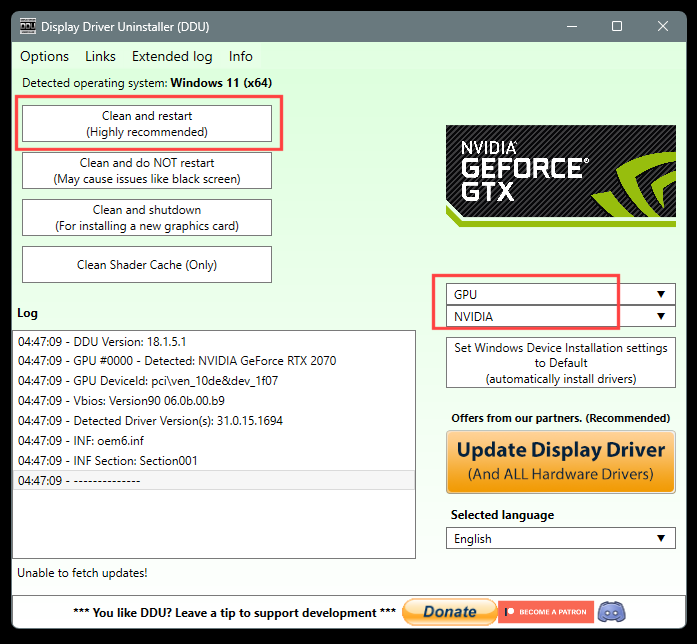
 DDU Instructions - Nvidia

1. First, do Option #2, step #3 and onward, here...
2. This will block MS from including drivers in Windows Updates.
3. They'll still be listed as Optional Updates, if you ever need them.


1. Get this program, here: Display Driver Uninstaller (DDU) | Wagnardsoft ...get the latest version, and save it to your desktop.
2. Get the Nvidia WHQL vid card driver here... https://www.guru3d.com/files/category/videocards-nvidia-geforce-windows-7-8-10/ ...save this to your desktop.
3. Unhook the internet completely.
4. Reboot into Safe Mode and run DDU (Display Driver Uninstaller) choose the "Highly Recommend Option", and just do what it tells you.
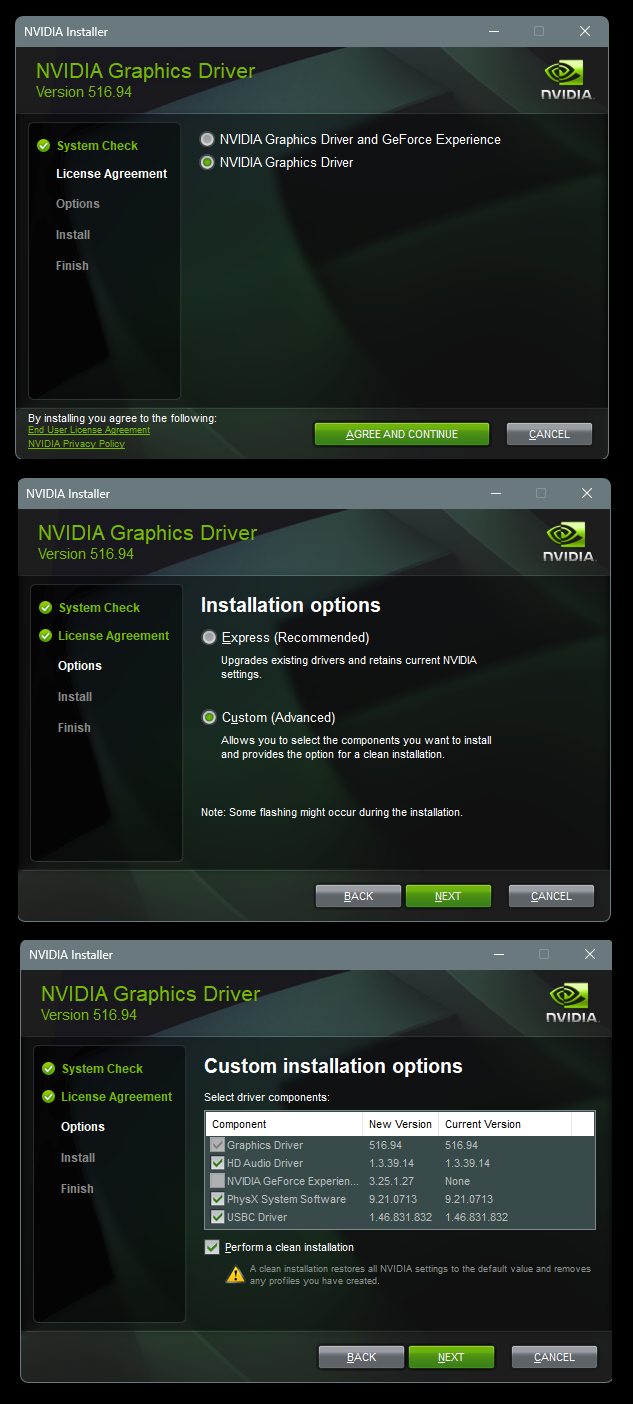
5. After it's done, reboot to normal mode, then just double click the Nvidia driver to install.
[See pics below]. If it want's to reboot, let it.
Rehook the internet.

Wo1E6bz.png


KdHz2yJ.png
 

My Computers My Computers

  • At a glance

    Win 11 Home ♦♦♦26300.9278 ♦♦♦♦♦♦♦26H2AMD Ryzen 7 3700XG.Skill (F4-3200C14D-16GTZKW)EVGA RTX 2070 (08G-P4-2171-KR)
    OS
    Win 11 Home ♦♦♦26300.9278 ♦♦♦♦♦♦♦26H2
    Computer type
    PC/Desktop
    Manufacturer/Model
    Built by Ghot® [May 2020]
    CPU
    AMD Ryzen 7 3700X
    Motherboard
    Asus Pro WS X570-ACE (BIOS 5302)
    Memory
    G.Skill (F4-3200C14D-16GTZKW)
    Graphics Card(s)
    EVGA RTX 2070 (08G-P4-2171-KR)
    Sound Card
    Realtek ALC1220P / ALC S1220A
    Monitor(s) Displays
    Dell U3011 30"
    Screen Resolution
    2560 x 1600
    Hard Drives
    2x Samsung 860 EVO 500GB,
    WD 4TB Black FZBX - SATA III,
    WD 8TB Black FZBX - SATA III,
    DRW-24B1ST CD/DVD Burner
    PSU
    PC Power & Cooling 750W Quad EPS12V
    Case
    Cooler Master ATCS 840 Tower
    Cooling
    CM Hyper 212 EVO (push/pull)
    Keyboard
    Ducky DK9008 Shine II Blue LED
    Mouse
    Logitech Optical M-100
    Internet Speed
    300/300
    Browser
    Firefox (latest)
    Antivirus
    Bitdefender Total Security
    Other Info
    Speakers: Klipsch Pro Media 2.1
  • At a glance

    Windows XP Pro 32bit w/SP3AMD Athlon 64 X2 5000+ (OC'd @ 3.2Ghz)TWIN2X2048-6400C4DHX (2 x 1GB, DDR2 800)EVGA 256-P2-N758-TR GeForce 8600GT SSC
    Operating System
    Windows XP Pro 32bit w/SP3
    Computer type
    PC/Desktop
    Manufacturer/Model
    Built by Ghot® (not in use)
    CPU
    AMD Athlon 64 X2 5000+ (OC'd @ 3.2Ghz)
    Motherboard
    ASUS M2N32-SLI Deluxe Wireless Edition
    Memory
    TWIN2X2048-6400C4DHX (2 x 1GB, DDR2 800)
    Graphics card(s)
    EVGA 256-P2-N758-TR GeForce 8600GT SSC
    Sound Card
    Onboard
    Monitor(s) Displays
    ViewSonic G90FB Black 19" Professional (CRT)
    Screen Resolution
    up to 2048 x 1536
    Hard Drives
    WD 36GB 10,000rpm Raptor SATA
    Seagate 80GB 7200rpm SATA
    Lite-On LTR-52246S CD/RW
    Lite-On LH-18A1P CD/DVD Burner
    PSU
    PC Power & Cooling Silencer 750 Quad EPS12V
    Case
    Generic Beige case, 80mm fans
    Cooling
    ZALMAN 9500A 92mm CPU Cooler
    Keyboard
    Logitech Classic Keybooard 200
    Mouse
    Logitech Optical M-BT96a
    Internet Speed
    300/300
    Browser
    Firefox 3.x ??
    Antivirus
    Symantec (Norton)
    Other Info
    Still assembled, still runs. Haven't turned it on for 15 years?
I don't know if this will solve your issue, but everyone should know about the Tutorial below, and the DDU instructions.

Sometimes the drivers that MS occasionally includes with Windows Updates...
can conflict with drivers that are already installed. Which is what the tutorial below is for.

DDU, on the other hand, will remove all the leftovers from MS or Nvidia drivers, so when you install an Nvidia driver, it has a clean slate to work with.


 DDU Instructions - Nvidia

1. First, do Option #2, step #3 and onward, here...
2. This will block MS from including drivers in Windows Updates.
3. They'll still be listed as Optional Updates, if you ever need them.


1. Get this program, here: Display Driver Uninstaller (DDU) | Wagnardsoft ...get the latest version, and save it to your desktop.
2. Get the Nvidia WHQL vid card driver here... https://www.guru3d.com/files/category/videocards-nvidia-geforce-windows-7-8-10/ ...save this to your desktop.
3. Unhook the internet completely.
4. Reboot into Safe Mode and run DDU (Display Driver Uninstaller) choose the "Highly Recommend Option", and just do what it tells you.
5. After it's done, reboot to normal mode, then just double click the Nvidia driver to install.
[See pics below]. If it want's to reboot, let it.
Rehook the internet.

Wo1E6bz.png


KdHz2yJ.png

I already block them in GPEDIT, and if it was a driver issue it wouldn't be affecting both the iGPU and the dedicated GPU.
 

My Computer My Computer

At a glance

Windows 11 Pro 25H2i7 12700k64GB DDR5 [CMK64GX5M2B5200C40]MSI 4060 2x Ventus 8G
OS
Windows 11 Pro 25H2
Computer type
PC/Desktop
Manufacturer/Model
DIY
CPU
i7 12700k
Motherboard
7E07vM9 [Z790 Pro Max Wifi]
Memory
64GB DDR5 [CMK64GX5M2B5200C40]
Graphics Card(s)
MSI 4060 2x Ventus 8G
Sound Card
Realtek® ALC4080 Codec
Monitor(s) Displays
ASUS VA24DQSB
Screen Resolution
1920x1080 @ 75hz
Hard Drives
Samsung 980 Pro 1TB (OS Drive)
Samsung 980 Pro 2TB (Secondary Drive)
Samsung 980 Pro 1TB (Other)
Samsung 860 Pro 512 (Other)
WD6400AAKS (Other)
PSU
Corsair 850x
Cooling
Noctua NH-D15
Mouse
G502 X Lightspeed
Browser
Chrome, Firefox
Antivirus
Malwarebytes Premium, Defender

So I have reinstalled Build 26200.6584 and I have yet to see this freeze issue on this build.

I'm at a loss here. What the heck did Microsoft do to March's update and later that would cause this?!

I have stumbled upon this post Chromium
What the person put in their video is exactly what I was going through, and they claimed it was their Monitor.
The person responded to them with a similar issue when resizing, and apparently Windows changed something called Multi-Pane Overlay in 25H2?
 
Last edited:

My Computer My Computer

At a glance

Windows 11 Pro 25H2i7 12700k64GB DDR5 [CMK64GX5M2B5200C40]MSI 4060 2x Ventus 8G
OS
Windows 11 Pro 25H2
Computer type
PC/Desktop
Manufacturer/Model
DIY
CPU
i7 12700k
Motherboard
7E07vM9 [Z790 Pro Max Wifi]
Memory
64GB DDR5 [CMK64GX5M2B5200C40]
Graphics Card(s)
MSI 4060 2x Ventus 8G
Sound Card
Realtek® ALC4080 Codec
Monitor(s) Displays
ASUS VA24DQSB
Screen Resolution
1920x1080 @ 75hz
Hard Drives
Samsung 980 Pro 1TB (OS Drive)
Samsung 980 Pro 2TB (Secondary Drive)
Samsung 980 Pro 1TB (Other)
Samsung 860 Pro 512 (Other)
WD6400AAKS (Other)
PSU
Corsair 850x
Cooling
Noctua NH-D15
Mouse
G502 X Lightspeed
Browser
Chrome, Firefox
Antivirus
Malwarebytes Premium, Defender
Back
Top Bottom