
Recently my volume stopped working when I watch YouTube videos. When that happened, I went to Output device, clicked the drop-down arrow and selected the other speaker that was there. That solved the problem. I can't remember the name of the other speaker that was there.
My volume stopped working again. Now when I select the drop-down arrow for Output device, only one option appears.
How can I fix this volume problem?
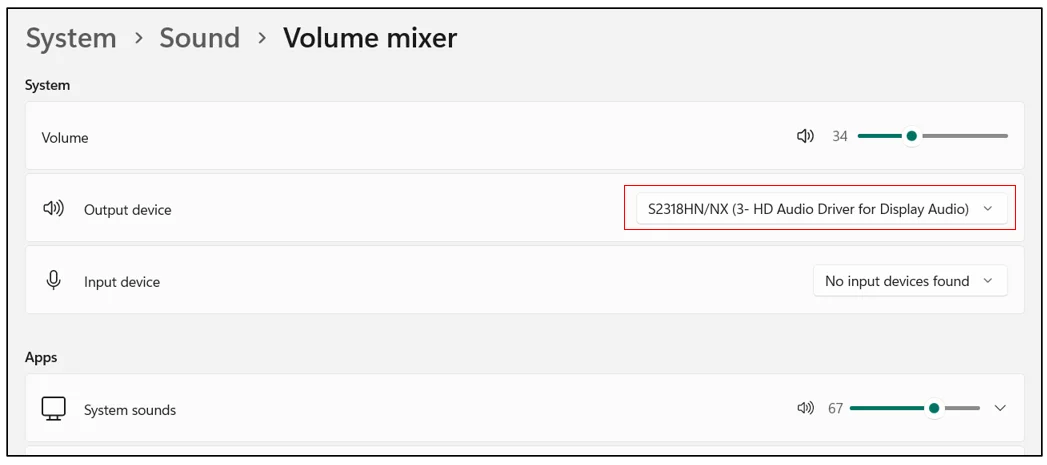
My volume stopped working again. Now when I select the drop-down arrow for Output device, only one option appears.
How can I fix this volume problem?
My Computer
At a glance
Windows 11 Pro12th Gen Intel(R) Core(TM) i7-12700H 2.30 GHz32.0 GB (31.7 GB usable)NVIDIA GeForce RTX 3050 Laptop GPU
- OS
- Windows 11 Pro
- Computer type
- Laptop
- Manufacturer/Model
- Dell XPS 15 9520
- CPU
- 12th Gen Intel(R) Core(TM) i7-12700H 2.30 GHz
- Motherboard
- 0MWGD4 A00
- Memory
- 32.0 GB (31.7 GB usable)
- Graphics Card(s)
- NVIDIA GeForce RTX 3050 Laptop GPU
- Monitor(s) Displays
- Dell XPS 15 LGD06B3 Display
- Hard Drives
- NVMe PC SN810 NVMe WDC 512GB
- Keyboard
- Dell Premier Multi-Device Wireless Keyboard and Mouse – KM7321W
- Mouse
- Dell Premier Multi-Device Wireless Keyboard and Mouse – KM7321W
- Antivirus
- McAfee






