Error Code: 0x0000098


when I went into the hardware monitor, ALL my parts were 80-90+ degrees.

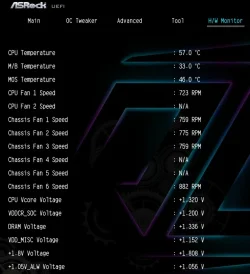
Here is a screenshot from my motherboard’s hardware-monitoring page in the BIOS.
251130221350.webp
 

My Computers

System One System Two

  • OS
    Windows 11 Pro
    Computer type
    PC/Desktop
    CPU
    AMD Ryzen 9 9950X3D
    Motherboard
    ASRock B650E Taichi Lite
    Memory
    Kingston FURY Beast 64GB (2x32GB) DDR5 6000MT/s
    Graphics Card(s)
    ASUS TUF Gaming Radeon RX 9070 OC Edition 16GB GDDR6
    Hard Drives
    Solidigm P44 Pro 2TB M.2 NVMe SSD
  • Operating System
    Windows 11 Home
    Computer type
    Laptop
    Manufacturer/Model
    Lenovo Legion Pro 7i Gen 10 16"
    CPU
    Intel Core Ultra 9 275HX
    Memory
    64GB (2x 32GB) DDR5-6400
    Graphics card(s)
    NVIDIA GeForce RTX 5080 16GB GDDR7 Laptop GPU
    Hard Drives
    2x 1TB M.2 NVMe SSD (SK Hynix)

My Computer

System One

  • OS
    windows 11
    Computer type
    PC/Desktop
    Manufacturer/Model
    Cyberpower
    CPU
    AMD Ryzen
    Memory
    32GB DDR4
    Graphics Card(s)
    NVIDIA
I tried to test out the steps and my pc does not restart at all in BIOS but when I went into the hardware monitor, ALL my parts were 80-90+ degrees. I’m not sure why but maybe that’s a reason why my pc keeps restarting over and over again or a failing SSD. I haven’t done anything to my fans and I’ve never had an overheating issue either. Does the error have anything to do with it?
Is this 80-90 degrees Celsius? this is very hot. Check to see all your fans are spinning, especially the CPU fan.. If your computer is restarting randomly that would be the cause.
Take a picture with your smart phone and attach it in your next post.
You may need to reapply Thermal Paste.
 

My Computer

System One

  • OS
    Windows 11 Pro Insider 64 bit 25H2 26200.5742
    Computer type
    PC/Desktop
    Manufacturer/Model
    Gigabyte Z390 UD
    CPU
    Intel Core i7 9700K 3.60
    Motherboard
    Gigabyte Z390 UD
    Memory
    16 GB
    Graphics Card(s)
    nVidia GEForce RTX 2060 Super
    Sound Card
    onboard
    Monitor(s) Displays
    Two 27" Dell 4K monitors
    Screen Resolution
    3840 x 2160
    Hard Drives
    M.2 NVME SSD, 500 GB; Two 2TB Mechanical HDD's
    PSU
    850w PSU
    Case
    Cyberpower PC
    Cooling
    Water cooled
    Keyboard
    Backlit Cyberpower gaming keyboard
    Mouse
    Backlit Cyberpower gaming mouse
    Internet Speed
    1 GB mbps
    Browser
    Brave
    Antivirus
    Windows Security
Is this 80-90 degrees Celsius? this is very hot. Check to see all your fans are spinning, especially the CPU fan.. If your computer is restarting randomly that would be the cause.
Take a picture with your smart phone and attach it in your next post.
You may need to reapply Thermal Paste.

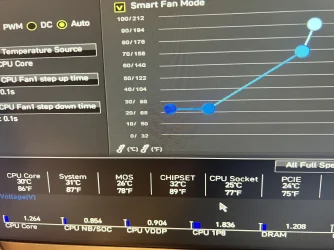
This is a picture. Sorry for not clarifying, 90 degrees Fahrenheit. I took this picture as it recently just turned on but as little time goes it just keeps going up.
 

Attachments

  • IMG_3270.webp
    IMG_3270.webp
    2 MB · Views: 1

My Computer

System One

  • OS
    windows 11
    Computer type
    PC/Desktop
    Manufacturer/Model
    Cyberpower
    CPU
    AMD Ryzen
    Memory
    32GB DDR4
    Graphics Card(s)
    NVIDIA
This is a picture. Sorry for not clarifying, 90 degrees Fahrenheit. I took this picture as it recently just turned on but as little time goes it just keeps going up.

ChatGPT:

"The values shown (around 75–90 °F) are completely normal. Even if they rise a bit while the system is sitting in the BIOS, that’s expected. These numbers are nowhere near overheating. So overheating is not the cause of the crashes or the 0xc0000098 error."

"The next thing to check is the SSD, because repeated crashes and the 0xc0000098 error can happen if the drive is failing. Before buying a new SSD, make sure the current one is consistently detected in the BIOS and, if possible, try running SMART or disk diagnostics from a bootable Windows 11 USB flash drive. If the drive disappears, shows SMART warnings, or fails the repair commands, then replacing the SSD would be the next step."
 

My Computers

System One System Two

  • OS
    Windows 11 Pro
    Computer type
    PC/Desktop
    CPU
    AMD Ryzen 9 9950X3D
    Motherboard
    ASRock B650E Taichi Lite
    Memory
    Kingston FURY Beast 64GB (2x32GB) DDR5 6000MT/s
    Graphics Card(s)
    ASUS TUF Gaming Radeon RX 9070 OC Edition 16GB GDDR6
    Hard Drives
    Solidigm P44 Pro 2TB M.2 NVMe SSD
  • Operating System
    Windows 11 Home
    Computer type
    Laptop
    Manufacturer/Model
    Lenovo Legion Pro 7i Gen 10 16"
    CPU
    Intel Core Ultra 9 275HX
    Memory
    64GB (2x 32GB) DDR5-6400
    Graphics card(s)
    NVIDIA GeForce RTX 5080 16GB GDDR7 Laptop GPU
    Hard Drives
    2x 1TB M.2 NVMe SSD (SK Hynix)

According to your picture in post #24 your computer is running at 90 degrees Celsius and 194 Degrees Fahrenheit
Way too hot!
 

My Computer

System One

  • OS
    Windows 11 Pro Insider 64 bit 25H2 26200.5742
    Computer type
    PC/Desktop
    Manufacturer/Model
    Gigabyte Z390 UD
    CPU
    Intel Core i7 9700K 3.60
    Motherboard
    Gigabyte Z390 UD
    Memory
    16 GB
    Graphics Card(s)
    nVidia GEForce RTX 2060 Super
    Sound Card
    onboard
    Monitor(s) Displays
    Two 27" Dell 4K monitors
    Screen Resolution
    3840 x 2160
    Hard Drives
    M.2 NVME SSD, 500 GB; Two 2TB Mechanical HDD's
    PSU
    850w PSU
    Case
    Cyberpower PC
    Cooling
    Water cooled
    Keyboard
    Backlit Cyberpower gaming keyboard
    Mouse
    Backlit Cyberpower gaming mouse
    Internet Speed
    1 GB mbps
    Browser
    Brave
    Antivirus
    Windows Security

My Computers

System One System Two

  • OS
    Windows 11 Pro
    Computer type
    PC/Desktop
    CPU
    AMD Ryzen 9 9950X3D
    Motherboard
    ASRock B650E Taichi Lite
    Memory
    Kingston FURY Beast 64GB (2x32GB) DDR5 6000MT/s
    Graphics Card(s)
    ASUS TUF Gaming Radeon RX 9070 OC Edition 16GB GDDR6
    Hard Drives
    Solidigm P44 Pro 2TB M.2 NVMe SSD
  • Operating System
    Windows 11 Home
    Computer type
    Laptop
    Manufacturer/Model
    Lenovo Legion Pro 7i Gen 10 16"
    CPU
    Intel Core Ultra 9 275HX
    Memory
    64GB (2x 32GB) DDR5-6400
    Graphics card(s)
    NVIDIA GeForce RTX 5080 16GB GDDR7 Laptop GPU
    Hard Drives
    2x 1TB M.2 NVMe SSD (SK Hynix)

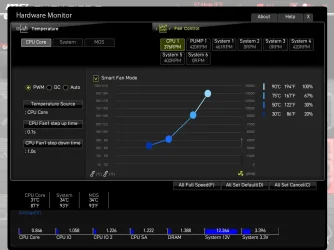
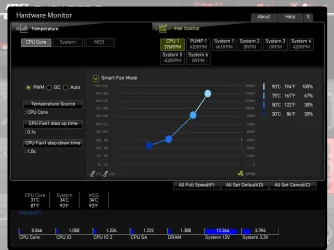
This picture shows the same info, 90 degrees Celsius, 194 Fahrenheit.
The computer is running too hot.
Try the All Set Default button for fan speed. If that fails, try All Full Speed and see if that helps.
Make sure all fans are spinning, if a water cooled system, the pump may have stopped working.
You may need to reapply Thermal Paste.
 
Last edited:

My Computer

System One

  • OS
    Windows 11 Pro Insider 64 bit 25H2 26200.5742
    Computer type
    PC/Desktop
    Manufacturer/Model
    Gigabyte Z390 UD
    CPU
    Intel Core i7 9700K 3.60
    Motherboard
    Gigabyte Z390 UD
    Memory
    16 GB
    Graphics Card(s)
    nVidia GEForce RTX 2060 Super
    Sound Card
    onboard
    Monitor(s) Displays
    Two 27" Dell 4K monitors
    Screen Resolution
    3840 x 2160
    Hard Drives
    M.2 NVME SSD, 500 GB; Two 2TB Mechanical HDD's
    PSU
    850w PSU
    Case
    Cyberpower PC
    Cooling
    Water cooled
    Keyboard
    Backlit Cyberpower gaming keyboard
    Mouse
    Backlit Cyberpower gaming mouse
    Internet Speed
    1 GB mbps
    Browser
    Brave
    Antivirus
    Windows Security
MSI_SnapShot_21 Fan1.webp

ChatGPT:

No — the processor is not at 90 °C (194 °F).

In the screenshot, the current CPU temperature is shown at the bottom left as:

CPU Core: 31 °C (87 °F)

The 90 °C / 194 °F number you see on the right side is only a fan-curve reference point used in Smart Fan Mode. It represents the temperature at which the fan would run at 100%, not the current temperature.

So your CPU is running cool at around 31 °C, not 90 °C.
 

My Computers

System One System Two

  • OS
    Windows 11 Pro
    Computer type
    PC/Desktop
    CPU
    AMD Ryzen 9 9950X3D
    Motherboard
    ASRock B650E Taichi Lite
    Memory
    Kingston FURY Beast 64GB (2x32GB) DDR5 6000MT/s
    Graphics Card(s)
    ASUS TUF Gaming Radeon RX 9070 OC Edition 16GB GDDR6
    Hard Drives
    Solidigm P44 Pro 2TB M.2 NVMe SSD
  • Operating System
    Windows 11 Home
    Computer type
    Laptop
    Manufacturer/Model
    Lenovo Legion Pro 7i Gen 10 16"
    CPU
    Intel Core Ultra 9 275HX
    Memory
    64GB (2x 32GB) DDR5-6400
    Graphics card(s)
    NVIDIA GeForce RTX 5080 16GB GDDR7 Laptop GPU
    Hard Drives
    2x 1TB M.2 NVMe SSD (SK Hynix)

Latest Support Threads

Back
Top Bottom