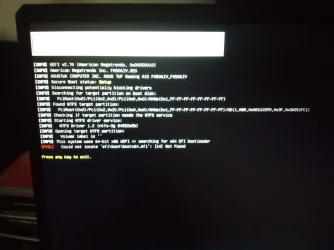
Solved Error every time system is booted


LM2007

Member
Local time
3:40 AM
Posts
7
OS
Windows 11
Since two or three days ago this problem started from nowhere. This is not a usb drive, this is the main drive (and SSD). After any key is pressed it continues to Windows and it works fine. This problem is very annoying and i have not any idea how to fix it.
 
Windows Build/Version
24H2 (build 26100.2605)

Attachments

  • 1000000451.webp
    1000000451.webp
    812 KB · Views: 1

My Computer My Computer

At a glance

Windows 114800H16GBGeForce RTX 2060
OS
Windows 11
Computer type
Laptop
Manufacturer/Model
Asus TUF A15
CPU
4800H
Memory
16GB
Graphics Card(s)
GeForce RTX 2060
Screen Resolution
1920x1080
Browser
Microsoft Edge
Antivirus
AVG free edition
In this video, i will guide on how to repair EFI System Partition (ESP), if the system partition has been corrupted, you can use BCDBoot command to recreate the system partition files by using new copies of these files from the Windows partition.


My Computer My Computer

At a glance

Windows 11AMD Ryzen 7 5700GMicron Technology DDR4-3200 16GBNVIDIA GeForce RTX 3060
OS
Windows 11
Computer type
PC/Desktop
Manufacturer/Model
HP Pavilion
CPU
AMD Ryzen 7 5700G
Motherboard
Erica6
Memory
Micron Technology DDR4-3200 16GB
Graphics Card(s)
NVIDIA GeForce RTX 3060
Sound Card
Realtek ALC671
Monitor(s) Displays
Samsung SyncMaster U28E590
Screen Resolution
3840 x 2160
Hard Drives
SAMSUNG MZVLQ1T0HALB-000H1
In this video, i will guide on how to repair EFI System Partition (ESP), if the system partition has been corrupted, you can use BCDBoot command to recreate the system partition files by using new copies of these files from the Windows partition.

Tried, but it says it cannot copy the fales
 

My Computer My Computer

At a glance

Windows 114800H16GBGeForce RTX 2060
OS
Windows 11
Computer type
Laptop
Manufacturer/Model
Asus TUF A15
CPU
4800H
Memory
16GB
Graphics Card(s)
GeForce RTX 2060
Screen Resolution
1920x1080
Browser
Microsoft Edge
Antivirus
AVG free edition
Is the EFI partition exist, did you make any changes to your system?
 

My Computer My Computer

At a glance

Windows 11AMD Ryzen 7 5700GMicron Technology DDR4-3200 16GBNVIDIA GeForce RTX 3060
OS
Windows 11
Computer type
PC/Desktop
Manufacturer/Model
HP Pavilion
CPU
AMD Ryzen 7 5700G
Motherboard
Erica6
Memory
Micron Technology DDR4-3200 16GB
Graphics Card(s)
NVIDIA GeForce RTX 3060
Sound Card
Realtek ALC671
Monitor(s) Displays
Samsung SyncMaster U28E590
Screen Resolution
3840 x 2160
Hard Drives
SAMSUNG MZVLQ1T0HALB-000H1
After any key is pressed it continues to Windows and it works fine.

Please run the V2 log collector > post a share link
 

My Computer My Computer

At a glance

Windows 10Intel(R) Core(TM) i7-4800MQ CPU @ 2.70GHz16 GB Total: Manufacturer : Samsung MemoryTyp...NVIDIA Quadro K3100M; Intel(R) HD Graphics 4600
OS
Windows 10
Computer type
Laptop
Manufacturer/Model
HP
CPU
Intel(R) Core(TM) i7-4800MQ CPU @ 2.70GHz
Motherboard
Product : 190A Version : KBC Version 94.56
Memory
16 GB Total: Manufacturer : Samsung MemoryType : DDR3 FormFactor : SODIMM Capacity : 8GB Speed : 1600
Graphics Card(s)
NVIDIA Quadro K3100M; Intel(R) HD Graphics 4600
Sound Card
IDT High Definition Audio CODEC; PNP Device ID HDAUDIO\FUNC_01&VEN_111D&DEV_76E0
Hard Drives
Model Hitachi HTS727575A9E364
Antivirus
Microsoft Defender
Other Info
Mobile Workstation
Had to reinstall Windows from scratch, it was the only way. All apps and programs lost now i have to install everything again. Is there an application that let me transfer or copy non-Windows apps including their respective registry entries so i could restore all at once if it happens again? (since i did an image restore and didn't fixed the problem)
 

My Computer My Computer

At a glance

Windows 114800H16GBGeForce RTX 2060
OS
Windows 11
Computer type
Laptop
Manufacturer/Model
Asus TUF A15
CPU
4800H
Memory
16GB
Graphics Card(s)
GeForce RTX 2060
Screen Resolution
1920x1080
Browser
Microsoft Edge
Antivirus
AVG free edition
"Had to reinstall Windows from scratch, it was the only way." It probably wasn't the only way. Did you try a repair install which would have kept all your personal stuff? Did you try sfc/ Scannow and varios DISM commands?

I'm sure forum members could have helped you and I don't understand why you asked for advice and then just decided not to wait.
 

My Computers My Computers

  • At a glance

    Windows 11 Pro 25H2 26200.8655AMD Ryzen 7 5825U with Radeon Graphics16GB
    OS
    Windows 11 Pro 25H2 26200.8655
    Computer type
    Laptop
    Manufacturer/Model
    Acemagic LX15PRO
    CPU
    AMD Ryzen 7 5825U with Radeon Graphics
    Memory
    16GB
    Screen Resolution
    1920 x 1080
    Hard Drives
    SSD 2TB
    Internet Speed
    30 Mbps
    Browser
    Brave
    Antivirus
    Webroot Secure Anywhere
    Other Info
    System 3

    Acer Swift SF114-34 laptop
    OS Windows 11 Pro 26200.8524
    CPU Pentium Silver N6000
    RAM 4GB
    SSD Samsung 970 EVO Plus SSD 2TB (an upgrade)
  • At a glance

    Windows 11 Pro 23H2 22631.2506Atom N450 1.66GHz2GB
    Operating System
    Windows 11 Pro 23H2 22631.2506
    Computer type
    Laptop
    Manufacturer/Model
    HP Mini 210-1090NR PC (bought in late 2009!)
    CPU
    Atom N450 1.66GHz
    Memory
    2GB
    Browser
    Brave
    Antivirus
    Webroot
Do you still have the restore image? If you do, you can restore the image of the old C: partition over top the new C: partition.
 

My Computers My Computers

  • At a glance

    Windows 11 Pro 25H2Intel Core i7-10700K16GB (8GB PC4-19200 DDR4 SDRAM x2)NVIDIA GeForce GTX 1050 TI
    OS
    Windows 11 Pro 25H2
    Computer type
    PC/Desktop
    Manufacturer/Model
    PowerSpec B746
    CPU
    Intel Core i7-10700K
    Motherboard
    ASRock Z490 Phantom Gaming 4/ax
    Memory
    16GB (8GB PC4-19200 DDR4 SDRAM x2)
    Graphics Card(s)
    NVIDIA GeForce GTX 1050 TI
    Sound Card
    Realtek Audio
    Monitor(s) Displays
    #1. LG ULTRAWIDE 34" #2. AOC Q32G2WG3 32"
    Screen Resolution
    #1. 3440 X 1440 #2. 1920 x 1080
    Hard Drives
    NVMe WDC WDS100T2B0C-00PXH0 1TB
    Samsung SSD 860 EVO 1TB
    PSU
    750 Watts (62.5A)
    Case
    PowerSpec/Lian Li ATX 205
    Keyboard
    Logitech K270
    Mouse
    Logitech M185
    Browser
    Microsoft Edge and Firefox
    Antivirus
    Webroot SecureAnywhere CE 26.1
  • At a glance

    Windows 11 Canary ChannelIntel Core i5-8400 CPU @ 2.80GHz16 MB DDR 4-2666
    Operating System
    Windows 11 Canary Channel
    Computer type
    PC/Desktop
    Manufacturer/Model
    PowerSpec G156
    CPU
    Intel Core i5-8400 CPU @ 2.80GHz
    Motherboard
    AsusTeK Prime B360M-A
    Memory
    16 MB DDR 4-2666
    Monitor(s) Displays
    23" Speptre HDMI 75Hz
    Screen Resolution
    1920x1080
    Hard Drives
    Samsung 970 EVO 500GB NVMe
    Keyboard
    Logitek K270
    Mouse
    Logitek M185
    Browser
    Firefox, Edge and Edge Canary
    Antivirus
    Windows Defender
Back
Top Bottom