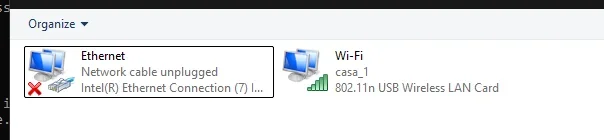
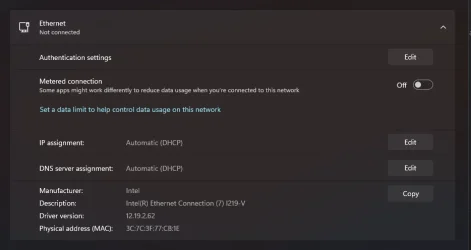
Ethernet - Not Connected


imdj

Member
Local time
6:04 PM
Posts
8
OS
Windows 11
Hello!

About 3 days ago, my desktop randomly stopped recognizing my Ethernet connection. At first, I thought it could be my cable or motherboard, so I cleaned up my desktop and replugged everything. I tried using the same cable on my Nintendo Switch and it worked.

I didn't know what else to do, so I tried reinstalling the drivers, but it still shows "Ethernet - Not Connected." I bought a new cable, plugged it in, and it still didn't work. Then, I bought a USB-to-Ethernet adapter to test my USB ports, and that didn't work either.

I don't know what else I can do, so I found this forum hoping for some help.

I have already tested:

  1. Replugging the cable
  2. Cleaning the computer
  3. Trying another cable
  4. Trying an adapter
  5. Running some DISM/SFC commands (still running while writing this post)
What else can I try?

Thanks!
 
Windows Build/Version
25H2

Attachments

  • 1782512370927.webp
    1782512370927.webp
    6.8 KB · Views: 2
  • 1782512390319.webp
    1782512390319.webp
    18.6 KB · Views: 1

My Computer My Computer

At a glance

Windows 11Intel Core i3-9100fHyperX DDR4Nvidia GTX 1660 SUPER
OS
Windows 11
Computer type
PC/Desktop
Manufacturer/Model
ASUS
CPU
Intel Core i3-9100f
Motherboard
ASUS Tuf B360 Plus-Gaming
Memory
HyperX DDR4
Graphics Card(s)
Nvidia GTX 1660 SUPER

Hello @imdj and welcome to ElevenForum.


It could be, the actual Ethernet port on the motherboard (rear).
I guess it could have something to do with the router.
 

My Computers My Computers

  • At a glance

    Win 11 Home ♦♦♦26200.8737 ♦♦♦♦♦♦♦25H2AMD Ryzen 7 3700XG.Skill (F4-3200C14D-16GTZKW)EVGA RTX 2070 (08G-P4-2171-KR)
    OS
    Win 11 Home ♦♦♦26200.8737 ♦♦♦♦♦♦♦25H2
    Computer type
    PC/Desktop
    Manufacturer/Model
    Built by Ghot® [May 2020]
    CPU
    AMD Ryzen 7 3700X
    Motherboard
    Asus Pro WS X570-ACE (BIOS 5302)
    Memory
    G.Skill (F4-3200C14D-16GTZKW)
    Graphics Card(s)
    EVGA RTX 2070 (08G-P4-2171-KR)
    Sound Card
    Realtek ALC1220P / ALC S1220A
    Monitor(s) Displays
    Dell U3011 30"
    Screen Resolution
    2560 x 1600
    Hard Drives
    2x Samsung 860 EVO 500GB,
    WD 4TB Black FZBX - SATA III,
    WD 8TB Black FZBX - SATA III,
    DRW-24B1ST CD/DVD Burner
    PSU
    PC Power & Cooling 750W Quad EPS12V
    Case
    Cooler Master ATCS 840 Tower
    Cooling
    CM Hyper 212 EVO (push/pull)
    Keyboard
    Ducky DK9008 Shine II Blue LED
    Mouse
    Logitech Optical M-100
    Internet Speed
    300/300
    Browser
    Firefox (latest)
    Antivirus
    Bitdefender Total Security
    Other Info
    Speakers: Klipsch Pro Media 2.1
  • At a glance

    Windows XP Pro 32bit w/SP3AMD Athlon 64 X2 5000+ (OC'd @ 3.2Ghz)TWIN2X2048-6400C4DHX (2 x 1GB, DDR2 800)EVGA 256-P2-N758-TR GeForce 8600GT SSC
    Operating System
    Windows XP Pro 32bit w/SP3
    Computer type
    PC/Desktop
    Manufacturer/Model
    Built by Ghot® (not in use)
    CPU
    AMD Athlon 64 X2 5000+ (OC'd @ 3.2Ghz)
    Motherboard
    ASUS M2N32-SLI Deluxe Wireless Edition
    Memory
    TWIN2X2048-6400C4DHX (2 x 1GB, DDR2 800)
    Graphics card(s)
    EVGA 256-P2-N758-TR GeForce 8600GT SSC
    Sound Card
    Onboard
    Monitor(s) Displays
    ViewSonic G90FB Black 19" Professional (CRT)
    Screen Resolution
    up to 2048 x 1536
    Hard Drives
    WD 36GB 10,000rpm Raptor SATA
    Seagate 80GB 7200rpm SATA
    Lite-On LTR-52246S CD/RW
    Lite-On LH-18A1P CD/DVD Burner
    PSU
    PC Power & Cooling Silencer 750 Quad EPS12V
    Case
    Generic Beige case, 80mm fans
    Cooling
    ZALMAN 9500A 92mm CPU Cooler
    Keyboard
    Logitech Classic Keybooard 200
    Mouse
    Logitech Optical M-BT96a
    Internet Speed
    300/300
    Browser
    Firefox 3.x ??
    Antivirus
    Symantec (Norton)
    Other Info
    Still assembled, still runs. Haven't turned it on for 15 years?
Look over this Link: Fix Ethernet connection problems in Windows | Microsoft Support

EDIT:
make sure the latest available motherboard drivers are installed,
downloaded directly from the board manufacturer's product support page(s).

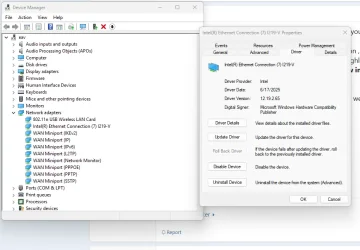
check your Device Manager for any 'Network adapter' or other warnings.

if all else fails, it could very well be that your motherboard has just malfunctioned.
you could try a network PCIe card with Ethernet available
 
Last edited:

My Computer My Computer

At a glance

Windows 11 25H2 (OS Build 26200.8737)Processor: 11th Gen Intel(R) Core(TM) i5-1135...12GBIntel R Iris R XE Graphics family
OS
Windows 11 25H2 (OS Build 26200.8737)
Computer type
Laptop
Manufacturer/Model
Dell
CPU
Processor: 11th Gen Intel(R) Core(TM) i5-1135G7 @ 2.40G
Motherboard
64-bit operating system Dell 0XMF7W
Memory
12GB
Graphics Card(s)
Intel R Iris R XE Graphics family
Sound Card
Cirrus Speakers High Definition Audio
Monitor(s) Displays
Generic PnP monitor
Screen Resolution
1920 x 1080
Hard Drives
NVMe 670p SSDPEKNU512GZ NVMe I NTEL 512GB
Case
cheap
Mouse
Logitech wireless mouse
Internet Speed
16 Mps download
Browser
Google Chrome
Antivirus
Security: Microsoft Defender & Malwarebytes Premium (with browser guard)
Other Info
Dell model: Inspiron 15 3511
You need to examine the Ethernet Plugs cables and sockets for functionality, all of them.

Plugs - Test for springiness of the retaining tab, use a Multimeter (resistance) to ascertain any intermittent plug/cable both ends.
Sockets - make sure the springy finger contacts are lined up and separated correctly and are still springy.

Examine contacts for corrosion, clean contacts with alcohol. General mechanical examination for worn/broken parts.
 

My Computer My Computer

At a glance

Windows 11
OS
Windows 11
Hi @imdj On the router. does the LED light up on the Lan port the computer are connected to?
The same on the computer, does the LED on the Lan port light up?(if you have status LED on the computer)
(100Mbit often Orange, 1000Mbit often Green... this can be different on different manufacturers the manual will tell)


First test to reboot the router(shut it of for 30 seconds and then power on again)
Test to switch the cable to another Lan port on the router
Also if you have access to another Ethernet cable, test another cable between the router and the computer.
Go in to Bios and check so internal Lan is active(test to disable/enable again)
Even if you did try an USB-ethernet adapter)
Test to disable and enable the network adapter.
Test to remove the network card from device manager, reboot and reinstall the adapter.

Good luck with the troubleshooting. :cool:
 

My Computers My Computers

  • At a glance

    Linux: Debian, Kali-linux, Alma, Win: 7, 8.1,...i3, i5 and i7 From 2gen to 9th gen... Server ...
    OS
    Linux: Debian, Kali-linux, Alma, Win: 7, 8.1,2012R
    Manufacturer/Model
    HP Elitebook 840, AsusX53, Aspire E1-572. AsusUX32A, HP Pro3130mt+3010mt, HP Proliant ML150, 3xCustom-PC, i3, i5, i7
    CPU
    i3, i5 and i7 From 2gen to 9th gen... Server dual Xenon
    Hard Drives
    Sata, M.2, SAS
  • At a glance

    Retro: 2003server.XPpro, Win2000, Win98SE, Wi...Oldest intel 8088 up to P4 dual core
    Operating System
    Retro: 2003server.XPpro, Win2000, Win98SE, Win95, Win3.11, MS-DOS, IBM-DOS
    Manufacturer/Model
    Commodore, AST, Fujitsu, Compaq, etc etc. etc Around 15 desktops and 20 laptops in the collection
    CPU
    Oldest intel 8088 up to P4 dual core
    Hard Drives
    MFM, IDE, SCSI
Look over this Link: Fix Ethernet connection problems in Windows | Microsoft Support

EDIT:
make sure the latest available motherboard drivers are installed,
downloaded directly from the board manufacturer's product support page(s).

check your Device Manager for any 'Network adapter' or other warnings.

if all else fails, it could very well be that your motherboard has just malfunctioned.
you could try a network PCIe card with Ethernet available
Will see the motherboard drivers tomorrow, after posting i tried downloading the latest Intel Ethernet connection driver but it didn’t work.

Also was thinking about buying a PCIe Lan card
 

My Computer My Computer

At a glance

Windows 11Intel Core i3-9100fHyperX DDR4Nvidia GTX 1660 SUPER

OS
Windows 11
Computer type
PC/Desktop
Manufacturer/Model
ASUS
CPU
Intel Core i3-9100f
Motherboard
ASUS Tuf B360 Plus-Gaming
Memory
HyperX DDR4
Graphics Card(s)
Nvidia GTX 1660 SUPER
Will see the motherboard drivers tomorrow, after posting i tried downloading the latest Intel Ethernet connection driver but it didn’t work.

Also was thinking about buying a PCIe Lan card

What throws me off is you said you had also tried a USB to ethernet dongle and that did not work either.
 

My Computer My Computer

At a glance

Windows 11 25H2Broadwell-e 6850K 4.5ghz @1.36v32GB Corsair LPM 3600 C16EVGA RTX 3080Ti FTW
OS
Windows 11 25H2
Computer type
PC/Desktop
Manufacturer/Model
EVGA home brew
CPU
Broadwell-e 6850K 4.5ghz @1.36v
Motherboard
EVGA X99 FTW K
Memory
32GB Corsair LPM 3600 C16
Graphics Card(s)
EVGA RTX 3080Ti FTW
Sound Card
Asus Centurion true 7.1 headset. (5 speakers in each earpeice)
Monitor(s) Displays
LG C4 55"
Screen Resolution
4K 144hz
Hard Drives
Various models of SSDs ~10TB No HDDs installed.
PSU
be quiet! BN516 Straight Power 12-1000w 80 Plus Platinum
Case
Corsair 780T modified to dual 200mm intake fans
Cooling
Corsair H110i
Keyboard
Corsair K95 Platinum
Mouse
Corsair M65 RGB Elite
Internet Speed
50Mbs
You need to examine the Ethernet Plugs cables and sockets for functionality, all of them.

Plugs - Test for springiness of the retaining tab, use a Multimeter (resistance) to ascertain any intermittent plug/cable both ends.
Sockets - make sure the springy finger contacts are lined up and separated correctly and are still springy.

Examine contacts for corrosion, clean contacts with alcohol. General mechanical examination for worn/broken parts.
oh.. i think i may not be able to do it, i dont own a multimeter.. but thank you so much for the information
 

My Computer My Computer

At a glance

Windows 11Intel Core i3-9100fHyperX DDR4Nvidia GTX 1660 SUPER
OS
Windows 11
Computer type
PC/Desktop
Manufacturer/Model
ASUS
CPU
Intel Core i3-9100f
Motherboard
ASUS Tuf B360 Plus-Gaming
Memory
HyperX DDR4
Graphics Card(s)
Nvidia GTX 1660 SUPER
Hi @imdj On the router. does the LED light up on the Lan port the computer are connected to?
The same on the computer, does the LED on the Lan port light up?(if you have status LED on the computer)
(100Mbit often Orange, 1000Mbit often Green... this can be different on different manufacturers the manual will tell)


First test to reboot the router(shut it of for 30 seconds and then power on again)
Test to switch the cable to another Lan port on the router
Also if you have access to another Ethernet cable, test another cable between the router and the computer.
Go in to Bios and check so internal Lan is active(test to disable/enable again)
Even if you did try an USB-ethernet adapter)
Test to disable and enable the network adapter.
Test to remove the network card from device manager, reboot and reinstall the adapter.

Good luck with the troubleshooting. :cool:
the leds on the router turns on, but the led on my computer doesn’t, tried another cable too, didn’t work.

I can do more testings tomorrow too
 

My Computer My Computer

At a glance

Windows 11Intel Core i3-9100fHyperX DDR4Nvidia GTX 1660 SUPER
OS
Windows 11
Computer type
PC/Desktop
Manufacturer/Model
ASUS
CPU
Intel Core i3-9100f
Motherboard
ASUS Tuf B360 Plus-Gaming
Memory
HyperX DDR4
Graphics Card(s)
Nvidia GTX 1660 SUPER
What throws me off is you said you had also tried a USB to ethernet dongle and that did not work either.
yeah, it didn’t.. it recognized the dongle but it was still “Ethernet - Not Connected”.
And its so weird cause i tested the same cable on my Nintendo and it did work well..

I may need to wipe my entire pc and reinstall everything :/
 

My Computer My Computer

At a glance

Windows 11Intel Core i3-9100fHyperX DDR4Nvidia GTX 1660 SUPER
OS
Windows 11
Computer type
PC/Desktop
Manufacturer/Model
ASUS
CPU
Intel Core i3-9100f
Motherboard
ASUS Tuf B360 Plus-Gaming
Memory
HyperX DDR4
Graphics Card(s)
Nvidia GTX 1660 SUPER
the leds on the router turns on, but the led on my computer doesn’t, tried another cable too, didn’t work.

I can do more testings tomorrow too
That is odd.
If the Router Lan port LED indicator turn on/light up it indicate it has a connection to a device. If the LED indicators on the computer lan port dont light up, it indicate it dont have a connection with the device in the other end (the router in your case)
It should be both either light up or dark. not only on one of the paired devices.

I's 6:16AM over here and i should be in bed now.
So i say good night and good luck with the hunt on the different steps i posted. :-)
 

My Computers My Computers

  • At a glance

    Linux: Debian, Kali-linux, Alma, Win: 7, 8.1,...i3, i5 and i7 From 2gen to 9th gen... Server ...
    OS
    Linux: Debian, Kali-linux, Alma, Win: 7, 8.1,2012R
    Manufacturer/Model
    HP Elitebook 840, AsusX53, Aspire E1-572. AsusUX32A, HP Pro3130mt+3010mt, HP Proliant ML150, 3xCustom-PC, i3, i5, i7
    CPU
    i3, i5 and i7 From 2gen to 9th gen... Server dual Xenon
    Hard Drives
    Sata, M.2, SAS
  • At a glance

    Retro: 2003server.XPpro, Win2000, Win98SE, Wi...Oldest intel 8088 up to P4 dual core
    Operating System
    Retro: 2003server.XPpro, Win2000, Win98SE, Win95, Win3.11, MS-DOS, IBM-DOS
    Manufacturer/Model
    Commodore, AST, Fujitsu, Compaq, etc etc. etc Around 15 desktops and 20 laptops in the collection
    CPU
    Oldest intel 8088 up to P4 dual core
    Hard Drives
    MFM, IDE, SCSI
Just wondering if it's not a hardware related problem ... maybe you could try this.

right click the icon to the internet to the left of your speaker icon , click on change adaptor options , right click your internet connection icon and choose properties , click on internet protocol v 4 to highlight it then properties , on the bottom half of the page you are looking at now , click on the button use the following dns , now in the first box you need 8 8 8 8 and in the second you need 8 8 4 4 , finally tick validate settings before exit .

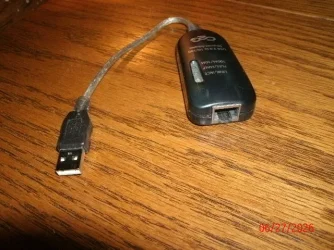
See this USB to ethernet dongle. It came with my laptop. NIB. It went off & on randomly!! I would not use one. Years ago I had 100' of ethernet cable. No Problems! good luck.
 

Attachments

  • GEDC2174.webp
    GEDC2174.webp
    78.7 KB · Views: 1

My Computer My Computer

At a glance

Windows 11 25H2 (OS Build 26200.8737)Processor: 11th Gen Intel(R) Core(TM) i5-1135...12GBIntel R Iris R XE Graphics family
OS
Windows 11 25H2 (OS Build 26200.8737)
Computer type
Laptop
Manufacturer/Model
Dell
CPU
Processor: 11th Gen Intel(R) Core(TM) i5-1135G7 @ 2.40G
Motherboard
64-bit operating system Dell 0XMF7W
Memory
12GB
Graphics Card(s)
Intel R Iris R XE Graphics family
Sound Card
Cirrus Speakers High Definition Audio
Monitor(s) Displays
Generic PnP monitor
Screen Resolution
1920 x 1080
Hard Drives
NVMe 670p SSDPEKNU512GZ NVMe I NTEL 512GB
Case
cheap
Mouse
Logitech wireless mouse
Internet Speed
16 Mps download
Browser
Google Chrome
Antivirus
Security: Microsoft Defender & Malwarebytes Premium (with browser guard)
Other Info
Dell model: Inspiron 15 3511
Anything show on the Device Manager ?
 

My Computer My Computer

At a glance

Windows 11 25H2 (OS Build 26200.8737)Processor: 11th Gen Intel(R) Core(TM) i5-1135...12GBIntel R Iris R XE Graphics family
OS
Windows 11 25H2 (OS Build 26200.8737)
Computer type
Laptop
Manufacturer/Model
Dell
CPU
Processor: 11th Gen Intel(R) Core(TM) i5-1135G7 @ 2.40G
Motherboard
64-bit operating system Dell 0XMF7W
Memory
12GB
Graphics Card(s)
Intel R Iris R XE Graphics family
Sound Card
Cirrus Speakers High Definition Audio
Monitor(s) Displays
Generic PnP monitor
Screen Resolution
1920 x 1080
Hard Drives
NVMe 670p SSDPEKNU512GZ NVMe I NTEL 512GB
Case
cheap
Mouse
Logitech wireless mouse
Internet Speed
16 Mps download
Browser
Google Chrome
Antivirus
Security: Microsoft Defender & Malwarebytes Premium (with browser guard)
Other Info
Dell model: Inspiron 15 3511
Just wondering if it's not a hardware related problem ... maybe you could try this.

right click the icon to the internet to the left of your speaker icon , click on change adaptor options , right click your internet connection icon and choose properties , click on internet protocol v 4 to highlight it then properties , on the bottom half of the page you are looking at now , click on the button use the following dns , now in the first box you need 8 8 8 8 and in the second you need 8 8 4 4 , finally tick validate settings before exit .

See this USB to ethernet dongle. It came with my laptop. NIB. It went off & on randomly!! I would not use one. Years ago I had 100' of ethernet cable. No Problems! good luck.
it can totally be a hardware problem, im just trying everything before.
my dongle is the same, i used as a test and it showed Ethernet 2 but didnt work

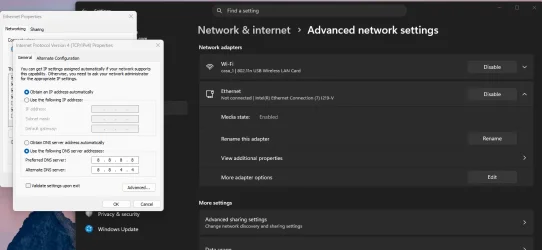
Also, i changed the dns and as you can see, still get the Not Connected thing..

I will probably format my machine right now, since nothing works
 

Attachments

  • 1782583725639.webp
    1782583725639.webp
    50.1 KB · Views: 1

My Computer My Computer

At a glance

Windows 11Intel Core i3-9100fHyperX DDR4Nvidia GTX 1660 SUPER
OS
Windows 11
Computer type
PC/Desktop
Manufacturer/Model
ASUS
CPU
Intel Core i3-9100f
Motherboard
ASUS Tuf B360 Plus-Gaming
Memory
HyperX DDR4
Graphics Card(s)
Nvidia GTX 1660 SUPER

My Computer My Computer

At a glance

Windows 11Intel Core i3-9100fHyperX DDR4Nvidia GTX 1660 SUPER
OS
Windows 11
Computer type
PC/Desktop
Manufacturer/Model
ASUS
CPU
Intel Core i3-9100f
Motherboard
ASUS Tuf B360 Plus-Gaming
Memory
HyperX DDR4
Graphics Card(s)
Nvidia GTX 1660 SUPER

My Computer My Computer

At a glance

Windows 11 25H2Broadwell-e 6850K 4.5ghz @1.36v32GB Corsair LPM 3600 C16EVGA RTX 3080Ti FTW
OS
Windows 11 25H2
Computer type
PC/Desktop
Manufacturer/Model
EVGA home brew
CPU
Broadwell-e 6850K 4.5ghz @1.36v
Motherboard
EVGA X99 FTW K
Memory
32GB Corsair LPM 3600 C16
Graphics Card(s)
EVGA RTX 3080Ti FTW
Sound Card
Asus Centurion true 7.1 headset. (5 speakers in each earpeice)
Monitor(s) Displays
LG C4 55"
Screen Resolution
4K 144hz
Hard Drives
Various models of SSDs ~10TB No HDDs installed.
PSU
be quiet! BN516 Straight Power 12-1000w 80 Plus Platinum
Case
Corsair 780T modified to dual 200mm intake fans
Cooling
Corsair H110i
Keyboard
Corsair K95 Platinum
Mouse
Corsair M65 RGB Elite
Internet Speed
50Mbs

My Computer My Computer

At a glance

Windows 11Intel Core i3-9100fHyperX DDR4Nvidia GTX 1660 SUPER
OS
Windows 11
Computer type
PC/Desktop
Manufacturer/Model
ASUS
CPU
Intel Core i3-9100f
Motherboard
ASUS Tuf B360 Plus-Gaming
Memory
HyperX DDR4
Graphics Card(s)
Nvidia GTX 1660 SUPER
All those things I mentioned do not rely on a multimeter. There are other methods for testing continuity, simple things like flexing leads along the length of a cable, judicious wiggling plugs and sockets with care, and so forth.
The physical checks just involve examination and applying common sense to contact strips and locking latches etc.

"but the led on my computer doesn’t, tried another cable too, didn’t work."

but the sockets need checking at both ends of the cable as well, if you can get to them the soldered socket connections as well.
 

My Computer My Computer

At a glance

Windows 11
OS
Windows 11
Back
Top Bottom