Solved Win 11 - Ethernet and Wifi disappeared


For the first run of WDV the tutorial has 3 customized tests.

I/O Verification
Force pending I/O requests
IRP logging

Please restart WDV with these customized tests and post one of these share links:

If there is no immediate BSOD > verifier /querysettings

If there is a BSOD > V2


After viewing the results, new customized tests will be provided for the next group of customized tests.
 

My Computer

System One

  • OS
    Windows 10
    Computer type
    Laptop
    Manufacturer/Model
    HP
    CPU
    Intel(R) Core(TM) i7-4800MQ CPU @ 2.70GHz
    Motherboard
    Product : 190A Version : KBC Version 94.56
    Memory
    16 GB Total: Manufacturer : Samsung MemoryType : DDR3 FormFactor : SODIMM Capacity : 8GB Speed : 1600
    Graphics Card(s)
    NVIDIA Quadro K3100M; Intel(R) HD Graphics 4600
    Sound Card
    IDT High Definition Audio CODEC; PNP Device ID HDAUDIO\FUNC_01&VEN_111D&DEV_76E0
    Hard Drives
    Model Hitachi HTS727575A9E364
    Antivirus
    Microsoft Defender
    Other Info
    Mobile Workstation

For the first run of WDV the tutorial has 3 customized tests.

I/O Verification
Force pending I/O requests
IRP logging

Please restart WDV with these customized tests and post one of these share links:

If there is no immediate BSOD > verifier /querysettings

If there is a BSOD > V2


After viewing the results, new customized tests will be provided for the next group of customized tests.
Hey,
See attached.
Thanks
 

Attachments

My Computer

System One

  • OS
    Window 11
    Computer type
    PC/Desktop
    CPU
    AMD Ryzen 7 7800X3D
    Motherboard
    B650M AORUS ELITE AX ICE
    Memory
    DDR5 32 GB
    Graphics Card(s)
    Sapphire AMD Radeon RX 9070XT
The link posted was

Gather_additional_dump_files.bat


This is the V2 link:


For any BSOD run the V2 log collector > post a share link.
 

My Computer

System One

  • OS
    Windows 10
    Computer type
    Laptop
    Manufacturer/Model
    HP
    CPU
    Intel(R) Core(TM) i7-4800MQ CPU @ 2.70GHz
    Motherboard
    Product : 190A Version : KBC Version 94.56
    Memory
    16 GB Total: Manufacturer : Samsung MemoryType : DDR3 FormFactor : SODIMM Capacity : 8GB Speed : 1600
    Graphics Card(s)
    NVIDIA Quadro K3100M; Intel(R) HD Graphics 4600
    Sound Card
    IDT High Definition Audio CODEC; PNP Device ID HDAUDIO\FUNC_01&VEN_111D&DEV_76E0
    Hard Drives
    Model Hitachi HTS727575A9E364
    Antivirus
    Microsoft Defender
    Other Info
    Mobile Workstation
The link posted was

Gather_additional_dump_files.bat


This is the V2 link:


For any BSOD run the V2 log collector > post a share link.


My Computer

System One

  • OS
    Window 11
    Computer type
    PC/Desktop
    CPU
    AMD Ryzen 7 7800X3D
    Motherboard
    B650M AORUS ELITE AX ICE
    Memory
    DDR5 32 GB
    Graphics Card(s)
    Sapphire AMD Radeon RX 9070XT
Please restart WDV with the 3 customized tests in the tutorial then if there is no immediate BSOD run verifier /querysettings

or if there is a BSOD run

Post a share link.V2


Then restart WDV for each of these groups of customized tests:


Group a
Code:
    [ ] 0x00000008 Pool tracking.
    [ ] 0x00000020 Deadlock detection.
    [ ] 0x00000080 DMA checking.
    [ ] 0x00000800 Miscellaneous checks.
    [ ] 0x02000000 Code integrity checks.


Group b
Code:
    [ ] 0x00000001 Special pool.
    [ ] 0x00040000 Systematic low resources simulation.
    [ ] 0x00200000 NDIS/WIFI verification.
    [ ] 0x00800000 Kernel synchronization delay fuzzing.
    [ ] 0x01000000 VM switch verification.


Group c
Code:
    [ ] 0x00000010 I/O verification.
    [ ] 0x00000200 Force pending I/O requests.
    [ ] 0x00000002 Force IRQL checking.
    [ ] 0x00002000 Invariant MDL checking for stack.
    [ ] 0x00004000 Invariant MDL checking for driver.


Group d
Code:
    [ ] 0x00020000 DDI compliance checking.
    [ ] 0x00080000 DDI compliance checking (additional).
    [ ] 0x00008000 Power framework delay fuzzing.
    [ ] 0x00010000 Port/miniport interface checking.
    [ ] 0x00000100 Security checks.


For each group of customized tests:


if there is no BSOD run verifier /querysettings > post a share link

or

if there is a BSOD run V2 > post a share link.
 
Last edited:

My Computer

System One

  • OS
    Windows 10
    Computer type
    Laptop
    Manufacturer/Model
    HP
    CPU
    Intel(R) Core(TM) i7-4800MQ CPU @ 2.70GHz
    Motherboard
    Product : 190A Version : KBC Version 94.56
    Memory
    16 GB Total: Manufacturer : Samsung MemoryType : DDR3 FormFactor : SODIMM Capacity : 8GB Speed : 1600
    Graphics Card(s)
    NVIDIA Quadro K3100M; Intel(R) HD Graphics 4600
    Sound Card
    IDT High Definition Audio CODEC; PNP Device ID HDAUDIO\FUNC_01&VEN_111D&DEV_76E0
    Hard Drives
    Model Hitachi HTS727575A9E364
    Antivirus
    Microsoft Defender
    Other Info
    Mobile Workstation
Last edited:

My Computer

System One

  • OS
    Window 11
    Computer type
    PC/Desktop
    CPU
    AMD Ryzen 7 7800X3D
    Motherboard
    B650M AORUS ELITE AX ICE
    Memory
    DDR5 32 GB
    Graphics Card(s)
    Sapphire AMD Radeon RX 9070XT
Please create a new post with this information and share links:


group a


group b


group c


group d


For each group post one of these share links


if there is no BSOD run verifier /querysettings > post a share link

or

if there is a BSOD run V2 > post a share link.
 

My Computer

System One

  • OS
    Windows 10
    Computer type
    Laptop
    Manufacturer/Model
    HP
    CPU
    Intel(R) Core(TM) i7-4800MQ CPU @ 2.70GHz
    Motherboard
    Product : 190A Version : KBC Version 94.56
    Memory
    16 GB Total: Manufacturer : Samsung MemoryType : DDR3 FormFactor : SODIMM Capacity : 8GB Speed : 1600
    Graphics Card(s)
    NVIDIA Quadro K3100M; Intel(R) HD Graphics 4600
    Sound Card
    IDT High Definition Audio CODEC; PNP Device ID HDAUDIO\FUNC_01&VEN_111D&DEV_76E0
    Hard Drives
    Model Hitachi HTS727575A9E364
    Antivirus
    Microsoft Defender
    Other Info
    Mobile Workstation
group a v2 group a.zip


group b v2 group b.zip


group c v2 group c.zip


group d v2 group d.zip


For each group post one of these share links


if there is no BSOD run verifier /querysettings > post a share link


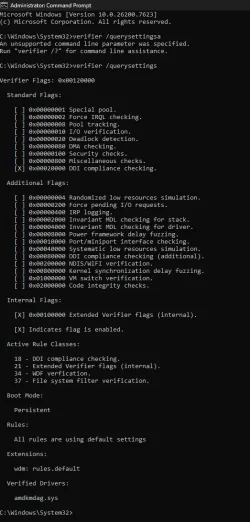
Microsoft Windows [Version 10.0.26200.7623]
(c) Microsoft Corporation. All rights reserved.

C:\Windows\System32>verifier /querysettings

Verifier Flags: 0x00000000

Standard Flags:

[ ] 0x00000001 Special pool.
[ ] 0x00000002 Force IRQL checking.
[ ] 0x00000008 Pool tracking.
[ ] 0x00000010 I/O verification.
[ ] 0x00000020 Deadlock detection.
[ ] 0x00000080 DMA checking.
[ ] 0x00000100 Security checks.
[ ] 0x00000800 Miscellaneous checks.
[ ] 0x00020000 DDI compliance checking.

Additional Flags:

[ ] 0x00000004 Randomized low resources simulation.
[ ] 0x00000200 Force pending I/O requests.
[ ] 0x00000400 IRP logging.
[ ] 0x00002000 Invariant MDL checking for stack.
[ ] 0x00004000 Invariant MDL checking for driver.
[ ] 0x00008000 Power framework delay fuzzing.
[ ] 0x00010000 Port/miniport interface checking.
[ ] 0x00040000 Systematic low resources simulation.
[ ] 0x00080000 DDI compliance checking (additional).
[ ] 0x00200000 NDIS/WIFI verification.
[ ] 0x00800000 Kernel synchronization delay fuzzing.
[ ] 0x01000000 VM switch verification.
[ ] 0x02000000 Code integrity checks.

[X] Indicates flag is enabled.

Active Rule Classes:

None

Boot Mode:

Persistent

Rules:

All rules are using default settings

Verified Drivers:

None

C:\Windows\System32>
 

My Computer

System One

  • OS
    Window 11
    Computer type
    PC/Desktop
    CPU
    AMD Ryzen 7 7800X3D
    Motherboard
    B650M AORUS ELITE AX ICE
    Memory
    DDR5 32 GB
    Graphics Card(s)
    Sapphire AMD Radeon RX 9070XT
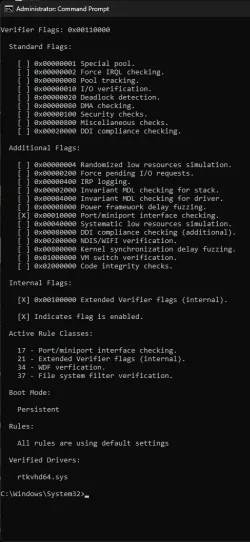
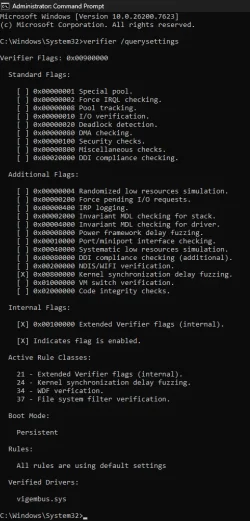
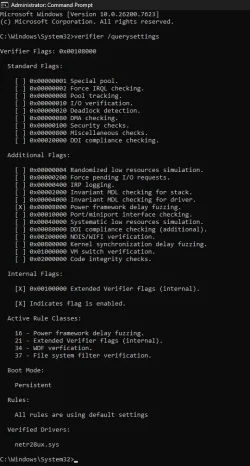
Please restart WDV with these customized tests:


Group 1
Code:
    [ ] 0x00010000 Port/miniport interface checking.

Only test this driver: RTKVHD64.sys


Group 2
Code:
[ ] 0x00800000 Kernel synchronization delay fuzzing.

Only test this driver: ViGEmBus.sys


Group 3
Code:
[ ] 0x00008000 Power framework delay fuzzing.

Only test this driver: netr28ux.sys


Group 4

Code:
[ ] 0x00020000 DDI compliance checking.

Only test this driver: amdkmdag.sys


Group 5

Code:
[ ] 0x00020000 DDI compliance checking.
[ ] 0x00080000 DDI compliance checking (additional).

Only test these drivers:
amdkmdag.sys
amdfendr.sys


For each group post one of these share links:


if there is no BSOD run verifier /querysettings > post a share link
if there is a BSOD run V2 > post a share link


After running WDV tests:

Run administrative command prompt: > post share links

wevtutil epl Application %userprofile%\Desktop\application.evtx

wevtutil epl System %userprofile%\Desktop\system.evtx
 
Last edited:

My Computer

System One

  • OS
    Windows 10
    Computer type
    Laptop
    Manufacturer/Model
    HP
    CPU
    Intel(R) Core(TM) i7-4800MQ CPU @ 2.70GHz
    Motherboard
    Product : 190A Version : KBC Version 94.56
    Memory
    16 GB Total: Manufacturer : Samsung MemoryType : DDR3 FormFactor : SODIMM Capacity : 8GB Speed : 1600
    Graphics Card(s)
    NVIDIA Quadro K3100M; Intel(R) HD Graphics 4600
    Sound Card
    IDT High Definition Audio CODEC; PNP Device ID HDAUDIO\FUNC_01&VEN_111D&DEV_76E0
    Hard Drives
    Model Hitachi HTS727575A9E364
    Antivirus
    Microsoft Defender
    Other Info
    Mobile Workstation
Group 1

v2 group 1.zip

Group 2

v2 group 2.zip

Group 3


Group 4


Group 5


For each group post one of these share links:


if there is no BSOD run verifier /querysettings > post a share link


Microsoft Windows [Version 10.0.26200.7623]
(c) Microsoft Corporation. All rights reserved.

C:\Windows\System32>verifier /querysettings

Verifier Flags: 0x00000000

Standard Flags:

[ ] 0x00000001 Special pool.
[ ] 0x00000002 Force IRQL checking.
[ ] 0x00000008 Pool tracking.
[ ] 0x00000010 I/O verification.
[ ] 0x00000020 Deadlock detection.
[ ] 0x00000080 DMA checking.
[ ] 0x00000100 Security checks.
[ ] 0x00000800 Miscellaneous checks.
[ ] 0x00020000 DDI compliance checking.

Additional Flags:

[ ] 0x00000004 Randomized low resources simulation.
[ ] 0x00000200 Force pending I/O requests.
[ ] 0x00000400 IRP logging.
[ ] 0x00002000 Invariant MDL checking for stack.
[ ] 0x00004000 Invariant MDL checking for driver.
[ ] 0x00008000 Power framework delay fuzzing.
[ ] 0x00010000 Port/miniport interface checking.
[ ] 0x00040000 Systematic low resources simulation.
[ ] 0x00080000 DDI compliance checking (additional).
[ ] 0x00200000 NDIS/WIFI verification.
[ ] 0x00800000 Kernel synchronization delay fuzzing.
[ ] 0x01000000 VM switch verification.
[ ] 0x02000000 Code integrity checks.

[X] Indicates flag is enabled.

Active Rule Classes:

None

Boot Mode:

Persistent

Rules:

All rules are using default settings

Verified Drivers:

None

C:\Windows\System32>

After running WDV tests:

Run administrative command prompt: > post share links

wevtutil epl Application %userprofile%\Desktop\application.evtx application.evtx

wevtutil epl System %userprofile%\Desktop\system.evtx system.evtx
 

My Computer

System One

  • OS
    Window 11
    Computer type
    PC/Desktop
    CPU
    AMD Ryzen 7 7800X3D
    Motherboard
    B650M AORUS ELITE AX ICE
    Memory
    DDR5 32 GB
    Graphics Card(s)
    Sapphire AMD Radeon RX 9070XT
Please list each step that you made to:
1) Run WDV
2) Run the verifier /querysettings

In the thread the verifier /querysettings results indicated that WDV was not running.

Did the system crash on every run of WDV?

Ask questions as needed to run the tool and run the commands.

Repeat the steps in post #29 > report what you do to select customized tests and what you do to select drivers the how you run the tool, then how you run verifier /querysettings or how you turn off WDV.
 

My Computer

System One

  • OS
    Windows 10
    Computer type
    Laptop
    Manufacturer/Model
    HP
    CPU
    Intel(R) Core(TM) i7-4800MQ CPU @ 2.70GHz
    Motherboard
    Product : 190A Version : KBC Version 94.56
    Memory
    16 GB Total: Manufacturer : Samsung MemoryType : DDR3 FormFactor : SODIMM Capacity : 8GB Speed : 1600
    Graphics Card(s)
    NVIDIA Quadro K3100M; Intel(R) HD Graphics 4600
    Sound Card
    IDT High Definition Audio CODEC; PNP Device ID HDAUDIO\FUNC_01&VEN_111D&DEV_76E0
    Hard Drives
    Model Hitachi HTS727575A9E364
    Antivirus
    Microsoft Defender
    Other Info
    Mobile Workstation

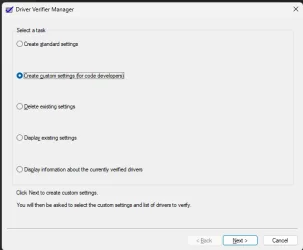
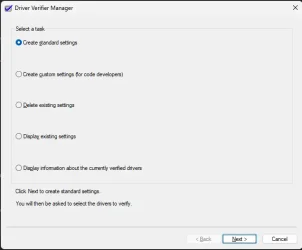
Please list each step that you made to:
1) Run WDV

Step 1

1769119460465.webp
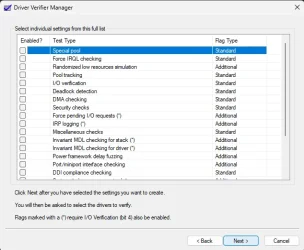
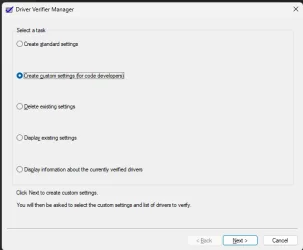
Step 2

1769119480489.webp
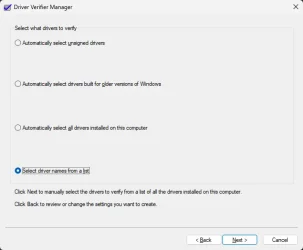
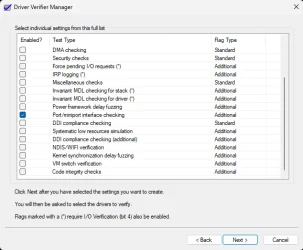
step 3

1769119519735.webp
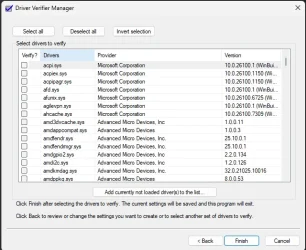
Step 4
1769119535567.webp

I then select the drivers you listed and then restart.

Next step after restart is running V2 log.

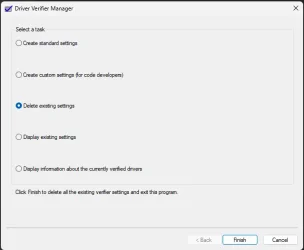
Next I will open DVM and Delete existing setting like below:

1769119623084.webp

Restart PC and then do the whole thing again for next set of tests.


2) Run the verifier /querysettings

I ran this after the final test as above. I did use Delete existing setting , restart and then ran verifier/querysetting.

PC didn't BSOD once during the last tests.
 

Attachments

  • 1769119444448.webp
    1769119444448.webp
    14.1 KB · Views: 1

My Computer

System One

  • OS
    Window 11
    Computer type
    PC/Desktop
    CPU
    AMD Ryzen 7 7800X3D
    Motherboard
    B650M AORUS ELITE AX ICE
    Memory
    DDR5 32 GB
    Graphics Card(s)
    Sapphire AMD Radeon RX 9070XT
Hi All

You two have an admirable staying power.
Just scrolling through this makes dizzy.
Will keep up with this as I want so much see how it develops.

So, kudos and DON'T GIVE UP.

Ciao, Han.
 

My Computers

System One System Two

  • OS
    WIN 11 24H2
    Computer type
    Laptop
    Manufacturer/Model
    Lenovo Thinpad X1 Yoga 3gen
    CPU
    i7-8550U
    Memory
    16 GB lpddr3
    Screen Resolution
    2560x1440
    Hard Drives
    NVME SSD 2TB Samsung PM981
    Mouse
    Logitech M720
    Internet Speed
    350 Mbps down and up from 500 advertised on WiFi
    Browser
    Firefox
    Antivirus
    Windows Security, Malwarebytes
    Other Info
    Acronis TrueImage 2019
  • Operating System
    Win 11 24H2
    Computer type
    PC/Desktop
    Manufacturer/Model
    Lenovo Tiny M920x
    CPU
    i7-8700T
    Memory
    32 GB DDR4
    Sound Card
    MOTU M4
    Monitor(s) Displays
    DELL P2418D
    Screen Resolution
    2560 x 1440
    Hard Drives
    NVME SSD 2TB Samsung PM981a
    NVME SSD 1TB Samsung PM981a
    SSD Sandisk 1T Sata
    Mouse
    Logitech M590
    Browser
    Firefox
    Antivirus
    Windows Security, Malwarebytes
    Other Info
    Acronis TrueImage 2019
Has every run of WDV caused BSODs without exception?

For the images in post #32:

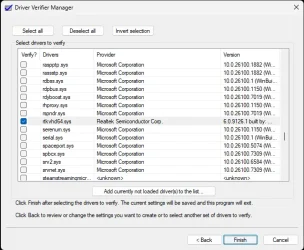
a) select the customized tests in post #29

b) post images with the customized box checked

c) post images of only non-Microsoft driver boxes checked

d) click finish to run the tool


With the customized test(s) and driver(s) the tool must run.
It will or will not trigger a BSOD.
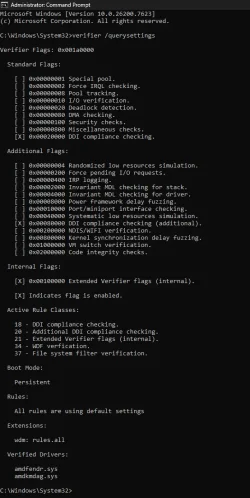
If it does not trigger a BSOD the verifier /querysettings command will display the boxes that you checked.
The two verifier /querysettings results in posts #28 and #30 had empty boxes (none checked).
So make sure that you do not delete existing settings before running the verifier /querysettings.
 
Last edited:

My Computer

System One

  • OS
    Windows 10
    Computer type
    Laptop
    Manufacturer/Model
    HP
    CPU
    Intel(R) Core(TM) i7-4800MQ CPU @ 2.70GHz
    Motherboard
    Product : 190A Version : KBC Version 94.56
    Memory
    16 GB Total: Manufacturer : Samsung MemoryType : DDR3 FormFactor : SODIMM Capacity : 8GB Speed : 1600
    Graphics Card(s)
    NVIDIA Quadro K3100M; Intel(R) HD Graphics 4600
    Sound Card
    IDT High Definition Audio CODEC; PNP Device ID HDAUDIO\FUNC_01&VEN_111D&DEV_76E0
    Hard Drives
    Model Hitachi HTS727575A9E364
    Antivirus
    Microsoft Defender
    Other Info
    Mobile Workstation
Group 1 v2 Group 1.zip
Code:

[ ] 0x00010000 Port/miniport interface checking.


Only test this driver: RTKVHD64.sys

1769194447493.webp

1769194494329.webp
1769194507806.webp
1769194518348.webp
Group 2 v2 Group 2.zip
Code:

[ ] 0x00800000 Kernel synchronization delay fuzzing.


Only test this driver: ViGEmBus.sys
1769194537995.webp


Group 3 v2 Group 2.zip
Code:

[ ] 0x00008000 Power framework delay fuzzing.


Only test this driver: netr28ux.sys
1769194544265.webp


Group 4 v2 Group 4.zip

Code:

[ ] 0x00020000 DDI compliance checking.


Only test this driver: amdkmdag.sys
1769194550476.webp


Group 5 v2 Group 5.zip

Code:

[ ] 0x00020000 DDI compliance checking.
[ ] 0x00080000 DDI compliance checking (additional).


Only test these drivers:
amdkmdag.sys
amdfendr.sys
1769194558550.webp


For each group post one of these share links:


if there is no BSOD run verifier /querysettings > post a share link
if there is a BSOD run V2 > post a share link


After running WDV tests:

Run administrative command prompt: > post share links

wevtutil epl Application %userprofile%\Desktop\application.evtx application.evtx

wevtutil epl System %userprofile%\Desktop\system.evtx system.evtx
 

My Computer

System One

  • OS
    Window 11
    Computer type
    PC/Desktop
    CPU
    AMD Ryzen 7 7800X3D
    Motherboard
    B650M AORUS ELITE AX ICE
    Memory
    DDR5 32 GB
    Graphics Card(s)
    Sapphire AMD Radeon RX 9070XT
Has every run of WDV caused BSODs without exception?

Please report for each group whether the customized test a drives did or did not have BSODs.
 

My Computer

System One

  • OS
    Windows 10
    Computer type
    Laptop
    Manufacturer/Model
    HP
    CPU
    Intel(R) Core(TM) i7-4800MQ CPU @ 2.70GHz
    Motherboard
    Product : 190A Version : KBC Version 94.56
    Memory
    16 GB Total: Manufacturer : Samsung MemoryType : DDR3 FormFactor : SODIMM Capacity : 8GB Speed : 1600
    Graphics Card(s)
    NVIDIA Quadro K3100M; Intel(R) HD Graphics 4600
    Sound Card
    IDT High Definition Audio CODEC; PNP Device ID HDAUDIO\FUNC_01&VEN_111D&DEV_76E0
    Hard Drives
    Model Hitachi HTS727575A9E364
    Antivirus
    Microsoft Defender
    Other Info
    Mobile Workstation
Has every run of WDV caused BSODs without exception?

Please report for each group whether the customized test a drives did or did not have BSODs.
no none has caused BSOD
 

My Computer

System One

  • OS
    Window 11
    Computer type
    PC/Desktop
    CPU
    AMD Ryzen 7 7800X3D
    Motherboard
    B650M AORUS ELITE AX ICE
    Memory
    DDR5 32 GB
    Graphics Card(s)
    Sapphire AMD Radeon RX 9070XT
Then why are you posting V2 links?


Redo post #25.

For each group report whether there was or was not a BSOD.

If there was no BSOD > post querysettings

If there was a BSOD then post V2.

Do not post both.

Make sure that querysettings is not empty.

Whenever possible post a txt report instead of an image.
 

My Computer

System One

  • OS
    Windows 10
    Computer type
    Laptop
    Manufacturer/Model
    HP
    CPU
    Intel(R) Core(TM) i7-4800MQ CPU @ 2.70GHz
    Motherboard
    Product : 190A Version : KBC Version 94.56
    Memory
    16 GB Total: Manufacturer : Samsung MemoryType : DDR3 FormFactor : SODIMM Capacity : 8GB Speed : 1600
    Graphics Card(s)
    NVIDIA Quadro K3100M; Intel(R) HD Graphics 4600
    Sound Card
    IDT High Definition Audio CODEC; PNP Device ID HDAUDIO\FUNC_01&VEN_111D&DEV_76E0
    Hard Drives
    Model Hitachi HTS727575A9E364
    Antivirus
    Microsoft Defender
    Other Info
    Mobile Workstation

My Computer

System One

  • OS
    Window 11
    Computer type
    PC/Desktop
    CPU
    AMD Ryzen 7 7800X3D
    Motherboard
    B650M AORUS ELITE AX ICE
    Memory
    DDR5 32 GB
    Graphics Card(s)
    Sapphire AMD Radeon RX 9070XT
Please see post #38.
 

My Computer

System One

  • OS
    Windows 10
    Computer type
    Laptop
    Manufacturer/Model
    HP
    CPU
    Intel(R) Core(TM) i7-4800MQ CPU @ 2.70GHz
    Motherboard
    Product : 190A Version : KBC Version 94.56
    Memory
    16 GB Total: Manufacturer : Samsung MemoryType : DDR3 FormFactor : SODIMM Capacity : 8GB Speed : 1600
    Graphics Card(s)
    NVIDIA Quadro K3100M; Intel(R) HD Graphics 4600
    Sound Card
    IDT High Definition Audio CODEC; PNP Device ID HDAUDIO\FUNC_01&VEN_111D&DEV_76E0
    Hard Drives
    Model Hitachi HTS727575A9E364
    Antivirus
    Microsoft Defender
    Other Info
    Mobile Workstation

Back
Top Bottom