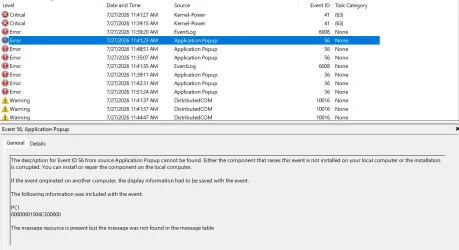
Event 56, Application Popup


GetTheClicker

Well-known member
Member
Local time
9:40 PM
Posts
122
OS
Windows 11
I can not for the life of me figure out how to fix this error. Nothing on google can tell me how either.
I tried SFC and DISM commands. It's driving me nuts I think it might be related to my PC crashes lately.
I have several reports of this one single error over and over.
 

Attachments
  • App Popup.webp
    App Popup.webp
    142.8 KB · Views: 2

My Computer My Computer

At a glance

Windows 11AMD 5950X64gigs DDR4 4000mhz Neo TridentZRadeon 7900XTX
OS
Windows 11
Computer type
PC/Desktop
Manufacturer/Model
Aorus
CPU
AMD 5950X
Motherboard
Aorus X570S Master
Memory
64gigs DDR4 4000mhz Neo TridentZ
Graphics Card(s)
Radeon 7900XTX
Monitor(s) Displays
Dual 42" Insignia 1080p 55" TCL 6 series
Screen Resolution
3200x1800 / 3840x2160
Hard Drives
1 500gb NvMe Operating System Drive
3x 2TB NvMe
1 2tb SSD
1 500gb SSD
PSU
Lian Li Edge Serie - 1000W
Cooling
ARCTIC Liquid Freezer II 360
Browser
Chrome
I can not for the life of me figure out how to fix this error. Nothing on google can tell me how either.
I tried SFC and DISM commands. It's driving me nuts I think it might be related to my PC crashes lately.
I have several reports of this one single error over and over.


Here's what Google AI says about Event ID 56 + crashes...

Recommended Fixes
    • Update BIOS and Chipset Drivers: Visit your motherboard manufacturer's website (ASUS, Gigabyte, MSI, etc.) to install the latest BIOS and chipset drivers, which directly patch ACPI and power-state bugs.
    • Adjust Power Settings in BIOS: A consensus on forums like Reddit indicates that enabling or disabling power-related options like Power Loading or tweaking C-States in the BIOS can stabilize power delivery on Intel platforms.
    • Check for Driver/Hardware Faults: Reinstall or roll back your graphics card and storage drivers, and ensure your power supply (PSU) provides stable, sufficient wattage.


I just checked my Event Viewer. I don't have any ID 56 errors.
But I flash the BIOS and update the chipset drivers regularly.


Here's the latest x570, socket AM$ chipset drivers...


My Computers My Computers

  • At a glance

    Win 11 Home ♦♦♦26300.9445 ♦♦♦♦♦♦♦26H2AMD Ryzen 7 3700XG.Skill (F4-3200C14D-16GTZKW)EVGA RTX 2070 (08G-P4-2171-KR)
    OS
    Win 11 Home ♦♦♦26300.9445 ♦♦♦♦♦♦♦26H2
    Computer type
    PC/Desktop
    Manufacturer/Model
    Built by Ghot® [May 2020]
    CPU
    AMD Ryzen 7 3700X
    Motherboard
    Asus Pro WS X570-ACE (BIOS 5302)
    Memory
    G.Skill (F4-3200C14D-16GTZKW)
    Graphics Card(s)
    EVGA RTX 2070 (08G-P4-2171-KR)
    Sound Card
    Realtek ALC1220P / ALC S1220A
    Monitor(s) Displays
    Dell U3011 30"
    Screen Resolution
    2560 x 1600
    Hard Drives
    2x Samsung 860 EVO 500GB,
    WD 4TB Black FZBX - SATA III,
    WD 8TB Black FZBX - SATA III,
    DRW-24B1ST CD/DVD Burner
    PSU
    PC Power & Cooling 750W Quad EPS12V
    Case
    Cooler Master ATCS 840 Tower
    Cooling
    CM Hyper 212 EVO (push/pull)
    Keyboard
    Ducky DK9008 Shine II Blue LED
    Mouse
    Logitech Optical M-100
    Internet Speed
    300/300
    Browser
    Firefox (latest)
    Antivirus
    Bitdefender Total Security
    Other Info
    Speakers: Klipsch Pro Media 2.1
  • At a glance

    Windows XP Pro 32bit w/SP3AMD Athlon 64 X2 5000+ (OC'd @ 3.2Ghz)TWIN2X2048-6400C4DHX (2 x 1GB, DDR2 800)EVGA 256-P2-N758-TR GeForce 8600GT SSC
    Operating System
    Windows XP Pro 32bit w/SP3
    Computer type
    PC/Desktop
    Manufacturer/Model
    Built by Ghot® (not in use)
    CPU
    AMD Athlon 64 X2 5000+ (OC'd @ 3.2Ghz)
    Motherboard
    ASUS M2N32-SLI Deluxe Wireless Edition
    Memory
    TWIN2X2048-6400C4DHX (2 x 1GB, DDR2 800)
    Graphics card(s)
    EVGA 256-P2-N758-TR GeForce 8600GT SSC
    Sound Card
    Onboard
    Monitor(s) Displays
    ViewSonic G90FB Black 19" Professional (CRT)
    Screen Resolution
    up to 2048 x 1536
    Hard Drives
    WD 36GB 10,000rpm Raptor SATA
    Seagate 80GB 7200rpm SATA
    Lite-On LTR-52246S CD/RW
    Lite-On LH-18A1P CD/DVD Burner
    PSU
    PC Power & Cooling Silencer 750 Quad EPS12V
    Case
    Generic Beige case, 80mm fans
    Cooling
    ZALMAN 9500A 92mm CPU Cooler
    Keyboard
    Logitech Classic Keybooard 200
    Mouse
    Logitech Optical M-BT96a
    Internet Speed
    300/300
    Browser
    Firefox 3.x ??
    Antivirus
    Symantec (Norton)
    Other Info
    Still assembled, still runs. Haven't turned it on for 15 years?
I just updated the BIOS to the most recent version a few days ago.
I set the power setting in BIOS to Typical Current Idle.
Within the power plan I set the CPU min/max to 98%.
 

My Computer My Computer

At a glance

Windows 11AMD 5950X64gigs DDR4 4000mhz Neo TridentZRadeon 7900XTX
OS
Windows 11
Computer type
PC/Desktop
Manufacturer/Model
Aorus
CPU
AMD 5950X
Motherboard
Aorus X570S Master
Memory
64gigs DDR4 4000mhz Neo TridentZ
Graphics Card(s)
Radeon 7900XTX
Monitor(s) Displays
Dual 42" Insignia 1080p 55" TCL 6 series
Screen Resolution
3200x1800 / 3840x2160
Hard Drives
1 500gb NvMe Operating System Drive
3x 2TB NvMe
1 2tb SSD
1 500gb SSD
PSU
Lian Li Edge Serie - 1000W
Cooling
ARCTIC Liquid Freezer II 360
Browser
Chrome
I just updated the BIOS to the most recent version a few days ago.
I set the power setting in BIOS to Typical Current Idle.
Within the power plan I set the CPU min/max to 98%.


Do the chipset drivers. They pretty much control everything on the motherboard.
This is the latest version... 8.05.04.516

You can check in Programs and Features, to see what version you have.

Image1.webp
 

My Computers My Computers

  • At a glance

    Win 11 Home ♦♦♦26300.9445 ♦♦♦♦♦♦♦26H2AMD Ryzen 7 3700XG.Skill (F4-3200C14D-16GTZKW)EVGA RTX 2070 (08G-P4-2171-KR)
    OS
    Win 11 Home ♦♦♦26300.9445 ♦♦♦♦♦♦♦26H2
    Computer type
    PC/Desktop
    Manufacturer/Model
    Built by Ghot® [May 2020]
    CPU
    AMD Ryzen 7 3700X
    Motherboard
    Asus Pro WS X570-ACE (BIOS 5302)
    Memory
    G.Skill (F4-3200C14D-16GTZKW)
    Graphics Card(s)
    EVGA RTX 2070 (08G-P4-2171-KR)
    Sound Card
    Realtek ALC1220P / ALC S1220A
    Monitor(s) Displays
    Dell U3011 30"
    Screen Resolution
    2560 x 1600
    Hard Drives
    2x Samsung 860 EVO 500GB,
    WD 4TB Black FZBX - SATA III,
    WD 8TB Black FZBX - SATA III,
    DRW-24B1ST CD/DVD Burner
    PSU
    PC Power & Cooling 750W Quad EPS12V
    Case
    Cooler Master ATCS 840 Tower
    Cooling
    CM Hyper 212 EVO (push/pull)
    Keyboard
    Ducky DK9008 Shine II Blue LED
    Mouse
    Logitech Optical M-100
    Internet Speed
    300/300
    Browser
    Firefox (latest)
    Antivirus
    Bitdefender Total Security
    Other Info
    Speakers: Klipsch Pro Media 2.1
  • At a glance

    Windows XP Pro 32bit w/SP3AMD Athlon 64 X2 5000+ (OC'd @ 3.2Ghz)TWIN2X2048-6400C4DHX (2 x 1GB, DDR2 800)EVGA 256-P2-N758-TR GeForce 8600GT SSC
    Operating System
    Windows XP Pro 32bit w/SP3
    Computer type
    PC/Desktop
    Manufacturer/Model
    Built by Ghot® (not in use)
    CPU
    AMD Athlon 64 X2 5000+ (OC'd @ 3.2Ghz)
    Motherboard
    ASUS M2N32-SLI Deluxe Wireless Edition
    Memory
    TWIN2X2048-6400C4DHX (2 x 1GB, DDR2 800)
    Graphics card(s)
    EVGA 256-P2-N758-TR GeForce 8600GT SSC
    Sound Card
    Onboard
    Monitor(s) Displays
    ViewSonic G90FB Black 19" Professional (CRT)
    Screen Resolution
    up to 2048 x 1536
    Hard Drives
    WD 36GB 10,000rpm Raptor SATA
    Seagate 80GB 7200rpm SATA
    Lite-On LTR-52246S CD/RW
    Lite-On LH-18A1P CD/DVD Burner
    PSU
    PC Power & Cooling Silencer 750 Quad EPS12V
    Case
    Generic Beige case, 80mm fans
    Cooling
    ZALMAN 9500A 92mm CPU Cooler
    Keyboard
    Logitech Classic Keybooard 200
    Mouse
    Logitech Optical M-BT96a
    Internet Speed
    300/300
    Browser
    Firefox 3.x ??
    Antivirus
    Symantec (Norton)
    Other Info
    Still assembled, still runs. Haven't turned it on for 15 years?
That hexadecimal address points to a PCI device (hardware on the PCI bus) that triggered the error.It’s a hardware or driver fault. I suggest you use these instructions to gather the logs necessary for @zbook to analyze. Upload them to any cloud provider and post a SHARED link here. He will take a look when he comes online. Follow the instructions carefully.
 

My Computers My Computers

  • At a glance

    Windows 11 Pro 25H2 26200.9445i9-10900 10 core 20 threads32 gbnone-Intel UHD Graphics 630
    OS
    Windows 11 Pro 25H2 26200.9445
    Computer type
    PC/Desktop
    Manufacturer/Model
    Dell Optiplex 7080
    CPU
    i9-10900 10 core 20 threads
    Motherboard
    DELL 0J37VM
    Memory
    32 gb
    Graphics Card(s)
    none-Intel UHD Graphics 630
    Sound Card
    Integrated Realtek
    Monitor(s) Displays
    Benq 27
    Screen Resolution
    2560x1440
    Hard Drives
    2x1tb Solidigm m.2 nvme /External drives 512gb Samsung m.2 sata+2tb Kingston m2.nvme
    PSU
    500w
    Case
    MT
    Cooling
    Dell Premium
    Keyboard
    Logitech wired
    Mouse
    Logitech wireless
    Internet Speed
    so slow I'm too embarrassed to tell
    Browser
    #1 Edge #2 Firefox
    Antivirus
    Defender+MWB Premium
  • At a glance

    Windows 11 Pro 24H2 26200.9445AMD Ryzen 7 6800U32 gbintegrated
    Operating System
    Windows 11 Pro 24H2 26200.9445
    Computer type
    PC/Desktop
    Manufacturer/Model
    Beelink Mini PC SER5
    CPU
    AMD Ryzen 7 6800U
    Memory
    32 gb
    Graphics card(s)
    integrated
    Sound Card
    integrated
    Monitor(s) Displays
    Benq 27
    Screen Resolution
    2560x1440
    Hard Drives
    1TB Crucial nvme
    Keyboard
    Logitech wired
    Mouse
    Logitech wireless
    Internet Speed
    still too embarrassed to tell
    Browser
    Firefox
    Antivirus
    Defender
  • System 3 is non compliant Dell 9020 i7-4770/24gb ram Win11 PRO 26200.9445
Yep. If the chipset driver (which also controls the PCI bus), doesn't fix the issue, the BSOD link above, is your next step.
 

My Computers My Computers

  • At a glance

    Win 11 Home ♦♦♦26300.9445 ♦♦♦♦♦♦♦26H2AMD Ryzen 7 3700XG.Skill (F4-3200C14D-16GTZKW)EVGA RTX 2070 (08G-P4-2171-KR)
    OS
    Win 11 Home ♦♦♦26300.9445 ♦♦♦♦♦♦♦26H2
    Computer type
    PC/Desktop
    Manufacturer/Model
    Built by Ghot® [May 2020]
    CPU
    AMD Ryzen 7 3700X
    Motherboard
    Asus Pro WS X570-ACE (BIOS 5302)
    Memory
    G.Skill (F4-3200C14D-16GTZKW)
    Graphics Card(s)
    EVGA RTX 2070 (08G-P4-2171-KR)
    Sound Card
    Realtek ALC1220P / ALC S1220A
    Monitor(s) Displays
    Dell U3011 30"
    Screen Resolution
    2560 x 1600
    Hard Drives
    2x Samsung 860 EVO 500GB,
    WD 4TB Black FZBX - SATA III,
    WD 8TB Black FZBX - SATA III,
    DRW-24B1ST CD/DVD Burner
    PSU
    PC Power & Cooling 750W Quad EPS12V
    Case
    Cooler Master ATCS 840 Tower
    Cooling
    CM Hyper 212 EVO (push/pull)
    Keyboard
    Ducky DK9008 Shine II Blue LED
    Mouse
    Logitech Optical M-100
    Internet Speed
    300/300
    Browser
    Firefox (latest)
    Antivirus
    Bitdefender Total Security
    Other Info
    Speakers: Klipsch Pro Media 2.1
  • At a glance

    Windows XP Pro 32bit w/SP3AMD Athlon 64 X2 5000+ (OC'd @ 3.2Ghz)TWIN2X2048-6400C4DHX (2 x 1GB, DDR2 800)EVGA 256-P2-N758-TR GeForce 8600GT SSC
    Operating System
    Windows XP Pro 32bit w/SP3
    Computer type
    PC/Desktop
    Manufacturer/Model
    Built by Ghot® (not in use)
    CPU
    AMD Athlon 64 X2 5000+ (OC'd @ 3.2Ghz)
    Motherboard
    ASUS M2N32-SLI Deluxe Wireless Edition
    Memory
    TWIN2X2048-6400C4DHX (2 x 1GB, DDR2 800)
    Graphics card(s)
    EVGA 256-P2-N758-TR GeForce 8600GT SSC
    Sound Card
    Onboard
    Monitor(s) Displays
    ViewSonic G90FB Black 19" Professional (CRT)
    Screen Resolution
    up to 2048 x 1536
    Hard Drives
    WD 36GB 10,000rpm Raptor SATA
    Seagate 80GB 7200rpm SATA
    Lite-On LTR-52246S CD/RW
    Lite-On LH-18A1P CD/DVD Burner
    PSU
    PC Power & Cooling Silencer 750 Quad EPS12V
    Case
    Generic Beige case, 80mm fans
    Cooling
    ZALMAN 9500A 92mm CPU Cooler
    Keyboard
    Logitech Classic Keybooard 200
    Mouse
    Logitech Optical M-BT96a
    Internet Speed
    300/300
    Browser
    Firefox 3.x ??
    Antivirus
    Symantec (Norton)
    Other Info
    Still assembled, still runs. Haven't turned it on for 15 years?
Do the chipset drivers. They pretty much control everything on the motherboard.
This is the latest version... 8.05.04.516

You can check in Programs and Features, to see what version you have.

View attachment 177669
It's up to date, I do have that version.


That hexadecimal address points to a PCI device (hardware on the PCI bus) that triggered the error.It’s a hardware or driver fault. I suggest you use these instructions to gather the logs necessary for @zbook to analyze. Upload them to any cloud provider and post a SHARED link here. He will take a look when he comes online. Follow the instructions carefully.
I will look into that. I suspect it's a power issue perhaps? It's a 6 month old LianLi Edge 1000. I have an old EVGA 1000 in storage. I believe it's still good but the fan died in it but that's not a problem, I have many spares lying around.
I also have a spare motherboard and CPU to go with it.
So if anyone thinks I should swap any of those parts out I will give it a shot.
 

My Computer My Computer

At a glance

Windows 11AMD 5950X64gigs DDR4 4000mhz Neo TridentZRadeon 7900XTX
OS
Windows 11
Computer type
PC/Desktop
Manufacturer/Model
Aorus
CPU
AMD 5950X
Motherboard
Aorus X570S Master
Memory
64gigs DDR4 4000mhz Neo TridentZ
Graphics Card(s)
Radeon 7900XTX
Monitor(s) Displays
Dual 42" Insignia 1080p 55" TCL 6 series
Screen Resolution
3200x1800 / 3840x2160
Hard Drives
1 500gb NvMe Operating System Drive
3x 2TB NvMe
1 2tb SSD
1 500gb SSD
PSU
Lian Li Edge Serie - 1000W
Cooling
ARCTIC Liquid Freezer II 360
Browser
Chrome
The only power supplies I like are the old PC Power & Cooling and the Seasonics.

But you can use HWInfo or HWMonitor, both free, to see what your power supply is up to.
It shows Min, Max, and Current, so you can see if you have voltage issues when you get those popups.

12v, 5v, and 3v
 

My Computers My Computers

  • At a glance

    Win 11 Home ♦♦♦26300.9445 ♦♦♦♦♦♦♦26H2AMD Ryzen 7 3700XG.Skill (F4-3200C14D-16GTZKW)EVGA RTX 2070 (08G-P4-2171-KR)
    OS
    Win 11 Home ♦♦♦26300.9445 ♦♦♦♦♦♦♦26H2
    Computer type
    PC/Desktop
    Manufacturer/Model
    Built by Ghot® [May 2020]
    CPU
    AMD Ryzen 7 3700X
    Motherboard
    Asus Pro WS X570-ACE (BIOS 5302)
    Memory
    G.Skill (F4-3200C14D-16GTZKW)
    Graphics Card(s)
    EVGA RTX 2070 (08G-P4-2171-KR)
    Sound Card
    Realtek ALC1220P / ALC S1220A
    Monitor(s) Displays
    Dell U3011 30"
    Screen Resolution
    2560 x 1600
    Hard Drives
    2x Samsung 860 EVO 500GB,
    WD 4TB Black FZBX - SATA III,
    WD 8TB Black FZBX - SATA III,
    DRW-24B1ST CD/DVD Burner
    PSU
    PC Power & Cooling 750W Quad EPS12V
    Case
    Cooler Master ATCS 840 Tower
    Cooling
    CM Hyper 212 EVO (push/pull)
    Keyboard
    Ducky DK9008 Shine II Blue LED
    Mouse
    Logitech Optical M-100
    Internet Speed
    300/300
    Browser
    Firefox (latest)
    Antivirus
    Bitdefender Total Security
    Other Info
    Speakers: Klipsch Pro Media 2.1
  • At a glance

    Windows XP Pro 32bit w/SP3AMD Athlon 64 X2 5000+ (OC'd @ 3.2Ghz)TWIN2X2048-6400C4DHX (2 x 1GB, DDR2 800)EVGA 256-P2-N758-TR GeForce 8600GT SSC
    Operating System
    Windows XP Pro 32bit w/SP3
    Computer type
    PC/Desktop
    Manufacturer/Model
    Built by Ghot® (not in use)
    CPU
    AMD Athlon 64 X2 5000+ (OC'd @ 3.2Ghz)
    Motherboard
    ASUS M2N32-SLI Deluxe Wireless Edition
    Memory
    TWIN2X2048-6400C4DHX (2 x 1GB, DDR2 800)
    Graphics card(s)
    EVGA 256-P2-N758-TR GeForce 8600GT SSC
    Sound Card
    Onboard
    Monitor(s) Displays
    ViewSonic G90FB Black 19" Professional (CRT)
    Screen Resolution
    up to 2048 x 1536
    Hard Drives
    WD 36GB 10,000rpm Raptor SATA
    Seagate 80GB 7200rpm SATA
    Lite-On LTR-52246S CD/RW
    Lite-On LH-18A1P CD/DVD Burner
    PSU
    PC Power & Cooling Silencer 750 Quad EPS12V
    Case
    Generic Beige case, 80mm fans
    Cooling
    ZALMAN 9500A 92mm CPU Cooler
    Keyboard
    Logitech Classic Keybooard 200
    Mouse
    Logitech Optical M-BT96a
    Internet Speed
    300/300
    Browser
    Firefox 3.x ??
    Antivirus
    Symantec (Norton)
    Other Info
    Still assembled, still runs. Haven't turned it on for 15 years?
I am not sure if this file will include the BSOD. I ran scans and cleaners so I could start from scratch but here is the ZIP file.
 

Attachments

My Computer My Computer

At a glance

Windows 11AMD 5950X64gigs DDR4 4000mhz Neo TridentZRadeon 7900XTX
OS
Windows 11
Computer type
PC/Desktop
Manufacturer/Model
Aorus
CPU
AMD 5950X
Motherboard
Aorus X570S Master
Memory
64gigs DDR4 4000mhz Neo TridentZ
Graphics Card(s)
Radeon 7900XTX
Monitor(s) Displays
Dual 42" Insignia 1080p 55" TCL 6 series
Screen Resolution
3200x1800 / 3840x2160
Hard Drives
1 500gb NvMe Operating System Drive
3x 2TB NvMe
1 2tb SSD
1 500gb SSD
PSU
Lian Li Edge Serie - 1000W
Cooling
ARCTIC Liquid Freezer II 360
Browser
Chrome

My Computers My Computers

  • At a glance

    Win 11 Home ♦♦♦26300.9445 ♦♦♦♦♦♦♦26H2AMD Ryzen 7 3700XG.Skill (F4-3200C14D-16GTZKW)EVGA RTX 2070 (08G-P4-2171-KR)
    OS
    Win 11 Home ♦♦♦26300.9445 ♦♦♦♦♦♦♦26H2
    Computer type
    PC/Desktop
    Manufacturer/Model
    Built by Ghot® [May 2020]
    CPU
    AMD Ryzen 7 3700X
    Motherboard
    Asus Pro WS X570-ACE (BIOS 5302)
    Memory
    G.Skill (F4-3200C14D-16GTZKW)
    Graphics Card(s)
    EVGA RTX 2070 (08G-P4-2171-KR)
    Sound Card
    Realtek ALC1220P / ALC S1220A
    Monitor(s) Displays
    Dell U3011 30"
    Screen Resolution
    2560 x 1600
    Hard Drives
    2x Samsung 860 EVO 500GB,
    WD 4TB Black FZBX - SATA III,
    WD 8TB Black FZBX - SATA III,
    DRW-24B1ST CD/DVD Burner
    PSU
    PC Power & Cooling 750W Quad EPS12V
    Case
    Cooler Master ATCS 840 Tower
    Cooling
    CM Hyper 212 EVO (push/pull)
    Keyboard
    Ducky DK9008 Shine II Blue LED
    Mouse
    Logitech Optical M-100
    Internet Speed
    300/300
    Browser
    Firefox (latest)
    Antivirus
    Bitdefender Total Security
    Other Info
    Speakers: Klipsch Pro Media 2.1
  • At a glance

    Windows XP Pro 32bit w/SP3AMD Athlon 64 X2 5000+ (OC'd @ 3.2Ghz)TWIN2X2048-6400C4DHX (2 x 1GB, DDR2 800)EVGA 256-P2-N758-TR GeForce 8600GT SSC
    Operating System
    Windows XP Pro 32bit w/SP3
    Computer type
    PC/Desktop
    Manufacturer/Model
    Built by Ghot® (not in use)
    CPU
    AMD Athlon 64 X2 5000+ (OC'd @ 3.2Ghz)
    Motherboard
    ASUS M2N32-SLI Deluxe Wireless Edition
    Memory
    TWIN2X2048-6400C4DHX (2 x 1GB, DDR2 800)
    Graphics card(s)
    EVGA 256-P2-N758-TR GeForce 8600GT SSC
    Sound Card
    Onboard
    Monitor(s) Displays
    ViewSonic G90FB Black 19" Professional (CRT)
    Screen Resolution
    up to 2048 x 1536
    Hard Drives
    WD 36GB 10,000rpm Raptor SATA
    Seagate 80GB 7200rpm SATA
    Lite-On LTR-52246S CD/RW
    Lite-On LH-18A1P CD/DVD Burner
    PSU
    PC Power & Cooling Silencer 750 Quad EPS12V
    Case
    Generic Beige case, 80mm fans
    Cooling
    ZALMAN 9500A 92mm CPU Cooler
    Keyboard
    Logitech Classic Keybooard 200
    Mouse
    Logitech Optical M-BT96a
    Internet Speed
    300/300
    Browser
    Firefox 3.x ??
    Antivirus
    Symantec (Norton)
    Other Info
    Still assembled, still runs. Haven't turned it on for 15 years?
Based on your screenshot, the Event ID 56 error (with the PCI 00000001004CE00000 parameter) is directly tied to the critical Kernel-Power (Event ID 41) events. This means that Event 56 is not just an informational log; it is the direct cause of your computer's sudden reboots or freezes.
The PCI code in the description indicates a conflict, driver failure, or power drop on the PCI Express bus. Most commonly, the device under this address is either your Graphics Card (GPU) or an NVMe SSD.
To fix this issue, follow these steps:
## 1. Disable PCIe Link State Power Management
The most frequent cause of this error is Windows trying to put a PCI device into a low-power saving mode, causing it to lose connection and crash the system.

* Open the Control Panel and go to Power Options.
* Next to your selected power plan, click Change plan settings -> Change advanced power settings.
* Expand the PCI Express category, then expand Link State Power Management.
* Change the setting to Off for both Battery and Plugged in (or just Setting), then click Apply.

## 2. Turn Off Fast Startup
Fast Startup can load the Windows kernel from a hibernation file with corrupted or glitched states for PCI device drivers.

* In the Power Options window, click Choose what the power buttons do on the left sidebar.
* Click Change settings that are currently unavailable at the top.
* Uncheck Turn on fast startup (recommended) and click Save changes.

## 3. Clean Reinstall GPU Drivers Using DDU
If your graphics card is causing the PCI bus drop (which is highly likely when combined with Kernel-Power 41):

* Download the official DDU (Display Driver Uninstaller) utility.
* Boot your PC into Safe Mode.
* Run DDU, select your GPU type (NVIDIA or AMD), and click Clean and restart.
* Once the PC reboots normally, install the latest driver downloaded directly from the official NVIDIA or AMD website.
 

My Computer My Computer

At a glance

Windows 11 Insider Experimental (26H2)Intel Core i5-1140032Gb (DDR4 SDRAM)Intel(R) UHD Graphics 730
OS
Windows 11 Insider Experimental (26H2)
Computer type
PC/Desktop
Manufacturer/Model
Gigabyte Technology Co., Ltd.
CPU
Intel Core i5-11400
Motherboard
Z590 AORUS PRO AX
Memory
32Gb (DDR4 SDRAM)
Graphics Card(s)
Intel(R) UHD Graphics 730
Sound Card
Realtek USB Audio
Monitor(s) Displays
LG 27US500-W 4K UHD UltraFine™
Screen Resolution
3840x2160
Hard Drives
Samsung SSD 980 PRO 1TB
WDC WD7501AALS
PSU
Montech CENTURY, 650W, 80+ Gold
Case
Cougar Airface ECO RGB
Cooling
ID-COOLING SE-224-XTS BLACK
Keyboard
Microsoft SideWinder X6 Keyboard
Mouse
Microsoft SideWinder Mouse
Internet Speed
Internet speed of 1 Gbit/s
Browser
Vivaldi browser
Antivirus
Windows Defender
1) Add WMIC:

DISM /Online /Add-Capability /CapabilityName:WMIC~~~~


2) Run bat scripts > post share links


a) tuneup_plus_log.bat


b) gather_additional_dump_files.bat


3) Reboot into safe mode (shift + restart) > rerun V2 > post a share link


4) Make sure that operating system/ software cleaning is not performed during the troubleshooting
 

My Computer My Computer

At a glance

Windows 10Intel(R) Core(TM) i7-4800MQ CPU @ 2.70GHz16 GB Total: Manufacturer : Samsung MemoryTyp...NVIDIA Quadro K3100M; Intel(R) HD Graphics 4600
OS
Windows 10
Computer type
Laptop
Manufacturer/Model
HP
CPU
Intel(R) Core(TM) i7-4800MQ CPU @ 2.70GHz
Motherboard
Product : 190A Version : KBC Version 94.56
Memory
16 GB Total: Manufacturer : Samsung MemoryType : DDR3 FormFactor : SODIMM Capacity : 8GB Speed : 1600
Graphics Card(s)
NVIDIA Quadro K3100M; Intel(R) HD Graphics 4600
Sound Card
IDT High Definition Audio CODEC; PNP Device ID HDAUDIO\FUNC_01&VEN_111D&DEV_76E0
Hard Drives
Model Hitachi HTS727575A9E364
Antivirus
Microsoft Defender
Other Info
Mobile Workstation
I am not sure if this file will include the BSOD.

It includes the dump file and it points to your AMD graphics drivers as the cause.
Reinstall your current driver or maybe go to a previous version.

Screenshot 2026-07-27 162251.webp
 

My Computer My Computer

At a glance

Windows 11 Pro
OS
Windows 11 Pro
Please perform the steps in post #12 before re-replacing the GPU driver.


Here is the error I get every couple days. These are clean drivers. I used DDU and the AMDCleanupUtility yet the issue still occurs. The drivers are directly from AMD's website.

View attachment 177542
 

My Computer My Computer

At a glance

Windows 10Intel(R) Core(TM) i7-4800MQ CPU @ 2.70GHz16 GB Total: Manufacturer : Samsung MemoryTyp...NVIDIA Quadro K3100M; Intel(R) HD Graphics 4600
OS
Windows 10
Computer type
Laptop
Manufacturer/Model
HP
CPU
Intel(R) Core(TM) i7-4800MQ CPU @ 2.70GHz
Motherboard
Product : 190A Version : KBC Version 94.56
Memory
16 GB Total: Manufacturer : Samsung MemoryType : DDR3 FormFactor : SODIMM Capacity : 8GB Speed : 1600
Graphics Card(s)
NVIDIA Quadro K3100M; Intel(R) HD Graphics 4600
Sound Card
IDT High Definition Audio CODEC; PNP Device ID HDAUDIO\FUNC_01&VEN_111D&DEV_76E0
Hard Drives
Model Hitachi HTS727575A9E364
Antivirus
Microsoft Defender
Other Info
Mobile Workstation
@zbook

Ok, I think I did it correctly.
I've never done a cloud share so here's hoping this works.
LiveKernal Reports

Just checked the Event Viewer and I think we're getting somewhere.
Fast boot was disabled within the BIOS but NOT within windows. I didn't know they were seperate.

There's only 1 EVENT 56 Error at 10:36am.
Spoke too soon, a 2nd one at 2:55pm.
I ran 3DMARK, Heaven Benchmark, Cinebench, and FurMark. Nothing bad happened. I even ran them all at the same time. The pc was certainly working hard but did not BSOD or crash.

I think I need to make a new post because now I'm running into a GPU driver issue that is preventing me from solving this little event 56 issue. My GPU goes dark and falls off device manager's list. Have to unplug it and plug it back in to get any video.
 

Attachments

Last edited:

My Computer My Computer

At a glance

Windows 11AMD 5950X64gigs DDR4 4000mhz Neo TridentZRadeon 7900XTX
OS
Windows 11
Computer type
PC/Desktop
Manufacturer/Model
Aorus
CPU
AMD 5950X
Motherboard
Aorus X570S Master
Memory
64gigs DDR4 4000mhz Neo TridentZ
Graphics Card(s)
Radeon 7900XTX
Monitor(s) Displays
Dual 42" Insignia 1080p 55" TCL 6 series
Screen Resolution
3200x1800 / 3840x2160
Hard Drives
1 500gb NvMe Operating System Drive
3x 2TB NvMe
1 2tb SSD
1 500gb SSD
PSU
Lian Li Edge Serie - 1000W
Cooling
ARCTIC Liquid Freezer II 360
Browser
Chrome
When available please post a new link with gather_additional_dump_files.bat results.


Reinstall an AMD driver older than 32.0.31021.5001.

If BSOD continue with different AMD drivers then plan to swap the GPU card (AMD or Nvidia)


Code:
Name    AMD Radeon RX 7900 XTX
PNP Device ID    PCI\VEN_1002&DEV_744C&SUBSYS_0E3B1002&REV_C8\6&36EAE14A&0&00000019
Adapter Type    AMD Radeon Graphics Processor (0x744C), Advanced Micro Devices, Inc. compatible
Adapter Description    AMD Radeon RX 7900 XTX
Adapter RAM    (1,048,576) bytes
Installed Drivers    C:\WINDOWS\System32\DriverStore\FileRepository\u0202082.inf_amd64_61e8e071c4b56ef4\B026218\atidx9loader64.dll,C:\WINDOWS\System32\DriverStore\FileRepository\u0202082.inf_amd64_61e8e071c4b56ef4\B026218\amdxx64.dll,C:\WINDOWS\System32\DriverStore\FileRepository\u0202082.inf_amd64_61e8e071c4b56ef4\B026218\amdxx64.dll,C:\WINDOWS\System32\DriverStore\FileRepository\u0202082.inf_amd64_61e8e071c4b56ef4\B026218\amdxc64.dll
Driver Version    32.0.31021.5001
INF File    oem4.inf (ati2mtag_Navi31 section)
Driver    C:\WINDOWS\SYSTEM32\DRIVERSTORE\FILEREPOSITORY\U0202082.INF_AMD64_61E8E071C4B56EF4\B026218\AMDKMDAG.SYS (32.0.31021.5001, 80.24 MB (84,134,928 bytes), 7/25/2026 9:02 PM)
 

My Computer My Computer

At a glance

Windows 10Intel(R) Core(TM) i7-4800MQ CPU @ 2.70GHz16 GB Total: Manufacturer : Samsung MemoryTyp...NVIDIA Quadro K3100M; Intel(R) HD Graphics 4600
OS
Windows 10
Computer type
Laptop
Manufacturer/Model
HP
CPU
Intel(R) Core(TM) i7-4800MQ CPU @ 2.70GHz
Motherboard
Product : 190A Version : KBC Version 94.56
Memory
16 GB Total: Manufacturer : Samsung MemoryType : DDR3 FormFactor : SODIMM Capacity : 8GB Speed : 1600
Graphics Card(s)
NVIDIA Quadro K3100M; Intel(R) HD Graphics 4600
Sound Card
IDT High Definition Audio CODEC; PNP Device ID HDAUDIO\FUNC_01&VEN_111D&DEV_76E0
Hard Drives
Model Hitachi HTS727575A9E364
Antivirus
Microsoft Defender
Other Info
Mobile Workstation
Ok I'm back.... I went parts swapping, didn't have much luck in that department. Older GPU drivers did not solve the issue. I took the rig completely apart. Dusted it. Did better cable managing. Took a good few hours.

I am now noticing I automatically get the Event 56 Application Popup every single boot up. It's the same exact one too.


- <Event xmlns=" ">


- <System>


<Provider Name="Application Popup" Guid="{47bfa2b7-bd54-4fac-b70b-29021084ca8f}" EventSourceName="Application Popup" />


<EventID Qualifiers="49156">56</EventID>


<Version>0</Version>


<Level>2</Level>


<Task>0</Task>


<Opcode>0</Opcode>


<Keywords>0x80000000000000</Keywords>


<TimeCreated SystemTime="2026-07-29T18:54:05.3910697Z" />


<EventRecordID>23489</EventRecordID>


<Correlation />


<Execution ProcessID="4" ThreadID="496" />


<Channel>System</Channel>


<Computer>Felony</Computer>


<Security />


</System>


- <EventData>


<Data />


<Data>PCI</Data>


<Data>00000001004CE00000</Data>


<Binary>000000000300280000000000380004C000000000380004C000000000000000000000000000000000</Binary>


</EventData>


</Event>
 

My Computer My Computer

At a glance

Windows 11AMD 5950X64gigs DDR4 4000mhz Neo TridentZRadeon 7900XTX
OS
Windows 11
Computer type
PC/Desktop
Manufacturer/Model
Aorus
CPU
AMD 5950X
Motherboard
Aorus X570S Master
Memory
64gigs DDR4 4000mhz Neo TridentZ
Graphics Card(s)
Radeon 7900XTX
Monitor(s) Displays
Dual 42" Insignia 1080p 55" TCL 6 series
Screen Resolution
3200x1800 / 3840x2160
Hard Drives
1 500gb NvMe Operating System Drive
3x 2TB NvMe
1 2tb SSD
1 500gb SSD
PSU
Lian Li Edge Serie - 1000W
Cooling
ARCTIC Liquid Freezer II 360
Browser
Chrome
In the search bar, type "Scheduler" and open Task Scheduler. Disable all tasks in the Scheduler Library section. Press Win+R, type: taskmgr /0 /startup in the field, and press Enter. Disable all startup tasks. Restart your computer.

See if the problem persists.
 

My Computer My Computer

At a glance

Windows 11 Insider Experimental (26H2)Intel Core i5-1140032Gb (DDR4 SDRAM)Intel(R) UHD Graphics 730
OS
Windows 11 Insider Experimental (26H2)
Computer type
PC/Desktop
Manufacturer/Model
Gigabyte Technology Co., Ltd.
CPU
Intel Core i5-11400
Motherboard
Z590 AORUS PRO AX
Memory
32Gb (DDR4 SDRAM)
Graphics Card(s)
Intel(R) UHD Graphics 730
Sound Card
Realtek USB Audio
Monitor(s) Displays
LG 27US500-W 4K UHD UltraFine™
Screen Resolution
3840x2160
Hard Drives
Samsung SSD 980 PRO 1TB
WDC WD7501AALS
PSU
Montech CENTURY, 650W, 80+ Gold
Case
Cougar Airface ECO RGB
Cooling
ID-COOLING SE-224-XTS BLACK
Keyboard
Microsoft SideWinder X6 Keyboard
Mouse
Microsoft SideWinder Mouse
Internet Speed
Internet speed of 1 Gbit/s
Browser
Vivaldi browser
Antivirus
Windows Defender
I'm not saying the issue is solved but I'd say it's under control. It only appears at boot and the system stability is better. I have a feeling I'm dealing with a slowly dying CPU or NvMe drive. The last time I had GPU drivers fail after a clean driver install it was a warning sign my OS drive was failing. This 5950x was bought used and has had random crash reboots since day one. The previous one died because of a failed AIO cooler. Lesson learned.

I ordered a brand new 5800X3D so I'm hoping that will solve something if not everything.
 

My Computer My Computer

At a glance

Windows 11AMD 5950X64gigs DDR4 4000mhz Neo TridentZRadeon 7900XTX
OS
Windows 11
Computer type
PC/Desktop
Manufacturer/Model
Aorus
CPU
AMD 5950X
Motherboard
Aorus X570S Master
Memory
64gigs DDR4 4000mhz Neo TridentZ
Graphics Card(s)
Radeon 7900XTX
Monitor(s) Displays
Dual 42" Insignia 1080p 55" TCL 6 series
Screen Resolution
3200x1800 / 3840x2160
Hard Drives
1 500gb NvMe Operating System Drive
3x 2TB NvMe
1 2tb SSD
1 500gb SSD
PSU
Lian Li Edge Serie - 1000W
Cooling
ARCTIC Liquid Freezer II 360
Browser
Chrome
Figured out the crashing problem with the CPU and GPU. It was a defective PSU. As for the application Popup, errors.... they only appear at boot and not the cause of my computer issues. Still a little bit annoying I can't figure out what's causing the error at boot.

Disabling all tasks in Scheduler Library didn't work. I still see the error.
 

My Computer My Computer

At a glance

Windows 11AMD 5950X64gigs DDR4 4000mhz Neo TridentZRadeon 7900XTX
OS
Windows 11
Computer type
PC/Desktop
Manufacturer/Model
Aorus
CPU
AMD 5950X
Motherboard
Aorus X570S Master
Memory
64gigs DDR4 4000mhz Neo TridentZ
Graphics Card(s)
Radeon 7900XTX
Monitor(s) Displays
Dual 42" Insignia 1080p 55" TCL 6 series
Screen Resolution
3200x1800 / 3840x2160
Hard Drives
1 500gb NvMe Operating System Drive
3x 2TB NvMe
1 2tb SSD
1 500gb SSD
PSU
Lian Li Edge Serie - 1000W
Cooling
ARCTIC Liquid Freezer II 360
Browser
Chrome
Back
Top Bottom