
Solved Explorer error on startup?


Spuggy

Active member
Local time
1:23 PM
Posts
9
OS
Windows 11 Pro 25H2 build 26200.7922
Hi all

I have a weird thing on startup
I get a small blank explorer.exe dialogue that until you click OK (by mouse click or enter on the keyboard), none of my startup programs run i.e Logitech G-hub, Sandboxie etc.
Once OK'd, I hear a notification sound, and they run as normal.
Its only started in the last few days, and I must admit to doing a bit of, 'cleaning up' of old empty folders, unrecognised recently created folder, a couple of which were in the ProgramData folder (stupid I know!) and emptied the Recycle Bin!

I've tried SFC/ Scannow, which revealed and fixed a few corrupt files, non of them where where I was poking around.
I had Windowblinds 11, and Start11 installed, but (after reading elsewhere here) uninstalled and cleaned using Revo uninstaller.

Looking at the reliability history doesn't show any apparent errors

This is what I see after the log in screen, which is a local account. I haven't set it up under any Microsoft accounts
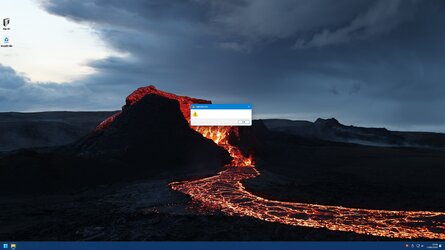
Screenshot 2024-01-12 220316.jpg


Any clues to a fix?

The computer so far appears to run normally, other than the annoying startup.

Thanks for any advice
 
Windows Build/Version
Windows 11 Pro 23H2 OS Build22631.3007
Last edited:

My Computer My Computer

At a glance

Windows 11 Pro 25H2 build 26200.7922i7 13700KF96 GB Corsair DDR5 Vengeance Black, PC5-51200MSI GeForce RTX 4070 Ti VENTUS 3X
OS
Windows 11 Pro 25H2 build 26200.7922
Computer type
PC/Desktop
Manufacturer/Model
Self Build
CPU
i7 13700KF
Motherboard
Asus ROG STRIX Z790-H Gaming WiFi
Memory
96 GB Corsair DDR5 Vengeance Black, PC5-51200
Graphics Card(s)
MSI GeForce RTX 4070 Ti VENTUS 3X
Sound Card
On Board
Monitor(s) Displays
32" iiyama Red Eagle G-MASTER
Screen Resolution
2560 x 1440
Hard Drives
Samsung SSD 990 PRO 1TB (OS)
Samsung SSD 970EVO Plus 500GB (downloaded software storage)
2 x Kingston SKC3000D 2TB (1 for game installation, 1 for file storage)
PSU
Corsair RMe Series 850W Modular
Case
Corsair 6500d Airflow
Cooling
Custom 240mm + 360mm water loop
Keyboard
Corsair K100 Air Wireless
Mouse
Logitech G502 X
Internet Speed
250Mbps
Browser
Firefox
Antivirus
Commodo Internet Security Premium
After messing with Windows so much, by customising it with various utilities and then using Revo to remove them, you really don't know what has been tweaked and modified and left behind.

Revo is excellent at uninstalling programs, but it cannot remove registry entries that have been tweaked and clearly, you have some of those.

Personally, I would do a repair install, click the link below:
The repair install should not remove your apps etc. but it should give you a good base to build on.

There are things I do not like about Windows 11, like the context menu and Quick Access to name a few, but I can remove or tweak them using simple registry edits, edits that can easily be reversed without any fear of upsetting the rest of the system.

HTH
 

My Computer My Computer

At a glance

Windows 11 ProRyzen 9 3900XG-Skill RipjawsV F4-3600C18 (16GB x 2)Gigabyte RX 5700 XT Gaming OC
OS
Windows 11 Pro
Computer type
PC/Desktop
CPU
Ryzen 9 3900X
Motherboard
ASUS ROG Strix X570-E Gaming
Memory
G-Skill RipjawsV F4-3600C18 (16GB x 2)
Graphics Card(s)
Gigabyte RX 5700 XT Gaming OC
Sound Card
Realtek ALC1220P
Monitor(s) Displays
ASUS VE278 (x 2)
Screen Resolution
1920x1080
Hard Drives
Samsung 850 Pro 256GB
Samsung 970 Pro NVMe 512GB (x 2)
ST10000VN0004 10TB (x 2)
ST10000VN0008 10TB (x 2)
ST4000VN000 4TB (x 2)
PSU
Corsair HX1000
Case
Corsair Carbide 400R
Cooling
AMD Wraith Prism (Stock)
Keyboard
Logitech G213
Mouse
Logitech G502
Internet Speed
100Mbps down / 40Mbps up
Browser
Firefox - Chrome - Edge
Antivirus
Windows Defender - Clamwin
Launch task manager via ctrl+shift+esc when that opens and see what all is running at that moment. End one process at a time to see which one closes that dialog box
 

My Computer My Computer

At a glance

Windows 11 Pro
OS
Windows 11 Pro
Find out which process that error dialog box belong to, i don't believe that error message belongs to File Explorer.

In this video, i will show you how to use Process Explorer to identify windows or message boxes that appear without any obvious indicator of what program they're from.


My Computer My Computer

At a glance

Windows 11AMD Ryzen 7 5700GMicron Technology DDR4-3200 16GBNVIDIA GeForce RTX 3060
OS
Windows 11
Computer type
PC/Desktop
Manufacturer/Model
HP Pavilion
CPU
AMD Ryzen 7 5700G
Motherboard
Erica6
Memory
Micron Technology DDR4-3200 16GB
Graphics Card(s)
NVIDIA GeForce RTX 3060
Sound Card
Realtek ALC671
Monitor(s) Displays
Samsung SyncMaster U28E590
Screen Resolution
3840 x 2160
Hard Drives
SAMSUNG MZVLQ1T0HALB-000H1
Any clues to a fix?
This might help, it will reset system startup entries to default. Run CMD as admin and copy/paste:
Code:
reg add "HKLM\Software\Microsoft\Windows NT\CurrentVersion\Winlogon" /v "Shell" /t REG_SZ /d "explorer.exe" /f
reg add "HKLM\Software\Microsoft\Windows NT\CurrentVersion\Winlogon" /v "Userinit" /t REG_SZ /d "C:\Windows\System32\userinit.exe," /f
reg add "HKLM\Software\Wow6432Node\Microsoft\Windows NT\CurrentVersion\Winlogon" /v "Shell" /t REG_SZ /d "explorer.exe" /f
reg add "HKLM\System\CurrentControlSet\Control\Session Manager" /v "BootExecute" /t REG_MULTI_SZ /d "autocheck autochk *" /f
reg add "HKLM\System\CurrentControlSet\Control\Session Manager" /v "SETUPEXECUTE" /t REG_MULTI_SZ /d "" /f
 

My Computer My Computer

At a glance

Home26H2CanAMD Ryzen 5 8600G (07/24)2x32GB Kingston FURY DDR5 5600 MHz CL36 @5200...ASROCK Radeon RX 6600 Challenger D 8G @48FPS ...
OS
Home26H2Can
Computer type
PC/Desktop
CPU
AMD Ryzen 5 8600G (07/24)
Motherboard
ASROCK B650M-HDV/M.2 (07/24) BIOS 4.21 AGESA ComboAM5 1.3.0.1 (04/26)
Memory
2x32GB Kingston FURY DDR5 5600 MHz CL36 @5200 CL36 (07/24)
Graphics Card(s)
ASROCK Radeon RX 6600 Challenger D 8G @48FPS (08/24)
Sound Card
Creative Sound BlasterX AE-5 Plus (05/24)
Monitor(s) Displays
24" Philips 24M1N3200ZS/00 (05/24)
Screen Resolution
1920×1080@165Hz via DP1.4
Hard Drives
Kingston KC3000 NVMe 2TB (05/24)
ADATA XPG GAMMIX S11 Pro 512GB (07/19)
PSU
Seasonic Core GM 550 Gold (04/24)
Case
Fractal Design Define 7 Mini with 3x Noctua NF-P14s/12@555rpm (04/24)
Cooling
Noctua NH-U12S with Noctua NF-P12 (04/24)
Keyboard
HP Pavilion Wired Keyboard 300 (07/24) + Rabalux 76017 Parker (01/24)
Mouse
Logitech M330 Silent Plus (01/26)
Internet Speed
500/100 Mbps via RouterOS (05/21) & TCP Optimizer
Browser
Edge, Brave for YouTube, LibreWolf for FB
Antivirus
NextDNS blocking 1/3 Traffic
Other Info
Phone: Motorola Moto G86 (02/26)
Backup: Hasleo Backup Suite (PreOS)
Headphones: Sennheiser RS170 (09/10)
Chair: Huzaro Force 4.4 Grey Mesh (05/24)
Notifier: Xiaomi Mi Band 9 Milanese (10/24)
FlexCore USB-C 3.2 Gen 1 (M) to LAN (F) (08/25)
Thanks for all the suggestions.

I think I'll try them in least disruptive order as I see them and if all else fails I'll do a repair install as @trumpy81 suggests.

Just to be clear, I got the error before running SCF Scannow and removing Windowblinds/Start 11, so the damage was done regardless of Revo uninstalling things.
It was just a suggestion I'd found elsewhere within these forums in case I'd removed something one of them needed to start.
 

My Computer My Computer

At a glance

Windows 11 Pro 25H2 build 26200.7922i7 13700KF96 GB Corsair DDR5 Vengeance Black, PC5-51200MSI GeForce RTX 4070 Ti VENTUS 3X
OS
Windows 11 Pro 25H2 build 26200.7922
Computer type
PC/Desktop
Manufacturer/Model
Self Build
CPU
i7 13700KF
Motherboard
Asus ROG STRIX Z790-H Gaming WiFi
Memory
96 GB Corsair DDR5 Vengeance Black, PC5-51200
Graphics Card(s)
MSI GeForce RTX 4070 Ti VENTUS 3X
Sound Card
On Board
Monitor(s) Displays
32" iiyama Red Eagle G-MASTER
Screen Resolution
2560 x 1440
Hard Drives
Samsung SSD 990 PRO 1TB (OS)
Samsung SSD 970EVO Plus 500GB (downloaded software storage)
2 x Kingston SKC3000D 2TB (1 for game installation, 1 for file storage)
PSU
Corsair RMe Series 850W Modular
Case
Corsair 6500d Airflow
Cooling
Custom 240mm + 360mm water loop
Keyboard
Corsair K100 Air Wireless
Mouse
Logitech G502 X
Internet Speed
250Mbps
Browser
Firefox
Antivirus
Commodo Internet Security Premium
Quick update

I tried both @FreeBooter and @dacrone suggestions, but they point to explorer.exe
Also tried @TairikuOkami suggestion but this didn't fix it either :(

I'll do the repair install and hope that works, but if all else fails I'll do a clean install from scratch and learn my lesson not to mess with things.

Cheers
 

My Computer My Computer

At a glance

Windows 11 Pro 25H2 build 26200.7922i7 13700KF96 GB Corsair DDR5 Vengeance Black, PC5-51200MSI GeForce RTX 4070 Ti VENTUS 3X
OS
Windows 11 Pro 25H2 build 26200.7922
Computer type
PC/Desktop
Manufacturer/Model
Self Build
CPU
i7 13700KF
Motherboard
Asus ROG STRIX Z790-H Gaming WiFi
Memory
96 GB Corsair DDR5 Vengeance Black, PC5-51200
Graphics Card(s)
MSI GeForce RTX 4070 Ti VENTUS 3X
Sound Card
On Board
Monitor(s) Displays
32" iiyama Red Eagle G-MASTER
Screen Resolution
2560 x 1440
Hard Drives
Samsung SSD 990 PRO 1TB (OS)
Samsung SSD 970EVO Plus 500GB (downloaded software storage)
2 x Kingston SKC3000D 2TB (1 for game installation, 1 for file storage)
PSU
Corsair RMe Series 850W Modular
Case
Corsair 6500d Airflow
Cooling
Custom 240mm + 360mm water loop
Keyboard
Corsair K100 Air Wireless
Mouse
Logitech G502 X
Internet Speed
250Mbps
Browser
Firefox
Antivirus
Commodo Internet Security Premium

Revo Uninstaller removes Registry settings if you do the Advanced Method.
If you haven't done the Repair Install yet, Start a Command Prompt as Admin and type the following Bold Commands pressing Enter after.
DISM /Online /CLEANUP-IMAGE /CheckHealth

DISM /Online /CLEANUP-IMAGE /RestoreHealth

After that finishes, type

SFC /scannow again and press Enter. If it says there are no Violations, then restart the computer. See if that works

You can also download Autoruns for Windows - Sysinternals to see what is starting with Windows that could be causing it.
 

My Computer My Computer

At a glance

Windows 11 Pro Insider 64 bit 25H2 26200.5742Intel Core i7 9700K 3.6016 GBnVidia GEForce RTX 2060 Super
OS
Windows 11 Pro Insider 64 bit 25H2 26200.5742
Computer type
PC/Desktop
Manufacturer/Model
Gigabyte Z390 UD
CPU
Intel Core i7 9700K 3.60
Motherboard
Gigabyte Z390 UD
Memory
16 GB
Graphics Card(s)
nVidia GEForce RTX 2060 Super
Sound Card
onboard
Monitor(s) Displays
Two 27" Dell 4K monitors
Screen Resolution
3840 x 2160
Hard Drives
M.2 NVME SSD, 500 GB; Two 2TB Mechanical HDD's
PSU
850w PSU
Case
Cyberpower PC
Cooling
Water cooled
Keyboard
Backlit Cyberpower gaming keyboard
Mouse
Backlit Cyberpower gaming mouse
Internet Speed
1 GB mbps
Browser
Brave
Antivirus
Windows Security
@Spunk Tried your first bit of code and everything was healthy, but I did the second anyway and then SFC /scannow and it was clean.
Rebooted and...........still got the error.

I'd downloaded Autoruns prior to rebooting and it pointed to an entry in HKCU\Software\Microsoft\Windows NT\CurrentVersion\Windows\Run
C:\Users\MYUSERNAME\AppData\Roaming\Paradingly48\Gevaldiges.exe.....................................File not found

I remember that this was one of the folders I'd deleted during the cleanup as I didn't recognise it

Deleting the entry from the registry has cured the issue, so Windows boots without error.

But worryingly found this

Gonna do some housework!!!

Thanks for the help
 

My Computer My Computer

At a glance

Windows 11 Pro 25H2 build 26200.7922i7 13700KF96 GB Corsair DDR5 Vengeance Black, PC5-51200MSI GeForce RTX 4070 Ti VENTUS 3X
OS
Windows 11 Pro 25H2 build 26200.7922
Computer type
PC/Desktop
Manufacturer/Model
Self Build
CPU
i7 13700KF
Motherboard
Asus ROG STRIX Z790-H Gaming WiFi
Memory
96 GB Corsair DDR5 Vengeance Black, PC5-51200
Graphics Card(s)
MSI GeForce RTX 4070 Ti VENTUS 3X
Sound Card
On Board
Monitor(s) Displays
32" iiyama Red Eagle G-MASTER
Screen Resolution
2560 x 1440
Hard Drives
Samsung SSD 990 PRO 1TB (OS)
Samsung SSD 970EVO Plus 500GB (downloaded software storage)
2 x Kingston SKC3000D 2TB (1 for game installation, 1 for file storage)
PSU
Corsair RMe Series 850W Modular
Case
Corsair 6500d Airflow
Cooling
Custom 240mm + 360mm water loop
Keyboard
Corsair K100 Air Wireless
Mouse
Logitech G502 X
Internet Speed
250Mbps
Browser
Firefox
Antivirus
Commodo Internet Security Premium
I don't think this is a Virus, but it certainly wouldn't hurt to scan with ADWCleaner followed by Malwarebytes

If you are still having problems, then you can search the Registry for Gevaldiges.exe and delete any of those entries. After backing up the Registry before attempting.
 

My Computer My Computer

At a glance

Windows 11 Pro Insider 64 bit 25H2 26200.5742Intel Core i7 9700K 3.6016 GBnVidia GEForce RTX 2060 Super
OS
Windows 11 Pro Insider 64 bit 25H2 26200.5742
Computer type
PC/Desktop
Manufacturer/Model
Gigabyte Z390 UD
CPU
Intel Core i7 9700K 3.60
Motherboard
Gigabyte Z390 UD
Memory
16 GB
Graphics Card(s)
nVidia GEForce RTX 2060 Super
Sound Card
onboard
Monitor(s) Displays
Two 27" Dell 4K monitors
Screen Resolution
3840 x 2160
Hard Drives
M.2 NVME SSD, 500 GB; Two 2TB Mechanical HDD's
PSU
850w PSU
Case
Cyberpower PC
Cooling
Water cooled
Keyboard
Backlit Cyberpower gaming keyboard
Mouse
Backlit Cyberpower gaming mouse
Internet Speed
1 GB mbps
Browser
Brave
Antivirus
Windows Security
Good call, fortunately both were clear.
I've added 2 factor authentication to my most used shopping channels just in case.

Probably had a lucky escape
 

My Computer My Computer

At a glance

Windows 11 Pro 25H2 build 26200.7922i7 13700KF96 GB Corsair DDR5 Vengeance Black, PC5-51200MSI GeForce RTX 4070 Ti VENTUS 3X
OS
Windows 11 Pro 25H2 build 26200.7922
Computer type
PC/Desktop
Manufacturer/Model
Self Build
CPU
i7 13700KF
Motherboard
Asus ROG STRIX Z790-H Gaming WiFi
Memory
96 GB Corsair DDR5 Vengeance Black, PC5-51200
Graphics Card(s)
MSI GeForce RTX 4070 Ti VENTUS 3X
Sound Card
On Board
Monitor(s) Displays
32" iiyama Red Eagle G-MASTER
Screen Resolution
2560 x 1440
Hard Drives
Samsung SSD 990 PRO 1TB (OS)
Samsung SSD 970EVO Plus 500GB (downloaded software storage)
2 x Kingston SKC3000D 2TB (1 for game installation, 1 for file storage)
PSU
Corsair RMe Series 850W Modular
Case
Corsair 6500d Airflow
Cooling
Custom 240mm + 360mm water loop
Keyboard
Corsair K100 Air Wireless
Mouse
Logitech G502 X
Internet Speed
250Mbps
Browser
Firefox
Antivirus
Commodo Internet Security Premium
Autoruns shows these items in yellow.
Probably not relevant to the fixed issue, but can I ignore them?
Or should I delete them from the registry

Screenshot 2024-01-13 234006.png
 

My Computer My Computer

At a glance

Windows 11 Pro 25H2 build 26200.7922i7 13700KF96 GB Corsair DDR5 Vengeance Black, PC5-51200MSI GeForce RTX 4070 Ti VENTUS 3X
OS
Windows 11 Pro 25H2 build 26200.7922
Computer type
PC/Desktop
Manufacturer/Model
Self Build
CPU
i7 13700KF
Motherboard
Asus ROG STRIX Z790-H Gaming WiFi
Memory
96 GB Corsair DDR5 Vengeance Black, PC5-51200
Graphics Card(s)
MSI GeForce RTX 4070 Ti VENTUS 3X
Sound Card
On Board
Monitor(s) Displays
32" iiyama Red Eagle G-MASTER
Screen Resolution
2560 x 1440
Hard Drives
Samsung SSD 990 PRO 1TB (OS)
Samsung SSD 970EVO Plus 500GB (downloaded software storage)
2 x Kingston SKC3000D 2TB (1 for game installation, 1 for file storage)
PSU
Corsair RMe Series 850W Modular
Case
Corsair 6500d Airflow
Cooling
Custom 240mm + 360mm water loop
Keyboard
Corsair K100 Air Wireless
Mouse
Logitech G502 X
Internet Speed
250Mbps
Browser
Firefox
Antivirus
Commodo Internet Security Premium
A bit of Googling reveals that they can be ignored, something to do with autoruns being a 32bit application looking in 64 bit locations and it gets redirected.
 

My Computer My Computer

At a glance

Windows 11 Pro 25H2 build 26200.7922i7 13700KF96 GB Corsair DDR5 Vengeance Black, PC5-51200MSI GeForce RTX 4070 Ti VENTUS 3X
OS
Windows 11 Pro 25H2 build 26200.7922
Computer type
PC/Desktop
Manufacturer/Model
Self Build
CPU
i7 13700KF
Motherboard
Asus ROG STRIX Z790-H Gaming WiFi
Memory
96 GB Corsair DDR5 Vengeance Black, PC5-51200
Graphics Card(s)
MSI GeForce RTX 4070 Ti VENTUS 3X
Sound Card
On Board
Monitor(s) Displays
32" iiyama Red Eagle G-MASTER
Screen Resolution
2560 x 1440
Hard Drives
Samsung SSD 990 PRO 1TB (OS)
Samsung SSD 970EVO Plus 500GB (downloaded software storage)
2 x Kingston SKC3000D 2TB (1 for game installation, 1 for file storage)
PSU
Corsair RMe Series 850W Modular
Case
Corsair 6500d Airflow
Cooling
Custom 240mm + 360mm water loop
Keyboard
Corsair K100 Air Wireless
Mouse
Logitech G502 X
Internet Speed
250Mbps
Browser
Firefox
Antivirus
Commodo Internet Security Premium

Latest Support Threads

Back
Top Bottom





