
Explorer - Navigation Pane - Expand to Current Folder not working


Doctor Rashir

Active member
Local time
10:28 AM
Posts
4
OS
windows 10 Pro 22H2
I don't know exactly when this changed. I have the setting 'Expand to Current Folder' checked. When I click on some of the pinned folders the Explorer Navigation pane the location does not expand to the target folder. But some of them do expand to current folder.

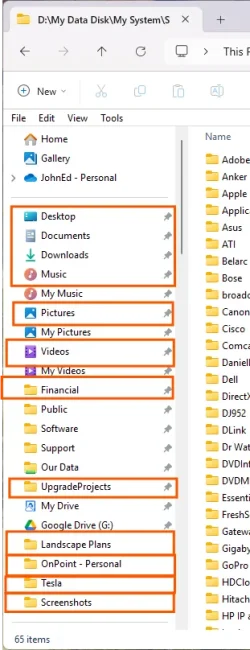
Below is a screenshot of the folders that do not expand, shown in red. There are several posts from 2023 that reference this but for me the issue appeared more recently. And I don't see any mention of only some of the folders don't expand. All the System shortcuts aren't expanding and some of ones I pinned don't expand.

Any clues to where to look to maybe solve this?

I'm on Windows 11, clearly, and updated from Windows 10 in June 2025. Version: 24H2. System is Asus with a Core i7-12700k.
 
Windows Build/Version
Windows 11 Pro, 24H2, 26100.6584

Attachments
  • Screenshot 2025-09-24 125430-a.webp
    Screenshot 2025-09-24 125430-a.webp
    37.7 KB · Views: 2

My Computer

System One

  • OS
    windows 10 Pro 22H2
    Computer type
    PC/Desktop
    Manufacturer/Model
    Custom Built
    CPU
    2th Gen Intel(R) Core(TM) i7-12700K 3.61 GHz
    Motherboard
    ASUS TUF GAMING H670-PRO WIFI D4
    Memory
    32 GB
    Hard Drives
    WD_BLACK 500GB SN850 NVMe SSD
    WD_BLACK 1TB SN850 NVMe SSD
    WD_BLACK 2TB SN850 NVMe SSD
    WD_RED 2TB HDD RAID1
From "Desktop" to "Google Drive" are pinned Quick Access Links. Those will never expand as they're just shortcuts to that folder. The folders below that appear to not have subfolders as there is no Tree View arrow on the left side of them...
 

My Computer

System One

  • OS
    Windows 11 Pro
From "Desktop" to "Google Drive" are pinned Quick Access Links. Those will never expand as they're just shortcuts to that folder. The folders below that appear to not have subfolders as there is no Tree View arrow on the left side of them...
Sorry, that is not correct. None of the items pinned to Quick Access have a Tree View arrow as they are File Folder shortcuts (or System Folder shortcuts). Almost all of the pinned items do have subfolders if you navigate to the full folder path via This PC.

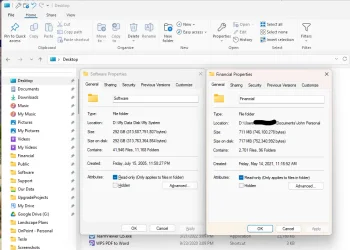
What I have observed is the ones that do expand are referencing folders outside my user profile folders. Also, I have the location changed for all System shortcuts from C:\Users\Myuser\ to D:\Users\Myuser. If I navigate to D:\Users\Myuser the folders that do have subfolders display the Tree View arrow. The following screenshot shows the properties of two File Folder shortcuts Financial does not expand to the target folder and Software does.
 

Attachments

  • Screenshot 2025-09-24 152641.webp
    Screenshot 2025-09-24 152641.webp
    66.6 KB · Views: 2

My Computer

System One

  • OS
    windows 10 Pro 22H2
    Computer type
    PC/Desktop
    Manufacturer/Model
    Custom Built
    CPU
    2th Gen Intel(R) Core(TM) i7-12700K 3.61 GHz
    Motherboard
    ASUS TUF GAMING H670-PRO WIFI D4
    Memory
    32 GB
    Hard Drives
    WD_BLACK 500GB SN850 NVMe SSD
    WD_BLACK 1TB SN850 NVMe SSD
    WD_BLACK 2TB SN850 NVMe SSD
    WD_RED 2TB HDD RAID1
It appears to me you are using the classic file explorer with ribbon which can only be accessed either through control panel or using a 3rd party app that alters the GUI. I'm suspecting you are using a 3rd party app. Uninstall it to see if it resolves your folder expanding problem.
 

My Computers

System One System Two

  • OS
    Windows 11 Pro 25H2
    Computer type
    PC/Desktop
    Manufacturer/Model
    Dell Optiplex 7080
    CPU
    i9-10900 10 core 20 threads
    Motherboard
    DELL 0J37VM
    Memory
    32 gb
    Graphics Card(s)
    none-Intel UHD Graphics 630
    Sound Card
    Integrated Realtek
    Monitor(s) Displays
    Benq 27
    Screen Resolution
    2560x1440
    Hard Drives
    2x1tb Solidigm m.2 nvme /External drives 512gb Samsung m.2 sata+2tb Kingston m2.nvme
    PSU
    500w
    Case
    MT
    Cooling
    Dell Premium
    Keyboard
    Logitech wired
    Mouse
    Logitech wireless
    Internet Speed
    so slow I'm too embarrassed to tell
    Browser
    #1 Edge #2 Firefox
    Antivirus
    Defender+MWB Premium
  • Operating System
    Windows 11 Pro 24H2 26200.8457
    Computer type
    PC/Desktop
    Manufacturer/Model
    Beelink Mini PC SER5
    CPU
    AMD Ryzen 7 6800U
    Memory
    32 gb
    Graphics card(s)
    integrated
    Sound Card
    integrated
    Monitor(s) Displays
    Benq 27
    Screen Resolution
    2560x1440
    Hard Drives
    1TB Crucial nvme
    Keyboard
    Logitech wired
    Mouse
    Logitech wireless
    Internet Speed
    still too embarrassed to tell
    Browser
    Firefox
    Antivirus
    Defender
    Other Info
    System 3 is non compliant Dell 9020 i7-4770/24gb ram Win11 PRO 26200.8457
You are correct I have a 3rd party app that restores the ability to locate the taskbar on the left and right sides of the screen. It also affects the look and feel of the Start menu and Explorer. But I have also verified that the same behavior occurs on a different user and a different system where this app was never installed.
 

My Computer

System One

  • OS
    windows 10 Pro 22H2
    Computer type
    PC/Desktop
    Manufacturer/Model
    Custom Built
    CPU
    2th Gen Intel(R) Core(TM) i7-12700K 3.61 GHz
    Motherboard
    ASUS TUF GAMING H670-PRO WIFI D4
    Memory
    32 GB
    Hard Drives
    WD_BLACK 500GB SN850 NVMe SSD
    WD_BLACK 1TB SN850 NVMe SSD
    WD_BLACK 2TB SN850 NVMe SSD
    WD_RED 2TB HDD RAID1
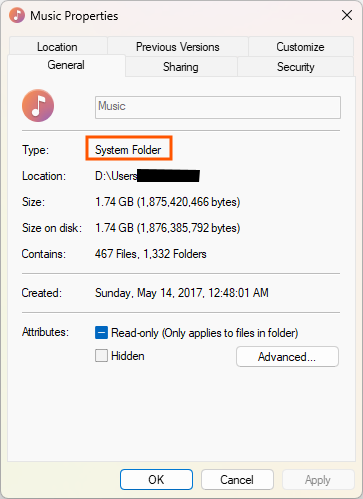
I've discovered further clarification on this:

So any QA shortcut directed to a folder under an item designated in Properties as Type: System Folder Location will not expand to current folder.

bS00NDU3MDUwLXFFenBXRA
 

My Computer

System One

  • OS
    windows 10 Pro 22H2
    Computer type
    PC/Desktop
    Manufacturer/Model
    Custom Built
    CPU
    2th Gen Intel(R) Core(TM) i7-12700K 3.61 GHz
    Motherboard
    ASUS TUF GAMING H670-PRO WIFI D4
    Memory
    32 GB
    Hard Drives
    WD_BLACK 500GB SN850 NVMe SSD
    WD_BLACK 1TB SN850 NVMe SSD
    WD_BLACK 2TB SN850 NVMe SSD
    WD_RED 2TB HDD RAID1
Back
Top Bottom


